
1. Introduction
Most laptop screens sit between 13 and 15 inches. That works until the workday fills up with documents, video calls, spreadsheets, and research tabs, all competing for space. Constant window switching breaks focus and slows work.
This is where the AOC 15-inch portable monitor comes in. A portable monitor for laptop adds a second screen without forcing you to carry a full desktop display. Plug it in, extend the screen, and the laptop suddenly has room to work.
But buyers often ask a practical question before purchasing a budget portable monitor. Does it actually improve daily work, or does it end up unused in the bag?
This AOC portable monitor review answers that question with a clear look at how a portable external monitor for a laptop works, when it makes sense to use one, and how the AOC 15.6- inch portable monitor compares with other affordable portable monitors.
Portable monitors are becoming a popular solution for professionals who need a portable dual- screen laptop setup without carrying a traditional external display.
Click here to buy AOC Monitors
Readers will learn:
- The real AOC portable monitor specs
- How a portable monitor for remote work fits into daily workflows
- How travelers build a portable workstation setup
- Simple answers to common searches such as “Is a portable monitor worth it?” and “How to connect a portable monitor with USB-C?”
As technology experts with over 20 years of experience in hardware and application research and development, we evaluate each product through real-world performance, durability, and value for money. The goal is simple: help readers choose the best product in every category — budget, performance, reliability, and long-term use.
Our recommendations come from extensive research, component analysis, real-world usability testing, and industry expertise.
Who Does This Review Help?
This guide helps people who rely on laptops but need more screen space without carrying heavy equipment, including:
- Remote professionals building a mobile workspace
- Students using portable monitors
- Developers working with a portable monitor for coding
- Engineers using a portable monitor for programming
- Freelancers and creators who travel frequently
- Digital nomads building a portable workstation setup
For many people, a portable monitor for productivity solves a basic problem: one screen is not enough.
Adding a second display often changes how work flows throughout the day.
Quick Summary
- The AOC 15-inch portable monitor adds a second display for laptops without adding heavy gear.
- It targets users looking for a budget portable monitor for work, travel, coding, and study setups.
- This guide explains the AOC portable monitor specs, real-world performance, and USB-C portable monitor connectivity.
- Readers will see whether a portable monitor for laptop actually improves daily
2. Portable Monitors: Why They Are Suddenly Everywhere
Work environments have changed. Many people now work across homes, offices, cafés, airports, and shared workspaces. When work happens on a laptop, screen space becomes the first limitation.
A single display forces constant switching between tabs. Documents hide behind video calls. Notes disappear when another window opens.
This is why the portable monitor for remote work has become common.
A portable monitor for digital nomads provides more workspace without adding heavy hardware. It converts a laptop into a dual-screen setup in seconds.
Different users rely on portable monitors for different tasks:
- Students using portable monitors to keep research on one screen and notes on another
- Developers use a portable monitor for coding or a portable monitor for programming to separate their editor and output windows
- Remote professionals rely on a portable monitor for productivity during meetings and document reviews
- Travelers build a travel workstation setup using a lightweight portable monitor
Setup remains simple.
Most USB-C portable monitors connect with a single cable. Open the cover, plug the display into the laptop, and extend the screen.
That quick step creates a portable workstation setup that feels closer to a full desk environment.
Once people start using a second screen, the benefit becomes clear. Applications can move to separate displays. Tasks no longer compete for the same screen space. Work becomes easier to manage.
3. Portable Monitor Value Model: The PORTABLE Framework
Choosing the right portable monitor for laptop can feel confusing when every product lists similar specs. To simplify the decision, we use a quick evaluation method called the PORTABLE Framework. It helps you judge any portable external monitor for a laptop in less than a minute.
P – Portability
Check the portable monitor weight comparison and the portable monitor thickness comparison. A lightweight portable monitor should fit easily in a backpack without adding bulk.
O – Output Quality
Look for a Full HD portable monitor with an IPS portable monitor panel. This combination delivers clear text for documents, coding, and web browsing.
R – Real Connectivity
A reliable USB-C portable monitor or a USB-C portable monitor with HDMI input ensures it works with most laptops and devices.
T – Travel Durability
A portable monitor with a magnetic cover stand or a portable monitor with a kickstand protects the display and keeps it stable on small desks.
A – Adaptability
A good portable monitor for laptop dual-screen setup should rotate easily between portrait and landscape.
B – Brightness Usability
Understanding portable monitor brightness requirements explained helps avoid displays that look dim outside offices.
L – Latency and Refresh Rate
For work tasks, a 60 Hz portable monitor keeps scrolling and navigation smooth.
E – Ecosystem Compatibility
Check whether the display works with MacBook, Windows laptops, and consoles such as portable monitor for Nintendo Switch, portable monitor for Steam Deck, portable monitor for PlayStation, or portable monitor for Xbox.
- Key point:
Run the AOC 15-inch portable monitor or any cheap portable monitor for laptop
through this checklist, and you will quickly know whether it fits your workflow.
Click here to buy AOC Monitors
4. AOC 15.6-Inch Portable Monitor Specs Explained
Understanding the AOC portable monitor specs helps translate technical numbers into real- world usability.
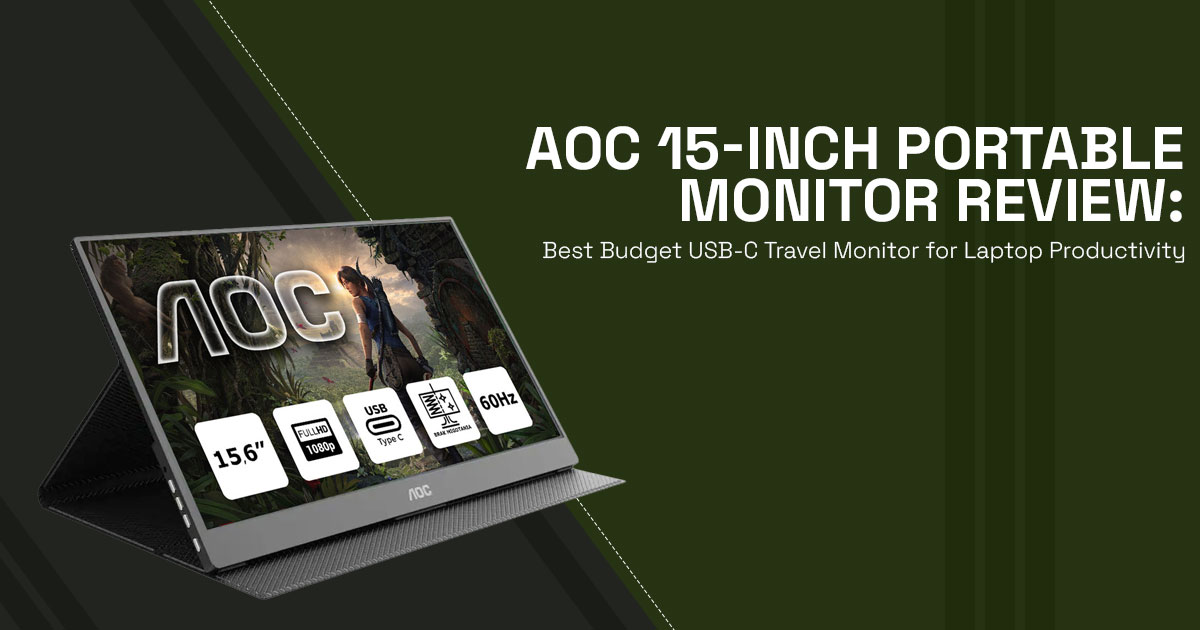
The AOC 15.6-inch portable monitor uses a 15.6-inch IPS panel with 1920 × 1080 resolution. This 1080p portable monitor provides around 141 PPI, which keeps text clear for spreadsheets, documents, and browser tabs.
The 60 Hz portable monitor refresh rate supports smooth scrolling and stable performance for office tasks and programming work.
Brightness reaches 250 nits, making it a portable monitor with 250-nit brightness. This level works well in offices, hotel rooms, and cafés. Brighter environments require adjusting the screen angle.
- Key takeaway:
This display focuses on everyday productivity rather than gaming or color-critical editing.
4.1 Portable Monitor Connectivity Options
Connectivity determines whether a portable monitor for laptop works smoothly with your devices.
The AOC portable monitor includes:
- USB-C port
- Mini HDMI port
This combination makes it both a USB-C portable monitor and a USB-C portable monitor with HDMI input.
Most modern laptops support portable monitor USB-C DisplayPort Alt Mode, which allows video, power, and data through a single cable.
Older laptops can connect through the mini HDMI portable monitor input.
Setup is simple. The display functions as a plug-and-play portable monitor, so most systems detect it immediately without installing drivers.
4.2 Portable Monitor Display Quality
Display quality depends on panel type, contrast, and resolution.
The IPS panel portable monitor offers wide viewing angles, which helps when working in shared spaces or adjusting screen position.
The portable monitor contrast ratio of 1000:1 keeps text readable and darker elements clear during indoor use.
As a Full HD portable monitor, it handles:
- documents
- spreadsheets
- coding tools
- web browsing
However, this 1080p portable monitor is not designed for professional color-grading or advanced photo editing.
- Summary:
Clear text, reliable viewing angles, and simple connectivity make it a practical display for everyday work.
5. Who Benefits Most From a Portable Monitor for Laptop
A portable monitor for laptop becomes useful when multitasking is part of the daily routine.
- Remote Workers: A portable monitor for remote work keeps video meetings on one screen while notes stay visible on another.
- Students: A portable monitor for students allows research materials to stay open while writing assignments.
- Developers and Engineers: A portable monitor for coding or a portable monitor for programming keeps documentation and output windows visible.
- Digital Nomads: A portable monitor for digital nomads transforms hotel desks into a travel workstation setup.
- Gamers: Devices such as portable monitors for Nintendo Switch, portable monitors for Steam Deck, portable monitors for PlayStation, and portable monitors for Xbox allow gaming on a larger screen while traveling.
Anyone who multitasks regularly will benefit from a portable monitor for productivity.
6. Portable Monitor for Laptop Dual-Screen Setup: Real Travel Workstation Example
A portable dual-screen laptop setup requires only a few items:
- 13-inch laptop
- portable external monitor for laptop
- wireless keyboard
- single USB-C cable
Total weight stays around 4 pounds.
Setup takes less than a minute:
- Open the USB-C portable monitor
- Connect the
- Extend the display in system
- Move apps across both
This laptop second screen monitor setup works in airports, trains, cafés, and coworking spaces. The result is a mobile workstation setup that remains compact and easy to carry.
7. Common Mistakes When Buying a Budget Portable Monitor Under $150
Many buyers choose the cheapest option without checking important details.
- Port Compatibility Problems: Some laptops require a portable monitor USB-C DisplayPort Alt Mode. Without this support, USB-C video will not work.
- Ignoring Brightness: Many users overlook portable monitor brightness requirements and end up with screens that struggle in bright environments.
- Weak Stands: A cheap portable monitor for laptop may come with a stand that feels unstable on uneven surfaces.
Checking these factors prevents frustration later.
8. Budget Portable Monitor vs Premium Portable Monitor
| Tier | Typical Features | Best For | Price Range |
| Budget | 1080p portable monitor, 60 Hz
portable monitor, basic stand |
Travel and light
work |
Under $150 |
| Mid-range | Higher brightness and stronger stands | Frequent travel setups | $150–300 |
| Premium | 4K panels, touch support,
brighter screens |
Creative work and
gaming |
$300+ |
The AOC portable monitor sits in the budget portable monitor category and still provides strong value for everyday productivity.
9. Portable Monitor Advantages and Disadvantages
Understanding portable monitor advantages and disadvantages helps set realistic expectations.
Advantages
- affordable price
- easy travel setup
- quick connection
- effective laptop productivity monitor Tradeoffs
- limited brightness outdoors
- basic speaker quality
- stands less sturdy than premium models
These portable monitor tradeoffs matter mainly for outdoor work or professional color tasks.
Click here to buy AOC Monitors
10. When a Portable Monitor Is Not Worth It
A portable monitor for laptop may not suit every situation.
Direct sunlight can make screens difficult to see. Searches like can portable monitors work outdoors and portable monitor brightness for outdoor use highlight this issue.
Video editors who require precise colors may need higher-end displays.
If your laptop already has a large, bright screen, carrying an extra monitor may not add enough benefit.
11. Portable Monitor Setup Guide
Many users search for how to use a portable monitor with a laptop before their first setup.
Steps remain simple:
- Connect the USB-C cable or Mini HDMI cable
- Open display settings and choose Extend Display
- Move windows across both screens
- Adjust brightness based on the room
For most systems, how to connect a portable monitor with USB-C involves one cable and works immediately.
12. Portable Monitor Buying Guide
Before purchasing a portable monitor for laptop, check a few practical details. Look at the portable monitor weight comparison to ensure it fits your travel bag.
Compare portable monitor thickness comparison to ensure the device remains easy to carry.
A portable monitor with a magnetic cover stand or a portable monitor with a kickstand
improves stability during travel.
Finally, consider the portable monitor’s travel durability, especially if the display will be used frequently on the road.
13. Frequently Asked Questions (FAQ) About Portable Monitors
Many readers searching for a portable monitor for laptop want quick answers before deciding whether the device fits their workflow. The questions below address common search queries about portable external monitors for laptops, including setup, compatibility, and everyday usability. These short answers focus on the key points people look for when researching a USB-C portable monitor, a budget portable monitor, or a portable monitor for travel and remote work.
Q. What is a portable monitor?
- A portable monitor is a lightweight portable external monitor for a laptop that connects through USB-C or Mini HDMI to provide a second screen for work, travel, or gaming.
Q. Is a portable monitor worth it for laptop users?
- Yes. A portable monitor for a laptop dual-screen setup helps users manage multiple apps, documents, or video calls without constant window switching.
Q. Is a 60 Hz portable monitor good for productivity tasks?
- Yes. A 60 Hz portable monitor works well for documents, coding, spreadsheets, video calls, and everyday office tasks.
Q. How do you connect a portable monitor with USB-C?
- Plug the cable into a laptop that supports USB-C DisplayPort Alt Mode, then extend the display in system settings.
Q. Can portable monitors work with gaming consoles?
- Yes. A Mini HDMI portable monitor connects easily to devices such as Nintendo Switch, Steam Deck, PlayStation, and Xbox.
Q. Are portable monitors good for remote work setups?
- Yes. A portable monitor for remote work allows meetings on one screen while documents or notes stay visible on another.
Q. What brightness should a portable monitor have?
- Around 250–300 nits works well indoors. Higher brightness helps if you plan to use the monitor in bright rooms.
Q. Can a portable monitor replace a desktop monitor?
- A portable monitor for productivity works well for travel and daily tasks, but large desktop monitors still provide better screen size for full-time desk setups.
Q. Are portable monitors good for students?
- Yes. A portable monitor for students makes it easier to keep research open while writing assignments or attending online classes.
Q. Do portable monitors require drivers to work?
- Most plug-and-play portable monitors connect instantly through USB-C or HDMI, so extra drivers are rarely needed.
Q. Can portable monitors work outdoors?
- Some can, but most portable monitors with 250-nit brightness perform best indoors or in shaded environments.
Q. What devices support USB-C portable monitors?
- Most Windows laptops, MacBooks, tablets, and handheld gaming devices support USB-C portable monitors if they include DisplayPort Alt Mode.
Q. How portable are portable monitors for travel?
- Most lightweight portable monitors weigh around 1–2 pounds, making them easy to carry in a backpack with a laptop.
Q. What is the best use for a portable monitor when traveling?
- Many professionals use a portable monitor for digital nomads to create a travel workstation setup in hotels, airports, or coworking spaces.
Q. Is a budget portable monitor under $150 good enough?
- A budget portable monitor under $150 usually offers 1080p resolution and 60 Hz refresh rate, which works well for everyday productivity.
14. Final Verdict: Is the AOC Portable Monitor Worth Buying?
Portable monitors have moved from niche gadgets to practical tools for people who work on the move. A portable monitor for laptop adds space to work without turning a backpack into a heavy office setup.
The AOC 15-inch portable monitor sits at the affordable end of the market and focuses on everyday usability. It works well for students, remote workers, and anyone who needs a compact external monitor for laptop users. In daily use, it fits naturally into a portable monitor for hybrid work setup or multitasking workflows, where keeping two windows open at once saves time and frustration.
The display handles documents, coding tools, browser tabs, and video calls comfortably. The lightweight design also makes it easy to pack for travel, which is why many users rely on a portable monitor for travel setup when working from hotels, cafés, or coworking spaces.
Like most budget models, it has limits. Bright outdoor environments can make the screen harder to see, and professionals who depend on precise color accuracy may need a higher-end display.
For general productivity, though, the balance of price, portability, and performance makes it a practical option.
Where to Buy AOC Portable Monitors (US and India)
AOC portable monitors are available through Amazon US and Amazon India, although the exact models available may vary by region.
One of the newest options is the AOC 16T20 portable monitor, a 15.6-inch Full HD IPS portable monitor with a slim design and smart cover stand. During promotional events, it has been listed at around $49.99 on Amazon US, making it one of the more affordable portable displays.
For buyers in India, AOC portable monitors can sometimes be found on Amazon India, while other models may appear through international retailers such as Ubuy or Desertcart depending on stock availability.
Popular AOC Portable Monitor Models AOC 16T20 Portable Monitor
A 15.6-inch Full HD IPS portable monitor known for its slim profile and magnetic smart cover stand. It supports USB-C and Mini HDMI connectivity, making it compatible with laptops, MacBooks, and gaming consoles.
Amazon Worldwide listing
Amazon India listing
AOC 16T3EA Portable Monitor
A flexible USB-C portable monitor with built-in kickstands that support both portrait and landscape viewing. It works well for travelers who want a stable portable monitor for laptop dual-screen setup.
AOC 16T2 Portable Monitor
This model adds touch support and a built-in 8000mAh battery, making it useful for users who want more independence from power outlets. It also includes USB-C and Micro HDMI inputs.
Current Deal for the AOC Portable Monitor
If you want to try a budget portable monitor for laptop, check the current listing below. Prices often change during promotions.
AOC Portable Monitor on Amazon Worldwide
Share Your Portable Monitor Setup
Every laptop setup is different. Some people build a simple portable dual-screen laptop setup, while others create a full mobile workstation setup for travel.
If you already use a portable monitor for laptop, share how you use it. Your experience can help the next reader decide whether a portable monitor for productivity ffts their workflow.
***Disclaimer***
This blog post reflects our own research, testing, and personal opinions. It should not be taken as the official position of any brand, manufacturer, or company mentioned here. While we aim to keep information accurate and up to date, product details, pricing, and availability can change. We recommend double-checking important details before making a purchase.
Some links in this article may be affiliate links. If you choose to buy through these links, we may earn a small commission at no extra cost to you. This helps support our work and allows us to keep publishing in-depth, unbiased reviews. Our recommendations are never influenced by affiliate partnerships.
Comments shared by readers reflect their own views and not ours. We are not responsible for outcomes resulting from the use of information on this site. Please seek professional advice where appropriate.
All product names, logos, and brands mentioned are the property of their respective owners. These names are used for identification and informational purposes only and do not imply endorsement.
