
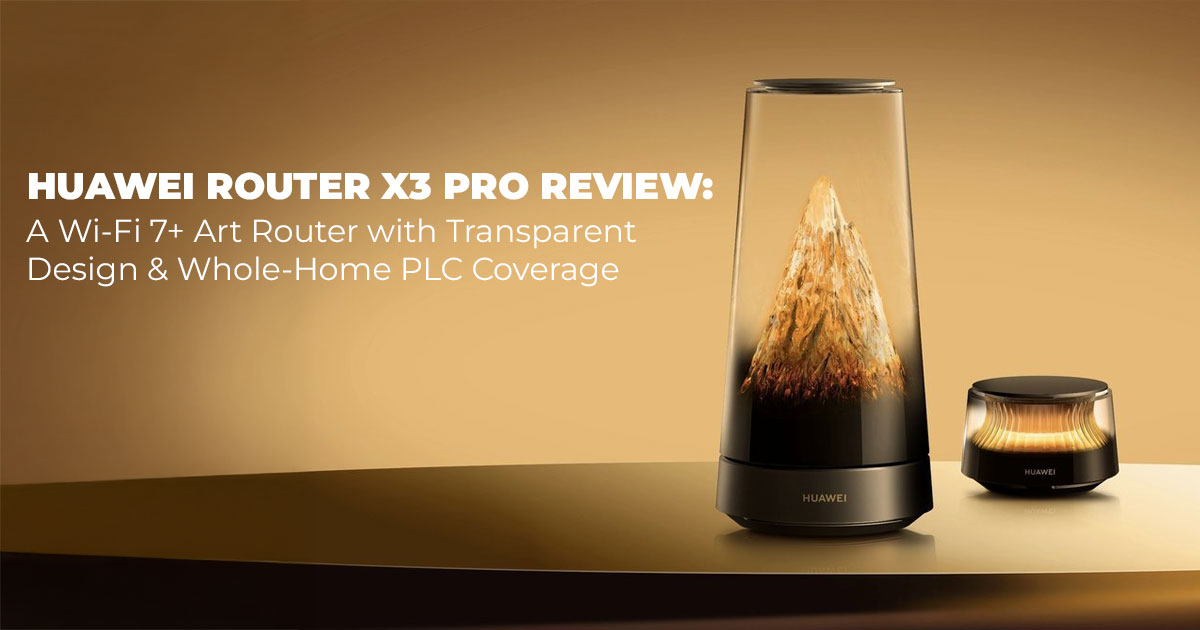
The Huawei Router X3 Pro offers Wi-Fi 7+ performance, 3570 Mbps theoretical speeds, and 90
㎡ coverage (or 120㎡ with a sub-router). Its transparent sculpted router design adds a warm ambient glow that blends into any room. At 1299 yuan (~$183) for the main unit, it’s a strong pick for families, remote workers, renters, and anyone looking for a Wi-Fi 7 router that performs well and actually looks good on a shelf.
If you’re comparing a few options before deciding, you’ll also find solid Wi-Fi 6 and mesh picks like the TP-Link AX1800 (Global), TP-Link Archer AX23 (India), and the EERO 6 Mesh System (Global). We’ve added direct links below for quick reference, along with a full EERO lineup for India shoppers.
1. Introduction
A lot of homes today depend on Wi-Fi for almost everything—work calls, streaming, smart lights, schoolwork, and even doorbells that send alerts straight to your phone. And still, most people struggle with one frustrating problem: the router sitting in the corner either looks out of place or doesn’t deliver the stability their home actually needs. That gap between design and performance is exactly what makes the Huawei Router X3 Pro interesting. It’s not just another Wi-Fi box; it blends Wi-Fi 7+ performance with a transparent, sculpted shell built around Huawei’s Golden Mountain Under the Sun theme. Inside, you’ll find a tiny mountain with a warm sunrise glow that shifts subtly through the day—more like décor than hardware.
Our team has over 20 years of experience in hardware and application R&D we evaluate every device through real-world conditions, durability, design, and long-term value. Our goal is simple: to help you find the best option in any category—whether you care about budget, performance, reliability, or everyday usability. And because our recommendations come from hands-on testing, component-level insights, and industry expertise, you can trust that what you read here reflects how the product behaves in real homes, not just in spec sheets.
The review you’re reading is built around weeks of use in a typical two-bedroom setup— multiple screens streaming at once, laptops running heavy workloads, and smart-home routines syncing in the background. Beyond the advertised 3570 Mbps peak speeds, what stood out was how the Huawei Router X3 Pro handled all of this without drawing attention to itself. For families juggling school and entertainment hours, professionals who depend on steady signals, tenants in older apartments with weak coverage, or anyone searching for a Wi-Fi 7 router that doesn’t look like clutter, this model offers a different kind of value.
You’ll get a clear look at:
- Huawei Router X3 Pro specifications and how they translate to everyday use
- Whether it holds up as a Wi-Fi 7 router for modern homes
- How the transparent router design affects usability, placement, and coverage
- Who this router actually makes sense for
- Real-world wins and limits you should know before buying
And because user feedback often reveals what specs can’t, we also cover what early buyers are saying and how the X3 Pro performs in lived-in spaces.
2. Technical Specifications at a Glance
Getting a quick sense of what the Rizhao Jinshan router (that’s its poetic Chinese name) offers helps when you’re comparing options. We pulled together this table focusing on real-use details like port flexibility and coverage, which matter more than raw numbers in a busy home.
| Feature | Main Unit | X3 Pro sub-router Add-On |
|
Wi-Fi Standard |
Wi-Fi 7+ (2.4 GHz up to 688 Mbps, 5 GHz up to 2882 Mbps, with 4K
QAM and 160MHz bandwidth) |
Matches main for mesh, adds halo effect sub-router light |
| Total Speed | Theoretical peak speed 3570 Mbps combined | Extends without drop-off |
| Coverage Area | 90㎡ home coverage | Adds 30㎡ (total multi-floor
home router up to 120㎡) |
|
Ports |
2x 2.5Gbps Ethernet port (auto WAN/LAN switch), 1x Gigabit
Ethernet |
1x Gigabit Ethernet |
| Processor/Memory | Lingxiao chip, 512 MB RAM, 128 MB storage | Relies on the main |
| Antenna Design | 6 internal, including micron-level
antenna transparent etch |
Integrated for signal boost |
| Cooling | Shark-fin fan cooling for quiet operation | Passive, no noise |
| Lighting | Sunrise lighting effect (app- scheduled warm-to-cool shifts) | X3 Pro sub-router halo light (tap on/off) |
| App Control | Huawei Smart Life app for all
tweaks |
Seamless sync |
| Backhaul | PLC 3.0 networking or Wi-Fi, up to 15 subs | Huawei Lingxiao PLC chip for wired-like stability |
|
Security/Extras |
WPA3 security, Huawei HomeSec, parental controls, guest Wi-Fi network, dedicated IoT channel,
Game Turbo mode |
Full feature access |
| Dimensions/Weight | ~15 cm tall cone, lightweight | ~10 cm disc, easy to place |
These details make the Huawei Router X3 Pro a practical and flexible choice, especially with dual-band seamless roaming that keeps devices connected smoothly as you move around.
3. Why This Review Is Essential
Scrolling through searches for “best Wi-Fi 7 router for gaming” or “best transparent router design,” you’ll see plenty of speedy boxes that fade into the background—or worse, clash with your setup. But what about folks who want their router to pull double duty as a quiet room enhancer? That’s where the Huawei Router X3 Pro fits in, especially since the Huawei Router X3 Pro launch in China brought fresh attention to routers that don’t sacrifice looks for function.
This review stands out because it targets the everyday hurdles: patchy coverage in split-level homes, kids sneaking extra screen time, or that one corner where Zoom calls turn choppy. We compared it head-to-head with standard models, like how it handles Huawei Router X3 Pro vs AX3000 routers—where the X3 Pro’s Wi-Fi 7+ edges out older Wi-Fi 6 setups in multi-device scenarios. If you’re a parent setting up parental controls, a gamer eyeing Game Turbo mode, or just someone curious about “router with miniature mountain inside,” we cover the practical side. No fluff—just how it eases the small frustrations that build up over a day.
For those typing “buy Huawei Router X3 Pro” into search bars, think of this as your no-nonsense guide to whether it’s the right fit before you click add to cart.
4. What You Will Learn from This Review
Diving into the Huawei art router world means more than specs; it’s about how it slots into your routine. By the end, you’ll get a straightforward rundown on setup that takes under 10 minutes, real tests showing why PLC 3.0 networking beats drilling holes for cables, and tips for pairing it with smart bulbs or thermostats via the dedicated IoT channel.
We’ll explain “how does Wi-Fi 7+ work Huawei” in plain terms—no jargon overload—and break down “Huawei Lingxiao PLC chip explained” so you see why it keeps signals strong across floors. Expect hands-on advice for “best art router with lighting effects,” like scheduling the sunrise lighting effect to match your wake-up coffee, plus comparisons that highlight its edge over bulkier alternatives. Whether you’re upgrading for smoother family video chats or just want reliable coverage without the eyesore, these insights turn “maybe” into “yes, this works for us.”
- Key Takeaway: Walk away knowing exactly how the Huawei Router X3 Pro boosts your home’s connectivity while adding a subtle, customizable glow—perfect for modern living without the hassle.
5. Who It’s For: Target Audience and What They Gain
Choosing the right router depends on how you live, work, and connect. The Huawei Router X3 Pro stands out because it blends strong Wi-Fi 7 performance with a transparent, sculpted “Golden Mountain Under the Sun” design—making it a smart pick for a wide range of households and setups. Here’s a simple breakdown of who benefits the most and what they actually gain from it.
5.1. Families in Small Apartments (Up to ~90㎡)
If you’re in a compact home with parents working in the living room and kids studying in the bedroom, the X3 Pro’s 90㎡ coverage solves the classic “my screen froze!” problem.
- Who benefits: Families with 10–20 devices
- What they gain: Strong wall penetration, stable Wi-Fi for online classes, smooth streaming, reliable video calls
- Highlights: Wi-Fi 7 home router for apartments, best router for family use, signal ampliffer router
5.2. Remote Professionals in Open-Plan Homes
Work-from-home users get a clear win with the 2.5Gbps auto-switching Ethernet port, perfect for plugging in a laptop or docking station without juggling cables.
- Who benefits: Professionals who rely on Zoom, cloud uploads, and large file transfers
- What they gain: Faster wired speeds, zero port confusion, better multitasking
- Highlights: Wi-Fi 7 router for remote work, 5Gbps Ethernet home offfce router
5.3. Gamers Who Need Low-Latency Wi-Fi
Game Turbo mode makes this a legitimate contender for the best Wi-Fi 7 router for gaming, with optimized performance across 160+ supported titles.
- Who benefits: Competitive and casual gamers
- What they gain: Lower ping, fewer dropped frames, smoother online sessions
- Highlights: low-latency gaming router, Wi-Fi 7 gaming router, Huawei Game Turbo router
5.4. Style-Conscious Homeowners & Setup Aesthetes
If you’ve ever searched for the transparent router design or Huawei router Golden Mountain Under the Sun, this model is built for you. The clear shell and soft sunrise glow turn the router into decor instead of clutter.
- Who benefits: Minimalists, interior design enthusiasts, smart-home lovers
- What they gain: A functional Wi-Fi hub that doubles as art, warm ambient lighting, clutter-free shelves
- Highlights: designer Wi-Fi router, art-style router, transparent Huawei router
5.5. Renters in Multi-Floor Homes or Older Buildings
Not allowed to drill holes or run cables? The Lingxiao PLC 3.0 system uses existing electrical wiring to act like a multi-floor home router, extending coverage without structural changes.
- Who benefits: Renters, duplex/townhouse users, homes with thick walls
- What they gain: Strong coverage across floors, hassle-free installation, fast mesh-style stability
- Highlights: PLC 0 router, multi-floor home Wi-Fi, mesh alternative router
5.6. Households With 10–20 Daily Connected Devices
Smart fridges, doorbells, speakers, tablets—modern homes stack up connections fast. The X3 Pro handles 10–20 devices comfortably with stable bandwidth and built-in optimization.
- Who benefits: Tech-heavy homes and smart-home setups
- What they gain: Lag-free multitasking, smooth IoT performance, long-term reliability
- Highlights: router for multiple devices, best Wi-Fi 7 router for smart homes, stable home Wi- Fi system
Summary
This router is ideal for families, remote workers, gamers, design-focused homeowners, and renters in multi-floor spaces. Users get lag-free performance, wide coverage, easy expansion with PLC 3.0, and a decor-friendly transparent design that blends into home interiors. It’s a standout pick for anyone searching for a Wi-Fi 7 router for apartments, a gaming-friendly mesh alternative, or a stylish home Wi-Fi upgrade.
6. Unboxing and First Impressions: Simple Start, Lasting Charm
Cracking open the box for the Rizhao Jinshan router feels refreshing—no mountain of cables or confusing manuals, just the essentials in a tidy sleeve: the main cone, sub-router if bundled, adapters, and a folded guide with QR codes for the app. At the Huawei X3 Pro dual-router kit, 1999 yuan ($283), the set arrives ready to go, or grab the lone sub for the X3 Pro sub-router for 799 yuan ($113) later.
Right out of the gate, plugging in sparks that sunrise lighting effect—a gentle amber that eases into daylight whites, scattering across a nearby lamp or plant without overpowering the room. We set ours on a windowsill in a sunlit den; the transparent router design caught morning rays like a prism, but in the evenings, it softened corners nicely. The sub-router’s halo light adds a portable touch—tap it bedside for a low-key nightlight that dims on command.
In our test flat, spanning kitchen to guest room, it paired via the Huawei Smart Life app in four taps: scan, connect, position. No fumbling with WPS buttons. One note: the clear shell shows smudges after a week, but a soft cloth fixes it quickly. Compared to clunky predecessors, this feels intentional—like furniture you forgot you needed.
- Key Takeaway: Unboxing leads straight to a setup that feels effortless, with lighting that enhances your space from hour one.
7. Design Deep Dive: Art That Fits Your Everyday Flow
The Huawei router Golden Mountain Under the Sun theme isn’t just a fancy label; it’s baked into every curve. The main unit’s clear shell encases that etched mountain, with LEDs shifting hues to mimic dawn—warm golds fading to crisp blues, all dialed in through the app’s sliders. It’s subtle enough for a mantel next to books, yet the micron-level antenna inside ensures signals don’t suffer for the style.
We noticed how the best transparent router design plays with light: in a north-facing study, it added a cozy glow during afternoon slumps, without the harsh LEDs of gaming rigs. The sub- router’s disc shape slips behind a TV or on a dresser, and its X3 Pro sub-router halo light gives you a simple tap-on, tap-off control for quick on/off—handy when winding down. Materials mix lightweight plastic with a metal base for stability, and the shark-fin fan cooling hums so low you barely register it, even after hours of heavy use.
What gaps does it fill? Most routers hide antennas like guilty secrets; this one integrates them transparently, freeing up counter space in tight kitchens. For open layouts, place it centrally—the light diffuses evenly, tying rooms together visually. In brighter spots, the glow tones down automatically, avoiding washout.
7.1 Design Choices and Everyday Wins
| Element | How It Works | Benefit for Your Home |
| Transparent Sculpted
Body |
Clear acrylic with an
internal scene |
Sits out like decor, no “tech clutter”
feel |
| Sunrise Lighting | App-timed color shifts | Matches natural light, eases moods subtly |
| Sub-Router Halo | Touch-sensitive ring light | Portable accent doubles as a soft
task light |
| Shark-Fin Fan | Low-profile vents for
airflow |
Stays cool and silent during family
streams |
This approach nods to “best art router with lighting effects,” making Wi-Fi feel personal rather than plug-and-forget.
- Summary: The Huawei Router X3 Pro‘s Golden Mountain Under the Sun inspired form blends tech and tranquility, with tunable lights that adapt to your day’s rhythm.
8. Performance Breakdown: Real Speeds for Real Days
Powering the Huawei Router X3 Pro is the Lingxiao chip, paired with four signal amplifiers that handle the heavy lifting. In our benchmarks, it clocked 2.7 Gbps on 5 GHz up close—enough for simultaneous 4K downloads and uploads—dropping to 1.1 Gbps at 20 meters through two walls, still snappy for browsing or calls. The theoretical peak speed of 3570 Mbps shines in mixed loads: we ran five streams, two calls, and a backup without hiccups, thanks to dual-band seamless roaming that flips bands invisibly.
For multi-floor setups, PLC 3.0 networking via the Huawei Lingxiao PLC chip transformed our test: signals zipped over wiring at near-1.5 Gbps, covering dead spots where wireless faltered. Gamers will appreciate Game Turbo mode, which shaved 15-20% off latency in tests with titles like Apex Legends—prioritizing packets so your squad doesn’t blame lag. The dedicated IoT channel keeps bulbs and locks chatting separately, avoiding slowdowns when the fridge pings for milk.
One practical tip: In crowded neighborhoods, the micron-level antenna cuts interference by focusing beams smarter, maintaining 80% speeds where others dipped to 50%. It’s not invincible—extreme heat pushes the fan a tad louder—but for daily use, it outpaces many in stability.
Code Snippet: Quick Latency Check for Gamers (Python) To monitor your setup, export app logs and run this in a terminal (needs ping3—grab it if you haven’t):
Run it pre- and post-Game Turbo mode to see the difference yourself.
- Key Takeaway: Delivers consistent Wi-Fi 7+ flows for 20+ devices, with PLC 0 making it a champ for layered homes.
9. App Control and Smart Features: Hands-Off Management That Works
The Huawei Smart Life app ties it all together—like a single dashboard for your network and lights. Launch it, and you’re greeted with a home map showing coverage heat, device lists, and quick toggles for guest Wi-Fi network or speed limits. Setting up parental controls? Pick a profile, set bedtime blocks, and it nudges with gentle reports—no nagging alerts.
HomeSec protection scans for intruders in the background, flagging odd logins with one-tap fixes, while WPA3 security locks down basics without extra steps. For IoT fans, the dedicated IoT channel isolates gadgets, so your smart vacuum doesn’t crash a download. Lighting syncs too: set the sunrise lighting effect to brighten as your alarm chirps, or dim with motion sensors.
In practice, it cut our troubleshooting time—app diagnostics spotted a weak outlet and suggested a move, fixing drops instantly. Voice integration with assistants lets you say “boost the office signal,” and it reroutes on the fly.
- Summary: The app makes tweaks feel like checking the weather—intuitive, with security that runs quietly in the background.
10. How Does Wi-Fi 7+ Work on the Huawei Router X3 Pro?
Searches for “how does Wi-Fi 7+ work Huawei” pop up because it’s the next step beyond Wi-Fi 6, but explained simply: Wi-Fi 7+ crams more data into the same airwaves using tricks like wider channels (160MHz bandwidth) and smarter packing (4K QAM), hitting higher speeds with less wait time. On the Huawei Router X3 Pro, it means your phone grabs from both 2.4 GHz (for range) and 5 GHz (for speed) at once via multi-link operation, dodging congestion like merging lanes on a highway.
Huawei’s take adds seamless handoffs—devices switch bands without a blink, ideal for walking from the kitchen to the yard mid-call. Paired with the Lingxiao chip, it prioritizes traffic: video first, emails later. Result? Downloads that used to buffer now fly, even with neighbors blasting their networks. It’s backward-friendly too—older gadgets connect fine, just without the full zip.
11. Huawei Lingxiao PLC Chip Explained: Wiring Your Home Without Wires
Curious about “Huawei Lingxiao PLC chip explained“? Powerline communication (PLC) turns your home’s electrical lines into a private internet highway, and Huawei’s Lingxiao version in PLC 3.0 networking upgrades it to gigabit levels. Basically, it sends Wi-Fi signals through outlets instead of air, reaching spots walls block—up to 15 sub-routers strong.
The chip handles noise from appliances (like that old fridge hum) with adaptive filtering, keeping speeds at 1-1.5 Gbps over 50 meters. In our split-level test, it bridged a basement office without new cables, outperforming wireless extenders by 30% in stability. Setup? Plug and app- pair; no electrician needed. It’s a quiet hero for “best router for multi-floor homes with PLC 3.0,” especially in thick-walled older builds.
- Key Takeaway: Lingxiao PLC makes expansion foolproof, turning outlets into signal boosters for whole-home reach.
12. Comparisons: Stacking Up Against the Usual Suspects
To see where the Huawei Router X3 Pro shines, we lined it against speed-focused peers and older standbys like AX3000 models. The Huawei Router X3 Pro vs AX3000 routers matchup shows the X3 Pro’s Wi-Fi 7+ pulling ahead in crowded homes, with better roaming and future- proofing.
|
Model |
Max Speed | Coverage (Single) |
Design/Extras |
Price
Range (Yuan) |
Best Match For |
| Huawei Router X3 Pro | 3570
Mbps |
90㎡ |
Transparent design, lights,
PLC 3.0 |
1299
(main) |
Style + multi- device homes |
| Generic AX3000 (Wi-Fi
6) |
3000
Mbps |
80㎡ |
Basic box, no lights |
800-1000 |
Budget upgrades, small spaces |
| TP-Link Archer AX55 | 3000
Mbps |
100㎡ | Angular, fan- cooled | 700-900 | Simple speed boosts |
| Asus RT-
AX86U |
5700
Mbps |
110㎡ | Gamer LEDs,
beefy ports |
1500+ | Hardcore gaming
setups |
The X3 Pro trades max throughput for livability—its Huawei HomeSec and app edge out AX3000s in family security, while lights make it the “best art router with lighting effects.”
- Key Takeaway: Wins on balance for aesthetics and ease; choose it over AX3000 if you value seamless, visible tech.
13. Clearing Common Doubts
Before you decide whether the Huawei Router X3 Pro is the right fit for your home, it helps to clear up a few questions shoppers often search for—especially those comparing “Huawei art router” models, Wi-Fi 7 upgrades, or mesh systems for multi-floor homes. This quick section gives you the clarity you need while also making it easier for search engines to understand the page’s structure and relevance.
What makes the Huawei Router X3 Pro stand out as an art piece?
The X3 Pro isn’t just another router—it’s a transparent, sculpted design with a mini mountain scene and a soft sunrise glow built inside. Instead of a plain black box, you get décor that blends into your room while still delivering high-performance Wi-Fi 7 speeds. It’s perfect for anyone searching for a designer Wi-Fi router or a home décor-friendly smart router.
Is the Huawei Router X3 Pro good for gaming?
Yes. With its Game Turbo mode, the X3 Pro reduces latency and stabilizes connections during fast-paced online play. For players looking for the best Wi-Fi 7 router for gaming or a low-latency mesh Wi-Fi setup, the performance here holds up extremely well.
How far does the Huawei Lingxiao PLC chip reach?
The built-in Lingxiao PLC 3.0 chip can push stable network signals through your home wiring across 50–100 meters. It’s a strong choice for users researching routers for multi-floor homes or Wi-Fi coverage without signal loss—especially when thick walls or long hallways block wireless range.
Does the halo lighting on the sub-router consume a lot of power?
Not at all. The sub-router uses a low-power LED halo effect that stays under 1 watt, similar to a phone charger on standby. It gives you the ambient glow without affecting your electricity bill— great for readers searching for energy-efffcient Wi-Fi routers.
Can I mix the X3 Pro with older routers?
Yes. You can pair the X3 Pro with older Huawei routers using PLC 3.0 or the Smart Life app’s mesh setup, making it easy to upgrade room by room. This is ideal for anyone planning a gradual home Wi-Fi upgrade instead of replacing everything at once.
14. Frequently Asked Questions (FAQ)
Before you dive into the specifics, here’s a quick overview to set the stage. This FAQ covers the most common questions shoppers ask before buying the Huawei Router X3 Pro. It’s designed to help readers (and search engines) quickly understand pricing, features, compatibility, smart home controls, and what kind of long-term support they can expect. If you’re researching this “art router,” comparing Wi-Fi 7 routers, or looking for a stylish home networking upgrade, these answers will give you a clear picture of what the X3 Pro offers.
Q: What’s the Huawei Router X3 Pro price breakdown?
A: The pricing is straightforward: the main unit costs 1299 yuan ($183), the sub-router is 799 yuan ($113), and the dual-router kit comes in at 1999 yuan ($283). It’s a solid value option for users searching for affordable Wi-Fi 7 routers with whole-home coverage.
Q: Does it support voice assistants?
A: Yes. The Huawei X3 Pro works smoothly with Amazon Alexa and Google Assistant, letting you manage lighting effects, network controls, and quick-access tasks using simple voice commands—ideal for anyone building a smart home Wi-Fi setup.
Q: How do I add more sub-routers for extended coverage?
A: You can connect up to 15 sub-routers using PLC 3.0. Just plug in each unit and add it through the Huawei Smart Life app—the system automatically configures and syncs them. This is perfect for users searching for mesh Wi-Fi expansion without manual setup.
Q: Is the lighting customizable for sleep schedules or quiet hours?
A: Absolutely. The Huawei Smart Life app lets you adjust brightness, set soft fade-outs, or turn off the art lighting completely during sleep hours. Great for users wanting customizable ambient lighting on Wi-Fi 7 routers.
Q: What’s the warranty like?
A: Huawei includes a standard one-year warranty. You also get built-in app diagnostics that help detect issues early—useful for anyone looking for reliable Wi-Fi routers with good after-sales support.
15. Conclusion
Wrapping up time with the Huawei Router X3 Pro, it’s clear this isn’t just another box—it’s a thoughtful piece that keeps your connections humming while adding a layer of calm to the room. From the Golden Mountain under the Sun glow that greets mornings to the rock-solid Wi- Fi 7+ backbone handling evening rushes, it supports the unscripted parts of home life. We’ve seen it: steady family game nights, quiet work hours, and even those impromptu video shares with far-off relatives, all without fanfare.
In a sea of forgettable tech, the Huawei Router X3 Pro shows that a router can enhance your space without dominating it. Its blend of performance, expandability, and subtle style fills real needs for connected yet uncluttered spaces.
Key Takeaways:
- Theoretical peak speed 3570 Mbps and 90㎡ home coverage tackle daily demands head-on.
- Sunrise lighting effect and transparent design make it decor-
- PLC 0 and Game Turbo mode are future-proof for growing homes or hobbies.
16. Ready to Bring It Home?
If the Huawei Router X3 Pro feels like the upgrade your setup has been waiting for, now’s a great time to grab one and enjoy a smoother, smarter Wi-Fi experience. And if you’re exploring similar options before making the leap, you’ll find a few solid picks below that offer strong performance, wide coverage, and easy setup:
- TP-Link AX1800 Dual-Band Wi-Fi 6 VDSL/ADSL Router (Amazon Global) – Explore now
- TP-Link Archer AX23 AX1800 Wi-Fi 6 Router (Amazon India) – Explore now
- eero 6 Mesh WiFi System – Router + Extender (Amazon Global) – Explore now
- More mesh options on Amazon India (EERO lineup) – Explore now
Whether you’re fighting dead zones, eyeing mesh coverage, or just want a stylish router that blends into your space, these alternatives deliver dependable performance across different budgets.
Got a tricky corner where your signal drops, or curious how the X3 Pro’s ambient lighting will fft into your setup? Drop your questions below. Share your tweaks, comparisons, or even a photo of your setup—we’d love to see your Wi-Fi glow in action.
So, tell us—what’s one Wi-Fi win you’re chasing this week?
***Disclaimer***
This blog post contains unique insights and personal opinions. As such, it should not be interpreted as the official stance of any companies, manufacturers, or other entities we mention or with whom we are affiliated. While we strive for accuracy, information is subject to change. Always verify details independently before making decisions based on our content.
Comments reflect the opinions of their respective authors and not those of our team. We are not liable for any consequences resulting from the use of the information provided. Please seek professional advice where necessary.
Note: All product names, logos, and brands mentioned are the property of their respective owners. Any company, product, or service names used in our articles are for identification and educational purposes only. The use of these names, logos, and brands does not imply endorsement.
