
Quick Overview
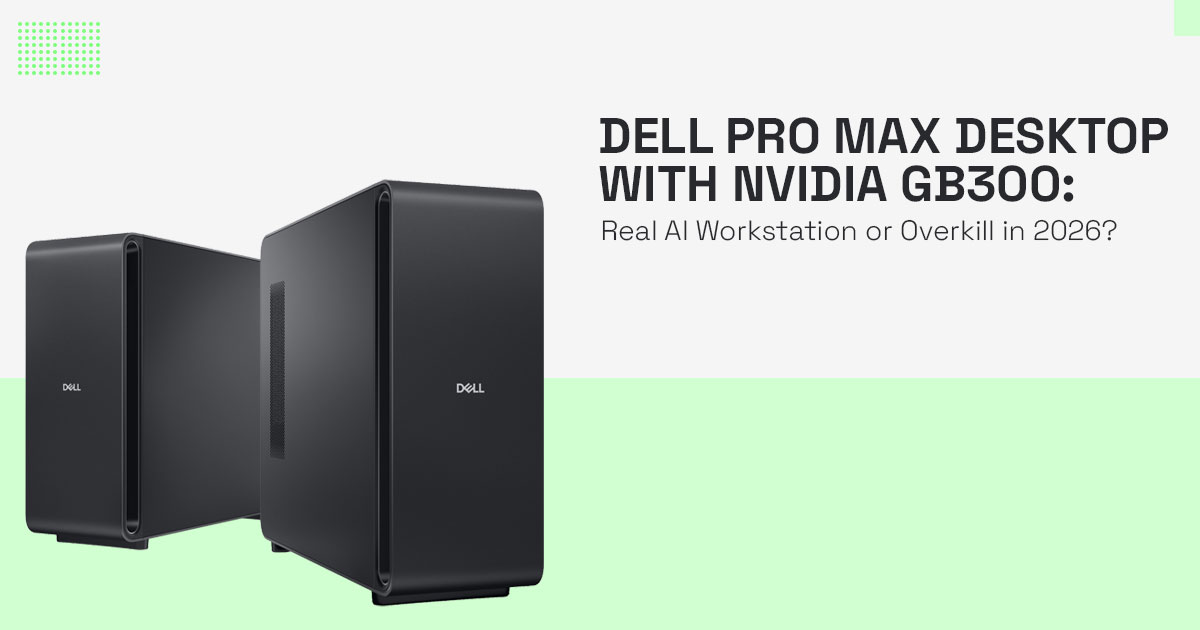
Dell Pro Max desktop with NVIDIA GB300 is not a normal PC. It’s a deskside AI supercomputer desktop built for serious work—like training large AI models locally. It delivers up to 20 petaFLOPS performance, massive 496GB LPDDR5X RAM, and up to 748GB of total memory across CPU and GPU.
Great for AI startups, research labs, and enterprises. Overkill for almost everyone else.
Big trade-offs: cost, power usage, cooling needs, and limited upgrades.
1. Introduction
Most developers hit the same wall sooner or later—you start building something serious with AI, and suddenly your laptop or even a high-end desktop just can’t keep up. Models crash, memory runs out, and cloud bills quietly pile up in the background.
That’s exactly where something like the Dell Pro Max desktop with NVIDIA GB300 steps in.
This isn’t just another workstation. It’s a high-performance AI desktop designed to bring server- level AI power to your desk. Think of it as a compact version of the machines that run large- scale AI systems—but built for local use.
As technology experts with over 20 years of experience in hardware and application research and development, we deeply analyze each product based on real-world performance, durability, and value for money. Our goal is to help you find the best product in every category—budget, performance, reliability, and long-term usage.
If you’re an AI developer, data scientist, startup founder, researcher, or enterprise team handling sensitive data, this kind of system might actually matter to you. Our recommendations are based on extensive research, component analysis, real-world usability, and industry expertise.
But here’s the real question:
Do you actually need something this powerful—or does it just sound impressive on paper?
That’s what we’re going to figure out.
If you’re searching for the best AI desktop for machine learning in 2026, this sits at the top end of what’s available right now.
2. Dell Pro Max Specifications and Features at a Glance
At the core of the Dell Pro Max workstation, you get the NVIDIA GB300 desktop superchip, built on the NVIDIA Grace Blackwell architecture.
This combines:
- A 72-core Arm-based NVIDIA Grace CPU
- A powerful Blackwell GPU
Together, they deliver up to 20 petaFLOPS of FP4 AI performance, optimized for AI workloads rather than general computing tasks.
Now let’s talk about memory—because that’s where things get interesting.
You get:
- 496GB LPDDR5X RAM desktop memory
- 252GB HBM3e GPU memory
That gives you up to 748GB of total available memory across CPU and GPU, designed to work together efficiently.
And this isn’t just about having “a lot” of RAM. The system uses a coherent memory design that allows CPU and GPU to share data more efficiently, reducing delays in data transfer. That’s a huge deal for large language model training workstations and heavy AI workflows.
You also get:
- An additional NVIDIA RTX Pro 2000 Blackwell GPU (16GB GDDR7) for standard graphics tasks
- Up to 16TB NVMe storage
- Preloaded Ubuntu with NVIDIA AI developer tools
Physically, this isn’t a small machine:
- Size: 610 × 569 × 231 mm
- Weight: around 39 kg
This is something you need to plan your workspace around. Power and cooling are just as serious:
- 1600W Titanium PSU
- Dell MaxCool thermal system designed to handle long AI training sessions without throttling
Is LPDDR5X RAM Good for Desktop Workstations?
In most desktops, LPDDR5X wouldn’t make sense. But here, it works because of the coherent memory design.
The result:
- Faster data movement
- Lower latency between CPU and GPU
- Better efficiency for AI model training and inference
And that’s exactly why this NVIDIA Grace Blackwell workstation feels smooth when handling massive datasets and models.
2.1 What This Setup Actually Means in Real Use
All these specs sound impressive—but here’s what they translate to in real life:
- You can run larger language models locally with fewer memory limits and fewer interruptions
- You reduce dependency on cloud GPU platforms
- You get predictable performance without worrying about shared resources
But—and this matters—it only makes sense if your workload actually needs this level of power.
3. Local AI Decision Triangle for High Memory AI Workstation Desktop (496GB RAM)
Before buying a high-memory AI workstation desktop with 496GB RAM, it helps to simplify the decision.
Think in three parts:
- Compute Power → GPU strength, CUDA cores, and AI acceleration
- Memory Capacity → HBM3e GPU memory + LPDDR5X RAM
- Data Proximity → local processing vs cloud dependency This is the Local AI Decision Triangle.
The Dell Pro Max desktop with NVIDIA GB300 and 496GB LPDDR5X RAM pushes all three to the limit. That’s why it can handle larger language models locally with fewer memory limitations.
But not everyone needs all three.
- A solo developer may focus on compute + memory
- A research lab may need all three for privacy and compliance
When thinking about how to choose AI workstation for local model training, this simple model helps avoid overspending.
4. Who Should Buy Dell Pro Max AI Workstation (And Who Should Not)
The Dell Pro Max AI workstation for startups works best when there is a clear, heavy workload.
Best fft:
- AI startups reducing cloud costs
- Enterprise teams handling sensitive data
- Research labs working offline
- Engineering and biotech teams running simulations
These users benefit from a high-performance AI desktop that runs continuously without cloud limits.
Not suitable:
- Gamers
- Casual creators
- Most small businesses
Is Dell Pro Max good for gaming or only AI?
It is built for AI. The Arm-based CPU and unified memory design are optimized for AI workloads, not gaming performance.
5. NVIDIA GB300 Desktop Real World Performance Explained for AI Workloads
Specs look impressive on paper, but what really matters is how the system behaves when you actually use it.
The NVIDIA GB300 desktop real world performance stands out because it removes the usual limits people hit—memory crashes, slow data transfer, and dependency on cloud GPUs. This makes everyday AI work feel more stable and predictable.
Here’s how that plays out in real situations:
5.1 Running Large Language Models Locally with NVIDIA GB300 Desktop
Most systems struggle when models get large. You either reduce the model size or move to the cloud.
With a large language model training workstation like this, you can:
- Run bigger models directly on your machine
- Keep sensitive data private
- Get faster responses without network delays
This matters for teams building internal tools, chatbots, or AI assistants where data control is critical.
5.2 Dell Pro Max Desktop for AI Training Locally (Without Cloud Costs)
Cloud GPUs work well, but costs add up fast—especially for continuous training.
Using the Dell Pro Max desktop for AI training locally:
- You train models without paying hourly fees
- You can run experiments anytime without waiting
- Long training cycles become easier to manage
For startups and developers, this often means more freedom to test ideas without worrying about budget limits.
5.3 Simulation Workloads on NVIDIA GB300 Performance Desktop
AI is not the only use case.
In ffelds like engineering, biotech, and research:
- Simulations involve large datasets
- Processing takes hours or days
- Cloud queues can slow things down
A high-performance AI desktop handles these workloads locally, so:
- You get faster iteration
- No waiting for shared resources
- Better control over how data is processed and how outputs behave
5.4 Edge AI Systems and Offline AI Processing
Not every environment has reliable internet.
The NVIDIA GB300 desktop use cases include:
- Factories running automation systems
- Remote research stations
- Secure environments where data cannot leave the site
In these cases, a local AI workstation ensures:
- Continuous operation without internet
- Lower latency
- Full data ownership
5.5 Everyday Productivity Gains (What Changes for the User)
Beyond technical use cases, the biggest difference is how work feels:
- Fewer crashes due to memory limits
- Faster model loading and inference
- Smooth switching between tasks
- Less reliance on external services
This reduces interruptions like memory crashes, slowdowns, and unstable runs, which is often more valuable than raw speed.
5.6 What Are the Use Cases of AI Workstations Like This?
A system like the NVIDIA GB300 performance desktop for AI workloads is best suited for:
- AI model development and training
- Data science and analytics at scale
- Simulation-heavy industries
- Privacy-focused applications
- Edge and offline AI systems
In simple terms, it fits any workload that needs:
High memory + strong compute + full control over data
6. Dell Pro Max Power Consumption, Cooling, and Space Requirements
This is where many buyers get surprised.
Power usage
How much power does Dell Pro Max consume?
The 1600W PSU signals high energy demand under load.
Cooling and placement
The Dell Pro Max cooling power and space requirements mean:
- Proper airflow is necessary
- Noise levels increase under heavy use
- You need dedicated space
Upgrade limitations
The 496GB LPDDR5X RAM desktop is not easily upgradeable.
So while high memory workstation desktop benefits include speed and stability, the limitations include long-term flexibility.
7. Local AI Training vs Cloud GPU Cost Comparison Desktop
This is one of the most searched decisions in local AI vs cloud GPU setups.
Quick comparison:
| Factor | Local NVIDIA GB300 Desktop | Cloud GPU |
| Upfront cost | High | Low |
| Long-term cost | Lower with heavy use | Keeps increasing |
| Flexibility | Fixed setup | On-demand scaling |
| Scalability | Limited to hardware | Virtually unlimited |
| Privacy | Full control | External dependency |
The Dell Pro Max vs cloud AI infrastructure cost breakdown depends on usage.
- Daily heavy workloads → local wins
- Occasional workloads → cloud is better
8. Dell Pro Max vs DGX vs Cloud GPUs (AI Workstation Comparison)
When choosing a high-performance AI desktop, most people compare three options: local workstation, DGX systems, and cloud GPUs.
Here’s a simple breakdown:
| Setup | Best For | Limitation |
| Dell Pro Max desktop with NVIDIA GB300 | Local AI training, privacy, steady workloads | High upfront cost |
| NVIDIA DGX systems | Large-scale enterprise AI infrastructure | Expensive, requires space |
| Cloud GPUs | Flexible scaling, short-term projects | Ongoing costs, data transfer delays |
What this means in real use:
- Dell Pro Max works well when you need local control and daily usage
- DGX systems fit large organizations with heavy infrastructure needs
- Cloud GPUs are better for burst workloads or experimentation
Simple takeaway:
Choose based on how often you run AI workloads, not just how powerful the system is. For AI workloads, this matters more than raw CPU speed.
9. NVIDIA GB300 Performance Desktop for AI Workloads
The NVIDIA GB300 performance desktop for AI workloads feels fast for one main reason:
Unified memory removes bottlenecks.
This leads to:
- Faster inference on large models
- Smoother training workflows But performance is not only
- Poor storage can slow things down
- Some workloads may not fully use the Arm CPU architecture
9.1 How powerful is NVIDIA GB300 compared to GB10?
The GB300 offers:
- Higher memory capacity
- Better tensor performance
- Improved handling of large-scale models
10. NVIDIA Grace Blackwell Desktop Software Stack Compatibility
The NVIDIA Grace Blackwell desktop use cases depend heavily on software.
This system supports:
- CUDA ecosystem
- PyTorch and TensorFlow
- Docker and Kubernetes
For teams already using AI developer tools NVIDIA, setup is smooth.
But there is one constraint:
- Strong reliance on the NVIDIA ecosystem
- Switching to alternatives like AMD requires effort
11. Common Mistakes When Buying a 496GB LPDDR5X RAM Desktop
Many buyers focus on numbers, not needs.
Common issues:
- Buying 496GB RAM without a matching workload
- Ignoring power and cooling requirements
- Not optimizing software for the hardware
- Choosing specs instead of solving a real problem
The biggest mistake:
Assuming more hardware automatically means better results
12. Best Alternatives to Dell Pro Max AI Workstation
Not everyone needs this level of power.
Better options include:
- Mid-range high-performance AI desktop
- Multi-GPU workstation builds
- Hybrid setups
A local AI training vs cloud GPU cost comparison desktop often leads to a hybrid model:
- Local system for daily work
- Cloud for peak demand This balance works for most
This kind of system is built as AI model training hardware, not a general-purpose desktop.
13. NVIDIA Blackwell GPU Architecture Future-Proofing and Lifespan
The NVIDIA Blackwell GPU architecture is advanced today, but hardware moves fast.
Things to consider:
- New chips are released every 1–2 years
- The Dell Pro Max workstation has limited upgrade flexibility
- Soldered memory reduces long-term adaptability
A realistic plan:
- Use it heavily for 2–3 years
- Re-evaluate as newer architectures arrive
14. Frequently Asked Questions (Dell Pro Max Desktop with NVIDIA GB300)
Before making a decision on a high-performance AI desktop, most readers have a few practical questions—about real use, cost, and whether this system fits their workflow. These quick answers focus on Dell Pro Max desktop with NVIDIA GB300, using real-world context to help you decide faster.
Q. Can Dell Pro Max run large language models locally?
- Yes. The Dell Pro Max desktop with NVIDIA GB300 and 496GB LPDDR5X RAM can run large language models locally, including very large-scale models, with fewer memory limitations.
Q. Is Dell Pro Max better than cloud GPUs for AI workloads?
- For steady use, the Dell Pro Max AI workstation reduces long-term costs and keeps data private. For occasional workloads, cloud GPUs remain more flexible.
Q. Can Dell Pro Max replace NVIDIA DGX systems for enterprises?
- For many teams, yes. This NVIDIA GB300 desktop AI workstation delivers similar capabilities in a deskside form, though large-scale deployments may still need full DGX setups.
Q. What industries need high-memory AI workstations like Dell Pro Max?
- Industries like healthcare, finance, biotech, and engineering use enterprise AI workstations for secure, local processing and large-scale data workloads.
Q. Is 496GB LPDDR5X RAM useful in a desktop workstation?
- For regular tasks, no. For AI model training, simulation workloads, and large datasets, this high-memory workstation desktop removes bottlenecks.
Q. Who should buy Dell Pro Max AI workstation in 2026?
- Best for AI developers, startups, and research teams needing local AI training without cloud costs and full data control.
15. Conclusion: Should You Buy Dell Pro Max Desktop with NVIDIA GB300?
At some point, adding more power stops helping and starts adding complexity. The Dell Pro Max desktop with NVIDIA GB300 sits right at that line.
This machine brings datacenter-level AI performance to a desk. For the right kind of work—AI model training, large datasets, private workloads—it solves real problems. You get speed, control, and consistency without depending on cloud systems.
But it also comes with trade-offs that are easy to overlook.
Power draw, cooling needs, physical space, and limited upgrades are not small details. They affect daily use, not just setup day.
That’s where the Local AI Decision Triangle helps. If your work truly needs all three—compute power, high memory, and local data control—this system makes sense. If not, you’re paying for capacity you won’t use.
In many cases, a mix works better:
A capable local system for everyday work, and cloud GPUs when you need extra scale.
As an AI workstation in 2026, it makes sense only when your workload justifies the cost and scale.
Final Verdict on NVIDIA GB300 Desktop for AI Workloads
The NVIDIA GB300 desktop AI workstation is built with a clear purpose. It’s powerful, focused, and reliable for teams that deal with AI workloads at scale.
But it’s not for everyone.
- If your work depends on running large language models locally, handling sensitive data, or training models daily → this is a strong fit
- If your usage is occasional, experimental, or budget-sensitive → a hybrid or smaller setup makes more sense
In simple terms, this is not about having the biggest machine. It’s about choosing the right tool for the work you actually do.
Available Professional Alternatives to Dell Pro Max AI Workstation
If the full Dell Pro Max desktop with NVIDIA GB300 and 496GB LPDDR5X RAM feels too much, there are more practical options depending on your needs:
- Dell Pro Max with GB10
A compact system with the NVIDIA GB10 Grace Blackwell chip, offering around 1 Petaflop AI performance. Better suited for local LLM inference and edge AI workloads.
- Dell Pro Max Micro Desktop
A smaller, professional setup with Intel Core Ultra 7 and NVIDIA RTX graphics, designed for AI-assisted workflows, content creation, and multitasking.
- Dell Pro Max Tower T2
A more traditional workstation with scalable RAM and storage, useful for users who want strong local compute power without going into supercomputer-level cost.
Other Amazon Alternatives for AI Workstations and Compact AI PCs
If you want to explore current availability and pricing:
- Amazon Worldwide – Dell Pro Micro AI PC
- Amazon India – Dell Pro Micro AI PC Options
- Amazon India – Dell Pro Max Tower T2
These options give you a better sense of what’s available across different budgets and workloads.
If you’re still unsure, don’t rush the decision.
Start with your actual workload:
- What models are you running?
- How often do you train?
- Do you need full data privacy?
Then match that to the system—not the other way around.
And if you want a second opinion, share your setup or use case. It’s easier to choose the right machine when the problem is clear.
***Disclaimer***
This blog post reflects our own research, testing, and personal opinions. It should not be taken as the official position of any brand, manufacturer, or company mentioned here. While we aim to keep information accurate and up to date, product details, pricing, and availability can change. We recommend double-checking important details before making a purchase.
Some links in this article may be affiliate links. If you choose to buy through these links, we may earn a small commission at no extra cost to you. This helps support our work and allows us to keep publishing in-depth, unbiased reviews. Our recommendations are never influenced by affiliate partnerships.
Comments shared by readers reflect their own views and not ours. We are not responsible for outcomes resulting from the use of information on this site. Please seek professional advice where appropriate.
All product names, logos, and brands mentioned are the property of their respective owners. These names are used for identification and informational purposes only and do not imply endorsement.
