
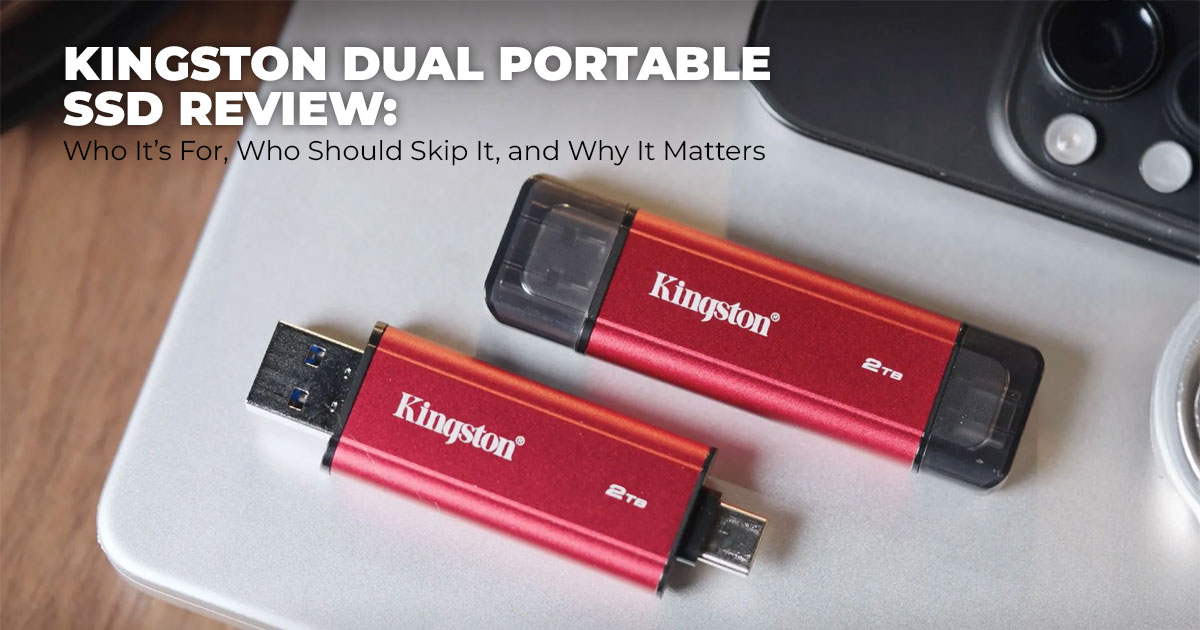
If you want an easy way to move files between your phone and laptop without adapters, the Kingston Dual Portable SSD is built for that job. If you already have a rough idea of what you’re looking for, you can quickly check the available 512 GB, 1 TB, and 2 TB options on Amazon Worldwide and come back to this guide to see which size actually makes sense for you.
This guide explains how it performs in real life, who it’s best for, and whether the convenience matches the price—so you can decide before you buy.
- Amazon Worldwide – 512 GB, 1 TB, 2 TB
- Amazon India – Kingston Dual Portable SSD Options
- Direct Purchase from Kingston (Official Store)
1. Introduction
Moving files between devices shouldn’t feel like a chore, yet for many people it still does. Phones fill up fast, laptops need those files, and the one adapter you need is never within reach. That everyday frustration is why products like the Kingston Dual Portable SSD exist—and why so many people search for a portable SSD with USB-C and USB-A that works without extra accessories.
This category is all about convenience and speed. A dual-connector portable SSD lets you plug directly into a phone or laptop and move photos, videos, or work files in seconds. That’s especially appealing if you’re looking for the best portable SSD for phone and laptop— especially when traveling, studying, or working on the go.
But choosing the right external storage isn’t just about connectors or advertised speeds. What really matters is how the drive performs in daily use—how reliable it feels during quick backups, whether it stays consistent with large files, and if it’s actually worth paying for compared to simpler options. This is where user feedback and real-world testing make a difference. Reviews often highlight things spec sheets skip, like long-term durability, ease of use, and whether the drive holds up for tasks such as video storage during trips or offline backups you depend on.
In this article, you’ll find clear answers to questions people actually ask, including ‘Is Kingston Dual Portable SSD worth buying’, who benefits most from this kind of drive, and where it may not be the right fit. The aim is simple: help you decide with confidence, using practical insight instead of marketing claims.
With over 20 years of experience in hardware and application research, we analyze products based on real-world performance, durability, and value for money. This guide is built on hands- on research and practical use—not just spec sheets.
2. Technical Specifications at a Glance
Here’s a quick table laying out the main specs to reference easily:
| Feature | Details |
| Interface | Dual USB-A and USB-C |
| Speed Standard | USB 3.2 Gen 2 SSD |
| Read/Write Speeds | Up to 1,050 MB/s read, 950 MB/s write |
| Capacities Available | 512GB, 1TB, 2TB |
| Dimensions | Compact (about 71.85mm long, thumb-drive size) |
| Durability | Metal and plastic casing, shock-resistant |
| Operating
Temperature |
0°C~60°C |
| Storage
Temperature |
-20°C~85°C |
| Compatibility | Windows 11, macOS (v. 13.7.6 +), Linux (v. 4.4x +), Android, Chrome OS, iOS/iPadOS (v.13+) (with adapters if needed) |
| Warranty | Limited 5-year warranty with free technical support |
This makes the Kingston Dual Interface SSD a bridge for mixed setups, blending speed with easy access.
3. Why This Review Is Essential
A lot of articles just list out features without connecting them to real situations, like rushing to back up a phone before a flight or dealing with slow loads on a work laptop. Searches for Kingston portable SSD review or Kingston SSD pros and cons show people want straight talk on value, not just hype. We built this to match that, offering depth on high-speed data transfer and compatibility that helps rank better in results. It guides you through decisions with trust- building elements, like comparing to alternatives and sharing user tips, which search engines like for helpful content.
4. What You Will Learn from This Review
You’ll pick up how the Kingston Dual Connector Portable SSD performs in common spots, like fast phone offloads or team file shares. We cover its edges in portability and speed, downsides for some groups, and side-by-sides with other storage. Plus, get advice on picking sizes, avoiding pitfalls, and answers to trending queries like how to backup phone using a portable SSD. By the finish, you’ll have solid points to weigh if it’s right for your routine, or if a basic drive works fine.
5. Quick Take: Is Kingston Dual Portable SSD Worth Your Attention?
The Kingston Dual Portable SSD is built for people who move files between devices often and want fewer steps in the process. With USB-C and USB-A connectors built in, it cuts out adapters and keeps transfers fast and simple. Its compact portable SSD design fits easily into a backpack or pocket, which suits mobile workflows.
This drive makes sense if you work with photos, videos, or large files across a phone and a laptop. It matters less if your setup stays at a desk or if you need very large storage at the lowest cost.
- Summary: A strong choice for users who value plug-and-play convenience and It may not be the best fit if your budget is tight or your storage needs are very basic.
6. The Real Problem: Why Dual-Connector Portable SSDs Exist
Many portable SSDs still rely on adapters or matching ports, which slows things down when space runs out on a phone or when files need to be moved quickly to a computer. Cloud storage helps, but it can raise data usage costs and privacy concerns, especially while traveling.
The Kingston mobile storage solution removes that friction. With direct USB-C for phones and USB-A for laptops, it supports easy file transfer between phone and laptop without extra gear. It also works well as offline storage during travel, where speed and reliability matter more than sync features.
This approach turns storage into a simple utility instead of another thing to manage.
7. What a Dual-Interface SSD Means in Daily Use
A dual interface SSD includes two physical connectors on the same drive—USB-A on one end and USB-C on the other. There’s no setup. You plug in the side that fits your device.
For example, connect the USB-C side to an Android phone to back up photos. Then plug the USB-A side into a laptop to edit or archive those files. The process feels direct and predictable, which saves time in mixed-device setups.
This design works best as an external SSD without an adapter for phone users. If all your devices already share the same port, the advantage becomes smaller.
- Key takeaway: Fewer parts, fewer delays, better flow for people using different devices.
- Amazon Worldwide – 512 GB, 1 TB, 2 TB
- Amazon India – Kingston Dual Portable SSD Options
- Direct Purchase from Kingston (Official Store)
8. USB 3.2 Gen 2 Speed: What You’ll Notice in Real Life
On compatible systems, the USB 3.2 Gen 2 SSD connection delivers real-world speeds close to 1,000 MB/s read and 900 MB/s write. Moving a 10GB video folder takes under half a minute, which is a clear step up from USB flash drives.
Large files benefit most—video clips, photo libraries, project folders. Smaller documents move quickly, too, though the difference feels less dramatic. On older ports, speeds drop to match the system, but performance still beats mechanical hard drives.
- Summary: Best gains show up with media files and modern ports.
9. Who This Portable SSD for Phone and Laptop Is Best For
- Portable SSD for smartphone users who need fast offloads
- SSD for content creators on the go, handling photos or video
- Portable SSD for students and professionals who want simple backups
- Field workers and reporters needing secure offline storage
If your work starts on a phone and ends on a computer, this design fits well.
10. Who Should Skip This Dual-Connector SSD
This drive adds little value for users who stay on a single desktop setup. Those needing very large storage volumes may hit limits faster. Budget-focused buyers may prefer standard external drives if dual-port portable SSD convenience is not essential.
- Key takeaway: It’s designed for movement, not fixed setups.
11. Design, Build, and Portability Beyond Photos
The Kingston compact SSD drive weighs under 50 grams and is easy to carry. Its metal body handles everyday bumps and stays cool during longer transfers. Grip texture helps reduce slips, though it’s not built for rough outdoor use.
As a travel-friendly portable SSD, it works best with a small sleeve in dusty conditions.
12. Capacity Options: Choosing the Right Size
The drive comes in 512GB, 1TB, and 2TB, and the right pick really depends on how you use it. If you’re comparing sizes or prices side by side, it helps to look at all three options together— something you can easily do on Amazon Worldwide, where the full range is listed in one place.
For most people, 1TB hits the sweet spot—plenty of room for backups, work files, and everyday transfers without constantly juggling space.
- Summary: Choose capacity based on habits, not guesses.
13. Kingston Dual Portable SSD Price vs Value
Pricing typically ranges from $100–$200, depending on capacity. The cost reflects convenience and time saved, not just raw speed. For users juggling devices, the Kingston SSD value for money shows in fewer accessories and smoother workflows. For simple storage needs, less expensive options still make sense.
14. How It Compares to Other Storage Options
Check this table for clear matchups:
| Aspect | Kingston Dual
Portable SSD |
Traditional
Portable SSD |
USB Flash Drive | Cloud Storage |
|
Speed |
Up to 1,000 MB/s | Up to 1,000 MB/s |
Up to 500 MB/s |
Varies by internet (slow
offline) |
|
Compatibility |
High (dual ports) | Medium (single port) | High (USB-A common) | Universal, but needs a
connection |
| Capacity Max | 2TB | 4TB+ | 1TB typically | Unlimited (paid tiers) |
| Cost per GB | Moderate | Lower | Higher for large
sizes |
Subscription-
based |
| Privacy/Security | Full control | Full control | Full control | Provider-
dependent |
| Best For | Mobile cross- device users | General backups | Quick small transfers | Always-online access |
This spotlights its strength in flexibility, answering portable SSD vs USB flash drive or portable SSD vs cloud storage.
15. Clearing Common Doubts About Portable SSDs and Dual Connector SSDs
Before buying a portable solid-state drive, most people pause at the same practical questions. These aren’t spec-level doubts—they’re real usage concerns about speed, compatibility, durability, and lifespan. This section clears up the most common searches around dual portable SSDs, helping you understand how they work in everyday situations and whether they fit your needs.
Q. What makes a dual portable SSD different from a regular portable SSD?
- A dual portable SSD has built-in USB-C and USB-A connectors, which means you don’t need adapters or extra cables. This makes it easier to switch between a phone and a laptop, especially in mixed-device setups. A regular portable SSD usually needs a specific cable or dongle, which adds friction and slows things down when you’re on the move.
Q. Is a portable SSD faster than a hard drive?
- Yes. A portable SSD is much faster than a traditional hard drive because it has no spinning parts. File transfers finish quicker, apps and media load faster, and performance stays consistent. This is why SSDs are now preferred for backups, travel storage, and daily file transfers.
Q. Can I use a portable SSD with my phone?
- You can. Most external SSDs for Android phones work through a direct USB-C connection. For iPhones, a simple compatible adapter is usually enough. This makes a portable SSD that works with phone and laptop a solid choice for backing up photos, videos, and documents without relying on cloud storage.
Q. How durable are portable SSDs for daily use and travel?
- Portable SSDs are built to handle everyday knocks better than hard drives. Their solid-state design makes them more resistant to drops and movement. That said, durability still depends on how you use them. Light travel and daily commuting are fine, but rough outdoor use may need extra protection.
Q. What is the lifespan of a portable SSD?
- A quality SSD typically lasts 5 to 10 years under normal use. Modern drives use wear-leveling technology to spread out writes evenly, which helps maintain long-term reliability. For most users, the SSD will outlast the device it’s paired with.
16. Common Questions Buyers Ask About the Kingston Dual Portable SSD
These are the questions buyers usually search for right before making a decision. They focus on real-world use, not specs—things like privacy, ease of use, and whether the drive fits modern workloads like video storage.
Q. Can a portable SSD replace cloud storage?
- A portable SSD works very well when you need fast access without internet, and it keeps your data private. It’s ideal for travel, backups, and large file transfers. Cloud storage still makes sense for remote access across locations, but many users rely on SSDs to avoid data limits and monthly fees.
Q. Does this SSD work without installing extra apps?
- Yes. It’s a plug-and-play SSD, which means no software is required for basic use. You plug it in, and it shows up like any external drive. That simplicity is a big reason people prefer portable SSDs over app-based storage solutions.
Q. Is a portable SSD safe for long-term backups?
- A quality portable solid-state drive is reliable for long-term storage if it’s handled properly. For critical data, it’s still smart to keep a second copy elsewhere. That way, you’re protected against loss, damage, or accidental deletion.
Q. Can it handle 4K video files smoothly?
- Yes. The speed is more than enough for 4K video transfers, previews, and quick edits. This makes it a strong option for Kingston SSD for mobile video storage, especially for creators moving footage between phones and laptops.
17. Final Verdict: Should You Buy the Kingston Dual Portable SSD?
So, should you buy the Kingston Dual Portable SSD? If your daily routine involves moving files between a phone and a laptop, the answer is yes. This design solves a very real problem—port mismatch—without adding complexity. You get fast transfers, direct connections, and a compact portable SSD that fits easily into everyday life.
This drive makes the most sense for people who move around—smartphone-first users, content creators, students, professionals, and frequent travelers who want easy phone-to-laptop file transfers without adapters. If your setup never leaves a desk or you need very large storage at the lowest price, simpler options may suit you better.
In short, if seamless switching matters more than raw capacity, this fast external drive delivers exactly what it promises.
17.1 Buying Checklist: What to Check Before You Click “Buy.”
Before you place an order, run through this quick list to avoid common mistakes:
- Device ports: Make sure your devices use USB-A or USB-C (this drive supports both).
- Operating system support: Works smoothly with modern systems; older devices should be tested first.
- Speed expectations: Best performance comes from newer hardware that supports USB 3.2 Gen 2.
- Use-case fit: Not designed for extreme outdoor use or users who need massive storage If this checklist lines up with how you work, the drive should fit right in.
Where to Buy the Kingston Dual Portable SSD
If you’re ready to move forward, here are trusted purchase options based on capacity and region:
- Amazon Worldwide – 512 GB, 1 TB, 2 TB
- Amazon India – Kingston Dual Portable SSD Options
- Direct Purchase from Kingston (Official Store)
If you pick one up, share how you’re using it—whether for mobile backups, video storage, or daily ffle transfers. Questions or setup doubts? Ask away. Storage works best when it ffts real habits, not just specs.
***Disclaimer***
This blog post contains unique insights and personal opinions. As such, it should not be interpreted as the official stance of any companies, manufacturers, or other entities we mention or with whom we are affiliated. While we strive for accuracy, information is subject to change. Always verify details independently before making decisions based on our content.
Comments reflect the opinions of their respective authors and not those of our team. We are not liable for any consequences resulting from the use of the information provided. Please seek professional advice where necessary.
Note: All product names, logos, and brands mentioned are the property of their respective owners. Any company, product, or service names used in our articles are for identification and educational purposes only. The use of these names, logos, and brands does not imply endorsement.
