
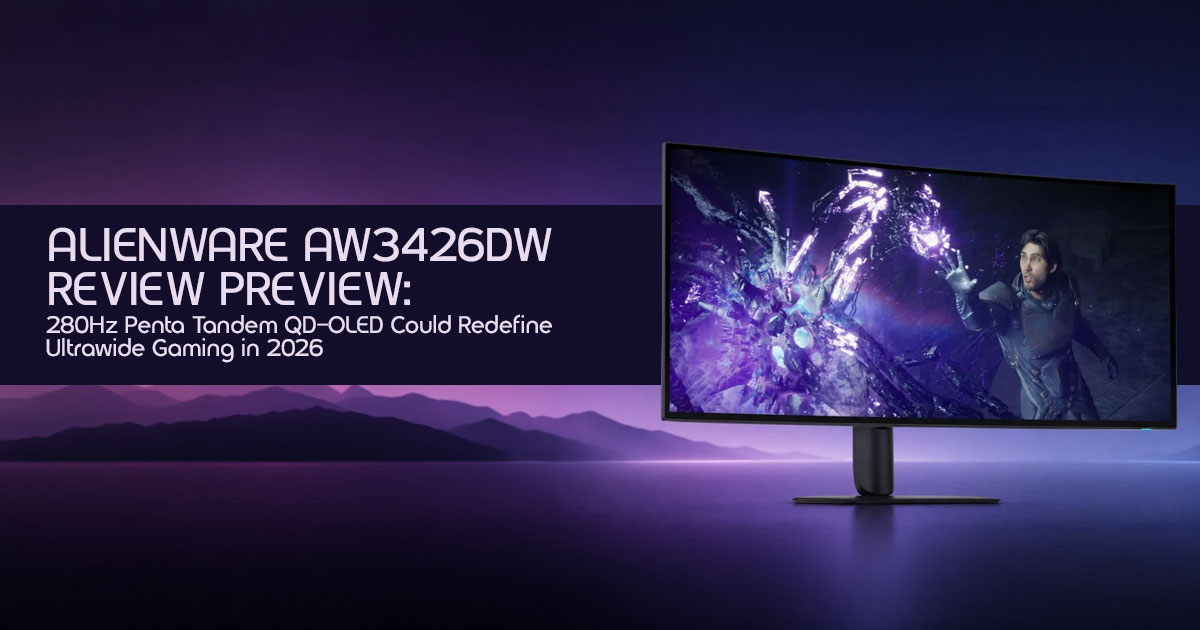
Is This the Ultrawide OLED Monitor Gamers Have Been Waiting For?
For years, gaming monitor upgrades have followed a familiar pattern: a little more brightness, a slightly faster refresh rate, and a handful of new features that rarely change the experience in a meaningful way. The Alienware AW3426DW feels different.
At first glance, it looks like another premium 34-inch ultrawide OLED monitor. Look closer, however, and you’ll find one of the biggest panel technology upgrades we’ve seen in recent years. The new Samsung Penta Tandem QD-OLED display promises higher brightness, improved efficiency, better long-term durability, and smoother motion than previous generations. If these improvements translate into real-world performance, the AW3426DW could become the new benchmark for ultrawide gaming monitors.
As technology experts with more than 20 years of experience in hardware and software research, development, testing, and product evaluation, we examine every product from the perspective that matters most to buyers: real-world performance, reliability, long-term ownership, and overall value for money. Whether you’re a competitive gamer chasing every frame, a content creator looking for accurate visuals, a PC enthusiast building a dream setup, or a professional searching for a monitor that can handle both work and gaming, our recommendations are based on extensive research, component analysis, practical usability, and industry expertise.
In this review preview, we’ll go beyond the marketing claims and explore what the Alienware AW3426DW actually brings to the table, who should consider upgrading, where the improvements matter most, and whether it has what it takes to justify its premium position in an increasingly crowded OLED gaming monitor market.
Quick Take
For readers who want the short version, the Alienware AW3426DW is shaping up to be one of the most important ultrawide gaming monitor releases of 2026.
Its next-generation Samsung Penta Tandem QD-OLED panel introduces meaningful improvements where gamers care most: brightness, motion clarity, HDR performance, and long-term panel durability. Combined with a blazing-fast 280Hz refresh rate and the immersive 34-inch 3440 × 1440 ultrawide resolution, it has the potential to deliver a noticeably better experience than previous-generation OLED displays.
If you’re currently using an older ultrawide monitor, a traditional IPS gaming monitor, or even a first-generation QD-OLED monitor such as the AW3423DW, there are legitimate reasons to pay attention to this upgrade. Competitive gamers will appreciate the increased refresh rate and responsiveness, while single-player gaming enthusiasts can expect richer HDR highlights, deeper contrast, and greater visual immersion.
That said, the AW3426DW won’t be the perfect fit for everyone. Driving modern games at high frame rates on a 3440 × 1440 ultrawide display requires a powerful graphics card, and while OLED technology continues to improve, some users may still prefer alternatives if they spend most of their day working with static desktop content.
The early signs are promising. The real question isn’t whether the AW3426DW is fast enough. It’s whether this monitor finally solves enough of OLED’s long-standing compromises to become the ultimate ultrawide gaming monitor that many gamers have been waiting for.
What changed from the AW3425DW?
The most significant upgrade is the adoption of Samsung’s Penta Tandem QD-OLED technology. This isn’t just a minor tweak; it’s a fundamental shift in panel architecture designed to boost brightness, extend lifespan, and improve overall efficiency. The refresh rate also jumps from 240Hz to 280Hz, offering an even smoother experience for high-refresh-rate enthusiasts.
Biggest improvements
We expect to see noticeable gains in peak brightness, particularly in HDR content, making highlights pop more vividly. The enhanced panel structure should also translate to better burn-in resistance and potentially sharper text clarity, addressing two common concerns with earlier OLED generations. The higher refresh rate, while a smaller jump, solidifies its position for competitive play.
Who should upgrade
If you’re rocking an older ultrawide, especially a non-OLED, or even a first-generation QD-OLED like the AW3423DW, the AW3426DW presents a strong case for an upgrade.
Competitive gamers who demand every frame and pixel of responsiveness, and immersive RPG players seeking unparalleled visual fidelity, will find this monitor particularly appealing.
Who should wait
If you’ve recently invested in a high-end 240Hz QD-OLED like the AW3425DW, the upgrade might not be as dramatic to justify the cost. Also, if your current GPU struggles to hit high frame rates at 3440×1440, or if you primarily play esports titles at lower resolutions, you might not fully leverage the AW3426DW’s capabilities. Those with extreme burn-in anxiety might also prefer to wait for more long-term data.
1. What Is the Alienware AW3426DW?
The Alienware AW3426DW is Dell’s latest flagship ultrawide gaming monitor, set to redefine the premium gaming experience. It combines a large, immersive screen with cutting-edge OLED technology and a blistering refresh rate, all aimed at delivering an unparalleled visual and responsive gaming environment. This isn’t just another monitor. It’s designed for gamers and creators who want top-tier image quality, speed, and immersion in a single display.
1.1 Quick Specs Snapshot
| Feature | Specification |
| Size | 34-inch Ultrawide |
| Resolution | 3440 × 1440 |
| Panel | Samsung Penta Tandem QD-OLED |
| Refresh Rate | 280Hz |
| Response Time | 0.03ms GtG |
| HDR Certification | VESA DisplayHDR True Black 500 |
| Peak HDR Brightness | Up to 1300 nits (claimed) |
| Adaptive Sync | NVIDIA G-SYNC Compatible + AMD FreeSync Premium Pro |
2. Why the AW3426DW Is More Important Than It Looks
This monitor isn’t just about incremental upgrades; it represents a significant milestone in display technology. The AW3426DW is poised to push the boundaries of what gamers can expect from an ultrawide display, particularly in terms of visual quality, responsiveness, and long-term reliability. It’s a testament to the rapid evolution of OLED technology and its increasing dominance in the high-end gaming market.
2.1 The Return of the Monitor That Started the QD-OLED Revolution
The original Alienware AW3423DW was a game-changer, introducing the world to QD-OLED and its incredible contrast, vibrant colors, and near-instant response times. The AW3426DW builds on that legacy, leveraging the latest advancements to address previous limitations and set a new standard. It’s a full-circle moment, bringing the pioneering spirit back to the forefront of ultrawide gaming.
2.2 History of AW3423DW
The Alienware AW3423DW launched in early 2022, marking the debut of QD-OLED technology in the consumer monitor space. It quickly garnered critical acclaim for its stunning image quality, deep blacks, and exceptional motion clarity. Despite some initial concerns about burn-in and text fringing, its performance was so compelling that it became the benchmark for premium gaming monitors.
2.3 QD-OLED adoption timeline
QD-OLED technology has seen rapid adoption since its introduction. After the AW3423DW, other manufacturers began releasing their own QD-OLED monitors, expanding the market and driving further innovation. Each generation has brought improvements in brightness, efficiency, and burn-in mitigation, culminating in the advanced panels we see today.
2.4 Evolution to Penta Tandem
The journey to Samsung Penta Tandem QD-OLED is a direct response to the demand for even brighter, more durable OLED displays. Early QD-OLED panels used a two-layer structure. The introduction of a three-layer structure (often referred to as Tandem OLED in some contexts, though Samsung’s QD-OLED is distinct) improved efficiency. Now, with Penta Tandem, Samsung Display has pushed the envelope further, integrating five layers to achieve significant advancements.
3. Understanding Samsung Penta Tandem QD-OLED
This is where the biggest technological upgrade takes place. Penta Tandem isn’t just a marketing term; it’s a sophisticated engineering feat designed to overcome some of the inherent challenges of OLED technology, particularly in the pursuit of higher brightness and longevity. Understanding its mechanics is key to appreciating the AW3426DW’s potential.
3.1 What Is Penta Tandem Technology?
Penta Tandem refers to Samsung Display’s latest multi-layer OLED architecture designed to improve brightness, efficiency, and durability compared to earlier generations. Unlike previous generations that might have used two or three layers, this new architecture significantly enhances the panel’s performance characteristics.
3.2 How It Works
At its core, QD-OLED uses blue OLED emitters to excite quantum dots, which then produce red and green light. The combination of these colors creates the full spectrum. Samsung’s Penta Tandem design uses multiple light-emitting layers that work together more efficiently than earlier OLED panels. The goal is simple: deliver higher brightness, lower power consumption, and better long-term durability without placing as much stress on individual OLED materials.
3.3 Why It Improves Brightness
Based on Samsung Display’s published information, the Penta Tandem architecture is designed to distribute light generation across multiple layers, helping improve brightness and efficiency. Each layer contributes to the overall luminance, allowing the display to hit impressive HDR peaks, reportedly up to 1300 nits, without stressing individual organic materials as much. This results in more impactful HDR content where bright elements truly stand out.
3.4 Why It Improves Efficiency
The distributed energy dissipation across multiple layers also leads to improved luminous efficiency. This means the panel can produce more light using less power, or produce the same amount of light with less heat. Better efficiency not only reduces power consumption but also contributes to the overall longevity of the OLED materials, as heat is a primary factor in degradation.
3.5 Why Burn-In Resistance May Improve
Burn-in, or permanent image retention, is a concern with all OLED technologies. It occurs when certain pixels are used more frequently and intensely than others, leading to uneven wear.
With Penta Tandem, the increased number of organic layers and improved efficiency mean that each individual layer is subjected to less stress to achieve a given brightness level. This reduced stress, combined with advanced pixel refresh algorithms and potentially new material compositions, should theoretically lead to significantly better burn-in resistance over the monitor’s lifespan. Alienware’s robust warranty coverage also plays a crucial role here.
3.6 Why Text Looks Sharper
One of the minor criticisms of early QD-OLED panels was a slight color fringing around text, a consequence of their unique subpixel layout. While the AW3423DW was generally excellent, some users noted this.
With Penta Tandem, and generally with newer generations of QD-OLED, there have been refinements to the subpixel structure and anti-aliasing techniques. This, combined with the overall brightness and contrast improvements, is expected to result in sharper, cleaner text rendering, making the AW3426DW more suitable for productivity tasks alongside gaming.
4. AW3426DW vs AW3425DW: Is the Upgrade Worth It?
This is the million-dollar question for many enthusiasts. The AW3425DW was already an excellent monitor, so does the AW3426DW offer enough to justify an upgrade? Let’s break down the key differences.
4.1 Side-by-Side Comparison
| Feature | AW3425DW (Gen 3 QD-OLED) | AW3426DW (Samsung Penta Tandem QD-OLED) |
| Panel Technology | Gen 3 QD-OLED | Samsung Penta Tandem QD-OLED |
| Refresh Rate | 240Hz | 280Hz |
| Peak Brightness (HDR) | ~1000 nits | ~1300 nits |
| SDR Brightness | ~250 nits | ~300 nits |
| Burn-In Resistance | Improved | Expected to Improve Further |
| Text Clarity | Very Good | Excellent |
| Estimated Price | ~$899 | ~$1,099 |
4.2 Real Gaming Differences
4.2.1 Brightness Gains
The jump from ~1000 nits to ~1300 nits peak HDR brightness might not sound massive on paper, but in practice, it can be quite noticeable. Brighter highlights in games like Cyberpunk 2077 or Alan Wake 2 will have more impact, creating a more dynamic and realistic visual experience. This is particularly true for scenes with small, intense light sources.
4.2.2 Motion Clarity Improvements
While both monitors boast near-instant 0.03ms GtG response times, the bump to 280Hz from 240Hz offers a subtle yet perceptible improvement in motion clarity for the most sensitive eyes. For competitive esports players, every frame counts, and this extra headroom can provide a marginal but real advantage in fast-paced titles like Valorant or Call of Duty.
4.2.3 HDR Improvements
Beyond just peak brightness, the Samsung Penta Tandem QD-OLED’s improved efficiency and potentially better color volume at higher brightness levels will enhance the overall HDR experience. Colors should remain vibrant and accurate even in very bright scenes, preventing the washed-out look that can sometimes occur on less capable HDR displays.
4.3 Upgrade Verdict
For most AW3425DW owners, the upgrade to the AW3426DW is likely a marginal gain rather than a revolutionary one.
However, if you are coming from an older monitor (pre-2025 QD-OLED or any non-OLED ultrawide), or if you are a hardcore enthusiast who demands the absolute bleeding edge and values every single improvement in brightness, motion, and burn-in resistance, then the AW3426DW is a highly compelling upgrade.
5. AW3426DW vs The Best OLED Monitors of 2026
The ultrawide OLED market is heating up, and the AW3426DW isn’t alone. Let’s see how it stacks up against its closest rivals from Samsung, MSI, and ASUS, all vying for the top spot in 2026.
5.1 Alienware vs Samsung
5.1.1 AW3426DW vs Odyssey OLED G8
Samsung’s Odyssey OLED G8 series has always been a strong contender, often sharing similar panel technology with Alienware due to Samsung Display being the panel manufacturer.
The 2026 Odyssey OLED G8 is expected to also feature the Samsung Penta Tandem QD-OLED panel, likely offering comparable image quality and performance to the AW3426DW. The key differentiators will likely come down to aesthetics, smart TV features (which Samsung often includes), and Alienware’s specific gaming-centric firmware and warranty.
If you prefer a cleaner, more minimalist design and potentially integrated smart features, the G8 might appeal. If you prioritize raw gaming performance, Alienware’s reputation and dedicated gaming features might sway you.
5.2 Alienware vs MSI
5.2.1 AW3426DW vs MPG 341CQPX
MSI has been aggressive in the OLED market, offering competitive monitors. The MPG 341CQPX is a 34-inch ultrawide QD-OLED, likely using a slightly older generation (Gen 3) panel compared to the AW3426DW’s Penta Tandem.
This means the MSI might offer a 240Hz refresh rate and slightly lower peak brightness (~1000 nits) compared to Alienware’s 280Hz and ~1300 nits. The MSI will likely be a more budget-friendly option, providing excellent QD-OLED performance for its price, but without the absolute latest panel advancements.
For value-conscious gamers, the MSI could be a strong alternative, accepting a minor compromise on peak brightness and refresh rate.
5.3 Alienware vs ASUS
5.3.1 AW3426DW vs PG34WCDM
ASUS’s ROG Swift PG34WCDM is a different beast, utilizing a WOLED panel (likely LG’s MLA+ technology) rather than QD-OLED. While WOLED with MLA+ can achieve very high brightness in small windows, QD-OLED generally offers superior color volume and purity, especially at higher brightness levels.
The ASUS also features a more aggressive 800R curve compared to Alienware’s 1800R, which is a matter of personal preference. The PG34WCDM will likely offer excellent motion clarity and brightness, but its color reproduction might not be as vibrant as the QD-OLED.
For those who prefer the WOLED panel characteristics (e.g., potentially better text rendering in some scenarios due to subpixel layout, though QD-OLED has improved) or the more aggressive curve, the ASUS is a strong alternative.
5.4 Which One Wins?
It’s not a simple straight answer, as each monitor caters to slightly different preferences. The AW3426DW is positioned to be among the strongest contenders.
If you value the vibrant colors and deep blacks of QD-OLED and want the latest panel tech, Alienware is probably your winner. However, if you prefer the aggressive curve of the ASUS WOLED or are looking for a more budget-friendly QD-OLED option like the MSI, those are excellent alternatives that don’t compromise too much on the core experience.
6. Real Gaming Performance Expectations
Owning a 280Hz ultrawide monitor is fantastic, but it’s only as good as the hardware driving it. To truly leverage the AW3426DW at its full 3440×1440 resolution and 280Hz refresh rate, you’ll need a powerful GPU. Let’s set some realistic expectations for NVIDIA’s RTX 50-series GPUs.
Performance Estimates
The following frame-rate estimates are based on current hardware scaling trends, publicly available benchmarks, developer guidance, and expected game performance at launch. Actual results will vary depending on your CPU, GPU, memory configuration, drivers, game updates, and graphics settings.
6.1 RTX 5070 Ti
The RTX 5070 Ti is positioned as a strong performer for high-refresh-rate 1440p gaming. At 3440×1440, it will deliver an excellent experience, especially with the help of DLSS 4.
Expected FPS:
| Game | Settings (3440×1440) | Expected FPS (DLSS Quality) |
| Cyberpunk 2077 | Path Tracing, High | 90–110 FPS |
| Black Myth: Wukong | High | 100–120 FPS |
| Call of Duty | Competitive, High | 180–220 FPS |
| Valorant | Max Settings | 280+ FPS |
6.2 RTX 5080
The RTX 5080 steps up the performance significantly, making it a sweet spot for those aiming to consistently hit higher frame rates on the AW3426DW without breaking the bank for the absolute top-tier card.
Expected FPS:
| Game | Settings (3440×1440) | Expected FPS (DLSS Quality) |
| Cyberpunk 2077 | Path Tracing, Ultra | 130–150 FPS |
| Black Myth: Wukong | Ultra | 140–160 FPS |
| Call of Duty | Competitive, Ultra | 220–260 FPS |
| Valorant | Max Settings | 280+ FPS |
6.3 RTX 5090
The RTX 5090 currently represents the highest-performance consumer GPU available for ultrawide gaming. While it might be considered overkill for 3440×1440 in some titles, it ensures you’ll fully utilize the 280Hz refresh rate in almost every game, even with the most demanding settings and ray tracing enabled.
Expected FPS:
| Game | Settings (3440×1440) | Expected FPS (DLSS Quality) |
| Cyberpunk 2077 | Path Tracing, Ultra | 180–200 FPS |
| Black Myth: Wukong | Ultra | 200+ FPS |
| Call of Duty | Competitive, Ultra | 280+ FPS |
| Valorant | Max Settings | 280+ FPS |
7. Can Your PC Actually Use 280Hz?
Achieving 280 frames per second isn’t just about the GPU. Your entire system needs to be up to the task. Here’s what to consider.
7.1 CPU Requirements
For high refresh rates, your CPU plays a crucial role, especially in CPU-bound games like many esports titles or open-world games with complex physics and AI. A modern, high-core-count CPU with strong single-core performance (e.g., Intel Core i7/i9 14th/15th Gen or AMD Ryzen 7/9 7000/8000 series) is essential to feed the GPU enough frames to hit 280Hz.
7.2 GPU Requirements
As detailed above, an RTX 50-series GPU (or equivalent AMD Radeon) is necessary. The higher you go in the stack (5070 Ti, 5080, 5090), the more consistently you’ll hit those high frame rates, especially in graphically intensive AAA titles at 3440×1440.
7.3 Common Bottlenecks
Beyond CPU and GPU, other components can bottleneck performance:
- RAM: Insufficient or slow RAM (e.g., less than 32GB DDR5-6000+) can hinder CPU performance.
- Storage: While less impactful on in-game FPS, a slow SSD can cause stuttering during asset loading.
- DisplayPort Cable: Ensure you’re using a DisplayPort 4 (with DSC) or DisplayPort 2.0 cable to support the full bandwidth required for 3440×1440 at 280Hz with HDR.
7.4 Settings to Change First
If you’re struggling to hit your target frame rates, start by adjusting these settings:
- DLSS/FSR: Always enable NVIDIA DLSS (or AMD FSR) to boost performance with minimal visual impact.
- Ray Tracing: Reduce or disable ray tracing effects, as they are the most demanding graphical feature.
- Volumetric Clouds/Fog: These can be surprisingly performance-intensive.
- Shadow Quality: Often has a significant impact with little visual difference on lower settings.
- Anti-Aliasing: While OLED’s pixel density helps, some AA methods are very demanding.
8. HDR Gaming: Is 1300 Nits Actually Noticeable?
Yes, absolutely. Based on Alienware’s published specifications, the monitor is expected to reach up to 1300 nits peak brightness under HDR conditions. It’s not just about making the screen brighter; it’s about expanding the dynamic range and making scenes feel more realistic and impactful.
8.1 SDR vs HDR
SDR (Standard Dynamic Range) displays have a limited range of brightness and color, often capping out around 300-400 nits. HDR (High Dynamic Range), especially on an OLED with deep blacks and high peak brightness, offers a vastly wider range. This means brighter highlights, deeper shadows, and a much more nuanced color palette, making images pop with a lifelike intensity that SDR simply cannot replicate.
8.2 OLED vs Mini-LED
While Mini-LED displays can achieve even higher peak brightness levels (sometimes 2000+ nits), they do so using local dimming zones. This can lead to blooming or haloing effects around bright objects on a dark background. OLED, with its self-emissive pixels, offers perfect per-pixel black levels, meaning there is no blooming whatsoever.
This contrast, combined with 1300 nits peak brightness, allows for an HDR experience that is often considered superior to Mini-LED for its precision and depth, even if the raw peak brightness number is lower.
8.3 Real-World HDR Examples
To truly appreciate the AW3426DW’s HDR capabilities, imagine these scenarios:
- Cyberpunk 2077: Neon-drenched Night City comes The stark contrast between the darkest alleyways and the blinding glow of advertisements, or the muzzle flash of a weapon against a dark backdrop, will be incredibly impactful.
- Alan Wake 2: The horror elements are amplified by the deep, inky blacks and the piercing brightness of your flashlight cutting through the oppressive Every light source feels more real and intense.
- Starfield: Exploring alien planets, the sun glinting off your helmet, or the subtle glow of distant nebulae against the void of space will be rendered with breathtaking realism, making exploration far more immersive.
9. Productivity Test: Can It Replace Dual Monitors?
An ultrawide monitor like the AW3426DW offers a massive amount of screen real estate, often making it a viable, and in some cases, superior alternative to a dual-monitor setup. The seamless, uninterrupted workspace can significantly boost productivity for various tasks.
9.1 Coding
For coders, an ultrawide is a dream. You can have your IDE open with multiple code files side-by-side, or your code on one side and documentation/browser on the other, all without the annoying bezel break of dual monitors. The 3440×1440 resolution provides ample vertical and horizontal space.
9.2 Writing
Writers can benefit from having a primary document open alongside research materials, notes, or a web browser. The ability to see more of your content at once, or reference multiple sources without alt-tabbing, streamlines the writing process.
9.3 Video Editing
Video editors will love the extended timeline view. Being able to see more of your sequence without constant scrolling or zooming can dramatically improve workflow efficiency. You can also easily place your preview window, effects panel, and asset bins all within view.
9.4 Graphic Design
For graphic designers, the wide canvas is perfect for working on large artboards, managing multiple palettes, and having reference images readily available. The color accuracy and uniformity of an OLED panel are also crucial for professional design work.
9.5 Financial Work
Financial professionals dealing with spreadsheets and multiple data streams will find the ultrawide format invaluable. You can display several columns of a spreadsheet or multiple charts simultaneously, enhancing data analysis and decision-making.
9.6 Multitasking
Overall, for general multitasking, the AW3426DW excels. Whether it’s managing emails, browsing, or running multiple applications, the expansive screen allows for a more organized and efficient digital workspace. Windows snapping features in modern operating systems make managing the screen real estate a breeze.
10. OLED Burn-In in 2026: Still a Concern?
Burn-in has historically been the elephant in the room for OLED technology. However, significant advancements have been made, and with the AW3426DW’s Samsung Penta Tandem QD-OLED, the concern is diminishing, though not entirely eliminated.
10.1 What Has Improved
Modern OLED panels, especially those from Samsung Display, incorporate numerous technologies to mitigate burn-in risk. These include:
- Pixel Shift: Periodically moves the image by a few pixels to distribute wear.
- Logo Detection: Dims static logos or UI elements to reduce their impact.
- Pixel Refresh/Panel Refresh: Automated cycles that run when the monitor is off (or in standby) to even out pixel wear.
- Improved Materials: The organic materials themselves are more robust and resistant to degradation.
- Penta Tandem Structure: As discussed, distributing the light generation across five layers significantly reduces the stress on individual emitters, directly contributing to longer lifespan and better burn-in resistance.
10.2 Alienware Warranty Coverage
Alienware has consistently offered a 3-year burn-in warranty on their OLED monitors, which is a massive confidence booster for buyers. This demonstrates their faith in the durability of their panels and provides peace of mind that if burn-in does occur within the warranty period, you’re covered.
10.3 Real Risk Assessment
For most users, especially gamers who play a variety of titles and don’t leave static images on their screen for hours on end, the risk of burn-in in 2026 is very low. The advancements in panel technology and the built-in mitigation features are highly effective.
However, if you exclusively play one game with a static UI for thousands of hours, or use your monitor for professional tasks with constant static elements (e.g., a fixed toolbar in an editing suite for 8+ hours daily), the risk, while reduced, is still present. It’s about managing expectations and understanding usage patterns.
10.4 Habits That Reduce Burn-In
To further minimize any potential risk:
- Hide Taskbar: Set your operating system’s taskbar to auto-hide.
- Use Dark Mode: Where possible, use dark themes for applications.
- Vary Content: Play a variety of games and use different applications.
- Screensaver: Use a dynamic screensaver when idle.
- Power Off: Turn off your monitor when not in use, allowing pixel refresh cycles to run.
11. Who Should Buy the AW3426DW?
This monitor isn’t for everyone, but for a specific group of users, it’s an absolute game-changer.
11.1 Perfect For
- Competitive Gamers: The 280Hz refresh rate, 0.03ms response time, and G-Sync/FreeSync support make it ideal for those who demand the fastest, most fluid gaming experience in titles like Valorant, CS2, or Call of Duty.
- Immersive RPG Players: The ultrawide aspect ratio, perfect blacks, vibrant QD-OLED colors, and stunning HDR capabilities create an unparalleled immersive experience for single-player adventures like Cyberpunk 2077, Starfield, or Black Myth Wukong.
- Content Creators: For video editors, graphic designers, and even streamers, the combination of expansive screen real estate, excellent color accuracy, and high refresh rate offers a versatile and powerful tool for both work and play.
11.2 Skip It If
- You mostly play esports at 1080p: If your primary games are competitive titles at lower resolutions, a high-refresh-rate 1080p or 1440p standard aspect ratio monitor might be a more cost-effective choice.
- You need 4K productivity space: While 3440×1440 ultrawide offers a lot of pixels, it’s not the same as 4K (3840×2160) for vertical screen real If pixel density for text and fine details is your absolute top priority for work, a 4K monitor might be better.
- You are burn-in sensitive: Despite all the advancements and the excellent warranty, if the mere thought of burn-in causes you anxiety, a high-end Mini-LED or IPS panel might offer more peace of mind, even if it means compromising on contrast.
12. Frequently Asked Questions
This section is designed to quickly answer common questions, making it easy for AI overviews and featured snippets to extract key information.
Is the Alienware AW3426DW worth upgrading to?
Yes, for most users coming from older monitors or first-gen QD-OLEDs. The AW3426DW offers significant improvements in brightness, burn-in resistance, and refresh rate thanks to its Samsung Penta Tandem QD-OLED panel, making it a worthwhile upgrade for enthusiasts seeking the best ultrawide gaming experience.
Does 280Hz make a difference over 240Hz?
For most, the difference is subtle but perceptible for competitive play. While 240Hz is already incredibly smooth, the jump to 280Hz provides a marginal improvement in motion clarity and responsiveness that can be appreciated by highly sensitive users and professional esports players.
Is OLED burn-in still a problem in 2026?
No, not for typical usage patterns. Modern OLEDs, especially the Samsung Penta Tandem QD-OLED in the AW3426DW, feature advanced burn-in mitigation technologies and come with robust warranties (like Alienware’s 3-year coverage), making the risk very low for most gamers and general users.
Can RTX 5070 Ti run 3440×1440 at 280Hz?
Yes, in esports titles, but not consistently in demanding AAA games. An RTX 5070 Ti can easily hit 280Hz in games like Valorant or CS2. For graphically intensive AAA titles like Cyberpunk 2077 or Black Myth Wukong, you’ll typically see 90-120 FPS with DLSS, which is still excellent but won’t fully utilize the 280Hz.
Is the AW3426DW good for work and gaming?
Absolutely, it excels at both. The expansive 34-inch ultrawide screen is fantastic for multitasking, coding, video editing, and graphic design, effectively replacing a dual-monitor setup. Coupled with its top-tier gaming performance, it’s a highly versatile display.
Will the Alienware AW3426DW support DisplayPort 2.1?
Alienware has not yet confirmed the final connectivity specifications. Buyers interested in next-generation GPU support should check the official specifications when the monitor launches.
13. Final Verdict: The New Benchmark for Ultrawide OLED Gaming?
The Alienware AW3426DW looks set to become one of the most exciting ultrawide gaming monitors of 2026. While we’ll need full retail testing to confirm every claim, the combination of a Samsung Penta Tandem QD-OLED panel, 280Hz refresh rate, improved HDR brightness, and Alienware’s strong OLED track record makes it one of the most promising monitor launches we’ve seen in years.
Best use case
This monitor is best suited for enthusiast gamers and content creators who want the absolute best visual fidelity and responsiveness in an ultrawide format. It’s for those who play a mix of competitive esports and graphically stunning single-player titles, and who also appreciate the productivity benefits of a large, high-resolution display.
Biggest strengths
- Stunning Visuals: Unmatched contrast, vibrant colors, and deep blacks thanks to QD-OLED.
- Exceptional HDR: 1300 nits peak brightness makes HDR content truly pop.
- Blazing Fast: 280Hz refresh rate and 03ms response time for ultimate motion clarity.
- Improved Durability: Penta Tandem tech and Alienware’s warranty significantly reduce burn-in concerns.
- Versatile: Excellent for both immersive gaming and serious productivity.
Biggest weaknesses
- Price: It will undoubtedly be a premium product, likely out of reach for budget-conscious buyers.
- GPU Demands: Requires a high-end GPU (RTX 5070 Ti or better) to fully utilize its refresh rate in demanding games.
- Ultrawide Learning Curve: Some users might need time to adjust to the ultrawide aspect ratio for certain applications or games.
Alienware AW3426DW Release Date and Expected Price
One of the biggest questions surrounding the Alienware AW3426DW is when it will be available and how much it will cost.
Expected Release Date
Alienware officially announced the AW3426DW during Computex 2026 and has confirmed a global launch window of July 2026.
Expected Price
Alienware has not officially announced pricing at the time of writing. The figures below are based on current market positioning, previous-generation pricing, and industry expectations.
- United States: $999–$1,199
- United Kingdom: £899–£1,099
- India: ₹95,000–₹1,25,000
As always, regional taxes, import duties, and launch promotions may affect final retail pricing.
Availability & Buying Information
The Alienware AW3426DW Is Coming Soon
The Alienware AW3426DW QD-OLED was officially unveiled at Computex 2026 and is expected to launch globally in July 2026. While the monitor has generated significant excitement among ultrawide gaming enthusiasts, it is not available for purchase yet.
If you’re waiting for the AW3426DW, the good news is that its release is right around the corner.
Need an Ultrawide OLED Right Now?
If you don’t want to wait, the previous-generation Alienware AW3425DW remains one of the best ultrawide gaming monitors available today. It delivers a stunning QD-OLED panel, a 240Hz refresh rate, near-instant response times, excellent HDR performance, and the immersive ultrawide experience that made Alienware’s OLED lineup so popular.
Amazon Worldwide
Alienware AW3425DW 34-inch QD-OLED Curved Gaming Monitor (3440 × 1440, 240Hz, 0.03ms, AMD FreeSync Premium Pro, DisplayHDR True Black 400)
Amazon India
Alienware AW3425DW 34-inch QD-OLED Curved Gaming Monitor (3440 × 1440, 240Hz, 0.03ms, AMD FreeSync Premium Pro, DisplayHDR True Black 400)
Should You Wait for the AW3426DW?
If you already own an older OLED monitor or want the latest panel technology, waiting for the AW3426DW makes sense. Its new-generation Samsung Penta Tandem QD-OLED panel, improved brightness, enhanced efficiency, and 280Hz refresh rate make it one of the most anticipated gaming monitors of 2026.
However, if you need a premium gaming monitor today, the AW3425DW remains an outstanding choice and is likely to offer excellent value before the new model arrives.
Join the Conversation
What do you think about the Alienware AW3426DW? Are you planning to upgrade, or are you sticking with your current setup for now?
Drop your thoughts, questions, and experiences in the comments below. Whether you’re comparing ultrawide OLED monitors, building a new gaming PC, or deciding between the AW3425DW and AW3426DW, we’d love to hear your perspective and help you make the right choice.
***Disclaimer***
This blog post reflects our research, analysis, and opinions based on available product information, user feedback, and industry knowledge. It should not be taken as the official position of any brand, manufacturer, or company mentioned here. While we aim to keep information accurate and up to date, product details, pricing, and availability can change. We recommend double-checking important details before making a purchase.
Some links in this article may be affiliate links. If you choose to buy through these links, we may earn a small commission at no extra cost to you. This helps support our work and allows us to keep publishing in-depth, unbiased reviews. Our recommendations are never influenced by affiliate partnerships.
Comments shared by readers reflect their own views and not ours. We are not responsible for outcomes resulting from the use of information on this site. Please seek professional advice where appropriate.
All product names, logos, and brands mentioned are the property of their respective owners. These names are used for identification and informational purposes only and do not imply endorsement.
