
1.0 Introduction: The Return of the Click
You send a quick text on your phone. Autocorrect fixes one word, then another. You send it anyway — and immediately regret it. Sound familiar? That minor annoyance adds up, especially if you are spending hours each day responding to emails or chats or working on documents on a touchscreen.
We have been led toward all-touchscreen devices in the smartphone market for years — sleek, clean and minimal. And yes, they look great. But more and more, in pursuit of larger screens and sleeker designs, an important element was being sacrificed: precision, control and the satisfying click of real keys.
Click here to buy from Amazon
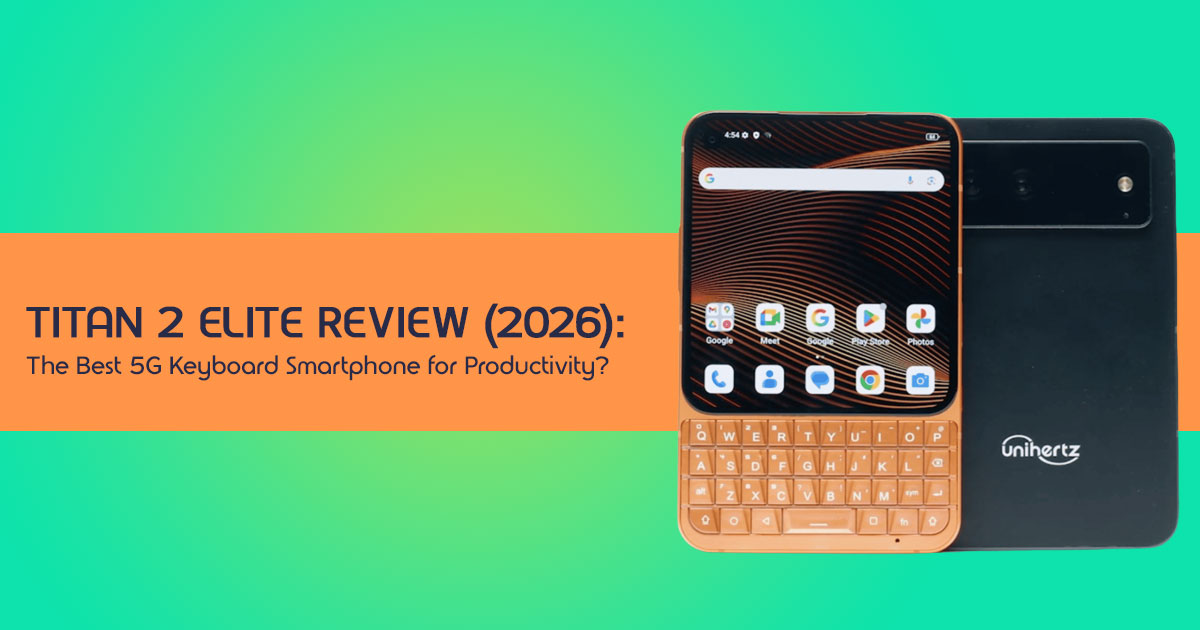
That’s where the Titan 2 Elite steps in. If you type a lot on your phone, this could change how you use it every day.
This isn’t trying to replace modern smartphones. It’s offering a different idea—one built around physical keyboards, fast typing, and distraction-free productivity, while still packing modern 5G performance, apps, and connectivity. It brings back something many users didn’t realize they missed until now.
Product/Category Overview
The Titan 2 Elite sits in a niche but growing category: smartphones with physical keyboards. These devices are designed for people who value accuracy over speed, tactile feedback over glass typing, and function over trend. Think of professionals, writers, business users, and anyone tired of typing errors and screen fatigue.
Our Expertise and Approach
As technology professionals with more than two decades of hardware and application R&D experience under our belts, we scrutinize every product about actual performance, durability, and value for money. We want to assist you in determining the best product available for each category—cost, performance, dependability, and longevity. We base our recommendations on in-depth research of the components, real-world use, and industry experience.
Who This Is For
This review is built for:
- Professionals who type long emails or documents on their phone
- Business users who need accuracy and speed without distractions
- Writers and content creators who prefer real keys
- Tech enthusiasts curious about alternatives to touchscreen-only phones
- Anyone frustrated with autocorrect errors, typing fatigue, or lack of tactile feedback
Here’s the thing—innovation isn’t always about removing buttons. Sometimes, it’s about bringing them back and doing them right. And that’s why this device stands out.
If you’ve ever felt that typing on glass just isn’t enough, this might change how you look at smartphones.
Quick Summary
- Touchscreen phones look great but often fall short on typing accuracy
- The Titan 2 Elite brings back physical keyboards with modern 5G power
- This review focuses on real-world performance, usability, and long-term value
- Best suited for professionals, writers, and productivity-focused users
- If you care about precision typing and tactile feedback, this is worth a closer look
1.1 Why This Review is Essential
In a world saturated with identical smartphones, the Titan 2 Elite stands out. This review goes beyond specs and looks at how the phone actually feels to use. We aim to provide a human-centric perspective, exploring how this unique device impacts daily life, productivity, and even our relationship with technology.
We will dissect its strengths and weaknesses, offering an honest assessment that helps you determine if this QWERTY smartphone is the right fit for your digital journey.
1.2 What You Will Learn From This Review
By the end of this review, you’ll understand:
- The Titan 2 Elite‘s core philosophy and its place in the 2026 smartphone market.
- Our unique Tactile-Digital Balance (TDB) Framework for evaluating keyboard phones.
- Detailed insights into its hardware, software, and real-world performance.
- Practical advice on integrating this device into your workflow.
- An honest breakdown of the trade-offs, potential pitfalls, and unexpected benefits.
- Whether the Titan 2 Elite actually delivers a better experience for keyboard phone users.
2.0 Technical Specifications at a Glance
Before we dive into the nuances, let’s establish a foundational understanding of what the Titan 2 Elite brings to the table. This 5G keyboard phone packs a surprising punch beneath its retro-inspired exterior.
| Feature | Standard Model | Pro Model | Why It Matters |
| Processor | Dimensity 7400 (expected) | Dimensity 8400 (expected) | Smooth multitasking, efficient 5G performance, and capable gaming. |
| RAM | 12GB LPDDR5 | 12GB LPDDR5 | Ensures fluid app performance and strong multitasking longevity. |
| Storage | Up to 512GB UFS 3.1 | Up to 512GB UFS 3.1 | Fast storage with plenty of space for apps, files, and media. |
| Display | 4.03-inch AMOLED, 120Hz | 4.03-inch AMOLED, 120Hz | Sharp, vibrant visuals with smooth scrolling in a compact form factor. |
| Rear Camera | 50MP Main + 50MP Telephoto (20x zoom) | 50MP Main + 50MP Telephoto (20x zoom) | Versatile photography with detailed shots and strong zoom capability. |
| Front Camera | 32MP Selfie | 32MP Selfie | Clear selfies and high-quality video calls. |
| Battery | Silicon-Carbon, 33W Fast Charging | Silicon-Carbon, 33W Fast Charging | Better energy density for longer use and faster top-ups. |
| Operating System | Android 16 (expected) | Android 16 (expected) | Modern features with expected long-term software support. |
| Connectivity | 5G, Dual SIM + eSIM, Bluetooth, NFC, IR Blaster, GPS | 5G, Dual SIM + eSIM, Bluetooth, NFC, IR Blaster, GPS | Full modern connectivity for productivity and everyday use. |
Quick Summary
The Titan 2 Elite isn’t just a novelty; it’s a genuinely capable 5G keyboard phone with modern internals, designed to handle today’s demanding applications while offering a unique input experience.
3.0 The “Tactile-Digital Balance” (TDB) Framework
To truly understand the appeal and practical utility of the Titan 2 Elite, we introduce an original framework: the Tactile-Digital Balance (TDB).
This helps you figure out if a QWERTY phone actually fits your daily use.
3.1 Input Velocity (IV): The Speed and Accuracy Equation
In an age of rapid-fire digital communication, the speed and accuracy of input are paramount. While virtual keyboards have made strides with predictive text and swipe typing, they often fall short in precision and the sheer satisfaction of physical feedback. The Titan 2 Elite‘s physical keyboard offers a distinct advantage here.
For those who rely on muscle memory and tactile cues, the ability to type without always looking at the screen can boost typing speed and reduce errors. It’s not just about typing speed—it’s about getting things right the first time.
3.2 Screen Utility (SU): The Visual Trade-off
The Titan 2 Elite features a compact 4.03-inch AMOLED display. While vibrant and smooth with its 120Hz refresh rate, this size presents a clear trade-off in an era dominated by large- screen content consumption. This basically comes down to one thing—how well the smaller screen works for what you do every day.
For reading documents, managing emails, or light browsing, it excels. However, for immersive video streaming, extensive social media scrolling, or graphic-intensive gaming, users must weigh the benefits of the physical keyboard against the reduced visual real estate. It’s a deliberate choice that prioritizes focused interaction over expansive media consumption.
3.3 Friction-to-Focus (F2F): The Intentionality Multiplier
Perhaps the most profound aspect of the TDB Framework is Friction-to-Focus. In a world designed for endless scrolling and instant gratification, the physical keyboard acts as a subtle, yet powerful, speed bump. The deliberate act of typing on physical keys can transform mindless consumption into intentional interaction.
This “friction” isn’t a bad thing—it actually helps you stay focused and use your phone with more intention. For those seeking a digital detox or a tool that promotes deep work, the F2F principle suggests that the Titan 2 Elite can be an unexpected ally in reclaiming digital mindfulness.
Key Takeaway: The TDB Framework encourages a holistic view of the Titan 2 Elite, moving beyond simple pros and cons to assess how its unique design influences your overall digital well-being and productivity.
4.0 Layered Intent: Is This Phone for You?
The Titan 2 Elite isn’t for everyone, and that’s precisely its strength. We recognize that different users approach technology with varying needs and expectations. This section addresses those diverse perspectives, helping you self-identify if you belong to the growing legion of QWERTY smartphone enthusiasts.
4.1 For the Beginner: Rediscovering the Joy of Buttons
Many younger users have never experienced a phone with a physical keyboard. Their primary question often revolves around the fundamental question: “Why would I want buttons in 2026?” The answer lies in a return to fundamental interaction. Physical keys offer unparalleled tactile feedback, making typing a more intuitive and satisfying experience. For those frustrated by the imprecision of touchscreens or simply curious about a different way to interact with their device, the Titan 2 Elite offers a compelling entry point into the world of physical keyboard phones. It’s about exploring an alternative that prioritizes accuracy and a tangible connection over sleek, often impersonal, glass.
4.2 For the Advanced User: Power and Precision in Your Palm
Advanced users demand performance and versatility. Their query often is: “Can it handle heavy multitasking and 5G gaming?” Based on early reports, it’s expected to feature a Dimensity 8400 (Pro) or Dimensity 7400 (Standard) processor, coupled with 12GB LPDDR5 RAM and 512GB UFS 3.1 storage. The Titan 2 Elite is far from a retro gimmick.
This 5G keyboard phone is engineered for modern demands. Apps launch swiftly, multitasking is fluid, and even graphically intensive games are playable, albeit on a smaller screen. It’s expected to run on Android 16 with long-term update support, though the exact update timeline is still not confirmed.
For the power user, the physical keyboard becomes a tool for rapid command entry, efficient text manipulation, and a distinct advantage in productivity-focused tasks, proving that a compact form factor doesn’t necessitate a compromise on power.
4.3 For the Skeptic: The “Brick” Reality Check
Skeptics are right to ask: “Is it too heavy (235g) and thick (10.8mm) for daily use?” We acknowledge that the Titan 2 Elite is a substantial device. In an era where phones are constantly shedding grams and millimeters, its robust build stands out. This weight and thickness are direct consequences of its core features: a durable aerospace-grade aluminum frame, a full physical keyboard, and a high-capacity Silicon-Carbon battery. For some, this will be a deal-breaker, impacting pocketability and one-handed use.
However, for others, this heft translates to a reassuring solidity, a device that feels substantial and less prone to accidental damage. It’s a trade-off: a more durable, tactile experience for a less svelte profile. We encourage potential users to consider their personal preferences for device ergonomics and the value they place on durability and physical input.
4.4 For the Commercial Buyer: Kickstarter vs. Retail Strategy
Commercial buyers, or those considering backing the project, often ponder: “Should I back it now or wait for the official launch?” The Titan 2 Elite has seen significant success on Kickstarter, indicating strong community demand. Backing a crowdfunding campaign often comes with perks like early access and potentially lower pricing, but also carries inherent risks associated with production and delivery timelines.
Waiting for a retail launch might offer more certainty regarding availability, final pricing, and established warranty processes. We advise potential buyers to weigh the benefits of early adoption against the security of a fully launched product. Researching the manufacturer’s track record with previous devices can provide valuable insight into their reliability and customer support.
Summary: The Titan 2 Elite caters to a diverse audience, from those seeking a nostalgic return to physical keys to power users demanding robust performance. Its unique design necessitates a careful consideration of personal priorities regarding size, weight, and input method.
Click here to buy from Amazon
5.0 The Hardware Deep Dive: Beyond the Specs
While the specifications table provides a snapshot, the true story of the Titan 2 Elite lies in the thoughtful engineering behind its components and how they converge to create a distinct user experience. This isn’t just a collection of parts; it’s a deliberate assembly aimed at a specific purpose.
5.1 The Keyboard Symphony: Customization and Control
The physical QWERTY keyboard is the heart of the Titan 2 Elite. It’s not merely a throwback; it’s a highly functional input device. Each key offers a satisfying click, providing unmistakable feedback that virtual keyboards can only simulate. Beyond basic typing, the keyboard is a hub for advanced interactions.
Users can customize shortcuts for individual keys. This turns the keyboard into your command center.
You can launch apps, trigger actions, or even run shortcuts instantly. It saves time and makes everyday tasks faster.
Furthermore, the innovative “Mouse Mode” enables precise cursor control directly from the keys, a boon for navigating intricate interfaces or editing text with granular accuracy. This level of customization and control elevates the keyboard from a simple input method to a powerful productivity tool.
5.2 Silicon-Carbon Battery Tech: Powering the Productivity Beast
The Titan 2 Elite houses a Silicon-Carbon battery, a choice that directly addresses the demands of a power-hungry 5G keyboard phone and its robust form factor. This battery packs more power into the same space compared to regular lithium batteries.
In simple terms—you get better battery life without making the phone bigger.
For a device that’s 10.8mm thick, this helps improve battery life without making the phone bigger. Combined with 33W fast charging, users can expect extended usage times and quick top-ups, ensuring the device keeps pace with demanding workdays or extended typing sessions.
This technological choice underscores the commitment to practical longevity, a key factor for users who rely on their device for critical tasks.
5.3 The Camera Paradox: Productivity Meets Photography
Can a “productivity” phone actually take good photos? The Titan 2 Elite challenges this notion with a surprisingly capable camera setup: a 50MP main sensor paired with a 50MP telephoto lens offering 20x zoom, and a 32MP selfie camera. While not positioned as a flagship camera phone, these specifications suggest a device capable of capturing high- quality images and videos.
The inclusion of a telephoto lens with significant zoom capabilities is worth noting, allowing for detailed shots from a distance – a feature often reserved for higher-end devices. For professionals who need to document work, capture quick reference images, or participate in high-quality video calls, this camera system provides more than adequate performance, proving that a focus on productivity doesn’t mean sacrificing photographic utility.
Key Takeaway: The hardware of the Titan 2 Elite is a testament to intentional design, where every component, from the customizable keyboard to the advanced battery and capable camera, serves to enhance the user’s productivity and overall experience, rather than simply chasing trends.
6.0 Implementation: Mastering the Titan 2 Elite
Acquiring the Titan 2 Elite is just the first step; unlocking its full potential requires understanding how to integrate its unique features into your daily workflow. This section shows you practical steps to master this QWERTY smartphone and maximize your efficiency.
6.1 Step 1: The Shortcut Map – Your Personalized Command Center
The Titan 2 Elite‘s physical keyboard is not just for typing; it’s a highly customizable control panel. The programmable red button on the side, along with individual key assignments, allows for unparalleled shortcut creation. We recommend dedicating time to mapping out your most frequently used applications and functions.
For instance, assign a single key press to launch your email client, another for your calendar, and the red button for a critical communication app. Explore combinations with modifier keys (e.g., Shift + Key) for secondary functions. This personalized shortcut map dramatically reduces navigation time and enhances productivity, making app switching and task execution instantaneous.
6.2 Step 2: Screen Optimization – Adapting Android 16 to 4 Inches
The 4.03-inch AMOLED display, while sharp and vibrant, requires some optimization to ensure Android 16 operates seamlessly. The default display scaling might not be ideal for all applications. Navigate to the display settings and experiment with font sizes, display sizes, and developer options (if comfortable) to fine-tune the interface.
Prioritize readability for text-heavy applications and ensure that interactive elements remain easily tappable. For social media or video apps, consider using the keyboard’s swipe gestures for navigation to minimize reliance on precise touchscreen interactions. This optimization ensures that the smaller screen enhances focus rather than hindering usability.
6.3 Step 3: The Terminal Workflow – Unleashing Command-Line Power
For developers, IT professionals, or anyone comfortable with command-line interfaces, the Titan 2 Elite is a portable powerhouse. The physical keyboard makes terminal access, coding, and executing command-line tasks surprisingly efficient. Install a robust terminal emulator application from the Play Store.
The tactile feedback of the keys is invaluable for accurate command entry, reducing errors common with virtual keyboards. Whether you’re SSHing into a server, managing local files, or running scripts, the Titan 2 Elite transforms into a pocket-sized workstation, offering a level of control and precision unmatched by traditional touchscreen devices. This makes it much more useful the device’s utility for specialized professional use cases.
Key Takeaway: Mastering the Titan 2 Elite involves leveraging its unique physical input capabilities through thoughtful customization and adapting the software experience to its compact form factor, thereby unlocking significant productivity gains.
7.0 Trade-offs, Mistakes, and Edge Cases
No device is perfect, and the Titan 2 Elite is no exception. A truly honest assessment requires acknowledging its inherent trade-offs and preparing for potential challenges. Understanding these aspects is crucial for setting realistic expectations and ensuring user satisfaction.
7.1 The “Instagram Problem”: Aspect Ratio and Modern Apps
One of the most significant trade-offs of the Titan 2 Elite‘s design is its square-ish aspect ratio, necessitated by the physical keyboard. While excellent for text-based tasks, this form factor can lead to the “Instagram Problem”: modern social media apps, video streaming platforms, and many games are optimized for taller, narrower screens.
This can lead to black bars, cropping, or awkward layouts.
If you watch a lot of videos or use social media heavily, this might bother you.
But if your focus is work, emails, or typing, it won’t matter much.
Users accustomed to full-screen immersion on larger devices may find this jarring. It’s an edge case where the device’s core strength (the keyboard) directly impacts its performance in a common smartphone use case. We advise users to prioritize their primary usage patterns: if visual content consumption is paramount, this may be a significant compromise.
7.2 Weight Management: The Feel of 235g
At 235g, the Titan 2 Elite is a heavy phone by modern standards. While this weight contributes to its robust, durable feel, it’s a factor that needs careful consideration. The perception of weight is subjective; 235g in a compact, thick device feels different than the same weight distributed across a larger, thinner phone.
It can feel a bit heavy if you use it one-handed for long periods.
But for many people, that extra weight actually makes the phone feel more solid and durable.
7.3 The Learning Curve: The “Muscle Memory Reset”
For many, the transition from years of touchscreen typing back to a physical keyboard will involve a “Muscle Memory Reset.” The initial days, or even weeks, might feel slower and less efficient than expected. Autocorrect and predictive text, often taken for granted on virtual keyboards, operate differently or are less prominent with physical keys. At first, you might feel a bit slow or make a few mistakes. That’s normal.
This learning curve is a critical edge case. However, with consistent practice, the precision and speed of physical typing often return, surpassing virtual keyboard performance for many. Patience and a willingness to relearn are essential for unlocking the full potential of the Titan 2 Elite‘s input method.
Key Takeaway: The Titan 2 Elite makes deliberate design choices that result in clear trade- offs. Understanding these, particularly regarding screen utility, weight, and the initial learning curve, is vital for a satisfying user experience and to avoid common mistakes.
At the end of the day, these trade-offs depend on how you use your phone. For the right user, most of these won’t be a problem.
8.0 Real-World Scenarios: Where the Titan 2 Elite Shines
The true value of the Titan 2 Elite emerges not in abstract specifications, but in how it empowers individuals in specific, real-world contexts. This QWERTY smartphone is a specialized tool, and like any specialized tool, it excels when applied to the right tasks and environments.
8.1 The Field Engineer: Ruggedness and Reliability
For the field engineer or technician working in demanding environments, the Titan 2 Elite is an invaluable companion. Its rugged build and aerospace-grade aluminum frame offer superior durability compared to fragile glass-sandwich phones, resisting drops, dust, and splashes.
The physical keyboard allows for accurate data entry even with gloves on, or in conditions where precise touchscreen interaction is difficult. Whether logging observations, accessing schematics, or communicating critical information from a remote site, the Titan 2 Elite provides a reliable, robust platform that minimizes downtime and maximizes operational efficiency. Its long battery life further ensures it remains operational throughout extended shifts.
8.2 The Focused Writer: Eliminating Digital Distractions
In an age of constant digital bombardment, the Titan 2 Elite serves as an antidote for the focused writer or professional seeking to minimize distractions. The smaller screen, combined with the deliberate act of typing on a physical keyboard, naturally discourages mindless scrolling through social media or endless video consumption.
Instead, it channels attention towards text-based tasks: drafting emails, writing reports, or composing long-form messages. The Friction-to-Focus (F2F) principle of our TDB Framework is vividly demonstrated here, as the device subtly guides users towards intentional creation rather than passive consumption. It becomes a powerful tool for deep work, fostering concentration and enhancing output.
8.3 The Privacy Advocate: Tactile Security
For the privacy advocate, the Titan 2 Elite offers an unexpected layer of security: tactile feedback. In situations where sensitive information is being entered in public, the physical keyboard provides a distinct advantage against “shoulder surfing” – the act of someone looking over your shoulder to glean information.
The physical keys make it more difficult for onlookers to discern which keys are being pressed compared to the illuminated, uniform surface of a touchscreen. Furthermore, the deliberate nature of physical input can reduce accidental taps or unintended disclosures.
While not a complete security solution, this physical keyboard phone contributes to a more secure and private digital interaction, aligning with the needs of users who prioritize data protection.
Click here to buy from Amazon
9.0 Frequently Asked Questions (FAQ)
Q1: What makes the Titan 2 Elite different from other smartphones?
A1: The Titan 2 Elite uniquely combines a full physical QWERTY keyboard with modern 5G connectivity and an expected Android 16 operating system. Its design prioritizes tactile input, durability, and focused productivity over the large, all-touchscreen form factor prevalent in most contemporary smartphones.
Q2: How long will the Titan 2 Elite receive software updates?
A2: The Titan 2 Elite is expected to receive long-term software updates, but the exact duration hasn’t been officially confirmed yet.
Q3: Is the Titan 2 Elite suitable for heavy professional use?
A3: Absolutely. With its expected Dimensity 8400/7400 processors, 12GB LPDDR5 RAM, and a highly customizable physical keyboard, the Titan 2 Elite handles heavy professional use well, especially for tasks requiring extensive typing, secure communication, or command- line operations.
Q4: What are the main trade-offs of using a physical keyboard phone like the Titan 2 Elite?
A4: The primary trade-offs include a smaller screen size (4.03-inch) which may not be ideal for all multimedia consumption, a heavier and thicker build (235g, 10.8mm) compared to typical smartphones, and an initial learning curve for those accustomed to virtual keyboards.
Q5: Where can I find more information about the Titan 2 Elite or its manufacturer?
A5: For more detailed information, we recommend visiting the official product pages or reputable tech review sites. You can also explore communities dedicated to QWERTY smartphones and rugged devices for user insights and discussions.
10.0 Conclusion: The Verdict on the Titan 2 Elite
We recommend the Titan 2 Elite for people who actually work on their phones— professionals, writers, field engineers, and anyone who’s done with typing on glass all day.
If you’re tired of missed words, awkward corrections, and that disconnected feel of a touchscreen, this phone gives you something more solid and reliable. It’s built for focused work, accurate typing, and real control—not just endless scrolling.
There’s a clear shift here. Most phones try to do everything. This one does a few things really well—and that’s what makes it interesting.
Right now, the Unihertz Titan 2 Elite isn’t sitting on store shelves yet. It was unveiled at MWC 2026 in March and moved into its crowdfunding phase on Kickstarter starting March 24, 2026. So if you’re planning to get one, you’re early—and that comes with both opportunity and a bit of patience before full retail availability.
If typing is a big part of your day, this phone will feel very different—in a good way.
And if this idea clicks with you—the feel of real keys, fewer distractions, and a phone that helps you get things done—then this is worth a closer look when it hits wider release.
So here’s the real question: do you want another touchscreen, or do you want a phone that changes how you use it?
If you’ve already tried a QWERTY smartphone, or you’re thinking about switching, share your thoughts below. Curious how it holds up in daily use? Ask away.
***Disclaimer***
This blog post reflects our own research, testing, and personal opinions. It should not be taken as the official position of any brand, manufacturer, or company mentioned here. While we aim to keep information accurate and up to date, product details, pricing, and availability can change. We recommend double-checking important details before making a purchase.
Some links in this article may be affiliate links. If you choose to buy through these links, we may earn a small commission at no extra cost to you. This helps support our work and allows us to keep publishing in-depth, unbiased reviews. Our recommendations are never influenced by affiliate partnerships.
Comments shared by readers reflect their own views and not ours. We are not responsible for outcomes resulting from the use of information on this site. Please seek professional advice where appropriate.
All product names, logos, and brands mentioned are the property of their respective owners. These names are used for identification and informational purposes only and do not imply endorsement.
