
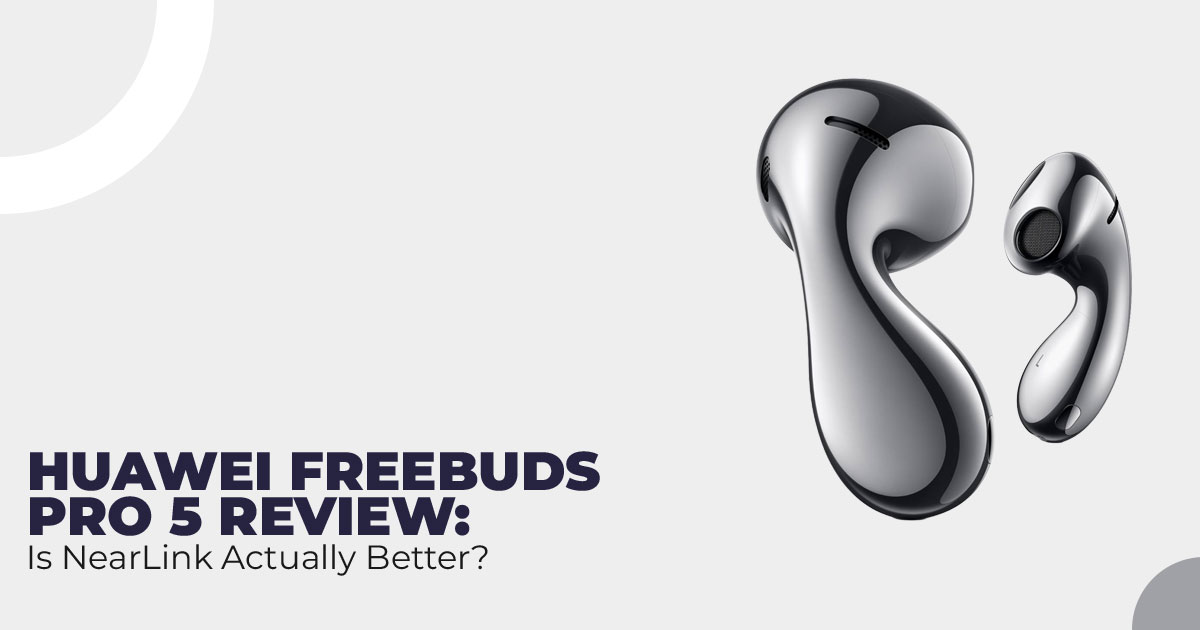
Wireless earbuds still struggle with audio lag, dropouts, and sync issues. The NearLink Certification on Huawei FreeBuds Pro 5 and FreeClip 2 is designed to fix those everyday problems at the connection level. This review explains what NearLink Audio actually changes, why SparkLink Alliance certification matters, and whether these Huawei wireless earbuds with NearLink are worth choosing based on how people really use them.
Wireless Earbuds Are Everywhere—But the Problems Haven’t Gone Away
Wireless earbuds are part of daily life now. Calls, meetings, movies, music, games—it all runs through them. But even today, many people still deal with audio lag, random dropouts, and sound that feels slightly out of sync with what’s on screen. These aren’t rare issues. They happen often enough to break the experience.
That’s where the NearLink Certification on the Huawei FreeBuds Pro 5 and Huawei FreeClip 2 becomes relevant. This certification isn’t about adding features. It’s about fixing the connection itself. These earbuds are tested to deliver faster pairing, steadier links, and more consistent audio using NearLink Technology, not just standard Bluetooth.
This matters because connection quality affects everything—calls, streaming, gaming, and even battery efficiency.
In this article, we explain what NearLink Audio actually brings to daily use, why SparkLink Alliance certification carries weight, and whether these best Huawei wireless earbuds with NearLink make sense for your routine.
As technology experts with over 20 years of experience in hardware and application research and development, we analyze products based on real-world performance, durability, and value for money. Our goal is to help you find the best product in every category—budget, performance, reliability, and long-term use.
This review is written for everyday users, professionals, gamers, and audio-focused buyers who want stable wireless sound without trial and error. Our recommendations come from deep research, component-level understanding, hands-on usability, and industry experience.
Customer reviews also matter. Specs tell you what a product promises. Real users tell you what it actually delivers over time. This review looks at both.
Click here to buy on Amazon
1. Introduction
Many people search for what is NearLink Technology or NearLink vs Bluetooth in Huawei earbuds because they want wireless audio that works without excuses. The Huawei FreeBuds Pro 5 and FreeClip 2 are among the first NearLink certified earbuds, carrying official certificates such as iSLA012025003-0000001 and iSLA012025003-0000002.
That certification confirms these earbuds meet defined standards for stability, speed, and efficiency. In simple terms, the connection is tested to handle high-quality audio without falling apart under real use.
In this review, we focus on what NearLink 2.0 changes in everyday situations—from smoother gaming audio to clearer calls and better video sync. The goal is to help you decide whether these best lossless audio earbuds are worth considering based on how you actually listen, not just how they look on a spec sheet.
2. What You Will Learn from This Review
By the end of this review, you’ll understand:
- How NearLink Technology compares with Bluetooth and UWB
- Why NearLink Certification from the SparkLink Alliance adds confidence in quality
- Key FreeBuds Pro 5 features and FreeClip 2 specifications that affect real use
- Practical benefits like 96 kHz / 24-bit lossless transmission and low-latency performance
- How these earbuds stack up against popular alternatives and who benefits most
This is written to help you make a clear decision, not to overwhelm you with specs.
3. Why This Review Is Essential
Most earbud reviews focus on design, comfort, or battery life. Those things matter, but they don’t explain why wireless audio still fails at basic moments, like watching a video or answering a call.
Very few reviews clearly explain Huawei FreeBuds Pro 5 NearLink 2.0 features or what FreeClip 2 NearLink Certification actually guarantees. That’s where confusion starts.
This review explains what the certification really means in practice: tested reliability, high- resolution audio transmission, fewer interruptions, and a more stable experience across devices. If you’re tired of lip-sync delays, audio lag in games, or connections that drop when you move, this guide helps you judge whether NearLink Audio in Huawei earbuds addresses those problems—or if it’s not the right fit.
4. Technical Specifications at a Glance
| Feature | Huawei FreeBuds Pro 5 | FreeClip 2 |
| Design Type | In-ear with silicone tips | Open-ear clip design |
| Wireless Standard | NearLink 2.0 + Bluetooth fallback | NearLink 2.0 + Bluetooth fallback |
| Latency (with
NearLink) |
~20 ms | ~25 ms |
| Audio Codecs | L2HC 5.0 Codec, LDAC, AAC,
SBC |
LDAC, AAC, SBC |
| Audio Quality | 96 kHz/24-bit Lossless Transmission | High-quality streaming |
| Noise Cancellation | Dual-Engine AI Noise
Cancellation up to 50 dB |
None (open design keeps
awareness) |
| Chipset | Kirin A3 Chipset | Standard processing |
| Drivers | Dual DAC Drivers, Bass Unit, Micro-Planar Tweeter | Balanced drivers |
| Battery Life (earbuds) | 6.5 hours (ANC on) / 8 hours (ANC off) | 8 hours |
| Battery Life (with
case) |
30 hours total | 36 hours total |
| Charging Case | Vegan Leather option, USB-C
+ wireless |
USB-C |
| Water/Dust Resistance | IP54 | IP54 |
| Transmission Rate | Up to 16 Mbps Transmission Rate | Strong stable rate |
- Summary: The Huawei FreeBuds Pro 5 delivers immersive high-res audio and top AI noise cancellation; the FreeClip 2 prioritizes comfort and natural awareness.
5. What Is NearLink Technology in Wireless Earbuds?
NearLink Technology is a newer short-range wireless system built for devices where timing and stability matter, such as Huawei wireless earbuds and wearables. It handles audio signals, control data, and device coordination more efficiently than older wireless standards.
Bluetooth was designed to support many types of connections. NearLink Audio, on the other hand, focuses on speed and accuracy between nearby devices. That difference shows up in daily use.
For users, this means:
- Lower latency, so sound matches video and on-screen action
- Stronger resistance to interference, especially in crowded wireless spaces
- Better power efficiency, which helps maintain battery life during long sessions
This is why people searching for NearLink vs Bluetooth in earbuds are paying attention. NearLink aims to solve problems users still face with wireless audio, not just improve specifications on paper.
6. NearLink Certification from SparkLink Alliance Explained
NearLink Certification is issued by the SparkLink Alliance, the organization responsible for setting NearLink standards. Devices must pass structured testing to prove they meet requirements for performance, security, and interoperability.
When the Huawei FreeBuds Pro 5 and FreeClip 2 received NearLink certification, they demonstrated consistent performance under real operating conditions. This includes stable audio transmission, reliable device communication, and secure data handling.
For buyers, this certification matters because it confirms that these are not experimental products. These are NearLink certified earbuds that meet defined standards rather than relying on unverified claims.
If you are looking for earbuds with NearLink support, certification offers clarity and confidence before buying.
7. Real-World Benefits of NearLink Audio in Huawei FreeBuds Pro 5 and FreeClip 2
A common question is whether FreeBuds Pro 5 supports NearLink. Yes, it does, and the difference shows up during everyday use.
Here’s where users notice the change:
- Gaming audio feels more accurate, with sound lining up closely with on-screen action
- Video playback shows better lip-sync, even on platforms where delay is common
- Voice calls remain clearer, with fewer interruptions while moving between locations
- Switching between devices feels smoother when used with NearLink-supported hardware
The benefits of NearLink 2.0 stand out most in busy wireless environments, such as offices, public transport, or shared living spaces. These are the situations where traditional Bluetooth often struggles.
For anyone searching for low-latency wireless earbuds with reliable everyday performance, NearLink Audio in Huawei earbuds focuses on practical improvements rather than cosmetic features.
8. NearLink vs Bluetooth vs Wi-Fi Audio: Which Wireless Standard Should You Actually Choose?
Most readers comparing NearLink vs Bluetooth or Wi-Fi audio aren’t chasing technology. They want earbuds that work every time—no lag, no drops, no second-guessing.
Here’s the short, honest comparison for wireless earbuds:
| Aspect | NearLink 2.0 | Bluetooth 5.3 (LE Audio) | Typical Wi-Fi Audio |
| Latency | 20–30 ms | 80–200 ms | Variable |
| Power Use | Lower | Standard | Higher |
| Interference
Handling |
Strong | Moderate | Good, but crowded |
| Audio Stability | Very consistent | Can vary | Network-dependent |
| Best Fit | Gaming, video, calls | Casual listening | Home speakers |
Here’s our take.
- Bluetooth is fine if you mainly listen to music and don’t notice small It’s familiar and works everywhere.
- NearLink is the better choice if timing If you watch a lot of video, play games, or take calls while moving around, the difference feels immediate. Audio stays in sync, and connections feel steady even in crowded places.
- Wi-Fi audio belongs in the living room, not your It works for speakers, not for true wireless earbuds you carry all day.
Choose NearLink earbuds if:
- You notice audio lag and find it annoying
- You game or watch a video on your phone or tablet
- You want fewer dropouts in busy environments
Stick with Bluetooth if:
- You only listen casually
- Your devices don’t support NearLink yet
This is where Huawei FreeBuds Pro 5 with NearLink makes sense for people who care more about daily reliability than broad compatibility.
Click here to buy on Amazon
9. NearLink vs UWB: Which Technology Fits Your Daily Use Better?
Another common question is NearLink vs UWB. On paper, both sound advanced. In practice, they serve different needs.
Here’s the clear breakdown:
| Aspect | NearLink 2.0 | Ultra-Wideband (UWB) |
| Core Strength | Low-latency, stable audio | Precise location tracking |
| Best At | Continuous listening | Short data bursts |
| Battery Impact | Lower for earbuds | Higher over time |
| Audio Handling | Built for sound | Not audio-focused |
| Common Use | Calls, music, gaming | Find-my digital keys |
Who NearLink is really for
- Gamers and video watchers who want sound to match the screen
- Call-heavy users who move around during the day
- Music listeners who care about the Huawei FreeBuds Pro 5 lossless audio quality
Who UWB makes more sense for
- Users who rely on precise tracking, like finding a lost case
- Ecosystems built around location awareness, not audio performance Here’s the key point many reviews miss:
NearLink replaces how audio is delivered. UWB adds location features on top of Bluetooth.
If your priority is sound quality, timing, and connection stability, NearLink Audio in Huawei earbuds fits better. If your priority is finding things, UWB matters more.
Quick Verdict: Which Should You Pick?
Choose Huawei earbuds with NearLink if you want:
- Better lip-sync in videos
- Tighter audio timing in games
- Fewer call dropouts during daily use
Skip NearLink for now if:
- Your phone doesn’t support it
- You only listen occasionally and never notice lag
If we were choosing based on daily use, NearLink makes more sense for earbuds than UWB. It improves the part you interact with every minute: sound.
Decision Guide Summary
- Best for audio reliability: NearLink
- Best for tracking features: UWB
- Best for casual use: Bluetooth
If you’re already considering Huawei FreeBuds Pro 5 or FreeClip 2, NearLink support isn’t a bonus—it’s the main reason to choose them.
If you’re unsure, look at how you actually use earbuds each day. The right choice becomes clear fast.
10. Compatibility & Limitations: What to Expect in Real Use
To get the full benefit of NearLink 2.0, these Huawei earbuds need to be paired with a NearLink- compatible phone. When that support is available, users get the lowest latency and better power efficiency.
If the phone does not support NearLink, the Huawei FreeBuds Pro 5 and FreeClip 2 switch automatically to Bluetooth. There is no setup change or manual toggle. The connection remains stable and reliable, but the extra-low latency and battery gains from NearLink are not active.
Here’s the practical takeaway:
- NearLink-supported phones unlock the best experience
- Other phones still deliver solid Bluetooth performance
- No loss of basic features or usability
- Certification ensures smooth fallback without connection issues
For most buyers, this means the earbuds work well today and stay relevant if devices are upgraded later.
11. How These Earbuds Compare to Alternatives That People Actually Buy
Many readers compare Huawei FreeBuds Pro 5, FreeClip 2, AirPods Pro, and Galaxy Buds
because they want to know which one fits daily use, not just brand loyalty.
Here’s how they stack up where it matters:
| Model | Lowest Latency | Noise Cancellation | Design | Battery (with case) | Price Range |
| Huawei FreeBuds
Pro 5 |
~20 ms (NearLink) | Excellent
(Dual-engine) |
Closed | 30 hours | Mid–
High |
| Huawei FreeClip 2 | ~25 ms (NearLink) | None | Open | 36 hours | Mid |
| AirPods Pro (latest) | ~100–150 ms | Very good | Closed | 30 hours | High |
| Galaxy Buds3 Pro | ~50–100 ms | Excellent | Closed | 30 hours | High |
| Sony WF-1000XM5 | ~100 ms | Top-tier | Closed | 24 hours | High |
The Huawei FreeBuds Pro 5 stands out in supported setups because of its Kirin A3 chipset, which helps keep sound balanced while maintaining stable connections during calls and streaming.
The FreeClip 2 plays a different role. Its open design favors awareness over isolation, making it a better option for walking, workouts, and long wear.
If low latency and connection stability matter more than ecosystem lock-in, these Huawei options hold their ground against more familiar names.
12. Buying Guide – Who Should Consider These Earbuds
These earbuds are not for everyone, and that’s a good thing. Here’s who they fft best:
- Gamers who want responsive sound without delay
- Video watchers dealing with lip-sync problems
- Professionals on frequent calls in busy places
- Fitness users, especially those who need awareness of FreeClip 2
- Listeners who care about battery life and high-quality wireless audio
If audio dropouts or lag interrupt your routine, these Huawei NearLink earbuds address the problem at the connection level rather than masking it.
On the other hand, if listening is casual and lag never crosses your mind, standard Bluetooth earbuds may already meet your needs.
Quick Decision Check
- Choose FreeBuds Pro 5 if you want isolation, strong noise cancellation, and the best NearLink performance
- Choose FreeClip 2 if comfort, awareness, and long wear matter more than ANC
- Skip both if you don’t notice latency and prefer wide ecosystem compatibility
For readers ready to upgrade, this makes the next step clear and removes the guesswork.
Click here to buy on Amazon
13. What Other Parents Are Asking
These are the questions people search for when they are close to making a decision. Instead of technical explanations, this section focuses on clear, everyday answers about NearLink Technology, Huawei FreeBuds Pro 5, and FreeClip 2—what they do well, where they differ from Bluetooth, and whether they make sense for real-world use.
Q. What is NearLink Technology?
- NearLink Technology is a short-range wireless standard designed to reduce audio latency, improve connection stability, and use less power than Bluetooth. For wireless earbuds, this means sound stays in sync with video, connections hold up in busy areas, and battery drain stays lower during daily use.
Q. Does FreeBuds Pro 5 support NearLink?
- Yes. The Huawei FreeBuds Pro 5 is one of the first NearLink certified earbuds and supports NearLink 2.0 when paired with compatible devices. This unlocks lower latency, smoother audio playback, and better efficiency compared to standard Bluetooth mode.
Q. How does NearLink improve audio quality in wireless earbuds?
- NearLink Audio supports 96 kHz / 24-bit lossless transmission, allowing higher-bitrate audio to stream more reliably. In real use, this leads to clearer detail, a stronger balance between bass and treble, and fewer drops during playback.
Q. Is NearLink better than Bluetooth for calls?
- Yes. For voice calls, NearLink offers steadier connections and fewer interruptions. Combined with Dual-Engine AI Noise Cancellation on the FreeBuds Pro 5, calls sound clearer even in noisy environments or while moving.
Q. Are Huawei NearLink earbuds worth buying if my phone doesn’t support NearLink?
- They still perform well using Bluetooth, with good sound quality and stable connections. However, without NearLink support, you miss the lowest latency and power efficiency that NearLink 2.0 provides. These earbuds make more sense if you plan to use or upgrade to compatible devices.
14. Conclusion – Should You Care?
For most people, it comes down to whether wireless audio issues still get in the way of daily use.
The NearLink Certification on Huawei’s newer earbuds is meant to address the problems that frustrate users most—audio lag, connection drops, and sound that slips out of sync during calls or video. These changes are not hidden in specs. They show up in how the earbuds behave day after day.
With a NearLink-compatible device, the experience feels tighter and more dependable, with lower latency, steadier connections, and support for high-quality audio. Even without NearLink support, Huawei earbuds fall back to Bluetooth cleanly and remain reliable for regular listening.
If call clarity, timing, and connection stability matter to you, this is worth paying attention to. If you only listen occasionally and never notice lag, standard Bluetooth earbuds may still be enough.
- Amazon India – HUAWEI FreeBuds 5 Wireless Earphones – Click here to explore
- Amazon India – HUAWEI FreeBuds Wireless Earphones Lineup – Click here to explore
- Amazon Worldwide – Huawei FreeBuds Lineup – Click here to explore
- Amazon Worldwide – Huawei FreeClip Lineup: Click here to explore
- Amazon India – Huawei FreeClip 2- Click here to explore
If you’ve already used Huawei earbuds, share what worked—or didn’t—for you. And if you’re still deciding, tell us what annoys you most about your current earbuds. We’ll help you decide without the guesswork.
***Disclaimer***
This blog post reflects our own research, testing, and personal opinions. It should not be taken as the official position of any brand, manufacturer, or company mentioned here. While we aim to keep information accurate and up to date, product details, pricing, and availability can change. We recommend double-checking important details before making a purchase.
Some links in this article may be affiliate links. If you choose to buy through these links, we may earn a small commission at no extra cost to you. This helps support our work and allows us to keep publishing in-depth, unbiased reviews. Our recommendations are never influenced by affiliate partnerships.
Comments shared by readers reflect their own views and not ours. We are not responsible for outcomes resulting from the use of information on this site. Please seek professional advice where appropriate.
All product names, logos, and brands mentioned are the property of their respective owners. These names are used for identification and informational purposes only and do not imply endorsement.
