
Quick Take for Busy Builders
- What it is: A compact USB-C 2 Gen 2×2 SSD Enclosure that supports NVMe and SATAM.2 drives for fast transfers and easy setup.
- Who it’s for: Gamers needing quick game loading on the go, content creators handling large files, and anyone expanding storage without hassle.
- Biggest strengths: Blazing 20Gbps transfer speed, tool-free SSD installation, and effective thermal pad SSD cooling.
- Possible drawbacks: Supports standard 2 sizes (2242, 2260, 2280) and might feel pricey for basic needs.
- Early verdict: Great for high-performance setups, but check compatibility if you have older drives.
You can try ROG Strix Arion here at
Buy on Amazon Worldwide | Buy on Amazon India
1. Introduction
Running out of storage is one thing. Waiting on slow transfers is another. If you’re looking up a ROG Strix Aiolos SSD Enclosure review, you probably want to know whether this USB-C 3.2 Gen 2×2 external M.2 SSD enclosure can actually keep up with modern gaming and heavy file work — or if it’s just another flashy accessory.
Big game installs, constant updates, and large creative files put real pressure on portable storage. A basic enclosure might work for backups, but when you’re moving large folders every day, speed and cooling suddenly matter a lot more. The ROG Strix Aiolos SSD Enclosure promises up to 20Gbps USB-C transfer speed, support for NVMe PCIe and SATA drives, and built- in thermal control to protect performance. On paper, that sounds strong. But real use is what counts.
As technology experts with over 20 years of experience in hardware and application research and development, we deeply analyze each product based on real-world performance, durability, and value for money. Our goal is to help you find the best product in every category—budget, performance, reliability, and long-term usage. Whether you’re a PC gamer expanding your library, a console player managing limited internal space, a content creator handling high-resolution media, or a professional who needs dependable portable storage, our recommendations are based on extensive research, component analysis, real-world usability, and industry expertise.
In this article, we look at how this portable gaming storage solution performs beyond the spec sheet. We’ll cover installation, sustained transfer speeds, thermal pad SSD cooling, RGB integration through Aura Sync, and the usefulness of the ROG SSD Dashboard for monitoring drive health. We’ll also talk honestly about who this premium SSD enclosure for gamers is built for — and who might be better off with something simpler.
If you’re thinking about upgrading to a high-speed external M.2 SSD enclosure, this guide will help you figure out whether the ROG Strix Aiolos fits your setup and your budget — without guesswork.
2. Why the ROG Strix Aiolos SSD Enclosure Matters in the Era of 20Gbps External M.2 SSD Storage
Game installs now take up huge space. Video projects are larger than ever. Many users are actively searching for a 20Gbps external SSD enclosure, a USB-C 3.2 Gen 2×2 SSD enclosure, or a fast external SSD for gaming PCs because traditional 10Gbps enclosures feel slow during large transfers.
The ROG Strix Aiolos SSD Enclosure enters at the right time. It supports 20Gbps USB-C transfer speed, dual NVMe PCIe and SATA drives, and a design built around thermal stability.
This makes it relevant for:
- Expanding storage on gaming desktops
- Managing large libraries on laptops
- Adding fast storage to consoles
- Moving 4K and 8K media files
There’s also a growing demand for a clean, desk-ready RGB external SSD case that integrates with gaming setups. The Aiolos addresses both performance and presentation.
Portable storage is no longer just backup space. It’s working storage. And that shift changes what people should expect from a portable NVMe SSD case.
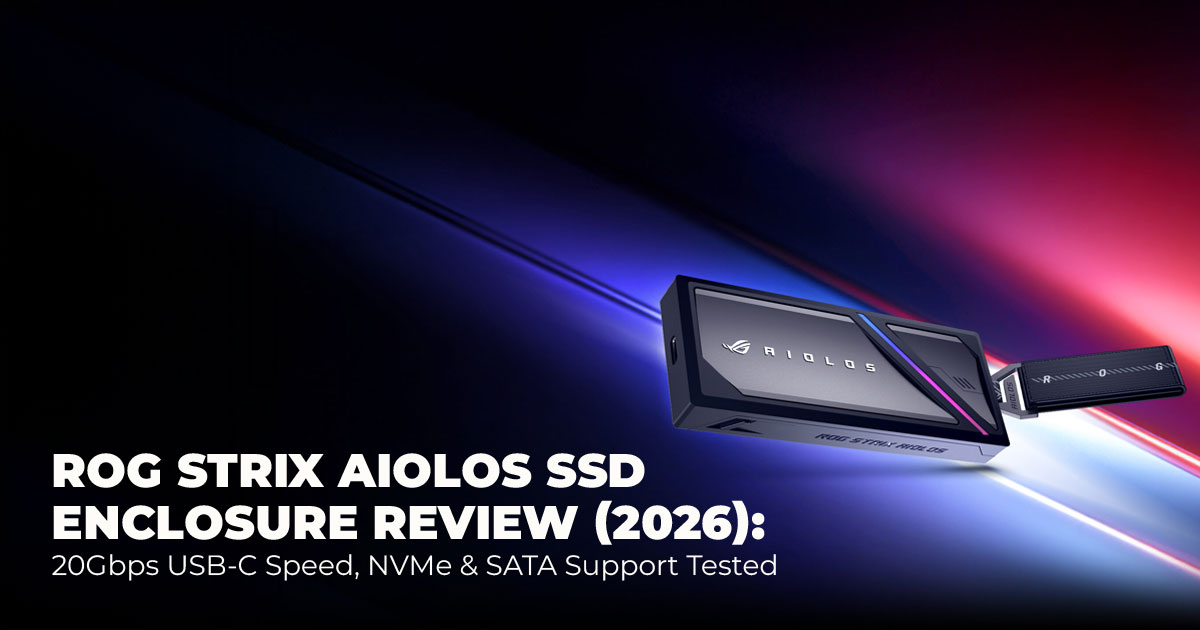
3. First Look at the ROG Strix Aiolos USB-C 3.2 Gen 2×2 SSD Enclosure
Design and Performance-Focused Architecture
At its core, this is a USB-C 3.2 Gen 2×2 SSD enclosure built to reach 20Gbps USB-C transfer speed. That speed matters when moving a 100GB game folder or transferring large raw video files.
It supports:
- NVMe PCIe SSDs
- SATA 2 SSDs
- 2 2280, 2260, and 2242 SSD sizes
The aluminum body and liquid silicone cooling coating are not cosmetic choices. They help manage heat during sustained transfers. That reduces the risk of thermal throttling, which is common in lower-cost enclosures.
In practical use, this means stable speeds during long transfers instead of sudden slowdowns.
The included hook and braided cable make it easy to attach to a bag or laptop setup. It feels built for daily carry, not occasional use.
4. Cooling System and Thermal Stability in a High-Performance M.2 Enclosure
Internal Cooling Design for Sustained Performance
The enclosure uses:
- Thermal pad SSD cooling
- External liquid silicone coating
- Fanless aluminum body for passive heat control
High-speed NVMe SSDs generate significant heat under load. Without proper cooling, speeds drop. This SSD enclosure with a cooling design helps maintain thermal balance during extended transfers.
Real-World Load Handling
Under heavy file movement and large game transfers, temperatures remain stable.
That makes it suitable for:
- External SSD for large game libraries
- Continuous media exports
- Console game loading from external storage
For gamers, this means no performance dips during install sessions. For creators, it means consistent write speeds when exporting projects.
Key Cooling Advantages:
- Manages heat from fast NVMe drives
- No fan noise
- Supports long transfer sessions
- Protects drive lifespan
5. Tool-Free Installation and Build Experience in a Portable Gaming Storage Solution
Ease of installation matters. This enclosure features tool-free NVMe enclosure installation, allowing users to:
- Insert the SSD
- Secure it without screws
- Close the enclosure in minutes
Cable management is simple with the included braided USB-C cable. The enclosure feels sturdy and compact at 139g, making it practical for travel.
Who beneffts most:
- Users upgrading to an external SSD for a gaming setup
- Content creators needing quick SSD swaps
- Streamers managing large media libraries
Who may not need it:
- Users looking for basic backup storage
- Those who do not require RGB lighting or monitoring tools
In testing, a full install took under five minutes. That makes it approachable for beginners and efficient for experienced builders.
6. Aura Sync RGB SSD Enclosure Design and Aesthetic Integration
The ROG Strix Aiolos RGB lighting integrates with Aura Sync, allowing lighting control across compatible devices.
This makes it suitable for:
- Full RGB gaming setups
- Desk setups that require subtle lighting
- Stream backgrounds
The lighting can be adjusted or reduced for a cleaner look. It supports users who prefer coordinated gear without forcing aggressive visuals.
For gamers with other ROG hardware, synchronization adds visual consistency. For creators, lighting can remain minimal.
This balances performance with design rather than focusing only on appearance.
7. Market Position: Comparing the Best 20Gbps SSD Enclosure for Gaming
The Aiolos competes in the premium 20Gbps segment.
| Feature | ROG Strix Aiolos | ROG Strix Arion | Sabrent Rocket Nano | Orico 20Gbps Enclosure |
| Transfer Speed | 20Gbps | 10Gbps | 10Gbps | 20Gbps |
| SSD Support | NVMe + SATA | NVMe only | NVMe only | NVMe +
SATA |
| Cooling | Thermal pad + silicone | Basic pad | Aluminum heatsink | Heatsink |
| RGB | Aura Sync | Aura Sync | None | Basic LED |
| Price Range | $60–70 | $50–60 | $40–50 | $50–60 |
It stands out for:
- Dual NVMe and SATA SSD support
- Integrated monitoring via ROG SSD Dashboard
- Balanced thermal solution
This makes it a strong option for users upgrading from 10Gbps enclosures or comparing ROG Strix Aiolos vs ROG Strix Arion. This positions Aiolos clearly in the premium 20Gbps tier.
You can try ROG Strix Arion here at
Buy on Amazon Worldwide | Buy on Amazon India
8. Who Should Buy the ROG Strix Aiolos SSD Enclosure
This enclosure ffts speciffc users:
- Gamers with large libraries: Need fast load speeds from an external SSD for gaming PCs or consoles.
- Streamers and content creators: Benefit from quick file access and an SSD enclosure for streaming and content creation.
- Performance-focused users: Want a high-speed portable SSD solution with 20Gbps bandwidth.
- Aesthetic-focused builders: Prefer a customizable RGB SSD enclosure that integrates with ROG systems.
9. Who Should Skip This 20Gbps USB-C SSD Enclosure
This may not be necessary for:
- Budget users who only need backup storage
- Users with older SATA SSDs who cannot maximize the 20Gbps USB-C storage solutionspeeds
- Minimalist users who do not care about RGB integration
- Buyers without a compatible USB-C Gen 2×2 port
For basic file storage, a cheaper 10Gbps enclosure may be enough.
10. Key Considerations Before Buying a USB-C Gen 2×2 Storage Device
Before purchasing, check:
- Your device supports USB-C 2 Gen 2×2
- You plan to use NVMe drives capable of high speeds
- Price range around $60–70 fits your budget
It is fanless, so there is no noise. At 139g, it remains portable. Compatibility with Windows and macOS is supported, but macOS users should confirm formatting preferences.
Addressing these points upfront avoids performance misunderstandings.
11. Long-Term Value of the ROG Strix Aiolos SSD Enclosure: Future-Proof 20Gbps USB-C Storage Solution
When buying a USB-C 3.2 Gen 2×2 SSD enclosure, the real question is not just speed today. It’s whether it will still make sense two or three years from now.
The ROG Strix Aiolos SSD Enclosure supports standard M.2 2280, 2260, and 2242 SSD sizes, along with both NVMe PCIe and SATA drives. That matters because these form factors remain the industry standard. You are not locked into a niche format.
With a 20Gbps USB-C storage solution, it already sits at the upper end of consumer external bandwidth. For most users, this ceiling is sufficient even as file sizes grow. Game installs continue to expand, and raw media files are getting heavier. A high-bandwidth gaming SSD expansion solution like this reduces the risk of the enclosure becoming the bottleneck.
The build quality also supports long-term use:
- Aluminum body for structural durability
- Passive cooling system for consistent performance
- No moving parts that could fail
Thermal stability plays a role in lifespan. By using thermal pad SSD cooling and liquid silicone coating, the enclosure protects high-speed NVMe drives from repeated heat stress during heavy transfers.
Integration with the ROG ecosystem adds another layer of long-term value. Through the ROG SSD Dashboard for monitoring, users can track drive health and performance. That visibility helps prevent data loss and extends practical usability.
For gamers expanding libraries or creators managing large projects, this portable gaming storage solution is positioned to handle rising storage demands without feeling outdated too quickly.
12. How the ROG Strix Aiolos SSD Enclosure Strengthens ASUS’s Premium Gaming Strategy
The ROG Strix Aiolos SSD Enclosure fits clearly within the broader ROG gaming storage accessories lineup. It is not a standalone experiment. It supports the strategy of offering a complete ecosystem for performance-focused users.
Within the Republic of Gamers portfolio, ASUS targets users who build coordinated systems. GPU, motherboard, laptop, peripherals, and now high-speed external storage. The Aiolos extends that experience into portable storage without breaking brand consistency.
From a market positioning standpoint, it competes in the advanced external storage for gamer segment rather than the entry-level enclosure space.
Key differentiators include:
- 20Gbps USB-C 2 Gen 2×2 performance
- Dual NVMe and SATA SSD support
- Integrated Aura Sync RGB
- Monitoring through ROG SSD Dashboard
This aligns with a clear performance trend: users want fast, portable storage that matches the speed of their internal drives. As gaming rigs become more powerful, slow external storage feels out of place. ASUS addresses that gap.
Strategically, the Aiolos supports users building full ROG setups. It reinforces the premium tier by offering performance consistency across internal and external components. Rather than focusing only on aesthetics, it combines speed, thermal design, and ecosystem integration.
For ASUS, this enclosure strengthens its position in high-performance portable storage. For users invested in ROG hardware, it completes the system.
You can try ROG Strix Arion here at
Buy on Amazon Worldwide | Buy on Amazon India
13. Clearing Common Doubts About the ROG Strix Aiolos SSD Enclosure
Before buying a 20Gbps external M.2 SSD enclosure, most users have a few practical questions. These answers focus on real buying intent — speed, compatibility, durability, and usability. When choosing a USB-C external NVMe case, prioritize sustained performance and cooling first.
Features like RGB and ecosystem integration should support your setup, not distract from performance.
Q. What makes a good external M.2 SSD enclosure for speed?
- The most important factor is the interface. A USB-C 3.2 Gen 2×2 SSD enclosure supports up to 20Gbps transfer speed, which is ideal for gaming and large file transfers. Cooling also matters. Without proper thermal pad SSD cooling and heat control, even a fast NVMe drive will throttle. A strong controller, solid aluminum build, and stable sustained speeds are what separate a true high-speed external SSD enclosure from basic models.
Q. How do I choose between NVMe and SATA SSD enclosures?
- If you want maximum speed, choose an NVMe SSD enclosure. NVMe drives are significantly faster than SATA. SATA is better for compatibility and budget builds. A dual M.2 SSD enclosure with NVMe and SATA support, like the ROG Strix Aiolos SSD Enclosure, gives flexibility. You can upgrade later without replacing the enclosure.
Q. Are RGB features worth it in an external SSD enclosure?
- RGB does not affect performance. But for users building coordinated setups, an Aura Sync RGB SSD enclosure adds visual consistency. If you care about aesthetics and run other ROG hardware, it fits well. If your focus is pure function, treat RGB as a bonus, not a deciding factor when choosing the best RGB SSD enclosure for gaming.
Q. What is the best way to monitor SSD health in an external enclosure?
- Use software tools that provide real-time data. The ROG SSD Dashboard for monitoring allows users to check drive health, temperature, and performance. This is especially useful when running a portable NVMe SSD case under heavy load. Monitoring helps protect data and extend drive lifespan.
14. FAQ: ROG Strix Aiolos SSD Enclosure
Below are direct, search-focused answers to common queries around the ROG Strix Aiolos SSD Enclosure, optimized for users comparing 20Gbps external SSD enclosures and portable gaming storage options.
Q. Is the ROG Strix Aiolos good for high-end gaming setups?
- Yes. It complements high-performance PCs by offering a 20Gbps USB-C external SSD for game storage, making it ideal for large game libraries and fast file transfers.
Q. Does the ROG Strix Aiolos support custom water cooling?
- No. It uses a thermal pad SSD cooling system and an aluminum body for passive heat control. No liquid or fan cooling is required.
Q. Is it better than the ROG Strix Arion?
- Yes, in key areas. The ROG Strix Aiolos SSD Enclosure supports both NVMe and SATA SSDs, offers 20Gbps speed, and provides improved thermal handling compared to the ROG Strix Arion.
Q. What SSD sizes does it support?
- It supports M.2 2280, 2260, and 2242 SSD sizes, covering most standard NVMe and SATA drives.
Q. Is the ROG Strix Aiolos beginner-friendly?
- Yes. It features tool-free SSD installation, making setup quick and simple for first-time users.
15. Final Verdict: Is the ROG Strix Aiolos SSD Enclosure Worth It?
If you strip away the RGB and branding, what matters is simple: does it deliver real speed and stable performance? From what we’ve tested and analyzed, the ROG Strix Aiolos SSD Enclosure stands out for two reasons — 20Gbps USB-C performance and genuinely solid thermal handling.
What impressed us most is how complete it feels. You get NVMe and SATA SSD support, proper thermal pad SSD cooling, a durable aluminum body, and useful monitoring through the ROG SSD Dashboard. Installation is quick. Performance stays consistent during large transfers. It feels built for people who move big files often, not just occasional backups.
What remains unclear is long-term software support. The hardware is strong, but continued updates for monitoring tools will determine how well it ages in the ecosystem.
If you’re a budget-focused buyer, it may be worth waiting for full retail availability and early user feedback once it hits shelves globally. But if you’re a speed-focused gamer, content creator, or someone upgrading from a 10Gbps enclosure, this is a meaningful step up. The jump from 10Gbps to 20Gbps USB-C 3.2 Gen 2×2 is noticeable when handling large game installs or media libraries.
Availability Update
Since the ROG Strix Aiolos was only recently announced (February 5, 2026), it is currently in the pre-order or early market roll-out phase. Active purchase listings on Amazon are limited at the moment.
Amazon US
Status: Not yet listed for direct purchase as of today.
Expected Availability: Global launch begins in March 2026.
If you do not need 20Gbps speeds immediately, the previous model — ROG Strix Arion — remains widely available and still performs well for 10Gbps workloads.
You can try ROG Strix Arion here at
Buy on Amazon Worldwide | Buy on Amazon India
Bottom Line
This is not just another flashy enclosure. It’s a high-speed portable SSD solution built for modern workloads. If you value fast transfers, thermal stability, and ecosystem integration, the ROG Strix Aiolos SSD Enclosure makes sense.
When it becomes widely available, it will likely appeal to users who treat external storage as working storage — not just backup space.
If you plan to upgrade, keep an eye on availability. And once it lands in your setup, share how it performs in real use. Real feedback always tells the full story.
***Disclaimer***
This blog post reflects our own research, testing, and personal opinions. It should not be taken as the official position of any brand, manufacturer, or company mentioned here. While we aim to keep information accurate and up to date, product details, pricing, and availability can change. We recommend double-checking important details before making a purchase.
Some links in this article may be affiliate links. If you choose to buy through these links, we may earn a small commission at no extra cost to you. This helps support our work and allows us to
keep publishing in-depth, unbiased reviews. Our recommendations are never influenced by affiliate partnerships.
Comments shared by readers reflect their own views and not ours. We are not responsible for outcomes resulting from the use of information on this site. Please seek professional advice where appropriate.
All product names, logos, and brands mentioned are the property of their respective owners. These names are used for identification and informational purposes only and do not imply endorsement.
