
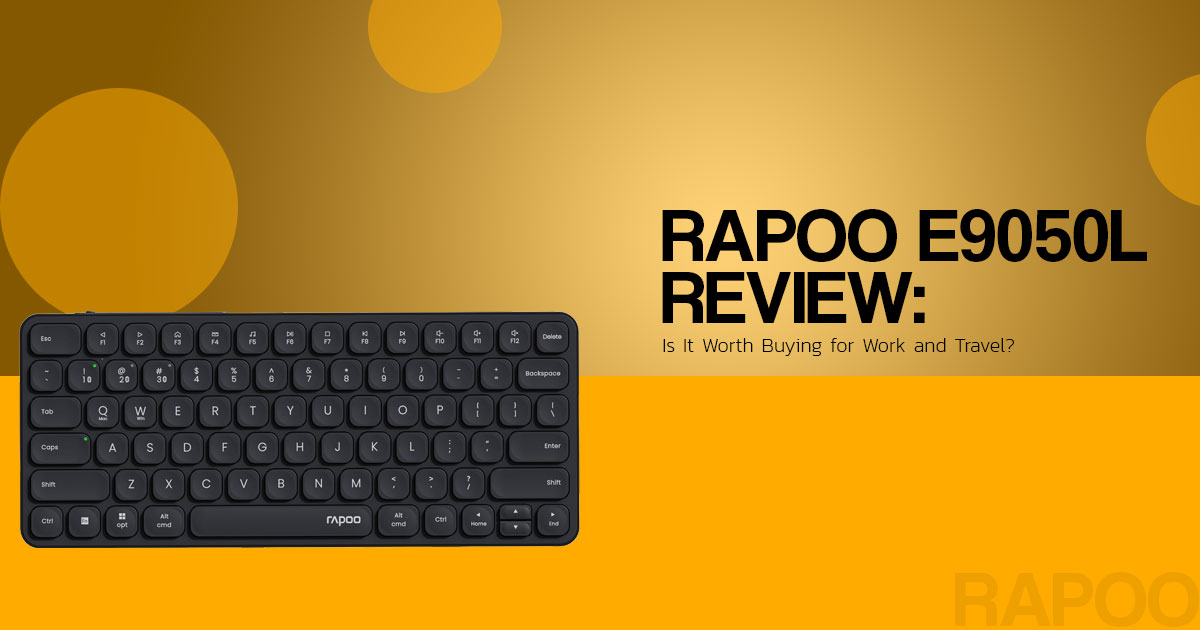
Looking for a compact wireless keyboard for your laptop, tablet, or phone? The Rapoo E9050L pairs a slim design and 78-key layout with a rechargeable battery, Bluetooth, and a 2.4 GHz USB receiver. It may suit a home office, a small desk, or a setup shared across devices.
Before you buy, consider how you plan to use it. Does the compact layout fit your typing habits? Will the keys feel comfortable during long work sessions? And is it good value compared with other wireless keyboards in the same price range?
We assess products against practical buying criteria, including typing comfort, build quality, durability, and value for money. This research-based review is for professionals, students, remote workers, and multi-device users. It examines the published specifications and available product information—not results from an independent hands-on test—so you can judge whether the Rapoo E9050L fits your needs.
“The practical case for the keyboard is its combination of a compact layout, rechargeable power, and more than one wireless connection method.”
Rapoo E9050L at a glance
| Detail | Published specification | What it means for buyers |
| Layout | 78 keys; 12 multimedia keys | Compact footprint; check the layout image if you depend on a particular navigation or number-key arrangement. |
| Dimensions | 284 × 119 × 13 mm | A compact footprint designed to take less desk or bag space than a full-size model. |
| Weight | 292 g | The listed weight is under 300 g; the total travel setup will weigh more once a sleeve, receiver, or cable is added. |
| Construction | Aluminum-alloy frame/base | This identifies the listed material; it does not establish drop resistance or spill protection. |
| Key mechanism | Chiclet-style keycaps with scissor structure | A low-profile, laptop-like design rather than a mechanical-switch keyboard. |
| Wireless modes | Bluetooth 4.0/5.0 and 2.4 GHz USB receiver | Bluetooth suits devices without a free USB port; the receiver offers another way to connect to a compatible computer. |
| Device switching | Up to four devices advertised | Confirm the exact channel allocation in the guide included with the regional model if you need several Bluetooth-only connections. |
| Battery and charging | 500 mAh rechargeable battery; USB-C | No disposable keyboard batteries to replace; charging uses a common cable type. |
| Compatibility | Android, Chrome OS, iOS, Mac OS, and Windows listed | Check that the key legends and shortcut behavior suit the device you use most. |
Rapoo describes the design as 5.3 mm slim, while its technical specifications list overall dimensions of 284 × 119 × 13 mm. The product page does not explain how the 5.3 mm measurement is taken, so use the full dimensions when checking whether the keyboard will fit in a bag or on a desk.
Three checks before ordering
- Look at the key-layout image for your region.
- Confirm whether the host device supports Bluetooth or has a compatible USB port for the receiver.
- If you need four Bluetooth connections specifically, verify the channel details in the box guide; “four devices” may count more than one wireless mode.
Design and layout: a compact keyboard, not a full-size replacement
The 78-key layout takes up less space than a full-size keyboard, and the listed weight of 292 g may suit a portable laptop or tablet setup. If you prefer more room between keys or rely on a full-size layout, a larger keyboard may be a better fit.
The aluminum-alloy frame and base describe the materials, not a protection rating. The specifications reviewed do not list an IP rating or spill resistance, so do not assume the keyboard is protected from liquids.
Layout matters more than the headline key count

If work involves frequent spreadsheet entry, editing shortcuts, or navigation keys, inspect the exact regional layout before ordering. “78 keys” alone does not show how familiar keys are arranged
Typing feel: scissor-style keys rather than mechanical switches
The Rapoo E9050L uses low-profile chiclet keycaps with a scissor mechanism. This is closer to a laptop keyboard than to a mechanical keyboard with individual switches. The design may appeal to people who prefer a low-profile keyboard, but the specifications alone cannot confirm how quiet or comfortable it will feel in use.
Rapoo describes the keys as quiet, but the material reviewed does not provide measured noise levels, key travel, or actuation force. A specification sheet cannot tell you whether the keys will feel comfortable during long typing sessions. If you prefer a distinct mechanical bump, deeper key travel, or replaceable switches, compare a mechanical model before buying.
The E9050L can work for programming if its compact layout and laptop-style keys suit your workflow. The available specifications do not establish a coding advantage, tested typing-speed results, or measured comfort benefits.
Connectivity: Bluetooth and a 2.4 GHz receiver
The Rapoo E9050L supports Bluetooth 4.0, Bluetooth 5.0, and 2.4 GHz wireless through a USB receiver. Bluetooth is useful for a phone, tablet, or laptop with Bluetooth support. The receiver is another option for a compatible computer with an available USB port.
Rapoo advertises switching among up to four devices. Because the keyboard uses more than one wireless mode, do not assume that this means four Bluetooth-only pairings. If you need to switch among several phones or tablets, check the setup guide for the exact channel arrangement on the version you plan to buy.
Bluetooth versions and the 2.4 GHz connection describe how the keyboard connects; they do not guarantee a particular range or response time. Results can vary with the host device, wireless interference, and receiver placement. This review did not include an independent latency test.
“The useful question is not just how many devices pair, but whether the available connection channels match the devices you actually switch between.”
Battery life and USB-C charging: read the claims in context
The Rapoo E9050L has a 500 mAh rechargeable battery and a USB-C charging port. Rapoo’s technical specifications list up to 240 hours of use on 2.4 GHz and up to 160 hours over Bluetooth. Rapoo’s online store also advertises up to 90 days, depending on how often the keyboard is used.
These figures use different measures. The hour estimates are listed by connection mode, while the 90-day claim depends on usage frequency. Treat both as manufacturer claims rather than guaranteed results; the available information does not define a common test schedule for comparing them.
Use the published runtime as an estimate, not a guarantee. Connection mode, usage frequency, charging habits, and battery age can affect real runtime.
Rapoo E9050L vs. Logitech K380 Multi-Device Bluetooth Keyboard and Microsoft Designer Compact Keyboard
The Rapoo E9050L, Logitech K380 Multi-Device Bluetooth Keyboard, and Microsoft Designer Compact Keyboard serve similar compact, multi-device needs, but their connection and power options differ. This is a comparison of published specifications, not a head-to-head test.
| Keyboard | Connection and power profile | Consider it if… |
| Rapoo E9050L | Bluetooth plus 2.4 GHz USB receiver; rechargeable USB-C battery; up to four devices advertised | You want both Bluetooth and a receiver option, plus an internal rechargeable battery. |
| Logitech K380 Multi-Device Bluetooth Keyboard | Bluetooth pairing with up to three devices; two AAA batteries | You want Bluetooth device switching and replaceable batteries. |
| Microsoft Designer Compact Keyboard | Bluetooth pairing with up to three devices; four C2032 coin-cell batteries; Expressive key requires Windows 11 | You want its Expressive key and can replace coin-cell batteries when needed. |
The Logitech K380 is a Bluetooth-focused alternative that pairs with up to three devices and uses two AAA batteries. The Rapoo E9050L adds a 2.4 GHz receiver and USB-C charging. The Microsoft Designer Compact Keyboard also pairs with up to three Bluetooth devices, uses four C2032 coin-cell batteries, and requires Windows 11 for its Expressive key. These differences describe the listed features, not which keyboard will feel better to you. Check the regional layout and availability before buying.
Pros and limitations
| Potential advantages | Points to check |
| Compact 78-key layout and 292 g weight | The layout may require adjustment if moving from a full-size keyboard. |
| Bluetooth and 2.4 GHz receiver options | Confirm the device-channel allocation if several Bluetooth connections are essential. |
| USB-C rechargeable 500 mAh battery | Runtime claims use different reporting bases; real use can vary. |
| Aluminum-alloy base and low-profile scissor/chiclet keys | Not a mechanical keyboard; no water-resistance rating or measured key-noise data is listed. |
| Compatibility list includes major desktop and mobile operating systems | Shortcut behavior and key legends can differ by platform and region. |
Who should consider the Rapoo E9050L?
The Rapoo E9050L is worth considering if you want a compact wireless keyboard that can switch between a laptop, tablet, or phone and offers both Bluetooth and a USB receiver. USB-C charging may appeal to buyers who prefer a rechargeable keyboard over replaceable batteries.
A different model may be a better fit if any of these describe the main use case:
- A mechanical keyboard feel, deeper travel, or switch customization is important.
- A full-size layout or dedicated number pad is necessary.
- Four separate Bluetooth-only pairings are required and the channel details cannot be confirmed.
- A defined, independently measured battery runtime or noise level is a deciding factor.
- Adjustable typing height or a specific ergonomic angle is essential; confirm those details before ordering.
Buying advice: check the regional key layout, device-switching instructions, seller, warranty, and return policy before ordering. These details may matter more than small differences between battery-life claims.
Final verdict: a practical compact option if the layout fits
The Rapoo E9050L makes sense for buyers who want a compact 78-key layout, low-profile scissor keys, Bluetooth and 2.4 GHz connectivity, and USB-C charging in one keyboard. The key questions are whether the layout suits your work, whether its device-switching channels match your setup, and how much weight you place on the battery-life claims.
It is worth shortlisting for portable work or a mixed-device setup if those features match your needs. Choose a mechanical or full-size keyboard instead if you need deeper key travel, customizable switches, or a dedicated number pad. Before buying, check the current regional listing for price, stock, seller, layout, and warranty.
Check current Rapoo E9050L listings
- Amazon US: Check the Rapoo E9050L product listing or browse the RAPOO Amazon US storefront.
- Amazon India: Check the Rapoo E9050L product listing or browse the Rapoo Amazon India storefront.
- Official Rapoo product page: Review the E9050L specifications.
Check the current price, stock, shipping costs, seller, regional key layout, and warranty before completing your purchase.
Frequently asked questions
Is the Rapoo E9050L a mechanical keyboard?
No. The E9050L uses low-profile chiclet keycaps with a scissor mechanism. If you want mechanical switches, compare a mechanical keyboard instead.
How many devices can the Rapoo E9050L connect to?
Rapoo advertises switching among up to four devices across its wireless modes. Check the guide for your exact regional version to confirm how the channels are assigned and whether the USB receiver counts as one of them.
Does the Rapoo E9050L support Bluetooth and 2.4 GHz wireless?
Yes. The listed options are Bluetooth 4.0, Bluetooth 5.0, and 2.4 GHz wireless through a USB receiver. Check that your computer has a compatible USB port for the receiver, or use Bluetooth if your device supports it.
What is the Rapoo E9050L battery life?
Rapoo’s technical specifications list up to 240 hours on 2.4 GHz and up to 160 hours on Bluetooth. Its online store separately advertises up to 90 days, depending on use frequency. Treat these as manufacturer estimates, not guaranteed runtime.
Is the Rapoo E9050L suitable for programming?
It may suit programming if the compact 78-key layout and laptop-style scissor keys fit your workflow. If you rely on a number pad, a full-size layout, or mechanical switches, compare alternatives before buying.
Does the Rapoo E9050L work with Mac, Windows, phones, and tablets?
Rapoo lists Windows, Mac OS, Android, Chrome OS, and iOS compatibility. Shortcut and modifier-key behavior can vary by operating system, so check the key legends and setup instructions for your device.
Have you used the Rapoo E9050L or another compact wireless keyboard? Share your experience in the comments. Have questions about keyboard compatibility, typing comfort, battery life, or value for money? Ask us below, and we’ll help you find the answers.
Know someone shopping for a wireless keyboard? Share this review with them so they can compare their options before spending their money. Your share could help a friend, colleague, or family member make a better buying decision.
Follow us for more product reviews, clear comparisons, and practical buying advice. Have a product you want us to review or a tech question you want answered? Leave a comment—we’d like to hear from you!
Disclaimer

This article is based on research, product information, available user feedback, and industry knowledge. It is not an official statement from any brand or manufacturer mentioned here. Specifications, prices, features, and availability can change, so check the latest details with the manufacturer or retailer before buying.

Some links in this article may be affiliate links. If you buy through one of them, we may earn a commission at no extra cost to you. These commissions help support our site and work, but they do not affect how we assess or discuss products. Reader comments and opinions belong to the people who post them and do not necessarily represent our views. This site provides general information and cannot guarantee a particular result. Where professional advice is needed, consult a qualified professional.

All product names, logos, and trademarks belong to their respective owners. We use them only to identify the products and companies discussed and do not imply endorsement or affiliation.
