
THE QUICK VERDICT

Building an open-loop water-cooled PC? Buy the MasterFrame 360 Panorama (MF360-KINN-S00). It is the only variant in the series with a dedicated right-side pump and reservoir bracket, which keeps a cylindrical D5 combo out of the path of your vertical GPU tubing — and it shares the $199.99 MSRP with the Stage Mirror and costs $100 less than the Stage LCD.

Buy the Stage LCD (MF360-KHNN-S02) only if the 15.6-inch front screen is the point of your build and your cooling plan is a 360 mm AIO or a compact CPU pump/block reservoir. It costs $100 more, its DIY tank mounts on the crowded left side, and its collectible stage is 70 mm narrower.

Do not confuse the Stage Mirror (MF360-KHNN-S01) with the Panorama. Both are reflective. Only the Panorama has the right-side bracket.
As technology experts with over 20 years of experience in hardware and application research and development, we deeply analyze each product based on real-world performance, durability, and value for money. Our goal is to help you find the best product in every category—budget, performance, reliability, and long-term usage. We write for PC enthusiasts, custom water-cooling builders, gamers, and hardware buyers who want to make informed decisions before spending their money. Our recommendations are based on extensive research, component analysis, real-world usability, and industry expertise.
Before you choose, there is one design difference that could change which model makes the most sense for your build. The answer lies not just in what each case offers, but in how well its layout accommodates your cooling ambitions. Read on to find out which MasterFrame 360 deserves a place in your setup.
01. THE SETUP
Same chassis family, different plumbing
This guide compares the three retail variants of Cooler Master’s MasterFrame 360 showcase chassis: the Panorama, the Stage LCD and the Stage Mirror. It explains what the three share, where their internal geometry diverges, and which one survives contact with a real custom cooling loop. By the end, you should be able to identify the right SKU, check local pricing and understand the compromises before the box arrives.
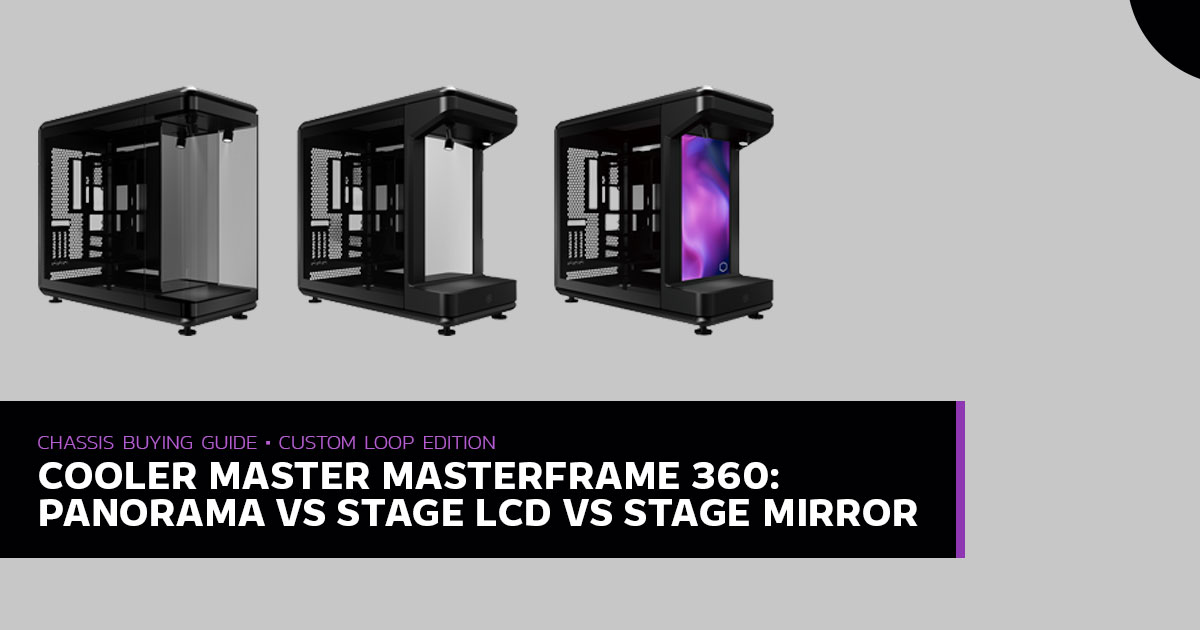
The reason this deserves an article of its own is that the differences are invisible in a spec comparison. Every variant lists the same 549 × 291 × 581 mm footprint, the same 430 mm GPU clearance, the same 75 mm radiator thickness allowance and the same twelve 120 mm fan positions. Cooler Master’s own product page presents the three side by side and separates them mainly by what fills the front showcase: panoramic glass, a mirror, or a screen.
One row in that comparison table changes everything for a water-cooled build. Under DIY Tank & Pump Support, the Panorama reads “Yes (with right side tank & pump bracket)”. The Stage LCD and Stage Mirror read “Yes (Left side)”. Four words, and they decide whether your reservoir lives in its own showcase column or wedges itself between a 430 mm GPU waterblock and the motherboard tray.
We have kept this guide to what a buyer can act on: measured clearances, verified prices, and the trade-offs that only show up once the loop is filled. Where Cooler Master’s specification sheet and a reviewer’s hands-on measurement disagree, we say so rather than picking the number that suits the argument.
02. SHARED DNA
What every MasterFrame 360 gets right
All three cases are built on Cooler Master’s FreeForm 2.0 modular platform: an SGCC steel body wrapped in the company’s aluminium exo-structure, with tempered glass on both sides held by magnets rather than thumbscrews. That last detail matters more than it sounds. A showcase chassis is only as good as the effort required to open it, and pulling a panel free to reach a drain port is a two-second job here.
| Dimensions, Clearances & Expansion | |
| Footprint (Including Protrusions)
549 × 291 × 581 mm 511 mm deep excluding protrusions; 93 L assembled, 86 L bare. |
GPU Clearance
430 mm Vertical mount only, 3.5 slots; PCIe 5.0 x16 riser included. |
| Radiator Capacity
360 mm top + 360 mm bottom 75 mm maximum thickness clearance per position. |
Fan Positions
12 × 120 mm Six top, six bottom; or 2 × 140 / 180 / 200 mm per panel. |
| CPU Cooler Height
145 mm Height is limited by the vertical GPU layout. |
Cable Routing
110 mm behind the tray Room for ASUS BTF and MSI Project Zero back-connect ATX boards. |
| PSU
ATX, up to 210 mm Mounted behind the motherboard tray. |
Storage
1 × 3.5″ HDD or 2 × SSD No 5.25″ bays; toolbox included. |
The front I/O is identical across the lineup and unusual for a case at this price: two USB 3.2 Gen 1 Type-A ports rated at 5 Gbps, one Type-C port that Cooler Master labels “USB 4.0 Gen 2×2” at 20 Gbps, and a combined 3.5 mm headset jack. The manufacturer’s port label is unusual: 20 Gbps corresponds to USB 3.2 Gen 2×2 naming, so do not infer USB4 or Thunderbolt support from the label alone. Check your motherboard’s internal USB-C header and supported connection standard before buying.
COOLING REALITY CHECK

Cooler Master lists removable mesh filters, while PCMag’s Stage LCD review lists “no dust filters” among its cons. Allround-PC also observed that the PSU fan faces the glass rather than a mesh intake. These reports suggest that PSU ventilation may be more restricted than a conventional case with a dedicated mesh intake, but they do not by themselves establish the PSU’s operating temperature or prove that it has no fresh-air path. Check the PSU orientation and ventilation in your own build, and monitor temperatures under load.
The chassis has been shown with up to four 360 mm radiators, but treat that as a complex fitment rather than a plug-and-play configuration. Cooler Master’s standard specifications list radiator support up to 360 mm at the top and bottom. PCMag also reported room for a 420 mm radiator, but that exceeds the manufacturer’s listed support and should be treated as an experimental fit, not an officially supported size. Before buying radiators, confirm the mounting positions, fan clearance and front-panel inset; the inset centre section is reported to be only 38 mm deep.
05. THE CORE CONFLICT
Left-side tank versus right-side bracket
Quote the spec sheet back to yourself, because this is the whole argument:
COOLER MASTER MASTERFRAME 360 SERIES — DIY TANK & PUMP SUPPORT
| Variant | Model Number | DIY Tank & Pump Support | Front Stage (H × W × D) |
|---|---|---|---|
| Panorama | MF360-KINN-S00 | ✓ Yes — right-side tank & pump bracket | 360 × 220 × 118 mm |
| Stage LCD | MF360-KHNN-S02 | ⚠ Yes — left side | 328 × 290 × 110 mm |
| Stage Mirror | MF360-KHNN-S01 | ⚠ Yes — left side | 328 × 290 × 110 mm |
Source: Cooler Master MasterFrame 360 series specification table. Highlighted row is the custom-loop recommendation.
In a vertical-GPU chassis the left side is already the busy one. It holds the motherboard, the CPU block, and a GPU waterblock hanging off a riser cable — for a flagship card that assembly runs 320 mm to 400 mm long. The gap between the trailing edge of that card and the front showcase partition is where your tubing has to live, and it shrinks fast once the block and its fittings are on.
What a left-mounted reservoir costs you
- Tubing radius. Runs leaving the GPU terminal and the bottom radiator ports have very little lateral room before they reach the pump top. With 14 mm or 16 mm acrylic, a clean 90-degree entry into the reservoir may require several offset rotary Depending on their design and the loop layout, additional fittings can introduce some flow resistance and create more joints to check during filling and bleeding.
- A cylinder on the left sits between the glass panel and the motherboard and GPU zone. The gallery look you bought the case for gets a vertical obstacle in the middle of it.
- Filling, bleeding and draining happen directly over the riser cable and GPU power leads. The first time you need to top up coolant six months later, you will remember this.
What the Panorama’s right-side bracket buys
Because the Panorama replaces the Stage LCD’s display partition with three-sided glass, Cooler Master had a free column on the right and put a bracket in it. The reservoir gets its own vertical space, visible through the front and right panels, and the loop geometry opens up.
A WORKABLE SINGLE-LOOP ROUTE IN THE PANORAMA
| Bottom 360 mm rad | → | Right-side pump/res | → | GPU block | → | CPU block | → | Top 360 mm rad | → | Back down the frame |
04. THE SHOW CASE
Stage dimensions: the Panorama trades width for height
Moving the pump bracket to the right also reshapes the rubberised display shelf under the two angle-adjustable ARGB spotlights. The numbers are close enough to misread at a glance, so here they are side by side.
FRONT COLLECTIBLES DISPLAY — MAXIMUM DIMENSIONS
| Measurement | Stage LCD & Stage Mirror | Panorama | Difference |
| Height | 328 mm | 360 mm | +32 mm for the Panorama |
| Width | 290 mm | 220 mm | −70 mm for the Panorama |
| Depth | 110 mm | 118 mm | +8 mm for the Panorama |
| Enclosure | Open front stage | Three-sided glass box | Dust and touch protection vs. free overhang |
Translated into what actually goes on the shelf: The Stage LCD’s 290 mm width can accommodate two narrow 1/7-scale figures side by side, or a mecha posed with its arms out. The Panorama’s 360 mm height can accommodate a taller 1/4-scale resin statue, but its 220 mm width limits wider dioramas and pairs of figures.
Actual fit depends on the shape of the item, not just its maximum dimensions.
★ THE OVER HANG DETAIL NOBODY PUTS IN THE SPECTABLE

Cooler Master describes the Stage LCD and Stage Mirror as an open design — good for figures that get handled and re-posed, and for pieces with long weapons or wings that extend past the chassis frame. The Panorama is the enclosed design: three-sided glass that keeps dust off and fingers out, but confines whatever you display to the box dimensions above. If your favourite piece has a spear that sticks out 100 mm, the open Stage variants will take it and the Panorama will not.
05. VARIANT DEEP DIVE
Choosing the Stage LCD (MF360-KHNN-S02)
If your cooling plan is a 360 mm AIO, or a compact pump/block reservoir that mounts on the CPU itself — an EK-Quantum Magnitude or a Modultra LOBO, for instance — the plumbing objection above mostly disappears, and the Stage LCD becomes what it was designed to be: the most literal showcase case on sale.
The screen, accurately described
The panel is 15.6 inches, has a 1920 × 1080 resolution, and runs at 60 Hz. Two things about it are genuinely better than the small aftermarket sensor displays people bolt into cases:
- It does not eat a graphics card The screen connects to an internal USB 2.0 header on the motherboard and takes power from a SATA connector. Your HDMI and DisplayPort ports stay free, and no AIDA64-style gadget is permanently occupying a video output.
- It works without the PC being awake. Cooler Master lists 16 GB of built-in storage, and reviewers found the practical form of that: a factory microSD card inside the controller. Hold the two brightness buttons for a few seconds and the card appears in Windows as removable storage, containing a display driver, an image folder, an MP4 folder, and a TOOL folder with a converter for making 1080 × 1920 vertical Two animations come preloaded.
In extended-desktop mode the panel behaves as a vertical 1080 × 1920 second monitor in Windows 11 — usable for Discord, OBS chat, telemetry, or a Wallpaper Engine scene sitting behind your figure. Supported playback media, per Impulse Gamer’s testing, is MP4 at 720p60 or 1080p30 and JPEG up to 3840 × 2160.
⚠ KNOWN PAIN POINTS — READ BEFORE YOU BUY

- The controller’s adhesive is PCMag listed it as a con, and it is the easiest fix in the whole build: replace the stock pad under the front lip with 3M Dual Lock or hook-and-loop tape before you finish cable management.

- Swapping the microSD card voids the A warranty sticker covers the factory 16 GB card, per PCMag. Want more storage? Live with the converter tool instead.

- Firmware updates can go wrong. The controller scans the card’s root directory and starts updating when it finds a firmware PCMag’s reviewer hit a corrupt file and needed a recovery image from Cooler Master. Do not update unless you need to.

- Owner reports of a flaky monitor mode. Some owner posts in r/coolermaster report problems entering desktop mode, primary-display flicker, or media-resolution errors; others report more reliable playback from the card. These are user reports, not a measure of how often the faults Test the screen in both modes the day it arrives, while returns are still easy.
How to cool it
Pair a top-mounted 360 mm AIO as exhaust with three to six 120 mm intakes — or two 200 mm — in the bottom. That leaves the main chamber empty, which is the entire point of the design: the vertical GPU and the screen stay the only two things competing for attention.
Expect temperatures to depend on the test setup and fan curve. Allround-PC measured 84 °C on the CPU and 68°C on the GPU under full load with fans held to 1,000 rpm. In that test, increasing fan speed reduced temperatures, at the cost of higher noise. Results will vary with components, ambient temperature and fan placement.
06. VARIANT DEEP DIVE
Choosing the Panorama (MF360-KINN-S00)
If hardline or ZMT tubing, coolant colour and reservoir craftsmanship are what you want people to look at, the Panorama is the better fit for a custom loop. Its US MSRP is $199.99, compared with $299.99 for the Stage LCD. The Indian street prices listed below also put the Panorama several thousand rupees below the Stage LCD, depending on the retailer.
| Reason 01
Three-Sided Glass over a Mirrored Floor |
Reason 02
The Bracket Unlocks Loop Geometry |
Radiator Capacity — Within Published Limits |
|
|
Published support covers one 360 mm radiator at the top and one at the bottom, with up to 75 mm clearance at each position. Four-radiator builds are reported as custom modifications, not standard supported configurations. Confirm mounting, fan clearance and thermal results for your exact components; do not assume a high-end CPU and GPU will run at low fan speeds. |
“At first I was worried about one pump on four radiators, CPU block and GPU block and all the tubing… everybody told me that one Alphacool D5 pump should do the job just fine.”
OWNER BUILD LOG, R/WATERCOOLING — A DUAL-LOOP PANORAMA BUILD
The owner build log shows that a four-radiator arrangement has been attempted, but it should be treated as a custom modification rather than a standard supported configuration. Check the exact mounting positions, fan clearance, pump performance and measured temperatures before attempting a similar build.
07. THE THIRD SIBLING
The Stage Mirror is not a cheaper Panorama
It is the easiest mistake in this lineup, because both cases are reflective and both are photographed with a figure on a lit shelf. The Stage Mirror (MF360-KHNN-S01) uses the Stage LCD’s internal layout in full: the 328 × 290 × 110 mm open stage and the left-side pump and tank mount. All it changes is the backdrop — a fixed two-way mirror instead of a 15.6-inch panel.
✖ BUY ON THE MODEL NUMBER, NOT THE PRODUCT NAME

If you want the right-side tank and pump bracket and the 360 mm-tall stage, the SKU on the box must read MF360-KINN-S00. MF360-KHNN-S01 is the Stage Mirror and MF360-KHNN-S02 is the Stage LCD; both mount the reservoir on the left. Some retailer pages appear to mix up display dimensions between variants, so check the manufacturer’s “DIY tank & pump support” line and the model number before you pay.
One further naming trap: Cooler Master also sells a Panorama S Limited Edition pre-built system, listed at $3,099.99 before current promotions. Some retailers also use “Panorama S” wording on listings for the standalone Panorama case. And a handful of listings, PBTech Australia among them, publish the Stage’s 328 × 290 × 110 mm stage dimensions on the Panorama’s page. The model number is the only reliable identifier.
08. PRE – BUILD CHECK LIST
Five things to plan around before checkout
01 |
No fans in the box.
None of the three variants ships with a fan, so budget for your own ARGB or radiator fans. Budget six to twelve 120 mm units, or four 200 mm, on top of the case price. |
02 |
Air cooling is capped at 145 mm.
The vertical GPU sits in front of the motherboard plane, so tall dual-tower coolers are out. A 165 mm Noctua NH-D15 will not fit. Plan for a 360 mm AIO or a CPU waterblock; APH Networks makes the same point, noting the limit rules out many standard 120 mm towers without touching the glass. |
|
03 |
Limited expansion-card options.
The included vertical GPU mount and riser occupy the intended graphics-card position, and PCMag reported no usable slots in the standard positions on the Stage LCD. If you need a capture card, a 10GbE NIC or another add-in card, verify whether a supported mounting arrangement is possible; otherwise, choose a case with conventional expansion slots. |
|
04 |
Check the PSU’s airflow path.
The PSU sits behind the motherboard tray. Allround-PC reported that its fan faces the glass rather than a dedicated mesh intake; that observation does not establish PSU temperatures or prove the absence of an airflow path. The effect depends on PSU orientation and the complete fan layout, so check ventilation and monitor temperatures under load. |
|
05 |
Measure the desk, then measure it again.
Spec-sheet dimensions are 549 × 291 × 581 mm; PCGamer measured the Panorama at 585 × 550 × 292 mm once feet and protrusions were included. Allow 75–80 cm of desk depth if the case sits at eye level, and confirm the surface can take the weight. |
09 MARKET BREAK DOWN
Pricing in the US and India
Indian retailer listings were checked on 23 October 2026. Prices and stock can change by seller, delivery location and payment offer; treat these figures as a dated snapshot, not a guaranteed quote.
UNITED STATES
| Variant | Current US Listed Price* | Retailer / Price Note |
| Panorama | $228.72 | Amazon US |
| Stage Mirror | $251.81 sale | Amazon US |
| Stage LCD | $340.47 | Amazon US |
*Newegg US product pages checked 23 October 2026; prices and stock may change. Stage Mirror shown at $154.75 sale ($269.99 original).
INDIA — AUTHORISED PC RETAILERS
| Variant | Street Price Seen | Where |
| Panorama | ₹17,995–₹18,800 | Computech Store (₹17,995), Vedant Computers (₹18,090), Vishal Peripherals (₹18,800). Stock and delivery eligibility vary. |
| Stage LCD | ₹24,899–₹25,600 | Computech Store (₹24,899), Vishal Peripherals (₹25,000), Viper PC (₹25,600). Stock and delivery eligibility vary. |
Listed MRPs vary by seller and SKU; the checkout price is what matters. Compare the final price, delivery charges and warranty terms rather than relying on the displayed discount percentage.
Two practical notes for Indian buyers. The current listings checked put the Stage LCD roughly ₹6,000–₹8,000 above the Panorama, depending on the retailer. That difference buys a screen you may not need if your priority is custom tubing. Cooler Master’s authorised-retailer directory includes several Indian sellers listed here, and retailer pages advertise a two-year warranty. Confirm the seller’s authorisation, current stock, final checkout price and warranty terms before paying. Clarion Computers also lists the Stage LCD; confirm stock, delivery eligibility, checkout price and warranty before ordering.
10. P R O D U C T V E R D I C T
Who should buy which
| Buy the Panorama If | Buy the Stage LCD If | Buy the Stage Mirror If |
$199.99 / ~₹18,000
|
$299.99 / ~₹24,000
|
Stated $199.99 launch MSRP; US street price varies
|
Skip the whole series if you need more than one expansion card, a tall air cooler, a compact desk, or a case that comes ready to run out of the box with fans fitted. Those are not fixable with brackets.
11. Q U E S T I O N S
Frequently asked
Can I mount a custom loop pump and reservoir in the MasterFrame 360 Stage LCD? ◆

Yes — Cooler Master lists DIY tank and pump support on the left side for the Stage LCD (MF360-KHNN-S02). The limitation is space, not basic support: that side also holds the motherboard, CPU block and a vertical GPU up to 430 mm, so a large cylindrical reservoir crowds the GPU waterblock’s tubing runs and sits in the sightline between the glass and the hardware. For a dedicated right-side bracket and unobstructed routing, the Panorama (MF360-KINN-S00) is the one to buy.
What is the largest figure that fits in the MasterFrame 360? ◆
Stage LCD and Stage Mirror: up to 328 mm tall, 290 mm wide, 110 mm deep — on an open stage, so parts can extend past the frame. Panorama: up to 360 mm tall, 220 mm wide, 118 mm deep — inside a sealed glass box, so nothing can overhang. PCGamer, testing the Panorama, found a figure around 32 cm filled the space and suggested going slightly smaller.
| Does the Stage LCD screen need a GPU HDMI or DisplayPort connection? ◆ |
| No. The panel connects to an internal USB 2.0 header on the motherboard and draws power from a SATA connector, so no graphics card output is consumed. In playback mode it reads photos and MP4 video from its built-in storage (a factory 16 GB microSD card) without the PC doing any work. In extended-desktop mode it appears as a vertical 1080 × 1920 secondary monitor after you install the driver shipped on that card. The screen is 1920 × 1080 at 60 Hz. |
| Does the MasterFrame 360 include a PCIe 5.0 riser cable? ◆ |
| Yes, in every variant. The box contains one PCIe 5.0 x16 riser cable and two angle-adjustable ARGB spotlights; the Stage LCD adds the 15.6-inch screen, and all three include a toolbox. TweakTown called the bundled riser high quality, which is worth noting given the case cannot be built without one. |
| How many radiators fit inside the MasterFrame 360? ◆ |
| The case has been reported to accommodate up to four 360 mm radiators in a carefully planned build, but Cooler
Master’s standard specification lists radiator support up to 360 mm at the top and bottom. PCMag also reported room for a 420 mm radiator; because that exceeds the manufacturer’s listed support, treat it as an experimental fit rather than an officially supported size. The front panel’s inset centre section is reported to be only 38 mm deep, which can limit fan placement. Confirm the exact mounting positions, radiator-plus-fan thickness and clearances before buying parts. |
| Are any fans included? ◆ |
| No. None of the three variants ships with fans. Top and bottom each take 6 × 120 mm, or 2 × 140 mm, 2 × 180 mm or 2
× 200 mm. |
| Which motherboards and power supplies fit? ◆ |
| The MasterFrame 360 supports Mini-ITX, Micro-ATX and ATX motherboards, including compatible back-connect ATX boards such as ASUS BTF and MSI Project Zero. It supports ATX power supplies up to 210 mm long and provides storage for one 3.5-inch HDD or two SSDs. There are no 5.25-inch drive bays. |
Planning a MasterFrame 360 build? Tell us in the comments which variant you’re considering—Panorama, Stage LCD, or Stage Mirror—and what cooling setup you have in mind. If you’re unsure about D5 pump placement, reservoir clearance, GPU tubing, or AIO compatibility, leave your questions below. We’ll help you work through the details.
Follow us for more PC case reviews, custom water-cooling guides, and hardware comparisons that help you choose the right components before you buy.
***Disclaimer***

This article is based on our research, analysis, available product information, user feedback, and industry knowledge. It is not an official statement from any brand or manufacturer mentioned in the article. Product specifications, prices, software features, and availability can change. We do our best to keep the information up to date, but please check the latest details with the manufacturer or retailer before making a purchase.

Some links in this article may be affiliate links. If you buy something through one of these links, we may earn a small commission at no extra cost to you. These commissions help support the site and our work. They do not affect how we assess or discuss products. Comments and opinions shared by readers belong to the people who post them and do not necessarily represent our views. Information on this site is provided for general purposes, and we cannot guarantee a particular result from using it. Where professional advice is needed, consult a qualified professional.

All product names, logos and trademarks belong to their respective owners. We use them only to identify the products and companies discussed and do not imply endorsement or affiliation.