
1. Introduction
Most modern desks have a problem. A laptop sits in the middle, and around it hang cables, dongles, and hubs. You plug in a drive, a monitor, headphones, maybe a tablet. And suddenly your “clean setup” feels crowded again.
That’s where a mechanical keyboard with a USB hub starts to make sense.
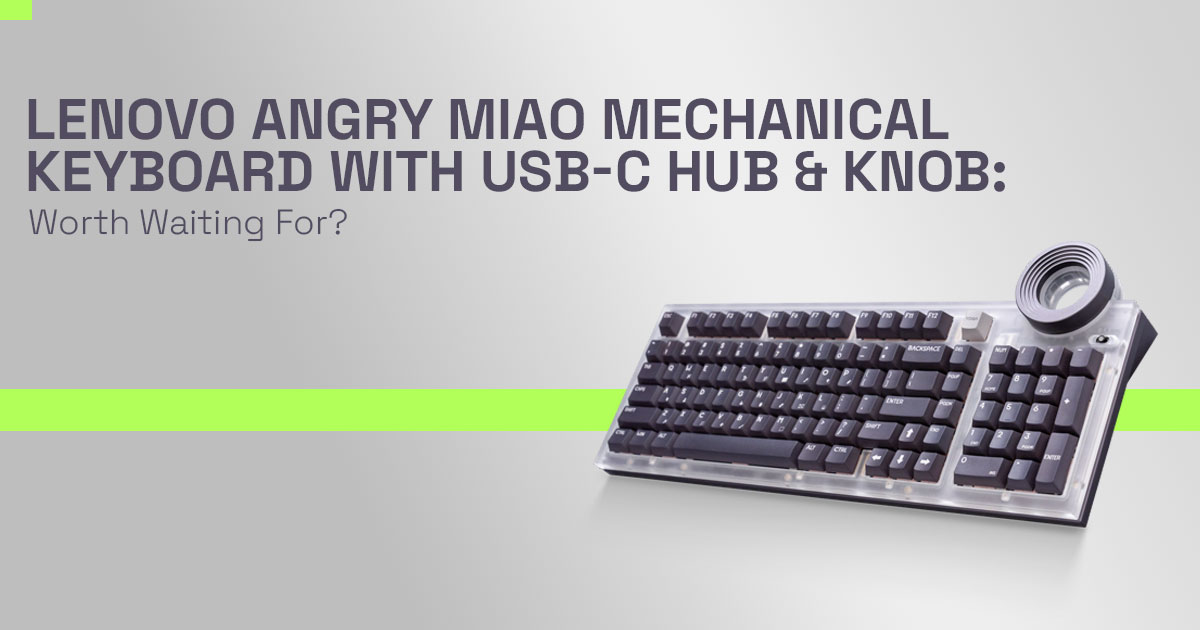
The Lenovo Angry Miao mechanical keyboard, officially called the Lenovo Yoga Creative Keyboard AngryMiao Edition, is more than a typing tool. It’s a 98-key mechanical keyboard with a knob, two integrated USB-C ports, and a heavy aluminum frame that stays planted. The idea is simple: fewer devices on your desk, fewer interruptions while you work.
As technology experts with over 20 years of experience in hardware and application research and development, we deeply analyze each product based on real-world performance, durability, and value for money. Our goal is to help you find the best product in every category—budget, performance, reliability, and long-term usage. Our recommendations are based on extensive research, component analysis, real-world usability, and industry expertise.
This review is written for:
- Video editors and content creators
- Graphic designers and digital artists
- Office professionals juggling multiple devices
- Keyboard enthusiasts curious about a rotary encoder keyboard with hub integration
And we won’t just repeat specs. We’ll look at what actually works, where the keyboard hub function has limits, and whether the customizable keyboard knob improves real workflows—or just looks good in photos.
Because reviews matter. On paper, many keyboards look impressive. But daily use reveals the truth: how stable it feels, whether the hub slows down transfers, and if the knob really saves time. That’s what we’re here to uncover.
Quick Overview
This Lenovo Yoga Creative Keyboard AngryMiao Edition is a 98-key layout with a full numpad and an oversized RGB-lit knob. It weighs 2.6 kg (5.73 lbs), making it one of the heavier boards in its class. The aluminum housing and translucent top give it a clean, premium finish, while silent switches keep typing noise low.
The two built-in USB-C ports turn it into a compact USB-C hub keyboard, reducing the need for a separate dock. That’s useful if you regularly connect storage drives, audio gear, or input devices.
At $299, it positions itself as a premium mechanical keyboard with a customizable knob
designed for creators who want speed and fewer cables.
Where it shines:
- Solid, stable typing experience
- Large, tactile knob that feels intentional
- Built-in hub reduces desk clutter
Where it compromises:
- Hub functionality has bandwidth and flexibility limits
- Customization works best in supported creative apps
- Heavy build makes it unsuitable for travel
- Not tuned for serious competitive gaming
Technical Specifications at a Glance
Layout: 98-key with full numpad
Weight: 2.6 kg (5.73 lbs)
Materials: Aluminum housing mechanical keyboard with translucent/frosted polycarbonate top
Switches: Silent mechanical switches (quiet profile)
Knob: Oversized RGB-illuminated customizable keyboard knob Hub: Two full-function USB-C ports (USB-C hub keyboard) Lighting: Per-key RGB through the top plate
Special Key: Keyboard with a dedicated audio switch key Price: $299 / €259
Availability: May/June 2026
Why This Review Is Essential
Most discussions about an RGB mechanical keyboard focus on switch feel and lighting effects. But this product changes something bigger: how your desk is organized.
A mechanical keyboard with USB hub shifts part of your docking system into the keyboard itself. That affects:
- Cable routing
- Peripheral access
- Workflow efficiency
- Long-term flexibility
We’ll look closely at the pros and cons of built-in USB hub keyboard designs, especially for creators who depend on stable connections and fast file transfers.
If you’re considering replacing your external hub or cleaning up a cluttered setup, this matters.
What You Will Learn from This Review
- Real-world use cases for the rotary encoder keyboard in video editing, graphic design, and productivity
- Whether a keyboard with a USB-C hub can realistically replace a standalone dock
- Build quality insights that matter to enthusiasts
- Honest limitations you won’t see in marketing
- Who should buy this—and who should skip it
Who This Fits
This keyboard makes sense if you:
- Edit video and scrub timelines often
- Resize brushes or zoom constantly in design tools
- Switch audio between devices using the keyboard with a dedicated audio switch key
- Want a cleaner desk with fewer visible hubs
- Keep your setup mostly stationary
It makes less sense if you:
- Travel frequently
- Need ultra-low latency for competitive gaming
- Rely on high-bandwidth external SSDs that demand a full docking station
The Wider Shift Toward Keyboards as Mini Hubs
There’s a noticeable trend. Keyboards are no longer just input devices. They’re becoming control centers.
A mechanical keyboard with a customizable knob now handles volume, zoom, brush size, and timeline scrubbing. A USB-C hub keyboard reduces dongles. And integrated features like dedicated audio routing show how peripherals are blending roles.
This product reflects that shift. It’s not trying to be portable. It’s trying to anchor your desk. And that’s the key question you should ask yourself:
Do you want a keyboard that simply types—or one that quietly manages your workspace?
In the sections ahead, we’ll break down whether this Lenovo Angry Miao mechanical keyboard
delivers on that promise—and where it falls short.
2. Lenovo Angry Miao Mechanical Keyboard Collaboration: Why This Brand Partnership Matters
The Lenovo Angry Miao mechanical keyboard is not a random co-branding move. It combines two different strengths.
- Lenovo brings ecosystem support, firmware stability, and wide
- Angry Miao brings boutique design, acoustic tuning, and enthusiast-grade
That combination reflects a broader shift in keyboard design. Keyboards are shifting from simple input tools to central desk hardware. A mechanical keyboard with a USB hub now acts as part control surface, part connection point.
This Angry Miao collaboration keyboard reflects a broader trend:
- Hardware brands moving toward creator-focused peripherals
- Fewer standalone hubs on desks
- More integrated devices built around USB-C hub keyboard setups
Common Search Questions:
- Why did Lenovo partner with Angry Miao?
- What makes the Lenovo Yoga Creative Keyboard AngryMiao Edition different?
- Are brand collaborations in mechanical keyboards worth it?
This release shows that style and structure can coexist. It is not just a design exercise. It is an attempt to anchor the desk around one core device.
3. Mechanical Keyboard with USB Hub: The Real Problem It Solves
Look at a typical creator’s desk in the middle of the day.
Laptop on one side.
External SSD connected through a hub. Monitor cable hanging.
Audio interface plugged into another adapter. Mouse cable crossing everything.
The result: clutter and constant cable swaps.
The knob-equipped mechanical keyboard with USB-C hub reduces that friction. You connect it once to your laptop. Then plug two additional devices directly into its rear USB-C hub keyboard ports.
What this solves:
- Fewer external hubs
- Cleaner cable routing
- Faster access to storage and audio gear
- Reduced port swapping
For users searching:
- How is the hub function useful on a keyboard?
- Keyboard hub function explained data and power use cases
Here’s what that means in practical terms.
The built-in hub supports:
- File transfers from external drives
- Charging smaller accessories
- Connecting a microphone or audio adapter
It does not replace a full docking station with display outputs. But for basic setups, it removes an entire box from your desk.
The mechanical keyboard with a weighted base adds another benefit. At 2.6 kg, it stays planted. That matters during long editing sessions or fast typing bursts.
Quiet switches also reduce background noise in meetings or voice recordings. For hybrid work setups, that detail counts.
4. Mechanical Keyboard with Customizable Knob: Workflow Tool or Gimmick?
The oversized customizable keyboard knob is central to this design.
It is not a small-volume wheel. It is large, textured, and firm. The tactile resistance gives it a controlled feel.
Practical Use Cases
| Use Case | How the Knob Helps | Why It Matters |
| Video
Editing |
Scrub timelines frame by frame | More precise control than dragging
a mouse |
| Fine-adjust clip positioning | Faster micro-adjustments during cuts | |
|
Photo Editing |
Resize brushes instantly | Keeps focus on the canvas |
| Adjust zoom levels | Smooth in-and-out control without shortcuts | |
| Switch tools | Reduces menu clicks | |
|
CAD & Graphics |
Smooth zoom control | Cleaner navigation in complex
layouts |
| Controlled navigation without
keyboard shortcuts |
Frees one hand for design input | |
|
Meetings & Media |
Quick volume adjustment | Immediate sound control during calls |
| Track skipping | Faster media control without key
combos |
|
|
Gaming |
Map to quick switches or macros | Useful for casual play |
| Not optimized for competitive
gaming |
Silent switch profile favors work
over rapid response |
Common search intent:
- How customizable is the knob on this keyboard?
- Can you use the knob for creative apps?
- How does the knob improve workflow?
Here is the direct answer.
It works well for supported applications and basic mappings like timeline scrubbing or resizing. Advanced open firmware customization is not confirmed. Enthusiasts who rely on deep remapping may find limits.
Key point:
The rotary encoder keyboard reduces mouse dependency. That saves seconds per action. Over hours of editing, that difference adds up.
For casual users, it is a bonus feature. For daily creators, it becomes muscle memory.
5. USB-C Hub Keyboard vs External USB Hub: Convenience and Limits
This mechanical keyboard with USB hub includes two rear USB-C ports.
You can connect:
- External storage
- Audio interface
- Wireless receiver
- Charging cable for smaller devices
Everything routes through a single cable to your laptop.
5.1 Pros and Cons of Built-In USB Hub Keyboard
| Aspect | Pros | Limits |
| Desk
organization |
Removes the external hub | Only two ports |
| Data transfer | Supports daily file moves | Speed specifications not detailed |
| Power delivery | Charges for light accessories | Not built for high-power devices |
| Dock
replacement |
Good for simple setups | No display output |
Search queries addressed:
- Does the Lenovo Angry Miao keyboard have a USB hub? Yes, it includes two USB-C ports built into the keyboard.
- Keyboard with USB-C hub and data transfer performance? Suitable for everyday
- Lenovo keyboard hub vs external USB hub? Cleaner setup but fewer expansion
This built-in solution works best for:
- One external drive
- One audio or input device
Heavy users with multiple SSDs, high-speed media workflows, or multi-monitor docking needs will still require a dedicated dock.
It works as a compact extension for light setups, but it cannot replace a full-featured docking station.
6. Aluminum Housing Mechanical Keyboard: Build Quality and Engineering
At 2.6 kg, this mechanical keyboard with a weighted base does not shift during use. The aluminum chassis reduces vibration and supports a stable typing feel.
The translucent top plate allows RGB mechanical keyboard lighting to glow without harsh brightness.
Engineering highlights:
- Flexible internal mount for improved typing feel
- Silent mechanical switches for office and studio use
- Designed with serviceability in mind, though full hot-swap confirmation should be checked at launch.
- Stable stabilizers for larger keys
Common search queries:
- Mechanical keyboards with custom aluminum housing
- Is the Lenovo Yoga Creative Keyboard durable?
- Can you replace switches on this keyboard?
Firmware ties into Lenovo’s ecosystem for features like the keyboard with a dedicated audio switch key. That may limit long-term custom firmware flexibility compared to open-source boards.
For enthusiasts, the appeal lies in:
- Weight
- Sound profile
- Structural rigidity
For general users, the takeaway is simple:
It feels solid. It stays steady. It sounds controlled.
Context Summary
- The Lenovo Angry Miao mechanical keyboard collaboration signals a shift toward creator-centered desk hardware.
- The mechanical keyboard with USB hub reduces clutter but does not replace a full dock.
- The customizable keyboard knob improves editing and design workflows when supported by software.
- The aluminum housing mechanical keyboard build delivers stability and durability.
These features serve creators and productivity users who value clean setups and practical control more than portability or gaming speed.
7. Who Should Buy the Lenovo Angry Miao Mechanical Keyboard?
Creators & Editors
If you edit video, design graphics, or work in CAD, this mechanical keyboard with a customizable knob makes daily tasks smoother.
- Timeline scrubbing with precision
- Faster brush and zoom control
- Quiet typing for long sessions
Yes, the Lenovo Angry Miao mechanical keyboard is a strong pick for video editing and creative work.
Office Professionals
As a USB-C hub keyboard, it reduces desk clutter.
- Two built-in ports
- One cable to your laptop
- Dedicated audio switch key for fast device changes
Minimal Desk Setups
If you want fewer cables and no external hub, this mechanical keyboard with USB hub keeps things simple.
Skip It If:
- You travel often (2.6 kg weight)
- You need many expansion ports
- You want deep firmware customization
- You focus on competitive gaming
8. Limitations of the USB-C Hub Keyboard
- Only two USB-C ports
- No display output (not a full dock replacement)
- App-focused knob customization
- Wired-only design
- Premium $299 price
It simplifies a desk but does not replace a full workstation dock.
9. Lenovo Angry Miao Keyboard vs Other Knob Keyboards
| Keyboard | Hub | Customization | Best For |
| Lenovo Angry Miao Mechanical Keyboard | 2 USB-C | App-based | Creators with fixed setups |
| Keychron Q (with knob) | None | Open firmware | Tinkerers |
| Custom builds | None | Full control | Mod enthusiasts |
| Logitech office boards | Limited | Basic | Office users |
Difference from Angry Miao ATM 98:
Adds USB-C hub, audio key, and Lenovo ecosystem integration. Less mod-focused, more ready- to-use.
10. Are Mechanical Keyboards Becoming Docking Stations?
Yes. As laptops lose ports, devices like this mechanical keyboard with USB hub take on more roles:
- Connection hub
- Audio control center
- Workflow dial
This model reflects that shift.
11. Frequently Asked Questions (FAQ) About the Lenovo Angry Miao Mechanical Keyboard
If you’re researching the Lenovo Angry Miao mechanical keyboard, these are the common questions people ask before buying. Below are clear, direct answers covering knob customization, USB-C hub performance, compatibility, noise levels, and real-world usability.
Q. Is the knob fully programmable on the Lenovo Yoga Creative Keyboard AngryMiao Edition?
- The mechanical keyboard with a customizable knob supports standard creative controls like timeline scrubbing, zoom, brush size, and volume. Customization runs through Lenovo’s software. It is not as open as fully programmable enthusiast boards with QMK or VIA support.
Q. How to customize the knob on the Lenovo Yoga Creative Keyboard?
- You assign functions using the companion software. The customizable keyboard knob can be mapped for video editing scrubbing, design adjustments, zoom control, or audio changes inside supported applications.
Q. Will the USB-C hub slow down my external drive?
- For normal file transfers, the USB-C hub keyboard performs well. For heavy, continuous, large- file workflows, a dedicated high-speed dock may deliver better sustained performance.
Q. How loud is the typing on this mechanical keyboard?
- It uses silent mechanical switches. The typing sound is controlled and suitable for shared offices, calls, or recording environments.
Q. Can this mechanical keyboard with USB hub replace my current USB dock?
- For two light-to-moderate devices, yes. The mechanical keyboard with hub vs standard USB hub comparison shows it saves desk space, but does not replace full docking stations with video output or expanded ports.
Q. Is there wireless connectivity?
- No wireless mode is highlighted. The wired connection supports the USB-C hub keyboard functionality, which requires a direct cable link.
Q. What if I don’t own a Yoga laptop?
- Typing, knob controls, and USB-C ports work normally on other devices. The keyboard with a dedicated audio switch key is optimized for compatible Lenovo ecosystem devices for audio routing.
Q. What devices work with the dedicated Yoga key?
- The audio switch key mainly integrates with supported Lenovo devices for seamless audio source switching between the laptop and connected hardware.
Q. How is repairability and long-term durability?
- The aluminum housing mechanical keyboard uses a standard design with swappable switches. This improves serviceability and long-term usability compared to fully sealed boards.
12. Final Verdict: Is the Lenovo Yoga Creative Keyboard AngryMiao Edition Worth Buying?
The Lenovo Yoga Creative Keyboard AngryMiao Edition has been officially announced, but it is
not yet available for immediate purchase.
It was unveiled on March 1, 2026, at Mobile World Congress (MWC) in Barcelona, and it is scheduled to go on sale in May 2026, with some regions seeing availability in June 2026.
So, the real question is not just “Is it worth buying?” — it’s also “Should you wait?”
Who Should Wait for It
Wait for the Lenovo Yoga Creative Keyboard AngryMiao Edition if:
- You edit or design daily and want a mechanical keyboard with a customizable knob
- Desk clutter slows you down
- You like the idea of a USB-C hub keyboard built directly into your setup
- You prefer a heavy aluminum keyboard that stays locked in place
This board makes the most sense for creators with a fixed desk who want fewer cables and smoother control inside editing apps.
Who Should Look Elsewhere
Consider alternatives if:
- You need a keyboard right now
- You rely on multi-port, high-speed docking
- You prefer deep open firmware customization
- Portability or wireless use matters more
The mechanical keyboard with USB hub here focuses on clean integration, not maximum expandability.
Need a Creative Knob Keyboard Now? Here Are the Best Alternatives
If you do not want to wait until May or June 2026, these high-end mechanical keyboards are available today.
Keychron Q1 (75%) or Q3 (TKL) Knob Version
Best for open firmware customization and strong aluminum build.
- Knob included
- QMK/VIA support
- Solid enthusiast-grade construction
- No built-in USB hub
Amazon Worldwide | Amazon India
If deep programmability matters more than integrated hub features, this is the stronger choice.
Logitech MX Mechanical Full Size
Best for office productivity and multi-device switching.
- Clean, professional design
- Wireless support
- Strong for business workflows
- No creative rotary knob
Amazon Worldwide | Amazon India
If you want a productivity keyboard without the creative dial focus, this fits better.
ASUS ROG Azoth 75% Wireless
Best for premium build with gaming flexibility.
- Wireless and wired modes
- OLED display
- Gasket mount design
- Knob support depending on variant
- No integrated USB hub
Amazon Worldwide | Amazon India
If you want premium feel with wireless freedom, this is the stronger pick.
So, Is It Worth Waiting?
If your main pain point is desk clutter and you want a mechanical keyboard with USB-C hub and customizable knob in one device, the Lenovo board offers a unique mix that most competitors do not.
If your priority is open customization, wireless support, or maximum docking flexibility, one of the alternatives may serve you better today.
The decision comes down to this:
Do you want integrated convenience built around creative workflow, or maximum flexibility across setups?
If you plan to wait for the offfcial release, keep an eye on availability in May–June 2026. If not, the options above are ready to ship now.
***Disclaimer***
This blog post reflects our own research, testing, and personal opinions. It should not be taken as the official position of any brand, manufacturer, or company mentioned here. While we aim to keep information accurate and up to date, product details, pricing, and availability can change. We recommend double-checking important details before making a purchase.
Some links in this article may be affiliate links. If you choose to buy through these links, we may earn a small commission at no extra cost to you. This helps support our work and allows us to keep publishing in-depth, unbiased reviews. Our recommendations are never influenced by affiliate partnerships.
Comments shared by readers reflect their own views and not ours. We are not responsible for outcomes resulting from the use of information on this site. Please seek professional advice where appropriate.
All product names, logos, and brands mentioned are the property of their respective owners. These names are used for identification and informational purposes only and do not imply endorsement.
