
1. Why This Keyboard Actually Matters
If you spend hours typing every day, you’ve probably felt it—the wrist pain, the shoulder tightness, or that dull discomfort that builds up by evening. Most people ignore it. But over time, it adds up. And that’s where your keyboard starts to matter more than you think.
The shift toward split ergonomic keyboards isn’t just a trend. It’s a response to how much we now depend on typing for work. A traditional keyboard layout forces your hands into a fixed position, while a split ergonomic design lets your arms rest more naturally. That small change can reduce strain and make long work sessions easier to handle.
This is where the Razer Pro Type Ergo steps in. Known for gaming gear, Razer is now pushing into the productivity keyboard space, aiming to build something that blends comfort, customization, and modern features. But here’s the real question—does it actually improve your daily workflow, or is it just an expensive keyboard with a different shape?
Click here to buy from Amazon
As technology experts with over 20 years of experience in hardware and application research and development, we focus on what really matters: real-world performance, durability, and value for money. Our goal is to help you find the best keyboard based on comfort, productivity, reliability, and long-term use.
This guide is for:
- Office professionals, writers, and developers typing for long hours
- Users dealing with wrist strain or looking for better ergonomics
- Anyone considering a move from a standard keyboard to a split ergonomic keyboard
Most reviews repeat specs. But real users care about something else—Does it feel better after a full day of work? That’s what we’re here to answer.
2. Quick Overview
For those needing a quick take on the Razer Pro Type Ergo:
- Best for: Office professionals, writers, developers, and anyone spending long hours typing who prioritizes comfort and advanced customization.
- Not for: Casual users, those on a tight budget, or mechanical keyboard purists who prefer a different key feel.
- Verdict in one line: The Razer Pro Type Ergo is a premium, highly customizable split ergonomic keyboard that offers significant comfort and productivity enhancements for dedicated professionals, making it a worthwhile investment despite its learning curve and price.
3. What You’ll Learn
In this in-depth review, we’ll cut through the marketing jargon and provide a real-world breakdown of the Razer Pro Type Ergo.
You’ll discover:
- Whether split ergonomic keyboards are truly worth the investment for your health and productivity.
- How the Razer Pro Type Ergo stacks up against market leaders like the Logitech Ergo K860 and Kinesis Freestyle series.
- The genuine impact on your daily workflow and productivity, going beyond just technical specifications.
- An honest look at the learning curve and adaptation required to master this unique keyboard.
- The true value of its innovative features, including the Razer Command Dial and the dedicated AI button.
Original Framework: “The 4-Layer Ergonomic Value Model”
To truly understand the value of an ergonomic keyboard, we need to look beyond surface- level features. We’ve developed the 4-Layer Ergonomic Value Model – a unique framework designed to assess how well an ergonomic keyboard truly serves its user. This model evaluates a keyboard across four critical dimensions:
Layer 1: Physical Comfort
This layer addresses the immediate physical benefits. Does the keyboard promote a natural posture? Does it reduce strain on wrists, hands, and shoulders? For the Razer Pro Type Ergo, the split design is a clear winner here.
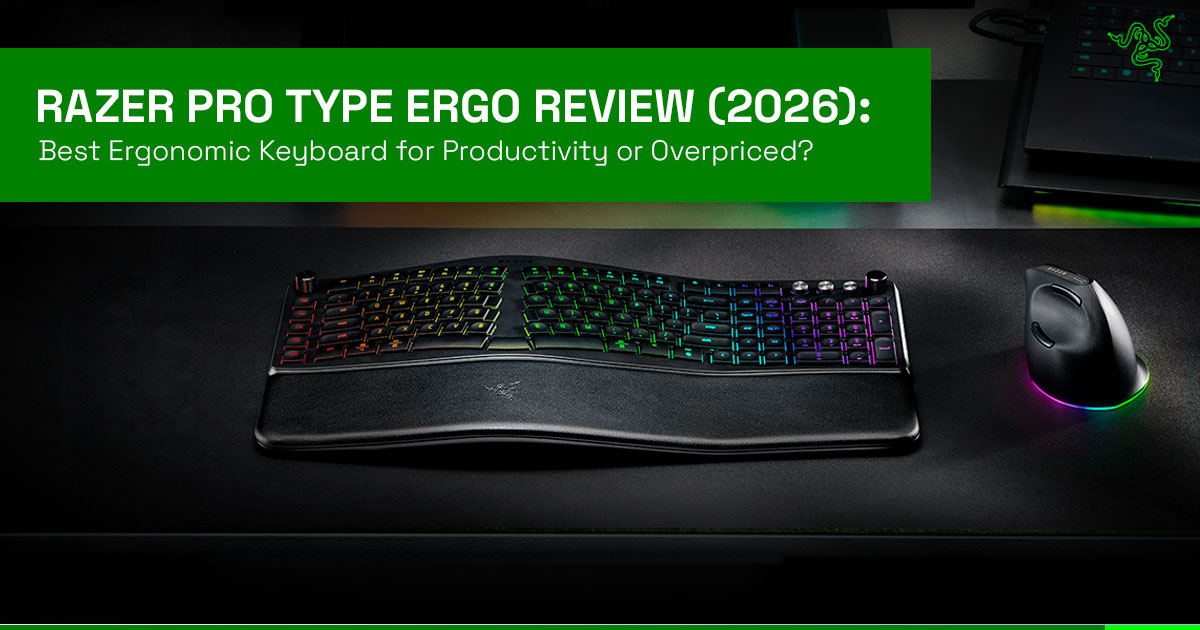
The inward-angled layout and the fixed 10° slope encourage a more natural hand and wrist position, alleviating the awkward pronation often associated with traditional keyboards. The integrated plush leatherette wrist rest, while non-removable, provides consistent support, which is crucial for long typing sessions.
We find that this design significantly reduces the need for wrist extension, a common cause of discomfort.
Layer 2: Cognitive Flow
Beyond physical comfort, an ergonomic keyboard should enhance your mental focus and typing efficiency. This layer considers how the layout and features contribute to an uninterrupted workflow.
The Razer Pro Type Ergo introduces a dual “B” key, which might seem unusual at first but is designed to facilitate a more natural typing rhythm, especially for touch typists. The inclusion of a middle spacebar that can function as a backspace key is another thoughtful addition, allowing for quick corrections without breaking your typing flow.
These subtle design choices aim to reduce cognitive load and keep your fingers closer to the home row, fostering a smoother, more intuitive typing experience.
Layer 3: Workflow Efficiency
This layer examines how the keyboard’s features integrate into and enhance your daily tasks. The Razer Pro Type Ergo truly shines here with its Razer Command Dial and dedicated macro keys. The Command Dial, customizable via Razer Synapse, can be assigned up to 8 functions (or 100 with Synapse profiles), allowing for quick adjustments in creative software, precise scrolling in documents, or even volume control.
The five dedicated macro keys provide instant access to frequently used commands or complex sequences, a boon for developers, video editors, or anyone who relies on shortcuts. This level of customization can significantly streamline workflows, turning multi-step processes into single-key actions and boosting overall productivity.
Layer 4: Adaptation Cost
Every new ergonomic setup comes with a learning curve, and this layer assesses the initial friction and time required to adapt. The Razer Pro Type Ergo, with its split layout, will undoubtedly demand an adjustment period.
Unlike traditional keyboards, the split design requires retraining muscle memory, especially for keys that cross the split. This can lead to an initial dip in typing speed and accuracy.
However, based on user experiences, this phase typically lasts a few days to a couple of weeks, with comfort and efficiency improving significantly after about a month of consistent use. It’s an investment in time that pays off in long-term ergonomic benefits.
👉 Scoring the Razer Pro Type Ergo Across the 4 Layers:
| Ergonomic Layer | Score (Out of 5) | Justification |
| Physical Comfort | 4.5 | Excellent split design, ~10° slope, and plush wrist rest reduce strain. Slight drawback: non-removable wrist rest. |
| Cognitive Flow | 4.0 | Dual “B” key and middle spacebar (as backspace) improve typing flow after a short adjustment period. |
| Workflow Efficiency | 4.5 | Command Dial and macro keys enable strong productivity gains. Software integration enhances customization. |
| Adaptation Cost | 3.0 | Noticeable learning curve due to split layout. Short-term slowdown, but long-term ergonomic benefits. |
4. Design Deep Dive (Beyond Specs)
The Razer Pro Type Ergo isn’t just a collection of features; its design is a deliberate effort to blend ergonomics with modern aesthetics and functionality. The split layout isn’t just about separating your hands; it’s about aligning your wrists and forearms in a more neutral, handshake-like position.
The fixed 10° slope is crucial here, as it naturally pronates your wrists, reducing pressure on the carpal tunnel. Unlike some modular split keyboards, the Pro Type Ergo maintains a connected body, offering a stable platform while still providing the ergonomic benefits of a split. The built-in plush leatherette wrist rest is a double-edged sword: it’s incredibly comfortable and supportive, but its fixed nature means you can’t easily replace it or adjust its position relative to the keyboard. This design choice prioritizes integrated comfort over modularity.
Click here to buy from Amazon
5. Real-World Use Cases (This is Missing in Source)
To truly understand the impact of the Razer Pro Type Ergo, let’s look at how it integrates into various professional workflows:
A. Writer / Blogger Workflow
For writers and bloggers, every word counts, and every moment of discomfort can break concentration. The Razer Pro Type Ergo becomes an invaluable partner. The split design allows for hours of comfortable typing, preventing the wrist and shoulder fatigue that often plagues long writing sessions.
The dedicated AI button, when configured with Razer Synapse, can be a game-changer. Imagine using it to instantly generate a draft outline, summarize research notes, or even refine a paragraph’s phrasing.
The customizable macro keys can be set to common editing shortcuts, while the middle spacebar (as backspace) offers a fluid way to correct typos without interrupting the creative flow. This keyboard can make writing feel smoother and less tiring during long sessions, especially if you type for hours every day, allowing writers to focus on their craft rather than their discomfort.
B. Developer Workflow
Developers often spend their days immersed in code, where precision and efficiency are paramount. The Razer Pro Type Ergo offers distinct advantages. The macro keys can be programmed for complex code snippets, common commands, or even navigating integrated development environments (IDEs).
The Razer Command Dial can be assigned to scroll through large code files, adjust zoom levels, or switch between open tabs, significantly speeding up navigation. The ergonomic design helps prevent repetitive strain injuries common among developers, ensuring they can maintain focus and productivity during intense coding sessions.
The AI button could even be used to trigger code generation or debugging prompts, further integrating AI into the development lifecycle.
C. Video Editor / Excel User
For professionals working with timelines, spreadsheets, or data-intensive applications, the Razer Pro Type Ergo offers unique benefits. Video editors can leverage the Razer Command Dial for precise scrubbing through timelines, adjusting audio levels, or zooming in and out of their workspace.
Excel users can program macro keys for complex formulas, data sorting, or quick navigation within large spreadsheets. The ergonomic design is crucial for these users, who often spend hours in precise, repetitive motions. The ability to customize shortcuts and integrate AI prompts can further enhance efficiency, making data manipulation and content creation smoother and less taxing.
6. The Learning Curve Nobody Talks About
Let’s be honest: switching to a split ergonomic keyboard isn’t like switching to a new pair of shoes. There’s a genuine adaptation period, and it’s important to set realistic expectations.
Many reviews gloss over this, but we believe in providing honest friction:
- First 3 Days: The Awkward Dance: Expect your typing speed to Your fingers will instinctively reach for keys in their old positions, leading to frequent errors and a sense of frustration. It feels unnatural, almost like learning to type all over again. This is normal.
- 1–2 Weeks: Muscle Memory Shift: Around this time, your brain and fingers start to rewire. You’ll notice fewer errors, and your speed will gradually increase. The split will begin to feel less alien and more intuitive. Consistency is key during this phase.
- 30 Days: The Comfort Payoff: By the end of a month, for most users, the split layout will feel natural, if not superior, to a traditional keyboard. The ergonomic benefits become apparent, and you’ll likely find yourself typing with greater comfort and sustained productivity. The initial struggle gives way to a profound sense of relief.
7. Comparison Section
When considering a premium ergonomic keyboard, it’s essential to see how the Razer Pro Type Ergo stacks up against its main rivals.
Here’s a comparison with two market leaders:
| Feature | Razer Pro Type Ergo | Logitech Ergo K860 | Kinesis Freestyle Series |
| Price (Approx.) | $189.99 | $129.99 | $135 – $200+ |
| Split Design | Moderate (fixed body, ~10° slope) | Mild (fixed curved body) | High (fully split, adjustable halves) |
| Customization | High (Command Dial, 5 macro keys, Synapse) | Moderate (Logi Options+) | Very High (programmable keys, accessories) |
| Software Dependency | High (Synapse required for full features) | Moderate (Logi Options+) | Moderate (SmartSet App) |
| Key Switches | Scissor-switch (membrane-like feel) | Scissor-switch | Mechanical (Cherry MX) or membrane |
| Wrist Rest | Built-in plush leatherette | Built-in padded | Detachable (varies by model) |
| Connectivity | 2.4GHz, Bluetooth, USB-C | Bluetooth, USB receiver | Mostly wired, some wireless variants |
| AI Features | Yes (AI Prompt Master button) | No | No |
8. AI Button: Gimmick or Game-Changer?
The dedicated AI button on the Razer Pro Type Ergo is one of its more interesting features. It works through Razer Synapse’s AI Prompt Master, which lets you trigger AI tools or prompts with a single press.
In real use, this can save time. You can set it up to generate content ideas, summarize notes, or even help with coding prompts. It’s especially useful if you already rely on AI tools in your daily work.
But it’s not essential for everyone. If you don’t use AI regularly, this button may end up feeling like an extra key you rarely touch.
People Also Ask
- What is the best ergonomic keyboard for carpal tunnel?
→ A split ergonomic keyboard like the Razer Pro Type Ergo or Logitech Ergo K860 can help reduce wrist strain by improving hand position. - Are split ergonomic keyboards worth it?
→ Yes, especially if you type for long hours. They can reduce strain and improve long-term comfort. - How long does it take to get used to a split keyboard?
→ Most users adjust within 1–2 weeks, with full comfort after about a month. - What is the Razer Command Dial used for?
→ It lets you control tasks like scrolling, zooming, volume, or app shortcuts quickly. - Does Razer make productivity keyboards?
→ Yes, the Razer Pro Type Ergo is designed specifically for work and productivity use.
Click here to buy from Amazon
9. Frequently Asked Questions (FAQ)
Q1: Is the Razer Pro Type Ergo good for gaming?
A1: While Razer is known for gaming, the Razer Pro Type Ergo is primarily designed for productivity. Its scissor-switch keys and ergonomic focus are not optimized for competitive gaming, but it can certainly handle casual gaming for a productivity-focused user.
Q2: Can I use the Razer Pro Type Ergo with a Mac?
A2: Yes, the Razer Pro Type Ergo is compatible with both Windows and Mac operating systems, offering seamless connectivity and functionality across platforms.
Q3: Is the wrist rest removable on the Razer Pro Type Ergo?
A3: No, the plush leatherette wrist rest on the Razer Pro Type Ergo is built-in and not removable. This design choice prioritizes integrated comfort and stability.
Q4: What is the battery life of the Razer Pro Type Ergo?
A4: The Razer Pro Type Ergo boasts an efficient, long-lasting battery, providing up to around 3 months of usage, depending on usage and lighting settings, ensuring uninterrupted work sessions.
Q5: Do I need Razer Synapse to use the keyboard?
A5: You don’t strictly need Razer Synapse to use the basic functions of the Razer Pro Type Ergo. However, to unlock its full potential, including customizing the Razer Command Dial, programming macro keys, and utilizing the AI Prompt Master, Razer Synapse is essential.
10. Final Verdict
The Razer Pro Type Ergo isn’t trying to be a keyboard for everyone—and that’s exactly why it works. It’s built for people who spend hours typing and are starting to feel the cost of it. If that sounds like you, this keyboard doesn’t just feel different on day one—it feels better after a few weeks, which is what actually matters.
The split ergonomic design, 10° angled layout, and built-in wrist rest do a solid job of reducing strain. Add in the Razer Command Dial, macro keys, and AI button, and you’re not just getting comfort—you’re getting a tool that can genuinely speed up how you work. But it comes with trade-offs. The learning curve is real, and the reliance on Razer Synapse software means you’ll need to spend time setting things up properly.
If you’re a writer, developer, analyst, or office professional, this keyboard can make long work sessions easier and more efficient. If you’re a casual user, or you just want something simple that works instantly, this might feel like too much effort for the price.
So the final call is simple:
If you’re willing to invest time to adapt, the Razer Pro Type Ergo rewards you with better comfort, smoother day-to-day work, and long-term usability. If not, a traditional keyboard will feel easier—but not necessarily better.
Ready to Buy? Check Latest Prices
If you spend hours typing every day, this is one upgrade you’ll actually notice within the first week.
If you’re thinking about upgrading to a split ergonomic keyboard, here are the direct purchase options:
- Buy on Amazon Worldwide
- Buy on Amazon India
- Razer Official Store: https://www.razer.com/productivity/razer-pro-type-ergo
Availability can change depending on region, so if you don’t see it in stock right away, it’s worth checking again later.
If you’ve already tried a split ergonomic keyboard, share your experience—good or bad. And if you’re still deciding, ask your questions. Real feedback helps more than specs ever will.
***Disclaimer***
This blog post reflects our own research, testing, and personal opinions. It should not be taken as the official position of any brand, manufacturer, or company mentioned here. While we aim to keep information accurate and up to date, product details, pricing, and availability can change. We recommend double-checking important details before making a purchase.
Some links in this article may be affiliate links. If you choose to buy through these links, we may earn a small commission at no extra cost to you. This helps support our work and allows us to keep publishing in-depth, unbiased reviews. Our recommendations are never influenced by affiliate partnerships.
Comments shared by readers reflect their own views and not ours. We are not responsible for outcomes resulting from the use of information on this site. Please seek professional advice where appropriate.
All product names, logos, and brands mentioned are the property of their respective owners. These names are used for identification and informational purposes only and do not imply endorsement.
