
Overview
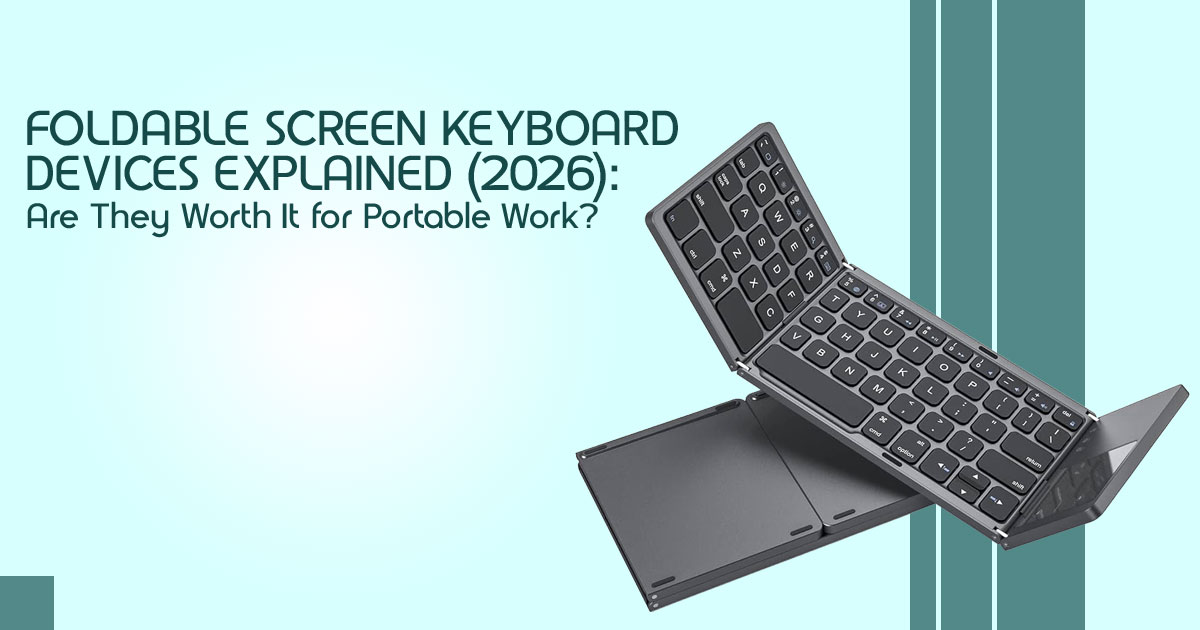
Foldable screen keyboard devices aim to replace your laptop accessories setup with one portable workstation. They work best for mobile professionals, digital nomads, and anyone tired of carrying a tablet + keyboard + portable monitor combo. You get better flexibility and a cleaner setup—but it’s not a laptop replacement and comes with real tradeoffs like power dependency and fixed ergonomics. This category is less about power and more about reducing friction in your mobile workflow.
1. The Real Problem: Why Your Bag Still Feels Messy in 2026
Most people carry at least 3–4 devices just to work comfortably outside the home. A laptop, maybe a tablet, an external keyboard, sometimes even a portable monitor. Add cables, chargers, and adapters—and your bag fills up fast.
And it’s not just about weight. It’s the constant setup. Finding space on a café table. Plugging things in. Adjusting everything just to start working.
That’s workspace fragmentation—when your tools don’t work as one system. It slows you down more than you realize.
Now there’s a new category trying to fix this: foldable screen keyboard hybrids. These combine a touchscreen display and a full keyboard into a single foldable unit. The idea is simple—reduce clutter, cut setup time, and give you a modular workspace extender that works with your existing devices.
Why Reviews Matter Before You Buy
On paper, these devices sound perfect. But real-world use is different.
- How does it feel to type on it daily?
- Is the screen angle comfortable for long sessions?
- Does it actually replace your portable monitor setup?
- What happens when you rely on it for travel work?
That’s where real user reviews matter. They show what works—and what doesn’t—outside product pages.
In this guide, we break down:
- Real-world usability
- Durability and build quality
- Value for money
- And whether this fits your daily workflow
How We Evaluate These Devices
As technology experts with over 20 years of experience in hardware and application research and development, we don’t just look at specs.
We test for:
- Real-world performance
- Durability over time
- Ease of use in daily scenarios
- Compatibility across devices
- Long-term value for money
Our goal is simple: help you choose the best product in every category—budget, performance, reliability, and long-term usage.
Who This Is For
This guide is for:
- Mobile professionals working across locations
- Digital nomads managing work on the go
- Users relying on tablets, smartphones, or mini PCs
- Anyone frustrated with a messy multi-device setup
If your work depends on a traditional laptop only, this might not change much for you. But if you’re juggling devices, this category is worth a closer look.
What You’ll Learn Next
- Where foldable screen keyboards actually fit
- When they improve your productivity setup—and when they don’t
- Real tradeoffs most reviews skip
- How to decide if this is right for your mobile workstation setup
And more importantly—whether this is something you’ll actually use every day, or just another gadget in your bag.
2. Unpacking the “3-Layer Mobile Work Model”
To truly understand the value of these new devices, we need to look beyond the hardware and consider the fundamental layers of mobile productivity. We’ve developed a 3-Layer Mobile Work Model to illustrate this:
| Layer | Description | Traditional Approach | Optimized Approach (with Foldable Devices) |
| Layer 1: Compute | The processing power; your main device. | Laptop, tablet, mini PC | Still your main device, but now more flexible |
| Layer 2: Interface | How you interact with your device (input). | Keyboard, mouse, touch | Integrated, seamless keyboard and 4K touch interface |
| Layer 3: Visual Space | Your screen real estate and multitasking area (output). | Laptop screen, external monitor | Ultra-wide portable monitor with dual-screen productivity |
Most of us focus solely on optimizing Layer 1, constantly upgrading our laptops or tablets. However, the real gains in portable workstation 2026 productivity come from the synergy between Layers 2 and 3. This is where foldable screen keyboard devices shine, offering a unified solution that addresses these often-overlooked layers.
3. What These Devices Actually Are (And Aren’t)
Let’s be clear: a foldable screen keyboard device isn’t a laptop. It’s not designed to replace your primary computing machine. Instead, think of it as a sophisticated, all-in-one peripheral. These devices typically combine a 13-inch ultra-wide touchscreen with a full-size keyboard, all connected via a single USB-C portable monitor keyboard connection for power and display. It’s a modular workspace extender, transforming your existing tablet, mini PC, or even smartphone into a more capable mobile work setup.
Where It Fits in the Market: A Comparison
To truly grasp its position, let’s compare it to other common mobile accessories:
| Feature / Device Type | Portable Monitors | Bluetooth Keyboards | Dual-Screen Laptops | Tablet + Keyboard Setups | Foldable Screen Keyboard |
| Screen Included | Yes | No | Yes | Yes | Yes |
| Keyboard Included | No | Yes | Yes | Yes | Yes |
| Portability | High | High | Medium | High | Very High |
| Integration | Low | Low | High | Medium | Very High |
| Cable Management | Moderate | Low | High | Moderate | Low (single USB-C) |
| Primary Function | Display | Input | Computing | Computing + Input | Interface + Visual Space |
This table highlights that these devices carve out a unique niche, offering a highly integrated and portable solution that goes beyond what individual peripherals can provide.
4. Real-World Use Cases: Beyond the Desk
Where it really helps is in how flexible it is across different situations.
- Travel Work Setup: Pair it with your tablet for a lightweight yet powerful workstation on planes, trains, or in hotel No more juggling multiple devices or searching for power outlets.
- Workflow: Its minimal footprint allows you to set up a productive workspace in even the smallest coffee shop tables, far less intrusive than a full laptop and external monitor.
- Hotel Productivity: Instantly converts any device – be it a mini PC, a smartphone, or a tablet – into a full-fledged workstation, ideal for catching up on emails or drafting documents.
- Gaming + Mini PC Setup: For those who enjoy gaming on the go, it serves as a plug-and-play second screen, enhancing the experience without adding bulk.
These devices offer cross-platform support. They work reliably with Windows and macOS, while Android and iOS support depends on the device.
5. Practical Setup Guide: Getting Started
Setting up your foldable screen keyboard is straightforward, but understanding a few nuances can optimize your experience.
- Connect via USB-C (DP Alt Mode): Ensure your host device supports DisplayPort Alternate Mode over USB-C for single-cable connectivity.
- Configure Display Scaling: Adjust resolution and scaling to your preference for optimal readability and workspace.
- Set Dual-Window Workflow: Utilize the ultra-wide aspect ratio for side-by-side applications, maximizing dual-screen productivity.
- Optimize Keyboard Shortcuts: Customize shortcuts for seamless navigation and task switching, especially if you’re used to a specific OS.
Pro Tip: Be aware of operating system differences. macOS might require specific display settings, while Android devices may have limitations on external display output or multi-window support. Understanding these can prevent frustration and unlock the full potential of your tablet productivity setup.
6. The Skeptic’s Corner: Hidden Tradeoffs You Need to Know
No device is perfect, and a foldable screen keyboard is no exception. Being aware of its limitations is crucial for making an informed decision.
- + Not a Laptop Replacement: This cannot be stressed enough. It lacks an internal CPU, GPU, or significant battery. It’s an accessory, not a standalone computer.
- + Ergonomics Issues: Unlike a traditional laptop or adjustable monitor, the fixed screen angle can lead to ergonomic challenges during prolonged use. Consider an external stand if you plan on using it for extended periods.
- + Power Dependency: It draws power from your host device. While efficient, this means your tablet or mini PC’s battery life will be impacted.
- + Lap Usage Problem: Its design, while portable, isn’t as stable as a laptop on your lap. It’s best used on a flat surface.
These aren’t deal-breakers, but they are important considerations that differentiate it from a traditional laptop experience.
7. Performance & Productivity Impact: Does it Actually Make You Faster?
The primary benefit of a foldable screen keyboard isn’t about raw computing speed, but rather about enhancing your workflow and efficiency. What improves:
- Multitasking: The 3840×1600 ultra-wide ratio is perfect for side-by-side applications, allowing for seamless dual-screen productivity.
- Faster Navigation: The combination of a tactile keyboard and 10-point touch interaction provides a more intuitive and quicker way to interact with your software.
What doesn’t change much:
- Raw Computing Speed: Since it’s a peripheral, it won’t boost your host device’s processing power.
- Heavy Workloads: For tasks requiring significant CPU/GPU resources (e.g., heavy video editing, 3D rendering), the bottleneck will still be your main device.
Ultimately, it’s about optimizing your interaction with your existing compute power, not replacing it.
8. Who Should Actually Buy This?
This device isn’t for everyone, but for the right user, it’s a practical upgrade for the right workflow.
⬛ Ideal Users:
- Tablet-first professionals: Those who primarily use an iPad or Android tablet but crave a more robust typing and display experience.
- Digital nomads: Individuals who prioritize a lightweight, versatile travel workstation gear that can adapt to any environment.
- Writers, editors, analysts: Professionals who benefit from extended screen real estate and a comfortable typing experience for long hours.
- Mini PC users: Anyone who wants to transform their compact computer into a full- fledged portable workstation 2026 with minimal fuss.
+ Not Ideal:
- Gamers needing high refresh rates: While it offers a great display, it’s not optimized for competitive gaming.
- Heavy video editors or 3D artists: These professionals require dedicated GPUs and powerful CPUs that this device doesn’t provide.
- Laptop-only users: If your workflow is entirely laptop-based, this accessory might not offer significant advantages over your existing setup.
If you’re still unsure, it helps to look at a few solid alternatives. Depending on how you work, one of these might fit you better.
9. Best Foldable Screen Keyboard Alternatives (2026)
Not everyone needs a foldable screen keyboard. In some cases, a simpler or more familiar setup might work better.
Here are a few alternatives that might fit your setup better:
1. Portable Monitors (Simple and Flexible)
If you already have a keyboard you like, a portable monitor is the easiest upgrade.
- Adds extra screen space without changing your setup
- Works well with laptops, tablets, and mini PCs
- Usually more adjustable than foldable devices
–− Best for: Users who only need more display space, not a full portable workstation setup
2. Tablet + Keyboard Setup (Balanced Option)
Devices like an iPad paired with the Apple Magic Keyboard offer a more traditional feel.
- Good mix of portability and usability
- Stable for lap use
- No extra cables or setup
–− Best for: Users who want a laptop-like experience without carrying a laptop
3. Dual-Screen Laptops (All-in-One Solution)
Devices like the ASUS Zenbook Duo give you everything built in.
- Two screens + keyboard in one device
- No need for external accessories
- Better performance for heavy tasks
–− Best for: Users who want a powerful, all-in-one productivity machine
Quick Take
- Want less setup and fewer cables → go with a foldable screen keyboard
- Want simplicity → choose a portable monitor
- Want stability → go with a tablet + keyboard setup
- Want power + everything built-in → choose a dual-screen laptop
10. Mistakes to Avoid: Navigating the Pitfalls
Once you’ve looked at the alternatives, it’s easier to avoid common mistakes people make with this setup.
- Buying without USB-C display support: Double-check that your primary device supports DisplayPort Alternate Mode over USB-C. Otherwise, you’ll need adapters, defeating the single-cable convenience.
- Expecting a laptop replacement: This is the biggest Manage your expectations; it’s an enhancement, not a substitute.
- Ignoring workspace ergonomics: While portable, prolonged use without proper posture or an external stand can lead to discomfort. Prioritize your health.
- Using it in unstable environments (bed/lap): For optimal stability and comfort, use it on a flat, firm surface.
11. Advanced Workflow Optimization: Power User Tips
For those looking to push the boundaries of their modular workspace extender, here are some advanced tips:
- Split-screen workflows: Master your OS’s window management features to create highly efficient side-by-side application layouts.
- Keyboard shortcut layering: Utilize software like Karabiner-Elements (macOS) or AutoHotkey (Windows) to create custom keybinds that supercharge your productivity.
- Multi-device switching: Seamlessly switch the USB-C portable monitor keyboard between your tablet, mini PC, and even smartphone, adapting to your needs on the fly.
Pro Tip: Consider using it as a dedicated reference screen. Keep your main work on your primary display and use the foldable 4K touchscreen keyboard for documentation, chat, or research, enhancing your dual-screen productivity without cluttering your main view.
12. The Future of Modular Computing: Beyond the Traditional Laptop
The rise of devices like the foldable screen keyboard signals a significant shift in how we approach personal computing. We’re moving from a world dominated by monolithic “devices” to a more flexible era of “systems.” This trend is fueled by:
- Mini PCs: Increasingly powerful and compact, these devices are decoupling compute from the traditional laptop form factor.
- Cloud Computing: The ability to access powerful resources remotely means less reliance on local hardware.
- Portable Interfaces: Devices like this foldable screen keyboard are the missing link, providing the human-computer interaction layer for these distributed systems.
Our prediction? For a growing segment of users, these replace traditional laptops—especially as the lines between work and life continue to blur, and the demand for adaptable hybrid work accessories intensifies.
13. People Also Ask (PAA) & Frequently Asked Questions (FAQ)
These questions mirror real search behavior and are optimized for AI Overviews and search snippets.
Q: Is a foldable screen keyboard a laptop?
A: No, it is not a laptop. It functions as an external display and keyboard accessory, relying on a separate host device (like a tablet, mini PC, or smartphone) for its computing power. It’s a modular workspace extender, not a standalone computer.
Q: Does a foldable screen keyboard work with phones?
A: Yes, many foldable screen keyboard devices are compatible with smartphones, provided the phone supports USB-C display output (DisplayPort Alternate Mode). This allows you to transform your phone into a more productive mobile work setup.
Q: Can a foldable screen keyboard replace a portable monitor?
A: Absolutely. It serves the same function as a portable monitor by providing additional screen real estate, but with the added benefit of an integrated, full-size keyboard. This makes it a more comprehensive portable work setup solution for many users.
Q: Is a foldable screen keyboard worth the investment?
A: The value depends heavily on your existing workflow. If you frequently work across multiple devices, travel often, or find yourself burdened by carrying separate peripherals, then a foldable screen keyboard can be a highly worthwhile investment. However, if your work is primarily laptop-based, the benefits might be less pronounced.
14. Final Verdict: The Future of Flexible Productivity
This isn’t about faster chips or bigger specs. It’s about cutting the small annoyances that slow you down every day—extra cables, cramped screens, juggling multiple devices. A foldable screen keyboard setup simplifies that. Open it, plug in one cable, and you’ve got a cleaner mobile workspace wherever you are.
If you already rely on a traditional laptop, this won’t replace it. But if you switch between a tablet, smartphone, or mini PC—and you’re often on the move—this starts to feel like a smart upgrade. Less clutter, fewer compromises, and a portable workstation setup that adapts to how you actually work.
What stands out is the shift in thinking. Instead of buying another device, you’re improving how your existing devices work together. That’s where the real value shows up.
What to Keep in Mind
- It’s a peripheral device, not a laptop replacement
- The biggest gains come from better screen space and input efficiency, not performance
- Works best for mobile professionals and multi-device workflows
- Helps reduce workspace fragmentation and accessory clutter
- You’ll need to accept fixed ergonomics and power dependency on your main device
Want to Try It?
If this feels like your kind of setup, explore what’s available right now:
- VitaLink foldable screen keyboard (Click here for official project page)
- Browse foldable screen keyboard devices on Amazon (worldwide listings)
- Check availability in India on Amazon India
If you’ve tried a foldable display keyboard or similar portable productivity device, what worked—and what didn’t? Drop your thoughts or questions below.
***Disclaimer***
This blog post reflects our own research, testing, and personal opinions. It should not be taken as the official position of any brand, manufacturer, or company mentioned here. While we aim to keep information accurate and up to date, product details, pricing, and availability can change. We recommend double-checking important details before making a purchase.
Some links in this article may be affiliate links. If you choose to buy through these links, we may earn a small commission at no extra cost to you. This helps support our work and allows us to keep publishing in-depth, unbiased reviews. Our recommendations are never influenced by affiliate partnerships.
Comments shared by readers reflect their own views and not ours. We are not responsible for outcomes resulting from the use of information on this site. Please seek professional advice where appropriate.
All product names, logos, and brands mentioned are the property of their respective owners. These names are used for identification and informational purposes only and do not imply endorsement.
