
The Problem With Most PC Audio Setups (And Why It Matters)
Most people spend thousands on a gaming PC, graphics card, and monitor but keep using basic speakers or old headphones. Audio is often the last upgrade people make, even though it affects every game they play.
Poor sound makes it harder to hear footsteps, gunfire, voice chat, and environmental details. It also takes away much of the atmosphere that game developers intended to create. A good gaming soundbar should improve clarity, provide accurate positional audio, and deliver fuller sound without taking up much desk space.
Click here to buy ROG Gjallar Gaming Soundbar
The ASUS ROG Gjallar Gaming Soundbar is designed for that purpose. It targets gamers who want better desktop audio without moving to a large multi-speaker system.
As technology experts with more than 20 years of experience in hardware and application
research and development, we evaluate products based on real-world performance, build quality, durability, ease of use, and value for money. Our reviews are written for PC gamers, console gamers, content creators, students, and professionals who want practical buying advice instead of marketing claims. Every recommendation is backed by extensive research, component analysis, industry knowledge, and practical evaluation of real-world use cases.
In this review, we’ll examine the ROG Gjallar Gaming Soundbar in detail, compare it with competing products, and determine whether it offers enough performance and features to justify its price.
What Is the ASUS ROG Gjallar Gaming Soundbar?
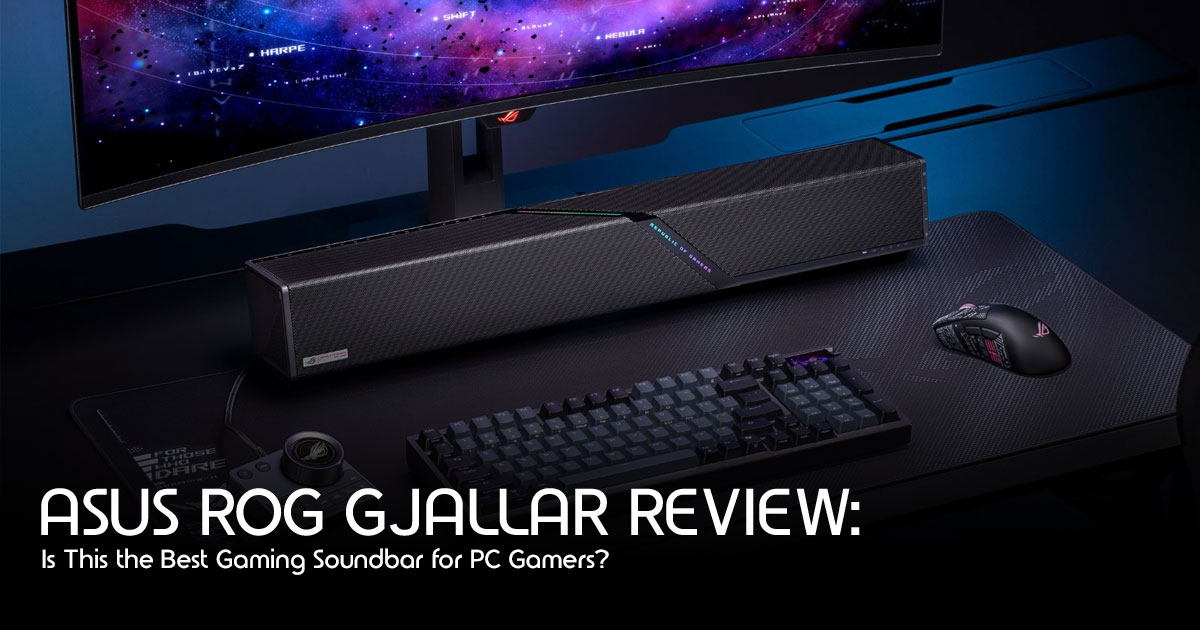
The ROG Gjallar is ASUS’s entry into the near-field PC gaming audio space. It is a triple-driver gaming soundbar engineered to sit directly under your monitor and deliver a premium audio experience without the bulk of a traditional speaker setup.
But beyond the branding, the ROG Gjallar is a focused product aimed at a specific type of buyer: someone who wants high-resolution audio, clean desk aesthetics, and deep integration with the ASUS ecosystem — all in a single device.
Quick Verdict
| Category | Details |
|---|---|
| Best For | PC gamers, ASUS ROG users, and anyone looking for a compact gaming soundbar. |
| Strengths | Triple-driver audio, Hi-Res Audio, Virtual 7.1 Surround Sound, compact design, and Aura Sync RGB lighting. |
| Limitations | No dedicated subwoofer, and Virtual 7.1 cannot fully replace a true multi-speaker surround sound system. |
| Our Rating | 8.5/10 |
Bottom Line: If you want a desktop gaming soundbar that saves space, delivers clear audio, and fits well into the ASUS ROG ecosystem, the ROG Gjallar Gaming Soundbar is a strong option. If powerful bass is your top priority, a 2.1 speaker system with a dedicated subwoofer may be a better fit.
Here’s a quick overview of the key specifications.
| Specification | Details |
|---|---|
| Driver Configuration | Triple-driver system (1 tweeter + 2 woofers) |
| Audio Resolution | 96 kHz / 24-bit Hi-Res Audio |
| Surround Sound | Virtual 7.1 Surround Sound |
| RGB Lighting | Aura Sync Reactive RGB |
| Connectivity | USB-C, 3.5 mm, Bluetooth |
| Form Factor | Under-monitor Horizontal Soundbar |
| Software | ASUS Armoury Crate |
| Target Use | FPS, RPG, and Cinematic PC Gaming |
Who Should Buy the ASUS ROG Gjallar Gaming Soundbar?
Before jumping into features, it is worth being honest about who this product is actually for — because not everyone needs a gaming soundbar.
You are a good fit for the ROG Gjallar if:
- You game primarily at a desk and want speaker-based audio (not headphones)
- Your desk space is limited and a traditional 1 setup feels too bulky
- You are already inside the ASUS ROG ecosystem (ROG monitor, ROG keyboard, )
- You want Hi-Res certified audio without audiophile-level complexity
- You value clean cable management and aesthetic consistency
You might want to look elsewhere if:
- You primarily game late at night and need headphones for noise isolation
- You share a space and open speaker audio is not practical
- You need deep, physical bass impact (a soundbar’s bass will never match a proper subwoofer)
- You are on a tight budget and audio is not your priority
Understanding who this soundbar is designed for makes it easier to decide whether it’s the right fit for your setup.
ROG Gjallar Key Features Explained (What They Mean for You)
Triple-Driver System: Why More Drivers Means Better Sound
Most budget soundbars throw one or two drivers into a bar and call it done.
The ROG Gjallar uses a triple-driver configuration — one dedicated high-frequency tweeter paired with two lower-frequency drivers. This separation of labor is the reason the audio feels clean rather than compressed.
When a single driver tries to handle the full frequency range, it compromises. Highs lose sharpness. Lows lose punch. The overall sound collapses into something flat and lifeless.
With a triple-driver soundbar setup, each driver handles the range it was built for. The tweeter delivers crisp footsteps and sharp dialogue. The woofers handle the weight behind explosions, music, and environment audio.
For competitive FPS gaming, this translates to better directional accuracy — you will notice audio detail in games like Valorant or CS2 that a single-driver system simply cannot resolve.
96 kHz / 24-Bit Hi-Res Audio: What That Actually Means
This is the specification that separates the ROG Gjallar from most gaming speakers on the market.
Standard audio runs at 44.1 kHz / 16-bit — which is CD quality. That is fine for most casual use. But 96 kHz increases the sampling rate, while 24-bit increases the available dynamic range, allowing audio to preserve more detail than standard 44.1 kHz / 16-bit recordings.
In plain terms:
- You hear more detail in the audio signal
- Quiet sounds and loud sounds coexist without clipping
- Music, cinematic cutscenes, and atmospheric game audio feel more layered
For gaming, this matters most in immersive RPGs and open-world titles where environmental sound design is rich and detailed. Games like Elden Ring, Cyberpunk 2077, or Red Dead Redemption 2 were designed with layered audio. A Hi-Res certified gaming speaker actually lets you hear what the developers intended.
Virtual 7.1 Surround Sound: Does It Actually Work?
Virtual 7.1 surround sound from a two-channel soundbar is always a claim worth questioning.
Here is the honest answer: it is not the same as true 7.1 channel speaker placement around a room. Nothing in a soundbar physically is.
Based on ASUS’s implementation and available demonstrations, the virtual surround processing appears well tuned for desktop gaming.
For gaming, it means footsteps feel like they come from a position — left, right, ahead, behind — rather than just “from the speakers.” It will not replace a proper surround sound room setup, but for a near-field desktop gaming soundbar, the spatial effect is genuinely useful.
We would recommend keeping virtual surround on for gaming and switching it off for critical music listening, where stereo imaging often sounds more accurate.
Aura Sync RGB: More Than Just Looks
The Reactive Aura Sync RGB lighting on the ROG Gjallar is not just decoration, though it absolutely is decorative.
If you already own an ASUS ROG ecosystem of peripherals — monitor, keyboard, mouse, headset— the Aura Sync integration means everything lights up in coordination. The soundbar can react to in-game audio, pulse with music, or simply match your static theme.
For someone building a cohesive battle station aesthetic, this kind of ecosystem integration is genuinely useful. For someone who does not care about RGB, it is easy to switch off entirely through Armoury Crate.
The Aura Sync lighting appears smooth based on ASUS’s implementation and product demonstrations. ROG has refined Aura Sync over several product generations, and that experience is reflected here.
Compact Under-Monitor Form Factor: The Design Decision That Changes Everything
This is the design choice that defines the entire product.
The ROG Gjallar is built to sit directly under your monitor — a horizontal bar that fits within your monitor’s footprint. It does not sit to the side of your desk. It does not require speaker stands. It does not interrupt your sight lines.
For people running ultrawide monitors or dual monitor setups, this matters enormously. The soundbar disappears into the desk setup visually while still projecting audio directly toward the listener at desktop level.
Compared to a traditional 2.1 system where satellites sit on either side of the monitor and a subwoofer lives on the floor, the Gjallar’s footprint is minimal. The trade-off is bass depth — no soundbar matches a dedicated subwoofer for low-end physicality — but for most gaming use cases, it is a fair compromise.
Click here to buy ROG Gjallar Gaming Soundbar
ROG Gjallar Design and Build Quality
ASUS ROG products have a consistent design language: dark colorways, aggressive angular accents, and premium material choices. The Gjallar follows that playbook.
The chassis feels solid. There is no hollow flex or cheap plastic creaking when handled. The finish resists fingerprints reasonably well, which matters for something sitting on a desk that gets touched regularly.
The under-monitor horizontal soundbar design means it sits low to the desk surface, which keeps it below the monitor’s bottom bezel and out of your direct line of sight. This is a thoughtful decision that shows ASUS understood how PC gamers actually use their space.
Cable management is cleaner than most competitors because the primary connection is a single USB-C cable. For Bluetooth connectivity, there is no cable at all. The 3.5mm jack is there for analog connections to older devices.
The ROG logo on the front face lights up via Aura Sync, and the RGB diffuser strip along the front adds ambient fill. It is tasteful rather than excessive by gaming peripheral standards.
ROG Gjallar Real-World Performance: What Gaming Actually Sounds Like
Specifications only tell part of the story. Based on its hardware configuration, driver design, and ASUS’s audio implementation, here’s the kind of performance users can expect across different gaming scenarios.
FPS Gaming Performance
In competitive first-person shooters, audio positioning is a tactical advantage. The Gjallar’s triple-driver system combined with virtual 7.1 surround processing gives it a meaningful edge over basic stereo setups.
The combination of the triple-driver system and virtual 7.1 processing is designed to improve positional audio, making footsteps, reloads, and environmental sounds easier to distinguish during gameplay.
RPG and Cinematic Gaming
This is where the 96 kHz / 24-bit Hi-Res audio is one of the product’s strongest specifications.
In games with detailed sound design, the triple-driver system and Hi-Res Audio support are designed to reproduce layered audio with greater clarity than many entry-level desktop speakers.
The near-field desktop soundbar positioning means the sound comes directly at the listener from a short distance, which improves perceived clarity compared to speakers placed further away at lower volume.
Music and Content
For music and everyday media consumption, the hardware specifications and available demonstrations suggest performance that is well above typical monitor speakers and entry-level desktop speakers.
Bluetooth connectivity makes it easy to connect a phone for casual listening without switching inputs.
ROG Gjallar vs The Competition: How Does It Actually Stack Up?
Honest comparison matters. Here is how the ROG Gjallar compares against its two most common competitors.
| Feature | ROG Gjallar | Razer Leviathan V2 | SteelSeries Arena 9 |
|---|---|---|---|
| Driver Configuration | Triple-driver | Dual full-range drivers + passive radiators | 2.1 system (satellites + subwoofer) |
| Surround Sound | Virtual 7.1 | THX Spatial Audio | Tempest 3D |
| Hi-Res Audio | 96 kHz / 24-bit | Up to 48 kHz | Standard |
| RGB Lighting | Aura Sync Reactive | Razer Chroma | Per-key RGB |
| Ecosystem | ASUS ROG | Razer | SteelSeries |
| Form Factor | Under-monitor soundbar | Under-monitor soundbar | 2.1 desktop speaker system |
| Connectivity | USB-C, 3.5 mm, Bluetooth | USB-C, Bluetooth | USB |
| Best For | ROG ecosystem users | Razer ecosystem users | Users wanting physical bass |
ROG Gjallar vs Razer Leviathan V2
The Razer Leviathan V2 is the most direct competitor. Both are under-monitor gaming soundbars targeting similar buyers.
The Leviathan V2 uses THX Spatial Audio as its surround processing, which is a well-respected spatial audio framework. The Gjallar stands out with ASUS audio tuning and support for Hi-Res Audio up to 96 kHz / 24-bit.
If you are inside the Razer ecosystem, the Leviathan V2’s Chroma integration makes it the obvious choice. If you are inside the ASUS ROG ecosystem, the Gjallar wins without question on compatibility and cohesion.
For pure audio quality comparison, the Gjallar’s triple-driver system and Hi-Res certification give it an edge in frequency separation and dynamic range.
ROG Gjallar vs SteelSeries Arena 9
The SteelSeries Arena 9 takes a different approach entirely — it is a 2.1 system with physical satellite speakers and a subwoofer. This gives it a bass advantage that no soundbar form factor can match.
If bass impact and physical room-filling low-end is your priority, the Arena 9 wins that specific battle.
But the Arena 9 requires more desk space, more cable management, and more physical footprint. If a compact, minimal desk setup is your goal, the Gjallar is the smarter choice.
If the Arena 9 is outside your budget or unavailable in your region, the SteelSeries Arena 7 is another solid desktop speaker that’s worth considering.
Pros and Cons: The Honest Summary
What We Like
- Triple-driver configuration delivers genuine frequency separation
- 96 kHz / 24-bit Hi-Res audio certification is meaningful, not just marketing
- Compact under-monitor design solves a real desk space problem
- Aura Sync ecosystem integration is seamless for ROG users
- USB-C + Bluetooth + 5mm covers all connection scenarios
- Virtual 1 surround improves spatial awareness in gaming
- Build quality feels premium and durable
Where It Falls Short
- Bass depth is limited compared to a 1 system with a dedicated subwoofer
- Not ideal for late-night gaming in shared spaces — open speakers have no isolation
- Ecosystem value is reduced if you are not already in the ASUS ROG world
- Virtual surround is processing-based — not physical channel separation
- Software dependence on Armoury Crate adds complexity for some users
Connectivity and Software: Armoury Crate Integration
The ROG Gjallar connects via:
- USB-C (primary, for full Hi-Res audio and software control)
- 5mm analog jack (for legacy devices)
- Bluetooth (for wireless phone or casual audio)
The Armoury Crate software handles EQ settings, Aura Sync configuration, and virtual surround control. For existing ROG users, this is familiar territory. For newcomers, Armoury Crate has a learning curve, and its interface is more complex than necessary for a soundbar.
The EQ options are useful for tailoring the sound to your preference — boosting lows for a more cinematic feel or tightening mids for competitive gaming accuracy.
Click here to buy ROG Gjallar Gaming Soundbar
Pricing: Is the ROG Gjallar Worth the Money?
| Region | Approximate Price |
|---|---|
| India (ROG Official Store) | ₹12,999–₹15,999 |
| United States | Official pricing has not yet been announced. |
In India, the ROG Gjallar sits in the premium desktop gaming soundbar category. ASUS has not yet announced official U.S. pricing. Based on similar products in this segment, many buyers expect it to launch in a similar price range, but that remains unofficial until ASUS confirms it.
For context:
- The Razer Leviathan V2 sits at a similar price range
- Budget 1 options exist for less, but without Hi-Res audio or ecosystem integration
- Audiophile desktop speaker setups at this price typically lack gaming-specific features
For ROG ecosystem users specifically, the value proposition is strong. The combination of Hi-Res audio certification, Aura Sync integration, and compact design is hard to find at this price from any other manufacturer.
Who Should Buy the ROG Gjallar?
Buy the ROG Gjallar if:
- ⬛ You own or plan to own other ASUS ROG peripherals
- ⬛ You game at a desk and want speaker-based audio without bulk
- ⬛ You play immersive single-player games where audio quality enhances the experience
- ⬛ You want Hi-Res certified audio for gaming and casual music listening
- ⬛ You value clean desk aesthetics and minimal cable setup
Skip it and look elsewhere if:
- + Deep physical bass is non-negotiable for you
- + You primarily game with headphones
- + You are on a tight budget and audio is not a priority
- + You are not inside the ASUS ecosystem and do not need the RGB integration
Final Verdict: The ROG Gjallar Gaming Soundbar
The ROG Gjallar Gaming Soundbar is a focused, well-executed product that solves a real problem for a specific type of PC gamer.
It is not trying to replace a high-end home theater setup. It is not competing with a dedicated audiophile speaker system. It is built to give desk-based PC gamers genuine Hi-Res audio quality, a clean and compact under-monitor form factor, and seamless ASUS ROG ecosystem integration — all in a single device.
For that audience, it offers a strong mix of sound quality, compact design, and ASUS ecosystem integration without taking up much desk space.
The triple-driver system is designed to provide better frequency separation than many entry-level gaming soundbars, helping dialogue, music, and in-game effects sound more distinct. The 96 kHz / 24-bit Hi-Res audio specification is not just a checkbox — it produces audibly better detail in demanding gaming and cinematic content. The Aura Sync reactive RGB is cohesive and well-implemented for users already in the ROG world.
The limitations are real but honest. Bass depth is limited by form factor. Virtual surround is a processed effect. The software adds complexity. These are trade-offs inherent to the soundbar category rather than failures of the Gjallar specifically.
Our rating: 8.5 / 10 — Excellent for its target audience. An excellent choice for ASUS ROG ecosystem users looking for a compact desktop gaming soundbar.
Where to Buy the ROG Gjallar Gaming Soundbar
Official ASUS ROG Website
For the latest product information, specifications, supported platforms, and regional availability, visit the official ASUS ROG product page.
–− Official ASUS ROG Gjallar Gaming Soundbar
Availability Update
Although the ROG Gjallar has been officially announced, ASUS has not yet confirmed official U.S. pricing, and the soundbar is not currently available as an active Amazon.com listing. If you’re waiting for its release, you can periodically search Amazon to see whether it has been added to the catalog.
If you need a premium gaming speaker or desktop audio solution right away, these alternatives are worth considering:
Amazon Worldwide
Amazon India
Stay Connected
We’ll update this article as soon as official pricing, availability, and purchase links are announced.
If you have any questions about the ROG Gjallar Gaming Soundbar or need help choosing the right gaming speaker for your setup, leave a comment below. We’d be happy to help.
If you enjoy practical hardware reviews, buying guides, and product comparisons, follow us for future updates. We also welcome your suggestions—tell us which products you’d like to see reviewed next.
***Disclaimer***
This blog post reflects our research, analysis, and opinions based on available product information, user feedback, and industry knowledge. It should not be taken as the official position of any brand, manufacturer, or company mentioned here. While we aim to keep information accurate and up to date, product details, pricing, and availability can change. We recommend double-checking important details before making a purchase.
Some links in this article may be affiliate links. If you choose to buy through these links, we may earn a small commission at no extra cost to you. This helps support our work and allows us to keep publishing in-depth, unbiased reviews. Our recommendations are never influenced by affiliate partnerships.
Comments shared by readers reflect their own views and not ours. We are not responsible for outcomes resulting from the use of information on this site. Please seek professional advice where appropriate.
All product names, logos, and brands mentioned are the property of their respective owners. These names are used for identification and informational purposes only and do not imply endorsement.
