
Introduction
Gaming audio has changed a lot over the last few years. More gamers are replacing bulky desktop speakers with compact soundbars that promise cinematic sound, Dolby Atmos support, and cleaner desk setups. ASUS is betting that this trend will continue with the launch of the ROG Gjallar, a premium 2.1.2 gaming soundbar that carries a price of CNY 3,699 (around $548 USD). At that price, however, expectations are naturally high.
The ASUS ROG Gjallar steps into a market where well-known brands like Razer, Creative, OXS, and Panasonic have already built a strong reputation. That means great specifications alone are not enough. Buyers ultimately care about three questions: Does it offer a meaningful upgrade over a gaming headset? Can it replace a traditional speaker setup? And does it justify costing more than many gaming monitors—and even some graphics cards?
As technology experts with over 20 years of experience in hardware and application research and development, we evaluate every product with a focus on real-world performance, build quality, long-term reliability, and value for money. Whether you’re a competitive PC gamer, a console player, a content creator, a streamer, or simply someone looking for a premium desktop audio experience, our goal is to help you understand not just what a product can do, but whether it deserves your money. Every recommendation we make is backed by extensive research, component analysis, real-world usability, and industry expertise, ensuring you can choose the best option for your needs and budget.
We have not tested the ASUS ROG Gjallar hands-on. This review is based on ASUS’s published specifications, launch information, and our analysis of competing gaming soundbars and desktop audio solutions in this category. Instead of repeating marketing claims, we’ll examine where the ROG Gjallar stands against its rivals, identify who it is best suited for, discuss where it excels and where it may fall short, and help you decide whether this premium Dolby Atmos gaming soundbar is worth adding to your setup.
What Is the ASUS ROG Gjallar?
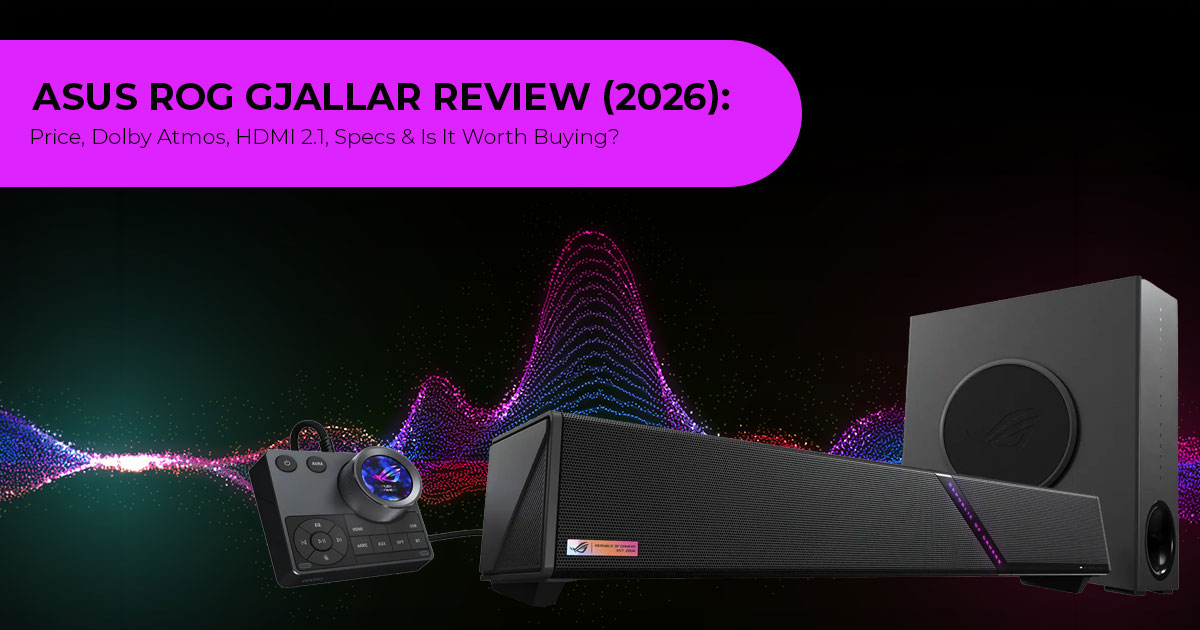
The ROG Gjallar (pronounced “ga-lar,” borrowed from the Gjallarhorn of Norse mythology) is ROG’s first gaming soundbar. It uses a 2.1.2-channel configuration — two front channels, one subwoofer, and two upward-firing height channels — to deliver Dolby Atmos surround sound from a compact bar designed to sit under a monitor.
The name comes from the mythical Gjallarhorn, a horn in Norse mythology associated with announcing significant events, making it a fitting name for ROG’s first gaming soundbar.
Unlike many compact soundbars adapted from TV designs, ASUS designed the Gjallar specifically for desktop gaming. Its feature set also targets multi-platform users with HDMI 2.1, a 5GHz wireless subwoofer, built-in beamforming microphones with acoustic echo cancellation, and a separate all-in-one control hub with an LCD display.
ROG Gjallar Specifications at a Glance
| Feature | Detail |
| Channel Configuration | 2.1.2-channel Dolby Atmos |
| Soundbar Drivers | 4× 50mm full-range drivers, 2× 27mm tweeters, and 2 up-firing channels |
| Subwoofer | 6.5-inch (165mm), 65W, wireless 5GHz connection |
| Frequency Response | 50Hz–20kHz |
| Connectivity | HDMI 2.1 IN, HDMI 2.1 OUT/eARC, USB-C, optical, 3.5mm AUX, and Bluetooth 5.3 |
| USB Hub | 2× side-mounted USB-A ports |
| Video Passthrough | Up to 4K at 120Hz with HDR support |
| Microphones | Built-in AEC beamforming microphones with AI noise suppression |
| RGB Lighting | ASUS Aura RGB with 16.8 million colors and four presets |
| Control Hub | Separate unit with an LCD display and physical controls |
| Software | Gear Link web-based PC tool and Gear Link Mobile app |
| Supported Platforms | PC, Mac, PS5, PS4, Xbox Series X|S, Xbox One, Nintendo Switch, and mobile devices |
| Soundbar Dimensions | 607 × 92 × 82mm (23.9 × 3.6 × 3.2 inches); 2.4kg (5.3lb) |
| Subwoofer Dimensions | 125 × 315 × 356mm (4.9 × 12.4 × 14.0 inches); 5.7kg (12.6lb) |
| Price | CNY 3,699 (approximately $548 USD) |
Key Features Explained
2.1.2 Dolby Atmos — Not Just Another Buzzword
A lot of gaming soundbars claim to support Dolby Atmos, but most do it through virtual processing — meaning software tricks that simulate height effects without dedicated hardware. The Gjallar takes a different approach with its 2.1.2 configuration. The “.2” refers to two physical up-firing drivers built into the soundbar that bounce sound off the ceiling to create the height layer.
What this means for gaming: directional audio becomes more precise. In a competitive FPS, footsteps above or below you register as distinct vertical cues rather than blending into the stereo field. In open-world games or RPGs, environmental effects like rain, aircraft flyovers, or echoing caverns gain a sense of space that a 2.0 or 2.1 system cannot reproduce.
At the same time, up-firing drivers are only as good as the room they fire into. If you have a high or vaulted ceiling, irregular surfaces, or acoustic treatment that absorbs high frequencies, the height effect will be diminished. A flat ceiling between roughly 7.5 and 12 feet high is ideal. This is not a flaw specific to the Gjallar — it applies to every soundbar that uses reflected height channels.
HDMI 2.1 with 4K at 120Hz Passthrough — The Feature Competitors Miss
This is arguably the Gjallar’s biggest advantage over most desktop gaming soundbars. Many competitors—including the Razer Leviathan V2 Pro—rely on USB or Bluetooth connections, which either limit platform compatibility or introduce latency.
The Gjallar includes a full HDMI 2.1 input and an HDMI 2.1 output with eARC. That means you can route your PS5, Xbox Series X, or gaming PC through the soundbar and out to your monitor at 4K resolution with a 120Hz refresh rate — with HDR intact. This is not common in desktop-class soundbars. It turns the ROG Gjallar from a PC gaming soundbar into a multi-platform audio hub for PCs and modern consoles.
Why this matters: if you run both a PC and a console on the same desk (or switch between them), the Gjallar can sit between your display and your sources without forcing you to compromise on video quality. Few currently announced desktop gaming soundbars offer that level of flexibility.
5GHz Wireless Subwoofer — Low Latency, No Cable
The 65-watt, 6.5-inch subwoofer connects to the soundbar over a 5GHz wireless link. This is a deliberate choice over Bluetooth or a standard 2.4GHz connection. 5GHz provides more bandwidth and avoids the crowded 2.4GHz spectrum that WiFi routers, wireless mice, and other peripherals typically occupy.
In practice, this means the subwoofer should deliver bass with minimal delay — important for games where low-frequency effects (explosions, engine rumble, gunfire) need to feel immediate. The subwoofer’s slim profile (roughly 5 inches wide) allows it to sit beside or under a desk without taking over the room.
One limitation to keep in mind: the subwoofer is proprietary. Based on the currently available specifications, ASUS has not indicated support for third-party subwoofers. The 5GHz link only works with the included unit.
Control Hub with AEC Microphones — Headset Alternative
The Gjallar ships with a separate desktop control hub that includes an LCD display, physical controls for volume and input switching, and a built-in beamforming microphone array with Acoustic Echo Cancellation (AEC) and AI noise suppression.
ASUS is positioning this as a way to game without a headset — the microphone array is designed to pick up your voice while filtering out game audio, keyboard noise, PC fan hum, and other ambient sounds. If it works as advertised, this addresses a real pain point: the discomfort of wearing a headset for hours during long gaming sessions.
Even so, the microphone performance still needs real-world testing in typical desk environments before it can be considered a true headset replacement. Mechanical keyboards are loud. GPU fans spin up under load. Room acoustics vary. The “AI beamforming” label covers a wide range of actual performance, and we have seen similar claims from other manufacturers fall short in noisy environments. This is a feature that needs real-world validation before anyone declares it a headset replacement.
Design and Build
The ROG Gjallar measures 607mm wide, 92mm deep, and 82mm tall — compact enough to sit under most monitors without blocking the screen. The aesthetic is unmistakably ROG: angular lines, matte black finish, and Aura RGB lighting that supports 16.8 million colors with four preset effects. The RGB is controllable through the Gear Link software and syncs with other Aura-compatible ROG gear.
Build materials have not been detailed by ASUS beyond the obvious plastic and metal grille construction. The subwoofer enclosure appears to be MDF or a dense composite — standard for this category — and at 5.7 kg (12.6 lbs), it has enough mass to avoid rattling at moderate volumes.
The separate control hub is a practical addition. Rather than reaching behind the soundbar to adjust settings or squinting at small LED indicators, you get a dedicated wired controller with a screen. It handles volume, EQ presets, input selection, microphone settings, and RGB. This is the kind of detail that separates a well-thought-out product from a spec-sheet exercise.
Competitor Comparison: ROG Gjallar vs the Field
The gaming soundbar market is small but competitive. Here is how the Gjallar stacks up against its most direct rivals based on published specifications.
| Input | What It Enables |
| HDMI 2.1 IN | Connect a console, PC, or streaming device directly; passes 4K video at 120Hz to the display. |
| HDMI 2.1 OUT / eARC | Send audio from a TV back to the soundbar and connect the soundbar to a monitor or TV. |
| USB-C | Direct PC or Mac connection for audio, microphone input, and software control. |
| Optical (TOSLINK) | Legacy digital-audio connection for older TVs or consoles. |
| 3.5mm AUX | Universal analog input for any device with a headphone jack. |
| Bluetooth 5.3 | Wireless music streaming from phones and tablets, with lower latency than older Bluetooth versions. |
| 2× USB-A Hub | Connect wireless dongles or flash drives, or charge compatible peripherals. |
The comparison reveals a clear pattern. The Razer Leviathan V2 Pro is cheaper and has unique head-tracking AI, but it is USB-only and does not support Dolby Atmos. The Creative Katana V2X is the budget pick with strong sound quality but fewer features. The OXS Thunder Pro offers more channels (5.1.2) for a similar price but lacks a dedicated subwoofer, integrated microphones, and a USB hub.
The Gjallar’s advantage is the breadth of its feature set. No single competitor combines physical Dolby Atmos up-firing drivers, HDMI 2.1 passthrough, a 5GHz wireless subwoofer, built-in microphones, and a USB hub in one package. Whether that breadth justifies the $548 price depends on how many of those features you will actually use.
Connectivity Breakdown
| Input | What It Enables |
| HDMI 2.1 IN | Connect a console, PC, or streaming device directly; passes 4K video at 120Hz to the display. |
| HDMI 2.1 OUT / eARC | Send audio from a TV back to the soundbar and connect the soundbar to a monitor or TV. |
| USB-C | Direct PC or Mac connection for audio, microphone input, and software control. |
| Optical (TOSLINK) | Legacy digital-audio connection for older TVs or consoles. |
| 3.5mm AUX | Universal analog input for any device with a headphone jack. |
| Bluetooth 5.3 | Wireless music streaming from phones and tablets, with lower latency than older Bluetooth versions. |
| 2× USB-A Hub | Connect wireless dongles or flash drives, or charge compatible peripherals. |
The connectivity options are among the most comprehensive currently announced for a desktop gaming soundbar. The inclusion of a USB hub is a small but genuinely useful addition — many gaming desks are short on accessible USB ports, and having two on the soundbar itself reduces cable clutter.
Pros and Cons
Strengths
- Physical up-firing Dolby Atmos drivers — not virtualized
- HDMI 1 4K at 120Hz passthrough — rare in desktop soundbars
- 5GHz wireless subwoofer — low latency, no cable to route
- Built-in AEC microphones — enables headset-free gaming
- Separate control hub with LCD — better than on-bar controls
- 2× USB-A hub — practical desk utility
- Multi-platform support — PC, Mac, all major consoles, mobile
- Bluetooth 3 — latest standard, good for music streaming
Limitations
- $548 is expensive — Razer and Creative offer alternatives for less
- Proprietary subwoofer — no option to upgrade or use your own
- No rear surround speakers — 1.2, not a full 5.1 or 7.1 system
- Up-firing height depends on room — vaulted or treated ceilings reduce the effect
- Microphone performance unverified — “AI beamforming” claims need real-world testing
- Global availability and pricing TBD — China launch only so far
- No Wi-Fi streaming — no AirPlay, Chromecast, or Spotify Connect
Who Should Buy the ROG Gjallar?
The ROG Gjallar is designed for a specific type of buyer. Here is who will get the most value from it.
| Buyer Persona | Why It Fits |
| Multi-Platform Gamers | If you regularly switch between a PC, PS5, or Xbox, the HDMI 2.1 passthrough and broad input selection eliminate the need for separate audio solutions. |
| Headset-Fatigued Players | If long gaming sessions leave your ears sore or hot, the built-in AEC microphones and soundbar output let you play comfortably without a headset—assuming the microphone array performs well in your room. |
| Desk-Space-Conscious Users | The soundbar fits beneath most monitors, while the slim subwoofer can sit beside a desk. With no rear speakers to position, it offers a cleaner alternative to a multi-speaker setup. |
| ROG Ecosystem Builders | If you already use ASUS ROG gear with Aura RGB, the Gjallar integrates with your lighting setup through Aura Sync. |
Who Should Skip It?
| Should Skip If… | Reason |
| Competitive Headphone Users | If you play competitive shooters and rely on a high-end gaming headset for precise positional audio, a soundbar—even one with Dolby Atmos—will not match the isolation and accuracy of good headphones. |
| Buyers on a Budget Under $300 | The Creative Sound Blaster Katana V2X at roughly $300 and the Razer Leviathan V2 at around $200 are solid alternatives with fewer features but significantly lower prices. |
| Existing 5.1 or 7.1 System Owners | If you already have a proper surround-speaker setup, a 2.1.2 soundbar is a sidegrade at best—and likely a downgrade in soundstage width. |
| Living Room Users | The Gjallar is designed for near-field desktop use. For a living-room setup, dedicated TV soundbars from Samsung, Sonos, or JBL deliver more power and room-filling sound for comparable prices. |
Frequently Asked Questions
Does the ROG Gjallar support Dolby Atmos on PC?
Yes. The Gjallar is expected to support Dolby Atmos through its supported audio connections, with HDMI offering the most straightforward Atmos setup. ASUS has not yet detailed every Atmos configuration scenario for USB-C. On Windows, you may need the Dolby Access app (free from the Microsoft Store) to configure Atmos output. Games that natively support Dolby Atmos for PC gaming — such as Cyberpunk 2077, Forza Horizon 5, and Call of Duty: Modern Warfare III — can benefit from the up-firing height channels.
Can I use the ROG Gjallar with my PS5 and PC at the same time?
You can connect both simultaneously using different inputs — for example, PS5 via HDMI 2.1 IN and PC via USB-C. The control hub lets you switch between inputs without re-cabling. The HDMI OUT/eARC port can connect to your monitor.
Is the wireless subwoofer truly wireless?
The subwoofer connects to the soundbar over a 5GHz wireless link — it does not need an audio cable. However, it still requires a power cable plugged into a wall outlet. It is “wireless” in terms of signal, not power.
How does it compare to a gaming headset for spatial awareness?
A good gaming headset with virtual surround (or a headset like the Audeze Maxwell with built-in Dolby Atmos) will generally provide more precise spatial cues because the drivers sit directly next to your ears with no room acoustics interfering. The Gjallar trades some positional precision for greater comfort, eliminating headset clamping pressure while delivering room-filling sound that is shared across the space. For competitive FPS, a headset is still the better tool. For immersive single-player games, movies, and music, the Gjallar offers a more natural listening experience.
When will the ROG Gjallar be available globally?
ASUS has not announced a firm global release date. The China launch happened in early August 2026. Based on typical ROG product rollouts, a global availability window of Q3 to Q4 2026 is reasonable to expect, but this is speculation — ASUS has not confirmed any dates beyond the China release.
Pricing and Availability
The ROG Gjallar gaming soundbar launched in China at CNY 3,699, which converts to approximately
$548 USD. Regional pricing for the US, Europe, and other markets has not been announced. Historically, ROG products often carry a slight premium in Western markets after accounting for import duties and regional distribution costs, so the final US price could land between $549 and $599.
At this price, the Gjallar is positioned above the Razer Leviathan V2 Pro (~$400) and the Creative Katana V2X (~$300), but below the OXS Thunder Pro+ bundle (~$700). It sits between mainstream and flagship gaming soundbars, with its premium largely reflecting the breadth of its feature set.
Whether that represents good value depends on how many of those features align with your setup. If you only need PC audio over USB, cheaper options exist. If you need a single gaming soundbar that handles PC, console, voice chat, and media playback without additional hardware, the Gjallar makes a stronger case.
Buyers should also expect regional pricing differences due to taxes, import duties, and local distribution costs.
Final Verdict
The ASUS ROG Gjallar stands out as one of the most ambitious gaming soundbars announced in 2026. Based on its announced specifications, it combines features that are rarely found together in a single product, including physical Dolby Atmos up-firing drivers, HDMI 2.1 with 4K at 120Hz passthrough, a 5GHz wireless subwoofer, AI-powered acoustic echo cancellation (AEC) microphones, and a built-in USB hub. That combination gives it an edge over many well-known rivals from Razer, Creative, and OXS.
The biggest question is whether those additional features justify the premium price compared with competing gaming soundbars. At around $548 USD, the ROG Gjallar sits firmly in the premium category, making it more expensive than many complete desktop audio setups. If you own both a gaming PC and a PlayStation 5 or Xbox Series X, want a single audio solution, regularly use HDMI 2.1 passthrough, prefer gaming without a headset, and value Dolby Atmos, this soundbar offers a compelling package that few competitors currently match.
On the other hand, if your setup is limited to a desktop PC and you mainly need high-quality USB audio for gaming, music, and movies, products like the Creative Katana V2X or Razer Leviathan V2 may deliver better value while saving you a significant amount of money.
Based on the available information, we recommend the ASUS ROG Gjallar primarily for multi-platform gamers, content creators, and users looking for a premium all-in-one desktop audio system. Everyone else should compare its price with competing options before making a final decision.
Where to Buy
The ASUS ROG Gjallar gaming soundbar is currently available in China. Global availability, including the United States and India, is expected during Q3–Q4 2026, although launch dates and pricing may vary by region.
- Amazon Worldwide: Search for “ASUS ROG Gjallar gaming soundbar” on Amazon to check the latest availability and pricing.
- Amazon India: Search for “ASUS ROG Gjallar gaming soundbar” on Amazon to check the latest availability and pricing.
Note: Bookmark the page for the updated Amazon links, which will be updated after the release. As availability expands, prices may change, so it’s always worth checking before making your purchase.
What do you think?
Would you choose the ASUS ROG Gjallar, or would you rather spend your money on a competing gaming soundbar or a premium headset? Share your thoughts in the comments—we’d love to hear your opinion.
If you found this review helpful, follow us for more in-depth tech reviews, buying guides, and the latest hardware news. And if you have any questions about the ROG Gjallar, gaming audio, or choosing the right setup for your budget, leave a comment below. We’ll be happy to help.
***Disclaimer***
This blog post reflects our research, analysis, and opinions based on available product information, user feedback, and industry knowledge. It should not be taken as the official position of any brand, manufacturer, or company mentioned here. We make every effort to keep this guide accurate, but product specifications, pricing, and availability may change after publication. We recommend double-checking important details before making a purchase.
Some links in this article may be affiliate links. If you choose to buy through these links, we may earn a small commission at no extra cost to you. This helps support our work and allows us to keep publishing in-depth, unbiased reviews. Affiliate partnerships never influence our recommendations.
Opinions expressed by readers are their own and do not necessarily reflect ours. We are not responsible for outcomes resulting from the use of information on this site. Please seek professional advice where appropriate.
All product names, logos, and brands mentioned are the property of their respective owners. These names are used for identification and informational purposes only and do not imply endorsement.
