
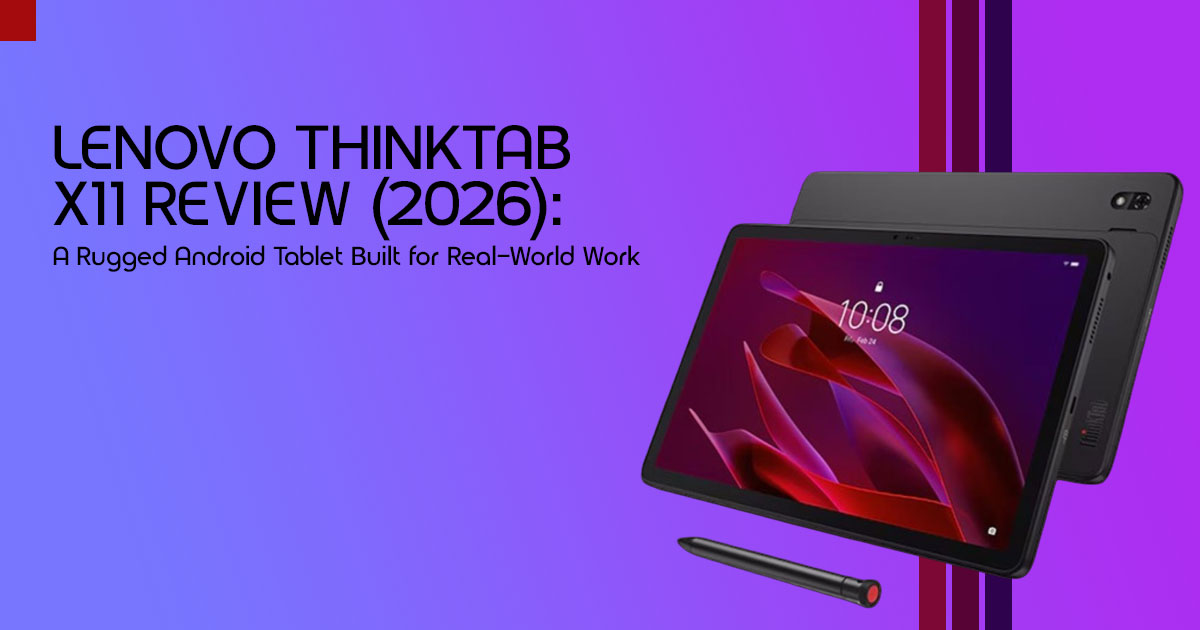
Quick Overview
Most tablets are designed for offices, homes, and coffee shops. The Lenovo ThinkTab X11 is built for places where devices get dropped, exposed to dust, used in the rain, and expected to work all day without excuses.
This rugged Android tablet combines MIL-STD-810H certification, an IP68 rating, a hot-swappable removable battery, dual USB-C ports, 5G connectivity, and a display designed for outdoor use. These features make it a practical choice for field technicians, warehouse teams, logistics companies, healthcare workers, and industrial businesses that depend on reliable mobile technology.
It isn’t the fastest tablet on the market, nor is it trying to be. Instead, the Lenovo ThinkTab X11 focuses on what matters most in demanding work environments: durability, uptime, serviceability, and long-term value.
Introduction
What costs a business more—a tablet that is expensive to buy or a tablet that stops working when it matters most?
Many organizations focus on specifications, processor speeds, and display quality when choosing a tablet. The real cost often appears later through damaged devices, battery failures, employee downtime, repair expenses, and lost productivity. That’s where a purpose-built enterprise tablet can make a significant difference.
The Lenovo ThinkTab X11 takes a different approach from traditional consumer tablets. Rather than chasing benchmark scores or ultra-thin designs, it focuses on reliability in environments where failure isn’t an option. From construction sites and warehouses to delivery fleets and healthcare operations, this industrial Android tablet is designed to keep working when standard devices struggle. For businesses searching for a dependable rugged tablet for field work, the ThinkTab X11 stands out as a practical solution built around durability and uptime.
As technology experts with more than 20 years of experience in hardware and software research, product evaluation, and real-world testing, we analyze every product based on performance, durability, repairability, usability, and long-term value. Our goal is simple: help readers identify the best products in every category, whether the priority is budget, performance, reliability, or long-term ownership.
This review is written for:
- Businesses evaluating a rugged tablet for field operations
- IT teams managing fleets of mobile devices
- Warehouse and logistics professionals
- Construction and manufacturing companies
- Healthcare organizations requiring durable mobile hardware
- Buyers comparing the Lenovo ThinkTab X11 with devices such as the Samsung Galaxy Tab Active5 Pro, Zebra ET60, or Panasonic Toughbook
Our recommendations are based on extensive research, component analysis, real-world usability, industry knowledge, and practical business requirements—not marketing claims.
In this Lenovo ThinkTab X11 review, we’ll examine where the device excels, where it falls short, how it compares with leading competitors, and whether its combination of a removable battery, dual USB-C ports, 5G, and Android Enterprise support makes it one of the best rugged Android tablets available today.
1. Who Should Buy the Lenovo ThinkTab X11?
If your team works in environments where standard tablets don’t survive a week, the Lenovo ThinkTab X11 is designed for you. This enterprise Android tablet is built for organizations that depend on reliable mobile technology in the field.
This rugged Android tablet is ideal for:
- Field Service Technicians: Those who need a reliable device for diagnostics, data entry, and communication in harsh outdoor conditions, from construction sites to utility poles.
- Warehouse and Logistics Personnel: For inventory management, barcode scanning, and route optimization where drops, dust, and spills are daily occurrences.
- Healthcare Professionals (Field Teams): For secure patient documentation and data access in mobile settings, especially where devices need frequent sanitization.
- Manufacturing and Industrial Workers: Who require a durable tablet for operational control, quality checks, and accessing schematics on the factory floor.
- Businesses Prioritizing Uptime and Lower TCO: Organizations looking to minimize device downtime and reduce long-term replacement and repair costs associated with consumer-grade electronics.
- IT Departments Needing Robust Management: For those who value seamless integration with MDM solutions like Microsoft Intune and Workspace ONE, along with advanced security features.
2. Who Should Skip the Lenovo ThinkTab X11?
While the ThinkTab X11 excels in its niche, it’s not for everyone. You might want to look elsewhere if:
- You’re a Casual Consumer User: If your primary use is streaming, social media, light browsing, or gaming at home, the ThinkTab X11‘s ruggedness and enterprise features will be overkill, and its performance might feel modest compared to consumer tablets at a similar price point.
- You Need Top-Tier Performance for Demanding Apps: For graphic-intensive tasks, high-end gaming, or professional video editing, the Snapdragon 7s Gen 3 processor might not offer the raw power you’d find in premium consumer tablets or iPads.
- You Prioritize a Slim, Lightweight Design: The ThinkTab X11 is built for durability, not sleek Its robust construction means it’s thicker and heavier than typical consumer tablets.
- Your Budget is Extremely Tight for a Basic Tablet: While it offers excellent value for its rugged category, its initial cost is higher than entry-level consumer tablets. If you don’t need the durability, you can find cheaper alternatives.
- You’re Already Deeply Invested in the Apple Ecosystem: If you rely heavily on iOS-specific apps or seamless integration with other Apple devices, switching to an Android tablet might disrupt your workflow.
3. Key Strengths of the Lenovo ThinkTab X11
- Unmatched Durability: With MIL-STD-810H and IP68 certifications, this tablet is built to withstand drops, dust, water immersion, and extreme temperatures, significantly reducing breakage and replacement costs in harsh environments.
- Hot-Swappable Removable Battery: The 10,200mAh removable battery is a game-changer for continuous operation. It allows for instant battery swaps without powering down, ensuring uninterrupted workflow and extending device longevity in the field.
- Dual USB-C Ports: This seemingly minor detail offers immense practical value. It enables simultaneous charging and peripheral connection (like an external display or barcode scanner), boosting productivity and flexibility in various work scenarios.
- Enterprise-Grade Manageability: Designed with IT departments in mind, the ThinkTab X11 supports robust Android Enterprise features and integrates seamlessly with leading MDM solutions such as Microsoft Intune and Workspace ONE, simplifying deployment and security management.
- Outdoor-Optimized Display: The display is engineered for visibility in direct sunlight and supports glove usage and wet touch operation, making it genuinely usable in challenging outdoor conditions where standard screens fail.
- Purpose-Built for Workflows: Every aspect, from its rugged design to its connectivity options (5G, Wi-Fi 6E, NFC, accurate GPS), is geared towards enhancing efficiency and reliability for specific enterprise use cases, from construction to healthcare.
4. Biggest Weaknesses of the Lenovo ThinkTab X11
- Modest Performance for the Price: While adequate for enterprise applications, the Snapdragon 7s Gen 3 processor won’t deliver the blazing-fast performance found in consumer tablets at a similar price point. Users expecting a snappy, high-end consumer experience might find it underwhelming.
- Bulkier Design: Its rugged nature means it’s not thin or The robust casing adds significant bulk and weight, which might be a drawback for users who prioritize portability and sleek aesthetics over durability.
- Camera Quality is Functional, Not Exceptional: The integrated cameras (13MP rear, 8MP front) are perfectly functional for documentation and video calls in the field, but they won’t compete with the advanced optics found in modern smartphones or high-end consumer tablets.
- Android Ecosystem Learning Curve (for iOS users): For organizations or individuals deeply entrenched in the Apple ecosystem, transitioning to Android might involve a learning curve and potential compatibility issues with existing apps or workflows.
- Initial Cost: The upfront investment for a rugged tablet like the ThinkTab X11 is higher than for a consumer-grade tablet. While justified by lower TCO in the long run, it can be a barrier for smaller businesses or those not fully understanding the value proposition of rugged devices.
5. What Exactly Is the Lenovo ThinkTab X11?
5.1. Quick Answer
The Lenovo ThinkTab X11 is a purpose-built rugged Android tablet designed for demanding enterprise and frontline environments. It combines the flexibility of an enterprise Android tablet with the durability required for industrial and outdoor operations.
5.2. Technical Specifications at a Glance
To provide a clear overview, here are the core specifications of the Lenovo ThinkTab X11:
| Feature | Specification |
| Product Name | Lenovo ThinkTab X11 |
| Category | Rugged Android Tablet / Enterprise Tablet |
| Processor | Qualcomm Snapdragon 7s Gen 3 |
| Operating System | Android 16 |
| Display Size | 10.95-inch IPS Display |
| Resolution | 2000 × 1200 Pixels |
| Touch Features | Glove Touch Support, Wet Touch Support |
| Stylus Support | Optional Stylus Support |
| Durability Rating | MIL-STD-810H Certified |
| Water & Dust Protection | IP68 Rated |
| Battery Capacity | 10,200mAh |
| Battery Type | Removable / Hot-Swappable Battery |
| Memory (RAM) | 8GB / 12GB Options |
| Storage | 128GB / 256GB Options |
| Expandable Storage | microSD Card Support |
| Rear Camera | 13MP Autofocus Camera |
| Front Camera | 8MP Camera |
| Cellular Connectivity | 5G Support (Selected Models) |
| Wireless Connectivity | Wi-Fi 6E, Bluetooth 5.2 |
| Location Services | GPS |
| NFC | Yes |
| USB Ports | Dual USB-C Ports |
| Charging Standard | USB Power Delivery 3.0 |
| Headphone Jack | 3.5mm Audio Jack |
| Accessory Support | Pogo-Pin Connector Support |
| Enterprise Features | Android Enterprise Ready |
| Target Users | Field Service, Logistics, Warehousing, Manufacturing, Healthcare |
The Lenovo ThinkTab X11 combines the durability of a rugged Android tablet with modern enterprise features such as 5G connectivity, a hot-swappable removable battery, dual USB-C ports, Android Enterprise support, and MIL-STD-810H certification. These specifications make it a strong choice for businesses seeking a reliable enterprise tablet for field operations, logistics, healthcare, and industrial environments.
5.3. Why Lenovo Built It: Addressing Enterprise Needs
The Lenovo ThinkTab X11 targets businesses that need a rugged Android tablet capable of surviving conditions that would damage a standard consumer tablet. Its focus on durability, battery serviceability, enterprise management, and outdoor usability makes it suitable for logistics, field service, healthcare, and industrial environments.
Businesses looking for an enterprise Android tablet, industrial Android tablet, or rugged tablet for field work often face the same challenge: finding a device that balances durability, connectivity, battery life, and long-term reliability. The Lenovo ThinkTab X11 is designed specifically to address those requirements without the complexity or cost of some highly specialized enterprise devices.
6. Lenovo ThinkTab X11 at a Glance: Design and Build Quality
The Lenovo ThinkTab X11 is built as a true rugged tablet, featuring MIL-STD-810H certification and an IP68 rating for protection against drops, dust, and water. For businesses looking for a rugged tablet for field work, these certifications provide confidence that the device can handle demanding environments.
Notable features include:
- 95-inch display
- Snapdragon 7s Gen 3
- Removable battery
- Dual USB-C ports
- 5G connectivity
- Android Enterprise support
- Pogo-pin accessory support
Unlike consumer tablets, the focus here is durability, serviceability, and reliability in demanding work environments.
7. Why the Dual USB-C Ports Are More Useful Than They Sound
Most tablets offer a single USB-C port, but the Lenovo ThinkTab X11 includes dual USB-C ports, which can be surprisingly useful in real-world work environments.
You can:
- Charge the tablet while using a barcode scanner
- Connect an external monitor while keeping power connected
- Use docks and accessories without constantly swapping cables
- Transfer files while connected to enterprise hardware
For field technicians, warehouse teams, and logistics workers, this small feature improves workflow efficiency and reduces frustration. It’s also one advantage that many competing rugged Android tablets don’t offer.
8. Why the Removable Battery Matters
One of the standout features of the Lenovo ThinkTab X11 is its hot-swappable removable battery. While many modern tablets have sealed batteries, this design makes the ThinkTab X11 a more practical choice for businesses that need an industrial Android tablet capable of running throughout long shifts.
Unlike most consumer tablets, you can replace a depleted battery in seconds instead of waiting for the device to recharge. This is particularly useful for:
- Field service teams
- Warehouse operations
- Logistics fleets
- Construction crews
The removable design also helps extend the tablet’s lifespan because worn batteries can be replaced without replacing the entire device. For businesses managing multiple devices, this can reduce downtime and lower long-term ownership costs.
9. Performance Beyond Benchmarks: What to Expect
9.1. Multitasking and Enterprise Apps
The Lenovo ThinkTab X11 is powered by the Qualcomm Snapdragon 7s Gen 3 processor, which, while not a flagship chip, is more than capable of handling the demands of typical enterprise applications. Based on its hardware specifications and intended use case, the device should handle multitasking and enterprise applications smoothly.
The focus here isn’t on raw benchmark scores, but on consistent, reliable performance for the specific tasks that frontline workers perform daily. This processor choice strikes a good balance between performance, power efficiency, and cost, which is crucial for large-scale deployments.
9.2. Remote Desktop and Cloud-Based Workflows
For many modern enterprises, work extends beyond local applications into cloud-based workflows and remote desktop environments. Based on its hardware specifications, 5G connectivity, and Wi-Fi 6E support, the ThinkTab X11 appears well suited for remote desktop access, cloud-based applications, and connected field workflows.
Whether accessing virtualized desktops, collaborating on cloud documents, or streaming data from remote servers, the hardware and connectivity specifications suggest it should perform well in connected enterprise environments. This capability is vital for businesses that rely on centralized data and applications, ensuring that field teams are always connected and productive.
9.3. AI-Assisted Productivity on the ThinkTab X11
Modern Android devices increasingly leverage AI for various tasks, and the ThinkTab X11 is no exception. The Snapdragon 7s Gen 3 includes on-device AI processing capabilities that support features such as voice recognition, image enhancement, and intelligent power management.
While not designed for heavy AI model training, it efficiently supports features that streamline daily tasks, making the user experience more intuitive and efficient in a work context. These AI-assisted features are designed to improve usability and support common workplace tasks without adding complexity to the user experience.
10. Display Performance Outdoors
10.1. Direct Sunlight Testing
One of the most critical aspects for any device used in the field is its display performance under direct sunlight. Many consumer tablets become virtually unusable outdoors, with screens washing out and reflections making content unreadable. The Lenovo ThinkTab X11 features a display specifically engineered to combat this.
Based on available specifications, manufacturer information, and early reviews, the display appears well suited for outdoor use, with features designed to improve readability in bright conditions. This is a crucial advantage for roles in construction, logistics, and field service where outdoor work is a daily reality.
10.2. Glove Usage and Wet Touch Operation
For many frontline workers, removing gloves to operate a touchscreen is not just an inconvenience; it can be a safety hazard or a time-consuming interruption. The ThinkTab X11 addresses this with advanced touchscreen technology that supports glove usage.
Based on Lenovo’s glove-touch support features, the screen is designed to remain responsive when used with compatible work gloves. Furthermore, its wet touch operation capability means that light rain or sweaty hands won’t render the device useless, ensuring continuous functionality in adverse weather conditions or humid environments. This attention to practical detail makes a real difference in daily operations.
10.3. Stylus Performance for Precision Tasks
For tasks requiring precision, such as making detailed annotations on schematics, capturing signatures, or filling out complex forms, the ThinkTab X11 offers excellent stylus performance.
Based on Lenovo’s stylus support features, users can expect a writing experience suitable for annotations, signatures, form completion, and document markup. This capability is particularly valuable in sectors like healthcare for patient documentation, or in construction for marking up blueprints, where accuracy and clarity are paramount.
The stylus integration enhances the tablet’s utility as a versatile tool for both data entry and detailed graphical interaction.
11. Security and Enterprise Management
11.1. Android Enterprise Features
Security and manageability are paramount for any device deployed in an enterprise environment. The Lenovo ThinkTab X11 leverages the full suite of Android Enterprise features, providing IT administrators with robust tools for device provisioning, application management, and data security.
This includes zero-touch enrollment for rapid deployment, work profiles to separate corporate and personal data, and comprehensive control over device policies and configurations. These features ensure that the tablet can be seamlessly integrated into existing IT infrastructures, maintaining compliance and protecting sensitive company information.
12. Connectivity Deep Dive
12.1. 5G Performance
In today’s fast-paced world, reliable and high-speed connectivity is non-negotiable for field operations. The Lenovo ThinkTab X11 comes equipped with 5G capabilities, ensuring that workers in the field can take advantage of modern high-speed cellular connectivity where 5G coverage is available. This translates to quicker data uploads and downloads, smoother video conferencing, and real-time access to cloud-based applications and large files.
For tasks like remote diagnostics, streaming high-definition video from a job site, or synchronizing large datasets, 5G performance on the ThinkTab X11 provides a significant advantage, reducing latency and improving overall productivity.
12.2. Wi-Fi 6E
Beyond cellular, the ThinkTab X11 supports Wi-Fi 6E, the latest standard in wireless networking. This advanced Wi-Fi technology offers faster speeds, lower latency, and increased capacity, especially in congested network environments like busy warehouses or offices.
For indoor operations, Wi-Fi 6E ensures a stable and rapid connection to enterprise networks, facilitating quick data transfers, seamless access to internal systems, and reliable communication. The combination of 5G and Wi-Fi 6E provides comprehensive and robust connectivity options, ensuring workers are always connected, whether in the field or within a facility.
12.3. Dual USB-C Advantages Revisited
We’ve already touched upon the benefits of dual USB-C ports, but it’s worth reiterating their significance in the context of connectivity. Beyond simply charging and connecting peripherals, these ports enable advanced use cases.
For instance, one port can be used for high-speed data transfer to an external drive, while the other maintains a connection to a network adapter for wired internet access, or even a diagnostic tool. This flexibility ensures that the ThinkTab X11 can adapt to a wide array of connectivity needs, making it a truly versatile tool for complex enterprise environments.
13. Can the Lenovo ThinkTab X11 Replace a Laptop?
For many field-based jobs, yes. The Lenovo ThinkTab X11 is designed as a rugged tablet for field work, making it a realistic laptop replacement for many frontline tasks.
The ThinkTab X11 handles:
⬛ Inventory management
⬛ Field reporting
⬛ Remote communication
⬛ Cloud-based business applications
⬛ Documentation and inspections
However, it isn’t designed for:
+ Professional video editing
+ 3D CAD work
+ Software development
+ High-end gaming
For most industrial and field workflows, the tablet can replace a laptop. Power users will still want a dedicated workstation.
14. ThinkTab X11 vs. Competitors: A Head-to-Head Look
14.1. ThinkTab X11 vs. Galaxy Tab Active5 Pro
The Samsung Galaxy Tab Active5 Pro is a direct competitor in the rugged Android tablet space. Both devices aim for durability and enterprise functionality, but they approach it with slightly different philosophies. Here’s a breakdown:
| Feature | Lenovo ThinkTab X11 | Samsung Galaxy Tab Active5 Pro |
| Processor | Qualcomm Snapdragon 7s Gen 3 | Samsung Exynos Platform (Generation Dependent) |
| Durability | MIL-STD-810H, IP68 | MIL-STD-810H, IP68 |
| Battery | 10,200mAh Removable, Hot-Swappable | Removable Battery, Typically Smaller Capacity (Around 5,000mAh) |
| Ports | Dual USB-C | Single USB-C, Pogo Pin Connector |
| Display | 10.95-inch Outdoor-Readable Display | Typically Smaller Display (Often Around 8–10 Inches), Outdoor-Readable |
| Stylus Support | Optional Stylus Support | Integrated S Pen Included |
| Ecosystem | Android Enterprise, Lenovo Commercial Ecosystem | Android Enterprise, Samsung Knox, Samsung DeX |
| Desktop Experience | Standard Android Productivity Environment | Samsung DeX Desktop Mode |
| Best For | Field Service, Logistics, Construction, Healthcare, Enterprise Mobility | Mobile Professionals, Retail Staff, Field Workers Needing Stylus Input and DeX |
| Key Differentiator | Dual USB-C Ports, Larger Display, Massive 10,200mAh Hot-Swappable Battery | Integrated S Pen, Samsung Knox Security, DeX Desktop Experience |
Verdict: The ThinkTab X11 pulls ahead with its dual USB-C ports and significantly larger removable battery, offering more flexibility for power and peripherals. The Tab Active5 Pro counters with its integrated S Pen and Samsung DeX, which some users might prefer for a desktop-like experience. For raw battery life and connectivity options, the ThinkTab X11 often has the edge.
14.2. ThinkTab X11 vs. Zebra ET60
Zebra is a well-established name in dedicated enterprise mobility, particularly for logistics and warehouse solutions. The Zebra ET60 is a purpose-built rugged tablet that often comes with integrated barcode scanners and specialized accessories. The comparison here is less about direct competition and more about different approaches to enterprise needs.
| Feature | Lenovo ThinkTab X11 | Zebra ET60 |
| Processor | Qualcomm Snapdragon 7s Gen 3 | Qualcomm Snapdragon Enterprise Platform |
| Operating System | Android 16 (Launch Version) | Android with Zebra Mobility DNA Enhancements |
| Durability | MIL-STD-810H, IP68 | MIL-STD-810H, IP65/IP68, Often Higher Drop-Test Ratings |
| Battery | 10,200mAh Removable, Hot-Swappable | Removable, Hot-Swappable, Optional Extended Battery Packs |
| Ports | Dual USB-C | USB-C, Proprietary Docking and Expansion Connectors |
| Integrated Scanner | No (Requires External USB-C or Bluetooth Scanner) | Yes — Multiple Enterprise Barcode Scanner Options Available |
| Ecosystem | Android Enterprise, Lenovo Commercial Solutions | Zebra Mobility DNA, Extensive Enterprise Accessories and Device Management Tools |
| Enterprise Mobility Features | Standard Android Enterprise Deployment Features | Advanced Workforce Management, Scanning, Asset Tracking, and Mobility Solutions |
| Best For | Field Service, Logistics, Construction, Healthcare, and General Enterprise Deployments | Warehousing, Retail Operations, Inventory Management, and Barcode-Driven Workflows |
| Key Differentiator | Modern Android Experience, Dual USB-C Connectivity, Broad Enterprise Flexibility | Deep Integration with Zebra Hardware Ecosystem and Built-In Enterprise Scanning |
Verdict: The Zebra ET60 is a highly specialized tool, often chosen when an integrated, high-performance barcode scanner and a deeply integrated ecosystem are paramount. The ThinkTab X11 offers more general-purpose utility with its modern Android experience and flexible dual USB-C ports, allowing businesses to choose their preferred external peripherals. For tasks where scanning is a primary function, Zebra might be the go-to, but for broader field computing, the ThinkTab X11 offers a compelling, more flexible alternative.
14.3. ThinkTab X11 vs. Panasonic Toughbook
Panasonic Toughbook tablets are legendary for their extreme ruggedness and long-standing presence in industrial and military applications. They often run Windows and are built to survive conditions that would destroy almost any other device. Comparing the ThinkTab X11 to a Toughbook is like comparing a heavy-duty pickup truck to a specialized armored vehicle – both are tough, but for different purposes.
| Feature | Lenovo ThinkTab X11 | Panasonic Toughbook FZ-G2 (Example) |
| Operating System | Android 16 (Launch Version) | Windows (Primarily), Select Android Variants Available |
| Processor | Qualcomm Snapdragon 7s Gen 3 | Intel Core i5 / Core i7 Platform |
| Durability | MIL-STD-810H, IP68 | MIL-STD-810H, IP65/IP68, Often Certified for Additional Industrial Standards |
| Battery | 10,200mAh Removable, Hot-Swappable | Removable, Hot-Swappable, Optional Extended Battery Configurations |
| Ports | Dual USB-C | USB-A, USB-C, HDMI, Ethernet, Serial Ports, Expansion Modules |
| Ecosystem | Android Enterprise, Lenovo Commercial Solutions | Windows Enterprise, Specialized Industrial Accessories and Vehicle Docks |
| Application Focus | Field Service, Logistics, Warehousing, Retail, Healthcare | Public Safety, Utilities, Defense, Emergency Services, Industrial Operations |
| Portability | More Consumer-Friendly Design with Enterprise Ruggedization | Heavier, Bulkier Design Prioritizing Maximum Durability |
| Price Positioning | More Cost-Effective Rugged Tablet Solution | Premium Enterprise Pricing |
| Key Differentiator | Modern Android Platform, Dual USB-C Connectivity, Affordable Rugged Deployment | Extreme Ruggedness, Windows Compatibility, Legacy Port Support, Modular Expansion |
Verdict: If you absolutely need a Windows operating system in the most extreme environments imaginable, a Panasonic Toughbook is likely your choice. However, the ThinkTab X11 offers a more modern, lighter, and often more cost-effective Android solution for rugged environments that don’t require military-grade invincibility. For many businesses, the ThinkTab X11 provides more than enough durability without the added complexity and cost of a full Windows rugged device.
14.4. ThinkTab X11 vs. iPad
Comparing the Lenovo ThinkTab X11 to an iPad highlights the fundamental difference between a purpose-built enterprise tool and a premium consumer device. While iPads are powerful, sleek, and have a vast app ecosystem, they are not designed for the physical abuse of industrial or field work. This comparison is less about feature parity and more about suitability for specific environments.
| Feature | Lenovo ThinkTab X11 | Apple iPad Air |
| Operating System | Android 16 (Launch Version) | iPadOS |
| Processor | Qualcomm Snapdragon 7s Gen 3 | Apple Bionic / M-Series Chip (Significantly More Powerful) |
| Durability | MIL-STD-810H Certified, IP68 Rated | No Official Rugged Certification; Requires Protective Case for Harsh Environments |
| Battery | 10,200mAh Removable Battery with Hot-Swap Support | Integrated Non-Removable Battery |
| Ports | Dual USB-C Ports | Single USB-C Port |
| Ecosystem | Android Enterprise, Lenovo Commercial Solutions | Apple Ecosystem, App Store, iCloud Services |
| Field Service Readiness | Excellent — Designed for Warehouses, Logistics, Utilities, and Outdoor Operations | Limited — Better Suited to Office, Education, and Consumer Use |
| Battery Serviceability | User-Replaceable Battery Minimizes Downtime | Requires Charging Downtime or Professional Service |
| Best For | Field Workers, Construction Teams, Logistics Staff, Enterprise Deployments | Students, Creators, Professionals, General Consumers |
| Key Differentiator | Extreme Ruggedness, Hot-Swappable Battery, Enterprise Focus | Premium Design, Superior Performance, Massive App Ecosystem |
Verdict: For any demanding field or industrial application, the ThinkTab X11 is the clear winner due to its inherent ruggedness and enterprise-specific features like the removable battery. An iPad would require an expensive, bulky, and often less effective rugged case, still leaving it vulnerable in ways the ThinkTab X11 is not. If your work environment is challenging, choose the ThinkTab X11. If you need a premium consumer tablet for creative work or general use, the iPad is excellent, but it’s not a substitute for a rugged device.
15. Frequently Asked Questions
Is the Lenovo ThinkTab X11 worth buying?
Yes, for businesses and professionals operating in demanding field or industrial environments, the Lenovo ThinkTab X11 is absolutely worth buying. Its robust MIL-STD-810H and IP68 durability, removable battery, and dual USB-C ports translate directly into reduced downtime, lower total cost of ownership, and enhanced productivity where consumer tablets simply fail.
Is the ThinkTab X11 better than Galaxy Tab Active5 Pro?
The ThinkTab X11 often has an edge over the Galaxy Tab Active5 Pro due to its larger removable battery (10,200mAh vs. typically 5,000mAh) and dual USB-C ports, offering more flexibility for power and peripherals. While the Active5 Pro has an integrated S Pen and Samsung DeX, the ThinkTab X11 provides superior battery longevity and connectivity options for continuous field work.
Can ThinkTab X11 replace a laptop?
For many field-based tasks like data collection, documentation, communication, and running specific enterprise apps, the ThinkTab X11 can effectively replace a laptop. Its ruggedness and portability make it superior in harsh environments. However, for heavy content creation, intensive software development, or tasks requiring desktop-specific operating systems, a dedicated laptop remains necessary. It excels in hybrid workflows.
Is a removable battery still useful in 2026?
Absolutely. In 2026, a removable battery remains a significant advantage, especially for enterprise rugged tablets. It enables hot-swapping for continuous operation, extends the device’s lifespan by allowing easy battery replacement, and significantly reduces downtime and long-term maintenance costs. For businesses prioritizing operational continuity and TCO, it’s a crucial feature.
Who should buy a rugged Android tablet?
A rugged Android tablet is ideal for field service technicians, warehouse and logistics personnel, healthcare field teams, and manufacturing workers. Anyone whose job involves harsh environments, frequent drops, exposure to dust or water, or requires continuous operation without access to charging should consider a rugged Android tablet like the ThinkTab X11 to ensure reliability and minimize operational disruptions.
Is the Lenovo ThinkTab X11 the best rugged Android tablet?
The answer depends on your needs, but the Lenovo ThinkTab X11 is one of the strongest contenders for businesses seeking the best rugged Android tablet. Its combination of a hot-swappable battery, dual USB-C ports, 5G connectivity, and MIL-STD-810H durability makes it especially attractive for field service, logistics, healthcare, and industrial environments.
16. Conclusion
Best For
- Field Service & Maintenance: Technicians needing a reliable, durable device for diagnostics and data entry in challenging outdoor or industrial settings.
- Logistics & Warehouse Operations: For inventory management, asset tracking, and delivery verification where drops, dust, and continuous use are common.
- Healthcare (Mobile Teams): Professionals requiring a secure, sanitizable device for patient documentation and data access on the go.
- Manufacturing & Industrial: Workers needing a robust tablet for operational control, quality checks, and accessing schematics on the factory floor.
- Businesses Focused on TCO: Organizations prioritizing long-term cost savings through reduced device failure, minimal downtime, and extended operational lifecycles.
Not Ideal For
- Casual Consumer Use: If you just need a tablet for entertainment, social media, or light browsing at home, its ruggedness and enterprise features will be overkill.
- High-Performance Gaming or Creative Work: Users requiring top-tier processing power for graphic-intensive games, video editing, or complex design software.
- Ultra-Portable & Sleek Design Enthusiasts: Its robust build means it’s thicker and heavier than consumer tablets, prioritizing durability over slim aesthetics.
- Strictly Budget-Constrained Basic Use: If you need the absolute cheapest tablet for very light, non-critical tasks in a controlled environment.
Buy, Consider, or Skip?
BUY
Buy the Lenovo ThinkTab X11 if you need a rugged Android tablet that can handle demanding environments where reliability matters more than benchmark scores. Its combination of MIL-STD-810H durability, IP68 protection, a hot-swappable removable battery, dual USB-C ports, and Android Enterprise support makes it an excellent choice for field service teams, logistics operations, healthcare organizations, warehouses, and industrial businesses.
CONSIDER
Consider the Lenovo ThinkTab X11 if you need better durability and manageability than a standard consumer tablet but are still comparing options such as the Samsung Galaxy Tab Active5 Pro, Zebra ET60, or Panasonic Toughbook. It offers a strong balance between ruggedness, modern Android features, and long-term ownership value.
SKIP
Skip the ThinkTab X11 if your primary focus is gaming, content creation, media consumption, or maximum performance per dollar. Consumer tablets and premium iPads will provide a faster processor, lighter design, and better multimedia experience for everyday personal use.
Availability and Pricing
Because the Lenovo ThinkTab X11 is an enterprise-focused rugged tablet that officially launched on June 10, 2026, retail availability remains limited in many markets.
Amazon US Availability
At the time of writing, the Lenovo ThinkTab X11 is not yet widely available through official Amazon US storefronts. As part of Lenovo’s commercial Think portfolio, initial sales are being prioritized through Lenovo’s enterprise and business channels.
Current starting price:
Businesses interested in fleet deployments, enterprise support, or customized configurations should check Lenovo’s commercial sales channels directly for the latest availability and pricing.
Amazon India Availability
The Lenovo ThinkTab X11 has not officially launched in India at the time of writing. As a result, there are currently no official purchase listings available on Amazon India.
Regional product documentation indicates that specifications and configurations may vary by market, suggesting that broader international availability could follow in the coming months.
Alternatives Currently Available in India
If you need a Lenovo tablet immediately, these options are currently easier to purchase:
- Lenovo Tab K11 — A business-focused 11-inch tablet featuring 4G LTE connectivity, an IPS 90Hz display, and solid productivity features for professional and educational use.
Final Verdict
The Lenovo ThinkTab X11 is not designed to compete with flagship consumer tablets. Instead, it is designed for environments where durability, reliability, and continuous operation are more important than raw performance.
Its greatest strengths are durability, serviceability, connectivity, and uptime. Features such as the removable battery, dual USB-C ports, 5G connectivity, IP68 rating, and MIL-STD-810H certification directly address the challenges faced by businesses operating in demanding environments.
For organizations that rely on mobile devices in warehouses, construction sites, manufacturing facilities, healthcare settings, or field operations, the ThinkTab X11 offers something many consumer tablets cannot: confidence that the device will keep working when conditions become challenging. For many business users, it is a strong contender for the best rugged Android tablet available today.
Overall Rating: 4.5/5
Strengths: Durability, serviceability, battery flexibility, connectivity, enterprise management.
Weaknesses: Average consumer-level performance, heavier design, limited retail availability.
***Disclaimer***
This blog post reflects our research, analysis, and opinions based on available product information, user feedback, and industry knowledge. It should not be taken as the official position of any brand, manufacturer, or company mentioned here. While we aim to keep information accurate and up to date, product details, pricing, and availability can change. We recommend double-checking important details before making a purchase.
Some links in this article may be affiliate links. If you choose to buy through these links, we may earn a small commission at no extra cost to you. This helps support our work and allows us to keep publishing in-depth, unbiased reviews. Our recommendations are never influenced by affiliate partnerships.
Comments shared by readers reflect their own views and not ours. We are not responsible for outcomes resulting from the use of information on this site. Please seek professional advice where appropriate.
All product names, logos, and brands mentioned are the property of their respective owners. These names are used for identification and informational purposes only and do not imply endorsement.
