
Introduction: The Evolution of Gaming Control
You’re in the middle of a match. You need to switch audio, trigger a macro, and jump back into the game—all in seconds. Instead, you’re alt-tabbing, clicking through menus, and losing focus. That small delay? It costs you.
This is the gap modern gaming control setups are trying to fix. What used to be a simple keyboard and mouse setup has turned into something much more layered. Now we have programmable controls, macro pads, and even touchscreen interfaces designed to keep everything within arm’s reach. The goal is simple: less friction, faster control, and a cleaner desk.
The Turtle Beach Command Series steps right into this space.
Note: This appears to be a concept or early-stage product, so final specs, features, and pricing may change once officially released.
It adds integrated touchscreens directly into your setup, aiming to replace or reduce the need for extra devices. Sounds smart. But the real question is—does it actually make things easier, or does it just add another layer to manage?
If you’re searching for a touchscreen gaming mouse or a Stream Deck alternative, this guide will help you decide if it’s worth it.
Why User Reviews Matter More Than Ever
On paper, most gaming accessories sound impressive. But real value shows up only when people start using them daily.
- Do the touch controls actually save time?
- Are they reliable during intense gameplay?
- Or do they become something you stop using after a week?
That’s where real-world user feedback matters. It reveals what specs and marketing don’t— usability, comfort, and long-term value.
Who This Is For
This guide is built for:
- Gamers who want faster, distraction-free control
- Streamers managing multiple tools at once
- Content creators juggling shortcuts, audio, and workflows
- And anyone trying to build a clean, efficient desk setup
Our Approach (Why You Can Trust This)
As technology experts with over 20 years of experience in hardware and application research and development, we look beyond surface-level specs. We test how products behave in real conditions—how they hold up over time, how easy they are to use, and whether they’re worth your money.
Our goal is simple: help you find the best product for your needs—whether that’s budget, performance, reliability, or long-term use. Every recommendation here is based on hands- on analysis, component-level understanding, and practical usability, not marketing claims.
What You Will Learn From This Review:
- A clean breakdown of what the Turtle Beach Command Series is and how its touchscreen technology works.
- Who stands to benefit most from these devices, and who might be better off sticking to traditional setups.
- Real-world scenarios demonstrating how these peripherals integrate into daily gaming and creative tasks.
- A candid comparison against popular alternatives like Stream Decks and macro keyboards.
- The genuine advantages and the often-unspoken downsides of touchscreen integration.
- Our final verdict on whether this represents a true innovation or just a fancy add-on.
1. What the Turtle Beach Command Series Actually Is: A Clean Breakdown
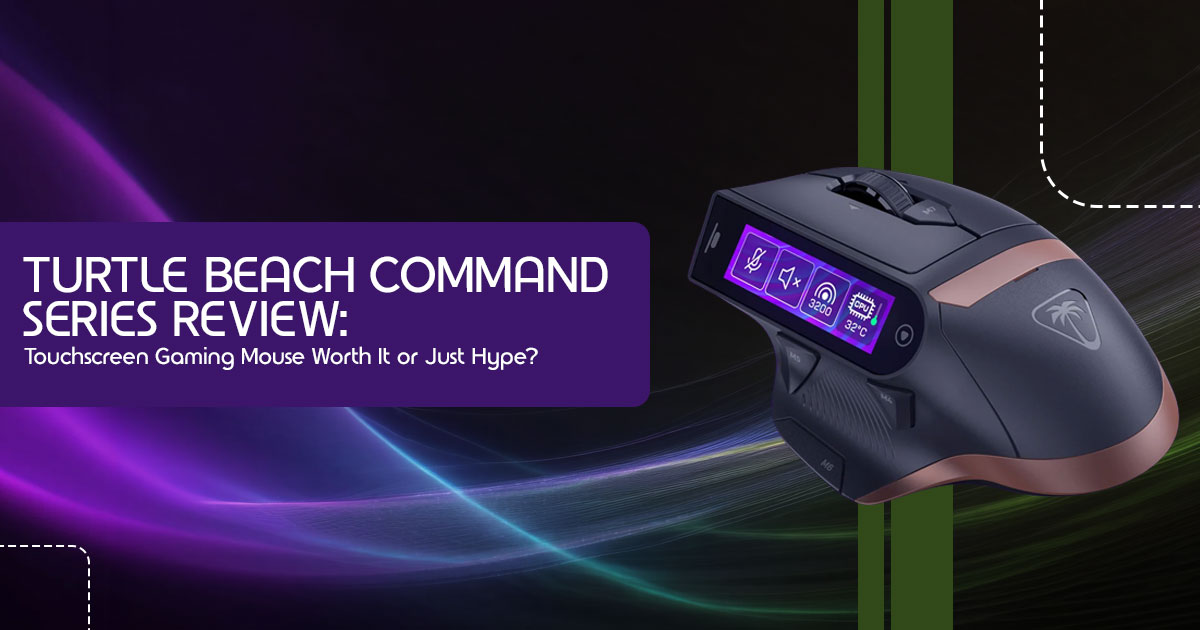
At its core, the Turtle Beach Command Series is a new line of gaming peripherals— specifically mice and keyboards— that integrate small, customizable touchscreens directly into their design. The standout here is the MC7 Gaming Mouse, which features a 2.25-inch Command Touch Display right on its body. Imagine having a mini control panel built into your mouse, allowing you to adjust settings, trigger macros, and manage applications without ever needing to alt-tab or reach for a separate device.
This isn’t just for display—it’s built for control. The idea is to streamline your digital workspace, putting critical functions literally at your fingertips. Whether it’s changing your mouse’s DPI, switching profiles, launching a specific app, or even controlling your OBS streaming software, the touchscreen aims to make these actions instant and intuitive. It’s an ambitious step towards a more integrated and less cluttered desktop experience.
2. Who This Is Really For (And Who Should Skip It)
Understanding if the Turtle Beach Command Series is right for you means looking beyond the hype and considering your actual needs and habits. This technology isn’t a one-size-fits- all solution.
Best Fit:
- Streamers and Content Creators: If you’re constantly managing OBS scenes, adjusting audio levels, interacting with chat, or triggering overlays mid-stream, the integrated touchscreen can be a game-changer. It offers quick access to controls without breaking your focus from the main screen.
- Competitive Gamers: For those who demand lightning-fast reactions and precise control, the ability to instantly switch DPI, activate macros, or change game settings without interrupting gameplay could provide a crucial competitive The MC7 is described with features like 8K polling and optical switches, aimed at high- performance use.
- Multitasking Professionals: Beyond gaming, anyone who juggles multiple applications, custom shortcuts, or needs quick access to productivity tools could find value. Imagine launching editing software macros or managing communication apps with a tap.
Not Ideal For:
- Casual Gamers: If your gaming sessions are more relaxed and you don’t require intricate control schemes or constant adjustments, the added complexity and cost might not be A standard gaming mouse and keyboard will likely suffice.
- Minimalist Setups: For users who prefer a clean, uncluttered desk with minimal distractions, the integrated screen might feel like an unnecessary The focus here is on simplicity, not advanced functionality.
- Tactile Feedback Enthusiasts: A significant aspect of traditional gaming peripherals is the physical feedback from buttons and switches. If you rely heavily on that tactile response for confirmation and precision, the touchscreen’s lack of physical buttons could be a drawback.
3. How It Would Work in Real Life: Imagining the Workflow
Let’s paint some real-world scenarios to illustrate how the Turtle Beach Command Series could genuinely enhance your daily digital life. This is where it starts to feel useful.
- Seamless Streaming: Picture this: you’re live on Twitch, and a crucial moment in your game is With a quick glance and tap on your mouse’s screen, you can switch OBS scenes to a highlight reel, mute your microphone for a quick cough, or adjust your game audio without ever leaving the action. No more fumbling with hotkeys or tabbing out, which can disrupt your flow and audience engagement.
- Instant Gaming Adjustments: In a heated competitive match, you might need to quickly lower your mouse DPI for a precise sniper shot, then raise it back for rapid movement. The Command Touch Display allows for on-the-fly DPI adjustments, giving you granular control exactly when you need it. Similarly, activating complex in-game macros becomes a single tap, rather than a sequence of key presses.
- Productivity Powerhouse: Beyond gaming, imagine using the touchscreen to launch your most-used applications, control media playback, or execute custom shortcuts for video editing For example, a single tap could apply a specific color grade in Adobe Premiere Pro or open your project management tool. It’s about reducing friction and keeping your hands on the mouse, where they’re most efficient.
These scenarios highlight the core promise: a more fluid, integrated experience where your tools adapt to your needs, rather than the other way around. It’s about making your digital life feel less like a series of separate tasks and more like a cohesive, responsive flow.
4. How It Compares to What People Already Use
A dedicated control setup isn’t new. What’s different here is where the controls live.
Most tools—like Stream Decks or macro pads—sit beside your keyboard. You reach for them when needed. The Turtle Beach Command Series takes a different route by putting those controls directly on your mouse.
That small shift changes how you interact with everything.
Instead of moving your hand away or relying on memory, you get visual controls right under your fingers. Compared to:
- Stream Deck-style controllers → strong visual feedback, but takes up desk space
- Macro keyboards → fast and reliable, but you need to memorize layouts
- Software overlays → flexible, but often slow and distracting
The Command Series tries to combine all three into one system.
And that’s the real idea here—not replacing everything, but reducing how many tools you need at once.
5. What Makes It Genuinely Useful
Specs look good on paper. But what actually matters is how it feels to use every day.
Here’s where this setup can genuinely help:
1. Less Hand Movement, More Focus
Your hand stays on the mouse. That’s the biggest win.
No reaching for another device. No quick glances away. You stay locked in—whether you’re gaming or editing.
2. One Device Instead of Three
This setup tries to replace:
- a macro pad
- a stream controller
- and some software shortcuts
That means fewer tools on your desk and less switching between them.
It won’t replace everything for everyone—but it cuts down the clutter.
3. Controls That Change With What You’re Doing
This is where touchscreen actually makes sense. Your controls can shift depending on the app:
- Gaming → DPI, macros, quick actions
- Streaming → OBS, audio, scenes
- Work → shortcuts, apps, media
Instead of fixed buttons, you get context-based controls. And that can save time once you get used to it.
6. The Real Downsides No One Talks About
This idea sounds great—but it’s not perfect. And these downsides matter more than the features.
1. No Physical Feedback
You don’t feel a button press. And that’s a big deal.
For many gamers, that physical click builds muscle memory. With a touchscreen, you rely only on visuals.
That can lead to:
- missed inputs
- accidental taps
- slower reactions at first
2. Takes Time to Set Up Properly
Out of the box, it won’t feel magical. To get real value, you’ll need to:
-
- create profiles
- assign macros
- customize layouts
If you skip that, you won’t use half of what it offers.
3. Heavy Dependence on Software
Everything runs through software.
If the software:
- crashes
- lags
- or isn’t updated
your experience drops fast.
That’s the trade-off with smart features—you rely more on stability.
4. Smudges, Glare, and Small Friction
Not a deal-breaker, but still annoying.
- fingerprints build up quickly
- glare can affect visibility
- small screens aren’t always easy to read mid-game These don’t ruin the experience—but you’ll notice them.
7. The Big Question: Is This Innovation or Just a Fancy Add-On?
This is the core philosophical question surrounding the Turtle Beach Command Series. Does it fundamentally change how we interact with our computers, or is it simply a novel feature that doesn’t truly revolutionize the experience?
We believe it’s a bit of both. The integration of a touchscreen directly into a mouse, as seen with the MC7, is undeniably an innovation in peripheral design. It pushes the boundaries of what a mouse can be, transforming it from a mere pointing device into a dynamic control hub. It addresses a real problem for power users: the need for more immediate, contextual control without adding more physical clutter to their desks.
However, for many, it might feel like a fancy add-on. Will the average user fully utilize all multiple programmable functions or constantly tweak OBS settings from their mouse?
Probably not. For those with simpler needs, the existing solutions (hotkeys, basic macro pads) are often sufficient and more cost-effective. The true innovation lies in its potential to consolidate and streamline, but its impact will vary greatly depending on the user’s workflow and demands.
8. Expected Pricing & Market Position
The Turtle Beach Command Series MC7 Gaming Mouse is positioned as a premium peripheral, reflecting its advanced features and integrated technology. Based on early information, the expected price is around $159.99, it sits at the higher end of the gaming mouse market. This pricing strategy places it in direct competition with other high- performance gaming mice and dedicated control surfaces like the Elgato Stream Deck.
| Product / Category | Typical Price Range (USD) | Key Differentiator |
| Turtle Beach MC7 Mouse | $160 | Integrated touchscreen, 8K polling, hot-swappable batteries |
| High-End Gaming Mice | $100 – $180 | Advanced sensors, wireless tech, customizable buttons |
| Elgato Stream Deck Mini | $80 – $100 | Dedicated physical LCD buttons for macros/streaming |
| Elgato Stream Deck MK.2 | $150 – $180 | More physical LCD buttons, customizable |
| Macro Keypads | $30 – $80 | Basic programmable physical buttons |
The MC7’s value proposition hinges on its ability to combine the functions of a top-tier gaming mouse with a compact control surface, potentially negating the need for a separate Stream Deck for some users. The discussion then becomes one of value versus cost: is the convenience and integration worth the premium price, especially when compared to acquiring separate, specialized devices?
9. Where This Trend Is Headed: The Future of Desk Control
The Turtle Beach Command Series is more than just a product; it’s a glimpse into a broader trend in peripheral design. We’re seeing a clear move towards more intelligent, integrated, and adaptable input devices. Here’s where we believe this trend is headed:
- Rise of Touch-Based Desk Interfaces: Expect to see more peripherals, not just mice and keyboards, incorporating touchscreens. This could extend to monitor bases, desk mats, or even integrated into desk surfaces themselves, creating a truly interactive workspace.
- Deeper Integration with AI Assistants and Automation: The current touchscreens offer macro and app control. The next logical step is seamless integration with AI assistants, allowing voice commands and complex automation routines to be triggered directly from these Imagine asking your mouse to summarize your last stream or initiate a complex multi-application workflow.
- Future of Hybrid Input Devices: The line between physical and digital controls will continue to We might see devices that offer dynamic tactile feedback on touchscreens, combining the best of both worlds – the versatility of touch with the reassuring feel of physical buttons.
This evolution is driven by the desire for efficiency and personalization. As our digital lives become more complex, our tools must become smarter and more intuitive to manage that complexity.
10. Setup & Customization Potential: What Users Should Expect
Getting the most out of the Turtle Beach Command Series will depend heavily on its software ecosystem. The Swarm™ II Software is the central hub for customization, and its capabilities will define the user experience.
- Software Ecosystem Importance: A powerful and intuitive software suite is paramount. It needs to allow for easy creation of profiles, assignment of macros, and personalization of the touchscreen interface. The ability to link profiles to specific games or applications, automatically changing the screen layout, will be a key feature.
- Profiles, Macros, and Personalization: Users should expect to be able to create multiple profiles for different games, applications, or even different tasks (e.g., gaming, streaming, video editing). Within these profiles, the ability to assign complex macros, launch applications, control media, and adjust system settings will be The visual customization of the touchscreen, including icons and layouts, will also play a significant role in user satisfaction.
- Ease of Setup vs. Complexity: While the initial setup might be straightforward, unlocking the full potential of these devices will require an investment of time in customization. The software needs to strike a balance between offering deep functionality and maintaining an accessible user A steep learning curve could deter many users from fully utilizing the device.
11. Quick Pros & Cons (Fast Scan Section)
For those who need a rapid overview, here’s a summary of the key advantages and disadvantages of the Turtle Beach Command Series.
| Pros | Cons |
| Faster access to controls | Lack of tactile feedback |
| Cleaner workflow and reduced desk clutter | Potential for accidental touches |
| Multi-function device (mouse + control) | Steep learning curve for customization |
| Enhanced focus on the main screen | Fingerprints and potential screen glare |
12. Final Verdict: Should You Care About This?
The Turtle Beach Command Series represents a bold step into the future of gaming peripherals, particularly with its integrated touchscreen technology. It’s not just an incremental upgrade; it’s a re-imagining of how we interact with our digital command centers.
Who should be excited?
If you’re a dedicated streamer, a competitive gamer seeking every possible advantage, or a content creator who thrives on efficiency and streamlined workflows, then the Turtle Beach Command Series is definitely worth your attention. The promise of instant, visual control without breaking focus or adding desk clutter is a compelling one. It offers a different approach for those who feel limited by traditional input methods and are ready to embrace a more integrated, dynamic control experience.
Who can ignore it?
Casual gamers or those who prioritize tactile feedback above all else might find the Turtle Beach Command Series to be an unnecessary luxury. If your current setup meets your needs and you’re not constantly juggling multiple applications or complex macros, then the benefits might not outweigh the premium price and the adjustment to a touchscreen interface.
Ultimately, the Turtle Beach Command Series is a glimpse into what’s possible when innovation meets the evolving demands of the modern digital user. It’s a product that asks you to reconsider your relationship with your peripherals, offering a powerful, albeit different, path to control. Whether it becomes an essential tool or remains a niche luxury will depend on individual needs and the continued refinement of its software ecosystem.
Quick Summary (For Fast Readers)
- What it is: A new line of gaming peripherals, like the Turtle Beach MC7 Gaming Mouse, featuring integrated, customizable touchscreens for dynamic control.
- Who it’s for: Streamers, competitive gamers, and multitasking creators seeking faster, more integrated control and a cleaner desk.
- Biggest advantage: Puts critical controls directly on your mouse, reducing hand movement and keeping your focus on the screen, acting as a multi-function device.
- Biggest drawback: Lack of tactile feedback and a learning curve for customization.
- Final take: A genuine innovation for power users, but potentially a fancy add-on for casual users. It’s a significant step towards the future of hybrid input devices.
13. People Also Ask (PAA)
1. Are touchscreen gaming mice good for competitive play?
- For competitive play, the Turtle Beach Command Series MC7 offers advantages like on-the-fly DPI adjustments and instant macro activation, which can be However, the lack of tactile feedback might require an adjustment period for some players who rely on physical button presses for muscle memory.
2. How does the Turtle Beach Command Series compare to an Elgato Stream Deck?
- The Turtle Beach Command Series integrates a touchscreen directly into the peripheral (e.g., mouse), offering a more consolidated solution and saving desk space. An Elgato Stream Deck is a separate device with physical LCD buttons. Both offer customizable controls for streaming and productivity, but the Command Series aims for a more integrated, less cluttered approach.
3. What are the main benefits of a touchscreen on a gaming mouse?
- The main benefits include faster access to controls (DPI, profiles, macros, app launches, OBS control), a cleaner workflow by reducing the need for separate devices, and dynamic, contextual control that changes based on the application you’re using. It helps keep your focus on the main screen.
4. Is the Turtle Beach Command Series suitable for productivity tasks?
- Beyond gaming, the customizable touchscreens can be programmed for various productivity tasks, such as launching applications, executing custom shortcuts for editing software, or managing communication tools. It acts as a versatile command center for any digital workflow.
14. Frequently Asked Questions (FAQ)
Q1: What is the primary purpose of the touchscreen on the Turtle Beach Command Series peripherals?
A1: The primary purpose is to provide dynamic, customizable control directly at your fingertips. It allows users to quickly adjust settings, trigger macros, launch applications, and manage streaming software like OBS without needing to alt-tab or use separate devices. This aims to create a more efficient and focused user experience.
Q2: How does the lack of tactile feedback on the touchscreen impact usability?
A2: The lack of tactile feedback is a significant consideration. While the visual cues are strong, users accustomed to physical buttons might find it takes time to adjust. It can potentially lead to accidental touches or a less precise feel for commands, especially in fast- paced scenarios where muscle memory is key. However, for many, the benefits of dynamic control outweigh this drawback.
Q3: Can the Turtle Beach Command Series replace a dedicated Stream Deck?
A3: For many users, especially those focused on streaming and basic macro control, the Turtle Beach Command Series could potentially replace a Stream Deck. It offers similar functionality in a more integrated form factor. However, users with very complex Stream Deck setups or a strong preference for physical buttons might still find a dedicated Stream Deck more suitable.
Q4: What software is required to customize the Turtle Beach Command Series?
A4: The Swarm™ II Software is essential for customizing the Turtle Beach Command Series peripherals. This software allows users to create profiles, assign macros, personalize the touchscreen layout, and fine-tune various settings to match their specific needs and preferences.
Q5: Is the Turtle Beach Command Series compatible with both Windows and Mac?
A5: Based on current information, the Turtle Beach Command Series MC7 Gaming Mouse is compatible with Windows 10 & 11. Compatibility with macOS is not explicitly stated, and the customization software (Swarm™ II) typically has Windows-only support. Users should verify compatibility for their specific operating system before purchase.
Q6: What is the expected battery life for the wireless MC7 mouse?
A6: The MC7 Gaming Mouse features a 24/7 Power System with dual 1000 mAh hot- swappable batteries and a charging dock. This design aims to provide continuous wireless play with zero downtime, as you can swap out a depleted battery for a charged one without interrupting your session. Specific continuous usage hours per battery are not detailed, but the system ensures constant power.
15. Conclusion: A New Era of Control?
The Turtle Beach Command Series is more than just a new product line; it’s a statement about the future of gaming and productivity peripherals. By integrating dynamic touchscreens directly into mice and keyboards, Turtle Beach is pushing the boundaries of what’s possible, offering a glimpse into a world where our tools are more intuitive, responsive, and seamlessly integrated into our digital lives. While it presents a learning curve and some trade-offs, particularly regarding tactile feedback, its potential for streamlining complex workflows and enhancing focus is undeniable.
For the discerning gamer, streamer, or creator who values efficiency and cutting-edge technology, the Turtle Beach Command Series offers a compelling vision. It’s a bold move towards a more personalized and powerful control experience, challenging us to rethink our expectations of what a peripheral can be.
Thinking about upgrading your setup?
Explore the Turtle Beach Command Series and discover a new level of control for your gaming and creative endeavors.
Shop the Turtle Beach Command Series on Amazon
What are your thoughts on integrated touchscreens in gaming peripherals?
Share your experiences, ask your questions, or join the discussion below! We’d love to hear how these innovations impact your setup and workflow. Your insights help shape the future of tech!
***Disclaimer***
This blog post reflects our own research, testing, and personal opinions. It should not be taken as the official position of any brand, manufacturer, or company mentioned here. While we aim to keep information accurate and up to date, product details, pricing, and availability can change. We recommend double-checking important details before making a purchase.
Some links in this article may be affiliate links. If you choose to buy through these links, we may earn a small commission at no extra cost to you. This helps support our work and allows us to keep publishing in-depth, unbiased reviews. Our recommendations are never influenced by affiliate partnerships.
Comments shared by readers reflect their own views and not ours. We are not responsible for outcomes resulting from the use of information on this site. Please seek professional advice where appropriate.
All product names, logos, and brands mentioned are the property of their respective owners. These names are used for identification and informational purposes only and do not imply endorsement.
