
Editorial Note
Throughout this review, we use the official hardware names provided by the manufacturer to keep specifications clear and consistent. References to the AMD Ryzen 7 H 255, AMD Radeon 780M, USB4, and Windows 11 Pro always refer to these official product names.
Performance observations are based on manufacturer specifications, industry data, publicly available benchmark information, and our technical analysis of real-world usage. Actual performance may vary depending on memory configuration, storage, software versions, cooling conditions, and workload.
Introduction
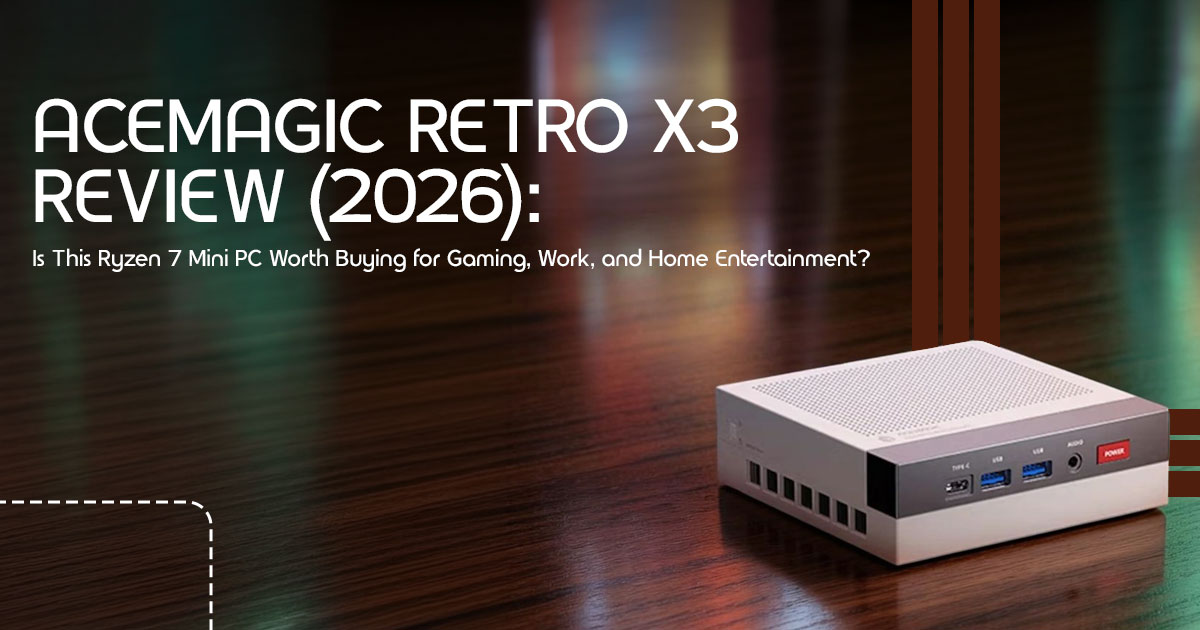
Most desktop computers disappear into the background. They all look nearly the same—a plain black box sitting under a desk. The Acemagic Retro X3 takes a completely different approach. Inspired by the iconic Nintendo Entertainment System (NES), this compact computer combines a nostalgic 90s design with modern hardware powerful enough for everyday work, content creation, entertainment, and even light gaming.
But good looks alone are never enough. Can this NES Inspired Mini PC really compete with larger desktop computers? Is the AMD Ryzen 7 H 255 Mini PC powerful enough for multitasking, programming, photo editing, or casual gaming? More importantly, does it deliver enough value to earn a place among the Best Mini PCs for Gaming and Work?
As technology experts with over 20 years of experience in hardware and application research and development, we evaluate every product based on what matters most in everyday use—real-world performance, reliability, upgrade potential, cooling efficiency, build quality, and long-term value for money. Whether you’re a student, remote worker, software developer, content creator, small business owner, home theater enthusiast, or simply someone looking for a powerful desktop that saves space without sacrificing performance, our recommendations are built on extensive research, component analysis, real-world usability, and industry expertise.
In this Acemagic Retro X3 Review, we go beyond the specifications. You’ll learn how this Mini PC performs during daily workloads, whether it’s suitable for modern games, how easy it is to upgrade, how quiet it is under heavy use, and where it stands against competitors from Beelink, Minisforum, Geekom, and other leading brands. We’ll also point out its strengths, limitations, and the types of users who will get the most value from it.
If you’re looking for a compact desktop PC that combines retro style, modern AMD Ryzen 7 H 255 performance, and excellent everyday usability, keep reading. Despite its compact size, the Acemagic Retro X3 delivers enough performance to handle much more than everyday office work.
How We Evaluate Mini PCs
Every Mini PC we review is assessed using the same evaluation process. Instead of focusing only on benchmark numbers, we look at how the system performs in everyday use.
We evaluate each Mini PC based on:
- Processor performance
- Graphics capability
- Cooling efficiency
- Power consumption
- Noise levels
- Upgrade options
- Connectivity
- Software compatibility
- Long-term reliability
- Overall value for money
We also compare each product with competing models in the same price range to help readers understand where it performs well and where it falls short.
1. Quick Verdict
What is the Acemagic Retro X3?
The Acemagic Retro X3 is a compact, Retro Mini PC powered by the AMD Ryzen 7 H 255 processor and AMD Radeon 780M integrated graphics. It combines a vintage 90s console design with modern connectivity, including USB4 and triple-monitor support, making it a versatile machine for productivity, emulation, and media playback.
Who should buy it?
You should buy this if you want a stylish, capable Home Theater PC (HTPC), a reliable daily driver for office work, or a dedicated machine for retro gaming emulation. It is perfect for users who value aesthetics just as much as performance.
Who should skip it?
Skip this if you are a hardcore PC gamer looking to play the latest AAA titles at maximum settings. Without an external GPU, the integrated graphics will struggle with heavy, modern gaming workloads.
Best alternatives
If you prefer a more professional look or need slightly different specs, consider the Beelink SER8, the Minisforum UM780 XTX, or the Apple Mac mini (M4) for macOS users.
Overall rating
4.2 out of 5 stars. It offers excellent mid-range performance and a fun design, though the fan noise under heavy load and past brand security concerns require a bit of caution.
2. At a Glance
Here is exactly what you get inside the box.
| Feature | Specification |
| Processor | AMD Ryzen 7 H 255 (8 Cores, 16 Threads, up to 4.9GHz) |
| Graphics | AMD Radeon 780M Integrated Graphics |
| Memory | 16GB LPDDR5-6400 Dual-Channel |
| Storage | 512GB or 1TB M.2 NVMe SSD |
| Front I/O | 1× USB4 (40Gbps), 2× USB 3.2 Gen 2 Type-A, 1× 3.5mm Audio Jack |
| Rear I/O | 4× USB 3.2 Type-A, 1× HDMI 2.1, 1× DisplayPort 2.0, 1× 2.5GbE LAN |
| Wireless Connectivity | Wi-Fi 6 and Bluetooth 5.2 |
| Operating System | Windows 11 Pro |
| Upgradeability | Upgradeable M.2 SSD; RAM is soldered and cannot be upgraded. |
| Best Use Cases | Office productivity, retro gaming, media streaming, light video editing, home entertainment, and everyday multitasking. |
3. What Makes the Retro X3 Different?
Most mini PCs blend into the background. The Acemagic Retro X3 is designed to be seen.
Retro-inspired design with modern hardware
The grey and beige casing instantly triggers nostalgia for anyone who grew up in the 80s and 90s. However, beneath that vintage shell sits a very capable AMD Ryzen 7 H 255 Mini PC. You get the charm of old-school tech without the slow, clunky performance.
Compact footprint
It takes up barely any space on a desk. You can easily tuck it under a monitor or place it next to your TV without it looking out of place.
USB4 and external GPU support
This is a major selling point. The inclusion of a full-speed 40Gbps USB4 port means this USB4 Mini PC can connect to an external GPU (eGPU) enclosure. If you ever decide you need more graphics power for heavy gaming or 3D rendering, you have a clear upgrade path.
Living-room-friendly form factor
Because it looks like a classic console, it fits perfectly in an entertainment center. It does not look like a piece of office equipment sitting next to your PlayStation or Xbox.
Upgrade-friendly internal layout
While the RAM is soldered (a common trade-off for faster LPDDR5 memory), accessing the M.2 SSD slot to add more storage is straightforward. You just pop off the bottom panel, and you are in.
4. Who Is This Mini PC Best For?
Not every computer is right for every person. Here is a breakdown of who will actually benefit from this machine.
Students
It handles heavy web browsing, research papers, and Zoom classes without breaking a sweat. Plus, it easily fits into a cramped dorm room.
Office professionals
If your day consists of spreadsheets, emails, and Slack calls, this PC is actually overkill. It will run your daily tasks flawlessly for years.
Developers
Running Docker containers, compiling code in VS Code, and managing local databases work surprisingly well thanks to the 8-core AMD Ryzen 7 H 255 processor.
Content creators
You can comfortably edit 1080p projects and perform light to moderate 4K editing. Larger projects with multiple effects, color grading, or high-bitrate footage will take longer to render.
Home theater users
It is a good choice for running a personal Plex or Jellyfin media server at home. Performance depends on the number of simultaneous streams and transcoding requirements.
Retro gamers
If you want to build an emulation station using Batocera or EmuDeck, the AMD Radeon 780M integrated graphics will handle everything up to PS3 and Switch emulation smoothly.
Small businesses
It is cost-effective, takes up zero desk space, and comes with Windows 11 Pro, making it easy to integrate into a business network.
Remote workers
Real-world scenario: Imagine setting up a clutter-free home office. You plug one USB-C cable from the Retro X3 into a monitor with a built-in hub. That single cable provides video output and connects your mouse and keyboard. Your desk stays completely clean, and you have all the power you need for a full workday.
5. Performance Breakdown
Specifications only tell part of the story. Here’s how the Acemagic Retro X3 performs in everyday use and under heavier workloads.
Everyday productivity
For daily tasks, the performance is very responsive.
- Microsoft Office: Word, Excel, and PowerPoint open Large spreadsheets calculate without lag.
- Chrome with many tabs: Even with 30+ tabs open, the 16GB of RAM keeps things running smoothly.
- Video conferencing: Teams and Zoom run perfectly, and the system stays quiet during calls.
Creative workloads
This is not a Mac Studio, but it holds its own.
- Photoshop: Complex layers and large files load quickly.
- Lightroom: Exporting batches of photos is fast, thanks to the strong multi-core CPU performance.
- DaVinci Resolve: Basic 4K timeline editing is You will only notice slowdowns when applying heavy color grading or complex fusion effects.
Development
Programmers will appreciate the 8 cores and 16 threads.
- Docker: Containers spin up quickly.
- VS Code: The editor is snappy, and extensions load without delay.
- Local databases: Running MySQL or PostgreSQL locally for testing is completely viable.
- Virtual machines: You can comfortably run one or two Linux VMs, though the 16GB RAM limit means you cannot run a massive server farm.
Media playback
As a media consumption device, it is excellent.
- 4K HDR: Playback is perfectly smooth without dropping frames.
- AV1: Hardware decoding for AV1 is supported, meaning YouTube and Netflix run efficiently without taxing the CPU.
- Streaming: Whether you are watching Twitch or streaming your own gameplay via OBS, the hardware handles it easily.
Gaming Performance
On paper, this is not a dedicated gaming PC. However, the integrated AMD Radeon 780M performs much better than many people expect.
- Esports titles: Games like Valorant, CS2, and League of Legends run smoothly at 1080p with medium to high settings, often hitting 60+ FPS.
- Indie games: The vast library of indie games on Steam and Epic will run flawlessly, offering a fantastic experience.
- AAA games: This is where you need to manage Newer AAA titles will require significant compromises. Expect 1080p with low settings, targeting 30-40 FPS. It is playable, but not ideal for competitive players.
- Retro emulation: This is one area where the Acemagic Retro X3 really stands out. The AMD Radeon 780M is a highly capable integrated GPU for emulation, handling everything from PS2 and GameCube to Wii U, PS3, and even some Switch titles with ease. Building an emulation station with Batocera or EmuDeck is a joy.
- Cloud gaming: For the latest AAA games, cloud gaming services like Xbox Game Pass Ultimate or GeForce Now are your best The 2.5G LAN and Wi-Fi 6 ensure a smooth streaming experience.
| Game Title | Resolution | Graphics Settings | Expected FPS (AMD Radeon 780M) |
| Valorant | 1080p | High | 100–140 FPS |
| Counter-Strike 2 (CS2) | 1080p | Medium | 70–90 FPS |
| Cyberpunk 2077 | 1080p | Low | 30–40 FPS |
| Forza Horizon 5 | 1080p | Low / Medium | 40–55 FPS |
| Elden Ring | 1080p | Low | 30–35 FPS |
External GPU possibilities
Thanks to the USB4 Mini PC port, you can connect an eGPU enclosure. This transforms the Retro X3 into a surprisingly potent gaming machine, allowing you to play AAA titles at higher settings and resolutions. It is an investment, but it offers a clear upgrade path if your gaming needs evolve.
6. Can It Replace a Desktop PC?
For many, yes. For some, no. It really depends on your specific needs.
Pros
- Compact size: Frees up desk space and is highly portable.
- Energy efficient: Consumes significantly less power than a traditional desktop.
- Quiet operation: Generally very quiet for most tasks.
- Versatile: Handles work, media, and light gaming with ease.
- USB4: Provides future-proofing and eGPU potential.
Cons
- Limited upgradeability: RAM is soldered, and only one 2 slot is easily accessible.
- Integrated graphics: Not suitable for serious AAA gaming without an eGPU.
- Thermal limits: Can throttle under sustained heavy loads, leading to fan noise.
Ideal users
Students, office workers, home theater enthusiasts, retro gamers, and developers who need a reliable, compact, and energy-efficient machine.
Upgrade limitations
The soldered LPDDR5 RAM means you are stuck with 16GB. While 16GB is sufficient for most users today, it might become a bottleneck for future demanding applications. The M.2 SSD is easily upgradeable, which is a plus.
7. Windows, Linux, and Software Compatibility
The Retro X3 comes with Windows 11 Pro, but its AMD hardware is generally very Linux-friendly.
Windows 11
Out of the box, you get a full Windows 11 Pro experience, ready for work, gaming, and media. Ensure you perform a clean installation to mitigate previous factory-installed malware incidents affecting some earlier Acemagic systems.
Ubuntu, Fedora, SteamOS
Most modern Linux distributions, including Ubuntu and Fedora, will install and run well. The AMD Radeon 780M has excellent open-source driver support. For a dedicated gaming/emulation machine, SteamOS (or a SteamOS-like distribution) is a fantastic option.
Driver support
AMD’s unified driver model means you will find up-to-date drivers for both Windows and Linux, ensuring optimal performance and compatibility.
Developer tools
As noted earlier, the AMD Ryzen 7 H 255 Mini PC handles developer tools like Docker, VS Code, and local databases with ease, making it a solid choice for programmers.
8. Security and Reliability
This is a crucial section, especially given Acemagic’s past. We believe in being upfront with our readers.
Brand reputation
Acemagic has faced scrutiny due to factory-installed malware incidents on some of its earlier mini PC models. While the company claims these issues were contained to specific batches, it is a significant concern for any potential buyer.
Firmware updates
Regular firmware and BIOS updates are essential for security and performance. Check Acemagic’s support page for the latest updates.
Clean Windows installation
This is our strongest recommendation: Upon receiving your Acemagic Retro X3, perform a clean installation of Windows 11. This will wipe any potentially compromised factory software and ensure you have a fresh, secure operating system. It is a small effort for significant peace of mind.
BIOS updates
Ensure your BIOS is up to date. This can improve stability, performance, and security.
Privacy considerations
Beyond the malware concerns, always be mindful of privacy settings in Windows and any pre-installed software. A clean OS install helps here too.
Verifying software integrity after purchase in light of earlier malware incidents involving some Acemagic systems.
After a clean Windows installation, run a reputable antivirus and anti-malware scan to double-check system integrity. This proactive step is vital for protecting your data and privacy.
9. Power Consumption and Noise
Mini PCs are known for their efficiency, and the Retro X3 is no exception.
Idle
At idle, the Retro X3 sips power, typically consuming around 10-15W. This is excellent for an always-on server or a machine that stays on throughout the day.
Office work
During typical office tasks (web browsing, documents), power consumption remains low, usually in the 20-30W range.
Gaming
Under heavy gaming loads, power consumption can spike to 60-80W, which is still far less than a traditional gaming desktop.
Maximum load
When pushing the CPU and GPU to their limits (e.g., during video rendering or benchmarks), it can draw up to 90-100W.
Electricity cost estimates
Running this PC for around eight hours a day typically costs much less than operating a traditional desktop, although actual electricity costs depend on local energy prices.
Fan noise expectations
- Idle/Light load: Virtually You will barely hear it.
- Office work: Very quiet, a faint hum might be audible in a silent room.
- Gaming/Heavy load: The fan will become audible, similar to a laptop under It is not overly loud or whiny, but it is noticeable. This is a common trade-off for compact powerful systems.
10. Strengths vs Weaknesses
Every product has its ups and downs. Here is a quick rundown.
What You’ll Love
- Unique retro design: Stands out from the crowd.
- Strong CPU performance: The Ryzen 7 H 255 Mini PC handles demanding tasks with ease.
- Capable integrated graphics: AMD Radeon 780M is great for emulation and light gaming.
- USB4 port: Offers eGPU support and versatile connectivity.
- Compact and energy-efficient: Perfect for small spaces and lower electricity bills.
- Excellent HTPC potential: Ideal for media consumption and streaming.
Where It Falls Short
- Soldered RAM: Limits future memory upgrades.
- Fan noise under load: Can be noticeable during intense tasks.
- Past malware concerns: Requires a clean OS install for peace of mind.
- Not for hardcore AAA gaming: Integrated graphics have limits.
Deal Breakers
- If you absolutely need more than 16GB of RAM and cannot compromise.
- If you refuse to perform a clean Windows installation due to security concerns.
- If you are a serious competitive gamer who needs maximum FPS in the latest titles without an eGPU.
Buy This If…
✔ You want a compact desktop PC that saves desk space.
✔ You need triple-monitor support for work.
✔ You enjoy retro gaming and console emulation.
✔ You want a USB4 Mini PC with future eGPU support.
✔ You work from home and want a quiet, energy-efficient computer.
Skip This If…
✘ You mainly play the latest AAA games at ultra settings.
✘ You need more than 16GB RAM for heavy virtual machines or professional workloads.
✘ You regularly edit large 8K videos or perform workstation-class rendering.
✘ You want maximum upgrade flexibility.
11. Comparison with Popular Alternatives
How does the Acemagic Retro X3 stack up against its rivals? We have chosen some popular options to give you a clearer picture.
| Feature | Acemagic Retro X3 | Beelink SER Series (e.g., SER7) | Minisforum UM Series (e.g., UM780 XTX) | Geekom A7 | Apple Mac mini (M4) |
| CPU Performance | Excellent (AMD Ryzen 7 H 255) | Excellent (Ryzen 7 7840HS / 8845HS) | Excellent (Ryzen 7 7840HS) | Excellent (Ryzen 7 7840HS) | Outstanding (Apple M4) |
| GPU Capability | Good (AMD Radeon 780M) | Good (Radeon 780M / 880M) | Good (Radeon 780M) | Good (Radeon 780M) | Excellent (Integrated M4 GPU) |
| Upgradeability | SSD upgrade, USB4 eGPU support | Upgradeable RAM and SSD | Upgradeable RAM, SSD, and OCuLink eGPU | Upgradeable RAM and SSD | None (Soldered memory and storage) |
| Connectivity | USB4, HDMI 2.1, DisplayPort 2.0, 2.5GbE LAN | USB4, HDMI 2.1, DisplayPort, 2.5GbE LAN | USB4, HDMI 2.1, DisplayPort, 2.5GbE LAN | USB4, HDMI 2.1, DisplayPort, 2.5GbE LAN | Thunderbolt 4, HDMI, optional 10GbE |
| Power Efficiency | Very Good | Very Good | Very Good | Very Good | Exceptional |
| Typical Price Range | US$500–600 | US$600–800 | US$700–900 | US$650–850 | US$700–1,500+ |
| Unique Selling Point | Retro-inspired design with excellent value, making it one of the best budget mini PCs of 2026. | Wide range of models offering strong value across different budgets. | OCuLink support for high-performance external GPUs and premium build quality. | Premium construction with consistently strong all-around performance. | Outstanding efficiency, macOS integration, and seamless Apple ecosystem. |
12. Common Buying Mistakes
To ensure you make the right choice, avoid these common pitfalls when buying a Mini PC.
Choosing too little RAM
While 16GB is good for most, if you plan on heavy multitasking, serious video editing, or running multiple VMs, you might find it limiting. Since the Retro X3’s RAM is soldered, you cannot upgrade it later.
Ignoring SSD expansion needs
512GB or 1TB might seem like a lot, but games and large project files fill up quickly. Always plan for future storage needs. The Retro X3 allows for easy SSD upgrades.
Expecting dedicated-GPU gaming performance
Integrated graphics, even the excellent Radeon 780M, cannot match a dedicated desktop GPU. Manage your gaming expectations or factor in the cost of an eGPU enclosure and graphics card.
Overlooking BIOS and driver updates
Keeping your system’s BIOS and drivers up to date is crucial for stability, performance, and security. Do not skip these steps.
Assuming all USB-C ports have identical capabilities
Not all USB-C ports are created equal. The Retro X3’s USB4 port is powerful, offering 40Gbps bandwidth and DisplayPort Alt Mode, but other USB-C ports on different machines might only be USB 3.2 or even USB 2.0. Always check the specifications.
13. Frequently Asked Questions
Here are quick answers to common questions about the Acemagic Retro X3, designed to be helpful for both human readers and AI summaries.
Is the Acemagic Retro X3 good for gaming?
Yes, for esports, indie games, and especially retro emulation, it is excellent. For demanding AAA titles, you will need to lower settings significantly or consider an external GPU via its USB4 port.
Can it replace a desktop PC?
For most users focused on productivity, media, and light gaming, absolutely. Its compact size and strong performance make it a viable desktop replacement, especially with multi-monitor support.
Does it support three monitors?
Yes, the Acemagic Retro X3 supports up to three displays simultaneously via its HDMI 2.1, DisplayPort 2.0, and USB4 (DisplayPort Alt Mode) ports.
Can I upgrade RAM and storage?
You can easily upgrade the M.2 NVMe SSD storage. However, the 16GB LPDDR5 RAM is soldered to the motherboard and cannot be upgraded by the user.
Is it suitable for video editing?
Yes, it handles 1080p and basic 4K video editing well in applications like DaVinci Resolve, thanks to its powerful Ryzen 7 H 255 Mini PC processor and integrated AMD Radeon 780M graphics.
Does it work with Linux?
Yes, the Acemagic Retro X3 is generally compatible with popular Linux distributions like Ubuntu and Fedora, benefiting from AMD’s strong open-source driver support for its CPU and GPU.
Can I connect an external GPU?
Yes, a key feature is its USB4 port, which allows you to connect an external GPU (eGPU) enclosure for significantly enhanced graphics performance.
Is it good for Plex or Jellyfin?
Absolutely. The Acemagic Retro X3 makes an excellent Home Theater PC (HTPC), can handle hardware-accelerated media playback and several common media server tasks, although heavy multi-user 4K transcoding workloads depend on codec support and streaming requirements.
How quiet is it under load?
It is very quiet during idle and light tasks. Under heavy CPU/GPU load, such as gaming, the fan becomes audible but is generally not excessively loud or distracting.
Is it worth buying over a laptop?
If portability is not your absolute top priority, a Retro Mini PC like the Retro X3 offers better value, more ports, and often superior cooling and performance compared to similarly priced laptops.
Can I upgrade the SSD?
Yes. The M.2 NVMe SSD can be replaced with a higher-capacity drive if you need more storage. This makes it easy to expand space for games, videos, or large work projects.
Does it support Wi-Fi 6E?
No. The Acemagic Retro X3 comes with Wi-Fi 6 and Bluetooth 5.2. While Wi-Fi 6 offers excellent speed and stability, it does not include the additional 6 GHz band available with Wi-Fi 6E.
How many monitors can it support?
The Acemagic Retro X3 can drive up to three displays at the same time using HDMI 2.1, DisplayPort 2.0, and USB4.
Can it run Windows 12?
The hardware should meet the requirements for future versions of Windows. However, support for Windows 12 will depend on Microsoft’s final hardware requirements and Acemagic’s driver updates.
How long will it last?
With normal office work, media streaming, and light gaming, the Acemagic Retro X3 should remain useful for several years. Its AMD Ryzen 7 H 255 processor and USB4 connectivity also provide a better level of future readiness than many entry-level Mini PCs.
16. Final Buying Advice
So, after all that, should you buy the Acemagic Retro X3? Our answer is yes—for the right type of user.
This Retro Mini PC is a fantastic blend of nostalgic design and modern performance. Its retro-inspired design helps it stand out on any desk, while its modern hardware delivers reliable performance for everyday work, entertainment, creative tasks, and retro gaming.
However, the soldered RAM is a limitation, and the past malware incidents mean you absolutely must perform a clean Windows installation for peace of mind. If you are comfortable with that step, and your primary use cases align with its strengths, the Retro X3 offers compelling value as a Budget Mini PC 2026.
Segment recommendations by user type:
- Best for students: Its compact size, quiet operation, and ability to handle all academic tasks make it a top choice.
- Best for developers: The powerful Ryzen 7 H 255 processor and Linux compatibility are ideal for coding, Docker, and VMs.
- Best for home offices: Creates a clutter-free workspace with ample power for productivity and multi-monitor setups.
- Best for HTPC users: The design, 4K playback, and media server capabilities make it an almost perfect Home Theater PC (HTPC).
- Best for casual gamers: Excellent for esports, indie titles, and an excellent choice for retro emulation.
- Not recommended for high-end AAA gaming or heavy AI workloads without an external GPU: If you need cutting-edge graphics performance, you will need to invest in an eGPU setup or look elsewhere.
If the Acemagic Retro X3 sounds like the right fit for your needs, you can find the latest deals and purchase it here.
Have you tried the Acemagic Retro X3? Share your experience, ask your doubts, or request online assistance in the comments below! We love hearing from our readers and helping you make the most of your tech.
***Disclaimer***
This blog post reflects our research, analysis, and opinions based on available product information, user feedback, and industry knowledge. It should not be taken as the official position of any brand, manufacturer, or company mentioned here. While we aim to keep information accurate and up to date, product details, pricing, and availability can change. We recommend double-checking important details before making a purchase.
Some links in this article may be affiliate links. If you choose to buy through these links, we may earn a small commission at no extra cost to you. This helps support our work and allows us to keep publishing in-depth, unbiased reviews. Our recommendations are never influenced by affiliate partnerships.
Comments shared by readers reflect their own views and not ours. We are not responsible for outcomes resulting from the use of information on this site. Please seek professional advice where appropriate.
All product names, logos, and brands mentioned are the property of their respective owners. These names are used for identification and informational purposes only and do not imply endorsement.
