
Overview
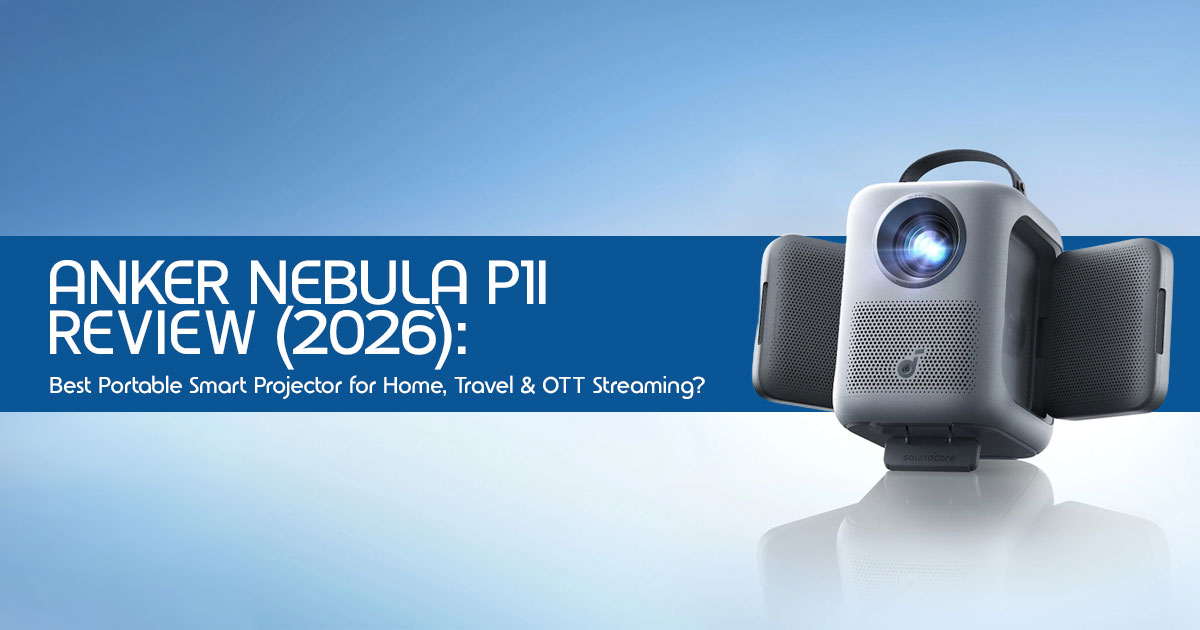
The Anker Nebula P1i smart portable projector focuses on what most budget projectors ignore—clean sound and a smooth smart TV experience. It works best in dark rooms, small bedrooms, hostel setups, and travel use where portability matters more than brightness.
But there’s a clear tradeoff. With 380 ANSI lumens, it struggles in bright spaces and depends on a power outlet, so it won’t replace your living room TV.
| Feature | Recommendation |
| Best For | Bedrooms, hostel rooms, dark environments, and casual OTT streaming. |
| Avoid If | You need a bright-room TV replacement or require a battery-powered projector. |
| Top Advantage | Powerful 20W flippable speakers combined with official Google TV (Netflix support). |
1. Introduction: Why This Projector Matters Right Now
A lot of people buy a portable projector expecting a “big screen anywhere” experience. Then reality hits—washed-out visuals in daylight, laggy apps, and weak audio that forces you to add speakers.
That’s the real problem with most budget smart projectors today.
Now add another shift happening in India. Streaming has taken over. Apps like Netflix, Prime Video, and YouTube are where people spend most of their time. And they want a screen that moves with them—from bedroom to balcony to weekend trips.
This is where the Anker Nebula P1i fits in.
It’s not trying to beat a TV. It’s trying to make casual viewing simple, flexible, and actually enjoyable—without extra setup or tech headaches.
And that’s why this review matters.
As technology experts with over 20 years of experience in hardware and application research and development, we deeply analyze each product based on real-world performance, durability, and value for money. Our goal is simple: help you find the best product— whether you care about budget, performance, reliability, or long-term use.
This review is especially useful for:
- Students and hostel users looking for a compact entertainment setup
- Young professionals who move often and don’t want bulky TVs
- Families needing a secondary screen for bedrooms
- Travel and camping users who want a simple movie setup
- First-time projector buyers who are confused by specs like lumens and contrast
Our recommendations come from hands-on research, component-level analysis, and real usage scenarios, not just spec sheets.
2. Technical Specifications at a Glance
Before diving into the performance, let’s look at the numbers that define this 1080p portable projector.
| Specification | Details |
| Native Resolution | 1920 × 1080 (Full HD) |
| Brightness | 380 ANSI lumens |
| Light Source | LED (rated up to 30,000 hours lifespan) |
| Audio | Dual 10W flippable speakers (20W total) with Dolby Audio |
| Operating System | Google TV (official apps: Netflix, YouTube, Prime Video) |
| Connectivity | HDMI, USB-A, 3.5mm AUX, dual-band Wi-Fi, Bluetooth 5.0 |
| Projection Size | 40″ to 150″ (optimal viewing at 80″–120″) |
| Weight | Approx. 3.3 kg (7.3 lbs) |
3. Why This Review is Essential
Most reviews stop at specs. They tell you what the projector has, not how it feels to use.
And that’s where people make the wrong decision.
For example:
- 380 lumens sounds fine—until you try using it in daylight
- Many projectors claim “smart features”—but lack official Netflix support
- Audio is often ignored, even though it shapes the entire experience
This review focuses on what actually matters:
- How the Anker Nebula P1i projector performs in real homes
- Whether the flippable speakers make a difference
- If Google TV runs smoothly without frustration
- And most importantly—who should buy it and who should skip it
Because specs don’t tell the full story. User experience does.
4. What You Will Learn From This Review
By the end of this guide, you’ll have a clear answer—not just information.
Here’s what you’ll learn:
- A simple way to decide using the P1i Value Framework™
- How this portable smart projector compares to models like the XGIMI MoGo 2 Pro and BenQ GV30
- The biggest mistakes people make when buying a projector
- How to set it up properly for the best picture quality in minutes
And more importantly—you’ll know if this is the right projector for your lifestyle, not just your budget.
If you’re expecting a TV replacement, this might disappoint you.
But if you want something easy, flexible, and genuinely enjoyable for everyday use, this one starts to make a lot more sense.
5. The P1i Value Framework™
To help you decide if this is the right fit, we’ve developed the P1i Value Framework™, a four-point decision model based on the core pillars of this device.
5.1 Brightness Reality Check
The 380 ANSI lumens rating is a “low-light only” specification. While it produces a vibrant image in a pitch-black room, it struggles against ambient light. If you plan to use this during the day without blackout curtains, you will be disappointed.
5.2 Portability Score
Despite lacking a battery, the P1i still feels easy to move around thanks to its compact cylindrical design and built-in carrying handle. It is designed to be moved from the living room to the bedroom, not really meant for long outdoor trips or remote locations.
5.3 Smart OS Utility
The inclusion of Google TV is a massive advantage. It provides a seamless, TV-like interface with personalized recommendations and Google Assistant voice control. This is a significant step up from the basic Android skins found on cheaper competitors.
5.4 Audio Independence
Most portable projectors require an external Bluetooth speaker to be usable. The P1i’s 20W dual speakers are loud and clear enough to stand on their own, reducing the clutter of extra wires and devices.
Final Score: Great convenience, but limited brightness for daytime use.
6. Who Should Buy This? (Intent Segmentation)
Understanding your user search intent is key to knowing if the P1i fits your lifestyle.
- The Beginner: If you want a plug-and-play Netflix projector that doesn’t require a degree in AV engineering to set up, this is for you.
- The Advanced User: If you need a portable second screen for a bedroom or a dedicated gaming nook (in the dark), the P1i is a solid secondary device.
- The Skeptical Buyer: If you’re worried about clunky smart interfaces and poor sound, the P1i addresses these with its refined OS and flippable speakers.
- The Budget Conscious: For those looking for a reliable brand under the ₹35,000 equivalent price bracket, this offers a balanced mix of features.
7. Specs That Actually Matter (Explained Simply)
Let’s translate the technical jargon into what you will actually experience on your wall.
- 1080p Full HD: This ensures the image is sharp enough for movies, and text is readable. You won’t see the “screen door effect” common in 720p projectors.
- 380 ANSI Lumens: This means the projector is dim-room only. It’s perfect for a late-night movie but won’t work for a Sunday afternoon cricket match in a bright hall.
- Dual flippable speakers: This is where the P1i really stands out. You can angle the sound directly toward your seating position, creating a more immersive Dolby Audio
- Auto Focus + Keystone: These features mean the projector fixes its own blurry image and crooked angles. You just point it at a wall, and it does the rest.
8. Real-World Performance: What Specs Don’t Tell You
8.1 Indoor Use
In a dark bedroom, the Nebula P1i shines. The colors are surprisingly accurate for an LED projector, and the all-glass lens prevents the “focus drift” that happens when plastic lenses heat up. We found it ideal for projecting onto a ceiling while lying in bed.
8.2 Outdoor Use
Since there is no built-in battery, outdoor use requires an extension cord or a portable power station. It works beautifully for backyard movie nights only after sunset. The 380 lumens are simply not enough to fight even the fading evening light.
8.3 Audio Performance
The audio is the standout feature. The 20W output is punchy and handles dialogue exceptionally well. While it won’t replace a dedicated 5.1 home theater, it sounds better than most portable projectors and even entry-level TV speakers.
9. Tradeoffs You Should Know
Every gadget has its compromises. Here is the reality of living with the P1i.
| Feature | Real-World Performance |
| Brightness | Limited in daylight; performs best in dark or dimly lit rooms. |
| Portability | Easy to move between rooms, but requires constant AC power (no battery). |
| Sound | Class-leading audio; powerful enough to skip external speakers. |
| Price | Competitive for the segment, with added value from smart features and brand ecosystem. |
10. P1i vs. Competitors: The Decision Section
How does the Anker Nebula P1i compare to other heavy hitters in the smart portable projector market?
| Feature | Nebula P1i | XGIMI MoGo 2 Pro | BenQ GV30 |
| Resolution | 1080p (Full HD) | 1080p (Full HD) | 720p (HD) |
| Brightness | 380 ANSI lumens | 400 ISO lumens (~320 ANSI) | 300 ANSI lumens |
| Audio | 20W speakers (rotatable design) | 16W speakers | 16W (2.1 channel with bass) |
| Battery | No (plug-in only) | No (plug-in only) | Yes (built-in battery) |
| Operating System | Google TV (native apps & better UI) | Android TV 11 | Android TV |
| Best For | Best overall (audio + smart experience) | Best image clarity & tuning | Best portability (battery-powered use) |
11. Mistakes Buyers Make
When searching for the best portable projector India, avoid these common pitfalls:
- Expecting TV-level Brightness: No portable projector at this price point can replace a TV in a bright room.
- Ignoring Room Lighting: If you can’t darken your room, even a more expensive projector will look washed out.
- Overvaluing Portability: If you never plan to take the projector out of your house, don’t sacrifice brightness for a battery you’ll never use.
12. Edge Cases
- Small Hostel Rooms: The P1i is a great fit It takes up zero floor space and provides a massive screen for gaming or movies.
- Power Cuts: Since it lacks a battery, you will need a UPS or power backup to keep the movie going during an outage.
- Gaming: While it supports HDMI, there is a slight input It’s fine for casual games like Mario Kart, but not recommended for competitive shooters like CS:GO.
13. Setup Guide: 5 Quick Steps to Cinema
- Placement: Place the projector 5m to 3m away from your wall or screen.
- Power Up: Connect the AC adapter (ensure it’s plugged into a stable outlet).
- Auto-Calibration: Let the auto-focus and auto-keystone run for 5 seconds.
- Connectivity: Connect to your 5GHz WiFi for buffer-free 1080p streaming.
- Sign In: Log into your Google account to sync your Netflix and YouTube watchlists.
14. Alternatives Based on Your Needs
- If you need the best brightness: Look at the XGIMI MoGo 2 Pro –AmazonWorldwide | Amazon India.
- If you need true portability (Battery): Consider the Nebula Capsule 3 –AmazonWorldwide | Amazon India.
- If you want the best balance of price and features: Stick with the Nebula P1i – Amazon Worldwide | Amazon India.
15. FAQ
Is the Nebula P1i good for daytime use?
No. With 380 ANSI lumens, the image will appear washed out in a bright room. It is designed for low-light or dark environments.
Does it replace a traditional TV?
It can replace a TV in a bedroom or a dedicated dark room, but it is not a direct replacement for a main living room TV used during the day.
Can I watch Netflix on the Nebula P1i?
Yes! Unlike many other projectors, the P1i comes with official Google TV, which supports the native Netflix app in Full HD.
Is it worth buying in 2026?
Yes, if you prioritize a seamless software experience and great built-in audio over having a built-in battery.
16. Final Verdict
The Anker Nebula P1i smart portable projector isn’t trying to replace a full home theater system—and that’s exactly why it works. It focuses on what most budget projectors get wrong: weak audio and frustrating smart interfaces.
With official Google TV, you get a clean, reliable streaming experience—no app issues, no workarounds. And those dual 10W flippable speakers with Dolby Audio? They deliver sound that actually fills a room, which is rare in this category.
The result is simple. A portable projector for home use that feels easy, consistent, and enjoyable—whether you’re watching Netflix in your bedroom or setting up a quick movie night.
If you’ve got a dark room, a blank wall, and a love for movies, this is one of the most practical upgrades you can make without spending on a full TV setup.
Ready to Upgrade Your Movie Nights?
If this setup fits your space, you can check the latest price below.
–− Check latest price and availability:
- Amazon Worldwide: Soundcore Nebula P1i Smart Projector lineup
- Amazon India: Soundcore Nebula P1i Smart Projector
Your Turn
Have you used a portable projector before?
Did you face issues with brightness, sound, or setup?
Drop your thoughts or questions below. If you’re unsure whether this projector fits your setup, ask—we’ll help you figure out the best projector for your room, budget, and usage.
***Disclaimer***
This blog post reflects our own research, testing, and personal opinions. It should not be taken as the official position of any brand, manufacturer, or company mentioned here. While we aim to keep information accurate and up to date, product details, pricing, and availability can change. We recommend double-checking important details before making a purchase.
Some links in this article may be affiliate links. If you choose to buy through these links, we may earn a small commission at no extra cost to you. This helps support our work and allows us to keep publishing in-depth, unbiased reviews. Our recommendations are never influenced by affiliate partnerships.
Comments shared by readers reflect their own views and not ours. We are not responsible for outcomes resulting from the use of information on this site. Please seek professional advice where appropriate.
All product names, logos, and brands mentioned are the property of their respective owners. These names are used for identification and informational purposes only and do not imply endorsement.
