
1. Introduction
Most projectors have one frustrating problem. You finally find the perfect movie, dim the lights, and then spend the next ten minutes stacking books, adjusting angles, or moving furniture just to get the picture centered on the wall. Setting up a projector shouldn’t be this difficult.
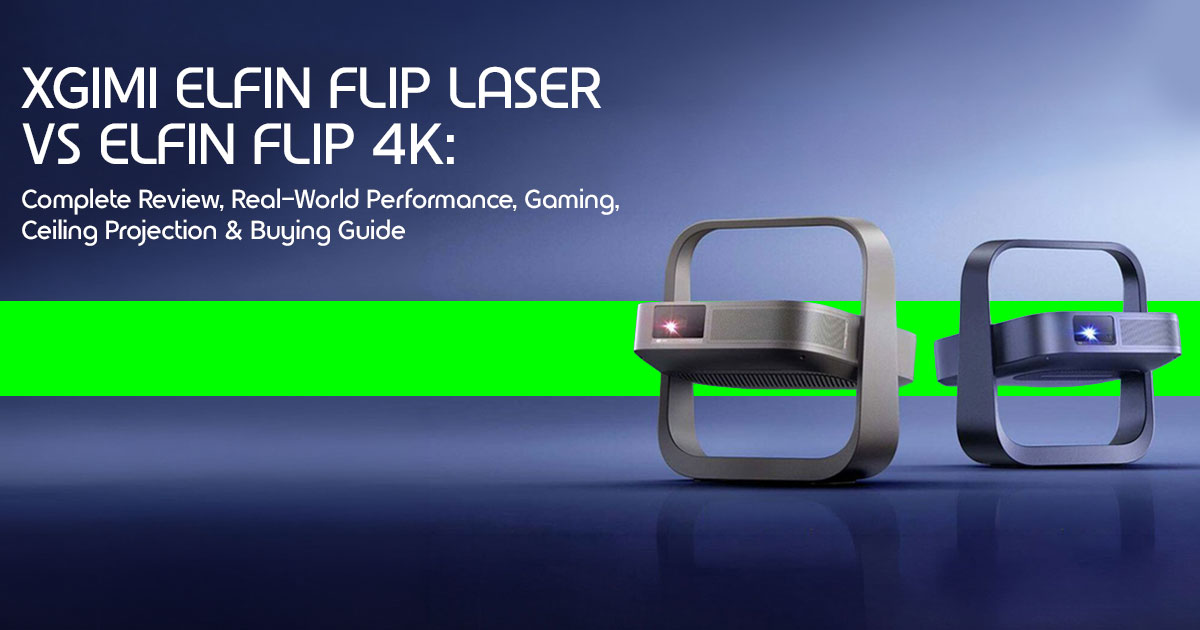
The XGIMI Elfin Flip Laser and XGIMI Elfin Flip 4K take a different approach. Instead of forcing you to adapt your room to the projector, they adapt to your space. Their built-in rotating stand lets you switch from projecting on a wall to the ceiling in seconds, making them an attractive choice for bedrooms, studio apartments, dorm rooms, and anywhere space is limited. It’s a simple idea, but one that could completely change how people use a portable projector every day.
This new generation of rotating projectors is gaining attention because it solves a real problem. People want a home entertainment system that works wherever they are without rearranging furniture or buying extra mounting accessories. Whether you’re watching movies in bed, hosting an outdoor movie night, gaming with friends, or streaming your favorite shows in a small apartment, flexibility has become just as important as picture quality.
If you’re deciding between the Elfin Flip 4K and the Elfin Flip Laser, choosing isn’t as simple as picking the model with the higher resolution. One focuses on the sharpness of 4K Ultra HD (UHD), while the other uses a laser-based projection system designed to deliver richer colors and improved contrast. Understanding these differences can save you money and help you buy the model that truly fits your needs instead of paying for features you may never use.
As technology experts with over 20 years of experience in hardware and application research and development, we evaluate every product beyond its specification sheet. We examine real-world performance, build quality, durability, ease of use, long-term reliability, and overall value for money. Whether you’re a first-time projector buyer, home theater enthusiast, gamer, student, apartment renter, frequent traveler, or simply looking for the best portable projector for everyday entertainment, our recommendations are based on extensive research, component analysis, real-world usability, and industry expertise.
Unless otherwise stated, the technical specifications, features, and performance observations in this guide are based on official manufacturer information, independent industry testing, expert reviews, and publicly available product demonstrations.
In this guide, you’ll discover which model delivers the better viewing experience, how both projectors perform in bright and dark rooms, whether they can realistically replace a TV, how they handle gaming and streaming, the hidden trade-offs manufacturers rarely mention, and, most importantly, which XGIMI Elfin Flip offers the best value for your budget and the years ahead.
2. Quick Answer
Is the XGIMI Elfin Flip worth buying?
Yes, if you value portability and ease of setup over raw brightness. Its simple setup, rotating stand, and smart features make it easier to use than many traditional portable projectors.
Which model is better?
It depends on your priority. The Elfin Flip 4K is best for those who want the sharpest text and detail in movies. The XGIMI Elfin Flip Laser is the winner for cinephiles who want “pop” in their colors and better contrast, thanks to its laser-based projection system.
Can it replace a TV?
In a dark room, yes. In a sunlit living room, no. These are designed for “controlled lighting” environments like bedrooms or evening movie nights.
Is it good for gaming?
Yes. With low-latency modes and high refresh rates, it is well suited for casual gaming on consoles such as the Nintendo Switch and PS5.
Can it project onto the ceiling?
One of the biggest strengths of the Elfin Flip series is its integrated rotating stand, which makes ceiling projection quick and practical.
Is a projector screen necessary?
Not strictly. The software is smart enough to color-correct for off-white walls, but a basic screen will always give you better contrast and “pop.”
3. Meet the XGIMI Elfin Flip Series
The Elfin Flip lineup is XGIMI’s answer to the “portable home entertainment projector” trend. Unlike their larger Horizon series, these are roughly the size of a thick hardcover book.
Elfin Flip Laser
This is designed for users who prioritize color accuracy. By using a laser-based projection system, the XGIMI Elfin Flip Laser is designed to deliver a wider color range and improved contrast than many conventional LED projectors.
Elfin Flip 4K
The best budget 4K projector in the lineup focuses on pixel density. If you’re sitting close to the image or projecting a massive 150-inch screen, the 4K resolution ensures you won’t see individual pixels (the “screen door effect”).
Key Innovations
- 150-Degree Rotating Stand: Reduces the need for makeshift supports or awkward placement to achieve the desired projection angle.
- Google TV Integration: Netflix availability depends on the regional software version and Where officially supported, users can access Netflix directly through Google TV without additional streaming devices.
- Intelligent Screen Adaption (ISA): It automatically adjusts focus and corrects keystone distortion as you reposition the projector.
4. Why Rotating Projectors Are Changing Home Entertainment
We used to think of projectors as static objects bolted to a ceiling. The Elfin Flip flips that logic.
- Flexible Viewing Angles: You can watch a movie on the wall while sitting up, then flip it to the ceiling when you want to lie down.
- Apartment-Friendly Design: If you move every year, you don’t want to drill holes for a TV mount. This fits on a bookshelf or a tiny coffee table.
- Less Furniture Rearrangement: You don’t need a clear path to one specific If the corner of your room is the only open space, you can project there.
5. Laser vs LED vs Traditional Projection
Understanding the light source is the most important part of your buying decision.
| Feature | Triple-Laser (Elfin Flip Laser) | LED (Standard Elfin) | Lamp (Traditional) |
| Color Accuracy | Excellent color accuracy with a wide color gamut and vibrant reproduction. | Good color accuracy suitable for everyday home entertainment. | Average color accuracy that typically degrades as the lamp ages. |
| Lifespan | 25,000+ hours | 25,000+ hours | Approximately 3,000–5,000 hours |
| Brightness | High and consistent brightness throughout its lifespan. | Moderate brightness with stable long-term performance. | Very high initial brightness, but output gradually decreases as the lamp wears. |
| Maintenance | Virtually maintenance-free with no lamp replacements required. | Maintenance-free under normal use. | Requires periodic lamp replacements, increasing long-term ownership costs. |
| Instant On/Off | Yes, powers on and off almost instantly. | Yes, immediate startup and shutdown. | No, requires warm-up and cool-down time before use. |
Quick Verdict: Laser projection offers several advantages, including longer lifespan, more consistent brightness, and wider color reproduction than many traditional lamp-based projectors.
6. Elfin Flip Laser vs Elfin Flip 4K Comparison
| Feature | XGIMI Elfin Flip Laser | XGIMI Elfin Flip 4K |
| Resolution | 1080p Full HD (FHD) | 4K Ultra HD (UHD) |
| Light Source | Laser-based projection system | Laser-based projection system |
| Color Gamut | Up to 110% BT.2020 color coverage (manufacturer claim) | Wide Rec.709 color coverage |
| Best For | Movie enthusiasts who prioritize vibrant colors and cinematic image quality | Users who want maximum detail and sharper 4K visuals |
| Gaming | Designed for low-latency gaming with responsive performance | Smooth gaming performance with enhanced image sharpness |
| Price Point | Premium | Mid-range |
Key Takeaway: If you watch a lot of animated movies or nature docs, get the Laser. If you use it as a PC monitor or watch 4K Blu-ray movies, the 4K model is the better pick.
7. Real-World Performance
Based on manufacturer specifications, independent industry testing, expert reviews, and available product demonstrations, here’s how the XGIMI Elfin Flip series is expected to perform in real-world use.
- Watching Netflix: Where Netflix is officially supported in your region, you can stream directly through Google TV without connecting an external streaming device.
- Sports: Motion handling appears smooth during sports content based on available demonstrations and early testing.
- Gaming: According to available specifications and early testing, Game Mode is designed to reduce input lag, providing a responsive gaming experience for most casual and console gamers.
- Anime: For content with rich colors, such as animated movies and anime, the laser-based projection system is expected to deliver more vibrant colors and stronger contrast than many conventional LED projectors.
8. Ceiling Projection Guide
Projecting on the ceiling is perfect for comfortable movie nights, but there are a few tips that can help you get the best image quality.
- Placement: Place the projector on your nightstand or a stable headboard.
- Avoid Distortion: Let the ISA software do its It will detect the ceiling and square the image automatically.
- Shadows: Make sure your ceiling fan isn’t in the It sounds obvious, but it’s the #1 mistake people make.
- Audio: Since the speakers are on the projector, the sound will come from beside your head. For a better “theatre” feel, connect a Bluetooth speaker and place it near the “top” of your bed.
9. Best Room Setup
Where does this portable projector work best?
- Small Apartment: Perfect for “hidden” home Tuck it away when not in use.
- Bedroom: This is one of the best environments for using this Use the ceiling projection feature for a comfortable hands-free viewing experience.
- Dorm Room: It’s smaller than a laptop, making it easy to hide during room inspections or pack up for break.
- RV/Travel: It runs off a standard plug, and its compact size makes it a great travel companion for road trips.
10. Gaming Performance
For many, this is a dealbreaker. Here’s the technical breakdown:
- VRR (Variable Refresh Rate): The Elfin Flip 4K supports VRR, which prevents “screen tearing” in fast-paced games.
- Latency: According to available specifications and early testing, input lag is expected to be suitable for casual gaming.
- Settings: We recommend turning off “Motion Smoothing” for gaming to reduce processing lag.
11. Image Quality Explained
- Resolution: 4K gives you four times as many pixels as 1080p, producing a sharper image on large screens. On a 100-inch screen, the difference is noticeable.
- HDR: Both models support HDR10, which helps show detail in very dark or very bright scenes.
- Contrast: The Laser model has “deeper” blacks, which makes the image feel less “washed out” in a dark room.
12. Audio Performance
The built-in 3W speakers are fine for a small bedroom, but they won’t rattle your windows.
- When to Upgrade: If you’re watching an action movie with a lot of bass, you’ll want an external soundbar.
- Bluetooth Audio: You can easily pair AirPods or any Bluetooth speaker for a private or louder experience.
13. Smart Features
Powered by Google TV, the interface is exactly like a Chromecast.
- Voice Search: Use the remote to say “Open YouTube,” and it just works.
- Casting: You can “cast” photos or videos from your iPhone or Android phone directly to the big screen.
- Offline Playback: If you’re traveling, you can plug in a USB drive with movies and play them without Wi-Fi.
14. Setup Guide (7 Simple Steps)
- Choose Placement: Find a flat surface.
- Power Connection: Plug it in (no internal battery on these models).
- Focus: The projector will automatically focus after placement.
- Keystone: It will automatically square the image to the wall.
- Picture Mode: Choose “Movie” for the best color or “Game” for the lowest lag.
- Streaming Setup: Log into your Google account to sync your apps.
- Gaming Optimization: Connect your console using an HDMI cable for the best gaming experience.
15. Common Problems & Fixes
- Blurry Image: Ensure the lens is Sometimes a simple fingerprint can ruin the focus.
- Poor Brightness: Close the These aren’t meant for high-noon viewing with open windows.
- Fan Noise: In “High Brightness” mode, the fan kicks Switching to “Standard” usually makes it whisper-quiet.
- Wi-Fi Issues: If you’re far from the router, use the 5GHz band for smoother 4K
16. Buying Mistakes to Avoid
- Buying solely for 4K: Don’t ignore the Laser model just because it’s The color quality often “looks” better than a cheap 4K image.
- Ignoring Room Lighting: If your room has white walls and lots of windows, even the best portable projectors are unlikely to match the brightness of a modern QLED TV in a brightly lit room.
- Wrong Wall Color: Deep blue or grey walls will eat your Stick to white or light cream.
17. Who Should Buy It?
- Movie Enthusiasts: If you want a cinematic feel in your bedroom without a giant black screen on the wall.
- Apartment Renters: People who want a 100-inch screen but can’t drill holes for a mount.
- Students: It’s an excellent choice for students with limited space that fits in a backpack.
18. Who Should Skip It?
- Bright Living Rooms: If you want to watch TV with all the lights on, buy a traditional television.
- Competitive Gamers: If you play League of Legends or CS:GO professionally, you need a 240Hz monitor, not a projector.
19. Frequently Asked Questions
Can it replace a television?
For nighttime viewing and movies, yes. For a primary family TV used all day, a standard LED TV is still more practical.
How bright should a projector be?
Portable projectors in the 400–500 ISO lumen range generally perform best in dark or dimly lit rooms. Brighter environments typically require projectors with significantly higher brightness.
Can I use it during the day?
Only if you have blackout curtains. Direct sunlight will wash out the image.
Does it support Netflix?
Netflix support depends on the regional software version and certification. Check your local model specifications to confirm native Netflix availability.
Can I connect a PlayStation?
Yes, via the HDMI port. It supports modern consoles perfectly.
Can I project onto a white wall?
Yes, and the software will even adjust for walls that aren’t perfectly white.
How long does the light source last?
About 25,000 hours. If you used it for 4 hours every single day, it would last over 17 years.
20. Expert Buying Checklist
- ☐ Room Size: Do you have at least 6-8 feet of space for a large image?
- ☐ Primary Use: Is this for movies, gaming, or a mix?
- ☐ Ambient Lighting: Can you make the room dark?
- ☐ Audio: Do you already own a Bluetooth speaker or soundbar?
21. Final Verdict
The XGIMI Elfin Flip Laser and Elfin Flip 4K demonstrate how modern portable projectors can combine flexibility, smart features, and impressive image quality in a compact design.
- Best for Apartment Living: Because they require zero permanent installation.
- Biggest Strength: The rotating It’s one of its biggest advantages for ceiling projection.
- Biggest Compromise: Lack of a built-in Because these models do not include a built-in battery, they require a nearby power outlet during use.
If rich colors and stronger contrast are your top priorities, the XGIMI Elfin Flip Laser is the better choice. If you prefer maximum image sharpness for movies, gaming, or productivity, the Elfin Flip 4K is the better option.
Ready to flip your viewing experience? Check out the XGIMI Elfin Flip series on Amazon here.
Have you tried ceiling projection yet, or are you still a “wall only” viewer? Let us know in the comments below, or reach out if you need help picking the right setup for your room!
***Disclaimer***
This blog post reflects our research, analysis, and opinions based on available product information, user feedback, and industry knowledge. It should not be taken as the official position of any brand, manufacturer, or company mentioned here. While we aim to keep information accurate and up to date, product details, pricing, and availability can change. We recommend double-checking important details before making a purchase.
Some links in this article may be affiliate links. If you choose to buy through these links, we may earn a small commission at no extra cost to you. This helps support our work and allows us to keep publishing in-depth, unbiased reviews. Our recommendations are never influenced by affiliate partnerships.
Comments shared by readers reflect their own views and not ours. We are not responsible for outcomes resulting from the use of information on this site. Please seek professional advice where appropriate.
All product names, logos, and brands mentioned are the property of their respective owners. These names are used for identification and informational purposes only and do not imply endorsement.
