
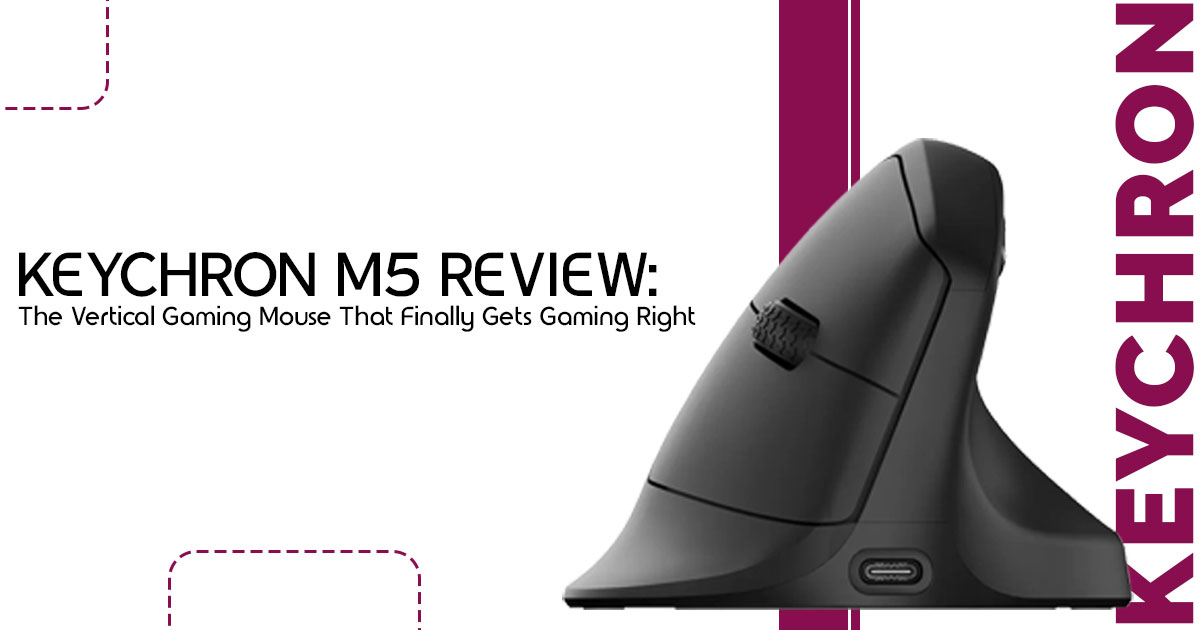
Most ergonomic mice fix wrist pain by sacrificing gaming performance. Most gaming mice ignore comfort completely. The Keychron M5 tries to sit right between comfort and gaming performance — and it gets closer than most mice we’ve tested. If you have ever felt that sharp twinge in your wrist after a four-hour session, you know the struggle of choosing between your health and your K/D ratio.
1. Introduction
The Vertical Gaming Mouse category has existed for years, but most products in this space were never truly built for gamers. Many were designed as office mice first and gaming devices second. They often came with weak sensors, poor weight balance, inconsistent tracking, and shapes that felt bulky during fast movement.
That created a frustrating gap in the market.
People looking for a comfortable gaming mouse or the best mouse for wrist pain gaming usually had to compromise somewhere. Either they accepted poor gaming performance for better ergonomics, or they continued using aggressive low-profile gaming mice that caused discomfort after long sessions.
This ergonomic gaming mouse review looks at whether the Keychron M5 can finally close that gap without forcing gamers to sacrifice comfort or performance.
Keychron’s idea is surprisingly simple: take modern gaming hardware — a flagship sensor, high polling support, responsive switches, wireless connectivity — and place it inside a shape that supports a more natural hand position. Instead of forcing the wrist to stay flat against the desk, the mouse encourages a handshake-style grip that reduces forearm rotation and wrist tension.
And honestly, that changes the experience more than most people expect.
What makes this especially interesting is how many users today no longer use their setup only for gaming. A single mouse now handles work, editing, browsing, content creation, and gaming across 10 to 12 hours every day. That makes comfort just as important as raw speed.
Customer reviews matter heavily in products like this because ergonomic devices are deeply personal.
Specs can tell you the polling rate or sensor model, but they cannot explain:
- how the mouse feels after six hours,
- whether adaptation becomes frustrating,
- if wrist pain actually improves,
- or whether gaming still feels responsive after switching from a traditional mouse.
That’s why real-world usage matters more than marketing claims.
As technology experts with over 20 years of experience in hardware and application research and development, we deeply analyze each product based on real-world performance, durability, and value for money. Our goal is to help you find the best product in every category—budget, performance, reliability, and long-term usage.
Whether you are:
- a gamer dealing with wrist strain,
- a hybrid office-and-gaming user,
- a creator spending long hours at a desk,
- or someone searching for a wireless ergonomic mouse that doesn’t feel slow and outdated,
our recommendations are based on extensive research, component analysis, real-world usability, and industry expertise.
And the Keychron M5 gives this category a perspective that most brands have ignored for years:
Maybe gamers shouldn’t have to sacrifice comfort just to stay competitive.
2. Technical Specifications at a Glance
Before we dive into how it feels, let’s look at the raw power under the hood. This isn’t your standard office peripheral.
| Feature | Specification |
| Sensor | PixArt PAW3950 (Flagship-grade gaming sensor) |
| Max DPI | 30,000 DPI |
| Polling Rate | Up to 8,000Hz (8K wireless version) |
| Weight | Approximately 100g |
| Connectivity | 2.4GHz wireless, Bluetooth 5.1, and USB-C wired mode |
| Battery Life | Up to 140 hours (Bluetooth) or 120 hours (2.4GHz wireless) |
| Angle | 47-degree vertical ergonomic tilt |
| Buttons | 6 programmable buttons plus a secondary horizontal scroll wheel |
Who Should Buy the Keychron M5?
Best For:
- Gamers dealing with wrist pain or repetitive strain from long gaming sessions.
- Users who spend 10+ hours a day switching between work and play.
- Hybrid productivity setups where desk space and comfort are priorities
- Casual and mid-core gamers who value longevity over professional esports specs.
Skip If:
- You play competitive esports at a professional level.
- You rely on ultra-fast, low-sensitivity flick aiming.
- You are unwilling to spend a week retraining your muscle memory.
- You prefer ultra-lightweight (sub-60g) mice.
Quick Verdict
The Keychron M5 is a legitimate breakthrough for the Vertical Gaming Mouse category. It uses one of the best gaming sensors ever found in a vertical mouse. It isn’t perfect, but it is the most “gaming-ready” vertical mouse we have ever tested.
3. Why the Keychron M5 Is Different From Most Gaming Mice
3.1 A Vertical Mouse That Doesn’t Feel Like Office Hardware
Most vertical mice are designed for people focused on office work, not fast-paced gaming. They often have a “handshake” grip that feels natural but lacks the tactile feedback needed for gaming. The Keychron M5 uses a 47-degree angle that reduces wrist rotation (pronation) without making the mouse feel like a bulky piece of medical equipment. It maintains a slim profile that allows for a more aggressive grip than its office-focused cousins.
3.2 Why Most Vertical Mice Fail at Gaming
Historically, if you wanted a vertical mouse, you had to settle for:
- Weak Sensors: High latency and poor tracking accuracy.
- Low Polling Rates: Usually capped at 125Hz or 250Hz, leading to “choppy” cursor movement.
- Heavy Designs: Most weigh over 130g, making fast movements exhausting.
- Sluggish Response: Mushy buttons that aren’t designed for rapid clicking.
The Keychron M5 changes the narrative by including the PAW3950 sensor and 8K polling, ensuring that the internal tech finally matches the external comfort. It also stands out as a strong Logitech MX Vertical alternative for users who want better gaming performance without giving up ergonomic comfort.
4. First Impressions After 24 Hours
4.1 The Adjustment Period Is Real
We won’t sugarcoat it: the first two hours with the Keychron M5 will feel awkward. Your brain is used to moving your wrist horizontally to aim. When you tilt that axis by 47 degrees, your muscle memory gets confused. You might find yourself overshooting targets or clicking the side of the mouse instead of the main buttons. It feels unfamiliar at first, especially during fast aiming movements.
4.2 What Starts Feeling Better After a Few Days
That’s when the mouse starts feeling natural. That dull ache at the base of the thumb started becoming much less noticeable. The tension in the forearm? Significantly reduced. Because the hand is in a neutral position, you stop “fighting” the desk. The hardware looks impressive on paper, but the real win is the lack of fatigue during long sessions. We realized we could play for four hours and feel almost the same as we did after the first thirty minutes.
5. Design & Ergonomics — Comfort Is the Main Selling Point
5.1 Shape, Grip, and Hand Position
The 47-degree tilt is the “Goldilocks” zone of ergonomics. It is vertical enough to stop your bones from crossing in your forearm, but horizontal enough that you can still use a hybrid claw grip. The thumb rest is deep and supportive, and the matte finish provides enough grip even when hands get a bit sweaty during a clutch moment.
5.2 Does It Actually Help Wrist Pain?
While it may help reduce strain during long sessions, many people searching for a gaming mouse for carpal tunnel or wrist fatigue will immediately understand why the vertical shape feels more comfortable during extended use.
By moving pressure away from the carpal tunnel and placing the hand in a more natural position, the mouse may help reduce stress on the wrist during long gaming or work sessions. It will not “cure” an existing injury overnight, but it can feel noticeably easier on the wrist compared to traditional flat gaming mice. The slightly wider arm position can also encourage a more relaxed sitting posture over time.
5.3 Long Session Comfort Test
- 2-Hour Gaming Session: Zero The mouse glides smoothly, and the weight is balanced well enough that it doesn’t feel like pushing a brick.
- 8-Hour Workday: This is where the Keychron M5 Switching between browser tabs, spreadsheets, and documents feels effortless.
- Late-Night Gaming Fatigue: Usually, a wrist starts to “burn” around 11 With the M5, that sensation was non-existent.
6. Gaming Performance — Better Than Expected, But Not Perfect
6.1 FPS Games: The Biggest Challenge
One of the biggest questions people ask before buying a vertical mouse for FPS games is whether aiming still feels accurate during fast matches. The Keychron M5 handles tracking beautifully. The PAW3950 sensor performs extremely well during tracking. However, “flick shots” are harder. Because you are using different muscles in the arm to move the mouse vertically, snapping to a headshot takes more effort than with a traditional flat mouse.
6.2 MMO, RPG, and Strategy Games Feel Excellent
For games like World of Warcraft, Baldur’s Gate 3, or League of Legends, this mouse is a dream. These games require high actions per minute but less “pixel-perfect” snapping. The comfort advantage here is massive. You can raid for hours without feeling like your hand is locking up.
6.3 Casual Gaming vs Competitive Gaming
There is a clear distinction here. If you are trying to go pro in Apex Legends, this probably isn’t the primary tool. But for 95% of gamers who play for fun and want to keep their wrists healthy, the tradeoff is 100% worth it. It gives gamers a more comfortable option without making gaming feel compromised.
7. Sensor, Polling Rate & Real-World Performance
7.1 Is 8K Polling Actually Useful?
Let’s be honest: most people cannot tell the difference between 1,000Hz and 8,000Hz polling. On a Vertical Gaming Mouse, where you aren’t making micro-adjustments at the speed of light, 8K is mostly about future-proofing. It does reduce input latency to sub-1ms, which feels “snappier,” but it also drains the battery significantly faster. We recommend sticking to 1,000Hz or 4,000Hz for the best balance.
7.2 PAW3950 Sensor Performance
This is the flagship sensor used in top-tier esports mice. It offers incredible tracking accuracy and a very low lift-off distance. Whether you are playing on a cloth pad or a hard surface, the Keychron M5 never spins out or loses tracking. It is consistent, which is the most important trait for any gaming peripheral.
8. Productivity Experience Is Surprisingly Strong
8.1 The Second Scroll Wheel Is More Useful Than Expected
Most gaming mice have one wheel. The M5 has a secondary thumb wheel that is a lifesaver for creators.
- Video Editing: Scrubbing through a timeline is a breeze.
- Spreadsheets: Horizontal scrolling through massive files becomes natural.
- Programming: Navigating long lines of code is much faster.
8.2 Best for Hybrid Users
If you are a remote worker who transitions straight into gaming at 5 PM, and if you want one mouse for both work and gaming, the Keychron M5 makes a lot of sense. You don’t have to swap peripherals or clutter the desk with two different mice. It handles both worlds with grace.
9. Software Experience — Finally, Mouse Software Without the Bloat
9.1 Browser-Based Customization Is Refreshing
One of the best Keychron M5 Specs isn’t even on the mouse—it’s the software. Keychron uses a web-based driver. You don’t have to install a massive program that eats your RAM. You just plug the mouse in, open your browser, and customize DPI, macros, and polling rate. It is clean, fast, and works on both Mac and Windows.
9.2 What’s Missing
It isn’t all perfect. The software lacks some of the advanced “layered” controls you might find in more established gaming brands. There is also limited onboard feedback; sometimes it’s hard to tell which profile is active without checking the web app.
10. Build Quality — Good Enough, But Not Premium
10.1 What Feels Great
The weight balance is excellent. It doesn’t feel “bottom-heavy” like some cheap vertical mice. The glides are high-quality PTFE, meaning it slides across a mousepad with very little friction. The button positioning is also intuitive; fingers naturally rest right over the switches.
10.2 What Feels Cheap
The plastic texture is a bit basic. It lacks the premium “soft-touch” coating found on more expensive mice. The main scroll wheel is functional but lacks a satisfying “clickiness.” It feels like a tool designed for utility rather than a luxury item.
11. Battery Life Reality Check
Readers love realistic expectations, so we broke down the battery life based on how you actually use the mouse.
| Mode | Polling Rate | Estimated Battery Life |
| Bluetooth | 125Hz | ~140 Hours |
| 2.4GHz Wireless | 1,000Hz | ~70–80 Hours |
| 2.4GHz Wireless | 4,000Hz | ~25–30 Hours |
| 2.4GHz Wireless | 8,000Hz | ~15–20 Hours |
Note: Using 8K polling will require you to charge the mouse every couple of days if you are a heavy user.
12. Keychron M5 vs Popular Alternatives
| Feature | Keychron M5 | Popular Office Vertical (Like Logitech MX Vertical) | High-End Ergonomic Mouse |
| Primary Focus | Gaming + Productivity | Pure productivity and office comfort | Productivity with light gaming support |
| Sensor | PAW3950 high-end gaming sensor | Office-grade sensor | Mid-range gaming sensor |
| Max Polling Rate | 8,000Hz | 125Hz | 1,000Hz |
| Weight | ~100g | ~135g | ~120g |
| Software | Browser-based customization | Heavy software installation required | Heavy software installation required |
| Price | ~$69 | ~$99 | ~$99 |
13. Who Should Actually Buy the Keychron M5?
Best Buyers:
- Wrist pain sufferers who refuse to stop gaming.
- Office workers who game and want one device for everything.
- Casual FPS players who prioritize comfort over rank.
- Ergonomic enthusiasts looking for the latest tech.
Not Ideal For:
- Hardcore esports players who need every millisecond of advantage.
- Ultra-low sensitivity aimers who move their entire arm across the desk.
- Users unwilling to adapt to a new hand orientation.
14. What Nobody Tells You About Switching to a Vertical Gaming Mouse
Switching to a Vertical Gaming Mouse is a commitment. You will likely see a temporary drop in accuracy for the first week. You might also need to adjust desk height or chair position, as the hand sits higher off the desk than before. Some people quit after two days because it feels “weird,” but those who stick through the first 10 hours rarely go back to flat mice.
15. Common Questions Buyers Search Before Purchasing (FAQ)
Is the Keychron M5 good for FPS games?
Yes, for casual and semi-competitive play. The sensor is top-tier, but the vertical orientation makes fast flick shots more difficult to master than a traditional mouse.
Can a vertical mouse improve wrist pain?
Absolutely. By placing the hand in a neutral “handshake” position, it helps keep the wrist in a more natural position, which may reduce strain during long sessions.
How long does it take to adjust?
Most users feel comfortable within 2-3 days, but it takes about a full week of consistent use to regain previous gaming performance levels.
Is 8K polling worth it?
For most, no. It is a great feature to have, but the battery drain is significant. 1,000Hz is more than enough for 99% of gamers.
Is this good for Mac and Windows?
Yes. The browser-based software makes it platform-agnostic, and it works perfectly via Bluetooth or 2.4GHz on both operating systems.
Can it replace a regular gaming mouse?
For many, yes. If you aren’t a professional esports player, the comfort benefits far outweigh the slight learning curve in aiming.
Is it worth the price?
At around $69, it is significantly cheaper than its main competitors while offering much better internal specifications.
16. Final Verdict: The Keychron M5 Solves a Problem Most Gaming Mice Ignore
Most gaming mice are built around one idea: speed first, comfort later. That works fine for short competitive sessions, but it becomes a different story when you spend eight, ten, or even twelve hours at your desk every day.
That’s where the Keychron M5 feels different.
This is not a mouse trying to beat ultralight esports models built purely for tournament-level flick shots. Instead, it focuses on something many brands still overlook — long-term comfort without making gaming feel slow, heavy, or disconnected.
And surprisingly, it succeeds more often than expected.
The vertical shape feels noticeably easier on the wrist during long gaming and work sessions, while the high-end sensor and responsive wireless performance keep the experience feeling fast enough for most modern games. Whether you are working during the day, editing content at night, or jumping into a few rounds of Valorant, Apex Legends, or casual RPG sessions, the Keychron M5 manages to balance comfort and control better than most ergonomic mice currently available.
That balance is what makes this mouse important.
It bridges the gap between health and hobby in a way that feels intentional instead of experimental. You can tell this product was designed for people who genuinely spend long hours at their setup — not just office users, and not just esports players.
Of course, it is not perfect.
Hardcore competitive FPS players may still prefer traditional lightweight gaming mice for faster reaction-based aiming. And the adjustment period can feel frustrating during the first few days, especially if you have used low-profile gaming mice for years.
But for the right user, those compromises are easy to accept. If you:
- struggle with wrist fatigue,
- want a more comfortable gaming mouse,
- need a better wireless ergonomic mouse for work and gaming,
- or simply want to protect your wrist before discomfort becomes a bigger problem,
then the Keychron M5 becomes one of the most practical and genuinely useful options in the current vertical gaming mouse market.
And that alone makes it stand out.
Where to Buy the Keychron M5
Amazon Worldwide
Keychron M5 Wireless Ergonomic Mouse on Amazon Worldwide
Amazon India
Keychron M5 Wireless Ergonomic Mouse on Amazon India
Share Your Experience
Have you already switched to a vertical gaming mouse? Did it actually help with wrist pain and long-session comfort, or was the adjustment harder than expected?
Share your experience in the comments below. And if you are still unsure whether the Keychron M5 is the right fit for your setup, feel free to ask your questions. Finding the right mouse is not only about gaming performance anymore — it is also about protecting your comfort for the long run.
***Disclaimer***
This blog post reflects our research, analysis, and opinions based on available product information, user feedback, and industry knowledge. It should not be taken as the official position of any brand, manufacturer, or company mentioned here. While we aim to keep information accurate and up to date, product details, pricing, and availability can change. We recommend double-checking important details before making a purchase.
Some links in this article may be affiliate links. If you choose to buy through these links, we may earn a small commission at no extra cost to you. This helps support our work and allows us to keep publishing in-depth, unbiased reviews. Our recommendations are never influenced by affiliate partnerships.
Comments shared by readers reflect their own views and not ours. We are not responsible for outcomes resulting from the use of information on this site. Please seek professional advice where appropriate.
All product names, logos, and brands mentioned are the property of their respective owners. These names are used for identification and informational purposes only and do not imply endorsement.
