
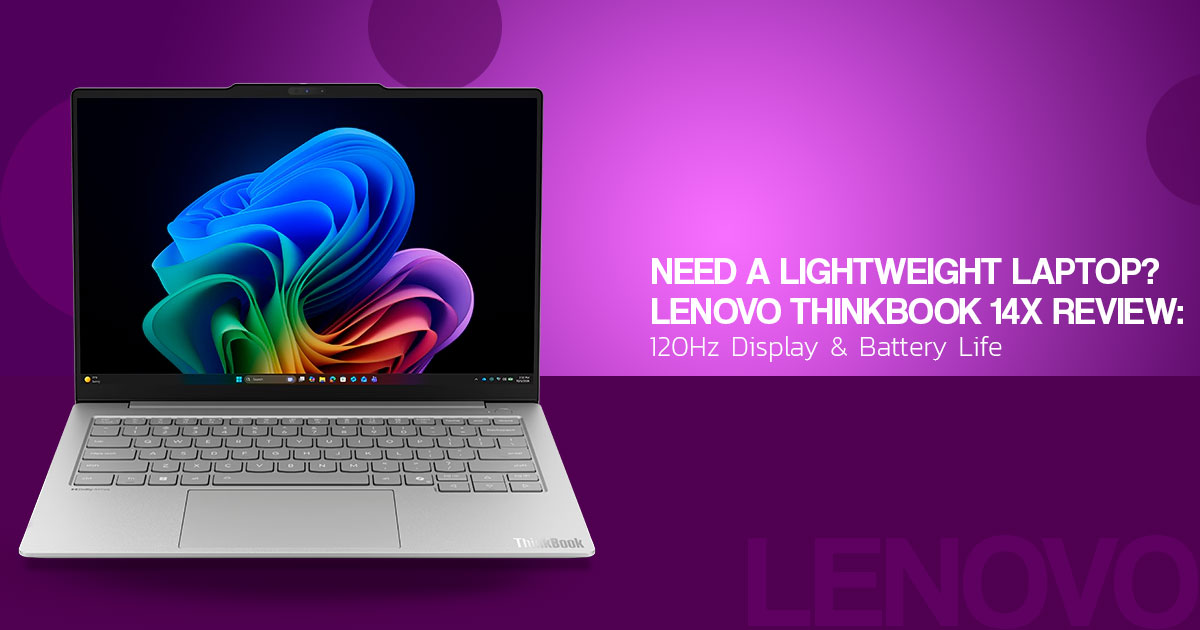
The Lenovo ThinkBook 14x (14-inch Intel) is a compact Windows business laptop for people who want a full Windows PC without carrying a heavy 14-inch machine. The configuration covered in this review pairs an Intel Core Ultra 5 226V processor with Intel Arc Graphics 130V, 16GB LPDDR5X memory, a 512GB Samsung NVMe SSD, and a 14-inch 1,920 × 1,200 matte IPS display with a 120Hz refresh rate.
That hardware makes the ThinkBook 14x relevant to students, office workers, remote professionals, commuters, and frequent travelers. The important questions are not just about the processor and memory. Battery life, keyboard comfort, display quality, portability, fan noise, storage, and graphics performance all shape the daily experience.
As technology experts with over 20 years of experience in hardware and application research and development, we analyze products based on real-world performance, durability, and value for money. Our goal is to help you find the right product across budget, performance, reliability, and long-term use. For this Lenovo ThinkBook 14x review, we focus on what matters to students, professionals, office users, remote workers, and travelers.
Our recommendations are based on product research, component analysis, real-world usability, and industry expertise. We have not independently tested this laptop. The performance, battery life, display, thermal behavior, noise, and benchmark observations in this article are based on the independent Notebookcheck review cited below.
Read on to see how the Lenovo ThinkBook 14x performs in everyday work, what its 120Hz display is like, how long the battery lasted in Notebookcheck’s test, and where its hardware limits may matter before you buy.
Key takeaway: The Lenovo ThinkBook 14x (14-inch Intel) is built around mobile productivity. The main buying questions are whether its light weight, battery life, display, and integrated graphics fit your needs.
Lenovo ThinkBook 14x (14-inch Intel) specifications
The official Lenovo product page and other listings may show different configurations or regional options, so buyers should verify the model number before ordering.
| Specification | Configuration covered here | Buyer relevance |
| Product name | Lenovo ThinkBook 14x (14-inch Intel) | Use the exact regional listing to confirm the configuration |
| Processor | Intel Core Ultra 5 226V | Designed for general productivity, multitasking, and efficient mobile use |
| Graphics | Integrated Intel Arc Graphics 130V | Suitable for multimedia and lighter games; not a discrete gaming GPU |
| Memory | 16 GB LPDDR5X | Appropriate for normal office and study workloads; upgradeability should be confirmed before purchase |
| Storage | 512 GB Samsung NVMe SSD | Provides quick application loading and moderate file capacity |
| Display | 14-inch, 1,920 × 1,200 matte IPS | Offers a 16:10 work area and reduced reflections |
| Refresh rate | 120 Hz | Makes scrolling and supported motion appear smoother than 60 Hz |
| Chassis | Aluminum | Provides a metal chassis for this configuration |
| Weight | Approximately 1 kg in the review comparison | Keeps the laptop at the light end of the 14-inch category |
| Maximum thickness | Approximately 15.6 mm in the review comparison | Supports a slim travel profile |
| Battery test result | 16 hours 56 minutes in the cited Wi-Fi test | A test result, not a guaranteed runtime for every workload or configuration |
| Price reference | Notebookcheck presents it as a sub-$900 laptop; its comparison table lists €949 for the reviewed configuration | Currency, market, retailer, and configuration must be checked separately |
Is the Lenovo ThinkBook 14x good for everyday work?
The available testing shows that the reviewed configuration handles documents, web research, spreadsheets, video calls, and everyday multitasking well. Notebookcheck describes the system as fast and responsive in daily use and reports stable SSD performance.
Notebookcheck records a PCMark 10 score of 6,956 for the reviewed unit. That result is useful when comparing tested systems under the same benchmark, but it does not predict performance in every program. Power settings, software updates, storage use, and workload duration can all affect results.
The Intel Core Ultra 5 226V belongs to Intel’s Lunar Lake family and is designed for thin, mobile systems. For buyers, that means a mix of CPU performance, integrated graphics, and power efficiency in a compact laptop. It is still a mobile productivity platform, not a replacement for a workstation built for long rendering or simulation jobs.
Note: A benchmark score is useful for comparing systems tested under similar conditions. It should not be treated as a universal rating for every ThinkBook 14x configuration.
Design and portability
One of the clearest advantages of this lightweight Lenovo laptop is its size. Notebookcheck measured the review unit at 1.013 kg with a maximum thickness of 15.6 mm. That puts it near the light end of the 14-inch laptops in the comparison.
For a student or commuter, that lower carry weight can make a real difference when the laptop moves between classes, meetings, home, and work. The same point matters to consultants, field workers, and travelers who need a full Windows PC rather than a tablet or phone.
Portability still needs to be weighed against workload. The ThinkBook 14x uses a compact cooling system, but Notebookcheck found that performance remained stable during prolonged testing and reports a 37W PL1 sustained power limit for the processor. Buyers who spend hours on CPU-heavy workloads should still consider whether a larger laptop with more cooling capacity would better fit their needs.
ThinkBook 14x (14-inch Intel) display
The ThinkBook 14x 120Hz display combines a 1,920 × 1,200 resolution, 16:10 aspect ratio, and matte IPS panel. The extra vertical space is useful for documents, browser pages, and spreadsheets, while the matte surface helps cut reflections.
The 120Hz refresh rate makes scrolling, cursor movement, and supported animations look smoother than on a 60Hz panel. It does not, by itself, guarantee higher brightness, stronger contrast, or wider color coverage.
Display quality needs a closer look. Lenovo’s India listing for this configuration specifies 100% sRGB, while Notebookcheck measured 92.2% sRGB on its review unit. Notebookcheck also measured an average brightness of about 322 nits. That makes the exact panel and regional configuration worth checking, especially for buyers who need consistent color for photo or video work.
The matte surface is useful in normal indoor lighting, but anyone working outdoors or in a bright room should check the brightness rating of the exact configuration before buying.
Performance and Intel Arc Graphics 130V
The reviewed ThinkBook 14x performs best in general-purpose computing. The Core Ultra 5 226V and Samsung NVMe SSD contribute to quick application loading and responsive system behavior. Notebookcheck also found stable performance during prolonged testing.
The Intel Arc Graphics 130V handles high-resolution video playback, hardware-accelerated media work, and less demanding games. Notebookcheck’s testing places the GPU below faster integrated graphics such as Intel Arc 140V and several higher-end AMD Radeon solutions, so the laptop is better suited to light gaming and everyday graphics work than demanding 3D workloads.
That makes the graphics solution suitable for casual gaming and multimedia, but buyers looking for high settings in modern AAA games, advanced 3D work, or a laptop with a discrete GPU should look at a different class of machine.
ThinkBook 14x (14-inch Intel) battery life
Battery life is one of the stronger results in the supplied review. Notebookcheck records 16 hours 56 minutes in its Wi-Fi browsing test, 28 hours 25 minutes at idle, and 2 hours 26 minutes under maximum load. These figures come from separate test conditions.
The Wi-Fi result is the most useful figure for many office users, but it is still a controlled test. Display brightness, browser activity, video calls, connected accessories, wireless signal strength, power mode, and application load can change real-world runtime.
The test supports the view that the reviewed configuration can handle a long workday under suitable conditions. It does not mean every ThinkBook 14x configuration will deliver the same runtime.
Best practice: Compare laptop battery figures only when the test method is known. Idle runtime, Wi-Fi browsing, video playback, and maximum-load results measure different conditions.
Keyboard, touchpad, and daily usability
The independent review describes the keyboard and touchpad as comfortable for work. That matters on a lightweight laptop because the machine still needs to support long writing, browsing, and office sessions.
The touchpad is also important when the laptop is used away from a desk. Users working with detailed design applications may still prefer an external mouse or drawing device, but Notebookcheck found the built-in controls comfortable for normal use.
The supplied review does not establish a universal webcam, speaker, biometric, or microphone specification for every market. Those details should be checked on the exact retailer listing rather than assumed from another ThinkBook configuration.
Connectivity, storage, and upgradeability
The reviewed unit contains a 512GB Samsung NVMe SSD in an M.2-2242 format. Notebookcheck notes that the chassis also has room for a longer M.2-2280 drive. That gives the platform some storage flexibility, but buyers should confirm the supported drive and upgrade procedure for the exact model.
The ThinkBook 14x ports and wireless features should be checked by model number. Notebookcheck’s related launch coverage says the North American model uses 10Gbps USB-C ports rather than USB4/Thunderbolt 4 and supports DisplayPort Alt Mode and USB Power Delivery. That information should not be applied to every regional listing without checking the exact model.
The reviewed configuration uses LPDDR5X memory. Buyers should not assume the RAM can be replaced or expanded. Lenovo’s listing for the reviewed class of configuration describes the memory as on-package, so choosing enough memory at purchase is the safer approach.
Warning: Confirm the port list, memory arrangement, storage layout, display panel, wireless standard, and warranty for the exact model number. A product-family name does not prove that two regional configurations are identical.
Lenovo ThinkBook 14x pros and cons
| Strengths supported by the research | Limitations supported by the research |
| Approximately 1 kg in the review comparison | Display color-gamut coverage is limited compared with higher-end panels |
| Aluminum chassis | Fan noise increases under heavier workloads |
| Matte 120 Hz IPS display | Integrated graphics are not intended for demanding gaming |
| Responsive Core Ultra 5 226V platform | Sustained maximum processor power is affected by temperature limits |
| Comfortable keyboard and touchpad | Exact regional specifications require verification |
| 16 hours 56 minutes in the cited Wi-Fi test | Battery figures will vary by workload and test conditions |
| Additional SSD-format flexibility noted in the review | LPDDR5X memory should not be assumed to be upgradeable |
Lenovo ThinkBook 14x alternatives
The supplied Notebookcheck review compares the configuration with several 14-inch alternatives, including the Lenovo ThinkPad E14 G8-21Y2006XGE, Asus ExpertBook PM3406, and Dell 14S DS14260. The useful comparison is based on the buyer’s priorities rather than a universal ranking.
| Buyer priority | Model direction to investigate | Reason for the comparison |
| Low carry weight | Lenovo ThinkBook 14x (14-inch Intel) | Approximately 1 kg in the reviewed comparison |
| Traditional business-laptop alternative | Lenovo ThinkPad E14 G8-21Y2006XGE | Included as a comparison model in the supplied review |
| Another compact office alternative | Asus ExpertBook PM3406 | Included in the supplied review’s performance and battery comparisons |
| Higher benchmark performance in the supplied comparison | Dell 14S DS14260 | Scores above the ThinkBook 14x in the cited PCMark 10 comparison |
| Color-focused work | A laptop with a separately verified wide-gamut OLED or IPS panel | The ThinkBook 14x review identifies color coverage as a limitation |
| Demanding gaming or 3D work | A laptop with a separately verified discrete GPU | Intel Arc Graphics 130V is integrated graphics |
The ThinkBook 14x vs ThinkPad E14 choice should be made using the exact processor, weight, display, ports, storage, and price of the two listings. The model names alone are not enough for a fair configuration-level comparison.
The same applies to ThinkBook 14x vs Asus ExpertBook. Compare the exact panel, memory, storage, battery, ports, and connectivity instead of relying on the product-family name.
Who should buy the Lenovo ThinkBook 14x (14-inch Intel)?
This configuration is worth considering for readers who prioritize portability and general productivity, including:
- Students carrying a Windows laptop between classes.
- Office workers moving between desks, meetings, or work locations.
- Travelers who value a low carry weight.
- Remote workers who need a full Windows productivity system.
- Buyers searching for a lightweight laptop for work who are willing to verify the exact configuration.
It may not fit readers who need:
- Wide-gamut color for professional photo or video work.
- High graphics settings in modern games.
- Sustained heavy rendering or simulation performance.
- Silent operation during demanding workloads.
- A particular port or upgrade path without checking the model number.
Lenovo ThinkBook 14x price and buying advice
The supplied Notebookcheck review presents the laptop as a sub-$900 option, while its comparison table lists a €949 list price for the reviewed configuration. Those are different market references, not a single global price. The review also lists a Lenovo US order price of $849 at the time of publication. Prices can change, so readers should check the live listing before buying.
The following checks can reduce the risk of ordering the wrong configuration:
- Confirm that the processor is Intel Core Ultra 5 226V or identify the alternative processor being considered.
- Confirm the memory capacity and whether it is soldered.
- Check whether the display is the 1,920 × 1,200 120 Hz IPS panel covered here.
- Verify storage capacity and the listed SSD format or expansion option.
- Compare the full port list with the monitor, dock, storage, and camera equipment to be used.
- Check the local warranty, return policy, currency, delivery charges, and taxes.
Check Amazon US pricing
The research-supported reasons to consider this configuration are its low carry weight, responsive general use, 120Hz screen, and battery performance shown in Notebookcheck’s testing. Use the link below to check the current US listing, configuration, price, and stock status:
Check current Lenovo ThinkBook 14x offers on Amazon US
Check Amazon India pricing
Indian listings may differ in processor, memory, display, storage, warranty, and delivered price. Check the model number and final checkout cost before comparing the offer with another 14-inch laptop:
Check current Lenovo ThinkBook 14x offers on Amazon India
Final verdict: Is the Lenovo ThinkBook 14x worth buying?
The evidence points to a strong fit for mobile productivity. The reviewed Lenovo ThinkBook 14x combines a low carry weight, responsive everyday performance, matte 120Hz display, comfortable input devices, and long battery life in Notebookcheck’s Wi-Fi test.
The limitations matter too. The tested display measured 92.2% sRGB, while Lenovo lists 100% sRGB for the India configuration. The Intel Arc Graphics 130V is integrated rather than a discrete gaming GPU, and fan noise rises under heavier workloads. Regional configuration differences also mean buyers should verify the exact listing.
For a student, commuter, office worker, or traveler, the low weight and battery test result may fit the way the laptop will be used. Buyers focused on professional color work, demanding gaming, or long rendering jobs should compare laptops with the display, cooling, or discrete graphics those workloads require.
Whether the ThinkBook 14x is worth buying comes down to the buyer’s priorities. It makes the most sense when mobility and everyday work matter more than maximum graphics performance or professional display coverage.
Frequently asked questions
How much does the Lenovo ThinkBook 14x (14-inch Intel) weigh?
The reviewed comparison places the configuration at approximately 1 kg, or about 2.2 lb. Weight can vary with the battery, display, and other configuration choices.
Does the Lenovo ThinkBook 14x (14-inch Intel) have a 120 Hz display?
The configuration covered by Notebookcheck uses a 14-inch 1,920 × 1,200 matte IPS display with a 120 Hz refresh rate. Buyers should confirm the panel specification on the exact listing.
How long does the battery last?
Notebookcheck reports 16 hours 56 minutes in its Wi-Fi browsing test, 28 hours 25 minutes at idle, and 2 hours 26 minutes under maximum load. Those figures come from different test conditions and should not be treated as one general runtime claim.
Can it run games?
The integrated Intel Arc Graphics 130V can run less demanding games at low to medium settings. It is not intended to provide the performance of a laptop with a discrete gaming GPU.
Is it suitable for photo editing?
It can support ordinary photo work, but Notebookcheck measured 92.2% sRGB coverage on its review unit, while Lenovo lists 100% sRGB for the India configuration. Professional users who need dependable wide-gamut color should verify the exact panel or use a calibrated external monitor.
Is the memory upgradeable?
The reviewed configuration uses LPDDR5X memory, and the available research does not establish a user-replaceable memory path. Lenovo describes the memory as on-package. Confirm the exact model specification before buying.
Does it have good cooling?
Notebookcheck reports safe surface temperatures and quiet operation during normal use. Fan noise rises under heavier workloads, while the review reports stable performance during prolonged testing.
Thinking about buying the Lenovo ThinkBook 14x? Before you order, check the full review and compare its performance, battery life, display, portability, and everyday usability with the way you plan to use the laptop.
Not sure which configuration or laptop fits your needs? Leave a comment with your budget, main tasks, and the other models you’re considering. We can help you compare the specifications and flag the details that could affect your decision. You can also ask about performance, battery life, display quality, gaming, upgrades, or long-term use.
If you find our reviews useful, follow us for more laptop, PC, and technology reviews to help with your next buying decision.
Disclaimer

This article is based on our research, analysis, available product information, user feedback, and industry knowledge. It is not an official statement from any brand or manufacturer mentioned in the article. Product specifications, prices, software features, and availability can change. We do our best to keep the information up to date, but please check the latest details with the manufacturer or retailer before making a purchase.

Some links in this article may be affiliate links. If you buy something through one of these links, we may earn a small commission at no extra cost to you. These commissions help support the site and our work. They do not affect how we assess or discuss products. Comments and opinions shared by readers belong to the people who post them and do not necessarily represent our views. Information on this site is provided for general purposes, and we cannot guarantee a particular result from using it. Where professional advice is needed, consult a qualified professional.

All product names, logos, and trademarks belong to their respective owners. We use them only to identify the products and companies discussed and do not imply endorsement or affiliation.
