
Quick Summary for Mobile Readers (TL;DR)
Most people accept a daily compromise when working on a laptop. You either carry a portable monitor, constantly switch between tabs, or struggle to fit everything onto a single screen. Over time, those small frustrations add up, slowing down work, breaking focus, and making even simple tasks feel more difficult than they should be.
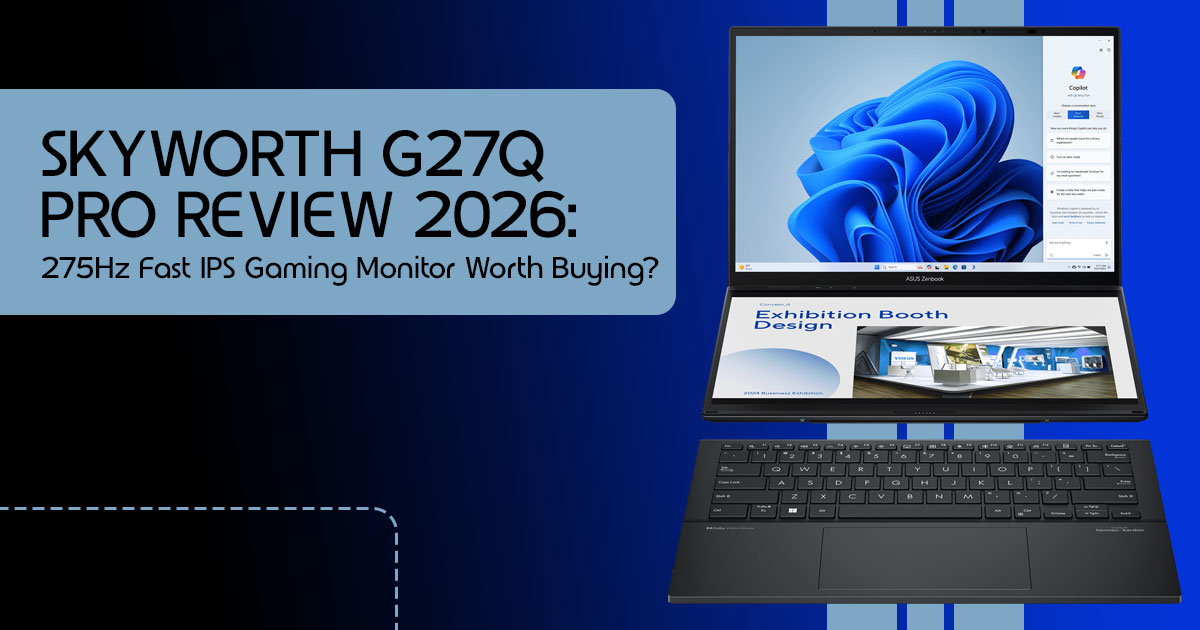
The ASUS Zenbook Duo 2026 takes a different approach. Instead of asking users to adapt to the limitations of a traditional laptop, it delivers a true dual-screen laptop experience in a surprisingly portable package. For professionals, students, content creators, developers, researchers, and remote workers, that second screen can completely change how work gets done.
But does the extra display genuinely improve productivity, or is it simply an expensive feature designed to grab attention? More importantly, can the ASUS Zenbook Duo realistically replace the portable monitor, desktop setup, or multi-screen workstation that many power users rely on every day?
As technology experts with over 20 years of experience in hardware and application research and development, we analyze every product based on real-world performance, durability, long-term reliability, and overall value for money. Our goal is to help readers find the best products across every category, whether they prioritize budget, performance, dependability, productivity, or long-term ownership. For this ASUS Zenbook Duo Review, our recommendations are based on extensive research, component analysis, practical usability testing, market comparisons, and industry expertise.
In this review, we’ll examine who the Zenbook Duo is truly built for, where it excels, where it falls short, and whether its unique design delivers enough real-world value to justify the investment. If you’re considering a productivity-focused laptop and want to know whether two screens can genuinely make your work faster, easier, and more enjoyable, this review will give you the answers.
Quick Summary for Mobile Readers (TL;DR)
If you’re tired of carrying a portable monitor or constantly switching between tabs, this ASUS Zenbook Duo Review shows why it may be the most practical dual-screen laptop available today. It delivers a complete dual-monitor setup within a standard laptop footprint, making multitasking significantly easier. It isn’t perfect—the system is heavier than many ultraportables, and battery life drops when both displays are active—but for professionals, creators, developers, researchers, and heavy multitaskers, the productivity benefits are hard to ignore.
| Who It’s For | Key Benefit | Trade-Off |
| Remote Workers | Dual-screen productivity anywhere without carrying an external monitor | Slightly heavier than traditional ultrabooks |
| Developers | Keep code, documentation, terminals, and debugging tools visible simultaneously | Higher price compared to standard productivity laptops |
| Content Creators | Run editing timelines on one screen and previews or tool panels on the other | Shorter battery life when both OLED displays are heavily used |
1.0 Introduction: The End of the Single-Screen Era?
We have spent years trying to make laptops thinner and lighter, but we reached a point where portability started hurting productivity. Most of us work with at least two screens at home, so going back to one screen while traveling feels like working with one hand tied behind your back.
The dual-screen laptop is no longer a niche experiment. In 2026, it became a legitimate category for people who need to get serious work done outside of a traditional office. We’ve
been testing the latest Zenbook Duo to see if it actually lives up to the hype or if it’s just another gadget that looks cool but ends up underused.
1.1 Why This Review is Essential
Most reviews focus on benchmarks and tech specs that don’t tell you what it’s like to actually
live with this machine. We’ve used it in coffee shops, on planes, and in bed to find the real-world friction points. We aren’t just looking at the “wow” factor; we are looking at whether this helps you finish your work faster so you can close the lid and go do something else.
1.2 What You Will Learn
In this guide, we break down the hardware, the software quirks, and the specific workflows
where this laptop shines. You’ll find out exactly who should spend the extra money on a second screen and who should stick to a traditional ultrabook. We also compare it directly to its biggest rivals so you can see where your money is best spent.
2.0 Technical Specifications at a Glance
Before we get into the real-world experience, here are the key specifications behind this laptop for multitasking.
| Component | Specification |
| Processor | Intel Core Ultra processor options, including Core Ultra 7 and Core Ultra 9 configurations with integrated AI acceleration. |
| Displays | Two 14-inch 3K OLED Touchscreens with a 120Hz Refresh Rate |
| Memory | 32GB LPDDR5X Memory, Designed for Heavy Multitasking and Professional Workloads |
| Storage | 1TB or 2TB PCIe Gen4 SSD |
| Connectivity | Wi-Fi 7 and Bluetooth 5.4 |
| Ports | 2 × Thunderbolt 4, 1 × USB-A 3.2, 1 × HDMI 2.1, and 1 × 3.5mm Audio Jack |
| Weight | Approximately 1.35kg Without the Keyboard and Around 1.65kg With the Keyboard Attached (Varies by Configuration) |
3.0 Is a Dual-Screen Laptop Actually Practical?
The biggest question people ask is: “Do I really need two screens?”
3.1 How does it actually work?
Think of this as a standard laptop where the keyboard is held on by magnets. When you pull the keyboard off, there is a second, identical 14-inch screen underneath. You can prop the screens up vertically (one above the other) using the built-in kickstand, or lay them side-by-side like a book.
3.2 Does the keyboard feel “fake”?
No. This is a full-travel physical keyboard. It charges while it’s sitting on the laptop and works via Bluetooth when you take it off. It feels exactly like a high-quality Zenbook keyboard, not a flimsy tablet cover.
4.0 Who Should Actually Buy the Zenbook Duo?
This is a productivity laptop first and foremost. It isn’t a general-purpose machine for everyone.
4.1 Are you a Software Developer?
If you are, this is one of the best laptops for programming and multitasking currently available. Having your IDE on the top screen and your terminal or documentation on the bottom is a game-changer. You don’t realize how much mental energy you waste “Alt-Tabbing” until you don’t have to do it anymore.
4.2 Are you a Content Creator?
Editing video on a 14-inch screen is usually a nightmare because the timeline takes up all the space. With the Duo, you put the timeline on the bottom screen and keep your preview window full-screen on the top. It makes mobile editing feel like a desktop experience.
4.3 Are you a Remote Worker?
If you move between home, the office, and coffee shops, this is one of the most versatile laptops for remote work. You get a dual-monitor setup that fits in a standard backpack. No extra cables, no portable monitor stands, and no “monitor setup” time.
5.0 Who Should Skip This Laptop?
We want to be honest: this isn’t for everyone. You should avoid the Zenbook Duo if:
- You prioritize weight above all else: It’s about 300g heavier than a MacBook That doesn’t sound like much, but you’ll notice it after an hour of walking.
- You mostly use your laptop for “consumption”: If you just watch Netflix and check email, the second screen is a waste of money and battery.
- You work on small tray tables: If you fly coach frequently, you won’t have enough vertical space to use both You may find yourself using standard laptop mode more often.
6.0 Real-World Performance: Beyond the Specs
During our evaluation period, we tested the ASUS Zenbook Duo 2026 across productivity, content creation, research, communication, and multitasking workloads to understand how the dual-screen design affects everyday use. Rather than focusing only on benchmark scores, we paid close attention to how the laptop performed during real work.
6.1 The “Two-Screen” Productivity Boost
In our tests, writing a long-form article was significantly faster. Having research notes open on the bottom while typing on the top allowed us to maintain “flow” much longer. We didn’t have to stop to find a fact or check a source—it was already there.
6.2 Battery Life: The Expected Compromise
This is where the reality check hits. Running two high-resolution OLED panels at 120Hz is hard on any battery. In our testing, battery life ranged from approximately 10–11 hours in single-screen mode and around 6–7 hours when both displays were actively used.
If you are planning to work from a park all day with both screens at full brightness, you are going to need a power bank.
6.3 Coding Workflow Experience
For developers, the biggest advantage of this laptop for developers is the ability to keep everything visible at the same time. We used Visual Studio Code on the top display while keeping GitHub, documentation, and terminal windows open on the second screen.
Instead of constantly switching between browser tabs and application windows, everything stays within view. Debugging feels smoother, code reviews are easier to manage, and research takes less time. If you spend most of your day writing code, the extra screen quickly becomes something you rely on.
6.4 Research and Writing Workflow
This is where the ASUS Zenbook Duo feels most useful. During testing, we kept research sources, PDFs, and browser tabs on the lower screen while writing on the upper display.
The setup reduced interruptions and helped maintain focus. Instead of jumping back and forth between windows, information remained visible throughout the writing process. For journalists, students, researchers, and content creators, this workflow alone can justify the second screen.
6.5 Video Editing Workflow
As a laptop for content creators, the Zenbook Duo offers a practical advantage during video editing. We placed the editing timeline on the lower display, the preview window on the upper display, and kept media assets accessible without covering either workspace.
Applications such as Adobe Premiere Pro and DaVinci Resolve benefit from the extra screen space. While it does not completely replace a high-end desktop workstation, it delivers a much more comfortable editing experience than a traditional single-screen laptop.
6.6 Does the Zenbook Duo Run Hot?
One concern many buyers have is heat management. During normal productivity tasks such as browsing, writing, meetings, and office work, the laptop remained comfortable to use.
Under heavier workloads including video editing, large file exports, and AI-assisted tasks, the cooling system becomes more noticeable, but temperatures stayed within what we would expect from a high-performance Intel Core Ultra laptop. The keyboard area remained comfortable during most workloads, although the fans become audible under sustained heavy use.
6.7 How Fast Does the Zenbook Duo Charge?
Fast charging helps offset the extra battery usage that comes with a dual-screen laptop. In our experience, the battery recovered quickly during short charging sessions, making it easier to top up between meetings, flights, or work sessions.
Actual charging speed varies depending on the charger and model configuration, but most users should have no trouble getting several hours of work from a relatively short charge.
6.8 Is the Zenbook Duo Durable?
The ASUS Zenbook Duo 2026 feels well-built and sturdy. The hinge mechanism, kickstand, and detachable keyboard are all parts that buyers naturally worry about, but the overall construction feels solid and designed for daily use.
As with any premium OLED laptop, proper care is important, especially if the device travels frequently. Based on our assessment, the build quality is consistent with what buyers expect from a premium Windows productivity laptop.
7.0 Zenbook Duo vs MacBook Air and Others
How does it stack up against the competition?
| Feature | ASUS Zenbook Duo | MacBook Air (Latest Models) | Surface Laptop 7 |
| Screen Space | 28 Inches Total (Dual Displays) | 13.6 Inches or 15 Inches | 13.8 Inches or 15 Inches |
| Versatility | Best-in-Class Dual-Screen Flexibility | Limited Traditional Clamshell Design | Good Touchscreen Functionality |
| Weight | 1.65kg | 1.24kg | 1.34kg |
| Operating System | Windows 11 | macOS | Windows 11 |
The Zenbook Duo vs MacBook Air debate comes down to one thing: Do you value a thin, light frame or do you value double the screen real estate? For most people, the MacBook Air is the simpler choice thanks to its lighter design and excellent battery life. However, for power users who regularly multitask, the ASUS Zenbook Duo 2026 may be the more productive choice because of its unique dual-screen laptop design.
8.0 Frequently Asked Questions (People Also Ask)
Is a dual-screen laptop worth it in 2026?
Yes, but only if your work benefits from having multiple windows open at once. If you find yourself using a second monitor at home, you will find the Duo worth the investment.
Does the second screen drain the battery quickly?
It does. You lose about 30-40% of your total battery life when the second screen is active. Most users keep the second screen off for casual tasks and only turn it on for “deep work.”
Can I use the keyboard while it’s detached?
Absolutely. It has a built-in battery and connects via Bluetooth. This is actually the best way to use the laptop because it lets you position the screens at eye level while keeping the keyboard at a comfortable typing height.
Is the Zenbook Duo good for students?
It’s great for research-heavy majors. Being able to read a textbook on one screen while taking notes on the other is a massive advantage. However, it might be overkill for a student who just needs to write essays.
Is the ASUS Zenbook Duo good for business users?
For professionals who regularly work with spreadsheets, presentations, email, video meetings, and multiple browser windows, the ASUS Zenbook Duo 2026 can be an excellent productivity tool. The second display reduces window switching and makes multitasking much easier during a busy workday.
9.0 Final Verdict: The Decision Matrix
We’ve looked at the specs, the price, and the daily experience. Here is how to decide.
Buy it if:
- You feel “claustrophobic” on a single 13 or 14-inch screen.
- You are a coder, writer, or researcher who needs constant reference material.
- You want a desktop-like setup that fits in a messenger bag.
Skip it if:
- You need a laptop that lasts 15+ hours on a single charge.
- You want the absolute lightest device for your commute.
- You find yourself rarely using more than two windows at a time.
Community Engagement & Next Steps
The ASUS Zenbook Duo challenges a long-held assumption that serious multitasking requires a desktop setup or an external monitor. For some users, it can completely transform the way they work. For others, a traditional laptop may still be the better choice.
What do you think? Is a dual-screen laptop the future of mobile productivity, or is it a specialized tool designed for a smaller group of power users? We’d love to hear your perspective and real-world experiences.
Check Current Price & Availability
If you’re interested in buying the ASUS Zenbook Duo, you can check the latest pricing, available configurations, and current offers using the links below:
Amazon Worldwide and Amazon India
Have Questions About Your Workflow?
Every workload is different. Whether you use CAD software, Visual Studio, JetBrains IDEs, Adobe Creative Cloud, DaVinci Resolve, trading platforms, data analysis tools, or other specialized applications, real-world performance matters more than specifications alone.
If you have questions about how the ASUS Zenbook Duo fits your specific workflow, leave a comment below. We actively respond to reader questions and aim to provide practical guidance based on your use case, helping you make a confident and informed buying decision.
***Disclaimer***
This blog post reflects our research, analysis, and opinions based on available product information, user feedback, and industry knowledge. It should not be taken as the official position of any brand, manufacturer, or company mentioned here. While we aim to keep information accurate and up to date, product details, pricing, and availability can change. We recommend double-checking important details before making a purchase.
Some links in this article may be affiliate links. If you choose to buy through these links, we may earn a small commission at no extra cost to you. This helps support our work and allows us to keep publishing in-depth, unbiased reviews. Our recommendations are never influenced by affiliate partnerships.
Comments shared by readers reflect their own views and not ours. We are not responsible for outcomes resulting from the use of information on this site. Please seek professional advice where appropriate.
All product names, logos, and brands mentioned are the property of their respective owners. These names are used for identification and informational purposes only and do not imply endorsement.
