
How We Researched This Review
This review is based on official vendor specifications, published interviews, official vendor documentation, and statements from the designer, product listings, and coverage from leading technology publications including The Verge, TechPowerUp, and Guru3D. Where applicable, we cross-checked specifications across multiple independent sources to verify consistency. Since the product has not yet shipped, this review does not include hands-on testing.
Introduction
Buying a custom mechanical keyboard isn’t just about picking the right switches anymore. Sometimes the biggest question is whether you can still buy it at all. Limited group buys have become common, and once they end, many buyers are left wondering if they missed their chance or if it’s worth waiting for a retail release.
That’s exactly the situation facing anyone interested in the KeyBoy Advance today.
As technology experts with over 20 years of experience in hardware and application research and development, we evaluate every product beyond the specifications. We look at real-world performance, build quality, durability, repairability, and long-term value to understand whether a product deserves your investment. Whether you’re a mechanical keyboard enthusiast, custom keyboard builder, Game Boy Advance fan, collector, or simply searching for a distinctive everyday keyboard, our recommendations come from extensive research, component-level analysis, practical usability testing, and years of industry experience.
Click here to buy KeyBoy Advance
Most coverage appeared while the Group Buy was still open, making much of that information outdated for anyone researching the keyboard now. That made sense at the time, but it no longer answers the questions buyers have today. The questions have changed. Can you still buy it? Is a restock coming? If you missed the group buy, did you really miss out?
Those are the questions this guide answers first.
Designed by PromoType (Galo), the KeyBoy Advance is a 50% HHKB-layout mechanical keyboard inspired by Nintendo’s iconic 2001 Game Boy Advance. It runs VIAL firmware, features programmable shoulder buttons, and launched as a $275 barebones kit during its limited Group Buy. The campaign closed on July 22, 2026, with customer orders expected to ship in Q4 2026.
Based on the vendors’ stated Group Buy discount, the projected retail price is around $344, although official retail pricing has not yet been announced.
That single detail changes the buying decision more than anything else, so it’s the best place to begin.
The Group Buy Has Ended. Here’s What That Means for Buyers Today
Between July 3 and July 8, 2026, nearly every article about the KeyBoy Advance focused on the same message: the group buy was live, the deadline was July 22, and interested buyers needed to decide quickly.
That advice is no longer relevant.
If you found this article while searching for the keyboard today, you probably want answers that reflect the current situation—not instructions written weeks ago.
Is the KeyBoy Advance group buy still open?
No. The KeyBoy Advance group buy officially ended on July 22, 2026 after running through Proto[Typist] Keyboards and UniKeys. Customers who placed orders during that period are expected to receive their keyboards in Q4 2026.
Will the KeyBoy Advance Be Restocked?
Current evidence from Proto[Typist] and UniKeys strongly suggests a future retail release, although neither vendor has officially confirmed one.
The strongest clue comes from the vendors themselves. They described the group buy price as being around 20% below the future retail price. Companies rarely advertise a discount against a future retail price unless they expect that price to exist.
The pricing strongly supports that conclusion. A $275 group buy price discounted by 20% works out to an estimated retail price of about $344. For today’s buyers, the choice is fairly simple.
You haven’t lost the opportunity to own one. What you missed was the Group Buy discount. Instead of paying $275, you’ll likely pay around $344 when retail stock becomes available. In return, you avoid the uncertainty of a group buy and the long production wait that comes with it.
For some people, saving about $69 is worth ordering months in advance. Others would rather pay the higher price and buy when the keyboard is actually in stock. Which option makes more sense depends on how much you value price, availability, and waiting time.
What is a group buy, and why does any of this work this way?
If you are new to custom keyboards, this whole model sounds strange, so here is the plain version.
A group buy is a pre-order system. A designer posts a keyboard, collects enough committed orders to justify a factory run, then manufactures the batch. You pay months before anything is made. In exchange you get the lowest price and access to a design that may never sit on a retail shelf.
The risks are real and worth naming. Ship dates slip. Estimated timelines are estimates, not guarantees. Refunds after a certain point are often unavailable. Anyone entering the custom mechanical keyboard hobby should understand that a Q4 2026 shipping window can become Q1 2027 without anyone doing anything wrong.
What Is the KeyBoy Advance?
At its core, this is a custom mechanical keyboard kit designed to capture the look of the Game Boy Advance while functioning as a full desktop keyboard.
It was designed by PromoType, known in the keyboard community as Galo. The project tagline used on vendor pages is “Childhood Has Returned,” which tells you exactly who it was built for.
This is not a keyboard with GBA-themed keycaps printed on it. The entire case is the tribute. That distinction is the reason it got picked up by The Verge, TechPowerUp, Guru3D and most of the enthusiast press within a five-day stretch.
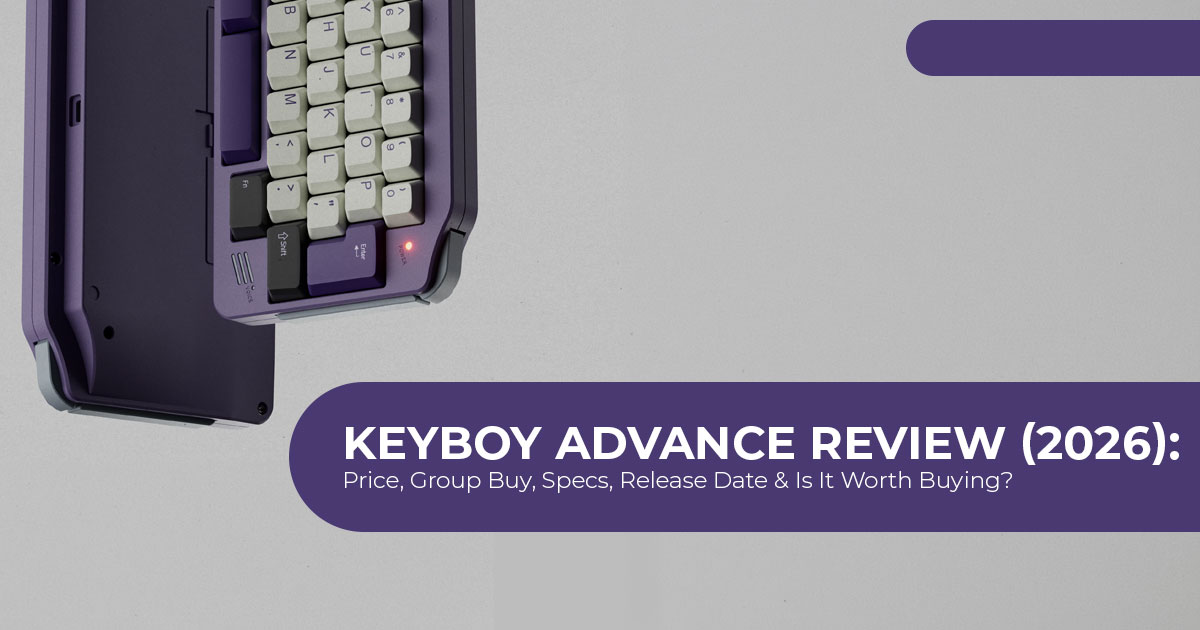
The design details that reference the original handheld
Here is what the designer carried over from Nintendo’s 2001 handheld:
- Landscape silhouette with the wide, horizontally squished proportions of the original GBA
- Faux speaker grille in the lower right of the case
- Battery cover styling along the bottom edge
- Power indicator LED in the top right corner, positioned where the handheld’s was
- Three-bar RGB light in the top left corner
- Physical shoulder buttons on the top corners, standing in for the L and R triggers
- Curved side profiles and an upward micro-curve on the front edge, which makes the board appear to sit slightly above the desk
One detail that’s worth mentioning: the designer has stated publicly that a literal 1:1 copy of the Game Boy Advance shape was not possible, because the resulting proportions would have been unusable as a keyboard. What exists is an interpretation, not a replica. That is an honest framing and we think it is the right one.
KeyBoy Advance Specifications
| Specification | Details |
|---|---|
| Designer | PromoType (Galo) |
| Layout | 50% HHKB layout with a full 10-key number row. |
| Vendors | Proto[Typist] Keyboards, UniKeys, and MonacoKeys. |
| Case Materials | Anodized aluminum, e-coated aluminum, or translucent polycarbonate. |
| Color Options | Nine finishes: Silver, Pale Gold, Teal, Classic, Purple, Orange, PC Pure, PC Purple, and PC Cyan. |
| PCB Options | Wired soldered, wired hot-swappable, dual-mode, and tri-mode hot-swappable versions. |
| Connectivity | USB-C, Bluetooth, and 2.4GHz wireless (tri-mode models only). |
| PCB Thickness | 1.6mm black-core PCB. |
| Firmware | VIAL open-source firmware with browser-based configuration. |
| Mounting Style | Top-mount design with both rigid and O-ring mounting hardware included. |
| Default Plate | 1.6mm FR4 plate. |
| Optional Plates | Aluminum, carbon fiber, polycarbonate, or polypropylene (typically +$15–$20). |
| Spacebar Layouts | Supports 2.25u + 1u + 2.75u split spacebar or 3u + 3u configuration. |
| Enter Key Support | Compatible with both ANSI and ISO layouts. |
| Typing Angle | 7° |
| Front Height | 19mm |
| Effective Key Height | 22.9mm |
| Dampening | Poron dampening pillar beneath the stepped spacebar. |
| Kit Type | Barebones kit (switches, keycaps, and stabilizers sold separately). |
| Starting Price | Group buy pricing started at $275. |
| Group Buy Status | Closed on 22 July 2026. |
| Estimated Shipping | Q4 2026. |
| Nintendo Licensing | Not officially licensed by Nintendo. |
How Much Does the KeyBoy Advance Actually Cost?
This is one detail many early articles overlooked, and it is the one that changes buying decisions.
Every article we reviewed led with $275. While that figure is accurate, it refers only to the barebones kit. Switches, keycaps, and stabilizers are sold separately, so the real cost is considerably higher.
Click here to buy KeyBoy Advance
A barebones kit includes the case, PCB, plate, and mounting hardware, but switches, keycaps, and stabilizers must all be purchased separately before the keyboard is ready to use.
Kit pricing by configuration
| Configuration | Group Buy Price |
|---|---|
| Soldered PCB with anodized aluminum case | $275 |
| Upgrade to a wired hot-swappable PCB | +$15 |
| Upgrade to a tri-mode hot-swappable PCB (Bluetooth, 2.4GHz, USB-C) | +$40 |
| Upgrade to an e-coated aluminum case | +$20 |
| Upgrade to a translucent polycarbonate case | +$30 |
| Soldered PCB with polycarbonate case | $300 |
| Tri-mode hot-swappable PCB with polycarbonate case | $340 |
The real cost, fully built
Here’s what a fully assembled build is likely to cost. These component figures reflect typical current market pricing for a 50% keyboard build.
| Component | Budget Build | Mid-Range Build | Premium Build |
|---|---|---|---|
| KeyBoy Advance Kit | $275 | $300 | $340 |
| Switches (approximately 60 required) | $25 | $40 | $70 |
| Keycaps (must support 50% layout and split spacebar) | $35 | $70 | $130 |
| Stabilizers | $12 | $25 | $40 |
| Lube, switch films, tape mod, and tuning supplies | $0 | $15 | $30 |
| Estimated Total Cost | $347 | $450 | $610 |
Realistically, most buyers should budget at least $350 for a complete build rather than focusing on the $275 barebones kit price.
We are flagging one extra cost that is easy to overlook. The split spacebar layouts and the 50% HHKB layout mean many standard keycap sets will not cover every key. Buyers frequently need a base set plus a compatibility or extras kit. That is where keycap budgets quietly grow.
If you are pricing a build, switches, keycaps and stabilizers are all readily available and easy to compare:
Check current switch, keycap and stabilizer prices on Amazon Worldwide and Amazon India before committing to a kit. Component pricing moves constantly, and a $40 swing on keycaps changes the total more than most kit upgrade options do.
The Shoulder Buttons: Gimmick or Genuinely Useful?
More than any other feature, the programmable shoulder buttons set this keyboard apart from other retro-inspired mechanical keyboards.
The shoulder buttons are not decorative shells. They use real micro-switches and they are fully remappable through VIAL.
What buyers can map them to
- Layer toggles, which matters a lot on a 50% keyboard
- Volume and media controls
- Macros
- Connectivity switching between Bluetooth, 4 GHz and wired
- Backlight controls
Our honest read
On most keyboards, two extra buttons would be a novelty. On a 50% layout, they are functionally significant.
Here is why. A 50% keyboard removes the function row, the navigation cluster and the arrow keys. Everything you lose has to come back through layers, and layers require a modifier key held under your thumb or pinky. That adds friction to routine actions.
Moving a layer toggle to a shoulder button relocates that work to your index finger, which is otherwise doing nothing while your hands rest on the home row. For anyone who plans to actually use this as a daily typing keyboard rather than a shelf piece, that is a practical ergonomic gain, not a themed flourish.
Limitation worth stating: two buttons is two buttons. If your workflow needs four or five accessible layers, you will still be reaching for modifiers.
Can You Game on the KeyBoy Advance?
Several outlets raised this question. None of them answered it, so we will. The short answer is that you can, with real caveats.
- What works well: WASD-driven games are The alpha cluster is complete and the number row is intact, so weapon and item hotkeys 1 through 0 are all present. The tri-mode PCB supports wired connection, which removes wireless latency concerns for competitive play.
- What does not work well: there are no dedicated arrow keys and no function Any game that expects F1 through F12 for quick actions requires layer access mid-match. That is workable in a strategy game and awkward in anything fast.
- The shoulder button angle: you can map them to game actions, and that is genuinely interesting. But they sit on the top corners of the case, not under your fingers during gameplay. They are better suited to push-to-talk or a layer swap than to a combat input.
- Our assessment: this is a typing keyboard inspired by gaming hardware, not one designed for competitive gaming. If competitive gaming is your priority, there are better options built specifically for that purpose.
Is a 50% HHKB Layout Hard to Use?
This is the single biggest practical barrier to this purchase, and it is worth being direct about it.
A standard 60% keyboard already removes the function row, arrows and navigation cluster. A 50% keyboard normally goes further and removes the number row too, which is where most people give up.
Unlike most 50% keyboards, this design keeps the number row. That is the design decision that makes this board approachable.
What you keep
- Full alpha cluster
- Full 10-key number row
- Standard modifiers
- ANSI or ISO Enter
What you lose
- Function row (F1 to F12)
- Arrow keys
- Home, End, Page Up, Page Down, Delete cluster
The realistic learning curve
Based on how comparable layouts behave, most typists coming from a 60% keyboard adapt within a few days, because the number row is the familiar element and everything else is already muscle memory. Users coming from a full-size or TKL board should expect one to two weeks of reduced speed while arrow keys and Delete move onto layers.
The split spacebar options matter here. Choosing 2.25u + 1u + 2.75u gives you a dedicated 1u key under a thumb, which is the most comfortable place to put a layer toggle. If you are ordering and unsure, the split option costs nothing extra and gives you more flexibility later.
Who should avoid a 50% layout: anyone doing heavy spreadsheet work, anyone who uses arrow keys constantly for text editing, and anyone unwilling to spend time in configuration software.
Design, Build Quality and Typing Feel
Case materials and what each one is for
| Material | Typing Character | Best For |
|---|---|---|
| Anodized Aluminum | Dense, solid feel with a muted and neutral typing sound. | Buyers who want the standard premium finish with the lowest entry price. |
| E-Coated Aluminum | Produces a slightly warmer typing tone with a smoother, more saturated finish. | Ideal for buyers wanting authentic Game Boy Advance-inspired colors such as Purple or Orange. |
| Translucent Polycarbonate | Lighter construction with a higher-pitched, more flexible typing feel. | Enthusiasts seeking the iconic clear-shell aesthetic popularized by Nintendo around the year 2000. |
The translucent polycarbonate option deserves a specific note. Clear plastic cases sound noticeably different from aluminium. They tend to produce a higher, more hollow tone. Whether that is good depends entirely on preference, but buyers should not assume the PC case is simply “the aluminium one but see-through.” It types and sounds differently.
Mounting and sound
The board uses a top mount system with O-rings, and both rigid and O-ring hardware ship in the kit. That is a meaningful inclusion, because it lets buyers tune firmness without buying anything extra.
Rigid top mount is stiffer and more uniform. O-ring top mount adds a small amount of give and softens the impact.
A Poron pillar sits under the stepped spacebar to reduce resonance. Spacebar rattle and hollowness are the most common complaints on small boards, so addressing it at the design stage rather than leaving it to mods is a sensible engineering choice.
The default FR4 plate is a middle-of-the-road option that suits most builds. Buyers who want a firmer, brighter typing feel should consider the aluminium plate. Those who want softer and deeper should look at polycarbonate or polypropylene.
Ergonomics
At a 7 degree typing angle, a 19 mm front height and a 22.9 mm effective key height, this is a low-profile board by custom keyboard standards. Most typists will not need a wrist rest. For comparison, many aluminium 65% and 75% boards sit at 6 to 7 degrees with front heights above 20 mm, placing this board comfortably within the range of other premium custom keyboards.
Click here to buy KeyBoy Advance
Is the KeyBoy Advance Licensed by Nintendo?
No. This is not an officially licensed Nintendo product.
This is an independent enthusiast project that references the Game Boy Advance design. Only one outlet we reviewed raised the point, so we want to give buyers a clear and measured explanation.
What buyers should understand
The design avoids a direct copy. The designer confirmed the exact GBA shape was not reproduced, and no Nintendo trademarks, logos or branding appear on the product. The keyboard is an interpretation of a form factor rather than a reproduction of a product.
Historically, Nintendo has focused its legal actions on counterfeit products, ROM distribution, and trademark infringement rather than individual buyers of enthusiast hardware.
That said, the honest position is this: unlicensed tribute products can be discontinued. If a project like this ever faced a legal challenge, the likely outcome is that production stops, not that existing owners lose their keyboards. Buyers should factor that into how they think about restocks and long-term availability, particularly if they are waiting for a retail release rather than buying during a confirmed run.
KeyBoy Advance vs the Alternatives You Can Buy Today
Since the group buy has closed, the comparison that matters most is against retro mechanical keyboards available right now.
| Product | Layout | Approx. Price | Ready to Use? | Best For |
|---|---|---|---|---|
| KeyBoy Advance | 50% HHKB | $275+ barebones kit ~$350+ fully built |
No — barebones kit | Keyboard enthusiasts who want a faithful Game Boy Advance-inspired build and don’t mind assembling it. |
| 8BitDo Retro 87 | TKL (87-key) | ~$90 | Yes, hot-swappable switches included | Buyers wanting Nintendo-inspired styling immediately with no assembly required. |
| 8BitDo Retro 108 | Full-size | ~$92 | Yes | Users who need a numeric keypad while keeping a classic NES-inspired design. |
| Angry Miao AM RGB 65 | 65% | ~$435 barebones | No | Collectors seeking an ultra-premium desk centerpiece with Game Boy-inspired design elements. |
| Lofree DOT / Flow | 75% / Low-profile | $160–$190 | Yes | People who prefer vintage typewriter aesthetics over gaming nostalgia. |
| Retro Keycap Set on an Existing Keyboard | Any | $40–$130 | Yes | Existing mechanical keyboard owners who want a retro appearance at the lowest possible cost. |
How we would frame the decision
If you want the Game Boy Advance look and you want it this month, the 8BitDo Retro 87 is the sensible answer. It costs roughly a quarter of a built KeyBoy Advance, arrives assembled with hot-swappable switches, and delivers Nintendo-era styling. It is not a GBA replica, and it is not a custom build. It is a solid keyboard that scratches the same itch immediately.
If you already own a decent hot-swap board, a retro keycap set in GBA purple and grey costs under $100 and gets you 70% of the visual payoff with none of the layout compromise. This is the option most buyers overlook and the one that makes the most financial sense for a lot of people.
If you’re specifically looking for this keyboard, nothing else combines its Game Boy Advance-inspired case, programmable shoulder buttons, and 50% HHKB layout with a retained number row. Waiting for the expected retail release at around $344 is a reasonable option.
Compare current prices on 8BitDo Retro keyboards, retro keycap sets and Lofree models on Amazon Worldwide and Amazon India. If you are not going to wait until Q4 2026, these are the practical alternatives, and stock on the retro-styled models tends to move quickly.
Pros and Cons
| Strengths | Limitations |
|---|---|
| ✔ A true Game Boy Advance-inspired case design rather than just themed keycaps. | ✖ Sold as a barebones kit, meaning the total build cost can easily reach around $350 after adding switches and keycaps. |
| ✔ Programmable shoulder buttons use real micro-switches for extra functionality. | ✖ The compact 50% layout has a noticeable learning curve for new users. |
| ✔ Keeps a full number row, which is uncommon on most 50% keyboards. | ✖ No dedicated arrow keys or function row; layer shortcuts are required. |
| ✔ VIAL compatibility provides open-source customization without proprietary software. | ✖ The initial group buy has ended, and a retail restock has not been confirmed. |
| ✔ Optional tri-mode connectivity supports Bluetooth, 2.4GHz wireless, and wired USB operation. | ✖ Wireless functionality costs an additional $40 beyond the base keyboard kit. |
| ✔ Includes hardware for both rigid mounting and O-ring top-mount configurations. | ✖ Q4 2026 shipping remains an estimate rather than a guaranteed delivery window. |
| ✔ Available in nine colorways across three different case materials. | ✖ Split-spacebar layouts may limit compatibility with some aftermarket keycap sets. |
| ✔ Poron foam dampening beneath the spacebar improves acoustics and reduces hollow sound. | ✖ Not officially licensed by Nintendo. |
| ✔ Supports both ANSI and ISO keyboard layouts. | ✖ Its compact layout makes it less suitable for competitive gaming than larger layouts. |
Who Should Buy the KeyBoy Advance?
It is a good fit if you:
- Have built a custom mechanical keyboard before, or are prepared to learn
- Already type comfortably on a 60% keyboard or smaller
- Grew up with the Game Boy Advance and value that specifically
- Can wait until Q4 2026 or later
- Have budget for switches, keycaps and stabilizers on top of the kit
- Want a piece that works as both a functional keyboard and a collectible
It is a poor fit if you:
- Want a keyboard working on your desk this week
- Have never used a compact layout
- Need arrow keys or a function row constantly
- Expected $275 to be the total cost
- Want a gaming keyboard first and a design piece second
- Are uncomfortable paying months before delivery
Click here to buy KeyBoy Advance
Frequently Asked Questions
Is the KeyBoy Advance group buy still open?
No. It closed on 22 July 2026. Orders from that window ship in Q4 2026.
How much does the KeyBoy Advance cost?
The kit started at $275. A fully built keyboard costs approximately $350 to $450 once switches, keycaps and stabilizers are added.
Does the KeyBoy Advance come with switches and keycaps?
No. It is a barebones kit containing the case, PCB, plate and mounting hardware only.
Is the KeyBoy Advance wireless?
Only in the tri-mode hot-swap PCB configuration, which supports wired, Bluetooth and 2.4 GHz. That option adds $40.
What software does the KeyBoy Advance use?
VIAL, an open source browser-based remapping tool. No proprietary software is required.
Is the KeyBoy Advance officially licensed by Nintendo?
No. It is an independent enthusiast design that references the Game Boy Advance without using Nintendo branding.
Can the shoulder buttons be remapped?
Yes. They use real micro-switches and are fully programmable in VIAL for layers, macros, media controls or connectivity switching.
Is a 50% keyboard practical for daily work?
For most typists, yes, after an adjustment period of a few days to two weeks. The retained number row makes the KeyBoy Advance easier to adapt to than most 50% keyboards. Heavy spreadsheet and text-editing users may find the missing arrow keys frustrating.
What is the best alternative to the KeyBoy Advance?
The 8BitDo Retro 87 at around $90 for buyers who want retro styling immediately, or a retro keycap set for those who already own a hot-swap keyboard.
Can I still pre-order the KeyBoy Advance?
No. The official Group Buy closed on July 22, 2026. If additional production runs are announced, they’ll be listed by Proto[Typist] and UniKeys through their official channels.
Final Verdict
Inspired by Nintendo’s Game Boy Advance, this custom keyboard is much more than a nostalgic tribute. Its design balances retro styling with thoughtful engineering, resulting in a board that’s practical enough for everyday typing rather than just display. The programmable shoulder buttons are genuinely useful instead of being decorative, while the decision to retain the number row on a 50% HHKB layout makes it far more practical than many ultra-compact keyboards.
Small engineering choices also deserve credit. The inclusion of dual mounting options and Poron support beneath the spacebar shows that the designer paid attention to typing feel, sound, and comfort, rather than focusing solely on appearance.
Before deciding whether it’s worth the investment, there are two important things every buyer should understand.
The first is the true cost of ownership. Much of the early coverage highlighted the $275 starting price, but that’s only for the barebones kit. It doesn’t include switches, keycaps, or stabilizers. Once those essential parts are added, a realistic build budget lands closer to $350–$450, depending on the components you choose.
The second is availability and timing.
The keyboard has not yet reached customers, with Group Buy orders expected to begin shipping in Q4 2026. Production is still underway, and new buyers can no longer place orders through the original Group Buy, which closed on July 22, 2026.
If you fit the target audience—a custom keyboard enthusiast, someone comfortable building their own boards, a fan of compact layouts, or someone with a genuine attachment to Nintendo’s 2001 Game Boy Advance—the KeyBoy Advance is one of the most thoughtful tribute keyboards released in recent years.
For everyone else, products like the 8BitDo Retro 87 or even a quality retro-themed keycap set deliver much of the same nostalgic appeal for considerably less money, with the added benefit of being available today.
Where to Buy
At the time of writing, the keyboard isn’t available as an in-stock product.
The keyboard was offered exclusively through Proto[Typist] and UniKeys during its limited Group Buy, which has now ended. Customers who secured an order are expected to receive their keyboards in Q4 2026. Both vendors have suggested that the keyboard may return after the initial production run, although neither has confirmed a retail launch or restock date.
If you missed the Group Buy, your best option is to monitor the official vendor pages and join their notification lists.
Official vendor pages:
Based on the pricing information shared by both vendors, expect a future retail price of around $344, compared with the $275 Group Buy price.
Amazon Worldwide
Whether you’re planning a future KeyBoy Advance build or assembling any other custom mechanical keyboard, the biggest differences in feel and sound come from the components you choose.
Check current Amazon Worldwide pricing for:
- Mechanical keyboard switches (linear, tactile, and silent)
- Retro-inspired keycap sets in Game Boy Advance color schemes
- Screw-in stabilizers for split-space layouts
- 8BitDo Retro 87 and 8BitDo Retro 108 if you prefer a fully assembled retro keyboard
Prices for switches and keycaps change regularly, and popular retro colorways often sell out quickly. Comparing today’s listings before buying can save a surprising amount.
Amazon India
Component pricing can look very different in India. Once shipping, GST, and import duties are added to an overseas keyboard kit, the total cost can increase significantly.
For many buyers, sourcing components locally provides much better overall value. Check current Amazon India pricing for:
- Mechanical keyboard switches
- Switch tester and sample packs
- PBT keycap sets for compact layouts
- Screw-in stabilizers
- Keyboard lubricants and tuning kits
- 8BitDo Retro mechanical keyboards and other retro-inspired models available with domestic shipping
If you’re building from India, comparing local prices against the final landed cost of an imported kit is almost always worthwhile.
***Disclaimer***
This blog post reflects our research, analysis, and opinions based on available product information, user feedback, and industry knowledge. It should not be taken as the official position of any brand, manufacturer, or company mentioned here. Specifications, pricing, and availability were verified using official vendor information available at the time of publication. We make every effort to keep this guide accurate, but product specifications, pricing, and availability may change after publication. We recommend double-checking important details before making a purchase.
Some links in this article may be affiliate links. If you choose to buy through these links, we may earn a small commission at no extra cost to you. This helps support our work and allows us to keep publishing in-depth, unbiased reviews. Affiliate partnerships never influence our recommendations.
Opinions expressed by readers are their own and do not necessarily reflect ours. We are not responsible for outcomes resulting from the use of information on this site. Please seek professional advice where appropriate.
All product names, logos, and brands mentioned are the property of their respective owners. These names are used for identification and informational purposes only and do not imply endorsement.
