
Introduction
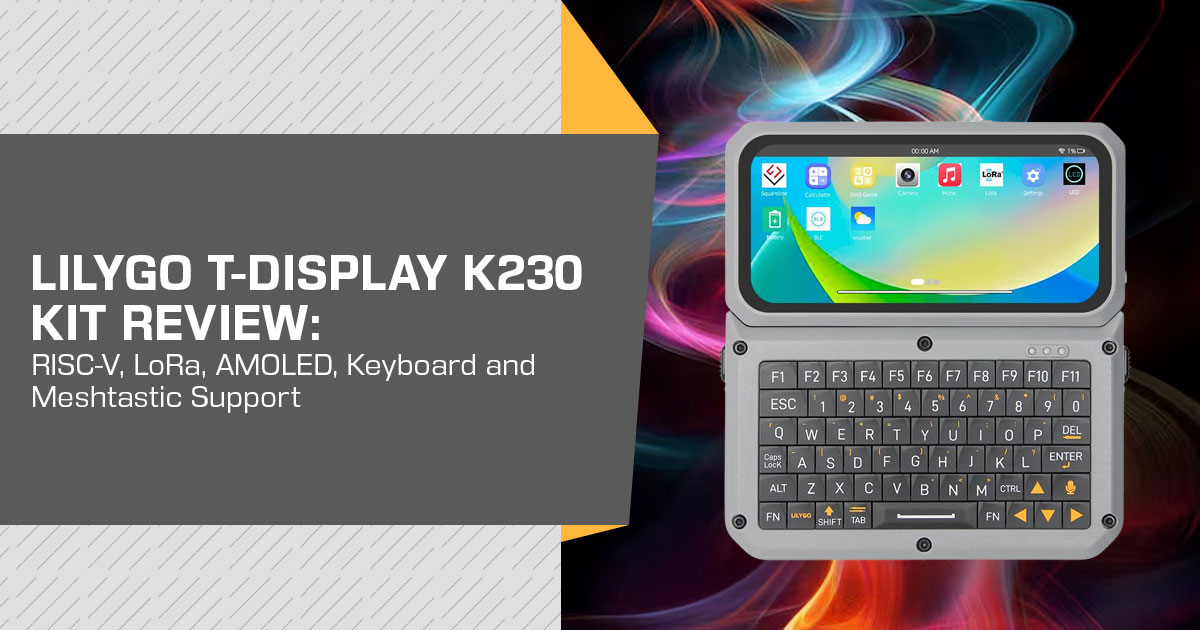
The LILYGO T-Display K230 Kit is a handheld computer aimed at developers, makers, hobbyists, and hardware enthusiasts. It uses the dual-core 64-bit RISC-V Kendryte K230 processor with 1 GB of RAM, a 4.1-inch AMOLED touchscreen, a detachable QWERTY keyboard, and an SX1262 LoRa radio. That makes it more interesting for development and embedded projects than a typical handheld gadget.
There are a few things to keep in mind before buying it. The T-Display K230 is not a phone; it does not officially support Meshtastic, and LILYGO has not listed a battery capacity or runtime. The CoreSet is listed at $150.31 on 30 August 2026, while the keyboard is sold separately.
With over 20 years of experience in hardware and application research and development, we look at products beyond the spec sheet. We assess performance, build quality, usability, reliability, and value for money to help developers, makers, and tech enthusiasts decide whether a product is worth buying. Our recommendations come from product research, component analysis, real-world usability, and industry experience.
What changed in August 2026, and what did not
The T-Display K230 board is not new: LILYGO’s firmware repository shows V1.0 dated 20 February 2025, and the bare board is listed at $98.79. What arrived this year is the Kit — the same silicon in an enclosure, with a physical keyboard, a second microcontroller and an alternative radio. The firmware history makes that clear:
| Firmware | Release Date | What LILYGO Says It Added |
|---|---|---|
| V1.0 | 20 February 2025 | Original firmware release |
| V1.1 | 25 March 2025 | LoRa hardware changed to SX1262 |
| V1.2 | 17 June 2025 | Touch functionality updated and BLE support added |
| V1.3 | 10 February 2026 | Added or updated support for LR2021, battery, keyboard, GPS, LTE-M, fan, speaker, and AHT20 |
The features that define the Kit — keyboard, battery handling, GPS, LTE-M — were added to the software in February 2026; the repository’s most recent push visible to us is 9 August 2026. The main point before buying is that the hardware offers more features than the current software support makes easy to use.
Design and build: a dev board wearing a phone
Without the keyboard, the main unit is roughly 104 × 51 × 15.5 mm — small-phone footprint, fifteen millimetres thick. The screen fills most of the front face and the keyboard docks below it.
For a buyer that means:
- It is a development platform in a case, not a consumer There is no cellular voice stack or app store, and you should not expect a phone-style setup experience. The enclosure mainly gives the board a more usable handheld form.
- Ports are split by One USB-C carries the 5 V supply, the second is USB OTG. A single cable will not both power the unit and talk to a laptop, which is easy to assume at a desk.
- The camera rotates, which matters for the video-call and vision uses shown in the sample apps.
- Expansion is A Qwiic I²C connector, a dual 20-pin header and a separate nRF52840 header let you add sensors or program the second chip without cutting into anything.
- It is not No ingress rating is published.
Display: why a 568 × 1232 AMOLED is unusual on a LoRa dev board
Within LILYGO’s own handheld line, this is the only colour AMOLED panel of this size: the T-Deck Max and T-Deck Pro pages both list a 3.1-inch E-Paper display at 320 × 240, and the T-Echo Plus lists a 1.54-inch display at 200 × 200. That is worth understanding as a trade, not as a win.
What the panel gives you: deep blacks, so a dark UI reads cleanly at night, and enough resolution for text typed on the keyboard to look sharp rather than pixelated.
What it costs you:
- No e-paper efficiency. E-paper generally uses much less display power when the image is static. The LILYGO T-Echo uses an e-paper display, so its display power draw is lower when the image is not changing.
- Burn-in is a consideration for anything showing a fixed status bar for LILYGO publishes no guidance on it.
- The display uses an RM69A10 driver, while touch uses a GT9895 controller over I²C. That distinction matters if you port UI code.
Performance: what a K230 adds over an ESP32
This is the reason the Kit exists. Most handhelds with LoRa and a keyboard are microcontrollers — fast enough for firmware, not for operating systems. The K230 is different in kind:
- Two 64-bit cores at 6 GHz and 800 MHz, and they are not symmetric. One supports the RISC-V Vector extension (RVV 1.0); the other does not. Workloads that benefit from vector maths belong on the fast core.
- 1 GB of RAM. The ESP32-S3 in the T-Deck Max is specified with 8 MB of PSRAM. That gives the K230 more memory headroom for operating-system, camera, and video workloads.
- A KPU/NPU rated up to 6 TOPS by LILYGO, used by the shipped face-detection sample.
- Hardware video is another major difference: the K230 supports 264/H.265 encoding and decoding, with HDMI output up to 1080p/30. That is well beyond what you would expect from a typical microcontroller handheld.
One caution: you will also see 6 TOPS and “13.7× the K210” claims elsewhere in the K230 ecosystem, but those figures should be treated as vendor claims until independently measured. We use LILYGO’s 1.6 TOPS.
Battery life: the hole in the spec sheet
Here we report an absence rather than a number. The T-Display K230 Kit lists battery functions in the V1.3 changelog and a 5 V / 500 mA input rating, but no cell capacity, battery part number, or runtime figure.
We checked LILYGO’s own product pages for the devices this Kit competes with. Three list a capacity, while two do not, so the omission is wider than this board alone:
| LILYGO Product | Battery Capacity as Listed |
|---|---|
| T-Display K230 Kit | No battery capacity figure listed |
| T-Deck Max | 1,500 mAh |
| T-Deck Pro | 1,400 mAh built-in battery (LILYGO store listing) |
| T-Echo Plus | 2,400 mAh |
| T-Beam SUPREME | No battery capacity figure listed |
For a 1.6 GHz processor, a colour display and a video pipeline, the published 5 V / 500 mA input rating does not tell you how long the battery will last. Anyone planning a day in the field should budget for external power — a small USB-C pack is the practical answer — and should remember that LILYGO sells the CoreSet and keyboard separately.
If you buy one, an hour-long test produces the number everyone else lacks: same brightness, three passes (radios idle; LoRa sending a short packet every 60 seconds; camera preview running), charge logged every ten minutes.
Connectivity: LoRa, Wi-Fi, Bluetooth, and the band you can actually order
Wireless is where the buying advice gets specific.
- LoRa. LILYGO’s product page lists the SX1262 and 868, 915 and 923 MHz options, while the CoreSet sold on the store is the 868 MHz The MMCX connectors accept external antennas.
- The LR2021 The second core unit is listed for 830–940 MHz. Semtech describes the LR2021 as a multi-band LoRa Plus transceiver that supports LoRa up to 125 kbps, FLRC, and LR-FHSS for terrestrial and non-terrestrial networks. LILYGO ships a LiveCall sample that streams video over the LR2021, and the store lists the unit in the 830–940 MHz configuration.
- Wi-Fi is 4 GHz only: the product page lists 2.4 GHz IEEE 802.11 b/g/n on an RTL8189 module, and the wiki attributes the 2.4 GHz radio to the ESP32-S3-R8. That is enough for firmware updates and MQTT bridges; nothing on either page lists 5 GHz or a newer amendment.
- Bluetooth needs a careful The product page names an RTL8189 Wi-Fi module and says nothing about Bluetooth; the LILYGO wiki assigns Wi-Fi and Bluetooth 5.0 LE to an ESP32-S3-R8 co-processor, V1.2 is annotated “add ble”, and a ble sample app ships. We follow the wiki as the fuller source — BLE is present in the current design — but confirm your board revision, since several launch articles reported no Bluetooth.
- Ethernet on a full-size RJ45 is unusual in a handheld and provides a straightforward way to pull.
For US and Indian buyers, the frequency details matter:
LILYGO currently lists the Kit’s CoreSet as the 868 MHz version. The bare T-Display K230 board is offered in 433, 868, 915 and 923 MHz; the 830–940 MHz LR2021 core unit covers the US915 range within its wider frequency range, but that does not make it a 915 MHz Kit variant. If you need 915 MHz for the Kit’s SX1262 configuration, check the exact SKU before ordering.
Sub-GHz rules are set by country, and imported radio hardware may also need local approval. In India, for example, WPC rules cover licence-exempt bands including 433.05–434.79 MHz and 865–868 MHz, while Equipment Type Approval can apply to wireless products. In Japan, the Giteki mark is relevant. Match the frequency and local approval requirements to your country before buying.
Software: what you can actually run, today
You can work with the device at several levels. The ready-made examples are the easiest starting point; custom K230 development takes more setup.
- Ready-made firmware: V1.3 ships a phone-style interface built on Brookesia, and the repository lists the apps: lora (send/receive on SX1262 or LR2021), camera with three-stream preview, Face_detect, Video, LiveCall, Gnss, Cellular, Keyboard, music, clock, calculator, led, Setting, Battery, Artboard, game_2048, ble. The app list shows that LILYGO is positioning it as a pocket computer with a radio, not a simple sensor reader.
- CanMV / MicroPython. The K230 CanMV ecosystem provides a MicroPython and OpenMV-style development path for vision Existing scripts may need changes for the T-Display K230‘s hardware, so treat them as a starting point rather than a guaranteed drop-in fit.
- The K230 SDK: Documentation puts Linux on one core and RT-Smart on the other, built in Ubuntu 04 (a Docker image exists: ghcr.io/kendryte/k230_sdk), with images written to microSD (dd if=sysimage-sdcard.img …, or Rufus on Windows). Prebuilt images sit on Canaan’s developer community.
The build path is the main source of friction. LILYGO’s own documentation says the K230 CanMV environment has been verified on Linux and recommends Ubuntu 20.04 for the compilation environment. If you do not want to build and flash custom firmware, the ready-made examples are the safer place to start.
Does it run Meshtastic? No — and that is the most important caveat
The combination of LoRa, a keyboard, and a screen can make this look like a Meshtastic handheld. But the software support is different, so we checked.
- The K230 is not listed as a supported device in Meshtastic‘s current hardware documentation. The supported LILYGO handhelds listed there include the T-Deck, T-Deck Plus and T-Deck Pro, while the Meshtastic firmware build targets include boards such as the T-Deck and T-Deck Pro. There is no T-Display K230 target in the supported hardware list.
- Meshtastic‘s firmware does include support for the LR2021 radio interface in its codebase, but that is not the same as support for the T-Display K230. Radio support at the software level does not create a board-specific firmware target.
So you can exchange LoRa packets using LILYGO‘s own sample, and you can build your own software around the radio — but there is no supported Meshtastic firmware target for the T-Display K230. That is the key point to check before buying.
How it compares with the devices people actually cross-shop
Everything below is read from the manufacturer’s own pages on 30 August 2026, in US dollars at the LILYGO US store. LILYGO showed no strike-through or compare-at price, so these are listed prices rather than discounts.
| Device | Processor | Display | Radio | Battery (as Listed) | In Meshtastic Device Table? | LILYGO US Price (30 Aug 2026) |
|---|---|---|---|---|---|---|
| T-Display K230 Kit (CoreSet + keyboard, no nRF9151) |
K230 dual-core RISC-V, plus the ESP32-S3 listed by the wiki | 4.1-inch AMOLED touchscreen, 568 × 1232 | SX1262 | No figure listed | No | $150.31 + $70.94 = $221.25 |
| T-Display K230 Kit (LR2021 core + keyboard with nRF9151) |
Same as above | Same as above | LR2021, 830–940 MHz | No figure listed | No | $153.01 + $113.25 = $266.26 |
| T-Display K230 (Bare board) |
K230 | 4.1-inch AMOLED touchscreen, 568 × 1232 | SX1262, 915 / 868 / 433 / 923 MHz bands | Not listed | No | $98.79 |
| T-Deck Max | ESP32-S3 dual-core LX7, 16MB flash, 8MB PSRAM | 3.1-inch front-lit E-Paper, 320 × 240 | SX1262 +22 dBm, 433 / 868 / 915 MHz; store also offers a 920 MHz SKU; 4G + GPS | 1,500mAh | Not listed by that exact name; sold under firmware filters for LILYGO / Meshtastic / MeshCore | $109.87 — sold out |
| T-Deck Pro | ESP32-S3FN16R8 dual-core LX7; Meshtastic’s table lists ESP32-S3FN8 | 3.1-inch E-Paper, 320 × 240 | Not named on the referenced page | 1,400mAh built-in battery (LILYGO store listing) | Yes | $94.68 — displayed variant sold out |
| T-Echo Plus | nRF52840, 2MB flash / 2MB RAM | 1.54-inch SPI E-Paper, 200 × 200 | LoRa transceiver, 433 / 868 / 915 MHz; chip not named | 2,400mAh | T-Echo is listed; the Plus variant is not | $66.31 — displayed variant sold out |
| T-Beam SUPREME | ESP32-S3FN8 | No display listed | Not named in the referenced extraction | No figure listed | Listed as T-BeamSUPREME | $37.12 (L76K) / $50.04 (u-blox) |
Two conclusions follow from those rows. If the priority is a handheld that already appears in Meshtastic‘s own device table, the T-Deck Pro ($94.68) and the T-Echo Plus ($66.31) are the simpler choices, and both are listed far below the Kit. If the priority is a machine you program — vision inference, video, your own UI over a long-range radio — the Kit has no near-priced rival inside this comparison, because it is the only entry here with an application processor rather than a microcontroller.
Pros and cons
| What Works | What to Watch |
|---|---|
| ✔ Application-processor-class performance in a $150.31 handheld, backed by 1GB of RAM. | ✖ Software maturity remains a consideration, with V1.3 keyboard and battery support dating to February 2026. |
| ✔ 4.1-inch AMOLED touchscreen is unusual in this category and genuinely useful for camera applications and graphical interfaces. | ✖ No published battery capacity or official runtime figures. |
| ✔ Strong expansion options include an nRF52840 header, Qwiic, 2 × 20-pin headers, and dual USB-C. | ✖ Combining Ethernet, HDMI, Wi-Fi, and LoRa on one board introduces multiple independent drivers that may require troubleshooting. |
| ✔ Integrated SX1262 LoRa connectivity with MMCX antenna connections provides useful long-range wireless flexibility. | ✖ Kit CoreSet availability is limited, making the supported frequency-band option important when ordering. |
| ✔ Ships with a practical collection of applications, including lora, Face_detect, and LiveCall. | ✖ There is currently no official Meshtastic support. |
| ✔ Full source code, examples, and build instructions are available on GitHub for developers and hardware tinkerers. | ✖ Wi-Fi is limited to 2.4GHz, while driver compatibility remains board-specific. |
Who should buy it, and who should not
Buy it if you want a pocketable Linux-capable development board with a screen, camera and LoRa radio, and you are comfortable with a developer-focused setup. It is a good fit for embedded students, makers and vision developers who want to experiment with the K230 platform.
Consider it carefully if the AMOLED and keyboard attracted you but the plan is a field communicator: the LoRa radio is useful, but the battery is unknown and the mesh ecosystem is missing.
Skip it if you need a Meshtastic handheld with a keyboard today, need a specific 915 MHz Kit SKU, or want something that works with little setup. A supported ESP32-S3 handheld is the safer choice for those needs.
Pricing, and where to check current prices
The listed prices on LILYGO’s store on 30 August 2026 were:
| SKU | Item | Price |
|---|---|---|
| K256-03 | T-Display K230 Kit — CoreSet SX1262 / 868 MHz | $150.31 |
| K277 | T-Display K230 Kit — Core Unit LR2021 / 830–940 MHz | $153.01 |
| K256-04 | Keyboard with nRF9151 supporting LTE-M, NB-IoT, and GNSS | $113.25 |
| K256-04-A | Keyboard without nRF9151 | $70.94 |
| K256 Series | Bare T-Display K230, available in 433 / 868 / 915 / 923 MHz variants | $98.79 |
The store names the two keyboard variants Keyboard With nRF9151 and Keyboard Without nRF9151; the difference we can attribute is the nRF9151 itself, which Nordic Semiconductor documents as a cellular IoT modem with an integrated GNSS receiver. LILYGO does not list supported cellular bands, a SIM or eSIM arrangement, or any change to the key layout, so treat the extra cost as a modem option to verify before ordering.
We deliberately do not quote marketplace prices because they move, and a stale figure in a review is worse than none. The bare board circulates through third-party sellers; the Kit’s SKUs have mostly been sold directly by LILYGO, so shipping and customs may apply. Search the K256 codes before buying anywhere.
LILYGO store — Current price and stock for the CoreSet
Keyboard, with or without the nRF9151
Bare T-Display K230, $98.79, four bands Amazon United States
If you prefer marketplace buyer protection to importing, search the device name plus the SKU rather than a generic brand listing: “LILYGO T-Display K230 Kit” or “K256-03.”
Third-party stock of the Kit is thin, so expect the bare board more often than the boxed Kit, and read the band carefully — a 915 MHz board is not the 868 MHz CoreSet. Landed prices here move with duty and stock, so check today’s figure rather than ours.
Search current listings on Amazon US
Amazon India
For Indian readers, the band question comes before the price question. India’s current WPC rules list licence-exempt ranges including 865–868 MHz and 433.05–434.79 MHz, subject to the conditions in those rules. LILYGO’s Kit CoreSet is the 868 MHz version, while the 433 MHz option is listed for the bare board rather than the CoreSet.
Confirm the current WPC rules and whether the imported equipment needs ETA approval before ordering.
Search current listings on Amazon India
Frequently asked questions
Is the LILYGO T-Display K230 Kit a phone?
Not quite. The T-Display K230 is a RISC-V development board built into a compact handheld-style enclosure with a 4.1-inch AMOLED touchscreen, wireless connectivity and optional keyboard and cellular hardware. It is not a conventional smartphone with a mobile operating system and app store. The keyboard is also sold separately.
Does it run Meshtastic?
Not officially. The T-Display K230 is not currently listed as a supported Meshtastic device. LILYGO’s own firmware repository provides LoRa examples for the board, but that is separate from official Meshtastic support.
Why do some pages say 1 GB and others 8 GB?
This is a bits-versus-bytes issue, not a contradiction. LILYGO’s documentation lists the memory as 8 Gb LPDDR4, where the lowercase b means bits. The firmware repository lists 1 GiB.
8 Gb equals 1 GB, while 1 GiB is about 1.074 GB. So the two specifications are describing roughly the same memory capacity using different units. For accuracy, it is best to describe the K230 as having 1 GiB of LPDDR4 memory.
Does it have Bluetooth?
Yes. LILYGO’s documentation lists Bluetooth 5.0 LE through the ESP32-S3-R8 co-processor, alongside 2.4 GHz Wi-Fi. The firmware repository also records Bluetooth support as part of the V1.2 update.
How long does the battery last?
LILYGO does not provide a published runtime figure. The firmware repository added battery support in V1.3, but that does not provide enough information to give a reliable hours-per-charge figure. Actual runtime will depend heavily on screen brightness, Wi-Fi, LoRa, camera use and any connected peripherals.
Which LoRa frequency should you order, and does SX1262 or LR2021 matter?
Choose the radio configuration that matches the frequency rules in your country. LILYGO lists the SX1262 CoreSet at 868 MHz, while the LR2021 Core Unit covers 830–940 MHz and adds LR-FHSS support. These are different radio configurations, so the choice should be based on the frequencies permitted and appropriate for your location rather than simply choosing the model with more features.
Is the keyboard worth it over the touchscreen?
If you plan to type regularly, yes. A physical QWERTY keyboard with a number row, function keys and arrow keys is much more practical than a 4.1-inch touchscreen for writing or entering commands. If you mainly use the K230 for menus, controls and occasional text input, the keyboard is harder to justify.
The current LILYGO store lists the keyboard without the nRF9151 at $70.94 and the version with the nRF9151 at $113.25.
Final verdict
The LILYGO T-Display K230 Kit behaves like a computer rather than a peripheral: a 1.6 GHz + 800 MHz RISC-V processor, 1 GB of RAM, a 4.1-inch AMOLED touchscreen, a rotatable camera, HDMI out, wired Ethernet and a LoRa radio with antenna connectors. Judged as a development platform, it covers a lot of ground for the money, and the optional keyboard plus a second programmable nRF52840 give it more expansion than the microcontroller decks it sits beside.
As a communicator, it is less convincing: there is no official Meshtastic firmware target, no published battery specification, and the CoreSet is the 868 MHz version. The recommendation is conditional — buy it to build on, but do not treat it as a finished off-grid communicator unless you are prepared to add the missing pieces.
Have questions about the LILYGO T-Display K230 Kit or want us to look at a specific feature in more detail? Leave a comment below and let us know what you think. Follow us for more honest hardware reviews and product analysis, and ask any questions you have.
***Disclaimer***
This blog post reflects our research, analysis, and opinions based on available product information, user feedback, and industry knowledge. It should not be taken as the official position of any brand, manufacturer, or company mentioned here. We make every effort to keep this guide accurate, but product specifications, pricing, and availability may change after publication. We recommend double-checking important details before making a purchase.
Some links in this article may be affiliate links. If you choose to buy through these links, we may earn a small commission at no extra cost to you. This helps support our work and allows us to keep publishing in-depth, unbiased reviews. Affiliate partnerships never influence our recommendations.
Opinions expressed by readers are their own and do not necessarily reflect ours. We are not responsible for outcomes resulting from the use of information on this site. Please seek professional advice where appropriate.
All product names, logos, and brands mentioned are the property of their respective owners. These names are used for identification and informational purposes only and do not imply endorsement.
