
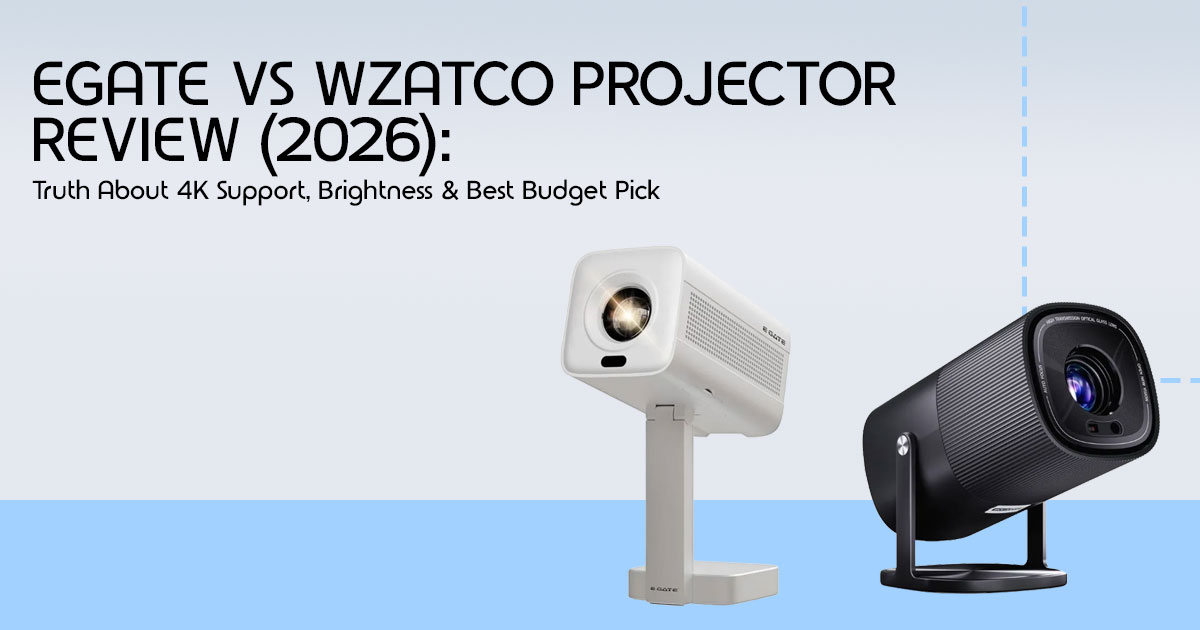
Quick Summary
- EGate projector gives a sharper image because it uses true native 1080p resolution
- WZATCO projector is a bit brighter and comes with more built-in features, making it easier to use in mixed lighting
- Neither offers real 4K resolution—they only support 4K input signals
- The right pick depends on your room lighting, viewing habits, and use case
Introduction: Why This Comparison Actually Matters
Most people don’t realize this until it’s too late: you set up your new budget projector, turn off the lights, play your favorite movie—and the image looks soft, colors feel dull, and something just feels off.
That’s the reality for a lot of buyers choosing between EGate vs WZATCO projectors. On paper, both promise “1080p full HD” and even “4K support”. But in real life, those specs don’t always translate into a great home entertainment experience.
And that’s where things get confusing. The budget projector market in India is flooded with options that look similar but behave very differently once you start using them.
Click here to buy from Amazon
Product Category Overview
This guide focuses on budget 1080p projectors—devices designed to give you a big-screen experience at home without the cost of a premium setup.
These are popular for:
- Home theater setups
- Casual movie nights
- Streaming OTT content
- Outdoor viewing
But here’s the catch: at this price range, every projector makes trade-offs. And if you don’t know what those are, you’ll likely pick the wrong one.
Why User Reviews Matter More Than Specs
Specs can look impressive—lumens, contrast ratio, 4K support—but they rarely tell you how the projector actually performs in your room.
That’s why real user reviews and real-world testing matter.
They reveal things like:
- Whether the brightness holds up in normal lighting
- If the image actually looks sharp or just stretched
- How smooth the streaming experience feels
- Whether the built-in speakers are usable or not
And that’s exactly what this comparison uncovers.
Our Experience & Approach
As technology experts with over 20 years of experience in hardware and application research and development, we deeply analyze each product based on real-world performance, durability, and value for money.
Our goal is simple: help you find the best projector based on your needs—whether that’s budget, performance, reliability, or long-term usage.
Our recommendations come from:
- Extensive research
- Component-level analysis
- Hands-on usability insights
- Industry expertise
Who This Guide Is For
This comparison is built for:
- Anyone looking for the best projector under ₹10,000–₹15,000
- First-time buyers confused by “4K support vs native resolution”
- People trying to replace a TV with a projector
- Users who want a portable home theater setup
- Buyers deciding between EGate vs WZATCO for real use
Technical Specifications at a Glance
Before looking at real-world performance, it helps to understand what these projectors offer on paper. The table below outlines the core specifications that define the EGate vs WZATCO comparison.
| Feature | EGate Projectors | WZATCO Projectors |
|---|---|---|
| Native Resolution | True 1080p (1920 × 1080) | 1080p (often softer focus) |
| Max Supported Resolution | 4K input (downscaled to 1080p) | 4K input (downscaled to 1080p) |
| Brightness (Real-World) | Moderate (best for dark rooms) | Slightly brighter (better in ambient light) |
| Operating System | Basic Android (limited optimization) | Feature-rich Android (more apps & flexibility) |
| Connectivity | HDMI, USB, Audio Out | HDMI, USB, Audio Out, Wireless options |
| Primary Strength | Sharper image and better text clarity | Higher brightness and richer feature set |
What You Will Learn From This Review
In this comprehensive guide, we will break down the EGate vs WZATCO comparison using a simple approach that focuses on real-world use over inflated marketing numbers. You will learn how to decode deceptive brightness claims, understand the reality of “4K support,” and determine which projector fits your specific environment. We will also cover practical setup advice, common mistakes to avoid, and the reality of using these devices for gaming and streaming.
A Better Way to Choose
Most comparisons just throw specs at you. But that doesn’t help when you’re sitting in your room wondering why the picture doesn’t look right.
So instead of just comparing numbers, this guide focuses on one thing:
–− How these projectors actually feel when you use them.
Because in the end, that’s what matters.
The P.R.O.J.E.C.T Framework: A Buyer Decision Model
To make an informed decision when looking for the best home theater projector under $200, you need a reliable framework. We developed the P.R.O.J.E.C.T model to help you evaluate budget projectors based on factors that actually impact your viewing experience.
| Factor | What It Means | Why It Matters |
|---|---|---|
| P – Pixel Truth | Native vs. supported resolution | Prevents falling for misleading “4K supported” marketing claims. |
| R – Real Brightness | ANSI lumens vs. inflated marketing lumens | Determines real-world usability based on your room lighting conditions. |
| O – OS & Apps | Operating system stability and app support | Impacts streaming quality and whether you need external devices. |
| J – Jitter (Lag) | Input lag and processing delay | Critical for gaming and smooth playback of fast-moving content. |
| E – Environment Fit | Room size and ambient lighting | Ensures the projector suits your space and viewing conditions. |
| C – Connectivity | Ports and wireless options | Enables seamless connection with laptops, consoles, and streaming devices. |
| T – Thermal & Noise | Cooling performance and fan noise | Affects comfort, especially during long viewing sessions. |
This framework helps you make a quick, practical decision, ensuring you evaluate the EGate vs WZATCO comparison based on practical utility rather than flashy specifications.
EGate vs WZATCO: Real-World Comparison
Picture Quality and The “4K” Illusion
When evaluating picture quality, the distinction between native 1080p vs 4K supported is the most critical factor. EGate projectors consistently deliver a sharper image because they utilize true native 1080p panels. This makes them excellent for reading text, displaying presentations, and watching content where fine details matter.
WZATCO projectors, while often listing similar resolution specs on paper, tend to produce a slightly softer image. But they make up for it with a bit more brightness. It is vital to understand that neither of these brands offers true 4K resolution.
When a budget projector claims “4K support,” it simply means the device can accept a 4K signal from your streaming stick or console, but it will downscale that image to fit its 1080p hardware. If you expect true 4K clarity from a budget projector, you’ll be disappointed.
Brightness Reality Check
Budget projector manufacturers frequently use inflated “marketing lumens” to make their products seem more capable than they are. When looking at ANSI lumens vs marketing lumens, the reality is sobering. WZATCO projectors usually give slightly higher usable brightness in real-world conditions, so they work a bit better in rooms with some ambient light.
However, both EGate and WZATCO struggle significantly in daylight or brightly lit rooms. The true “cinema feel” that buyers desire is only achievable in a dark room. If you plan to use your projector in a living room with large windows during the day, you will need heavy blackout curtains regardless of which brand you choose.
Most budget projectors don’t publish true ANSI lumen ratings, so real performance can vary from model to model. Real brightness can vary a lot between models, even within the same brand.
Click here to buy from Amazon
Smart Features and The Streaming Experience
Both brands offer models that run on Android, positioning them as affordable smart projectors for home use. While having built-in apps seems convenient, the reality is often frustrating. The Android operating systems on these budget devices can be sluggish and prone to crashing.
More importantly, official support for major streaming platforms like Netflix is frequently absent due to licensing restrictions. You will often need to rely on workarounds, sideloaded apps, or a dedicated streaming stick (like a Roku or Amazon Fire Stick) to get a reliable, high-definition streaming experience. Relying solely on the built-in OS is a common mistake that leads to a poor user experience.
Sound Reality
The built-in speakers on both EGate and WZATCO projectors are functional but far from immersive. They are adequate for casual YouTube viewing or a quick presentation, but they lack the depth, bass, and clarity required for a true home theater experience. Connecting an external sound system or a high-quality soundbar is an absolute necessity if you want audio that matches the large screen size.
Beginner Section: Understanding the Basics
What does “4K supported” actually mean?
As mentioned earlier, “4K supported” means the projector can process a 4K video file or stream, but it does not have the physical pixels to display a 4K image. It shrinks the 4K content down to 1080p. You are not getting 4K quality; you are just avoiding an “unsupported format” error on your screen.
Can this replace a TV?
A budget projector can replace a TV, but only under specific conditions. It works well if you primarily watch content at night or in a dedicated, light-controlled room. You must also be willing to deal with the setup effort, including managing cables, adjusting focus, and connecting external audio. If you want a device you can simply turn on in a bright room and immediately start watching, a traditional TV remains the better choice.
Advanced Buyer Section: If you want to go beyond basic specs, this is where it gets interesting
Gaming Performance
For gaming on budget projectors, input lag is the main concern. Both EGate and WZATCO exhibit noticeable input lag, which is the delay between pressing a button on your controller and seeing the action on screen. While they are perfectly fine for casual, slow-paced games, they are not ideal for competitive, fast-twitch gaming like first-person shooters or fighting games.
Room Size and Throw Distance
Your physical space dictates which projector will work best. In a small room, you need a projector with a shorter throw distance to achieve a large image without needing to place the device far away from the wall. In a larger room, brightness becomes the more critical factor, as the light has to travel further to reach the screen.
Connectivity Reality
While wireless casting features are heavily advertised, they are often laggy and unreliable for high-definition video. A direct HDMI connection remains the most stable and highest-quality method for connecting your devices. Always prioritize physical ports over wireless promises when setting up your home theater.
Skeptical Buyer Section: Debunking Myths
Common Myths
- “More lumens = better”: Marketing lumens are often exaggerated. Look for ANSI lumens for a true measure of brightness, and remember that contrast ratio and color accuracy are equally important for a good picture.
- “4K support = 4K quality”: As established, this only refers to signal compatibility, not display resolution.
- “Android projector = smart TV replacement”: False. The built-in OS on budget projectors is rarely as smooth or well-supported as a dedicated smart TV or streaming stick.
Click here to buy from Amazon
Commercial Intent Section: Who Should Buy What?
Choosing between EGate and WZATCO comes down to your specific needs and environment.
| Use Case | Best Choice | Why |
|---|---|---|
| Movie Lover (Dark Room) | EGate | Sharper native 1080p resolution delivers a more cinematic experience in controlled lighting. |
| Casual Use (Ambient Light) | WZATCO | Higher usable brightness performs better in rooms that aren’t fully dark. |
| Outdoor Movie Nights | WZATCO | Extra brightness helps combat ambient outdoor lighting conditions. |
| Presentations & Sharp Text | EGate | Better image clarity ensures text remains sharp and readable. |
Setup Guide: Practical Depth
To get the most out of your budget projector, follow these setup steps:
- Placement: Position the projector at the correct distance from the wall or screen based on the manufacturer’s throw ratio specifications.
- Surface: Use a dedicated projector screen or a smooth, matte white Avoid glossy surfaces that reflect light unevenly.
- Alignment: Adjust the keystone settings carefully to ensure the image is perfectly rectangular, but rely on physical placement as much as possible to avoid digital distortion.
- Audio: Connect an external speaker or soundbar via the audio out port or Bluetooth (if supported and lag-free).
- Lighting: Dim the lights as much as The darker the room, the better the image will look.
Real-World Scenarios
Scenario 1: The Small Bedroom
In a small, easily darkened bedroom, the EGate projector is the clear winner. The sharper image quality shines in a controlled environment, making it perfect for late-night movie watching.
Scenario 2: The Living Room with Ambient Light
If you are setting up in a living room where you cannot always draw the curtains, the WZATCO projector is the better option. Its slightly higher usable brightness helps keep the image watchable even when the room isn’t pitch black.
Scenario 3: Outdoor Movie Night
For backyard gatherings, the WZATCO projector is generally preferred. The slightly higher usable brightness helps deal with outdoor light like dusk or nearby streetlights.
Tradeoffs: The Honest Reality
When buying a budget projector, you are inherently making compromises.
| Trade-off | Reality Check |
|---|---|
| Price vs Quality | Budget projectors often use lower-quality optics and cooling, resulting in softer image clarity and noticeable fan noise. |
| Portability vs Brightness | Compact designs limit internal space, reducing brightness compared to larger, less portable models. |
| Smart OS vs Reliability | Built-in smart systems are often inconsistent, with limited app support—external streaming devices are usually more reliable. |
Mistakes to Avoid
- Buying based on “lumens” alone: Always look for independent reviews that measure real-world brightness.
- Ignoring resolution type: Ensure you understand the difference between native and supported resolution.
- Expecting TV-level clarity: Projectors provide a massive screen size, but they cannot match the pixel density and contrast of a modern television.
- Skipping external audio: Relying on built-in speakers will ruin the cinematic experience.
FAQs
Q: Is WZATCO better than EGate?
→ It depends on what you need—WZATCO is better for brightness, while EGate is better for sharpness.
Q: Can I use these projectors in daylight?
→ Not really. These work best in low light or dark rooms.
Final Verdict
If your setup is mostly night-time viewing in a dark room and you care about image sharpness, the EGate projector makes more sense. The picture looks cleaner, the text is easier to read, and the movies feel more detailed.
But if your space isn’t always dark—or you plan to use it for casual watching, family time, or even outdoor movie nights—the WZATCO projector gives you more flexibility. It handles ambient light better and is easier to use across different situations.
One thing to be clear about: both brands advertise “4K support”, but neither delivers true 4K resolution. If that’s what you’re after, you’ll need to look at a higher price range.
Where to Buy (Latest Deals & Reviews)
Before you decide, it’s worth checking real user feedback and current pricing—that often tells you more than specs ever will.
Take a few minutes to scan reviews—look for comments on brightness, fan noise, and long- term use. That’s where the real story is.
If you’ve already used an EGate or WZATCO projector, what was your experience like? Did it meet your expectations, or were there surprises?
And if you’re still deciding, feel free to ask. Whether it’s setup help, room compatibility, or choosing the right model, I’ll help you figure it out.
***Disclaimer***
This blog post reflects our own research, testing, and personal opinions. It should not be taken as the official position of any brand, manufacturer, or company mentioned here. While we aim to keep information accurate and up to date, product details, pricing, and availability can change. We recommend double-checking important details before making a purchase.
Some links in this article may be affiliate links. If you choose to buy through these links, we may earn a small commission at no extra cost to you. This helps support our work and allows us to keep publishing in-depth, unbiased reviews. Our recommendations are never influenced by affiliate partnerships.
Comments shared by readers reflect their own views and not ours. We are not responsible for outcomes resulting from the use of information on this site. Please seek professional advice where appropriate.
All product names, logos, and brands mentioned are the property of their respective owners. These names are used for identification and informational purposes only and do not imply endorsement.
