
TL;DR
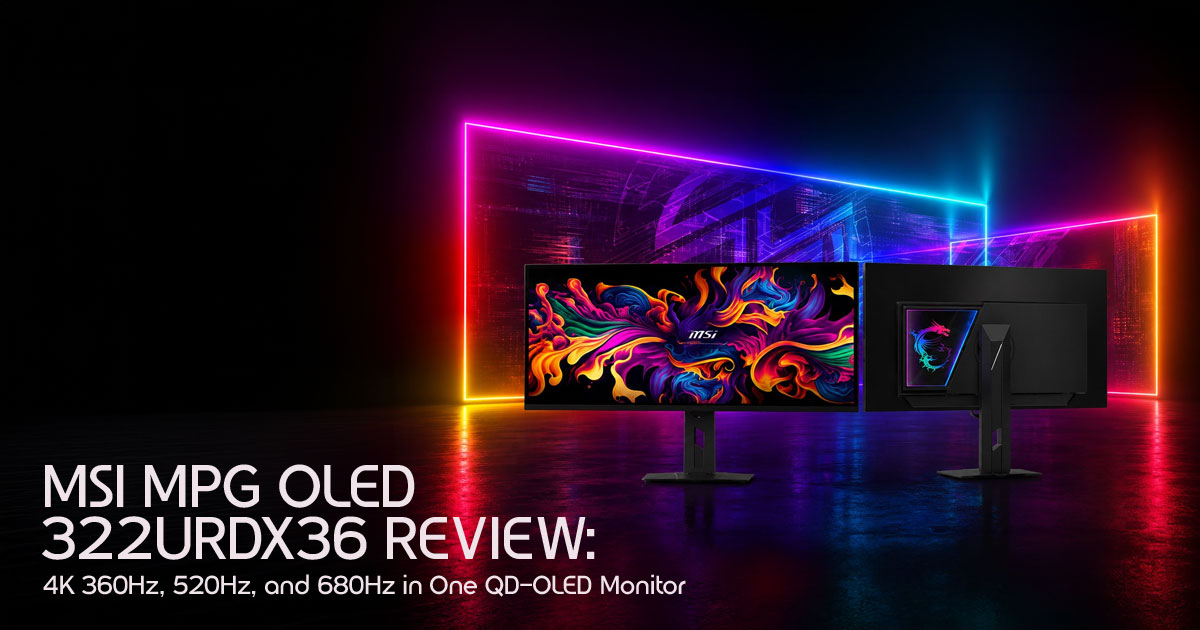
The MSI MPG OLED 322URDX36 combines 4K 360Hz, 1440p 520Hz, and 1080p 680Hz modes into one premium QD-OLED gaming monitor. It’s built for gamers who want both cinematic visuals and esports-level speed without owning multiple displays.
The Quick Verdict
The MSI MPG OLED 322URDX36 is the first screen that actually tries to be everything at once. It lets you switch between sharp 4K visuals for cinematic games and ultra-fast refresh rates for competitive shooters. It’s expensive and needs extremely powerful hardware to fully take advantage of what it offers.
Click here to buy from Amazon
Introduction
For years, gamers have been forced into a frustrating compromise. If you wanted stunning 4K visuals with rich colors and razor-sharp detail, you sacrificed speed. If you cared about competitive gaming and ultra-fast refresh rates, you usually ended up staring at a softer-looking screen built more for reaction time than immersion.
You could either enjoy the world or dominate the scoreboard. Rarely both.
MSI is now trying to break that cycle with something genuinely different. The new MSI MPG OLED 322URDX36 is being introduced as the world’s first Triple-Mode QD-OLED gaming monitor, and the idea behind it is simple but ambitious: one display that changes depending on how you play.
You can switch between:
- 4K at 360Hz for cinematic AAA gaming
- 1440p at 520Hz for balanced competitive gaming performance
- 1080p at 680Hz for maximum esports gaming speed
On paper, it sounds almost ridiculous. Three performance tiers packed into a single QD-OLED panel. The kind of monitor that tries to replace multiple high-end gaming monitors sitting on a gamer’s desk.
But this monitor raises bigger questions than MSI’s marketing slides are willing to answer.
Does 680Hz gaming actually matter in real gameplay? Can modern PCs even push these frame rates consistently? Will Triple Mode monitor technology become the future of gaming monitors, or is this simply a premium experiment built to chase headlines?
That’s where this review matters.
Instead of repeating spec sheets and press-release hype, we’re looking at how this monitor fits into real-world gaming, long-term ownership, hardware requirements, image quality, competitive gaming performance, and overall value for money. Because the truth is, most buyers are not searching for the “highest number.” They are trying to avoid buyer’s remorse.
As technology experts with over 20 years of experience in hardware and application research and development, we analyze every product based on real-world performance, durability, thermal efficiency, display quality, upgrade potential, and long-term usability. Our goal is to help gamers, content creators, streamers, competitive esports players, and high-performance PC users find the best products based on budget, performance, reliability, and everyday ownership experience.
Every recommendation in this guide is built on extensive research, component-level analysis, real gaming scenarios, market comparison, and industry expertise — not marketing promises.
And if MSI actually delivers on what this monitor claims to do, the gaming monitor market may have just entered a completely new phase.
Why This Review Matters
Most reviews just read you the spec sheet. We’re looking at how this affects your actual gameplay and whether your desk needs this much power. With next-generation GPUs arriving soon, it’s important to know whether your monitor can actually keep up before spending this kind of money.
We’ll cover how next-generation esports gaming monitors are changing
We’ll cover how esports gaming monitors are changing, why the new RGB Stripe subpixel layout fixes the old “blurry text” problem, and if the 1080p 680Hz refresh rate is something a human can actually see.
1. What Makes This Monitor Different From Every Other OLED Monitor?
1.1 The Problem With Modern Gaming Monitors
Right now, the monitor market is split. If you want 4K, you’re usually capped at lower
speeds. If you want the fastest refresh rates, you’re stuck with 1080p or 1440p. For people who play both Cyberpunk and Counter-Strike, this means either owning two monitors or just being unhappy half the time. High resolution usually kills speed, and high speed usually kills the view.
1.2 Why Triple Mode Matters
This is where the Triple-Mode QD-OLED monitor comes in. Instead of forcing you to choose, it adapts. You get one high-end panel that changes its “native” feel based on what you’re playing. It’s about flexibility. As our graphics cards get better, this monitor stays relevant because it can scale with the hardware you buy next year.
1.3 The Bigger Industry Shift
We’re seeing an arms race. OLED is no longer a luxury; it’s becoming the standard for anyone serious about gaming. With Samsung pushing new panels, we’re seeing better
brightness and faster response times than ever. MSI is just the first to package it in a way that handles three different resolutions properly.
2. MSI MPG OLED 322URDX36 At a Glance
Quick Specifications Overview
| Feature | Details |
| Panel | 31.5-inch Triple-Mode QD-OLED Monitor |
| Modes | 4K 360Hz Gaming Monitor / 1440p 520Hz Mode / 1080p 680Hz Mode |
| Response Time | 0.03ms GtG (Virtually Instant) |
| HDR | VESA DisplayHDR True Black 600 |
| Technology | Latest-Generation Samsung QD-OLED Panel Technology |
| Subpixels | RGB Stripe Subpixel Layout for improved text clarity and desktop readability |
What Immediately Stands Out
The big one is the 1080p 680Hz refresh rate. It’s a number that sounds fake until you see it. But the real winner for us is the RGB Stripe subpixel layout. Older OLEDs made text look fringed and weird; this fixes that, making it a monitor you can actually use for work during the day.
Click here to buy from Amazon
3. Understanding Triple Mode: The Feature Everyone Will Talk About
3.1 Mode 1: 4K 360Hz
This is the “show-off” mode. It’s for when you want to see every leaf in Black Myth: Wukong or every neon sign in Night City.
- Who it’s for: AAA gamers and people who do video work on the side.
- The Hardware Reality: You’re going to need a We’re talking RTX 5090 territory. Even with DLSS, 4K at 360Hz is a heavy lift for any PC.
3.2 Mode 2: 1440p 520Hz
This is the mode we think most people will actually live in. The 1440p 520Hz mode is the perfect middle ground. It still looks sharp enough for most gamers, but the higher frame rates make gameplay feel incredibly smooth and responsive. It’s much easier for a modern PC to hit 500+ FPS at 1440p than it is to push 4K.
3.3 Mode 3: 1080p 680Hz
This is for the pros. Is 680Hz actually noticeable? To be honest, for 99% of people, the jump from 520Hz to 680Hz is tiny. But for an esports gaming monitor, it’s about input lag. It’s
about that fraction of a millisecond where you see the enemy before they see you. If you’re playing for money, you want this. If you’re playing for fun, it’s probably overkill.
4. The New QD-OLED Technology Behind This Monitor
4.1 Penta Tandem OLED Explained
MSI is using the latest-generation Samsung QD-OLED panel technology. In simple terms, the newer panel design improves brightness, color performance, and long-term efficiency compared to older OLED displays.
4.2 RGB Stripe: The Productivity Fix
If you’ve ever used an older OLED for reading emails, you probably noticed the text looked a bit “fuzzy.” That’s because of how the pixels were arranged. The RGB Stripe subpixel layout in this monitor fixes that. It’s a huge deal because it means you don’t need a second monitor just for browsing the web.
5. Gaming Performance: What to Expect
Competitive Gaming (Valorant, CS2, Apex)
This is where the monitor feels exceptionally responsive. The motion clarity at 680Hz looks incredibly smooth, especially in fast shooters like Valorant and CS2. Quick mouse movements feel sharper, enemy tracking feels cleaner, and fast reactions feel more immediate compared to traditional gaming monitors.
Story-Driven Gaming (Cyberpunk, Elden Ring)
Switch to 4K, and it’s a different world. The deep blacks of the OLED make dark caves or space scenes look incredible. You get contrast that a normal LCD just can’t touch.
6. Can Your PC Even Handle This?
We have to be real here. You can’t plug this into a mid-range laptop and expect magic. To hit 360Hz at 4K, you need the best of the best. If you don’t have a top-tier GPU and a fast CPU, you would not be using the monitor anywhere near its full potential. This is a monitor for the enthusiasts who already have (or are buying) the most powerful parts on the market.
7. HDR: Where OLED Wins
The latest-generation Samsung QD-OLED panel technology helps this screen deliver deeper blacks, stronger HDR contrast, and better overall brightness efficiency. This means the dark parts of the screen are actually off, not just dark gray. When an explosion
happens on a dark background, it’s blindingly bright. It’s a much better experience than Mini-LED, which can sometimes have a “glow” or “halo” around bright objects.
8. Potential Downsides
- The Price: It’s going to be Expect a “world’s first” tax.
- Burn-in: While the tech is better, OLEDs still need Don’t leave the same static image on for 24 hours.
- The 680Hz Question: Most people will never hit 680 FPS in anything other than Minecraft or CS2.
9. Comparison: How it Stacks Up
| Feature | MSI Triple-Mode | Typical 4K OLED | High-End Mini-LED |
| Versatility | Best (Triple-Mode) | Fixed Refresh/Resolution Mode | Fixed Refresh/Resolution Mode |
| Motion Clarity | Elite | Great | Good |
| Black Levels | Perfect | Perfect | Very Good |
| Text Quality | Sharp (RGB Stripe) | Mixed (Depends on Subpixel Layout) | Sharp |
10. Who Should Buy This?
Buy it if:
- You play both competitive shooters and big cinematic games.
- You want one monitor to do everything and have the desk space for it.
- You have a high-end PC (RTX 4090/5090).
Skip it if:
- You only play casual games or Sims.
- You’re on a budget.
- You already have a great 4K 240Hz screen and don’t care about the extra speed.
11. Frequently Asked Questions
What is a Triple-Mode gaming monitor?
It’s a screen that can change its resolution and speed. Instead of just one setting, you get three different “sweet spots” for different types of games.
Does QD-OLED suffer from burn-in?
All OLED panels can experience burn-in over time, but newer Samsung QD-OLED panel technology and MSI’s OLED protection features are designed to reduce the risk significantly during normal use.
What is the difference in QD-OLED vs WOLED?
In the QD-OLED vs WOLED battle, QD-OLED usually wins on color brightness. Colors stay vibrant even when the screen is very bright, whereas WOLED can sometimes look a bit washed out at max brightness.
What GPU do you need for 4K 360Hz gaming?
To properly run 4K 360Hz gaming, you need an extremely powerful setup. Realistically, this means high-end GPUs like the RTX 4090, upcoming RTX 5090, or future flagship graphics cards. Even then, most modern AAA games will still rely on technologies like DLSS and Frame Generation to get close to those frame rates at maximum settings.
For competitive esports titles like Valorant or CS2, reaching very high frame rates is much easier because those games are less demanding than modern cinematic titles.
Is 680Hz overkill for gaming?
For most gamers, yes — 680Hz gaming is probably more than they actually need. The visual jump between 360Hz, 520Hz, and 680Hz becomes smaller as refresh rates get higher.
But for professional esports players, every millisecond matters. Lower input lag and cleaner motion can still provide a competitive edge in fast shooters. For everyday gaming, though, most people will likely spend more time using the excellent 1440p 520Hz mode, which offers a better balance between image quality and speed.
Can HDMI 2.1 support 4K 360Hz gaming?
HDMI 2.1 can handle high refresh rate gaming, but full 4K 360Hz gaming usually requires DisplayPort 2.1 for maximum bandwidth. This is especially important for PC gamers using high-end graphics cards and advanced display features.
Click here to buy from Amazon
12. Final Verdict
Is the MSI MPG OLED 322URDX36 revolutionary? Honestly, it has a very strong case.
For years, the gaming monitor market forced players into separate categories. You bought one monitor for cinematic 4K gaming, another for ultra-fast competitive esports, and maybe compromised somewhere in between if your budget allowed it. MSI is one of the first companies seriously attempting to erase that separation.
The world’s first Triple-Mode QD-OLED monitor is not just chasing headline numbers. It introduces a genuinely different approach to gaming displays by giving users the flexibility to prioritize image quality or raw speed depending on the game they are playing.
And that changes the conversation. Instead of asking:
“Should I buy a 4K monitor or a high refresh esports monitor?”
You are suddenly asking:
“Why can’t one display do both?”
That is what makes the MSI MPG OLED 322URDX36 important. The combination of:
- 4K 360Hz gaming
- 1440p 520Hz performance
- 1080p 680Hz esports speed
- QD-OLED image quality
- DisplayPort 1 connectivity
- OLED-level response times
- and next-generation gaming monitor flexibility
makes this one of the most ambitious gaming displays we have seen in years. At the same time, this is not a monitor for everyone.
To fully experience what this display can do, you will need an extremely powerful gaming PC, likely equipped with current or next-generation flagship hardware. Most gamers will never consistently hit 680 FPS in modern titles, and many users may realistically spend most of their time in the excellent 1440p 520Hz mode instead.
But that does not make the technology meaningless. It makes the monitor future-focused.
This is a display designed for enthusiasts who want their monitor to survive multiple GPU upgrade cycles without feeling outdated two years later. It is aimed at gamers who care about both immersion and competitive edge without constantly swapping between specialized screens.
If MSI delivers strong pricing, reliable OLED protection features, and solid real-world performance testing, the MPG OLED 322URDX36 could become one of the most influential gaming monitors of this generation.
Bottom Line
If you already own high-end hardware — or plan to build an elite gaming setup soon — the MSI MPG OLED 322URDX36 may be the most flexible gaming monitor ever created.
It represents something the monitor industry has struggled with for years: The end of the compromise between visual quality and competitive speed.
Availability and Launch Information
As of right now, the MSI MPG OLED 322URDX36 has not been officially released to retail shelves for public purchase, but its launch appears very close.
MSI recently unveiled the monitor ahead of Computex 2026, which means the product is still in its early announcement phase. Final retail pricing, regional availability, and launch timelines have not yet been fully confirmed.
More details are expected as the Computex event continues and MSI expands official product announcements globally.
For buyers who do not want to wait for the Triple-Mode model to launch, MSI already offers premium 32-inch 4K QD-OLED gaming monitors that are widely available right now.
Available Alternatives You Can Buy Today
MSI MPG 321URX
A premium 4K QD-OLED gaming monitor already popular among enthusiasts for its excellent image quality, fast response times, and OLED gaming performance.
Amazon Worldwide:
MSI MPG 321URX on Amazon
MSI MPG 322UR X24
Another high-end QD-OLED gaming monitor designed for gamers looking for immersive visuals, high refresh rates, and flagship-level gaming performance.
Amazon Worldwide:
MSI MPG 322UR X24 on Amazon
Ready to Upgrade?
If you are planning to build the ultimate gaming setup around next-generation hardware, the MSI MPG OLED 322URDX36 is easily one of the most exciting monitors to watch this year.
And if you are unsure whether your current PC can actually handle 4K 360Hz gaming, 520Hz competitive gaming, or 680Hz esports performance, drop your build details in the comments. We’ll help you figure out whether your hardware is ready for this level of performance before you spend your money.
***Disclaimer***
This blog post reflects our research, analysis, and opinions based on available product information, user feedback, and industry knowledge. It should not be taken as the official position of any brand, manufacturer, or company mentioned here. While we aim to keep information accurate and up to date, product details, pricing, and availability can change. We recommend double-checking important details before making a purchase.
Some links in this article may be affiliate links. If you choose to buy through these links, we may earn a small commission at no extra cost to you. This helps support our work and allows us to keep publishing in-depth, unbiased reviews. Our recommendations are never influenced by affiliate partnerships.
Comments shared by readers reflect their own views and not ours. We are not responsible for outcomes resulting from the use of information on this site. Please seek professional advice where appropriate.
All product names, logos, and brands mentioned are the property of their respective owners. These names are used for identification and informational purposes only and do not imply endorsement.
