
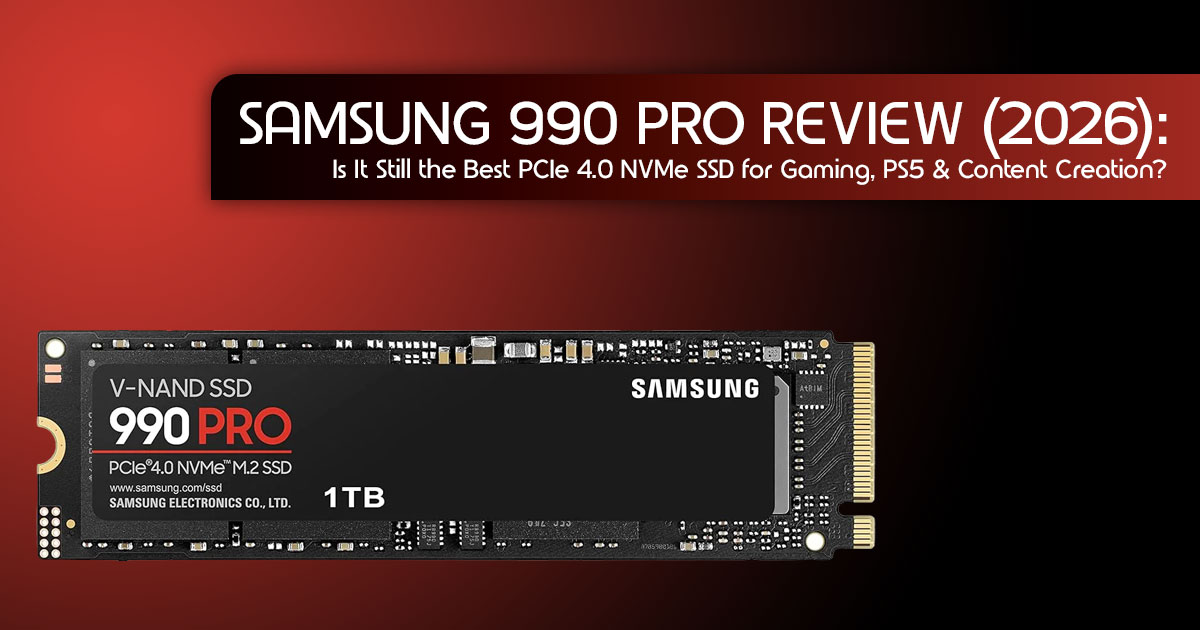
TL;DR: The Samsung 990 Pro remains one of the best PCIe 4.0 NVMe SSDs in 2026. While PCIe 5.0 drives offer higher benchmark speeds, the 990 Pro delivers an excellent balance of performance, thermal efficiency, reliability, and value for gamers, creators, and professionals.
1. Introduction
Storage technology continues to evolve at a rapid pace, with PCIe 5.0 SSDs delivering record-breaking sequential speeds. Yet raw specifications don’t always translate into a better everyday experience. For most users, the real measure of an SSD is how consistently it performs across gaming, content creation, software development, large file transfers, and years of continuous use. That’s where the Samsung 990 Pro continues to stand out.
As Samsung’s flagship PCIe 4.0 NVMe SSD, the Samsung 990 Pro was engineered to maximize the capabilities of the PCIe 4.0 interface. Even in 2026, it remains one of the strongest options for enthusiasts and professionals who value a balanced combination of high sustained performance, low latency, excellent power efficiency, thermal stability, and long-term reliability. Rather than chasing theoretical benchmark numbers, it delivers the consistent real-world performance that demanding workloads require.
At NGXP Technologies, our hardware evaluations are backed by more than 20 years of experience in hardware and application research and development. Every recommendation is based on detailed analysis of controller architecture, NAND flash technology, firmware maturity, thermal behavior, endurance ratings, power efficiency, compatibility, and real-world application performance. We assess products the way experienced system builders and IT professionals do—looking beyond marketing specifications to determine how they perform under sustained workloads and whether they provide genuine long-term value.
This guide is intended for PC enthusiasts, system builders, gamers, content creators, software developers, IT professionals, and PlayStation 5 owners who want an objective evaluation before investing in a high-performance SSD. Whether you’re upgrading from a SATA SSD, replacing an older PCIe 3.0 drive, expanding your PS5 storage, or comparing the Samsung 990 Pro with competing PCIe 4.0 and PCIe 5.0 SSDs, this review provides the technical context needed to make an informed decision.
Throughout this review, we’ll examine the Samsung 990 Pro from both a technical and practical perspective, including its architecture, real-world performance, endurance, thermal characteristics, compatibility, software ecosystem, and overall value. We’ll also compare it with leading alternatives, identify the workloads where it excels, discuss scenarios where another SSD may be a better fit, and determine whether it remains one of the best PCIe 4.0 SSDs available in 2026. This approach ensures the final recommendation is based on measurable performance, practical usability, and long-term ownership rather than specifications alone.
How We Evaluated the Samsung 990 Pro
Our evaluation considers controller architecture, NAND flash technology, endurance ratings, thermal performance, firmware maturity, software ecosystem, published benchmark data, compatibility, long-term reliability, and practical use cases across gaming, creative workloads, software development, and professional computing.
1.1 Why SSD pricing matters in 2026
We’ve moved past the era of cheap storage. With AI models living locally on our machines and games hitting 300GB, your SSD choice isn’t just about space—it’s about how long you’re willing to wait for a progress bar. Getting a deal on a high-end NVMe SSD during Prime Day can save you enough to bump up your GPU or RAM.
1.2 Who should read this guide
If you’re building a new PC, upgrading a sluggish laptop, or trying to fit more games on your PS5, this guide is for you. We aren’t just looking at charts; we’re looking at how this drive handles daily life in 2026.
1.3 What makes this different from deal-only articles
Most deal-focused articles simply list specifications and today’s price. Our evaluation combines published benchmark data, hardware analysis, long-term reliability reports, and real-world usage scenarios to help you understand how the Samsung 990 Pro performs in everyday use. We’ll also explain where it performs exceptionally well and where another SSD may be a better choice.
2. Quick Answer
2.1 Is the Samsung 990 Pro worth buying?
Verdict: Yes. The Samsung 990 Pro is widely regarded as one of the most mature and well-balanced PCIe 4.0 SSDs available. It continues to deliver excellent real-world performance, thermal efficiency, and long-term reliability across a wide range of workloads.
2.2 Is Prime Day the best time to buy?
Verdict: Usually, yes. Prime Day frequently offers some of the lowest prices of the year, although discounts vary by region and retailer. If the price matches or falls below previous sale prices, it’s an excellent time to buy.
2.3 Who should buy it?
Gamers, video editors, and developers who want a drive that won’t overheat or slow down during long sessions.
2.4 Who should skip it?
Casual users who only browse the web, or extreme enthusiasts who have a PCIe 5.0 motherboard and the budget for a Samsung 9100 Pro.
2.5 Best capacity
The 2TB model is the “sweet spot” for most people.
2.6 Best alternatives
The WD SN850X is the closest rival, while the Crucial T500 is a great budget-friendly pick.
3. What Is the Samsung 990 Pro?
At its core, the Samsung 990 Pro is an NVMe SSD that uses the PCIe 4.0 interface. But what does that actually mean for you?
- PCIe Generation: Think of this as the PCIe 4.0 is a wide, fast road. PCIe 5.0 is wider, but most of us don’t have the “cars” (software) to fill it yet.
- NVMe: This is the language the drive speaks to your It’s much faster than the old SATA language used by older, boxy drives.
- 2: This is the physical shape. It looks like a stick of gum and plugs directly into your motherboard.
- TLC NAND: This is the actual storage Samsung uses high-quality TLC, which lasts a long time even if you write data to it every day.
- DRAM Cache: This is like the drive’s short-term It helps the SSD find your files instantly without stuttering.
- Samsung Controller: Samsung designs its own SSD controller, firmware, and NAND flash memory, allowing the hardware and software to work together more efficiently. This close integration helps deliver consistent performance, better power efficiency, and long-term reliability.
4. Samsung 990 Pro Specifications Explained
| Feature | Specification | Why It Matters |
| Sequential Read Speed | Up to 7,450 MB/s | Enables faster game loading, quicker application launches, and improved system responsiveness. |
| Sequential Write Speed | Up to 6,900 MB/s | Speeds up large file transfers, 4K/8K video exports, backups, and game installations. |
| Random IOPS | Up to 1.4M Read / 1.55M Write | Delivers a faster, more responsive experience when multitasking and accessing many small files. |
| Endurance (TBW) | 1,200 TBW (2TB Model) | Indicates the total amount of data that can be written over the drive’s lifetime before reaching its endurance rating. |
| Warranty | 5 Years | Provides long-term coverage and confidence for gaming, professional, and everyday workloads. |
Although sequential read speeds often receive the most attention, random read and write performance (IOPS) has a greater impact on how responsive a system feels during everyday use. The Samsung 990 Pro delivers excellent random performance, making applications launch quickly and multitasking feel smoother.
5. Real-World Performance
5.1 Gaming
In games like Cyberpunk 2077, the Samsung 990 Pro cuts load times to just a few seconds. If your game supports DirectStorage, this NVMe SSD can feed data directly to your GPU, making open-world transitions feel seamless.
5.2 Content Creation
When editing 4K 10-bit video in applications such as Premiere Pro and DaVinci Resolve, the Samsung 990 Pro provides the sustained performance needed for smooth timeline playback, fast project loading, and quicker file exports. Photoshop users also benefit from faster opening and saving of large project files.
5.3 Software Development
For those running Docker, Virtual Machines, or compiling in Android Studio, disk speed is everything. The Samsung 990 Pro maintains consistent performance under sustained workloads, making it well suited for software compilation, virtual machines, containerized development environments, and multitasking.
5.4 AI Workloads
The Samsung 990 Pro is well suited for storing LLM model checkpoints, AI datasets, and Stable Diffusion assets, where fast storage can improve project loading times and overall workflow responsiveness.
6. Samsung 990 Pro vs. Competitors
| Drive | Interface | Maximum Sequential Read Speed | Best For |
| Samsung 990 Pro | PCIe 4.0 | 7,450 MB/s | Outstanding all-around performance for gaming, content creation, and professional workloads |
| WD Black SN850X | PCIe 4.0 | 7,300 MB/s | High-end gaming PCs and PlayStation 5 upgrades |
| Crucial T500 | PCIe 4.0 | 7,400 MB/s | Excellent value for money with strong everyday performance |
| Lexar NM790 | PCIe 4.0 | 7,400 MB/s | Budget-conscious builds that prioritize speed over DRAM caching |
| Samsung 9100 Pro | PCIe 5.0 | 14,800 MB/s | Early adopters seeking maximum performance and long-term future-proofing |
Our Take: The Samsung 990 Pro usually wins on software (Samsung Magician) and overall reliability. If both drives are similarly priced, the Samsung 990 Pro is generally the better choice thanks to its mature firmware, Samsung Magician software, and strong long-term reliability.
7. Which Capacity Should You Buy?
- 1TB: Good for a boot drive and a few main games.
- 2TB: The best choice for most You won’t have to delete games every week.
- 4TB: Recommended for professionals working with large video projects, AI models, virtual machines, software development environments, or extensive media libraries.
- 8TB: For most users, the additional capacity isn’t Unless you regularly work with exceptionally large datasets or enterprise-level storage requirements, the 4TB model offers a better balance of capacity and value.
8. Compatibility Guide
8.1 Desktop & Gaming PCs
The Samsung 990 Pro is fully compatible with PCIe 3.0 motherboards. However, it will operate at PCIe 3.0 speeds, so you won’t experience its full PCIe 4.0 performance until it’s installed in a compatible motherboard.
8.2 Laptops
Most modern gaming laptops fit this drive easily. Just check if you have room for the version with a heatsink—some laptops are too thin for it.
8.3 PS5
The Samsung 990 Pro is a perfect PS5 upgrade. Important: You must use a heatsink. Buy the version that comes with one, or add your own.
9. Installation Guide
- Slot Check: Find the 2 slot (usually near the CPU).
- BIOS: Update your BIOS if your motherboard is older.
- Physical Install: Slide it in at a 30-degree angle and secure the screw.
- Heatsink: If your motherboard has a built-in cover, use it.
- Software: Boot into Windows and use Disk Management to “Initialize” the drive.
10. How to Clone Your Existing SSD
If you’re upgrading from an existing SSD, you can migrate your operating system, applications, and files to the Samsung 990 Pro without reinstalling Windows. Samsung provides migration software that simplifies the cloning process for supported drives.
Steps to Clone Your Existing SSD
- Back up important data before starting the migration process. While cloning is generally reliable, a backup protects your files in case of unexpected interruptions.
- Install the Samsung 990 Pro in an available 2 NVMe slot on your desktop or laptop.
- Download and install Samsung Magician and the Samsung Data Migration utility from Samsung’s official website.
- Select your current drive as the source and the Samsung 990 Pro as the destination drive.
- Start the cloning process and wait for the data transfer to The time required depends on the amount of data being copied.
- Restart your computer, enter the BIOS/UEFI if necessary, and set the Samsung 990 Pro as the primary boot drive.
- Verify the migration by confirming that Windows boots normally and all files and applications are accessible.
Before You Begin
- Ensure the destination SSD has enough capacity for all the data on the source drive.
- Connect laptops to a reliable power source throughout the cloning process.
- Avoid using the computer while cloning to reduce the risk of interruptions.
- After confirming that the new SSD is working correctly, you can format or repurpose the old drive if needed.
Tip: If your system already contains important files, create a backup using an external drive or a trusted cloud storage service before cloning. Having a current backup provides an additional layer of protection against accidental data loss.
11. Samsung Magician Features
Samsung Magician is Samsung’s SSD management software designed to help you maintain, monitor, and optimize the performance of your Samsung 990 Pro throughout its lifespan.
With Samsung Magician, you can:
- Update firmware to install the latest performance improvements, stability enhancements, and security fixes.
- Monitor SSD health by checking drive status, temperature, remaining lifespan, and SMART (Self-Monitoring, Analysis, and Reporting Technology) diagnostics.
- Benchmark performance to measure sequential and random read/write speeds and verify that your SSD is performing as expected.
- Optimize drive settings by enabling recommended performance features and verifying that technologies such as TRIM are working correctly.
- Securely erase the SSD when preparing the drive for resale, recycling, or a fresh operating system installation, helping ensure that stored data cannot be
- Manage over-provisioning to improve long-term performance and endurance by reserving a portion of storage for background maintenance tasks.
Why it matters: Keeping your SSD’s firmware up to date and periodically monitoring its health can improve system stability, maintain consistent performance, and help identify potential issues before they affect your data.
12. Common Buying Mistakes
- Buying Gen 5 for a Gen 4 PC: Don’t waste money on a Samsung 9100 Pro if your PC can’t handle it.
- Ignoring the Heatsink: High-speed SSDs get If your case has bad airflow, get the heatsink version.
- Buying Fakes: Only buy from official If a 2TB 990 Pro is $40 on a random site, it’s a fake.
13. Edge Cases
- Upgrading from 980 Pro? Not worth it unless you need more space.
- Upgrading from a Hard Drive? Upgrading from a hard drive delivers one of the biggest performance improvements you’ll notice in everyday computing, including faster boot times, quicker application launches, and significantly improved file transfers.
14. Is PCIe 5.0 Worth It Yet?
In 2026, a PCIe 4.0 SSD like the Samsung 990 Pro continues to offer the best balance of performance, compatibility, power efficiency, and overall value.
15. Reliability & Lifespan
With a 2TB model rated at 1,200 TBW, the Samsung 990 Pro offers more than enough endurance for typical consumer and professional workloads. Even users writing around 100 GB of data per day are unlikely to reach the rated endurance limit for decades under normal usage.
16. How to Spot Fake Samsung SSDs
If Samsung Magician doesn’t recognize the drive, it’s likely a fake. Real drives will show the serial number and firmware version perfectly in the app.
17. Buying Checklist
- ☐ Does my motherboard support NVMe?
- ☐ Do I need a heatsink?
- ☐ Have I backed up my old data?
18. Frequently Asked Questions
Is the Samsung 990 Pro good for PS5?
Yes. The Samsung 990 Pro is fully compatible with the PlayStation 5 and exceeds Sony’s recommended SSD performance requirements. For the best results, choose the Samsung 990 Pro with a heatsink or install a compatible M.2 heatsink to help maintain optimal temperatures during extended gaming sessions.
Does it work in older PCs?
Yes. The Samsung 990 Pro is backward compatible with PCIe 3.0 motherboards, making it a suitable upgrade for many older desktops and laptops that support an M.2 NVMe slot.
While it will operate at PCIe 3.0 speeds instead of its maximum PCIe 4.0 performance, you’ll still benefit from significantly faster boot times, application launches, and file transfers compared to traditional hard drives or SATA SSDs.
How long is the warranty?
The Samsung 990 Pro is backed by a 5-year limited warranty or until the drive reaches its specified Total Bytes Written (TBW) endurance rating, whichever comes first. This warranty reflects Samsung’s confidence in the drive’s durability and makes it a reliable choice for gaming, content creation, and professional workloads.
19. Final Verdict
The Samsung 990 Pro remains one of the leading PCIe 4.0 SSDs available in 2026. It offers an excellent balance of performance, reliability, power efficiency, and long-term value for gamers, creators, developers, and professionals.
- Best for: Gamers, content creators, software developers, professional workstations, and PlayStation 5 owners looking for a reliable PCIe 0 NVMe SSD.
- Value Rating: 5/10 (when on sale).
Ready to Upgrade?
Don’t let your storage hold you back. Check the latest Prime Day deals and grab your Samsung 990 Pro today.
Check Price on Amazon Worldwide and Amazon India.
Key Takeaways
- Samsung 990 Pro is the top PCIe 0 choice in 2026.
- 2TB is the ideal capacity for most users.
- Always use a heatsink for PS5 or heavy workloads.
- Prime Day frequently offers some of the year’s most competitive prices.
Have you upgraded your storage recently? Share your experience in the comments below or ask us for help with your build!
***Disclaimer***
This blog post reflects our research, analysis, and opinions based on available product information, user feedback, and industry knowledge. It should not be taken as the official position of any brand, manufacturer, or company mentioned here. While we aim to keep information accurate and up to date, product details, pricing, and availability can change. We recommend double-checking important details before making a purchase.
Some links in this article may be affiliate links. If you choose to buy through these links, we may earn a small commission at no extra cost to you. This helps support our work and allows us to keep publishing in-depth, unbiased reviews. Our recommendations are never influenced by affiliate partnerships.
Comments shared by readers reflect their own views and not ours. We are not responsible for outcomes resulting from the use of information on this site. Please seek professional advice where appropriate.
All product names, logos, and brands mentioned are the property of their respective owners. These names are used for identification and informational purposes only and do not imply endorsement.
