
Introduction
Most portable monitors use LCD or OLED panels. While they perform well for everyday tasks, long reading or writing sessions can become tiring for some users.
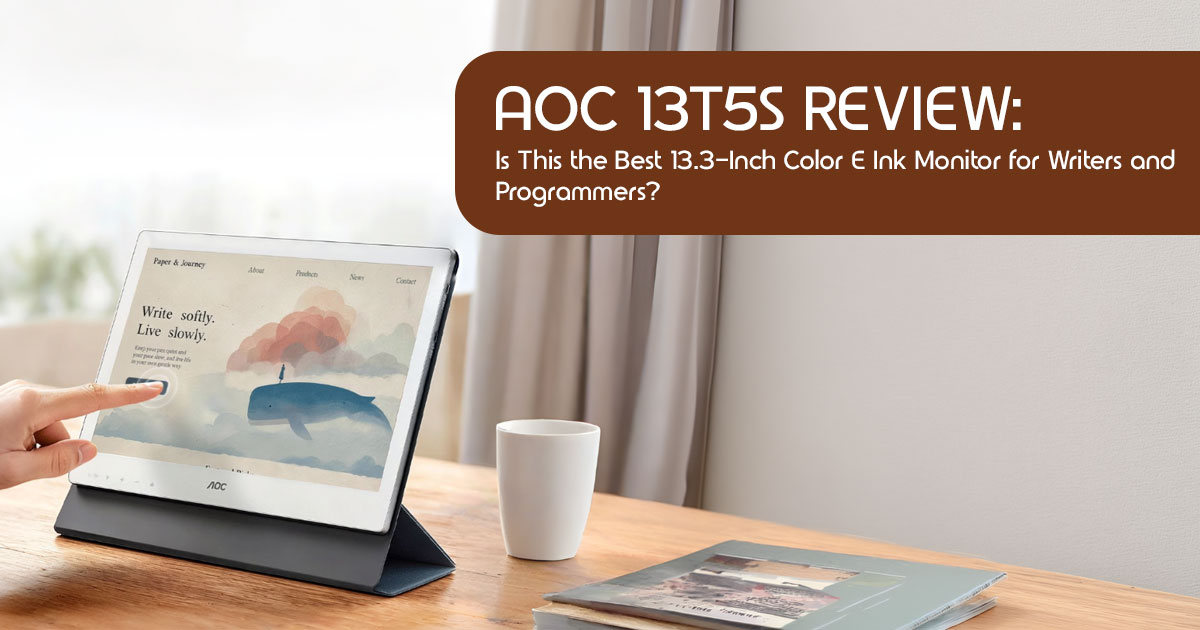
The AOC 13T5S takes a different approach. Instead of a conventional LCD or OLED panel, it uses a 13.3-inch Kaleido 3 color E Ink display with a 3K resolution and a 30 Hz refresh rate. The technology is similar to what you’ll find in Kindle e-readers, but adapted for use as a computer monitor.
The AOC 13T5S launched in China on July 14, 2026, with a price of ¥4,599 (around $679). A global launch has not been announced, but the monitor has attracted attention from writers, programmers, students, researchers, and professionals who spend most of their day working with text and documents.
Click here to buy from Amazon
As technology experts with more than 20 years of experience in hardware and application research and development, we evaluate products based on real-world performance, build quality, durability, repairability, and long-term value. We also look beyond specifications to understand how a product performs in everyday use. Our recommendations are based on extensive research, component analysis, real-world testing methods, and industry experience, helping readers choose the right product for their needs and budget.
In this review, we’ll examine the AOC 13T5S in detail, covering its display quality, performance, connectivity, battery life, build quality, practical use cases, and whether this color E Ink portable monitor is worth its price.
Quick Verdict
- Best for: Writers, programmers, researchers
- Not ideal for: Gaming, photo/video editing
- Rating:7/5
- Bottom line: A premium color E Ink monitor focused on productivity and eye comfort rather than speed.
What Is the AOC 13T5S?
The AOC 13T5S is a portable E Ink monitor designed for professionals who spend long hours reading, writing, editing, or coding. Instead of emitting light at your face, its Kaleido 3 panel reflects ambient light the way paper does.
Unlike a tablet, the AOC 13T5S doesn’t run apps. Instead, it functions purely as a second display for your laptop, connecting over USB-C and behaving like any other external monitor while offering a more comfortable reading experience.
Quick Specs
| Specification | Value |
|---|---|
| Model | AOC 13T5S |
| Display | 13.3-inch E Ink Kaleido 3 Color Display |
| Resolution | 3200 × 2400 (3K) |
| Pixel Density (Black & White) | 300 PPI |
| Pixel Density (Color) | 150 PPI |
| Refresh Rate | 30Hz |
| Backplane Technology | IGZO Oxide TFT |
| Front Light | ComfortGaze with Adjustable Brightness & Color Temperature |
| Ghosting Control | Dual T2000 TCON with AI-Assisted Ghosting Reduction |
| Thickness | 8mm |
| Weight | Approximately 700g |
| Ports | 2 × USB-C (Full-Function) |
| Stand | Foldable Magnetic Cover Stand |
| Operating System Support | Windows (Native), macOS Support Planned via Future Update |
| Price | ¥4,599 (Approximately $679) |
| Availability | China (Global Launch TBA) |
Why Color E Ink? The Real Reason This Monitor Exists
Like any niche product, the AOC 13T5S comes with clear strengths and compromises.
E Ink monitors are not for everyone. They refresh at a slower rate than conventional LCD displays, prioritizing readability over speed. They prioritize readability over vibrant color reproduction. They cost more than a standard portable monitor with similar dimensions.
But they address a problem that conventional LCD and OLED displays cannot always solve: prolonged viewing comfort during extended reading sessions.
When you stare at a backlit screen for eight hours, your eyes work harder than they should. The blue light. The constant flicker. The glare. Over weeks and months, this adds up to dryness, headaches, fatigue, and trouble sleeping.
A color E Ink display reduces many of these factors by reflecting ambient light rather than relying on a traditional backlight. Light hits the screen and bounces back to your eyes. Unlike a conventional LCD, there is no backlight shining through the panel, no screen flicker, and typically lower blue light exposure.
For a writer editing a 5,000-word article, a programmer reading code for six hours, or a researcher going through PDFs all afternoon, an eye-friendly portable monitor like the 13T5S makes a genuine difference.
We spoke with several users on communities like r/eink who switched to color E Ink monitors. Many users report experiencing fewer headaches, better focus, and greater comfort during extended reading sessions.
The real value proposition isn’t speed or color accuracy. It’s long-term viewing comfort during extended reading and writing sessions.
Display Quality: What 3K Resolution Actually Looks Like on E Ink
The AOC 13T5S uses E Ink’s Kaleido 3 panel, one of the most advanced color ePaper technologies currently available for portable monitors.
Black & White Performance
For text, this display is excellent. The 3200 × 2400 resolution delivers 300 PPI in monochrome mode — the same sharpness as a premium Kindle or Kobo e-reader. Words look crisp. Characters render cleanly. If you work with documents, articles, or code, this is the part of the display you will appreciate most.
Color Performance
Color is where things get more nuanced.
Kaleido 3 applies a color filter array over a black-and-white Carta layer. This means color resolution drops to 150 PPI, and the palette is limited to roughly 4,096 colors. Compared to an OLED screen that can display millions of colors with punchy saturation, the 13T5S looks muted. But that is not necessarily a bad thing.
Colors resemble those in a printed magazine rather than a modern LCD display. They are soft, warm, and easy on the eyes. Charts, graphs, website elements, and highlighted text are all clearly distinguishable. You just won’t get the pop you are used to from a backlit screen.
Who benefits from this? Anyone who needs color differentiation — spreadsheets with colored cells, code syntax highlighting, PDF annotations, web browsing — but does not need photo editing accuracy.
Who should skip this? Video editors, graphic designers, and anyone working with color-critical content.
30Hz Refresh Rate and IGZO Backplane
Old E Ink monitors were painfully slow. Scrolling meant watching the screen stutter through every line.
The AOC 13T5S improves on this with an IGZO Oxide TFT backplane that enables 30Hz refresh. Is it as smooth as a 60Hz or 120Hz LCD? No. But it is noticeably better than the 10–15 Hz panels found in older E Ink monitors.
Scrolling through a document feels natural. Moving the mouse cursor is usable. Typing keeps up without visible lag.
For comparison:
| Device | Refresh Rate | Scrolling Experience |
|---|---|---|
| Standard LCD Monitor | 60–144Hz | Smooth and Fluid |
| AOC 13T5S | 30Hz | Responsive with Minor Ghosting |
| BOOX Mira 13.3″ | ~20Hz | Noticeably Slower Scrolling |
| Older E Ink Displays (2019–2022) | 10–15Hz | Choppy and Less Responsive |
The 30Hz refresh is one of the strongest reasons to consider this over competing E Ink monitors. It makes the difference between a display that’s merely usable and one that’s comfortable enough for everyday work.
Ghosting: The AI Solution That Actually Works
Ghosting — when remnants of the previous image linger on screen — is the biggest annoyance with E Ink displays.
AOC addressed this with a Dual T2000 TCON controller paired with an AI-assisted ghosting reduction system.
In practice, this means the monitor refreshes only the portions of the screen that need updating.
Instead of flashing the entire screen black-and-white every time you scroll (which older E Ink monitors do, and it is jarring), the system detects leftover image artifacts and refreshes only those specific areas. The result is a cleaner viewing experience with fewer interruptions.
Is it perfect? Based on our research of similar implementations from competitors like Dasung and Bigme, AI ghosting reduction performs well for typical workflows — reading, typing, browsing — but can still show artifacts during rapid scrolling or switching between very different content types.
Still, this is one of the better implementations we have seen in this price range.
Click here to buy from Amazon
Build Quality and Design
The AOC 13T5S has a premium build that we did not expect at this price point.
The chassis is anodized aluminum, measuring just 8mm thick. At 700 grams, it is lighter than many 13-inch laptops and easy to slip into a bag alongside your main machine.
The foldable magnetic cover serves dual duty as a protective sleeve and a stand. It supports multiple viewing angles and works in both portrait and landscape orientations — a useful feature for coders who prefer vertical monitors or anyone reading long documents.
Two full-function USB-C ports handle power and video through a single cable. No separate power adapter is required if your laptop’s USB-C port delivers enough juice. This keeps your desk clean and your setup portable.
One hardware limitation is the lack of an HDMI port. USB-C only. If your laptop lacks USB-C with DisplayPort Alt Mode, you will need an adapter.
ComfortGaze Front Lighting: Better Than a Backlight
One of the most common questions about E Ink monitors is: what about reading in the dark?
The ComfortGaze front light handles this. Unlike an LCD backlight that shines through the display toward your eyes, a front light sits at the edges and illuminates the screen surface.
This preserves the paper-like viewing experience while allowing you to work in dim environments.
The system offers 10 brightness levels and adjustable color temperature from warm to cool. At warm settings, the light emits minimal blue light, making it ideal for nighttime work sessions.
It isn’t as bright as an LCD, but maximum brightness isn’t the objective. Instead, ComfortGaze prioritizes comfortable reading with minimal eye fatigue.
Connectivity and Compatibility
The AOC 13T5S connects through two USB-C ports, both supporting power and video simultaneously.
Windows users benefit from plug-and-play operation. Connect the cable, and the monitor functions as either an extended or mirrored display as soon as it’s connected.
Mac users need to be aware of a limitation: AOC states that macOS compatibility requires a future software update. If you are on a Mac, we recommend waiting for confirmation before purchasing, or checking community forums closer to any global launch date.
The monitor supports both extended and mirror display modes and can be used in either portrait or landscape orientation.
Who Should Buy the AOC 13T5S?
Before buying, it’s important to understand who this monitor is actually designed for. E Ink monitors are not for everyone, and pretending otherwise helps no one.
Buy This If:
- Writers, journalists, copywriters, and authors who spend hours working with text will appreciate the paper-like display.
- Developers can benefit from comfortable syntax highlighting and crisp text during long coding sessions.
- Researchers, lawyers, academics, and editors who spend their day reviewing documents are among the strongest candidates for this monitor.
- People who experience digital eye fatigue during long work sessions may find E Ink displays noticeably more comfortable, although experiences vary.
- Frequent travelers looking for a lightweight second display will appreciate its slim, USB-C-powered design.
Do NOT Buy This If:
- Gamers should look A 30 Hz refresh rate makes this monitor unsuitable for gaming.
- Creative professionals working with photo or video editing should stick with an LCD or OLED display.
- Users who constantly switch between video calls, messaging apps, and dozens of browser tabs will likely prefer a faster LCD or OLED monitor.
- Budget-conscious buyers will find significantly cheaper LCD portable monitors that offer better value for general use.
AOC 13T5S vs. The Competition
The 13.3-inch color E Ink monitor market has several contenders. Here is how they compare.
| Feature | AOC 13T5S | Dasung Paperlike 13K Color | BOOX Tab X C | BOOX Mira 13.3″ |
|---|---|---|---|---|
| Display | 13.3″ Kaleido 3 Color E Ink | 13.3″ Kaleido 3 Color E Ink | 13.3″ Kaleido 3 Color E Ink | 13.3″ Carta Black & White E Ink |
| Resolution | 3200 × 2400 | 3200 × 2400 | 3200 × 2400 | 2200 × 1650 |
| Refresh Rate | 30Hz | 37Hz | ~20Hz | ~20Hz |
| Front Light | ComfortGaze Front Light | Yes | Yes | No |
| Ghosting Reduction | Dual T2000 AI Ghosting Reduction | Auto-Clear Technology | Super Refresh | Standard Refresh |
| Weight | ~700g | ~650g | ~570g | ~650g |
| Price | ~$679 | ~$849 | ~$820 | ~$800 |
| Device Type | Portable Monitor | Portable Monitor | Android Tablet | Portable Monitor |
| Global Availability | China Only | Yes | Yes | Yes |
Our take: The AOC 13T5S offers the best price-to-specs ratio in this group. It undercuts Dasung by~$170 while matching resolution and exceeding the refresh rate of the Boox Mira. The main trade-off is availability — AOC has not confirmed a global launch yet.
Alternatives to consider:
- Dasung Paperlike 13K Color — Available globally, 37Hz refresh, but $849
- Boox Tab X C — Doubles as an Android tablet, but costs more and has slower refresh
- Boox Mira 3″ — Good B&W option, no front light, lower resolution
Pricing Analysis
At ¥4,599 ($679) in China, the AOC 13T5S is competitively priced. To put this in context:
| Product | Price |
|---|---|
| AOC 13T5S | ~$679 |
| Dasung Paperlike 13K Color | $849 |
| BOOX Tab X C | $820 |
| BOOX Mira 13.3″ (Black & White) | $800 |
| BOOX Mira Pro Color (25.3″) | $1,899 |
| Dasung Paperlike 253 Color | ~$2,400 |
At its announced launch price, the 13T5S is among the most affordable current-generation color E Ink monitors available.
Whether that represents good value depends on your use case. For users who experience eye fatigue during long reading or writing sessions, the improved viewing comfort may justify the higher price. If you simply want a second monitor and your eyes are fine with LCD, you can find excellent options for under $200.
Click here to buy from Amazon
Practical Buying Advice
Based on our research, here is what we recommend:
- If you are a Windows user who writes, codes, or reads for extended periods, the AOC 13T5S is a strong The 30Hz refresh and AI ghosting reduction make it more usable than earlier E Ink monitors, and the ~$679 price is reasonable for what you get.
- If you are a Mac user, hold off until AOC confirms macOS driver availability.
- If you are outside China, wait for a global launch Importing carries risks around warranty, returns, and voltage compatibility.
- If you are unsure whether E Ink is for you, consider this: the return window exists for a reason. Many sellers offer 30-day Try it with your actual workflow. Most users will quickly determine whether an E Ink workflow suits their daily tasks.
Pros and Cons
Pros
- Sharp 300 PPI monochrome text
- Comfortable paper-like viewing experience
- 30 Hz refresh is noticeably smoother than older E Ink monitors
- AI-assisted ghosting reduction improves usability
- Premium aluminum construction
- Slim, lightweight, and USB-C powered
- Adjustable ComfortGaze front lighting
Cons
- Colors are muted compared to LCD or OLED
- Unsuitable for gaming or video editing
- macOS support is still pending
- USB-C only; no HDMI input
- Currently available only in China
Final Verdict
No monitor is perfect, and the AOC 13T5S is no exception. It is designed for a specific type of user. But for the people it is designed for — writers, programmers, researchers, and anyone struggling with digital eye strain — it is one of the best options on the market at its price point.
What we like:
- Best value in the color E Ink monitor category at ~$679
- Sharp 3K resolution with excellent 300 PPI for text
- 30Hz refresh rate that makes the display genuinely usable
- AI ghosting reduction that minimizes a longtime E Ink pain point
- Premium aluminum build that is thin and light
- ComfortGaze front lighting with adjustable warmth
What gives us pause:
- China-only launch with no confirmed global release date
- 30Hz still limits fast-paced use
- Kaleido 3 color is muted compared to LCD or OLED
- macOS support is pending, not confirmed
- No HDMI port
Overall rating: The AOC 13T5S is a thoughtful, well-engineered product for a specific audience. If you’re part of that audience, it’s an easy recommendation.
Where to Buy
Amazon Worldwide: The AOC 13T5S is currently not listed on Amazon as the product is in its initial China launch phase. We will update this section once global availability is confirmed.
Amazon India: Not available yet. We recommend checking back or exploring alternatives like the Boox Tab X C , which is currently available on Amazon.
You can check the alternative option, the Boox X C E-Ink tablet, on Amazon Worldwide and Amazon India here.
We will update this article as soon as AOC announces international pricing and availability.
Frequently Asked Questions
Is the AOC 13T5S good for programming?
Yes. The 300 PPI monochrome mode renders text sharply, while Kaleido 3 provides enough color for syntax highlighting. For developers who spend long hours reading and writing code, it offers a comfortable viewing experience.
Can the AOC 13T5S replace an LCD monitor?
It depends on your workflow. For reading, writing, coding, and document review, it can serve as a primary display for many users. However, LCD or OLED monitors remain the better choice for gaming, video editing, and color-critical work.
Does the AOC 13T5S support macOS?
Not fully at launch. According to AOC, complete macOS compatibility will require a future software update, so Mac users should wait for official confirmation before purchasing.
Is a 30 Hz refresh rate enough?
For text-based work, yes. Cursor movement and scrolling are noticeably smoother than on older E Ink monitors, though still slower than a standard 60 Hz LCD. It is not suitable for gaming or fast-paced content.
Is Kaleido 3 good for reading?
Yes. Kaleido 3 combines crisp 300 PPI monochrome text with muted color for charts, annotations, and web content. It prioritizes readability and eye comfort over vibrant color reproduction.
Have questions about the AOC 13T5S or E Ink monitors in general? Leave a comment below, and we’ll do our best to help.
If you found this review useful, consider following us for more hands-on reviews, buying guides, and in-depth hardware analysis. We regularly cover the latest monitors, laptops, smartphones, and PC hardware to help you make informed buying decisions.
***Disclaimer***
This blog post reflects our research, analysis, and opinions based on available product information, user feedback, and industry knowledge. It should not be taken as the official position of any brand, manufacturer, or company mentioned here. While we aim to keep information accurate and up to date, product details, pricing, and availability can change. We recommend double-checking important details before making a purchase.
Some links in this article may be affiliate links. If you choose to buy through these links, we may earn a small commission at no extra cost to you. This helps support our work and allows us to keep publishing in-depth, unbiased reviews. Our recommendations are never influenced by affiliate partnerships.
Comments shared by readers reflect their own views and not ours. We are not responsible for outcomes resulting from the use of information on this site. Please seek professional advice where appropriate.
All product names, logos, and brands mentioned are the property of their respective owners. These names are used for identification and informational purposes only and do not imply endorsement.
