
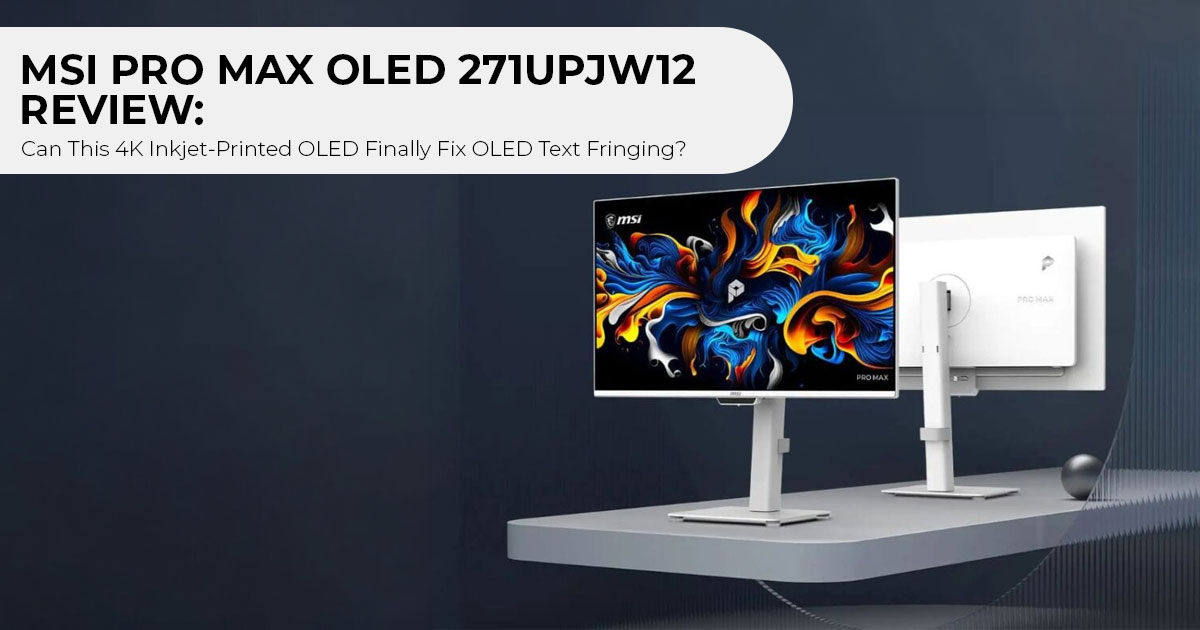
For years, OLED monitors have been easy to recommend for gaming and entertainment but much harder to recommend for everyday work. The picture quality is outstanding, with deep blacks, infinite contrast, and near-instant response times. Yet many people who spend their day coding, writing, editing documents, or working with spreadsheets have stayed away for one simple reason: text doesn’t always look as sharp as it should.
That problem, known as subpixel text fringing, has been one of the biggest drawbacks of modern QD-OLED and WOLED displays. If you’ve ever noticed colored edges around letters or slightly fuzzy-looking fonts on an OLED monitor, you’ve seen it firsthand. It’s a small detail that becomes impossible to ignore after hours of work.
Now, the display industry may finally have an answer.
At ChinaJoy 2026, MSI partnered with TCL CSOT to unveil the MSI PRO MAX OLED 271UPJW12, which MSI describes as the world’s first 27-inch 4K 120Hz inkjet-printed OLED monitor. Instead of relying on the unconventional pixel layouts used by current OLED panels, it adopts a standard vertical RGB stripe layout produced through precision inkjet printing. While this sounds like a technical change, it could have a much bigger impact: bringing the text clarity of traditional LCD monitors to the visual quality of OLED.
This launch reflects a broader trend in the display industry. OLED technology is no longer focused only on gamers and movie lovers. Manufacturers are now competing to win over software developers, content creators, graphic designers, photographers, video editors, students, business professionals, and anyone who spends long hours in front of a monitor. Clear text, accurate colors, and comfortable everyday usability are becoming just as important as high refresh rates and HDR performance.
As technology experts with over 20 years of experience in hardware and application research and development, we evaluate every product beyond its specifications. We focus on real-world performance, long-term reliability, repairability, and overall value for money. Whether you’re buying your first premium monitor or upgrading your professional workspace, our recommendations are based on extensive research, component analysis, hands-on usability, and industry expertise.
In this review, we’ll explain how inkjet-printed OLED technology works, why the RGB stripe layout could be a major breakthrough, how it compares with today’s QD-OLED and WOLED panels, and whether the MSI PRO MAX OLED 271UPJW12 is the 4K OLED monitor that professionals have been waiting for. If crisp text has been the only reason you’ve avoided OLED, this display deserves your attention.
Technical Specifications at a Glance
Here are the confirmed technical specifications for the MSI PRO MAX OLED 271UPJW12:
| Feature / Hardware Specification | Official Specification | What This Means for the Buyer |
| Model | MSI PRO MAX OLED 271UPJW12 | MSI’s premium display aimed at professional users and content creators |
| Panel Manufacturer | TCL CSOT IJP OLED | Built using 5.5-generation inkjet-printing technology |
| Screen Size & Resolution | 27-inch 4K UHD (3840 × 2160) | Provides a sharp workspace with ample room for multitasking |
| Pixel Density | 164 PPI | Produces sharp icons, user-interface elements, text, and detailed images |
| Refresh Rate | 120Hz | Enables smooth scrolling, responsive gaming, and fluid motion |
| Subpixel Layout | Standard vertical RGB stripe | Designed to minimize OLED text fringing on Windows and macOS |
| Color Gamut Coverage | 99% DCI-P3 | Supports wide-gamut photo, video, and digital-art workflows |
| Factory Color Accuracy | Delta E ≤ 2 factory calibration | Targets accurate colors out of the box without extensive manual tuning |
| HDR Certification | VESA DisplayHDR True Black 500 | Certifies deep black levels, with claimed peak HDR brightness of up to 1,000 nits |
| Burn-In Protection | MSI OLED Auto Care with Data Counting | Uses background compensation designed to reduce maintenance interruptions |
| Panel Surface Finish | 3H-hardness anti-glare coating | Designed to improve scratch resistance compared with older 2H coatings |
| Eye-Comfort Standards | Eyesafe 3.0 and TÜV Flicker-Free | Designed to reduce high-energy blue light and flicker during extended use |
| Productivity Features | Built-in KVM switch, PIP / PBP | Control two PCs with one keyboard and mouse setup. |
| Connectivity Ports | 2× HDMI 2.1, 1× DisplayPort 1.4a, USB-C | Connect modern graphics cards, consoles, and laptops easily. |
| Mac Integration | MSI M-Mate app support | Syncs color profiles seamlessly with a MacBook display. |
What Is Inkjet-Printed OLED (IJP OLED)?
To understand why this display matters, we need to look at how regular OLED panels are built.
Most QD-OLED monitors (from Samsung Display) and WOLED monitors (from LG Display) are built using a method called Vacuum Thermal Evaporation (VTE).
In that process, organic materials are heated inside a vacuum chamber until they turn into vapor. The vapor passes through a thin metal stencil called a Fine Metal Mask (FMM) to place color on the glass.
This older method has two major drawbacks:
- High Waste: More than half of the expensive organic material sticks to the metal stencil and the chamber walls instead of the screen.
- Mask Sagging: At high resolutions, the thin metal mask sags under its own To avoid defects, manufacturers had to arrange subpixels into triangles or add an extra white subpixel.
| Traditional Vacuum Thermal Evaporation (VTE) | TCL CSOT Inkjet Printing (IJP) |
| Vaporized OLED materials are deposited inside high-vacuum chambers. | Liquid OLED emitter inks are deposited directly using precision micro-printheads. |
| Requires Fine Metal Masks (FMM) to define pixel patterns. | Uses drop-on-demand nozzle printing, eliminating the need for FMM. |
| Can produce high material waste, potentially exceeding 50% during deposition. | Offers substantially higher material efficiency than conventional VTE. |
| FMM limitations can require nonstandard subpixel structures. | Can enable a native vertical RGB-stripe subpixel layout for potentially better image and text quality. |
| Requires costly equipment, tooling, and maintenance. | Could reduce long-term manufacturing costs, especially at high production volumes. |
Inkjet-Printed OLED (IJP OLED) changes that approach.
Instead of vaporizing chemicals, TCL CSOT dissolves the organic materials into liquid inks. Industrial printheads deposit exact droplets of red, green, and blue material directly into each subpixel slot.
There is no metal mask. There is very little wasted material compared with conventional VTE manufacturing. Most importantly, it allows the manufacturer to print a standard vertical RGB stripe OLED at high pixel densities.
TCL CSOT developed this process on its Gen 5.5 production line in Wuhan after acquiring key equipment and patents from pioneer JOLED. Now, MSI is among the first manufacturers to bring this inkjet-printed OLED panel technology to consumer desktop monitors.
Display Quality: Why the RGB Stripe Fixes Text Fringing
The headline feature of the MSI PRO MAX OLED 271UPJW12 is its subpixel arrangement.
Modern font-rendering systems, including Windows ClearType and macOS text rendering, are optimized for displays with a standard RGB stripe layout. Those LCDs use three vertical stripes placed side by side: Red, Green, and Blue.
When you view text on older OLEDs:
- Triangular QD-OLED panels place green on top and red/blue on the Your computer expects vertical lines, so you see green and magenta halos along the top and bottom of letters.
- WOLED panels add a white subpixel (WRGB / RWBG). That extra subpixel alters character spacing, making small fonts look soft or blurry.
| Feature | Triangular Subpixel (QD-OLED) | Vertical RGB Stripe (MSI Inkjet-Printed OLED) |
| Subpixel Layout | Triangular RGB arrangement | Standard vertical RGB-stripe arrangement |
| Font-Rendering Alignment | ❌ Does not fully align with assumptions used by Windows ClearType | ✅ Designed to align more closely with Windows ClearType |
| Text Clarity | ❌ Color fringing may appear around text edges | ✅ Expected to produce sharp text with minimal fringing |
| Font Appearance | ❌ Fonts may appear slightly soft or show colored halos | ✅ Potentially crisp typography with well-defined character edges |
| Coding & Daily Workflows | ⚠️ Fringing may be distracting during long coding or document sessions | ✅ Better suited to programming, spreadsheets, and document editing |
| Visual Experience | Excellent for gaming and media, with a potential compromise in text rendering | Designed to combine OLED image quality with LCD-like text sharpness |
| Closest Display Experience | Visibly different from traditional RGB-stripe LCD monitors | ✅ Potentially close to premium 4K IPS/LCD monitors, subject to independent testing |
Key Takeaway
| QD-OLED | MSI Inkjet-Printed OLED |
| ❌ Some subpixel layouts may produce color fringing around text | ✅ RGB-stripe layout is designed to deliver sharper text rendering |
| ❌ Fine font edges may appear softer or show colored halos | ✅ Potentially LCD-like font clarity, subject to independent testing |
| Best suited to gaming, HDR media, and wide-color content | Designed for a mix of desktop productivity, creative work, gaming, and entertainment |
By returning to a standard vertical RGB stripe, the MSI 27-inch 4K OLED renders letters cleanly.
When you combine that layout with 164 PPI pixel density (3840 × 2160 resolution on a 27-inch screen), text rendering is exceptionally sharp. You do not need third-party font scaling utilities or ClearType tuning workarounds. For comparison, many popular 27-inch 1440p monitors offer around 109 PPI. The higher 164 PPI of this 4K display produces finer text, sharper icons, and smoother UI elements.
For programmers reading lines of code, writers reviewing manuscripts, and data analysts working inside massive spreadsheets, this addresses one of the biggest usability complaints of today’s OLED monitors.
Color Precision and HDR Performance
While office users benefit from sharper text, creative professionals get reference-level color fidelity.
The MSI PRO MAX OLED 271UPJW12 covers 99% of the DCI-P3 color gamut and comes with a factory calibration rating of Delta E ≤ 2. This means colors shown on the screen match real-world broadcast and print standards accurately right out of the box.
For HDR workflows, the monitor carries the VESA DisplayHDR True Black 500 certification and reaches up to 1,000 nits peak HDR brightness.
Because each OLED pixel turns off completely, you get true infinite contrast without the backlight haloing or blooming common on Mini-LED monitors. Dark room video grading, game development, and photo editing all benefit directly from these per-pixel luminance controls.
COLOR & CONTRAST HIGHLIGHTS

✔ 99% DCI-P3 Color Space: Broad color palette for cinema, HDR mastering, and photo editing.

✔ Factory Delta E ≤ 2 Accuracy: Reliable out-of-the-box color consistency without hardware calibrators.

✔ DisplayHDR True Black 500: Certified deep 0.0005-nit black level reproduction.

✔ 1,000 Nits Peak Luminance: Dynamic specular HDR highlights for realistic lighting effects.
Burn-In Protection: Real-Time Data Counting Compensation
The fear of permanent screen burn-in is another common reason buyers avoid OLED monitors.
Static desktop elements like the Windows taskbar, browser tabs, and application toolbars keep specific pixels lit at identical brightness levels for hours.
Most existing OLED monitors handle this with scheduled maintenance pop-ups. Every 4 to 16 hours, the monitor stops what you are doing and demands a 5- to 10-minute “Pixel Cleaning” cycle.
MSI addresses this issue on the PRO MAX OLED 271UPJW12 with an upgraded MSI OLED Auto Care system:
- Real-Time Data Counting Compensation: The monitor tracks the usage time and electrical load of individual subpixels continuously in the For example, instead of waiting until wear becomes noticeable, the monitor continuously estimates how much each pixel has been used and applies tiny brightness adjustments to keep the panel wearing evenly over time.
- Designed to Minimize Interruptions: Instead of relying on scheduled maintenance cycles, the monitor continuously adjusts pixel behavior in the background.
- 3H Anti-Glare Surface Coating: The panel features a durable 3H hardness anti-glare finish, offering
2.5 times the scratch resistance of conventional 2H coatings.
This real-time system protects the panel without interrupting your daily work.
Productivity Features and Connectivity
MSI built the PRO MAX OLED 271UPJW12 as a dedicated workstation hub. It includes several hardware features designed for multi-computer setups:
DESKTOP WORKFLOW INTEGRATION ARCHITECTURE

WORKSTATION CONNECTIVITY & DUAL-PC WORKFLOW

[ Desktop Workstation ] (via DisplayPort 1.4a / HDMI 2.1)

│

▼

[ INTEGRATED KVM SWITCH ] ──► [ MSI PRO MAX OLED 271UPJW12 ] (PIP / PBP Modes)

▲

│

[ MacBook Pro / Laptop ] (via USB-C DP Alt Mode + MSI M-Mate Color Sync)
1. Integrated KVM Switch and PIP / PBP
With the built-in KVM switch, you can plug your keyboard and mouse directly into the monitor. You can switch between your gaming desktop and your work laptop with a single button press. Picture-in-Picture (PIP) and Picture-by-Picture (PBP) let you view both systems on the 27-inch 4K screen simultaneously.
2. Mac Integration with MSI M-Mate
If you connect a MacBook, MSI’s M-Mate companion software automatically synchronizes display color profiles. This keeps colors consistent between your MacBook screen and the external monitor without requiring manual gamma adjustments.
3. Port Selection
The monitor includes:
- 2× HDMI 1 ports (supporting 4K at 120Hz for PCs and gaming consoles).
- 1× DisplayPort 4a port.
- USB-C with Power Delivery and DisplayPort Alternate Mode.
- A multi-port USB Type-A hub for desktop
(Note: While some high-wattage laptops require 90W+ chargers, the primary USB-C port is optimized for video transmission and standard peripheral power).
Gaming Performance: Is 120Hz Enough for a 4K OLED?
While marketed primarily for professionals, the MSI PRO MAX OLED 271UPJW12 is fully capable of high-end gaming.
The monitor runs at a native 120Hz refresh rate and supports AMD FreeSync Premium Pro and NVIDIA G-SYNC compatibility.
| Feature | Traditional 144Hz IPS LCD | 120Hz Inkjet-Printed OLED (MSI PRO MAX OLED 271UPJW12) |
| Pixel Response Time | 1ms–4ms gray-to-gray (GtG) transition | Approximately 0.03ms near-instant pixel response |
| Motion Blur | ❌ Visible motion blur may appear during fast movement | ✅ Minimal visible motion blur |
| Ghosting / Overshoot | ❌ May show ghosting or inverse ghosting depending on the overdrive setting | ✅ Minimal ghosting with no overdrive overshoot |
| Overdrive Requirement | ⚠️ May require overdrive tuning for the best results | ✅ No overdrive tuning required |
| Motion Clarity | Good, but dependent on panel tuning | ✅ Exceptionally clear motion across frames |
| Best For | General gaming and professional work | Content creation, smooth desktop use, and gaming where 120Hz is sufficient |
Key Takeaway
| Traditional 144Hz IPS LCD | 120Hz MSI Inkjet-Printed OLED |
| ❌ Motion blur can appear during fast-moving scenes | ✅ Clearer motion with minimal visible blur |
| ❌ Performance depends on overdrive settings | ✅ Consistent pixel response without overdrive tuning |
| Good overall gaming experience | OLED-level motion clarity even at 120Hz |
Why it matters: A 120Hz OLED can often look clearer in motion than a faster-refresh LCD because its 0.03ms pixel response time is dramatically quicker than the 1–4ms transitions of most IPS panels.
The result is sharper moving objects, cleaner text while scrolling, and smoother gameplay with virtually no ghosting.
Because OLED pixels transition almost instantly, a 120Hz OLED can appear clearer in motion than many faster IPS monitors. While refresh rate still determines how many frames are displayed each second, OLED’s rapid pixel response greatly reduces motion blur and ghosting.
For 4K gaming, 120Hz hits the practical performance ceiling of modern graphics cards like the RTX 4080, RTX 4090, and upcoming next-generation GPUs. It also pairs directly with the 4K 120Hz output modes on the PlayStation 5 and Xbox Series X.
For example, even today’s fastest graphics cards struggle to maintain well above 120 FPS in many modern AAA games at native 4K with maximum graphics settings, making 120Hz a practical target for most players.
Display Architecture Comparison
How does the MSI inkjet-printed OLED monitor compare against other high-end panel technologies currently on the market?
| Feature / Metric | IJP OLED (MSI / CSOT) | QD-OLED (Samsung G3) | WOLED (LG Display) | Mini-LED IPS |
| Subpixel Layout | Standard vertical RGB stripe | Triangular / V-stripe | RWBG / WRGB four-subpixel layout | Standard vertical RGB stripe |
| Text Legibility | Minimal fringing* | Good, with minor halos | Fair to average | Excellent |
| Contrast Ratio | Effectively infinite (0.0005 nits) | Effectively infinite (0.0005 nits) | Effectively infinite (0.0005 nits) | Up to ~1,000,000:1, with possible blooming |
| Color Gamut | 99% DCI-P3 | 99.3% DCI-P3 | 98.5% DCI-P3 | 95%–98% DCI-P3 |
| Peak HDR Brightness | 1,000 nits | 1,000–1,300 nits | 1,300–1,500 nits | 1,400–2,000+ nits |
| Burn-In Protection | Real-time data counting | Scheduled panel cleaning | Scheduled panel cleaning | No OLED burn-in risk due to inorganic backlighting |
| Daylight Glare | Low with True Black filter | Slightly raised blacks with a magenta tint | Low with True Black treatment | Low to moderate |
| Best Use Case | Mixed productivity, coding, and video work | High-end HDR gaming | Esports and dark-room use | Bright offices and static productivity workloads |
*Minimal Fringing: Although the RGB stripe layout greatly improves text rendering, factors such as operating system font rendering, display scaling, and application behavior can still influence how sharp text appears.
Pros and Cons: A Balanced Assessment
Based on our analysis of the technical specifications, panel physics, and feature set, here are the core advantages and potential limitations of the MSI PRO MAX OLED 271UPJW12:
Strengths
- Clear Text Rendering: The native vertical RGB stripe eliminates color fringing on fine lines and small
- High Pixel Density: 4K resolution on a 27-inch diagonal yields 164 PPI, delivering crisp
- Uninterrupted Burn-In Protection: Data Counting Compensation works silently in the background without intrusive pop-up breaks.
- Color Accuracy: Factory calibrated Delta E ≤ 2 with 99% DCI-P3 coverage supports professional visual
- Durable Screen Coating: 3H hardness anti-glare finish resists scratches better than standard OLED monitor coatings.
- Productivity Hub: Features a built-in KVM switch, PIP/PBP modes, and Mac color-matching
Considerations & Potential Drawbacks
- 120Hz Ceiling: While fast enough for 4K content creation workflows and cinematic gaming, competitive esports players may prefer 240Hz or 360Hz 1440p panels.
- Peak Brightness Window: While peak HDR reaches 1,000 nits in small highlights, sustained full-screen white brightness will naturally be lower due to OLED power management.
- First-Generation Desktop Deployment: As the first consumer desktop monitor using TCL CSOT’s IJP line, broad retail volume and regional availability are still ramping up.
Who Should Buy This Monitor?
| ✅ Buy This Monitor If… | ❌ Consider Alternatives If… |
| You spend hours coding, writing, or working with spreadsheets and documents. | You mainly play competitive esports and want a 240Hz or higher refresh rate. |
| You want OLED-level contrast and deep blacks without sacrificing text clarity. | You work in bright, sunlit environments, where a Mini-LED display may provide higher sustained brightness. |
| You edit color-critical photos, videos, or digital artwork and require accurate colors. | Your budget is under $400, where quality IPS monitors may offer better value. |
| You prefer a monitor with fewer interruptions and reduced reliance on frequent pixel-cleaning cycles. | You do not need OLED image quality and primarily use your monitor for basic office tasks. |
| You want a future-ready 4K content-creation monitor that combines sharp text with premium OLED visuals. | You prioritize the highest possible refresh rate over image quality and everyday productivity. |
Who Is This Monitor Best For?
| User Type | Recommendation |
| Software Developers & Programmers | ★★★★★ Excellent |
| Writers & Office Professionals | ★★★★★ Excellent |
| Photo & Video Editors | ★★★★★ Excellent |
| Graphic Designers | ★★★★★ Excellent |
| General Productivity Users | ★★★★★ Excellent |
| Single-Player Gamers | ★★★★☆ Very Good |
| Competitive Esports Players | ★★★☆☆ Consider a 240Hz–360Hz monitor instead |
| Budget Buyers | ★★☆☆☆ Better-value IPS alternatives are available |
Bottom line: The MSI PRO MAX OLED 271UPJW12 is built for users who value sharp text, OLED picture quality, and professional productivity. If your work revolves around reading, writing, coding, designing, or editing, it offers a compelling balance that current OLED monitors have struggled to achieve. If your priority is competitive esports or the lowest possible price, there are better alternatives.
1. Software Developers and Content Writers
If you spend hours looking at terminal windows, IDEs, or Word documents, older OLEDs were hard to recommend due to text fringing. The MSI PRO MAX OLED 271UPJW12 is designed to significantly reduce the text fringing issue by using a standard RGB stripe subpixel structure.
2. Creative Professionals and Colorists
Video editors and graphic designers get 99% DCI-P3 wide color gamut coverage, factory Delta E ≤ 2 precision, and VESA DisplayHDR True Black 500 contrast. The MSI M-Mate app ensures consistent color synchronization for MacBook workflows.
3. Hybrid Gamers and Professionals
If you use one monitor for daytime remote work and evening 4K PC or console gaming, this display offers an ideal balance: sharp text during the day, and instantaneous 0.03ms pixel response times with deep HDR contrast at night.
Expected Pricing and Availability Outlook
MSI showcased the PRO MAX OLED 271UPJW12 at ChinaJoy 2026, with commercial panel shipments from TCL CSOT scheduled across late 2026.
While official retail pricing has not been finalized by regional distributors, industry supply chain analyses from TrendForce indicate that inkjet-printed OLED panels will carry distinct cost advantages over traditional vacuum-evaporated OLEDs as production lines scale.
Because the IJP process eliminates expensive fine metal masks and reduces material waste by more than 50%, this manufacturing method is engineered to make high-resolution OLED monitors more price-accessible over time.
Final Verdict
The MSI PRO MAX OLED 271UPJW12 is an important technological milestone for desktop displays.
By uniting TCL CSOT’s 4K 120Hz inkjet-printed OLED panel with a standard vertical RGB stripe subpixel structure, MSI aims to address one of the biggest weaknesses of current consumer OLED monitors: text rendering quality.
Add in real-time background burn-in compensation, factory calibrated Delta E ≤ 2 color accuracy, and a built-in KVM workstation hub, and this monitor stands as one of the most well-rounded displays announced this year for hybrid productivity, content creation, and 4K entertainment.
If you have held off on buying an OLED monitor because of fuzzy text or intrusive maintenance cycles, the MSI PRO MAX OLED 271UPJW12 is well worth tracking.
Where to Check Price & Availability
As regional stock and launch dates roll out across retailers, you can check real-time pricing, promotional offers, and customer availability through the official retail links below:
RETAIL PRICING & AVAILABILITY TRACKER

UNITED STATES & INTERNATIONAL BUYERS
Check live prices, customer reviews, and shipping details on Amazon Worldwide:

👉 View MSI PRO MAX OLED 271UPJW12 on Amazon Worldwide
What Do You Think?
Would you buy the MSI PRO MAX OLED 271UPJW12, or are you waiting to see how inkjet-printed OLED performs in real-world reviews? We’d love to hear your thoughts.
Share your opinion in the comments below. If you have any questions about this monitor, OLED technology, 4K displays, or need help choosing the right monitor for your budget and workflow, feel free to ask—we’re happy to help.
If you found this review useful, follow us for more in-depth hardware reviews, buying guides, comparisons, and the latest tech news. We test the details that matter so you can make smarter buying decisions with confidence.
***Disclaimer***
This blog post reflects our research, analysis, and opinions based on available product information, user feedback, and industry knowledge. It should not be taken as the official position of any brand, manufacturer, or company mentioned here. We make every effort to keep this guide accurate, but product specifications, pricing, and availability may change after publication. We recommend double-checking important details before making a purchase.
Some links in this article may be affiliate links. If you choose to buy through these links, we may earn a small commission at no extra cost to you. This helps support our work and allows us to keep publishing in-depth, unbiased reviews. Affiliate partnerships never influence our recommendations.
Opinions expressed by readers are their own and do not necessarily reflect ours. We are not responsible for outcomes resulting from the use of information on this site. Please seek professional advice where appropriate.
All product names, logos, and brands mentioned are the property of their respective owners. These names are used for identification and informational purposes only and do not imply endorsement.
