
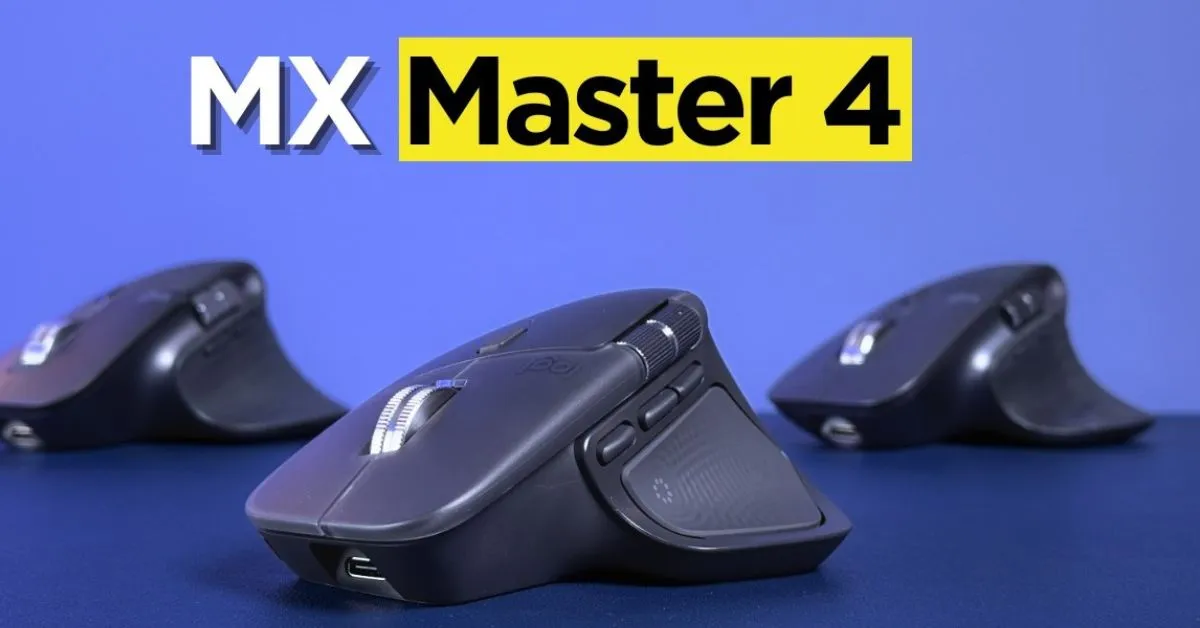
Modern work environments demand tools that adapt quickly, perform reliably, and enhance productivity across multiple devices. As remote work, hybrid offices, and multi-screen setups become common, choosing the right input device is no longer a minor decision. This detailed review explores whether Logitech MX Master 4 truly sets a new benchmark for professionals seeking efficiency, comfort, and intelligent control.
Rather than focusing only on specifications, this article evaluates real-world usability, ergonomics, and long-term value. It also examines how this Wireless mouse fits into evolving workflows and whether it justifies the expectations set by earlier models in the Logitech MX series.
Evolution of Productivity Mice
Productivity mice have evolved from basic pointing devices into advanced tools designed for multitasking, creative work, and extended daily use. Today’s users expect precision tracking, customizable controls, and seamless switching between devices.
The Logitech MX series has consistently focused on this professional segment, offering ergonomic designs and software-driven customization. The Logitech MX Master 4 continues this legacy with refinements aimed at speed, accuracy, and cross-device productivity.
Design Philosophy and Ergonomics
Comfort plays a major role in long work sessions. Poor ergonomics can lead to wrist strain, fatigue, and reduced efficiency. This mouse is shaped to support the natural resting position of the hand, making it suitable for long hours of use.
The sculpted body supports the palm, while textured side grips improve control. Button placement feels intuitive, reducing the learning curve for first-time users. Compared to flat designs like the apple magic mouse, this ergonomic structure prioritizes comfort over minimalism.
Key ergonomic highlights:
- Natural hand curvature support
- Thumb rest for stability
- Balanced weight distribution
- Suitable for right-handed users
These elements make the mouse especially appealing to professionals who spend most of their day navigating complex interfaces.
Build Quality and Materials
Build quality directly affects durability and long-term reliability. The surface feels premium with a matte finish that resists fingerprints and sweat. Buttons provide tactile feedback without feeling stiff, contributing to a refined user experience.
Scroll wheels, often overlooked, are one of the strongest aspects of this device. The smart scroll mechanism switches between free-spin and precision modes automatically, improving navigation through long documents and spreadsheets.
Performance and Tracking Accuracy
Precision is critical for designers, developers, and analysts. The sensor delivers consistent tracking across various surfaces, including desks without mouse pads. This flexibility enhances mobility and convenience.
As a Wireless mouse, it maintains stable connectivity without noticeable lag. Cursor movement remains smooth even during rapid multitasking or graphic-intensive workflows.
Multi-Device Connectivity Experience
One of the standout features is the ability to connect with multiple devices simultaneously. Users can switch between systems instantly, making it ideal for those working across laptops, desktops, and tablets.
This feature supports seamless workflows, especially for professionals who frequently move between operating systems or devices.
Benefits of multi-device support:
- Faster task switching
- Reduced desk clutter
- Improved productivity
- Ideal for hybrid work setups
This functionality is where the Logitech MX Master 4 truly differentiates itself from standard input devices.
Customization and Software Integration
Customization transforms a mouse from a generic tool into a personalized productivity assistant. Through companion software, users can assign specific actions to buttons, adjust sensitivity, and create app-specific profiles.
These options allow tailored workflows for creative tools, spreadsheets, and coding environments. Compared to earlier models like logitech mx master 3s, customization feels more refined and responsive.
Feature Comparison Overview
| Feature Area | User Benefit |
| Ergonomic design | Reduced wrist strain |
| Smart scroll wheel | Faster document navigation |
| Multi-device pairing | Seamless workflow |
| Custom buttons | Personalized productivity |
| Advanced sensor | Accurate tracking |
This table highlights why productivity-focused users gravitate toward advanced mice rather than basic models.
Battery Life and Charging
Battery performance is a crucial factor for wireless peripherals. Long-lasting battery life reduces interruptions and enhances reliability. The mouse supports fast charging, allowing hours of use from a short charge.
This reliability makes it suitable for professionals who cannot afford downtime during work sessions.
Real-World Productivity Use Cases
In real-world scenarios, the mouse excels in environments that require precision and speed. Tasks like video editing, coding, data analysis, and content creation benefit from programmable controls and smooth scrolling.
Where It Delivers the Most Value
- Video Editing & Content Creation: Smooth scrolling helps manage long timelines and large media files easily.
- Coding & Development: Programmable buttons reduce repetitive actions and speed up navigation.
- Data Analysis: Precise cursor control improves accuracy while working with complex datasets.
- Multitasking Workflows: Quick switching and fluid movement support faster task handling.
Comparison With Other Popular Mice
Comparing productivity mice helps clarify value. Minimalist options like the apple magic mouse prioritize aesthetics but sacrifice ergonomics and customization. In contrast, productivity-focused designs emphasize comfort and control.
Older models such as logitech mx master 3s remain capable, but newer iterations introduce subtle improvements in performance, battery efficiency, and connectivity.
Productivity Mouse Comparison
| Mouse Type | Best For | Limitation |
| Ergonomic productivity mouse | Long work sessions | Higher price |
| Flat minimalist mouse | Casual use | Poor ergonomics |
| Basic wireless mouse | Simple tasks | Limited features |
This comparison shows why advanced users often choose premium productivity mice despite higher costs.
Software Learning Curve
While customization is powerful, it may feel overwhelming for beginners. However, once configured, daily use becomes intuitive. Most users adapt quickly, especially those familiar with productivity tools.
The software enhances the overall value by allowing fine-grained control over workflows.
Long-Term Reliability and Maintenance
Durability matters for professionals investing in premium tools. The build quality suggests long-term reliability, with buttons rated for extensive use cycles.
Regular firmware updates ensure compatibility with modern systems, protecting the investment over time.
Who Should Consider This Mouse?
This mouse is ideal for:
- Professionals working long hours
- Users managing multiple devices
- Creatives requiring precision
- Developers and analysts
Casual users may not fully utilize its advanced features, making simpler alternatives more suitable for basic needs.
Overall Value Proposition
The Logitech MX Master positions itself as a productivity investment rather than a casual accessory. Its combination of comfort, precision, and multi-device support addresses real professional needs.
For users who prioritize efficiency and ergonomic health, the value extends beyond initial cost.
Conclusion
The Logitech MX Master 4 represents a mature evolution in productivity-focused peripherals. By combining ergonomic comfort, intelligent customization, and reliable multi-device connectivity, it addresses the real needs of modern professionals.
Rather than focusing on flashy features, it delivers consistent performance where it matters most. For users seeking long-term productivity gains and comfort, this mouse stands out as a practical and forward-looking choice in today’s demanding work environments.
FAQs
1. Is Logitech MX Master 4 good for productivity work?
Yes, it is designed for professionals who require precision, customization, and multi-device support.
2. How does it compare to logitech mx master 3s?
It offers refined performance, better battery optimization, and smoother connectivity.
3. Is this Wireless mouse suitable for long hours?
Yes, its ergonomic design reduces strain during extended use.
4. Can it replace the apple magic mouse?
For productivity-focused users, it offers better comfort and customization.
5. Does it support the Logitech MX series software features?
Yes, it integrates fully with advanced customization tools.
6. Is it worth upgrading from an older productivity mouse?
For multi-device users and professionals, the upgrade can significantly improve workflow efficiency.
***Disclaimer***
This blog post contains unique insights and personal opinions. As such, it should not be interpreted as the official stance of any companies, manufacturers, or other entities we mention or with whom we are affiliated. While we strive for accuracy, information is subject to change. Always verify details independently before making decisions based on our content.
Comments reflect the opinions of their respective authors and not those of our team. We are not liable for any consequences resulting from the use of the information provided. Please seek professional advice where necessary.
Note: All product names, logos, and brands mentioned are the property of their respective owners. Any company, product, or service names used in our articles are for identification and educational purposes only. The use of these names, logos, and brands does not imply endorsement or affiliation.
