
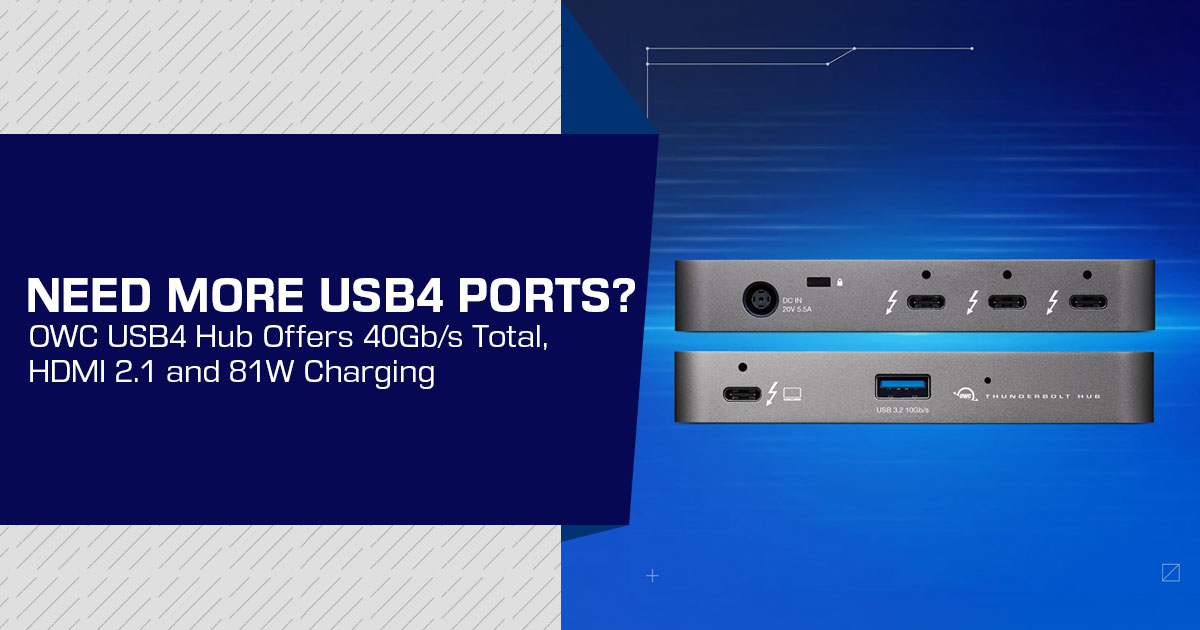
The OWC USB4 Hub is a six-port USB4 hub for laptop users who need more high-speed connections at their desk. It has two downstream USB4 ports, two USB-C ports, HDMI 2.1, and up to 81W of laptop charging through a single host connection.
Priced at $129.99, the OWC USB4 Hub is aimed at professionals, developers, content creators, photographers, and power users who rely on fast external storage, USB-C accessories, and high-resolution displays. OWC says the hub is expected to become generally available toward the end of October 2026, with pre-orders listed on its product page.
This is not a full desktop dock. The published specifications do not include USB-A, Ethernet, or an SD card reader. Instead, the hub focuses on USB4 connectivity, HDMI 2.1, fast storage, and a compact desk setup.
Click here to buy from Amazon
With over 20 years of experience in hardware and application research and development, we examine products using available performance data, real-world usability, durability, and value for money. For the OWC USB4 Hub, that means looking at its ports, charging capability, compatibility, everyday usability, and whether its $129.99 price makes sense for the people who need this type of connectivity.
Our recommendations are based on extensive research, component analysis, real-world usability, and industry expertise. We look at what the product offers, what it lacks, and who it is built for.
OWC USB4 Hub specifications at a glance
| Feature | Verified Specification | Buyer Relevance |
|---|---|---|
| Product Name | OWC USB4 Hub | This is the manufacturer’s published product name. |
| Port Count | Six ports | The advertised total includes the host connection used to connect the hub to a computer. |
| Host Connection | One USB4 host port | Connects the laptop to the hub while carrying data, display signals, and charging power. |
| Downstream USB4 | Two USB4 ports | Designed for compatible high-speed storage, displays, adapters, and other USB4 accessories. |
| USB4 Bandwidth | Up to 40Gb/s total across the two downstream ports; up to 20Gb/s per port | The advertised 40Gb/s bandwidth is shared rather than being available independently to each downstream port. |
| Additional Data Ports | Two USB-C ports rated for up to 10Gb/s | Suitable for peripherals, adapters, and storage devices that do not require USB4-level bandwidth. |
| Display Output | HDMI 2.1 | Supports the listed maximum display modes when the host computer, cable, and monitor are also compatible. |
| Maximum Display Modes | Up to 4K at 120Hz, 4K at 240Hz with DSC, or 8K at 60Hz | These are maximum published capabilities and are not guaranteed across every laptop, GPU, operating system, or display configuration. |
| Multiple Displays | OWC’s support documentation states that two external displays can be connected using HDMI 2.1 and a USB4 port, subject to host and display limitations. | Actual dual-display resolution and refresh-rate combinations depend on the host’s display capabilities and the available display path. |
| Laptop Charging | Up to 81W | Enough for many USB-C laptops, although high-performance notebooks may require more power during demanding workloads. |
| Power Supply | 100W external power supply | Available power is dynamically allocated between the connected laptop and peripherals attached to the hub. |
| Compatibility | Thunderbolt 3, Thunderbolt 4, Thunderbolt 5, USB4, and USB-C; supports Mac, Windows, Linux, ChromeOS, and compatible iPad Pro hosts | Broad compatibility does not mean every platform will provide identical display, bandwidth, or charging performance. |
| Cooling | Fanless aluminum enclosure | Passive cooling eliminates fan noise and removes the need for an internal cooling fan. |
| Listed Launch Price | $129.99 USD | This is the published US price and should not be treated as confirmed pricing for every international market. |
What is the OWC USB4 Hub for?
The OWC USB4 Hub is intended to expand a laptop’s desk connectivity through one host cable. That cable connects the computer to external drives, accessories, a display, and power while the hub remains connected to the workspace.
This arrangement may suit people who move between a portable and fixed setup. It can reduce the number of cables connected directly to the laptop each time the computer is placed on the desk.
The product is relevant to searches such as USB4 hub for MacBook, USB4 hub for Windows laptop, and USB4 hub for content creators. It is also listed as compatible with Linux and ChromeOS, and with supported iPad Pro devices. The host computer still determines many display and performance limits.
Port layout and USB4 bandwidth
The six-port layout consists of:
- One USB4 host port
- Two downstream USB4 ports
- Two USB-C ports rated for up to 10Gb/s
- One HDMI 1 output
The two downstream USB4 ports are the principal reason to consider this product over a basic USB-C port expansion accessory. They can connect compatible USB4 or Thunderbolt storage, card readers, and other high-bandwidth devices.
A video editor, photographer, or other content creator could connect a separate card reader and an external SSD at the same time. The hub does not contain a built-in card reader, so camera-card workflows still require a separate reader.
How much bandwidth does each USB4 port provide?
The hub provides up to 40Gb/s of total bandwidth across its two downstream USB4 ports. OWC specifies up to 20Gb/s per downstream port, not 40Gb/s to each port.
The hub can support two fast devices, but the 40Gb/s figure is shared across the two downstream ports. For maximum performance from one USB4 storage device, OWC recommends a direct host connection.
Actual transfer rates also depend on the storage devices, cables, file sizes, controller behavior, and other traffic passing through the hub.
HDMI 2.1 display support
The built-in HDMI 2.1 output allows a compatible monitor to connect directly without a separate USB-C-to-HDMI adapter.
OWC publishes support for:
- 4K at 120Hz
- 4K at 240Hz with Display Stream Compression (DSC)
- 8K at 60Hz
Display Stream Compression is a method that reduces the data required for certain high-resolution, high-refresh display modes. The computer, monitor, cable, and connection path must support the selected mode.
The display figures are maximum published capabilities. OWC’s support manual also lists two-display use through HDMI 2.1 and a USB4 port, but the laptop still determines what display modes are available.
For buyers searching for a USB4 hub with HDMI 2.1, the direct output is useful. Buyers looking for a dual-display USB4 hub should check the specific laptop model before assuming that two screens will run at a particular resolution or refresh rate.
Click here to buy from Amazon
Is 81W laptop charging enough?
The included 100W power supply can provide up to 81W of host charging through the USB4 connection. The hub allocates power between the laptop and attached devices.
For many office laptops, ultraportables, and general-purpose notebooks, 81W may be sufficient for normal charging. A high-performance laptop can require more power during sustained CPU or GPU workloads. In that situation, charging may be slower or the battery may not increase while the computer is under heavy load.
The relevant buying question is whether the laptop’s normal charging requirement is within the hub’s 81W host-charging limit. The figure should not be interpreted as a replacement for every laptop’s original high-wattage power adapter.
Fanless aluminum construction
The hub uses a fanless aluminum enclosure with ventilated sides and raised feet, according to the published product information. A fanless design avoids the mechanical noise of a small internal fan, which may matter in an office, recording space, or editing room.
The available sources confirm the enclosure design but do not provide independent long-duration thermal testing. Sustained transfers, several active devices, and a warm environment can still affect operating temperatures and performance.
That makes “fanless USB4 hub” and “quiet USB4 hub” reasonable descriptive terms. Stronger claims about guaranteed throttle-free operation would not be supported by the available evidence.
What ports are missing?
The published specification does not list these integrated connections:
- USB-A
- Ethernet
- SD or microSD card reader
- Dedicated DisplayPort output
- Audio output
This matters for buyers searching for a USB4 hub with Ethernet, a USB4 hub with USB-A, or a USB4 hub with SD card reader. Those users would need additional adapters or a different type of dock.
The limited port mix is less important for a desk that already uses USB-C accessories and wireless networking. It is more significant for photographers, video editors, and office users who regularly connect legacy peripherals, wired networks, and memory cards.
OWC USB4 Hub versus a full docking station
A full docking station generally offers a wider range of connectors, while a hub concentrates on a smaller set of expansion functions. The distinction is practical rather than absolute, but it helps define the product’s target buyer.
| Buying Requirement | OWC USB4 Hub | What to Check in a Full Docking Station |
|---|---|---|
| Small Desk Footprint | Designed as a compact hub for space-conscious desk setups. | Check both the dock dimensions and the size of its external power adapter. |
| USB4 Storage | Two downstream USB4 ports, rated at up to 20Gb/s per port. | Check the number, type, and maximum bandwidth of downstream USB-C and USB4 ports. |
| HDMI Display | Includes one HDMI 2.1 output. | Compare available HDMI, DisplayPort, and USB-C video outputs and their supported resolutions and refresh rates. |
| Laptop Charging | Provides up to 81W of host charging. | Confirm the dock’s maximum host-charging wattage and how power is allocated when multiple devices are connected. |
| USB-A Devices | No USB-A ports are listed. | Check the number of USB-A ports and their supported USB data speeds. |
| Wired Networking | Ethernet is not listed. | Look for Gigabit, 2.5GbE, or faster Ethernet depending on your networking requirements. |
| Camera & Memory Card Workflow | No built-in SD or microSD card reader is listed. | Check for integrated SD and microSD slots, including their supported UHS speed class. |
| Port Variety | Uses a focused port selection centered on USB4, HDMI, and host connectivity. | Full docking stations typically provide a broader port selection, although the exact configuration varies by model. |
| Price | US$129.99 listed launch price. | Verify the exact model, included accessories, configuration, and current regional price before purchasing. |
The OWC product is a better match when the main requirements are USB4 storage, HDMI output, laptop charging, and a smaller accessory. A broader dock may reduce the number of extra adapters for a desk that needs Ethernet, USB-A, and memory-card access.
OWC USB4 Hub compatibility with Thunderbolt and USB-C
The product page lists compatibility with Thunderbolt 3, Thunderbolt 4, Thunderbolt 5, USB4, and USB-C devices. It also lists Mac, Windows, Linux, ChromeOS, and supported iPad Pro hosts.
Compatibility should not be confused with identical performance. A USB-C connector can support different standards and features depending on the computer and accessory. Display output, charging, and transfer rates can therefore vary between systems.
Before purchasing, verify that the laptop has a compatible USB4 or Thunderbolt connection and that its operating system and graphics hardware support the intended monitor configuration.
Click here to buy from Amazon
Who is the OWC USB4 Hub suitable for?
The product is worth comparing for:
- Laptop users who want a compact one-cable desk setup
- People who use USB4 or Thunderbolt external SSDs
- Editors and content creators who need two high-speed accessories connected at once
- Users who want direct HDMI 1 output
- People who prefer a fanless enclosure for a quiet workspace
- Mac, Windows, Linux, ChromeOS, and supported iPad Pro users who have checked host limitations
Who should consider a different product?
A broader docking station may be more suitable when the setup requires:
- Several USB-A peripherals
- Wired Ethernet
- Built-in SD or microSD access
- More display outputs than the host and hub combination can provide
- A single accessory that replaces most desktop ports
- More than 81W of laptop charging during sustained heavy workloads
The hub’s main benefits depend on a host with USB4 or Thunderbolt. An ordinary USB-C host may not support the same display, data, or charging features.
Frequently asked questions
Does the OWC USB4 Hub support 8K?
Yes. OWC lists HDMI output of up to 8K at 60Hz, subject to the capabilities of the host computer, monitor, cable, and selected display configuration.
Does it support 4K at 240Hz?
OWC lists up to 4K at 240Hz with Display Stream Compression. The host computer and monitor must support the required display mode.
Does each downstream USB4 port deliver 40Gb/s?
No. The hub provides up to 40Gb/s of total bandwidth across its two downstream USB4 ports, with up to 20Gb/s available per port.
Can it charge a laptop while a display and storage are connected?
The included 100W power supply can provide up to 81W to the host, while the hub allocates available power between the laptop and attached devices.
Does the OWC USB4 Hub include Ethernet or USB-A?
No. Ethernet and USB-A are not listed in the published port configuration. A built-in SD card reader is also not listed.
Is it compatible with Mac and Windows?
The product page lists compatibility with Mac, Windows, Linux, ChromeOS, and supported iPad Pro systems. The laptop’s own USB4, Thunderbolt, graphics, and display limits still apply.
Is it a full docking station?
It is a compact powered hub with display output and host charging. Its port selection is narrower than a full docking station that includes networking, USB-A, and memory-card connections.
OWC USB4 Hub price and availability
OWC’s launch material lists the product at $129.99 USD in the United States and says general availability is expected toward the end of October 2026. The OWC product page provides pre-order information. These are launch and listed-availability details, not a guaranteed current price or delivery date.
OWC has also announced separate 3-meter and 5-meter 40Gb/s active optical USB4 cables. Those accessories have their own prices and availability dates and are not part of the hub’s listed price.
Check the latest Amazon US price
If the main requirements are HDMI 2.1, two downstream USB4 ports, and up to 81W of host charging, compare the current Amazon US price with the published US launch price. Check the seller, delivery date, warranty terms, and exact product configuration before ordering.
Check the latest OWC USB4 Hub offers on Amazon US
Check Amazon India availability
The published $129.99 USD figure should not be treated as an Amazon India price. Buyers in India should check the current INR listing, import or delivery costs, warranty coverage, seller information, and included power cable before purchasing.
Check the latest OWC USB4 Hub offers on Amazon India
Final verdict: is the OWC USB4 Hub worth buying?
The OWC USB4 Hub is a focused option for a laptop-based desk that needs USB4 storage, direct HDMI 2.1 output, and laptop charging in a compact enclosure. Its published specifications do not make it a replacement for every full-size dock because the port list omits USB-A, Ethernet, and a built-in card reader.
The 40Gb/s figure also needs careful interpretation. It is the total bandwidth across the two downstream USB4 ports, with up to 20Gb/s per port. Buyers who need the highest possible speed from one USB4 SSD should consider a direct connection to the laptop.
At the published launch price of $129.99 USD, the product is most relevant to users whose existing accessories rely on USB-C, USB4, or Thunderbolt. Buyers who need networking, legacy USB-A devices, or memory-card access should compare the cost of additional adapters with a broader docking station.
Have a question about the OWC USB4 Hub or want us to look at something we missed? Leave a comment below. Follow us for more practical hardware reviews and buying guides, and let us know what you want us to cover next.
Disclaimer

This blog post reflects our research, analysis, and opinions based on available product information, user feedback, and industry knowledge. It should not be taken as the official position of any brand, manufacturer, or company mentioned here. We make every effort to keep this guide accurate, but product specifications, pricing, and availability may change after publication. We recommend double-checking important details before making a purchase.

Some links in this article may be affiliate links. If you choose to buy through these links, we may earn a small commission at no extra cost to you. This helps support our work and allows us to keep publishing in-depth, unbiased reviews. Affiliate partnerships never influence our recommendations.

Opinions expressed by readers are their own and do not necessarily reflect ours. We are not responsible for outcomes resulting from the use of information on this site. Please seek professional advice where appropriate.

All product names, logos, and brands mentioned are the property of their respective owners. These names are used for identification and informational purposes only and do not imply endorsement.
