
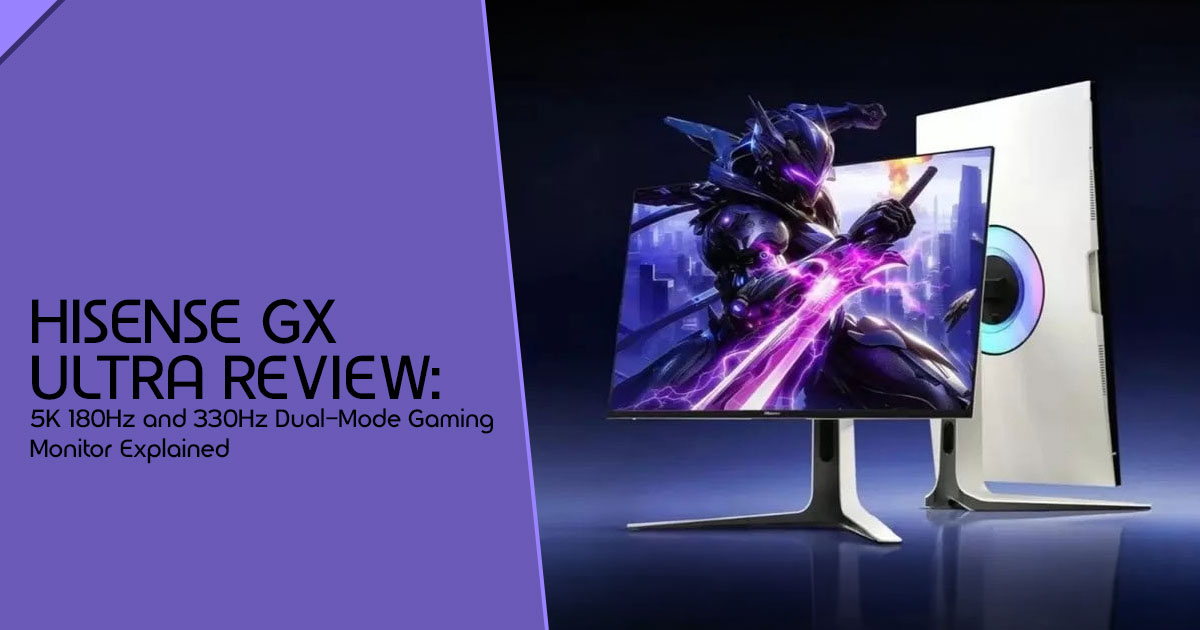
1. Introduction: Why This Monitor Is Getting Attention
The average PC gamer now spends several hours each week switching between work, entertainment, and gaming on the same screen. And that creates a frustrating problem. A monitor that looks incredible for video editing or content creation often feels too slow for competitive gaming. Meanwhile, a super-fast esports display can make movies, creative work, and everyday browsing look less sharp than expected.
That’s why the Hisense GX Ultra is getting so much attention right now.
This new dual-mode gaming monitor promises something most displays still struggle to offer: the ability to switch between a razor-sharp 5K gaming monitor experience at 180Hz and an ultra-fast 330Hz gaming monitor mode built for competitive play. For gamers, streamers, content creators, and professionals who want one premium display instead of multiple monitors, that sounds genuinely useful.
But specs alone don’t tell the full story.
A lot of launch coverage simply repeats numbers from a press release without explaining how the monitor actually performs in daily use. And that’s exactly where real buyer concerns begin:
- Does 5K gaming actually feel better?
- Is 330Hz refresh rate noticeable outside esports?
- Can this monitor replace both a work monitor and a gaming monitor?
- Does Mini LED compete with OLED in real-world HDR performance?
- And most importantly, is the Hisense GX Ultra worth the price buyers will likely pay?
This article focuses on those real questions.
We’ll break down:
- actual gaming performance and productivity benefits,
- possible limitations,
- who this monitor is really made for,
- and whether the dual-mode monitor setup is practical or just another feature that sounds better on paper.
Customer reviews and early user reactions also matter here because they often reveal things spec sheets never mention — thermal behavior, long-session comfort, firmware issues, HDR consistency, text clarity, fan noise, and overall usability. Those small details usually decide whether a monitor feels premium after six months of ownership or becomes frustrating to live with.
As technology experts with over 20 years of experience in hardware and application research and development, we deeply analyze each product based on real-world performance, durability, and value for money. Our goal is to help you find the best product in every category—budget, performance, reliability, and long-term usage. Whether you are a competitive gamer, content creator, streamer, video editor, programmer, or a professional looking for one powerful display for both work and entertainment, our recommendations are based on extensive research, component analysis, real-world usability, and industry expertise.
And here’s what makes the Hisense GX Ultra interesting: it reflects a bigger shift happening in the monitor market. People no longer want separate screens for gaming and productivity. Buyers now expect one display to handle everything — fast esports titles at night, creative workloads during the day, and HDR entertainment in between.
That expectation is pushing companies toward a new kind of premium gaming monitor. The GX Ultra may be one of the clearest examples of that shift so far.
Summary
- The Hisense GX Ultra combines 5K resolution and 330Hz refresh rate in one dual-mode monitor.
- It targets gamers, creators, streamers, and professionals who want one display for both productivity and high-performance gaming.
- This article examines real-world usability, HDR quality, gaming performance, value for money, and practical daily use — not just marketing specs.
- We also explore whether Mini LED gaming monitors like this can realistically compete with OLED displays in 2026.
- If you are considering a premium 5K gaming monitor or high-refresh gaming monitor, this guide will help you understand whether the Hisense GX Ultra actually fits your needs.
1.1 Why This Hisense GX Ultra review Is Essential
In a market flooded with technical jargon and spec sheets, it’s easy to get lost. Our goal with this Hisense GX Ultra review is to cut through the noise and focus on what truly impacts your daily experience. A monitor is more than a list of specs. It’s something you use every day for work, gaming, entertainment, and creativity. We’ll explore the human side of this technology, examining how it fits into diverse lifestyles and whether it genuinely offers a superior experience.
1.2 What You Will Learn From This Review
By the end of this comprehensive review, you’ll have a clear understanding of:
- What makes the Hisense GX Ultra unique and how its dual-mode display actually works.
- The real-world performance of 5K gaming and 330Hz refresh rates, including the hardware you’ll need.
- A balanced comparison of Mini LED vs OLED technology in the context of this monitor.
- Practical considerations for desk setup, power, and daily productivity.
- Crucial questions to ask before purchasing, covering potential limitations and hidden catches.
- Who this monitor is for and who should consider alternatives.
- A look at the future of dual-mode monitors and whether they’re here to stay.
2. What Makes the Hisense GX Ultra Different?
2.1 The Core Idea Behind the Monitor
At its core, the Hisense GX Ultra is designed to handle very different types of workloads on a single screen. The idea is simple but ambitious: one monitor that can seamlessly adapt to vastly different needs. Imagine switching from a detailed, expansive canvas for your creative projects to a lightning-fast, ultra-responsive screen for competitive gaming, all without needing a second display.
This dual-mode monitor allows users to toggle between two distinct profiles:
- 5K 180Hz monitor mode – perfect for tasks demanding visual fidelity, like graphic design, video editing, or simply enjoying crisp text and vibrant images.
- 1440p 330Hz monitor mode – engineered for pure speed, where every millisecond counts in competitive esports titles.
2.2 Why This Matters to You
For many of us, our digital lives are split. We might have a dedicated monitor for work, valuing screen real estate and color accuracy, and a separate, high-refresh-rate display for our gaming escapades. This often leads to cluttered desks, cable management nightmares, and the constant hassle of switching inputs or even physically moving between setups.
The GX Ultra tries to make that setup simpler. It’s not just about impressive numbers; it’s about consolidating your digital workspace and playground into one elegant solution. For the hybrid work/gaming user, the content creator who unwinds with competitive shooters, or the enthusiast who simply wants the best monitor for gaming and work, this monitor promises a unified, high-performance experience.
3. Dual-Mode Displays Explained Simply
3.1 What Is a Dual-Mode Monitor?
A dual-mode monitor is essentially a display that can operate in two distinct resolution and refresh rate configurations. It’s a practical way to solve a problem many users deal with every day. To understand why this is significant, we need to look at the inherent trade-offs between refresh rate and resolution.
- Refresh Rate vs. Resolution Trade-offs: Higher resolutions, like 5K, demand significantly more processing power from your graphics card and more bandwidth from your display cables. This often means sacrificing refresh rate. Conversely, achieving extremely high refresh rates, like 330Hz, typically requires lowering the resolution to reduce the data load, allowing the GPU to render frames much faster.
- Why Competitive Gamers Lower Resolution: In games like Valorant or CS2, competitive players often prioritize frame rate and responsiveness above all A lower resolution (like 1440p) allows their system to push hundreds of frames per second, minimizing input lag and maximizing motion clarity.
- Why Creators Prefer Sharper Displays: For tasks such as video editing, graphic design, or even complex spreadsheet work, detail and screen real estate are paramount. A 5K resolution provides an expansive canvas, allowing creators to see more of their timeline, design elements, or code without constant scrolling or zooming.
3.2 Simple Examples of Use Cases
Let’s put this into perspective with some real-world examples:
- Competitive FPS Players (e.g., Valorant / CS2): These gamers live and die by latency and frames per second (FPS). They’ll likely switch to the 1440p 330Hz monitor mode to ensure the lowest possible input delay and the smoothest, clearest motion for tracking fast-moving targets.
- Video Editors / Graphic Designers: For these professionals, detail and color accuracy are The 5K 180Hz monitor mode offers the pixel density and smooth motion needed for precise edits and an expansive workspace.
- Streamers: A streamer often needs a They might use the 5K mode for their primary game or creative application while streaming, then switch to 1440p 330Hz for a quick competitive match. The gaming monitor with KVM switch feature is also a huge boon here for managing multiple PCs.
3.3 Is Switching Modes Instant?
This is a crucial question that often gets overlooked in initial product announcements. While the Hisense GX Ultra is designed for seamless switching, it’s important to manage usability expectations. Users will likely notice a short flicker or brief black screen while the monitor switches between display modes. It’s unlikely to be truly instantaneous. The real test will be how quickly and reliably it handles this transition during daily use. Will users constantly toggle modes, or will they find a “sweet spot” and stick with it? For many, the convenience of having both options available without swapping cables will outweigh a momentary pause.
4. 5K Gaming: Incredible or Overkill?
4.1 The Truth About 5K Gaming Performance
Let’s be honest: 5K gaming is incredibly demanding. Running games at 5K resolution with high frame rates puts a heavy load on even the most powerful gaming PCs available today. While the Hisense GX Ultra supports up to 180Hz at 5K, achieving those frame rates in modern AAA titles is currently a pipe dream for most setups. Even top-tier GPUs struggle to maintain consistent 60+ FPS at native 4K, let alone 5K.
4.2 What Hardware You’ll Actually Need
To truly harness the 5K 180Hz monitor potential of this monitor for gaming, you need serious horsepower. We’re talking about the absolute bleeding edge of current technology, and likely future generations.
- GPU Requirements: You’ll realistically need a flagship-level GPU such as the RTX 4090 or newer high-end graphics hardware to achieve smooth gaming performance at native 5K resolution in demanding games.
- Bandwidth Limitations: Pushing 5K at 180Hz requires massive data The Hisense GX Ultra specs mention DisplayPort 1.4 and HDMI 2.1. To achieve these specs, it heavily relies on Display Stream Compression (DSC). While DSC is visually lossless in most scenarios, it’s a necessary compromise to fit that much data through current cable standards.
4.3 Games That Benefit Most (and Least) From 5K
Not all games are created equal when it comes to resolution scaling.
| Game Category | Benefit Level | Why? |
| Cinematic Single-Player | High | Ultra-sharp visuals and enhanced detail make games like Cyberpunk 2077 and Alan Wake 2 more immersive. |
| Flight Simulators | High | High resolution helps with reading cockpit instruments and spotting distant landmarks clearly. |
| Racing Games | High | Sharper track details and wider environmental clarity create a more realistic driving experience. |
| Esports Shooters | Low | Competitive gamers prioritize maximum frame rates and low latency over extra visual detail. |
| MOBAs | Low | These games rely more on stable performance and responsiveness than ultra-high resolutions. |
5. Why 330Hz Matters More Than Most People Think
5.1 What Higher Refresh Rates Actually Feel Like
Moving beyond generic spec-talk, what does 330Hz actually feel like? It’s not just a bigger number; it’s a tangible difference in how you interact with the game.
- Smoother Motion: Animations are incredibly fluid. Fast camera pans or rapid character movements lose that slight stutter or blur you might notice on a 60Hz or even 144Hz display.
- Lower Input Delay: The time between your mouse click and the action happening on screen is minimized. This makes the game feel more responsive and connected to your actions.
- Easier Target Tracking: In fast-paced shooters, tracking a moving enemy becomes significantly easier when the image updates 330 times a second. The target remains clear and distinct, rather than a blurry streak.
- Cleaner Motion Clarity: Combined with the monitor’s 1ms GtG response time, fast-moving objects leave less trailing or ghosting, resulting in a sharper, cleaner image during intense action.
5.2 Who Will Notice 330Hz?
The benefits of extreme refresh rates are subjective and depend heavily on the user and the game.
| User Type | Will They Notice? | Why? |
| Competitive FPS Players | Absolutely | Every millisecond counts. Higher refresh rates improve tracking precision and flick-shot responsiveness. |
| Casual Gamers | Slightly | Games may feel smoother overall, but the difference usually won’t dramatically improve gameplay performance. |
| Console Gamers | Mostly No | Modern consoles like the PS5 and Xbox Series X are generally limited to 120Hz output. |
| Creative Professionals | Rarely | For editing and design work, resolution, color accuracy, and panel quality matter more than ultra-high refresh rates. |
5.3 The Hidden Catch With 330Hz
While 330Hz sounds amazing, there are practical limitations to consider:
- Needing Massive FPS Output: To benefit from a 330Hz refresh rate, your PC must be able to generate 330 frames per second. This requires a powerful CPU and GPU, even at 1440p resolution.
- CPU Bottlenecks: At lower resolutions and extreme frame rates, the CPU often becomes the bottleneck, struggling to feed instructions to the GPU fast enough.
- Diminishing Returns: The jump from 60Hz to 144Hz is massive. The jump from 240Hz to 330Hz offers diminishing returns; only the most sensitive and competitive players will truly feel the difference.
6. Mini LED vs OLED: Which Is Better Here?
6.1 Why Hisense Chose Mini LED Instead of OLED
The debate between Mini LED and OLED is fierce, but Hisense’s choice of a 2304-zone
Mini LED gaming monitor backlight for the GX Ultra makes sense for a dual-mode monitor aimed at both productivity and gaming.
- Brightness Advantages: Mini LED can achieve significantly higher peak and sustained brightness levels than The Hisense GX Ultra specs boast an impressive 2000 nits peak brightness, making it ideal for bright rooms.
- Burn-in Concerns: OLED panels are susceptible to permanent burn-in from static elements (like taskbars or HUDs). For a monitor intended for productivity, Mini LED offers peace of mind.
- Text Clarity Benefits: The traditional LCD panel paired with Mini LED in the GX Ultra ensures crisp, clear text for coding or reading, avoiding the subpixel fringing sometimes seen on OLEDs.
6.2 Real Advantages of the 2304-Zone Mini LED Backlight
What does a 2304-zone Mini LED backlight actually mean in plain English?
- Deeper Blacks: By dividing the backlight into 2,304 independent zones, the monitor can turn off the LEDs behind dark areas of the image, resulting in much deeper blacks compared to standard edge-lit LCDs.
- Brighter Highlights: Conversely, it can push maximum power to the zones behind bright objects, creating dazzling highlights.
- Better HDR Contrast: This precise control over light and dark areas significantly improves the overall contrast ratio, making HDR content look far more dynamic and realistic.
6.3 Where OLED Still Wins
We must be honest about the limitations of Mini LED compared to OLED:
- Pixel Response Times: OLED pixels change state almost Even the best Mini LED panels can’t quite match OLED’s raw speed.
- Infinite Contrast: Because OLED pixels emit their own light, they offer infinite contrast. Mini LED can still exhibit slight “blooming” or “halo effects” around bright objects on dark backgrounds.
- Viewing Consistency: OLED maintains perfect color and contrast from almost any viewing angle. Mini LED panels can show slight shifts when viewed off-center.
7. The Real-World Experience Most Articles Ignore
7.1 Desk Setup Considerations
When integrating the Hisense GX Ultra into your workspace, consider these practical aspects:
- 27-inch Size Limits for 5K Scaling: A 27-inch screen is relatively small for a native 5K resolution. To make text readable, you will almost certainly need to use display scaling (likely around 200%). Text and images look much sharper at 5K resolution, although display scaling reduces the amount of extra workspace you might expect from the higher resolution.
- Ideal Viewing Distance: Given the high pixel density, you’ll want to sit relatively close (around 2 to 3 feet) to fully appreciate the clarity without straining your
- Heat, Power Consumption & Fan Noise: High-end Mini LED monitors can generate significant It’s crucial to consider if the monitor requires active cooling (fans) and how loud they might be during quiet work sessions.
7.2 Daily Productivity Experience
How does the GX Ultra handle the daily grind?
- Coding and Spreadsheet Work: The 5K resolution makes staring at code or dense spreadsheets for hours much more comfortable.
- Video Editing and Multitasking: The high resolution allows for detailed timeline views and multiple windows open simultaneously.
- MacBook Pairing via USB-C: This is a major workflow The inclusion of a USB-C port with 90W power delivery means you can connect your MacBook Pro, display the 5K image, and charge the laptop simultaneously with a single cable.
8. Connectivity Breakdown: What Buyers Should Know
8.1 HDMI 2.1 vs DisplayPort 1.4
The GX Ultra offers both HDMI 2.1 and DisplayPort 1.4. Both standards have bandwidth limitations when pushing 5K at 180Hz or 1440p at 330Hz, which is why the monitor relies on Display Stream Compression (DSC).
8.2 USB-C With 90W Charging: Why This Is Useful
The USB-C port is a game-changer for modern setups. It allows for a clean, one-cable connection for video, data, and power (up to 90W), perfect for modern laptops and creator setups.
8.3 Built-In KVM Switch Explained
Many users overlook the gaming monitor with KVM switch feature, but it’s incredibly powerful for hybrid setups. A KVM switch allows you to control two different computers using a single keyboard and mouse connected to the monitor. Imagine having your gaming
PC connected via DisplayPort and your work laptop connected via USB-C; you can toggle between them seamlessly.
9. HDR Performance: Real HDR or Marketing HDR?
9.1 What 2000 Nits Actually Means
Hisense claims a peak brightness of 2000 nits in XDR mode. It’s crucial to understand that 2000 nits is likely a peak measurement for small highlights for short durations. The sustained full-screen brightness will be lower, but still significantly brighter than most standard monitors.
9.2 What Makes HDR Look Good Beyond Brightness
Brightness isn’t everything. The GX Ultra’s 2304 dimming zones are what make the HDR truly effective. The high number of zones allows for precise control over dark areas, minimizing the “blooming” or “halo” effect often seen on lesser Mini LED displays.
9.3 Can This Monitor Compete With Premium HDR Displays?
Yes. While OLED still holds the crown for absolute black levels, a well-implemented 2304-zone Mini LED gaming monitor like the GX Ultra offers a compelling alternative, especially for users who need high sustained brightness and want to avoid burn-in risks.
10. Hidden Questions Buyers Should Ask Before Purchasing
Before dropping a significant amount of money on the Hisense GX Ultra, consider these often-overlooked questions:
- Does it support full bandwidth at maximum settings? (Likely requires DSC).
- Does it have proper local dimming control? (Algorithm quality is key).
- Are firmware updates supported? (Crucial for long-term stability).
- Is there VRR across all modes? (Verify FreeSync Premium Pro works at both modes).
- Is it console compatible? (Yes, but limited to console specs).
- Is there accurate factory calibration? (Vital for creators).
Potential Concerns:
- Blooming Artifacts: Some might be visible in extreme high-contrast scenes.
- Input Lag Outside Gaming Mode: Does the 5K mode introduce lag?
- Fan Cooling Noise: Does the high-brightness Mini LED require a noisy fan?
11. Who Should Actually Buy the Hisense GX Ultra?
11.1 Best For:
- Competitive gamers who also create content: The perfect target audience.
- Hybrid work/gaming users: Those who want one premium display for everything.
- Enthusiasts wanting one premium display: Users who appreciate cutting-edge quality.
- Users upgrading from standard IPS monitors: The improvement in image quality, motion clarity, and responsiveness will be easy to notice during everyday use and gaming.
11.2 Not Ideal For:
- Budget buyers: This is a premium product with a high price tag.
- Casual console gamers: You are paying for features your console cannot use.
- Users with mid-range GPUs: You won’t be able to drive the monitor to its full potential.
- People highly sensitive to blooming: OLED is still the better choice for absolute blacks.
12. Best Alternatives to Consider
- If You Want Better HDR: Look at OLED alternatives like the ASUS ROG Swift OLED PG27AQDM.
- If You Want Pure Esports Speed: Consider dedicated 360Hz or 500Hz esports displays.
- If You Want Better Productivity: An ultrawide monitor or a larger 32-inch 4K monitor might offer better usable space.
- If You Want Better Value: A high-quality 1440p 240Hz IPS monitor offers a great balance for most.
13. Long-Term Outlook: Is Dual-Mode the Future?
The Hisense GX Ultra represents a significant shift in monitor design. We expect more brands to follow this dual-mode monitor trend as GPU power rises and hybrid lifestyles become the norm. While it might not replace multi-monitor setups for everyone, it offers a clean, high-performance solution for those who want the best of both worlds in a single screen.
Suggested FAQ Section
Is 5K gaming worth it in 2026?
For visually stunning, slower-paced games, 5K offers incredible detail. However, it requires a top-tier GPU such as the RTX 4090 or newer flagship graphics hardware. For competitive shooters, lower resolutions with higher frame rates are still preferred.
Can HDMI 2.1 handle 5K at high refresh rates?
Yes, but it requires Display Stream Compression (DSC) to fit the data within bandwidth limits.
Is Mini LED better than OLED for gaming?
It’s a trade-off. Mini LED offers higher peak brightness and no burn-in risk. OLED offers perfect blacks and faster pixel response times.
Does 330Hz make a real difference?
For highly competitive esports players, yes. It reduces input lag and improves motion clarity. For casual gamers, the difference is less dramatic.
Can the GX Ultra replace a work and gaming monitor setup?
Absolutely. That is its primary design goal. The 5K mode is excellent for work, and the 330Hz mode is perfect for gaming.
Is the Hisense GX Ultra good for PS5 or Xbox?
It works well with modern consoles, although many of its advanced features are designed mainly for high-end PC gaming. Current consoles are limited to 4K 120Hz output.
Does 5K improve productivity?
Yes, the high pixel density makes text incredibly sharp, reducing eye strain.
What GPU is needed for 5K 180Hz gaming?
You need the absolute best hardware available, such as an NVIDIA RTX 4090 or other flagship-level modern graphics hardware.
Final Verdict: The Big Takeaway
The Hisense GX Ultra stands out not because it pushes only one feature to the extreme, but because it tries to solve a real problem modern users face every day. Most people no longer want separate displays for work, gaming, streaming, and entertainment. They want one powerful screen that can handle everything without compromise.
And that’s exactly what makes this dual-mode gaming monitor interesting.
The combination of a sharp 5K resolution mode for productivity and immersive visuals, alongside a fast 330Hz refresh rate mode for competitive gaming, gives the GX Ultra a unique position in the growing premium gaming monitor market. It targets users who need flexibility instead of a one-purpose display.
For competitive gamers, the high refresh rate can deliver smoother motion and lower input delay in fast-paced titles. For content creators, video editors, and professionals, the detailed 5K display and Mini LED panel offer a more refined experience for creative workloads, multitasking, and HDR media consumption.
But the success of the Hisense GX Ultra will ultimately depend on a few important factors:
- real-world gaming performance,
- HDR quality,
- thermal management,
- firmware optimization,
- and how seamless the dual-mode monitor experience feels during everyday
Pricing will also play a major role. Buyers spending over a thousand dollars on a display expect long-term reliability, excellent panel quality, and a polished user experience — not just impressive specifications on paper.
The Hisense GX Ultra was officially released in China on May 8, 2026. It is currently available for pre-order on platforms like JD.com, with a launch price of 6,999 yuan (approximately $1,030 USD).
As of mid-May 2026, Hisense has not officially confirmed global pricing or an international release timeline. However, high-end displays in this category often launch globally around three to four months after their initial China release.
While the Hisense GX Ultra is currently limited to the Chinese market, several strong alternatives are already available for immediate purchase through Amazon in both the US and India. These monitors include professional 5K monitors, creator-focused displays, and premium high-performance panels suitable for gaming and productivity workloads.
Check Price on Amazon
Samsung ViewFinity S9
- Amazon Worldwide – Samsung ViewFinity S9
- Amazon India – Samsung ViewFinity S9
Asus ProArt PA27JCV
- Amazon Worldwide – Asus ProArt PA27JCV
- Amazon India – Asus ProArt PA27JCV
LG UltraFine 5K (27MD5KL-B)
- Amazon Worldwide – LG UltraFine 5K (27MD5KL-B)
- Amazon India – LG UltraFine 5K (27MD5KL-B)
We’d love to hear your thoughts on dual-mode monitors and high-refresh 5K gaming displays. Do you think monitors like the Hisense GX Ultra represent the future of gaming and productivity setups, or would you still prefer separate displays for different tasks?
If you have questions about monitor selection, gaming performance, HDR quality, or
compatibility for your setup, leave a comment below. We’ll help you find the right display based on your budget, workflow, gaming preferences, and long-term needs.
***Disclaimer***
This blog post reflects our research, analysis, and opinions based on available product information, user feedback, and industry knowledge. It should not be taken as the official position of any brand, manufacturer, or company mentioned here. While we aim to keep information accurate and up to date, product details, pricing, and availability can change. We recommend double-checking important details before making a purchase.
Some links in this article may be affiliate links. If you choose to buy through these links, we may earn a small commission at no extra cost to you. This helps support our work and allows us to keep publishing in-depth, unbiased reviews. Our recommendations are never influenced by affiliate partnerships.
Comments shared by readers reflect their own views and not ours. We are not responsible for outcomes resulting from the use of information on this site. Please seek professional advice where appropriate.
All product names, logos, and brands mentioned are the property of their respective owners. These names are used for identification and informational purposes only and do not imply endorsement.
