
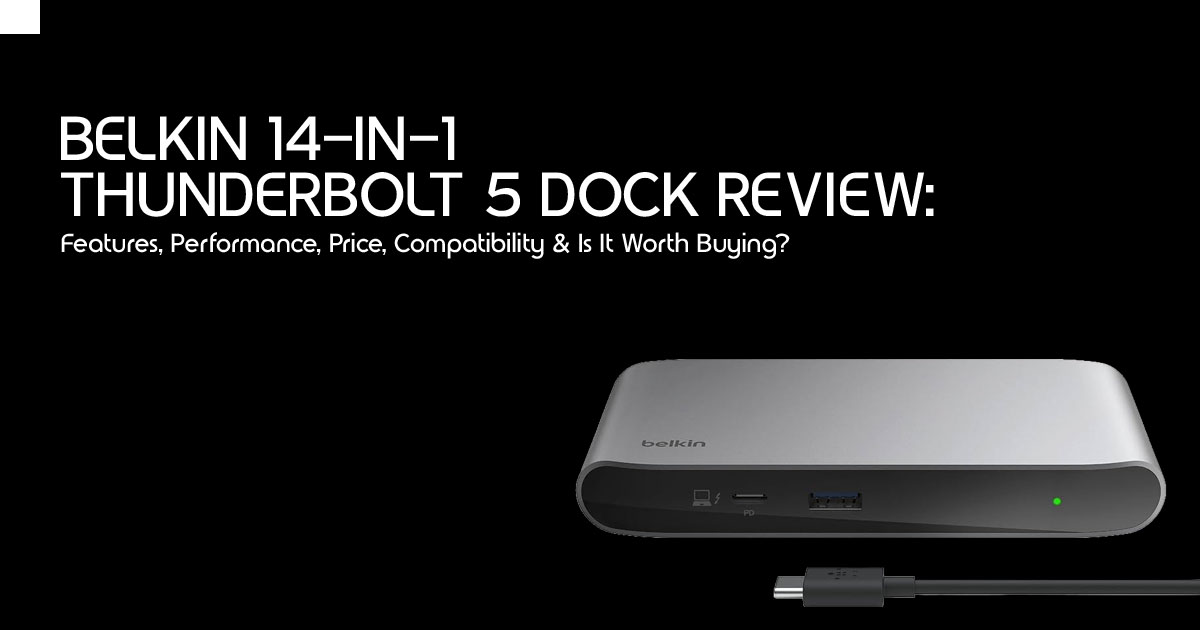
Introduction
There was a time when even the most powerful laptops came with one frustrating compromise. You had the performance, but the moment you connected multiple monitors, external SSDs, wired internet, memory cards, and other accessories, your workspace became a tangled mess of adapters, limited ports, and slowdowns. For many professionals, the laptop wasn’t the problem—the connection between the laptop and everything else was.
That is exactly why the Belkin 14-in-1 Thunderbolt 5 Dock deserves attention. This is more than a new accessory or another annual hardware refresh. It represents a meaningful step forward in professional connectivity, giving modern laptops the bandwidth they need to perform like desktop replacements.
Whether you’re editing high-resolution videos, building software, creating 3D models, transferring massive project files, or managing several displays at once, the dock is designed to remove one of the biggest limitations professionals face every day.
Most people are only beginning to understand Thunderbolt 4, so it is fair to ask why Thunderbolt 5 matters. The answer comes down to one word: bandwidth. If you’ve ever experienced lag while copying large files, noticed dropped frames when using multiple 4K monitors, or struggled to keep every connected device running at full speed, you’ve already reached the limits of older connectivity standards. Thunderbolt 5 is built for those demanding workloads, allowing high-speed storage, multiple displays, networking, charging, and peripherals to work together without competing for bandwidth.
The real question isn’t whether this dock has impressive specifications. It is whether those specifications make a noticeable difference in everyday work. Can it improve productivity? Is it worth paying a premium over a Thunderbolt 4 dock or a standard USB-C docking station? And more importantly, who actually benefits from upgrading?
In this guide, we answer those questions from a practical perspective. Rather than repeating the specification sheet, we’ll examine how the Belkin 14-in-1 Thunderbolt 5 Dock performs in real-world scenarios, where it delivers genuine value, where it may be excessive, and whether it deserves a place on your desk.
As technology experts with over 20 years of experience in hardware and application research and development, we analyze every product based on real-world performance, durability, long-term reliability, and overall value for money. Whether you’re a content creator, software developer, photographer, architect, engineer, gamer, IT professional, remote worker, or business user building a productive workspace, our recommendations are backed by extensive research, component-level analysis, practical usability testing, and industry expertise. Our goal is simple: help you choose the best product for your needs—whether your priority is budget, performance, reliability, or long-term investment—so you can spend with confidence instead of relying on marketing claims.
Quick Summary
- What is the Belkin 14-in-1 Thunderbolt 5 Dock? It is a professional-grade docking station that supports Thunderbolt 5 with 80Gbps bidirectional bandwidth and up to 120Gbps Bandwidth Boost for display-intensive It also delivers up to 140W of power to compatible laptops through a single cable.
- Who is it designed for? This dock is built for power users, including video editors, AI developers, and creative professionals who use high-resolution multi-monitor setups and high-speed external storage.
- Price: The dock is positioned as a premium accessory, typically retailing around $338 to $399 depending on the region and retailer.
- Key features: It features 14 ports, including dual Thunderbolt 5 downstream ports, 2.5Gb Ethernet, SD/microSD 4.0 slots, and support for up to three 4K displays at 144Hz.
- Biggest advantage: The substantial increase in bandwidth and 140W charging make it easier to run multiple high-resolution displays, transfer large files quickly, and power demanding laptops from a single connection.
- Should you buy it? If you own a Thunderbolt 5-compatible laptop and need a “one-cable” solution for a complex setup, it is a top-tier investment. Casual users should stick with Thunderbolt 4 for now.
What Makes This Launch Important?
The transition to Thunderbolt 5 is a major milestone for workstation connectivity. For years, we have been capped at 40Gbps. While that sounds like a lot, it quickly disappears when you plug in two 4K monitors and a fast NVMe drive. Thunderbolt 5 effectively doubles the baseline speed to 80Gbps and can boost up to 120Gbps when your monitors need it.
This launch hits the market just as high-resolution monitors and AI-heavy workflows are becoming the norm. If you’re moving toward 6K or 8K displays, you’re going to need massive amounts of data. At the same time, AI developers and creative professionals are working with external GPU enclosures, high-speed SSDs, and storage arrays that demand much faster data transfer speeds.
We are also seeing a trend where professional laptops are completely replacing traditional towers. A dock like this lets a MacBook Pro or a high-end Windows laptop deliver a desktop-like workstation experience the moment you connect a single cable.
Belkin 14-in-1 Thunderbolt 5 Dock Specifications
| Feature | Details |
| Primary Connectivity | Thunderbolt 5 (Upstream) |
| Total Ports | 14 |
| Maximum Bandwidth | 80Gbps (Standard) / 120Gbps (Bandwidth Boost) |
| Power Delivery | Up to 140W to the Host Laptop |
| Display Support | Up to Triple 4K @ 144Hz (on supported Windows systems) or Dual 6K/8K @ 60Hz, depending on your laptop’s GPU, operating system, and display configuration. |
| Networking | 2.5 Gigabit Ethernet |
| Card Readers | SD 4.0 & microSD 4.0 (UHS-II, up to 312MB/s) |
| USB Ports | USB-C 3.2 (30W & 7.5W charging), USB-A 3.2 (10Gbps), and 2 × USB-A 3.0 (5Gbps) |
| Audio | 3.5mm Combo Audio Jack |
| Build Material | Premium Aluminum Chassis |
| Power Supply | 180W External Power Adapter |
Top Benefits of the New Belkin Dock
Instead of just staring at a spec sheet, let’s look at how this changes the way you work every day. The biggest win here is a one-cable desktop setup. You can walk into your office with a dead laptop, plug in a single cord, and instantly wake up three monitors, your wired internet, studio speakers, and start charging at full speed.
- Cleaner Desk Strategy: By moving all your peripherals—including the bulky Ethernet cable and multiple display cords—to the back of the dock, your desk stays clear of “cable spaghetti.”
- Faster Backups: If you work with 4K or 8K raw footage, moving files to an external SSD via the Thunderbolt 5 ports is significantly faster than previous generations.
- Better Multitasking: With support for high refresh rates (144Hz), your screen movement feels fluid, reducing eye strain during long editing sessions.
- Simultaneous Charging: The 140W output is enough to keep even a 16-inch MacBook Pro or a high-end Dell XPS charged while you are rendering heavy 3D files.
Real-World Use Cases
Remote Workers & Executives
For those who jump between meetings and deep-focus work, the dock acts as a home base. You get the stability of a wired 2.5Gb Ethernet connection for video calls and the screen real estate to keep your email, calendar, and documents open simultaneously.
Software & AI Developers
AI workflows often involve moving large datasets. The increased PCIe throughput of Thunderbolt 5 means external storage feels as fast as internal drives. Developers running multiple virtual machines or containers will appreciate the extra bandwidth for external peripherals.
Graphic Designers & Photographers
Color accuracy and resolution are everything. This dock allows you to run a primary 5K or 6K color-accurate display alongside two secondary monitors for your tools and references, all while the UHS-II card readers ingest photos at peak speeds.
Video Editors & Streamers
Editing 4K and 8K video puts enormous pressure on storage and display bandwidth. This Thunderbolt 5 docking station is one of the strongest options available for professionals building a Thunderbolt 5 workstation setup or searching for the best Thunderbolt 5 dock in 2026. It keeps high-speed storage, multiple displays, and essential peripherals running smoothly from a single connection.
Thunderbolt 5 vs Thunderbolt 4
| Feature | Thunderbolt 4 | Thunderbolt 5 |
| Bi-directional Bandwidth | 40 Gbps | 80 Gbps |
| Bandwidth Boost (Video) | N/A | Up to 120 Gbps |
| Maximum Power Delivery | 100W | Up to 240W (140W on this dock) |
| PCIe Data Throughput | 32 Gbps | 64 Gbps |
| Monitor Support | Dual 4K @ 60Hz | Triple 4K @ 144Hz |
| Ideal Users | General office users, remote workers, and light creative professionals | Professional video editors, AI developers, 3D artists, software engineers, and high-end gamers |
Note: While the Thunderbolt 5 standard supports up to 240W Power Delivery, the Belkin 14-in-1 Thunderbolt 5 Dock delivers up to 140W, which is enough to charge most professional laptops.
Quick Verdict: If you are only using one 4K monitor and a few USB drives, Thunderbolt 4 is still perfectly fine. You should only look at Thunderbolt 5 vs Thunderbolt 4 upgrades if you find yourself hitting bandwidth limits or needing more than 100W of power.
Thunderbolt 5 Dock vs USB-C Hub: What’s the Difference?
It is common to see people confuse a $40 USB-C hub with a professional dock. The difference goes far beyond the number of ports. A standard USB-C hub shares a single 10Gbps lane for everything—displays, data, and internet. This leads to flickering screens and slow drive speeds.
A professional laptop dock like the Belkin 14-in-1 uses dedicated controllers to ensure that your 2.5Gb Ethernet doesn’t slow down just because you are transferring a file. It provides the “pipes” necessary for high-performance work that a cheap hub simply cannot handle.
Is This Dock Worth the Upgrade?
Current Thunderbolt 4 Users
If your current setup works without lag, stay put. If you’re planning to buy one of the latest Apple Silicon Macs or a high-end Thunderbolt 5 Windows laptop, this dock is an excellent way to prepare your desk for future upgrades.
MacBook Owners
MacBook Pro users (especially those with M4 Pro/Max chips) will benefit most from the multi-monitor support. Historically, Macs have been picky about docks, but this one is designed to handle the high-resolution demands of Apple displays.
If you own a MacBook Pro, this is one of the most capable Thunderbolt 5 docks for MacBook Pro announced so far.
Creative Professionals
Yes. Creative professionals will appreciate the faster transfers, smoother multi-monitor support, and cleaner workspace.
Compatibility Guide
Before you hit the buy button, we need to check your hardware. Thunderbolt 5 is backward compatible, but it won’t give you “magic” speeds on an old laptop.
- Windows: Requires a laptop with a Thunderbolt 5 port to hit 120Gbps. It will work on Thunderbolt 4 ports but at reduced Professionals using compatible laptops will find it to be one of the best Thunderbolt 5 docks for Windows.
- MacBook: Works best with the latest Apple Silicon Macs, while older M1, M2, and M3 models still benefit from its high-speed connectivity.
- USB4 / USB-C: The dock will function as a standard high-speed hub, but you will lose the advanced Thunderbolt features like daisy-chaining and maximum bandwidth.
- Limitations: Note that older Thunderbolt 3 devices are generally not supported by this specific Belkin model.
Best Workstation Setup Using This Dock
To get the most out of this, imagine your desk as a hub. Here is how we recommend routing your gear:
- The Brain: Your Laptop connects via the included 1m Thunderbolt 5 cable.
- The Vision: Two 4K monitors via the DisplayPort and HDMI ports, plus a third via one of the Thunderbolt 5 downstream ports.
- The Backbone: 5Gb Ethernet plugged directly into your router for lag-free uploads.
- The Peripherals: Keyboard and mouse in the USB-A ports; your high-speed SSD in the second Thunderbolt 5 port.
- The Media: SD cards go straight into the front slots for quick offloading.
Everything flows through that one cable, leaving your laptop’s other ports free for “on-the-go” needs.
Advantages
- High-speed connectivity: The 120Gbps Bandwidth Boost offers a significant improvement when working with multiple high-resolution displays and large media
- Powerful charging: 140W means you can leave your laptop’s brick in your bag.
- Premium build: The aluminum heat-dissipating design keeps it cool even under heavy load.
- Future-ready technology: Thanks to Thunderbolt 5 support, this dock should remain relevant for many years, especially as more laptops adopt the new desk.
Potential Drawbacks
- Premium price: It is an investment, not a casual purchase.
- Limited TB5 Laptops: As of early 2026, only the newest high-end laptops have the ports to match these speeds.
- Overkill for some: If you just want to plug in a mouse and a monitor, this is too much power.
- Power Brick Size: The 180W external power supply is quite large and will need space under your desk.
Common Buying Mistakes
- Buying for USB-A laptops: If your laptop only has old rectangular USB-A ports, this dock will not work.
- Ignoring display limitations: Even with a great dock, a base-model MacBook Air might still only support one external screen due to its own internal limits.
- Using low-quality cables: Do not use a random $5 USB-C cable to connect the dock to your laptop. You must use the included Thunderbolt 5 cable to get full performance.
- Expecting gaming performance improvements: While it helps with monitor refresh rates, a dock won’t make your laptop’s graphics card faster.
Frequently Asked Questions
Does it work with MacBook Air?
Yes, it will charge and connect peripherals, but most MacBook Air models are limited to one external display by Apple’s hardware, regardless of the dock’s capabilities.
Can it charge gaming laptops?
It provides up to 140W. This is enough for many “creator” laptops, but some high-end gaming rigs that require 240W+ will still need their original power brick for peak performance.
Is Thunderbolt 5 backward compatible?
Yes, you can plug a Thunderbolt 4 or USB4 laptop into this dock. It will work perfectly, but it will be limited to the speeds of your laptop’s port (usually 40Gbps).
Can I connect three monitors?
On compatible Windows laptops, yes, you can run three 4K monitors at 144Hz. On Mac, it depends on whether you have a “Pro” or “Max” series chip.
Does HDMI support 8K?
Yes, the HDMI 2.1 port supports up to 8K @ 60Hz or 4K @ 240Hz, provided your laptop and monitor also support those standards.
Is it worth buying in 2026?
If you are upgrading your workstation this year, yes. It is one of the most capable Thunderbolt 5 docking stations currently available, especially for professionals building a high-performance desktop setup.
Final Verdict
The Belkin 14-in-1 Thunderbolt 5 Dock is one of the most capable Thunderbolt 5 docking stations announced so far, but it is designed for a specific type of user. This isn’t a product for someone who only checks email, browses the web, or works with a few spreadsheets.
Instead, it’s built for professionals whose productivity depends on high-speed data transfers, multiple high-resolution displays, fast charging, and a clean, reliable, one-cable workstation.
If you’re a video editor, photographer, 3D artist, software developer, AI engineer, architect, music producer, or any other power user working with demanding applications, the benefits become easy to justify. You’re not simply buying more ports—you’re investing in a workspace that eliminates cable clutter, reduces downtime, speeds up file transfers, and lets your laptop perform like a true desktop replacement.
While its expected retail price of around $350 USD places it firmly in the premium category, a quality docking station often remains useful through several laptop upgrades. For professionals who rely on their setup every day, that makes it a long-term investment rather than a short-term purchase.
Who Should Buy the Belkin 14-in-1 Thunderbolt 5 Dock?
⬛ Content creators working with 4K or 8K video
⬛ AI developers running data-intensive workflows
⬛ Software developers using multiple monitors and external storage
⬛ Engineers, architects, and designers handling large project files
⬛ Users with Thunderbolt 5 Windows laptops or the latest Apple Silicon Macs who want a faster, cleaner, and more reliable desktop setup.
Who Should Skip It?
+ Casual home users
+ Students with basic productivity needs
+ Owners of older USB-C laptops who won’t benefit from Thunderbolt 5 speeds
+ Buyers looking for the most affordable docking solution
Availability and Expected Price
The Belkin 14-in-1 Thunderbolt 5 Dock has only recently been introduced in select markets, including China, and has appeared briefly on Belkin’s global website. Since it is still in the early stages of its worldwide rollout, official Amazon listings are not yet available in either the United States or India.
When global availability begins, the dock is expected to retail for approximately $350 USD, although regional pricing may vary depending on taxes, import costs, and local distribution.
Best Alternatives Available Right Now
If you need a high-performance docking station today, these are excellent alternatives currently available on Amazon.
For Users Looking for Thunderbolt 5 Performance Amazon Worldwide
Anker Prime TB5 14-in-1 Thunderbolt 5 Docking Station
Amazon India
Anker Prime TB5 14-in-1 Thunderbolt 5 Docking Station
For Users Who Don’t Need Thunderbolt 5 Yet
If your laptop supports Thunderbolt 4, the Belkin Connect Thunderbolt 4 Dock 14-in-1 remains one of the best premium docking stations available today.
Amazon Worldwide
Belkin Connect Thunderbolt 4 Dock 14-in-1
Planning to upgrade your workstation this year? Keep an eye on the Belkin 14-in-1 Thunderbolt 5 Dock as it becomes available worldwide. Based on its specifications, features, and connectivity options, it has everything needed to become one of the best premium Thunderbolt 5 docking stations for professional users.
What does your current desk setup look like? Are you already using a Thunderbolt 4 dock, or are you planning to move to Thunderbolt 5? Share your setup and experience in the comments below. If you’re unsure whether this dock is compatible with your laptop, let us know your laptop model, and we’ll help you determine whether it’s the right upgrade for your workflow.
***Disclaimer***
This blog post reflects our research, analysis, and opinions based on available product information, user feedback, and industry knowledge. It should not be taken as the official position of any brand, manufacturer, or company mentioned here. While we aim to keep information accurate and up to date, product details, pricing, and availability can change. We recommend double-checking important details before making a purchase.
Some links in this article may be affiliate links. If you choose to buy through these links, we may earn a small commission at no extra cost to you. This helps support our work and allows us to keep publishing in-depth, unbiased reviews. Our recommendations are never influenced by affiliate partnerships.
Comments shared by readers reflect their own views and not ours. We are not responsible for outcomes resulting from the use of information on this site. Please seek professional advice where appropriate.
All product names, logos, and brands mentioned are the property of their respective owners. These names are used for identification and informational purposes only and do not imply endorsement.
