
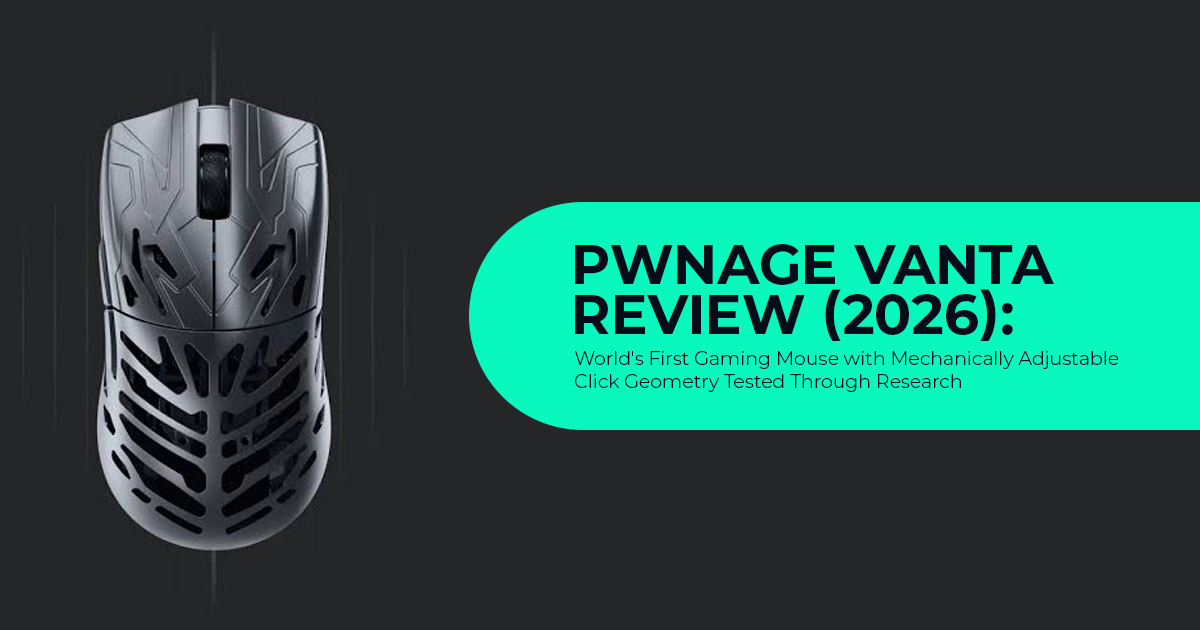
Every year, dozens of lightweight wireless gaming mice promise faster reactions, lower weight, and better performance. Yet after a few hours of gaming, most of them feel surprisingly similar. The click response is fixed at the factory, so if the buttons feel too stiff or too soft, there’s little you can do except buy another mouse.
The Pwnage Vanta challenges that long-standing design. Instead of asking gamers to adjust through software, it lets you physically fine-tune the click feel using a small adjustment screw. Even better, the left and right buttons can be adjusted independently, making it the world’s first gaming mouse with mechanically adjustable click geometry. It’s a fresh idea in a market where most brands compete by shaving off a few grams or increasing DPI numbers.
As technology experts with over 20 years of experience in hardware and application research and development, we look beyond product launches and marketing claims. Every product we cover is evaluated for real-world performance, build quality, durability, repairability, and long-term value for money. Whether you’re a competitive FPS player, esports enthusiast, MMO or MOBA gamer, content creator, or simply someone searching for a premium wireless gaming mouse that feels comfortable for hours of work and play, our goal is to help you make a confident buying decision. While we have not conducted hands-on testing of the Pwnage Vanta, this review is based on official specifications, Pwnage engineering demonstrations, component analysis, industry comparisons, and early feedback from the gaming community. Our recommendations come from extensive research, real-world usability analysis, and years of hardware expertise—not marketing promises.
The bigger question isn’t whether the Pwnage Vanta is different—it clearly is. The real question is whether its adjustable click system offers a genuine advantage over today’s best ultralight wireless gaming mice, or if it’s simply an interesting feature that most gamers won’t notice. That’s exactly what we’ll help you answer.
What Is Pwnage Vanta Gaming Mouse?
Pwnage Vanta is a 49g gaming mouse built around three core ideas:
- VANTAGE Click System — a mechanical screw system that changes the button geometry
- Adjustable sensor position — you can slide the XERO sensor forward or backward inside the
- Magnesium alloy gaming mouse construction at 49 grams with a symmetrical gaming mouse
It is positioned as an ultralight, competitively focused mouse for players who care about click feel as much as weight and sensor performance.
VANTAGE Click System Explained: How Tunable Click System Works
Every gaming mouse has a force path from your finger to the microswitch. In most mice, that path is fixed.
VANTAGE Click System changes the path.
On Pwnage Vanta, two screws sit under the perforated top shell. Using the included small screwdriver, you rotate these screws. That rotation shifts the leverage angle of the button plate over the SPDT switches. The result is not a software change. It is a physical change to how much force reaches the switch and how quickly.
According to Pwnage’s documentation, one adjustment affects six elements:
- Click force — how hard you need to press
- Initial resistance / pre-travel — slack before the click starts
- Actuation distance — travel to register the click
- Force curve — whether the press feels linear, progressive, or snappy
- Break point — where the tactile snap occurs
- Return feel — how the button bounces back
Left and right clicks can be tuned independently. You can set a lighter left click for spamming in FPS and a firmer right click for ADS.
Does adjustable click geometry affect battery life or latency?
No. Because the tuning is purely mechanical, it does not affect battery life, latency, or power consumption. This is different from magnetic systems like the Logitech G Pro X Superstrike, which use sensors to detect actuation. That distinction matters if you run 8000Hz polling rate constantly.
The trade-off: you need a screwdriver, and you have to try settings manually. There is no screen showing the current force curve. Our take: most users will find one setting and leave it.
Adjustable Sensor Position and XERO Sensor Based on PAW3950
The second unique feature is adjustable sensor position. The XERO sensor sled can be moved forward or backward.
Why does that matter?
Where the sensor sits changes how wrist rotation translates to cursor movement. A sensor closer to the fingertips makes the same wrist arc cover more screen distance. A sensor closer to the wrist makes it feel tighter and more anchored. It does not replace DPI.
According to Pwnage, its cited research suggests the patented sensor-position system can improve throughput by up to 14% while reducing path deviation by up to 23%. These figures come from the company’s referenced study and have not yet been independently verified. In real use, the benefit depends on grip:
- Fingertip grip — often prefers forward sensor position
- Claw grip — often prefers centered to slightly forward
- Palm grip — often prefers centered to slightly rear
The sensor itself is the XERO sensor, a custom-tuned PixArt PAW3950. This is the same base as many 2026 flagship gaming mice, but tuned by Pwnage for 99.8% tracking accuracy claims.
49g Magnesium Alloy Gaming Mouse: Design and Build Quality
Magnesium alloy chassis is the reason Pwnage Vanta hits 49 grams without a honeycomb plastic flex problem.
Key design points from our research:
- Weight: 49 grams — listed as 49g to 51g depending on color/coating
- Dimensions: 120 x 61 x 39 mm — symmetrical shape aimed to disappear in the hand
- Construction: magnesium alloy chassis — According to Pwnage, the chassis is lighter than aluminum while offering greater rigidity than traditional plastic shells
- Shell: perforated top for weight and screw access, matte coating
- Colors: Black, White, Platinum, Nacho
What this means for the buyer: low weight helps with fast flicks and less fatigue. The magnesium chassis feels noticeably more rigid than most plastic ultralight gaming mice. Perforations will collect dust faster than a solid shell. That is the maintenance trade-off.
Performance: 8K Polling Rate, Nordic nRF54L15, and 36000 DPI Specs
Here is the full performance package of Pwnage Vanta gaming mouse in a clean view:
| Specification | Pwnage Vanta Details | What It Means for You |
| Sensor | PAW3950-based XERO sensor, developed through a custom PixArt collaboration | Flagship-level tracking with up to 36,000 DPI, 750 IPS, and 50g acceleration |
| Polling Rate | 8,000Hz polling in wired and wireless modes | Reports motion data up to eight times more frequently than a standard 1,000Hz mouse |
| MCU | Nordic nRF54L15 | Designed for low latency and improved wireless efficiency |
| Switches | Dual-contact SPDT switches rated for 70 million clicks | Supports fast signal detection and improved debounce control |
| Weight | 49g | Ultralight design particularly suited to claw and fingertip grips |
| Shape | Symmetrical gaming-mouse shape | Accommodates multiple grip styles but uses a right-handed side-button layout |
| Feet | PTFE skates included; glass skates optional | PTFE provides a more controlled glide, while glass skates offer faster movement |
| Battery | Up to 160 hours in office use or 100 hours of gaming; approximately two-hour recharge | Should last several days of regular gaming for most users |
Battery Life and Connectivity
Pwnage Vanta uses 2.4GHz wireless with a dongle on a stand and USB-C wired mode. No Bluetooth mentioned for gaming.
- 160 hours battery life in office/productivity mode at 1000Hz
- 100 hours battery life in gaming mode at 1000Hz
- At 8000Hz polling, battery life will naturally be lower than at 1000Hz. The exact runtime depends on usage patterns, lighting settings (if applicable), and polling configuration.
- Full recharge in ~2 hours
The Nordic nRF54L15 controller is built for efficiency. Based on available technical documentation and industry testing, this generation of Nordic chips handles 8000Hz polling more stably than older nRF52840 implementations.
Pwnage Vanta vs Logitech G Pro X Superstrike vs Razer Viper V4 Pro: 49g Gaming Mouse Comparison
Here’s how the major competitors compare. Mechanically adjustable click geometry is new, but you are still choosing between proven platforms.
| Mouse | Click Technology | Weight | Sensor | Polling | Price at Launch |
| Pwnage Vanta | VANTAGE Click System—a mechanical screw adjusts the click-force path | 49g | XERO sensor (PAW3950) | 8,000Hz wired and wireless | $159 with PTFE skates / $179 with glass skates |
| Logitech G Pro X Superstrike | Magnetic Haptic Inductive Trigger System with software-adjustable actuation | ~61g | HERO 2 44K | 8,000Hz | ~$179 |
| Razer Viper V4 Pro | Fourth-generation optical switches with fixed geometry | 49g | Focus Pro 50K Gen-3 | 8,000Hz | ~$159 |
| Finalmouse UltralightX | Fixed click system with a solid magnesium construction | 40g | Custom sensor | 1,000Hz | ~$189 |
What this comparison tells you:
- If you want to physically tune click feel without software, Pwnage Vanta is the only option right now. Logitech G Pro X Superstrike adjusts via magnets and firmware, not mechanics.
- If you want the lightest, most proven 49g shape with broad pro adoption, Razer Viper V4 Pro is the safer pick.
- If you want absolute lightest magnesium with no tuning, Finalmouse is lighter at 40g but usually costs more and has lower polling.
Pwnage Vanta vs Logitech G Pro X Superlight 2 is also a common search. Superlight 2 is heavier at 60g but has more established software and warranty support.
Pricing, Pre-Order, Colors, and PTFE vs Glass Skates
Based on official store and competitor tracking:
- Early promotional pre-order pricing started at $149 for select PTFE After the promotional period, the standard launch MSRP is $159 for the Black, White, and Platinum editions. The Nacho edition is priced at $169, while Glass Black models with glass skates retail for $179.
- Four colors: Black, Platinum, Nacho, White
- Shipping started September 28, 2026 per Pwnage
- Package includes: paracord cable, receiver stand, grip sets, adjustment screwdriver
What to pick:
- Choose PTFE skates if you play on a slow pad and want control for precise
- Choose glass skates if you play on a hard pad or want maximum glide speed for
- Extra grip sets are useful if you have sweaty hands or prefer side grip texture. Check price before you buy — early pre-order batches sell out quickly in this
Who Should Buy Pwnage Vanta Gaming Mouse?
Buy Pwnage Vanta if:
- You notice and care about click feel differences between mice
- You use different grips for different games and want adjustable sensor position to match
- You want a true 49g magnesium alloy gaming mouse that does not flex
- You like tuning hardware once and leaving it alone
- You play FPS or competitive shooters where lighter clicks for left and firmer right helps
Skip Pwnage Vanta if:
- You never thought about click force before — you likely will not use the tuning
- You want plug-and-play with no screwdriver adjustments
- You need Bluetooth multi-device support
- You prefer heavy palm-fill mice over symmetrical shape ultralights
- You want extensive software macros — Pwnage’s strength is hardware, not software ecosystem
Who Should Wait Before Buying?
You may want to wait if:
- You prefer buying hardware only after long-term reliability has been validated by independent
- You want more third-party testing of the VANTAGE Click System before
- You’d rather wait for potential firmware updates, price reductions, or broader retail
Waiting a few months could provide more real-world feedback without changing the overall value proposition.
Pros and Cons: Balanced View From Research
| Pros | Cons |
| Claimed to be the world’s first gaming mouse with mechanically adjustable click geometry—a genuinely new approach | Screw-based tuning requires experimentation and provides no digital preset readout |
| VANTAGE Click System does not affect battery life or latency | The perforated magnesium chassis may collect dust |
| Adjustable sensor position supports fingertip, claw, and palm grip preferences | The moving sensor sled’s long-term durability has not been proven through independent testing |
| 49g gaming mouse with a rigid magnesium-alloy chassis | Higher price than entry-level ultralight mice, at approximately $149–$179 |
| PAW3950-based XERO sensor, Nordic nRF54L15, and 8,000Hz polling rate provide flagship-level specifications | The symmetrical shape may not suit large hands that prefer a pronounced right-handed ergonomic profile |
| Independent left- and right-click tuning | Limited data on adoption among professional players |
Real-World Use Scenarios We Evaluated
- Valorant / CS2: Setting a light left click force with short pre-travel helps with counter-strafing and peeking. A slightly heavier right click prevents accidental scope.
- Battle Royale / Apex: Adjustable sensor position forward can make wrist flicks cover more distance when looting and flicking quickly.
- Work + Gaming: The 160 hours battery life at 1000Hz means you can use it all week for office work then switch to 8000Hz polling for evening ranked games.
FAQs About Pwnage Vanta
What is VANTAGE Click System on Pwnage Vanta? VANTAGE Click System is a mechanical screw mechanism that changes the button geometry over the SPDT switches. It lets you tune click force, initial resistance, force curve, actuation feel, break point, and return feel without changing the switch itself.
How do you adjust clicks on Pwnage Vanta? You use the included small screwdriver through the top shell holes. Turning the screws changes the force path into the switch. Left and right buttons have separate screws for independent tuning.
Does tuning the clicks affect battery or latency? No. Because it is purely mechanical, adjusting mechanically adjustable click geometry does not affect battery life or latency. Battery life is driven by polling rate and MCU load from the Nordic nRF54L15.
What sensor does Pwnage Vanta use? It uses the XERO sensor, a custom-tuned PixArt PAW3950 with up to 36000 DPI, 750 IPS, and 50g acceleration, paired with an 8000 Hz polling rate.
How light is Pwnage Vanta? It is a 49g gaming mouse, 49 to 51 grams depending on color variant. The magnesium alloy chassis keeps it rigid despite the low weight.
Is Pwnage Vanta better than Logitech G Pro X Superstrike? They solve different problems. Pwnage Vanta offers mechanical click tuning with no power penalty. Logitech G Pro X Superstrike offers magnetic adjustable actuation with haptic feedback via software. If you want physical tuning, choose Vanta. If you want software control and broader support, consider Superstrike.
What is the price and release date? Pre-orders opened at $159 for Black/White/Platinum with PTFE skates, $169 for Nacho, and $179 with glass skates. Shipping was set for September 28, 2026.
Final Verdict: Is Mechanically Adjustable Click Geometry Worth It?
The Pwnage Vanta doesn’t try to compete by being one gram lighter or by advertising a higher DPI than everyone else. Instead, it rethinks something gamers have accepted for years—the feel of the mouse click itself.
If you’ve ever purchased two identical mice only to notice that one felt crisp while the other felt slightly softer, you’ll understand why mechanically adjustable click geometry is more than a marketing feature. It gives you control over something that has traditionally been left to factory tolerances. On the other hand, if click feel has never influenced your gameplay or comfort, this feature may not add much value.
After reviewing the official specifications, engineering details, and early community feedback, the Pwnage Vanta stands out because it combines a 49g magnesium alloy chassis, an adjustable sensor position, and the VANTAGE Click System in a single package priced at $159. As of 2026, no other lightweight wireless gaming mouse offers this exact combination. The trade-off is that getting the perfect setup takes a little experimentation, and the click adjustment system is still new compared to more established designs.
If you enjoy tweaking your hardware and prefer features built into the mouse instead of software running in the background, the Pwnage Vanta is one of the most interesting lightweight wireless gaming mice released this year. If your priorities are a familiar shape, years of proven reliability, and a mature software ecosystem, options like the Razer Viper V4 Pro or Logitech G Pro X Superlight 2 remain safer choices.
The bottom line is simple: if click feel is something you notice every time you play, the Pwnage Vanta offers a level of customization no other gaming mouse currently provides. If it isn’t, you’ll likely be better served by choosing the mouse that best fits your hand, preferred weight, and grip style.
Check Current Price and Offers
If you’ve decided the Pwnage Vanta fits your gaming style, it’s worth checking the latest pricing before you buy. Pre-order batches, limited-edition colors, and glass skate versions often sell out first.
Official Website
Check the latest Pwnage Vanta gaming mouse listings on the official site to compare current pricing for the 49g models. Verify whether you’re getting PTFE skates or glass skates, and compare the standard Black, White, and Platinum editions with the premium Nacho version.
If you want the fastest glide with the least friction, choose the glass skates version. If you prefer more controlled movement and precise stopping power for tactical shooters, the PTFE skates edition is the better fit.
Explore More Pwnage Gaming Mice
Not sure if the Pwnage Vanta is the right fit? Pwnage offers several other wireless gaming mice designed for different grip styles, budgets, and competitive play. You can compare the latest models, including the StormBreaker, StormBreaker Max CF, Trinity CF, Ultra Custom Pro Symm 3, and other lightweight gaming mice before making your decision.
Amazon Worldwide
Browse the complete lineup of Pwnage gaming mice available on Amazon Worldwide, compare prices, colors, and current deals.
➡ Amazon Worldwide – Pwnage Gaming Mouse Collection
Amazon India
If you’re shopping from India, check the latest imported Pwnage gaming mouse listings. Stock availability, pricing, and seller warranty can change frequently.
➡ Amazon India – Pwnage Gaming Mouse Collection
What do you think?
Would you actually adjust your mouse clicks, or do you think it’s a feature most gamers will never use? Share your thoughts in the comments—we’d love to hear your experience.
If this review helped you, follow us for more in-depth hardware reviews, gaming mouse comparisons, buying guides, and the latest tech launches. And if you have any questions about the Pwnage Vanta or need help choosing the right gaming mouse for your budget or play style, leave a comment below—we’re happy to help.
***Disclaimer***
This blog post reflects our research, analysis, and opinions based on available product information, user feedback, and industry knowledge. It should not be taken as the official position of any brand, manufacturer, or company mentioned here. We make every effort to keep this guide accurate, but product specifications, pricing, and availability may change after publication. We recommend double-checking important details before making a purchase.
Some links in this article may be affiliate links. If you choose to buy through these links, we may earn a small commission at no extra cost to you. This helps support our work and allows us to keep publishing in-depth, unbiased reviews. Affiliate partnerships never influence our recommendations.
Opinions expressed by readers are their own and do not necessarily reflect ours. We are not responsible for outcomes resulting from the use of information on this site. Please seek professional advice where appropriate.
All product names, logos, and brands mentioned are the property of their respective owners. These names are used for identification and informational purposes only and do not imply endorsement.
