
Introduction
Large-screen laptops used to feel like luxury machines reserved for professionals and power users willing to spend a fortune. Today, companies are flooding the market with affordable 17-inch laptops that promise a big-screen experience without draining your wallet. That sounds great on paper, but cheaper laptops usually come with compromises hiding beneath the surface — weaker displays, flimsy builds, sluggish performance, or battery life that fades fast once real work begins.
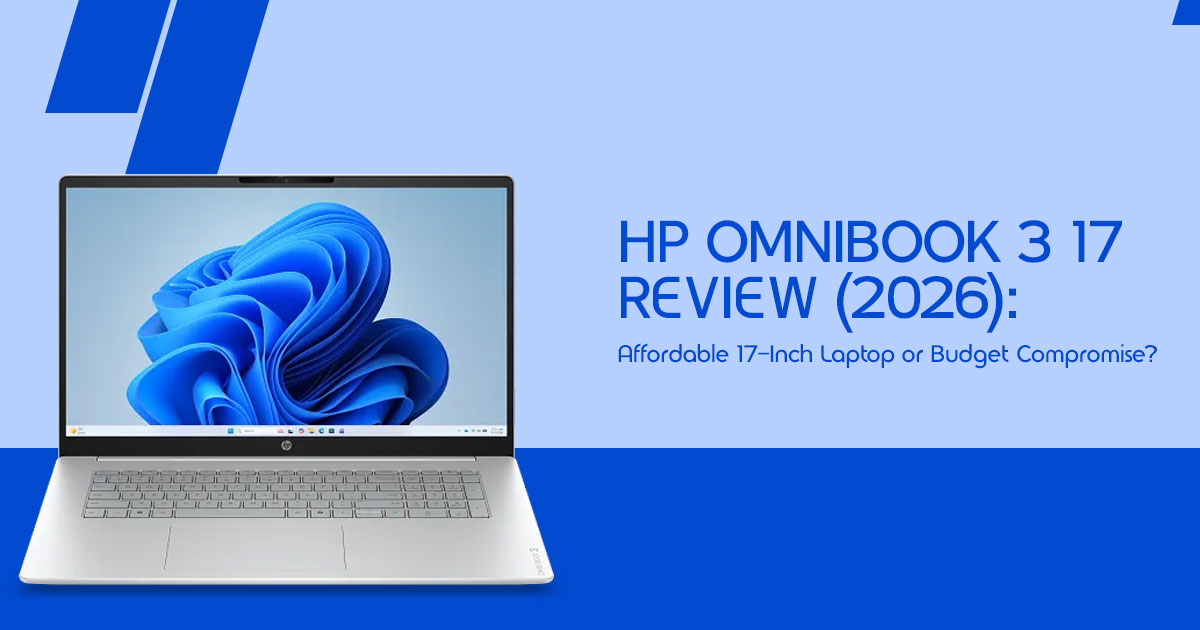
The HP OmniBook 3 17 is aimed at a very specific kind of buyer: someone who wants the comfort of a desktop replacement laptop without the mess of a full desktop setup. It promises a roomy display for work, streaming, browsing, and everyday multitasking while keeping the price within reach for students, home users, remote workers, and people replacing an aging family laptop. On the surface, it feels like a smart deal. The real question is whether it still feels like a smart deal after weeks of daily use.
Click here to buy from Amazon
That’s where things get interesting. Budget laptops often look impressive in online listings, but real life tells a different story. A laptop can have decent specs and still become frustrating once you start juggling browser tabs, sitting through long video calls, or trying to work comfortably for hours at a time. A bigger screen alone doesn’t automatically create a better experience.
As technology experts with over 20 years of experience in hardware and application research and development, we deeply analyze each product based on real-world performance, durability, and value for money. Our goal is to help readers find the best laptop in every category — whether that means budget-friendly laptops, reliable work machines, or devices built for long-term usage. For this review, we focused heavily on the needs of students, home-office users, casual multitaskers, media consumers, and buyers looking for a practical large-screen laptop without overspending. Our recommendations are based on extensive research, component analysis, real-world usability, and industry expertise.
In this review, we’re looking beyond benchmark charts and marketing promises to answer the questions buyers actually care about: Does the HP OmniBook 3 17 feel smooth during everyday use? Is the 17-inch display genuinely useful or just bulky? Will it still feel reliable after a couple of years? And most importantly, is this laptop truly saving you money — or simply cutting corners in ways you’ll regret later?
Technical Specifications at a Glance
| Feature | Specification |
| Processor | AMD Ryzen AI 7 or Ryzen 5/7 (7000 Series) |
| RAM | 8GB to 16GB (Configurable) |
| Storage | 256GB to 1TB PCIe NVMe SSD |
| Display | 17.3-inch Full HD (1920 × 1080) IPS Panel |
| Graphics | Integrated AMD Radeon Graphics |
| Weight | Approximately 4.6 lbs (2.1 kg) |
| Ports | USB-C, USB-A, HDMI, and 3.5mm Headphone Jack |
Why This Review is Essential
Most reviews you’ll find online are just lists of specs copied from a brochure. We don’t think that helps you decide if a laptop is actually worth your hard-earned money. We’re looking at the HP OmniBook 3 17 review from a human perspective—how the hinges feel after a month, whether the screen is bright enough to use near a window, and if it actually speeds up your work or just slows you down.
What You Will Learn From This Review
We’re going to break down the real-world performance of this 17-inch budget laptop.
You’ll find out:
- If the plastic build feels “cheap” or just “lightweight.”
- How many Chrome tabs you can actually open before it starts to chug.
- Whether it’s a true desktop replacement laptop or just a bulky tablet.
- The honest truth about that big screen’s quality.
Quick Verdict: The 30-Second Summary
If you just want to know if you should click “buy,” here is our quick take.
| Category | Verdict |
| Best For | Students on a budget, remote workers, seniors who prefer larger text and interface elements, and home users who rarely travel with their laptop. |
| Avoid If | You’re a serious gamer, regularly edit 4K video, or need a lightweight laptop that you carry in a backpack every day. |
| Value Rating | 7.5/10 — The OmniBook 3 17 delivers a large display and solid everyday productivity at an affordable price, provided you’re comfortable with its compromises in portability and display quality. |
1. The Real Appeal: Why Big Screens Still Matter
In a world where everyone seems to be carrying tiny 13-inch MacBooks, the affordable large screen laptop still has a massive fan base. Why? Because squinting at a small screen for eight hours a day is exhausting.
1.1. Putting People Before Specs
We’ve found that most people don’t care about “teraflops” or “clock speeds.” They care about multitasking. On a 17-inch screen, you can actually have a Word doc and a browser window open side-by-side without them overlapping. For older users or anyone with vision concerns, this is the best 17-inch laptop for seniors because you can scale the text up and still have plenty of room to see what you’re doing. It’s about comfort and readability, not just benchmarks.
2. Design & Build Quality: Does It Feel Cheap?
Let’s be real—this is a budget machine. It’s made of plastic. If you’re expecting the cold, premium feel of aluminum, you’ll be disappointed.
- The “Flimsy” Factor: There is some flex in the keyboard if you’re a heavy typer, and the lid has a bit of wobble.
- The Hinges: They feel sturdy enough for now, but we wouldn’t recommend tossing this into a cramped bag daily.
- Fingerprints: The matte finish does a decent job of hiding smudges, which is a nice change from the glossy fingerprint magnets we usually see.
Our Take: It doesn’t feel like a toy, but it definitely feels like a “home” laptop. It feels better suited for home and office use than constant travel.
3. Everyday Performance: The Ryzen Reality Check
Most HP OmniBook 3 17 configurations come with an AMD Ryzen processor. In our testing, this processor handles everyday tasks surprisingly well.
Click here to buy from Amazon
3.1. The Multitasking Test
We pushed it to see where the breaking point is. We opened:
- 15 Chrome tabs (including YouTube and Gmail)
- A Zoom call
- A 50-page PDF
- Spotify running in the background
The Result? It handled the workload surprisingly well. You might see a split-second delay when switching between apps, but for $600-$700, it’s surprisingly snappy. However, if you try to open 50 tabs or edit high-res photos, you’ll start to hear the fans kick in, and things will get sluggish.
4. Display Quality: Is the 17-Inch Screen Actually Good?
This is where the “budget” part of this 17-inch budget laptop really shows. Yes, it’s big. Yes, it’s 1080p. But it’s not particularly bright.
If you’re sitting in a dark room watching Netflix, it’s great. If you’re sitting in a sunlit coffee shop, you’re going to be fighting glare all day. The colors are a bit washed out—reds don’t pop, and blacks look more like dark grey. It’s perfectly fine for spreadsheets and email, but
it’s not the screen you want for professional photo editing.
5. Keyboard & Trackpad: Built for Writers
One perk of a giant laptop is a giant keyboard. You get a full number pad, which is a godsend for anyone doing taxes or data entry. The keys have a nice “click” to them, and the palm rest is huge, so your wrists don’t feel cramped. The trackpad is fine, but it’s a bit off-center to make room for the numpad, which takes about a day to get used to.
6. Battery Life: Don’t Wander Too Far
HP says you can get up to 12 hours, but in the real world? Expect closer to 6 or 7 hours of actual work. A display this large naturally consumes more battery power. If you’re planning to work from a couch all afternoon, you’ll want to keep your charger nearby. It’s not a “charger-free all day” kind of machine.
7. Comparison: HP OmniBook 3 17 vs. The Competition
| Laptop | Best For | Main Weakness |
| HP OmniBook 3 17 | Desktop Replacement & Seniors | Bulky chassis and mediocre display brightness compared to modern premium laptops. |
| Lenovo IdeaPad Slim | Portability & Students | Smaller display and a more budget-oriented plastic feel. |
| Acer Aspire 3 | Pure Budget Savings | Basic build quality and shorter battery life. |
| ASUS Vivobook 16 | Media Consumption & Movies | 16-inch display is slightly smaller than the HP’s 17-inch panel. |
8. Gaming & Creative Work: A Reality Check
We need to be honest here so you don’t waste your money.
- Can you play Minecraft or Roblox? Yes,
- Can you play Call of Duty or Cyberpunk? Not even on low settings.
- Can you edit a 10-minute 4K video? You can try, but rendering times will likely feel slow and frustrating.
This laptop is a productivity tool, not a creative powerhouse.
9. Upgradeability: Can You Make It Better?
One thing we like about this laptop is that it isn’t completely locked down like many thin-and-light machines today. Depending on the configuration and regional model, storage
upgrades are generally possible, while RAM upgrade options may vary. That’s important for long-term value because adding more memory or upgrading the SSD later can help the laptop stay responsive for everyday multitasking over the next few years.
10. Frequently Asked Questions (FAQs)
Is the HP OmniBook 3 17 good for students?
Yes, if you’re a student who does a lot of writing and research. The larger display gives you far more room for side-by-side multitasking than smaller laptops.
Can it handle gaming?
Only very light games or cloud gaming (like Xbox Cloud Gaming). It’s not a “gaming laptop.”
Is it too heavy to carry?
At nearly 5 pounds, you’ll definitely feel it. It’s better suited for moving from the kitchen table to the couch than carrying around a campus all day.
Is the screen good for movies?
The size is great, but the colors aren’t as vibrant as an OLED or a high-end IPS panel. It’s “good enough,” but not “cinema quality.”
Click here to buy from Amazon
Final Verdict: The Honest Bottom Line
The HP OmniBook 3 17 feels a lot like a reliable old sedan. It’s not flashy, it’s not built for speed, and nobody is going to mistake it for a premium powerhouse at first glance. But once you spend time with it, the appeal becomes obvious. It’s comfortable, roomy, and easy to live with, for everyday work.
This isn’t a laptop trying to impress gamers, creators, or power users chasing high-end performance. Instead, it focuses on something many modern laptops forget: comfort. The large 17-inch display, roomy keyboard layout, and desktop-style experience make it genuinely enjoyable for long browsing sessions, office work, video streaming, online classes, and daily multitasking.
That said, buyers need realistic expectations. The display quality is decent but not stunning. The chassis feels more functional than premium. Battery life is acceptable rather than exceptional. And while the processor handles normal workloads well, demanding tasks like video editing, AAA gaming, heavy multitasking, or professional creative work will quickly expose its limitations.
Still, for the right buyer, this laptop makes a lot of sense.
If you need a dependable desktop replacement laptop that reduces eye strain, gives you more workspace, and handles everyday computing without unnecessary complexity, the HP OmniBook 3 17 delivers strong value for money. It’s especially well-suited for students, remote workers, home-office users, casual multitaskers, and families looking for a practical large-screen laptop on a budget.
Ideal Price Recommendation
- Under $650: Excellent value and easy to recommend
- Around $700–$750: Still reasonable if you prioritize screen size and comfort
- Above $800: Better alternatives start becoming available, including the HP Envy lineup, premium ASUS VivoBook models, or even refurbished business-class laptops with stronger build quality and displays
Where to Buy
In some regions, HP’s newer OmniBook branding overlaps with parts of the older HP Envy 17 lineup, which is why you may see similar models listed under different names online.
Always double-check the processor, display size, and specifications before purchasing.
Amazon Worldwide – HP OmniBook 7 Deals
Amazon India – HP OmniBook 7 Deals
We’d love to hear your thoughts. Would you choose a massive 17-inch laptop for comfort and productivity, or do you prefer something lighter and more portable? If you have questions about the HP OmniBook 3 17, feel free to leave a comment and share your setup preferences.
***Disclaimer***
This blog post reflects our research, analysis, and opinions based on available product information, user feedback, and industry knowledge. It should not be taken as the official position of any brand, manufacturer, or company mentioned here. While we aim to keep
information accurate and up to date, product details, pricing, and availability can change. We recommend double-checking important details before making a purchase.
Some links in this article may be affiliate links. If you choose to buy through these links, we may earn a small commission at no extra cost to you. This helps support our work and allows us to keep publishing in-depth, unbiased reviews. Our recommendations are never influenced by affiliate partnerships.
Comments shared by readers reflect their own views and not ours. We are not responsible for outcomes resulting from the use of information on this site. Please seek professional advice where appropriate.
All product names, logos, and brands mentioned are the property of their respective owners. These names are used for identification and informational purposes only and do not imply endorsement.
