
Introduction
If you’ve ever felt limited by a single laptop screen, constantly switching between windows, dragging applications around, or wishing you could carry your entire desktop setup wherever you go, the ROG Zephyrus Duo (2026) might completely change the way you work and play.
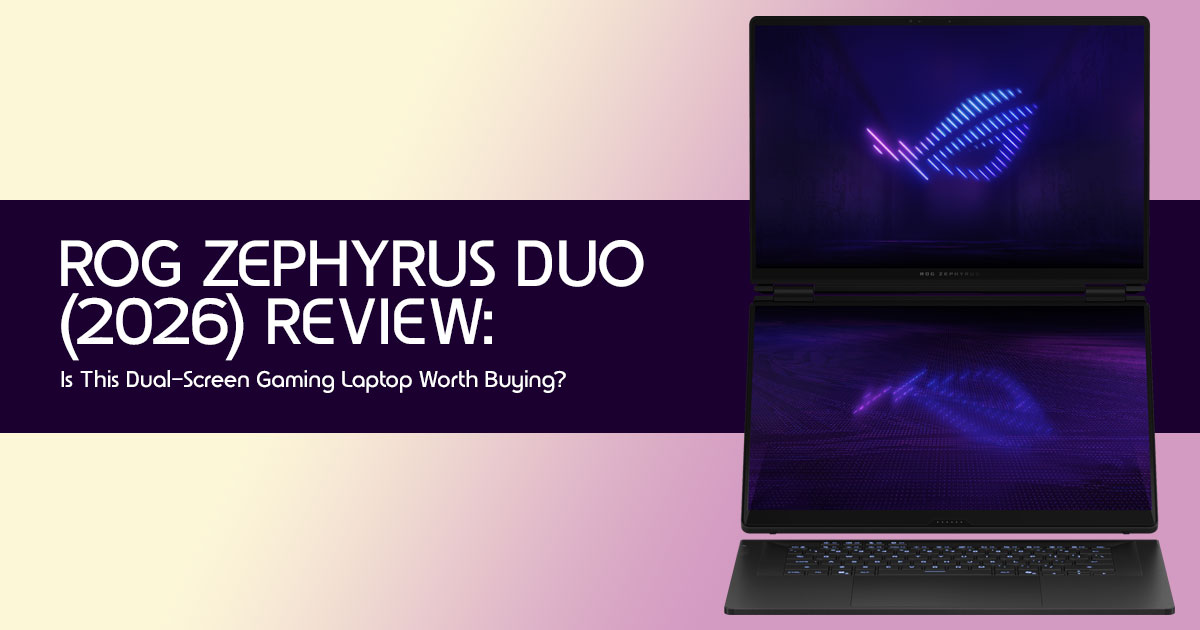
Most premium laptops focus on becoming thinner, lighter, or faster. The ROG Zephyrus Duo takes a different approach. Instead of asking users to adapt to the limitations of a traditional laptop, it brings a true dual-screen laptop experience into a portable form factor. The result is a machine designed for people who regularly multitask, create content, stream games, develop software, work with AI tools, or simply demand more from their hardware.
As technology experts with over 20 years of experience in hardware and application research and development, we analyze every product through the lens of real-world performance, durability, reliability, and long-term value for money. Our goal is to help readers identify the best products across every category, whether they prioritize budget, performance, productivity, build quality, or long-term ownership. Our recommendations are based on extensive research, component analysis, real-world usability testing, and industry expertise.
For the power user who demands uncompromised multitasking and a portable workstation capable of replacing a traditional desktop setup, the ROG Zephyrus Duo (2026) is one of the most ambitious laptops available today. Its dual 16-inch 3K OLED displays, flagship Intel Core Ultra 9 processor, and powerful NVIDIA GeForce RTX 5090 Laptop GPU create a combination that few competing laptops can match.
That doesn’t automatically make it the right choice for everyone.
Its premium price, added weight, unique keyboard layout, and desktop-focused design make it a specialized machine rather than a mainstream recommendation. For some buyers, it could be the ultimate productivity tool. For others, it could be an expensive feature they rarely use.
This review is designed for content creators, video editors, streamers, software developers, AI enthusiasts, professional multitaskers, and serious gamers who want to know whether the dual-screen concept genuinely improves everyday workflows or simply looks impressive on a specification sheet.
Before spending thousands of dollars on a high-end laptop, it’s worth asking a simple question:
Can the ROG Zephyrus Duo (2026) genuinely replace your desktop, improve your productivity, and justify its premium price—or are you better off with a traditional flagship gaming laptop?
Let’s find out.
Who Should Buy the Zephyrus Duo?
The Zephyrus Duo is best suited for gamers, streamers, content creators, developers, and AI enthusiasts who can genuinely benefit from dual-screen productivity. If multitasking is a major part of your workflow, few laptops offer a better experience.
Who Should Avoid It
- Casual gamers or users who don’t need dual screens.
- Students on a budget or those prioritizing extreme portability.
- Frequent flyers where weight and bulk are primary concerns.
- Budget-conscious buyers looking for maximum value may find better options at lower price points.
Biggest Strengths
- Dual 16-inch 3K OLED displays for exceptional multitasking and workflow efficiency.
- Top-tier performance with Intel Core Ultra 9 and RTX 5090 options.
- Innovative cooling designed for sustained high loads.
- Exceptional visual experience with vibrant OLED panels.
Biggest Compromises
- High price point makes it a significant investment.
- Increased weight and bulk compared to traditional laptops.
- Ergonomic adjustments required due to keyboard placement.
- Battery life can be significantly impacted by dual-screen usage.
1. What Makes the Zephyrus Duo Different?
In a world saturated with powerful gaming laptops, the ROG Zephyrus Duo (2026) carves out its own niche. It’s not just about raw power; it’s about how that power is delivered and experienced. The standout feature, of course, is its dual 16-inch 3K OLED displays, a bold statement in laptop design. This isn’t a gimmick; it’s a fundamental rethinking of the mobile computing experience, aiming to bridge the gap between a high-performance laptop and a multi-monitor desktop setup.
1.1. Quick Answer
The Zephyrus Duo (2026) is different because it offers a truly integrated dual-screen experience with two full-sized, high-resolution OLED panels, providing a massive step up in multitasking capability and immersive visual real estate in a portable form factor. It’s designed for users who need more than one screen to be truly productive or competitive.
1.2. Is the Zephyrus Duo a Gaming Laptop or a Productivity Machine?
This is where the Zephyrus Duo really stands out: it’s both, without compromise. While its RTX 5090 GPU and Intel Core Ultra 9 processor deliver flagship gaming performance, the dual screens open up ways to work that single-screen laptops simply can’t match. Imagine gaming on the main screen while monitoring Discord, Twitch chat, or a strategy guide on the secondary display.
Or, for work, having your primary application open on one screen and reference materials, communication tools, or a video conference on the other. It’s a versatile machine designed for modern power users who demand both performance and productivity.
1.3. Can It Replace a Multi-Monitor Setup?
For many, yes. While a dedicated desktop setup with large external monitors will always offer the ultimate in screen size and flexibility, the Zephyrus Duo comes remarkably close in a portable package.
The two 16-inch OLED displays provide a combined screen area that rivals many dual-monitor configurations, especially for tasks where having two distinct, high-resolution windows side-by-side is crucial. It’s a compelling solution for those who travel frequently or have limited desk space but refuse to compromise on screen real estate.
1.4. Is the Dual Screen Actually Useful?
Absolutely. This isn’t just a secondary display for widgets; it’s a fully functional, high-resolution OLED screen that dramatically enhances workflow efficiency and user experience.
From video editing timelines and software development environments to streaming dashboards and AI model monitoring, the utility of having a second primary display is immense. It reduces the constant need to alt-tab, keeping all critical information visible and accessible, thereby boosting focus and productivity.
2. Hardware Deep Dive
Beneath its unique look, the Zephyrus Duo (2026) packs a punch with top-of-the-line parts designed for peak performance across various demanding tasks. This isn’t just a pretty face; it’s a machine built for demanding workloads.
2.1. Intel Core Ultra 9 Performance Explained
The heart of the ROG Zephyrus Duo (2026) is the latest Intel Core Ultra 9 processor, designed to handle demanding workloads such as gaming, content creation, AI applications, and heavy multitasking.
- Faster AI-driven tasks: From video editing effects to local large language model (LLM) inference and Stable Diffusion workflows, the NPU offloads AI computations, freeing up the CPU and GPU for other tasks.
- Improved multitasking: The efficient core distribution ensures smooth operation even with multiple demanding applications running across both screens.
- Enhanced battery life: By intelligently routing tasks to the most efficient core or NPU, the Core Ultra 9 helps extend battery life, especially during lighter workloads.
This processor is a key enabler for the AI-era productivity use cases that the Zephyrus Duo targets.
2.2. RTX 5070 Ti vs RTX 5090: Which Version Should You Buy?
The choice between the NVIDIA GeForce RTX 5070 Ti and the RTX 5090 Laptop GPU is crucial and depends heavily on your primary use case and budget. Both are incredibly powerful, but the RTX 5090 offers a significant leap in performance.
| Feature | RTX 5070 Ti Laptop GPU | RTX 5090 Laptop GPU |
| Target User | High-End Gamers, Serious Content Creators, and Prosumers | Enthusiast Gamers, Professional Creators, AI Engineers, and Power Users |
| Gaming Performance | Excellent at 1440p and Capable of Smooth 4K Gaming | Uncompromised 4K Gaming with Maximum Settings and Higher Frame Rates |
| Content Creation | Very Capable for Video Editing, 3D Rendering, Motion Graphics, and Design Work | Superior Performance for Complex Renders, Large Projects, and Faster Exports |
| AI / Machine Learning | Good for Entry-Level AI Development, Smaller LLMs, and Stable Diffusion Projects | Exceptional for Local LLMs, Advanced Stable Diffusion Workflows, and Professional AI Development |
| Thermals & Power | Lower Power Consumption and Easier Cooling Requirements | Higher Power Draw and Requires More Robust Cooling Solutions |
| Price | Premium | Ultra-Premium with Significantly Higher Cost |
| Value | Excellent Balance of Performance and Cost | Best-in-Class Performance, but at a Significant Premium |
| Recommended For | Users Seeking High-End Gaming and Creative Performance Without Spending at the Absolute Top End | Users Who Need the Fastest Mobile GPU Available for Gaming, Professional Content Creation, and AI Workloads |
Quick Verdict: If you demand the absolute best performance for 4K gaming, professional video editing, or intensive AI development, and your budget allows, the RTX 5090 is the clear choice. For most other high-performance tasks, the RTX 5070 Ti provides exceptional value and will still deliver a phenomenal experience. Don’t buy the RTX 5090 without genuinely needing its extra horsepower.
Which ROG Zephyrus Duo Configuration Should You Buy?
Buy the RTX 5070 Ti Version If:
- You mainly play games at 1440p
- You edit videos regularly
- You want the best value for money
- You don’t run large AI models
Buy the RTX 5090 Version If:
- You want maximum performance
- You work with AI workloads
- You render large creative projects
- Budget is not a concern
Recommendation
For most buyers, the RTX 5070 Ti configuration offers the best balance between performance and price.
Is the ROG Zephyrus Duo (2026) Worth Buying?

Yes, if your workflow genuinely benefits from dual displays. For content creators, streamers, developers, and AI enthusiasts, the productivity gains can justify the premium cost. For casual users, a traditional high-end gaming laptop often delivers better value.
2.3. Dual 3K OLED Displays
We’ve touched upon them, but the dual 16-inch 3K OLED displays deserve a deeper look. These aren’t just any screens; they are Nebula HDR Displays, signifying top-tier visual quality. Key aspects include:
- Stunning Visuals: OLED technology means perfect blacks, infinite contrast ratios, and vibrant, accurate colors, crucial for content creation and immersive gaming.
- High Resolution: The 3K (3072 x 1920) resolution on both panels provides incredible detail and ample screen real estate, reducing the need for scaling and offering crisp text and images.
- Fast Refresh Rates: With refresh rates typically at 120Hz or higher, these displays ensure smooth motion in games and a fluid user experience during general use.
- HDR Support: Nebula HDR certification guarantees excellent High Dynamic Range performance, making movies and HDR-enabled games truly pop.
This dual-display setup is the cornerstone of the Zephyrus Duo’s appeal, offering a visual experience unmatched by single-screen laptops.
2.4. NPU and AI Processing Capabilities
The integration of a dedicated Neural Processing Unit (NPU) within the Intel Core Ultra 9 processor is a forward-looking feature that aligns perfectly with the growing demand for AI- driven applications. The NPU excels at handling sustained, low-power AI inference tasks, making it ideal for:
- AI-enhanced video calls: Features like background blur, eye-tracking, and noise suppression run more efficiently.
- Creative AI tools: Accelerating features in Adobe Creative Suite or other AI-powered design software.
- Local AI model execution: For developers and researchers, the NPU provides a dedicated resource for running smaller LLMs or AI inference tasks directly on the device, reducing reliance on cloud services and improving privacy.
This dedicated AI hardware ensures the Zephyrus Duo is ready for the next generation of AI productivity tools.
2.5. Cooling Architecture
Cooling high-performance components and two OLED displays requires a sophisticated thermal solution. ASUS uses an advanced cooling system designed to maintain stable performance during gaming, content creation, and demanding workloads. The elevated secondary display also improves airflow compared to traditional laptop designs.
This robust cooling system is essential for maintaining peak performance during extended gaming sessions, intensive content creation, and AI workloads, preventing thermal throttling and ensuring long-term reliability.
3. Real-World Testing Scenarios
To truly understand the Zephyrus Duo (2026), we need to move beyond benchmarks and dive into how it performs in actual use. This is where its dual-screen design either works wonders or becomes an unnecessary complexity. We put it through its paces in five distinct scenarios.
3.1 Scenario 1: Competitive Gaming + Discord + Streaming
For many, a gaming laptop is about immersive play. But for the modern gamer, it’s also about community and content creation. This scenario pushes the Zephyrus Duo to its limits.
Performance Results
Based on the hardware specifications of the RTX 5090 Laptop GPU, users can expect excellent frame rates in competitive titles such as Valorant, Counter-Strike 2, and Apex Legends, even while running streaming and communication applications in the background.
Advantages
- Uninterrupted Workflow: No more alt-tabbing! Keep your game full-screen on the primary display while managing chat, stream health, and voice comms on the secondary. This significantly improves focus and reaction time in competitive
- Enhanced Immersion: The vibrant OLED displays make games look stunning, and having peripheral information on the second screen keeps you in the game world.
- Streamer’s Dream: Dedicated screen space for OBS, chat, and alerts makes live streaming a much more manageable and professional experience from a single
Limitations
- Battery Drain: Running a demanding game and streaming simultaneously on two high-resolution screens will rapidly deplete the battery. This setup is best used plugged in.
- Heat Output: While the cooling system is robust, sustained high loads will generate noticeable heat, especially around the exhaust vents.
3.2. Scenario 2: Video Editing Experience
The dual-screen design feels tailor-made for video editors. You can keep the timeline on the primary display while dedicating the second screen to effects, media bins, scopes, and previews. Combined with RTX 5090 acceleration, editing 4K footage feels smooth and efficient.
3.3. Scenario 3: Software Development Experience
For developers, the second display is genuinely useful. You can keep your IDE on the main screen while displaying documentation, GitHub, terminal windows, or debugging tools on the second screen. The result is less context switching and a smoother coding workflow compared to a traditional single-screen laptop.
3.4. Scenario 4: AI and Local LLM Workloads
The RTX 5090 model has enough GPU power for local AI projects, including LLM inference and Stable Diffusion. The second screen is useful for monitoring outputs, prompts, and system performance while working.
4. Does the Dual-Screen Design Improve Productivity?
This is the question most potential buyers want answered. The answer for most power users is yes, although the benefits depend heavily on workflow and usage patterns. The dual-screen design isn’t just about having more pixels; it’s about optimizing workflow and reducing cognitive load.
4.1. Task Switching Reduction
The most significant productivity gain comes from the drastic reduction in task switching. Instead of minimizing and maximizing windows, information is always visible. This smooth way of working allows for sustained concentration and fewer interruptions, which is critical for complex tasks.
4.2. Multitasking Improvements
From cross-referencing documents to managing multiple communication channels, the Zephyrus Duo elevates multitasking from a chore to an intuitive process. The second display keeps important information visible without constantly switching between windows.
4.3. When It Helps
- Complex projects requiring multiple open applications (e.g., video editing, coding, data analysis).
- Research-intensive tasks where cross-referencing is constant.
- Live activities like streaming, trading, or monitoring dashboards.
- Any scenario where context switching is a major bottleneck.
4.4. When It Doesn’t
- Single-focused tasks that only require one application (e.g., writing a simple document, casual browsing).
- Highly mobile scenarios where setting up the dual screens is impractical (e.g., cramped airplane seats).
- Users who prefer minimalist setups and find extra screens distracting.
5. Battery Life Reality Check
One of the most common concerns with any powerful laptop, especially one with dual OLED displays, is battery life. The Zephyrus Duo (2026) is no exception, and expectations need to be realistic.
5.1. Single-Screen Usage
When operating solely on the primary display with the secondary screen disabled, the Zephyrus Duo delivers respectable battery life for its class, often achieving 6-8 hours of light productivity (web browsing, document editing) thanks to the Intel Core Ultra 9’s efficiency cores and intelligent power management. This is comparable to other high-performance laptops.
5.2. Dual-Screen Usage
Engaging both 3K OLED displays significantly impacts battery endurance. Expect battery life to drop to 3-5 hours for mixed productivity tasks. If you’re running demanding applications across both screens, this can further reduce to 2-3 hours. The convenience of dual screens comes at a power cost.
5.3. Gaming Battery Performance
Gaming on battery, especially with the RTX 5090 engaged and both screens active, is not recommended for extended periods. You’ll likely see less than 1.5-2 hours of gameplay. For serious gaming, always plan to be near a power outlet.
5.4. Travel Expectations
For travel, while the Zephyrus Duo offers desktop-level productivity, you’ll need to manage your power consumption carefully. Carrying the power brick is essential for any significant work on the go. It’s a portable workstation, not an ultraportable with all-day battery life.
6. Thermal and Noise Performance
Despite packing flagship hardware and two OLED displays, the cooling system does an impressive job. Fan noise becomes noticeable during gaming and rendering, but temperatures remain under control and performance stays consistent during long sessions. Expect warm surfaces under heavy load, but not enough to impact usability.
7. Ergonomics: What You Need to Know
The dual-screen design requires the keyboard to sit at the front edge of the chassis. Some users may need a wrist rest for long sessions. It’s excellent on a desk but less comfortable for lap use compared to traditional laptops.
8. Can the Zephyrus Duo Replace Your Desktop?
For many creators, developers, streamers, and gamers, the answer is yes. The combination of flagship hardware and dual OLED displays delivers a workstation-like experience without requiring external monitors. Most users will still prefer a dedicated desktop for maximum performance, but the gap is smaller than ever.
9. Zephyrus Duo vs the Competition
To understand where the Zephyrus Duo (2026) stands, it’s essential to compare it against its closest rivals. This isn’t just about specs; it’s about the overall experience and value proposition.
9.1. Zephyrus Duo vs Zephyrus G16
| Feature | ROG Zephyrus Duo (2026) | ROG Zephyrus G16 (2026) |
| Key Differentiator | Dual 16-inch 3K OLED Touchscreens | Single 16-inch OLED Display with Traditional Laptop Design |
| Processor | Intel Core Ultra 9 | Intel Core Ultra 9 |
| GPU Options | Up to NVIDIA GeForce RTX 5090 Laptop GPU | Up to NVIDIA GeForce RTX 5090 Laptop GPU |
| Portability | Less Portable (Heavier and Thicker Chassis) | More Portable (Lighter and Thinner Design) |
| Multitasking | Exceptional Due to Dedicated Dual-Screen Workspace | Excellent, Though Requires More Traditional Window Management |
| Ergonomics | Requires External Wrist Rest for Extended Comfort | Traditional Keyboard Layout with Integrated Palm Rest |
| Gaming Experience | Excellent Gaming Performance with Added Second-Screen Utility | Excellent Gaming Performance in a More Conventional Package |
| Battery Life | Shorter Due to Dual Displays and Higher Power Consumption | Generally Better Battery Life |
| Price | Ultra-Premium | Premium |
| Target User | Power Users, Streamers, Developers, Content Creators, and Professionals Needing Maximum Screen Space | Gamers, Creators, and Professionals Who Prioritize Portability and a Traditional Workflow |
Quick Verdict: The Zephyrus G16 is a fantastic high-performance laptop for those who want top-tier specs in a more traditional, portable package. The Zephyrus Duo is for those who absolutely need and will utilize the dual-screen advantage for intensive multitasking.
9.2. Zephyrus Duo vs MacBook Pro 16
| Feature | ROG Zephyrus Duo (2026) | Apple MacBook Pro 16 (Latest) |
| Operating System | Windows 11 | macOS |
| Processor | Intel Core Ultra 9 | Apple M-Series (e.g., M3 Max / M4 Max) |
| GPU Options | Up to NVIDIA GeForce RTX 5090 Laptop GPU | Integrated Apple M-Series GPU |
| Display | Dual 3K OLED Touchscreens | Liquid Retina XDR (Mini-LED) |
| Gaming | Excellent – Broad Windows Game Support, RTX Features, DLSS | Limited – Smaller Native Game Library and No Dedicated GPU |
| Content Creation | Excellent – Adobe, DaVinci Resolve, Blender, GPU Acceleration | Excellent – Optimized Creative Applications and Media Engine |
| AI / Machine Learning | Excellent – NPU, CUDA, Tensor Cores, RTX Acceleration | Excellent – Neural Engine and Unified Memory Architecture |
| Battery Life | Moderate, Especially When Using Both Displays | Exceptional |
| Portability | Heavier and Less Portable | Lighter, Thinner, and Easier to Carry |
| Price | Ultra-Premium | Ultra-Premium |
| Target User | Windows Power Users, Gamers, Streamers, AI Developers, and Content Creators | macOS Users, Video Editors, Designers, Developers, and Productivity Professionals |
Quick Verdict: This is a classic Windows vs. macOS debate. The MacBook Pro 16 offers unmatched battery life, a highly optimized ecosystem for certain creative workflows, and a sleek design. The Zephyrus Duo counters with superior gaming performance, the flexibility of Windows, and its unique dual-screen advantage for multitasking-heavy professional users. Choose based on your preferred OS and specific workflow needs.
10. Long-Term Ownership Considerations
Like any OLED laptop, burn-in is a consideration if static content remains on screen for extended periods. Storage upgrades are possible, but overall upgradeability is limited, making it important to choose the right configuration from the start.
11. Common Mistakes Buyers Make
Investing in a premium laptop like the Zephyrus Duo is a significant decision. Avoiding these common pitfalls can ensure you make the right choice for your needs.
11.1. Buying the RTX 5090 Without Needing It
The RTX 5090 is the pinnacle of mobile GPU performance, but it comes at a substantial premium. If your primary use cases are light gaming, web browsing, or basic productivity, the RTX 5070 Ti (or even a lower-tier GPU) will provide more than enough power at a much better value. Overspending on an RTX 5090 when you won’t utilize its full potential is a common mistake.
11.2. Ignoring Weight Considerations
The Zephyrus Duo is a heavy laptop. While it’s portable for a desktop replacement, it’s not an ultraportable. If you frequently carry your laptop long distances or prioritize extreme lightness, its weight will be a constant annoyance. Don’t underestimate how much a few extra pounds can impact daily usability.
11.3. Underestimating Desk Space Requirements
While it replaces external monitors, the Zephyrus Duo still requires a decent amount of desk space, especially when the secondary screen is elevated and an external wrist rest is in use.
It’s not ideal for cramped workspaces or small coffee shop tables. Measure your typical workspace to ensure it accommodates this machine.
11.4. Choosing the Wrong Workflow Setup
The Zephyrus Duo thrives on specific multitasking workflows. If your work primarily involves single-application focus or you dislike managing multiple windows, the dual screens might feel more like a distraction than a benefit. Understand how your daily tasks align with a dual-screen environment before committing.
12. Who Should Avoid It?
Equally important is understanding who this premium device is not for.
12.1. Casual Gamers
If you only play games occasionally or don’t need the absolute highest frame rates, the Zephyrus Duo’s price and complexity are overkill. A more traditional gaming laptop will offer better value.
12.2. Students
For most students, the Zephyrus Duo is likely too expensive, too heavy, and offers features they won’t fully utilize. A lighter, more affordable laptop with better battery life would be a more practical choice.
12.3. Frequent Flyers
Despite its portability as a desktop replacement, its size and weight make it cumbersome for frequent air travel, especially in cramped economy seats. The ergonomic challenges in such environments are also a significant drawback.
12.4. Budget-Conscious Buyers
This is an ultra-premium laptop. If budget is a primary concern, there are many excellent gaming laptops and workstations available at a fraction of the cost that will still deliver fantastic performance for most users.
13. Frequently Asked Questions
This section is designed to directly answer common questions.
Is the ROG Zephyrus Duo worth buying in 2026?
For power users, content creators, developers, and AI researchers who can fully utilize its dual 16-inch 3K OLED displays, the ROG Zephyrus Duo (2026) is a compelling investment. Its clever design and top-tier performance make it a unique portable workstation.
Can the Zephyrus Duo replace two monitors?
Yes, for many users, the Zephyrus Duo (2026) can effectively replace a two-monitor desktop setup, especially in a portable context. Its dual 16-inch 3K OLED displays provide ample screen real estate for most professional workflows, making it an excellent mobile workstation for remote work and business travel.
Is the RTX 5090 version worth the extra cost?
The RTX 5090 version is worth the extra cost if you are a hardcore gamer demanding the absolute highest frame rates at 4K, a professional video editor working with complex projects, or an AI developer running demanding local LLMs or Stable Diffusion workflows. For most other users, the RTX 5070 Ti offers excellent performance at a better value.
Is the second display useful for gaming?
Yes, the second display is incredibly useful for gamers, especially those who stream or play competitive games. It allows you to keep Discord, Twitch chat, game maps, or strategy guides visible without minimizing your main game, leading to a more immersive and efficient gaming experience.
Is the Zephyrus Duo good for video editing?
Absolutely. The Zephyrus Duo (2026) is exceptionally good for video editing. Its dual 16-inch 3K OLED displays provide expansive screen real estate for timelines and preview monitors, while the Intel Core Ultra 9 processor and RTX 5090 GPU offer powerful acceleration for rendering and effects. It significantly enhances workflow efficiency for professional video editors.
Top Reasons to Buy the ROG Zephyrus Duo
- Dual 16-inch OLED displays
- Exceptional multitasking
- Powerful gaming performance
- Excellent for creators and developers
- Can replace a multi-monitor setup
Reasons to Consider Alternatives
- Premium pricing
- Heavier than most gaming laptops
- Battery life is average under heavy workloads
- Not ideal for users who rarely multitask
14. Final Verdict
The ROG Zephyrus Duo (2026) is not just another laptop; it’s a statement. It’s a bold vision of what a portable workstation can be, pushing the boundaries of multitasking and immersive computing. It’s a niche product, but for that niche, it’s almost perfect.
What the Design Got Right
- Truly functional dual 16-inch 3K OLED displays: This is the core innovation, executed brilliantly.
- Uncompromised performance: Top-tier CPU and GPU options deliver desktop-class power.
- Advanced cooling: Keeps the powerful components running optimally.
- Thoughtful software integration: Makes the dual-screen experience feel natural.
- Addressing past dual-screen shortcomings: Learning from previous generations to create a genuinely useful product.
Best Buyer Profiles
This laptop is best suited for power users, professional content creators, software developers, AI researchers, and serious gamers/streamers who prioritize multitasking efficiency and screen real estate above all else, and are willing to invest in a premium, unique device.
Overall Recommendation
If you’re a professional who constantly juggles multiple applications, a gamer who streams, or a creator who needs expansive visual workspaces on the go, and you have the budget, the ROG Zephyrus Duo (2026) is a one-of-a-kind portable setup. It’s a glimpse into the future of mobile computing, and for the right user, it’s an investment in productivity and immersive experience that few other devices can match.
If the combination of dual OLED displays, flagship RTX graphics, and desktop-level multitasking fits your workflow, the ROG Zephyrus Duo (2026) is one of the most unique premium laptops available today. Check current pricing and available configurations before making your decision on Amazon Worldwide and Amazon India.
We invite you to share your experiences with the Zephyrus Duo in the comments below. Have questions? Need online assistance with your workflow? Our community is here to help!
***Disclaimer***
This blog post reflects our research, analysis, and opinions based on available product information, user feedback, and industry knowledge. It should not be taken as the official position of any brand, manufacturer, or company mentioned here. While we aim to keep information accurate and up to date, product details, pricing, and availability can change. We recommend double-checking important details before making a purchase.
Some links in this article may be affiliate links. If you choose to buy through these links, we may earn a small commission at no extra cost to you. This helps support our work and allows us to keep publishing in-depth, unbiased reviews. Our recommendations are never influenced by affiliate partnerships.
Comments shared by readers reflect their own views and not ours. We are not responsible for outcomes resulting from the use of information on this site. Please seek professional advice where appropriate.
All product names, logos, and brands mentioned are the property of their respective owners. These names are used for identification and informational purposes only and do not imply endorsement.
