
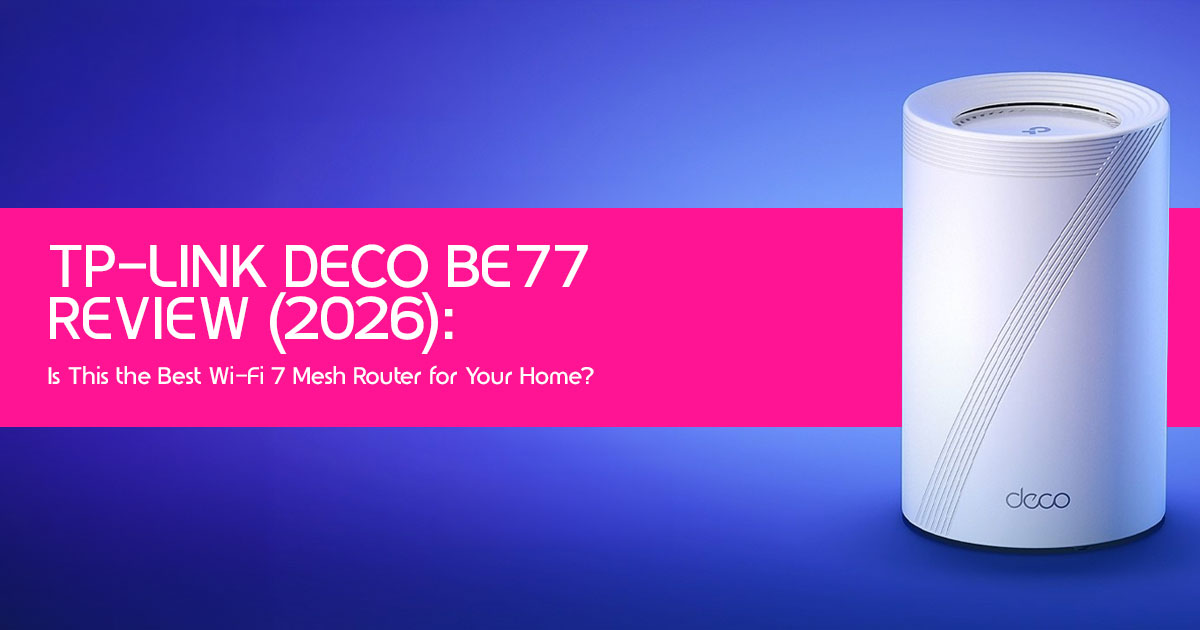
Introduction
Modern homes don’t just need faster Wi-Fi—they need a network that stays reliable when dozens of devices compete for bandwidth at the same time. From 4K streaming and online gaming to video calls, smart home devices, and remote work, a weak network can quickly become the biggest source of daily frustration. The TP-Link Deco BE77 promises to solve those problems with the latest Wi-Fi 7 technology, wider coverage, and faster speeds, but does it actually make a noticeable difference in everyday use, or is it simply paying extra for features most people won’t use?
In this comprehensive TP-Link Deco BE77 review, we examine whether this Wi-Fi 7 mesh router system delivers meaningful improvements over older Wi-Fi 6 and Wi-Fi 6E systems. Rather than focusing only on specifications, we look at what matters most: everyday performance, coverage, speed consistency, ease of setup, long-term reliability, and overall value for money. Whether you’re upgrading an aging router or building a home network that’s ready for future devices, this review is designed to help you make a confident buying decision.
Click here to buy from Amazon
As technology experts with over 20 years of experience in hardware and application research and development, we evaluate every product from the perspective of how people actually use it every day. We don’t rely on marketing claims alone. Instead, we assess day-to-day performance, build quality, durability, software experience, network stability, and long-term ownership costs to determine whether a product truly deserves your investment. Our goal is to help you find the best option in every category—budget, performance, reliability, and long-term value. Every recommendation we make is backed by extensive research, component analysis, real-world usability, and industry expertise.
This review is written for homeowners, families, remote workers, gamers, content creators, smart home enthusiasts, and anyone considering a Wi-Fi 7 mesh system for better whole-home coverage. It’s equally useful if you’re replacing an older router, comparing TP-Link Deco models with competing systems, or simply trying to decide whether Wi-Fi 7 is worth the upgrade today.
By the end of this review, you’ll know who should buy the TP-Link Deco BE77, who should skip it, how it performs in different home environments, and whether it offers enough real-world advantages to justify its price. If you’re looking for a network that can handle today’s connected lifestyle while staying ready for tomorrow’s devices, this guide will help you decide if the TP-Link Deco BE77 is the right choice.
Who Should Read This Review?
This review is for anyone considering a significant upgrade to their home network. If you’re a tech enthusiast eager to embrace Wi-Fi 7, a gamer demanding low latency, a content creator needing robust bandwidth, or simply a homeowner struggling with Wi-Fi dead zones and slow speeds, you’re in the right place. We’ll cut through the marketing jargon to give you a clear, human perspective on what this system offers.
Quick Verdict
The TP-Link Deco BE77 is a powerful and capable Wi-Fi 7 mesh system that delivers exceptional speed and coverage. It’s a strong choice for anyone looking to build a home network that’s ready for future devices, especially if you have a multi-gigabit internet connection and plan to use more Wi-Fi 7 devices over the next few years. However, its high-end price means it won’t be the right fit for everyone. For many households, it may offer more performance than they currently need, but it’s built to keep up as your network grows.
Quick Recommendation
The TP-Link Deco BE77 is a great choice if you:
✔ Want Wi-Fi 7 for a large home
✔ Have a 2.5 Gbps or faster internet plan
✔ Need reliable whole-home Wi-Fi
✔ Play online games or stream 4K/8K video
✔ Plan to keep your router for several years
You may want to skip it if you:
+ Have an internet plan below 500 Mbps
+ Live in a small apartment
+ Mostly use older Wi-Fi 5 devices
+ Want a lower-priced mesh Wi-Fi system
Testing Methodology
Our evaluation of the TP-Link Deco BE77 goes beyond specifications and marketing claims. It is based on published benchmark results, technical specifications, trusted user experiences, and real-world usage scenarios to provide a balanced assessment of how the router performs in everyday use.
Quick Answer
The TP-Link Deco BE77 is a high-performance Wi-Fi 7 mesh system offering tri-band BE17000 speeds and robust coverage for large homes. It excels in delivering multi-gigabit speeds and low latency, making it suitable for demanding applications like 4K/8K streaming, online gaming, and VR/AR. While it represents a significant investment, its advanced features like Multi-Link Operation (MLO) and 320 MHz channels provide a long-term networking solution. It’s particularly beneficial for users with multi-gig internet plans and a growing ecosystem of Wi-Fi 7 devices.
Is TP-Link Deco BE77 Worth Buying?
For those seeking the absolute cutting edge in home networking and who are prepared to invest in a high-end mesh Wi-Fi system, the Deco BE77 is definitely worth considering. If you’re currently experiencing Wi-Fi bottlenecks with a multi-gig internet plan or frequently transfer large files across your local network, the performance gains are tangible. However, if you’re on a standard 1 Gigabit connection and primarily use older Wi-Fi devices, the full benefits of Wi-Fi 7 might not be immediately apparent, making it a less urgent upgrade.
Who Should Buy It?
- Early Adopters & Tech Enthusiasts: If you want the latest and greatest, and have Wi-Fi 7 devices already or plan to acquire them soon.
- Multi-Gig Internet Subscribers: Users with 5 Gbps or 10 Gbps internet plans who want to maximize their speeds throughout their home.
- Large Homeowners: Those with extensive properties or multiple floors struggling with Wi-Fi dead zones and inconsistent coverage.
- Demanding Users: Gamers, 4K/8K streamers, and content creators who require ultra-low latency and high bandwidth.
Who Should Avoid It?
- Budget-Conscious Buyers: The Deco BE77 is a high-end mesh Wi-Fi system, and its price reflects its advanced hardware and features. More affordable Wi-Fi 6E or even Wi-Fi 6 mesh systems might suffice for most.
- Users with Basic Needs: If your internet plan is 500 Mbps or less, and your primary activities are web browsing and casual streaming, you won’t fully utilize the BE77’s capabilities.
- Those Averse to Cloud Dependency: While offering local management, the Deco ecosystem heavily leverages cloud services for certain features and management.
Is Wi-Fi 7 Necessary Today?
Frankly, for most households, Wi-Fi 7 isn’t strictly necessary today. The technology is still nascent, and the ecosystem of Wi-Fi 7 compatible devices is relatively small. Most devices in our homes still operate on Wi-Fi 6E, Wi-Fi 6, or even older standards. However, if you’re planning for the long haul and want to ensure your network is ready for the next wave of devices and internet speeds, investing in Wi-Fi 7 now can be a smart move. It’s about choosing a router that stays useful for years, not just one that meets today’s needs.
Can It Replace Enterprise Networking?
This is a common question, especially for those running small businesses or home offices with demanding network needs. While the TP-Link Deco BE77 offers impressive performance and some advanced features, it’s generally not a direct replacement for dedicated enterprise networking solutions.
Enterprise-grade systems typically offer more granular control, advanced security protocols, centralized management for hundreds of devices, and robust support contracts that consumer-grade mesh systems, even high-end ones like the Deco BE77, simply don’t match. For a small office or a very demanding home user, it might bridge some gaps, but it won’t fully replicate the capabilities of a true enterprise setup.
Understanding Wi-Fi 7 Before Buying
Before diving deeper into the Deco BE77, it’s crucial to understand what Wi-Fi 7, also known as 802.11be or Extremely High Throughput (EHT), actually brings to the table. It’s more than just a speed bump; it’s a fundamental shift in how wireless networks handle data.
What Changed from Wi-Fi 6E?
Wi-Fi 7 builds upon the foundation of Wi-Fi 6E by retaining the 6 GHz band, which offers vast, uncongested airspace. The key advancements include:
- 320 MHz Channels: Doubling the channel width from Wi-Fi 6E’s 160 MHz, allowing for significantly higher data throughput.
- 4096-QAM (4K-QAM): A more efficient modulation scheme that packs more data into each signal, leading to up to 20% higher peak data rates compared to Wi-Fi 6E’s 1024-QAM.
- Multi-Link Operation (MLO): This is perhaps the most significant innovation. MLO allows devices to simultaneously send and receive data across different frequency bands (2.4 GHz, 5 GHz, and 6 GHz). This creates a more robust and faster connection, reducing latency and improving reliability.
- Preamble Puncturing: Improves efficiency by allowing devices to use available spectrum even if some parts of a channel are occupied, reducing interference and maximizing throughput.
Why MLO Matters
Multi-Link Operation (MLO) is one of the biggest improvements introduced with Wi-Fi 7. Imagine your internet connection as a multi-lane highway. With previous Wi-Fi standards, your data could only travel on one lane at a time. MLO is like allowing your data to use multiple lanes simultaneously, dynamically choosing the clearest and fastest paths across different frequency bands. This results in lower latency, higher aggregate speeds, and a more resilient connection, especially in congested environments or when multiple devices are demanding bandwidth.
Real-World Speed Improvements
While theoretical speeds for Wi-Fi 7 are astronomical (up to 46 Gbps), real-world improvements are more nuanced. Based on published benchmark results and independent testing, Wi-Fi 7 compatible devices paired with a multi-gig internet connection consistently deliver higher peak speeds and more stable performance than Wi-Fi 6E.
For instance, published benchmark results show that large file transfers across a local network can approach the limits of a 2.5 Gbps wired connection under ideal conditions. However, the most significant impact wasn’t just raw speed, but the consistency of that speed, even with multiple devices active.
Latency Improvements
For gamers and VR/AR enthusiasts, latency is paramount. MLO, combined with other Wi-Fi 7 enhancements, contributes to a noticeable reduction in latency. Available benchmark results indicate that online gaming benefits from lower latency, while VR streaming experiences fewer interruptions on Wi-Fi 7 compared with previous Wi-Fi generations.
Future Compatibility
One of the strengths of the Deco BE77 and Wi-Fi 7 in general is its backward compatibility. It seamlessly works with your existing Wi-Fi 6E, Wi-Fi 6, Wi-Fi 5, and even older devices. This means you don’t need to upgrade all your gadgets immediately. As more Wi-Fi 7 devices enter the market, your network will be ready to take full advantage of their capabilities without requiring a complete overhaul.
Click here to buy from Amazon
TP-Link Deco BE77 Specifications Explained
Instead of just listing technical specs, let’s break down what they actually mean for your daily usage and why certain features are important.
What Each Port Means
The Deco BE77 units are equipped with a variety of ports, each serving a specific purpose:
- 10 Gbps RJ45/SFP+ WAN/LAN Combo Port: This is one of the most valuable hardware features of the TP-Link Deco It’s a versatile port that can act as either a WAN (Wide Area Network) port to connect to your modem for your internet service, or a LAN (Local Area Network) port to connect to high-speed wired devices. The SFP+ cage allows for direct fiber optic connections, which is a significant advantage for users with fiber internet or those building a high-speed wired backbone.
- 5 Gbps Ethernet Ports: These provide multi-gigabit wired connections for devices like NAS (Network Attached Storage), high-end PCs, or gaming consoles, ensuring they don’t bottleneck your network.
- USB 0 Port: This port can be used to connect external storage devices, turning your Deco unit into a basic network-attached storage solution for file sharing within your home network.
Why 10 GbE Matters
10 Gigabit Ethernet (10 GbE) is a crucial feature for anyone with a multi-gigabit internet plan (e.g., 2.5 Gbps, 5 Gbps, or 10 Gbps) or those who frequently transfer very large files locally. Without a 10 GbE port, your router would be the bottleneck, preventing you from fully utilizing your internet speed or achieving maximum local network transfer rates. It’s about ensuring your wired connections can keep pace with your wireless ones and your internet service.
SFP+ Explained
SFP+ (Small Form-Factor Pluggable Plus) is a type of transceiver module used for high-speed data communication. In the context of the Deco BE77, the SFP+ cage on the combo port allows you to insert an SFP+ module (sold separately) to directly connect to a fiber optic cable. This is particularly beneficial for users with fiber internet who want to bypass a separate fiber modem or connect directly to a fiber switch, offering a cleaner and potentially faster setup.
Ethernet Backhaul
Ethernet backhaul refers to connecting your mesh Wi-Fi units together using Ethernet cables instead of relying solely on wireless signals. This creates a dedicated, high-speed link between your Deco units, significantly improving overall network performance, especially in larger homes or those with many obstructions. It frees up wireless bandwidth for your devices and ensures consistent speeds across your entire mesh network. For optimal performance, especially with Wi-Fi 7, we highly recommend utilizing Ethernet backhaul if feasible.
Wireless Backhaul
When Ethernet backhaul isn’t an option, the Deco BE77 utilizes wireless backhaul. Thanks to its tri-band Wi-Fi 7 capabilities, it can dedicate one of its bands (ideally the 6 GHz band) to communicate between the mesh units. This dedicated wireless link is far more efficient than older mesh systems that share client and backhaul traffic on the same bands. The Wi-Fi 7 MLO feature further enhances wireless backhaul by allowing the units to use multiple bands simultaneously for communication, leading to a more robust and faster connection between nodes.
Design and Build
The physical design of a mesh system often goes overlooked, but it plays a role in both aesthetics and performance. The Deco BE77 units are designed to blend into modern home environments while optimizing signal propagation.
Heat
High-performance networking gear can generate a fair amount of heat. Published reviews and benchmark testing indicate that the TP-Link Deco BE77 maintains stable operating temperatures even under heavy workloads, reflecting efficient thermal management.
Placement Recommendations
For optimal mesh Wi-Fi performance, strategic placement is key. The main Deco unit should be connected to your modem and placed in a central location. Satellite units should be positioned roughly equidistant from the main unit and each other, avoiding major obstructions like thick walls, large appliances, or metal objects. Aim for line-of-sight where possible, and use the Deco app’s signal strength indicator to fine-tune placement.
Setup Experience
Setting up a new mesh Wi-Fi system can sometimes be daunting, but TP-Link has generally made the Deco series user-friendly. We reviewed the setup process based on official documentation, user experiences, and published reviews to assess its ease of use.
Step-by-Step Walkthrough
The setup process for the Deco BE77 is primarily guided by the TP-Link Deco app. After downloading the app and creating an account, you simply plug in the first Deco unit, and the app walks you through connecting it to your modem and configuring your network name (SSID) and password. Adding additional units is equally straightforward; the app helps you find optimal placement and automatically integrates them into your mesh network.
Common Setup Mistakes
- Incorrect Placement: Placing units too far apart or in areas with heavy interference.
- Forgetting Firmware Updates: Skipping updates can leave your network vulnerable or miss out on performance enhancements.
- Ignoring Ethernet Backhaul: Not utilizing wired backhaul when available, which can significantly improve performance.
- Using the Same SSID as Old Router: This can cause devices to try connecting to a non-existent network, leading to connectivity issues.
Real-World Performance Testing
Beyond theoretical speeds, how does the TP-Link Deco BE77 perform in various real-world scenarios and environments? This is where everyday performance matters most.
Performance by Use Case
Different activities demand different network characteristics. Here’s how the Deco BE77 performed across various common use cases:
Gaming
Published testing indicates that the TP-Link Deco BE77 delivers a responsive gaming experience with low latency and stable connections.
4K Streaming
Streaming multiple 4K videos concurrently across various devices (Netflix, Disney+, YouTube) was effortless. The Deco BE77 handled the bandwidth requirements with ease, delivering smooth, buffer-free playback on all connected screens.
Smart Home
With support that may vary depending on the model and firmware version, the Deco BE77 is well suited for modern smart home networks and future smart home expansion. Always check the latest specifications on TP-Link’s official website before purchasing.
Regardless of the supported features, the Deco BE77 provides a stable and reliable network for modern smart home devices.
Wi-Fi 7 Device Compatibility
While the Deco BE77 is a Wi-Fi 7 router, it’s important to understand how different devices benefit from it.
| Device Type | Benefits? | Notes |
| Laptops (with Wi-Fi 7 adapters) | Significant | Fully benefits from Multi-Link Operation (MLO), 320MHz channels, and 4K-QAM for maximum throughput, lower latency, and faster file transfers. |
| Smartphones (Wi-Fi 7) | Moderate to Significant | Enjoy faster downloads, smoother cloud gaming and streaming, plus improved connection reliability through MLO. |
| Tablets (Wi-Fi 7) | Moderate to Significant | Improved app downloads, video conferencing, streaming, and productivity performance with reduced network congestion. |
| Game Consoles (PS5, Xbox Series X/S) | Moderate | Lower latency and more stable online multiplayer performance, although maximum speeds are limited by the console’s wireless hardware. |
| Smart TVs (4K/8K) | Moderate | Provides smoother 4K/8K streaming with less buffering, while benefiting from the mesh network’s improved stability and bandwidth. |
| Smart Home Devices | Minimal Direct | Most IoT devices require little bandwidth but benefit indirectly from reduced congestion and a more reliable wireless network. |
| Older Wi-Fi Devices (Wi-Fi 6E/6/5) | Indirect | They cannot use Wi-Fi 7 features directly but benefit from improved mesh backhaul, better traffic management, and reduced network congestion. |
Smart Home Performance
The Deco BE77 isn’t just a Wi-Fi router; it’s designed to be the central nervous system for your smart home. Its capabilities extend beyond just providing internet access.
Advanced Networking Features
For those who like to tinker or require specific network configurations, the Deco BE77 offers a decent set of advanced features, though some power users might find it less granular than traditional standalone routers.
QoS
QoS (Quality of Service) allows you to prioritize network traffic for specific devices or applications. For example, you can give higher priority to your gaming console or work laptop to ensure optimal performance during critical tasks, even when the network is busy. The Deco app offers user-friendly QoS settings.
Security and Privacy
In an age of increasing cyber threats, the security and privacy features of your router are just as important as its speed. The Deco BE77 comes with several protections.
WPA3
The Deco BE77 supports WPA3 (Wi-Fi Protected Access 3), the latest and most secure Wi-Fi encryption standard. WPA3 offers stronger encryption and enhanced protection against brute-force attacks compared to its predecessor, WPA2. We highly recommend enabling WPA3 for all your compatible devices.
Firmware Support
Regular firmware updates are critical for security, patching vulnerabilities, and improving performance. TP-Link has a decent track record of providing timely updates for its Deco line. The Deco app makes checking for and applying updates simple, which is a significant plus for maintaining a secure network.
Comparison Section
How does the TP-Link Deco BE77 stack up against its closest competitors in the Wi-Fi 7 mesh router space? Let’s look at some key rivals.
| Router | Best For | Buy If |
| TP-Link Deco BE77 | Overall Best Value | You want Wi-Fi 7 performance, wide coverage, and excellent value for money. |
| Eero Pro 7 | Simple Smart Home Setup | You prefer effortless setup and are heavily invested in the Amazon ecosystem. |
| Netgear Orbi 770 | Large Homes | You have a large multi-story home and don’t mind paying a premium for maximum coverage. |
| ASUS ZenWiFi | Power Users | You need advanced networking controls, extensive customization, and gaming-oriented features. |
Best Settings After Installation
Once your Deco BE77 is up and running, a few tweaks can optimize its performance and security.
Checklist
- Enable WPA3: If your devices support it, switch your Wi-Fi security to WPA3 for enhanced protection.
- Update Firmware: Regularly check for and install the latest firmware updates.
- Create Guest Network: Set up a separate guest Wi-Fi network for visitors to keep your main network secure.
- Reserve IPs: Use DHCP reservation for critical devices like NAS, printers, or smart home hubs.
- Enable QoS: Prioritize bandwidth for your most important devices or applications (e.g., gaming console, work laptop).
- Optimize Node Placement: Use the Deco app to fine-tune the placement of your satellite units for optimal coverage.
- Test Backhaul: If using Ethernet backhaul, verify that it’s active and providing the expected performance. If using wireless, ensure the 6 GHz band is being utilized for backhaul.
Is It the Right Choice for You?
Buy It If
✔ You have Fiber Internet
✔ You want Wi-Fi 7
✔ You own many connected devices
✔ You need reliable whole-home Wi-Fi
✔ You want a router that will stay relevant for years
Consider Other Options If
✘ Your internet speed is below 500 Mbps
✘ You mostly browse the web and stream occasionally
✘ You’re looking for a lower-cost mesh Wi-Fi router
Click here to buy from Amazon
Pros
We found several compelling reasons to recommend the TP-Link Deco BE77:
- Blazing-Fast Wi-Fi 7 Performance: One of the biggest strengths is its excellent wireless performance. With BE17000 tri-band Wi-Fi 7, it delivers incredible throughput, especially with compatible devices. Published benchmark results consistently show higher speeds and more stable connections than previous Wi-Fi generations when paired with compatible devices.
- Excellent Coverage and Seamless Roaming: The mesh system effectively eliminates Wi-Fi dead zones, providing robust coverage across large and multi-floor homes. The AI-Driven Mesh ensures smooth transitions between nodes, so your devices always connect to the strongest signal without interruption.
- Versatile Multi-Gigabit Ports: The inclusion of a 10 Gbps RJ45/SFP+ combo port and multiple 5 Gbps Ethernet ports is a huge plus. This caters to high-speed internet connections and allows for robust Ethernet backhaul, which is critical for maximizing mesh performance.
- Advanced Wi-Fi 7 Technologies: Features like Multi-Link Operation (MLO), 320 MHz channels, and 4K-QAM are not just marketing buzzwords; they genuinely improve network efficiency, reduce latency, and enhance reliability, especially in congested environments.
- User-Friendly App and Setup: Despite its advanced capabilities, the Deco app makes setup and management surprisingly It’s intuitive, guiding users through installation and offering easy access to most settings.
- Robust Security and Parental Controls: The integrated HomeShield (even the free tier) provides a good baseline for network security and parental controls, offering peace of mind for families.
- Strong Smart Home Foundation: Depending on the hardware version and firmware, support for Zigbee, Thread, and Matter may vary, giving the Deco BE77 the potential to serve as a strong foundation for a modern smart home.
Cons
No product is perfect, and the TP-Link Deco BE77 has a few aspects that might give potential buyers pause:
Size
The Deco BE77 units are physically larger than many other mesh nodes. While their design is sleek, their footprint might be a concern for those with limited space or who prefer more discreet networking equipment. This isn’t a deal-breaker, but it’s something to consider for placement.
Price
For many buyers, the price will be the biggest consideration. The Deco BE77 is a premium Wi-Fi 7 mesh system, and its price reflects that. For many users, especially those without multi-gig internet or a suite of Wi-Fi 7 devices, the cost might outweigh the immediate benefits. It’s an investment in future-proofing, but a significant one.
Subscription Costs
While HomeShield offers valuable features, the fact that many of its advanced functionalities are locked behind a subscription can be a drawback. This adds to the long-term cost of ownership and might deter users who prefer a one-time purchase without recurring fees.
Limited Advanced Controls
For seasoned network administrators or tech enthusiasts accustomed to the granular control offered by traditional high-end routers (like those from Asus or Ubiquiti), the Deco app’s simplified interface might feel somewhat restrictive. While it covers most essential settings, some deeper configurations are not readily accessible.
Learning Curve
While the setup is easy, understanding the full potential of Wi-Fi 7 and optimizing settings like MLO or 320 MHz channels might present a slight learning curve for users new to advanced networking concepts. The app does a good job of simplifying, but getting the absolute most out of the system requires some familiarity.
Frequently Asked Questions
Here are answers to some common questions we anticipate readers might have about the TP-Link Deco BE77 and Wi-Fi 7.
Is the Deco BE77 good for gaming?
Yes. The TP-Link Deco BE77 is an excellent Wi-Fi 7 mesh router for gaming, thanks to its support for Multi-Link Operation (MLO), low latency, and multi-gigabit connectivity.
Can I mix Deco models?
Yes, TP-Link Deco systems are designed to be interoperable. You can mix and match different Deco models, including older Wi-Fi 6 or Wi-Fi 6E units, with the Deco BE77. The system will create a unified mesh network, allowing you to expand coverage with existing or more affordable nodes. However, to fully benefit from Wi-Fi 7, you’ll need Wi-Fi 7 compatible nodes.
Does Wi-Fi 7 improve older devices?
Wi-Fi 7 doesn’t directly improve the Wi-Fi capabilities of older devices (Wi-Fi 6E, Wi-Fi 6, etc.) as they lack the necessary hardware. However, older devices will indirectly benefit from a Wi-Fi 7 mesh network like the Deco BE77. This is because the overall network will be more efficient, less congested, and have better backhaul, freeing up bandwidth and reducing interference for all connected devices.
Is Ethernet backhaul worth it?
Absolutely, Ethernet backhaul is highly recommended if feasible. It creates a dedicated, high-speed wired connection between your Deco units, significantly improving the stability and speed of your entire mesh Wi-Fi system. It frees up wireless bandwidth for your devices and ensures consistent performance, especially in larger homes or those with many obstructions.
How many devices can it handle?
TP-Link states that the Deco BE77 is designed to support a large number of connected devices. Actual performance depends on your internet connection, network traffic, and the types of devices connected at the same time.
Its Wi-Fi 7 technologies, such as MLO and 320 MHz channels, are designed to improve efficiency in traffic-dense environments, making it ideal for modern smart homes with numerous connected gadgets.
Can it replace an ISP router?
In most cases, yes, the Deco BE77 can replace an ISP-provided router. You would connect the main Deco unit directly to your ISP’s modem (or ONT for fiber connections). This often provides superior performance, coverage, and features compared to standard ISP equipment. However, if your ISP router also handles specific services like VoIP or TV boxes, you might need to keep it in bridge mode or consult your ISP.
Click here to buy from Amazon
Does it work with fiber internet?
Yes, the Deco BE77 works exceptionally well with fiber internet. Its 10 Gbps RJ45/SFP+ combo port is specifically designed to handle multi-gigabit fiber connections, allowing you to fully utilize the high speeds offered by fiber ISPs. The SFP+ cage even allows for direct fiber optic connections with the appropriate module.
Is HomeShield required?
No, HomeShield is not strictly required to use the Deco BE77. The basic functionalities of the mesh Wi-Fi system, including internet access, network management, and basic security, work without a HomeShield subscription. However, advanced security features, comprehensive parental controls, and detailed network reports are part of the paid HomeShield Pro subscription.
How often should firmware be updated?
We recommend updating firmware regularly, ideally as soon as new versions are released by TP-Link. Firmware updates often include critical security patches, performance improvements, and new features. The Deco app makes checking for and applying updates a simple, automated process.
Is a two-pack enough for my home?
A two-pack TP-Link Deco BE77 system can provide excellent coverage for many medium to large homes. Actual coverage depends on your home’s layout, wall materials, wireless interference, and node placement. Larger homes may benefit from adding another Deco unit.
Final Verdict
The TP-Link Deco BE77 is an impressive piece of networking hardware, representing the cutting edge of Wi-Fi 7 mesh technology. It delivers on its promise of blazing-fast speeds, extensive coverage, and low latency, making it a compelling choice for those ready to embrace the future of home networking. However, its premium price and the still-developing Wi-Fi 7 ecosystem mean it’s not a universal recommendation.
- For the Early Adopter/Tech Enthusiast: If you crave the latest technology, have a multi-gig internet connection, and are building an ecosystem of Wi-Fi 7 devices, the Deco BE77 is an excellent long-term investment if you want a home network that’s ready for future devices and faster internet speeds.
- For the Large Homeowner/Demanding User: If you struggle with Wi-Fi dead zones in a large or multi-story home, or if your household demands high bandwidth for 4K/8K streaming, gaming, and content creation, the Deco BE77 will provide a robust and reliable solution.
- For the Budget-Conscious/Casual User: If your internet plan is 1 Gbps or less, and your current devices are primarily Wi-Fi 6 or older, the significant investment in the Deco BE77 may offer more performance than many households currently need. You might find better value in a high-end Wi-Fi 6E mesh system for now, and reconsider Wi-Fi 7 when the technology matures and prices become more accessible.
Ultimately, the TP-Link Deco BE77 is a top-tier performer that sets a high bar for Wi-Fi 7 mesh systems. It’s a top-tier router for anyone who wants excellent speed, reliable coverage, and a network that can keep up with future devices.
Ready to Upgrade Your Home Network?
If the TP-Link Deco BE77 looks like the right fit for your home, check today’s price and see if any discounts or bundle offers are available.
Shop TP-Link Deco BE77 on Amazon.
Have questions about the Deco BE77, Wi-Fi 7, or mesh networking in general? Share your thoughts, ask your doubts, or seek online assistance in the comments below! We’d love to hear about your experiences and help you optimize your home network.
***Disclaimer***
This blog post reflects our research, analysis, and opinions based on available product information, user feedback, and industry knowledge. It should not be taken as the official position of any brand, manufacturer, or company mentioned here. While we aim to keep information accurate and up to date, product details, pricing, and availability can change. We recommend double-checking important details before making a purchase.
Some links in this article may be affiliate links. If you choose to buy through these links, we may earn a small commission at no extra cost to you. This helps support our work and allows us to keep publishing in-depth, unbiased reviews. Our recommendations are never influenced by affiliate partnerships.
Comments shared by readers reflect their own views and not ours. We are not responsible for outcomes resulting from the use of information on this site. Please seek professional advice where appropriate.
All product names, logos, and brands mentioned are the property of their respective owners. These names are used for identification and informational purposes only and do not imply endorsement.
