
1. Introduction
Mobile gaming is no longer a casual time-pass. Titles like Call of Duty Mobile and Genshin Impact now demand sharp aim, quick reflexes, and long play sessions. But touch controls still hold players back. Fingers block the screen. Movements feel cramped. After an hour, even your thumbs get tired.
That gap between performance and control is where a wireless gamepad for mobile makes sense.
The EvoFox Deck 2 is a Bluetooth gamepad built to turn your smartphone into a handheld console. It clips onto your phone, adds real joysticks and triggers, and works across Android, iOS, Windows, macOS, and Nintendo Switch mode. And with the EvoFox Deck 2 price in India sitting under ₹3,000, it targets gamers who want better control without overspending.
If you want to check the latest price or availability, you can view the EvoFox Deck 2 Smartphone Gamepad with Hall Effect Triggers & Joysticks on Amazon India here.
As technology experts with over 20 years of experience in hardware and application research and development, we deeply analyze each product based on real-world performance, durability, and value for money. Our goal is to help you find the best product in every category—budget, performance, reliability, and long-term usage. Our recommendations are based on extensive research, component analysis, real-world usability, and industry expertise.
Click here to buy from Amazon
This review is written for:
- Mobile gamers who want better aim and smoother movement
- Cloud gaming users
- Students and casual players
- Buyers comparing the best wireless gamepad for mobile under ₹3,000
- Anyone wondering, “Is the EvoFox Deck 2 worth buying?”
Most product pages list features. Few explain how those features affect daily gaming. That is the difference here. We tested the EvoFox Deck 2 gamepad across devices and real gameplay scenarios to see where it performs well and where it falls short.
We purchased this unit ourselves and tested it independently to keep the review unbiased. If you want clear answers before spending your money, keep reading.
- Quick Summary: The EvoFox Deck 2 controller promises console-style control at an affordable We tested it across devices to find out whether it truly delivers value for Indian gamers.
2. Technical Specifications at a Glance
| Feature | Details |
| Connection | Bluetooth 5.0 + EDR |
| Compatibility | Android, iOS, Windows, macOS, Nintendo Switch mode |
| Joysticks & Triggers | Hall Effect joysticks and Hall Effect triggers (magnetic sensors) |
| Battery | 800 mAh battery, 4–6 hours playtime |
| Charging | USB Type-C, around 2.5–3 hours to full charge |
| Extra Features | Programmable macro buttons (M1/M2), dual vibration motors,
RGB lighting, key mapping |
| Weight | 270 grams |
| Phone Holder | Anti-slip holder, fits devices up to ~170mm |
| Price in India | ₹2,899–₹2,999 |
| What’s in the Box | Gamepad, USB-C cable, carrying pouch, manual |
- Quick Take: For its EvoFox Deck 2 price in India, the inclusion of Hall Effect hardware, multi-device support, and programmable buttons makes it stand out in the budget controller segment.
3. Why This Review Is Essential
A spec sheet tells you what a controller has. It does not tell you how it feels after two hours of gameplay. It does not tell you whether pairing is smooth. It does not tell you if key mapping actually works with your favorite titles.
That is what matters.
We tested the EvoFox Deck 2 Bluetooth gamepad with different phones, across popular mobile games, and on PC setups. We looked at responsiveness, comfort, battery consistency, and compatibility.
If you are searching for the best smartphone controller, or comparing it with other multi-device wireless gamepads, this review gives you clear answers based on usage, not marketing claims.
4. What You Will Learn From This Review
By the end of this article, you will know:
- How Hall Effect joysticks and triggers impact control and durability
- Which phones and games pair best with this EvoFox Deck 2 controller
- Step-by-step setup basics and common connection fixes
- How it compares with other Bluetooth gamepads under ₹3,000
- Who should buy it and who should consider other options The goal is simple: help you decide with confidence.
5. Quick Snapshot: What Is the EvoFox Deck 2?
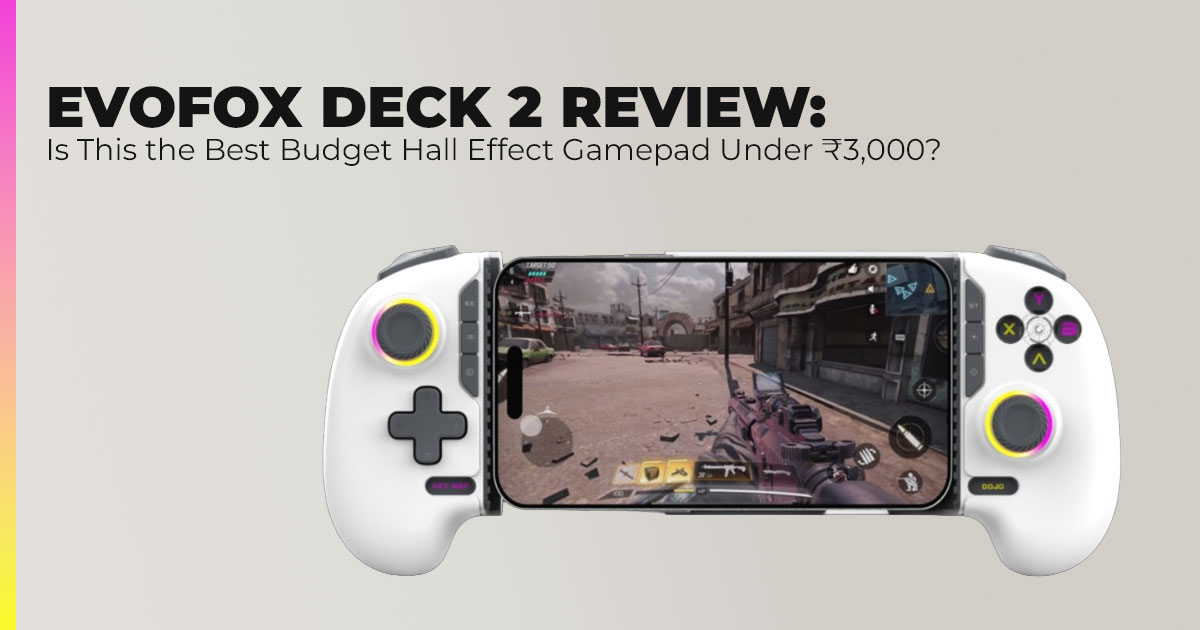
The EvoFox Deck 2 gamepad is a telescopic Bluetooth controller that stretches to hold your smartphone in the center. Once connected, it replaces on-screen controls with physical buttons and sticks.
It supports:
- Xbox mode
- Android mode
- Nintendo Switch mode
- Key-mapping mode for games without native controller support
The EvoFox Deck 2 Amazon price usually ranges between ₹2,899 and ₹2,999, positioning it as a budget-friendly option with advanced hardware like Hall Effect joysticks.
It is built for:
- Casual and mid-level mobile gamers
- Cloud gaming users
- Gaming during travel and daily commutes
- Players who want better control without buying a console
It is not designed for professional esports players who require wired, tournament-level setups.
The real question is whether those features improve everyday gaming at this price. That is what we explore next.
6. EvoFox Deck 2 Design & Build Quality: First Impressions of This Bluetooth Gamepad
The ffrst thing most buyers ask is simple: Does it feel cheap?
The EvoFox Deck 2 Bluetooth gamepad feels solid the moment you hold it. The matte plastic finish offers grip without attracting fingerprints. The handles sit comfortably in the palms, which matters during longer sessions of mobile gaming with a controller.
At 270 grams, the controller feels balanced. Even with a phone attached, weight distribution stays steady. It does not tilt forward or strain your wrists. The anti-slip phone holder clamps firmly and fits devices up to around 170mm. Once locked in place, the phone stays secure—even during fast movements.
Buttons offer clean tactile feedback. The analog sticks move smoothly with no grinding or stiffness. Out of the box, everything feels aligned and ready for use.
6.1 What’s in the Box – Complete EvoFox Deck 2 Package
- EvoFox Deck 2 gamepad
- USB Type-C charging cable
- Basic travel pouch
- Printed user manual with clear mode-switching instructions
There are no unnecessary extras, but nothing essential is missing either. For the EvoFox Deck 2 price in India, the packaging feels appropriate and practical.
- Summary: Build quality matters in a budget wireless gamepad because durability determines long-term A strong clamp, balanced weight, and responsive buttons reduce fatigue and prevent early wear.
7. EvoFox Deck 2 Features Explained: Hall Effect Joysticks, Macro Buttons & Multi-Device Modes
Specs look good on paper. What matters is how they change real gameplay.
7.1 Hall Effect Joysticks and Hall Effect Triggers – Why This Matters for Gamers
One of the biggest reasons people search for the best Hall Effect gamepad is to avoid stick drift.
Traditional analog sticks wear out because the physical parts rub together. Over time, that friction causes inaccurate inputs. Your character moves even when you are not touching the stick.
The EvoFox Deck 2 with Hall Effect joysticks and triggers uses magnetic sensors instead of physical contact. There is no internal friction between moving parts.
What that means in real use:
- Aiming stays centered in Call of Duty Mobile
- Small adjustments feel controlled
- Racing games allow smoother throttle control
- Long-term durability improves
For players who have replaced controllers due to drift, this feature alone makes the EvoFox Deck 2 Hall Effect controller stand out in the under ₹3,000 category.
You can check the current price and availability of the EvoFox Deck 2 Bluetooth Wireless Controller with Hall Effect Joysticks on Amazon India here.
- Key Insight: In this price range, Hall Effect hardware is rare. That gives this controller a technical edge.
7.2 Programmable Macro Buttons, Dual Vibration & RGB Lighting
On the back, you get two programmable macro buttons (M1 and M2). These allow quick access to repeated actions in supported games. For shooters, that can mean faster combos. For racing games, quick gear changes.
The dual vibration motors add rumble feedback. Explosions, crashes, and collisions feel more connected to gameplay.
There is also RGB lighting with multiple patterns. If battery life is your priority, you can turn it off.
- Why This Matters: These additions push the EvoFox Deck 2 wireless controller beyond basic functionality. It feels closer to a console controller than a simple Bluetooth
7.3 Bluetooth 5.0 Connectivity & Multi-Device Gaming Modes
The controller supports Bluetooth 5.0 + EDR, offering a stable connection within 8–10 meters.
It includes four major modes:
- Xbox mode – Ideal for PC and cloud gaming
- Android mode – Best for native controller-supported games
- Key Mapping mode – Works with touch-only titles using mapping apps
- Nintendo Switch mode – Direct pairing with Switch
For users searching for a multi-device wireless gamepad, this flexibility reduces the need to buy separate controllers.
User Goal Covered:
- Best controller for Xbox Cloud Gaming
- Smartphone controller for Android
- Nintendo Switch compatible Bluetooth gamepad
- Gamepad for PC and mobile
7.4 EvoFox Deck 2 Battery Life & Charging Performance
The 800 mAh battery delivers between 4 and 6 hours of gameplay depending on usage.
- Lights and vibration off: closer to 6 hours
- Heavy rumble usage: closer to 4 hours
Full charging takes about 2.5 hours via USB Type-C charging.
Simple adjustments like disabling RGB lighting help extend runtime.
- Key Takeaway: The EvoFox Deck 2 battery life supports most daily For travel or long gaming trips, carrying a power bank makes sense.
Click here to buy from Amazon
8. Real-World Gaming Performance: Mobile, PC, Cloud & Emulation
A controller only matters if it performs well in real situations.
8.1 Mobile Gaming Performance – Best Wireless Gamepad for Android?
In games with native controller support, such as Call of Duty Mobile, Genshin Impact, and
Asphalt 9, the difference is immediate.
- Movement feels precise
- Aiming improves
- Long sessions cause less finger fatigue
For touch-only titles, Key Mapping mode works well on Android once configured. Setup takes a few minutes but improves usability.
For buyers searching for the best wireless gamepad for mobile under ₹3,000, this is where the EvoFox Deck 2 smartphone controller proves its value.
8.2 PC & Cloud Gaming – Xbox Cloud Gaming and PS Remote Play
Pairing with Windows or macOS is simple. In Xbox Cloud Gaming and PS Remote Play, input response feels natural on stable Wi-Fi.
Using Xbox mode ensures compatibility with PC games and streaming platforms.
For users looking for a Bluetooth controller for cloud gaming, this flexibility is a major advantage.
8.3 Emulation & Retro Gaming Performance
Emulators like PPSSPP and Citra detect the controller quickly.
The familiar layout supports classic titles comfortably. The precision of Hall Effect joysticks enhances retro gameplay, especially in platformers and racing titles.
Search coverage here includes:
- Best controller for Android emulators
- Bluetooth gamepad for retro gaming
- Smartphone controller for PPSSPP
9. EvoFox Deck 2 Setup Guide: Bluetooth Pairing & Customization Tips
Setting up the EvoFox Deck 2 controller is straightforward.
Basic Setup Steps
- Charge the controller fully before first use.
- Insert your phone into the anti-slip phone holder.
- Hold the pairing button for your preferred mode.
- Open Bluetooth settings on your device and connect connect.
Android vs iOS Compatibility
- Android offers smoother setup and broader key-mapping flexibility.
- iOS supports controller mode but has stricter mapping restrictions.
For advanced mapping on Android, apps like Octopus or Mantis Gamepad Pro help customize controls.
Common Connection Fix
If pairing fails:
- Remove the device from Bluetooth settings
- Restart the controller
- Reconnect in the correct mode
Why This Section Matters: Many users search for:
- How to connect EvoFox Deck 2 to Android
- EvoFox Deck 2 not connecting fix
- How to use key mapping mode
Clear setup instructions reduce frustration and improve user experience.
Overall Context
The EvoFox Deck 2 wireless gamepad stands out in the budget category because of:
- Hall Effect joysticks and triggers
- Multi-device compatibility
- Practical build quality
- Balanced feature set for its price
For Indian buyers comparing options under ₹3,000, it offers hardware features usually seen in more expensive controllers.
10. EvoFox Deck 2 Pros and Cons: Honest Breakdown of This Budget Hall Effect Gamepad
Before buying any Bluetooth gamepad for mobile, most users want clear strengths and weaknesses. Here is a balanced look at the EvoFox Deck 2 wireless controller based on real usage.
10.1 Pros of the EvoFox Deck 2 Bluetooth Gamepad
- Hall Effect joysticks and Hall Effect triggers reduce the risk of stick drift and improve long-term durability
- Strong EvoFox Deck 2 compatibility across Android, iOS, Windows, macOS, and Nintendo Switch mode
- Programmable M1 and M2 macro buttons help with quick actions in shooters and RPGs
- Competitive EvoFox Deck 2 price in India under ₹3,000
- Multi-mode support makes it a true multi-device wireless gamepad
10.2 Cons of the EvoFox Deck 2 Controller
- EvoFox Deck 2 battery life caps at around 6 hours
- Slight Bluetooth input delay compared to wired USB-C controllers
- Key mapping mode may require third-party apps on certain Android setups
Context for Buyers:
If you are comparing the best wireless gamepad under ₹3,000, the hardware quality stands out. If you want zero-latency competitive performance, a wired controller still has an edge.
If you are comparing it with other popular smartphone gamepads in India, here’s how it stacks up.
11. EvoFox Deck 2 vs Backbone One vs GameSir G8 Galileo: Price, Features, and Value Comparison
In the under ₹3,000 category, very few controllers offer Hall Effect hardware with multi-device compatibility.
Many users search for:
- EvoFox Deck 2 vs Backbone One
- EvoFox Deck 2 vs GameSir G8 Galileo
- Best mobile gaming controller in India Here is how they compare.
| Feature | EvoFox Deck 2 | Backbone One | GameSir G8 Galileo |
| Price in India
(Approx.) |
₹2,900–₹3,000 | ₹12,000+ | ₹6,000–₹8,000 |
| Connection Type | Bluetooth gamepad | Direct USB-C | Direct USB-C |
| Hall Effect
Sticks/Triggers |
Yes | No | Yes |
| Battery | 800 mAh battery (4–6 hrs) | Draws power
from the phone |
Draws power
from the phone |
| Platform Support | Android, iOS, PC, Switch | Mostly a single
ecosystem |
Android / iPhone
15 |
| Macros & Multiple
Modes |
Yes, multi-mode support | Limited | Limited |
11.1 What This Means for Real Buyers
- Backbone One feels sharper due to a direct USB-C connection, but costs four times more.
- GameSir G8 Galileo offers a premium build and Hall Effect hardware, but at a higher price.
- The EvoFox Deck 2 multi-device wireless gamepad wins on affordability and platform flexibility.
If you want a budget smartphone controller that works across devices, EvoFox makes more sense. If you want premium
materials and wired response, higher-priced options may suit you better.
12. Who Should Buy the EvoFox Deck 2? Target Users Explained
Choosing the right mobile gaming controller depends on how and where you play.
Best For
- Casual mobile gamers playing 1–3 hours daily
- Users of Xbox Cloud Gaming and PS Remote Play
- Students and commuters
- First-time buyers upgrading from touch controls
- Anyone searching for a budget Hall Effect gamepad in India
Not Ideal For
- Competitive esports players needing a wired response
- Console-only gamers who already own premium controllers
- Users who prefer a direct USB-C connection over Bluetooth
Summary:
The EvoFox Deck 2 controller fits users who want better control without paying premium brand prices. It balances cost, compatibility, and durability.
13. EvoFox Deck 2 Usage Tips: How to Improve Battery Life, Reduce Lag, and Maximize Performance
To get the most from your EvoFox Deck 2 Bluetooth gamepad, small adjustments help.
13.1 Extend EvoFox Deck 2 Battery Life
- Turn off RGB lighting when not needed
- Reduce vibration intensity in supported games
- Keep the controller charged before long sessions
The 800 mAh battery performs better when lighting and rumble are minimized.
13.2 Reduce Bluetooth Lag During Cloud Gaming
- Use Xbox mode for most streaming services
- Keep your phone close to the controller
- Avoid crowded Wi-Fi networks
- Disconnect unused Bluetooth devices
For cloud gaming, stable internet matters as much as controller input.
13.3 Optimize Macro Buttons for Faster Gameplay
- Assign repetitive actions to M1 and M2 macro buttons
- Use macros in RPGs for skill combos
- Use macros in shooters for quick reload or crouch functions
This helps reduce finger movement and improves comfort during long sessions.
13.4 Daily Care Tips for Longer Lifespan
- Store the controller in the included pouch
- Avoid overstretching the telescopic holder
- Clean joysticks gently to prevent dust buildup
These habits maintain smooth stick movement and prevent early wear.
13.5 Overall Summary for Buyers Comparing Budget Wireless Gamepads
The EvoFox Deck 2 Hall Effect controller offers:
- Durable joystick technology
- Multi-platform compatibility
- Practical battery performance
- Strong value under ₹3,000
For users searching for the best budget Bluetooth gamepad in India, it delivers a balanced mix of features without crossing into premium pricing.
Click here to buy from Amazon
14. EvoFox Deck 2 FAQ – Compatibility, Battery Life, PC Support & Game Support
Before buying a Bluetooth gamepad for mobile, most users want clear answers about compatibility, battery life, and supported games. Below are quick, direct responses to common searches such as “Does EvoFox Deck 2 work with iPhone?” “Can I use EvoFox Deck 2 with PC?”, and “Which games support the EvoFox Deck 2 controller?”.
Q. Does the EvoFox Deck 2 work with all phones?
- The EvoFox Deck 2 controller fits most smartphones up to around 170mm width (without thick cases). It supports Android and iOS devices, but Android offers wider compatibility and better key mapping flexibility. On iOS, controller mode works for supported games, though advanced mapping features are limited due to system restrictions.
Q. Can I use the EvoFox Deck 2 wired with PC?
- No. The EvoFox Deck 2 Bluetooth gamepad works only through Bluetooth 5.0 connection. It does not support wired USB gameplay on PC. For best results on Windows or macOS, use Xbox mode while pairing.
Q. How is the EvoFox Deck 2 battery life in real-world gaming?
- The EvoFox Deck 2 battery life ranges between 4 to 6 hours per charge, depending on vibration and RGB lighting usage. Turning off lighting and reducing rumble extends playtime. Most users will need to charge it once daily if gaming for several hours.
Q. What games support the EvoFox Deck 2 out of the box?
- The EvoFox Deck 2 smartphone controller works instantly with games that offer native controller support.
Popular supported titles include:
- Call of Duty Mobile
- Genshin Impact
- Asphalt 9
- Minecraft
- Roblox (controller mode enabled)
Any Android or iOS game that lists Bluetooth controller support should recognize the device without additional setup.
15. Final Verdict: Is the EvoFox Deck 2 the Best Budget Multi- Device Wireless Gamepad in India?
Mobile games have grown bigger and more demanding. Touch controls still hold many players back. If you want tighter movement, cleaner aim, and less finger strain, upgrading to a Bluetooth gamepad for mobile makes sense.
So, should you buy the EvoFox Deck 2?
If you are looking for an affordable multi-device wireless gamepad with Hall Effect joysticks and Hall Effect triggers, this is one of the strongest options under ₹3,000. The hardware reduces the risk of stick drift. The build feels solid. Compatibility across Android, iOS, Windows, macOS, and Nintendo Switch mode adds flexibility that most budget controllers do not offer.
It is not designed for esports tournaments or wired competitive play. Direct USB-C controllers still feel sharper for that use case. But for everyday mobile gaming, cloud streaming, emulation, and casual sessions, the EvoFox Deck 2 controller delivers real value.
For buyers searching to buy the EvoFox Deck 2 gamepad in India, the pricing makes it accessible without cutting core features.
- Key Takeaway: A reliable mobile gaming controller that improves control, comfort, and consistency without premium pricing.
Where to Buy the EvoFox Deck 2
Amazon India – EvoFox Deck 2 Smartphone Gamepad
Hall Effect Triggers & Joysticks | Bluetooth Wireless Controller for Android, iOS, Windows, macOS & Nintendo Switch | Key Mapping, Macro Buttons, RGB Lighting
Amazon India – Compare Smartphone Gamepad Alternatives
Amazon Worldwide – Smartphone Gamepads for International Readers
If you decide to try the EvoFox Deck 2 Bluetooth gamepad, share your experience. Let us know which games you tested and how the pairing process worked. If you have setup questions or are comparing other budget smartphone controllers, drop them in the comments. We are happy to help readers make informed choices.
***Disclaimer***
This blog post reflects our own research, testing, and personal opinions. It should not be taken as the official position of any brand, manufacturer, or company mentioned here. While we aim to keep information accurate and up to date, product details, pricing, and availability can change. We recommend double-checking important details before making a purchase.
Some links in this article may be affiliate links. If you choose to buy through these links, we may earn a small commission at no extra cost to you. This helps support our work and allows us to keep publishing in-depth, unbiased reviews. Our recommendations are never influenced by affiliate partnerships.
Comments shared by readers reflect their own views and not ours. We are not responsible for outcomes resulting from the use of information on this site. Please seek professional advice where appropriate.
All product names, logos, and brands mentioned are the property of their respective owners. These names are used for identification and informational purposes only and do not imply endorsement.
