
Introduction
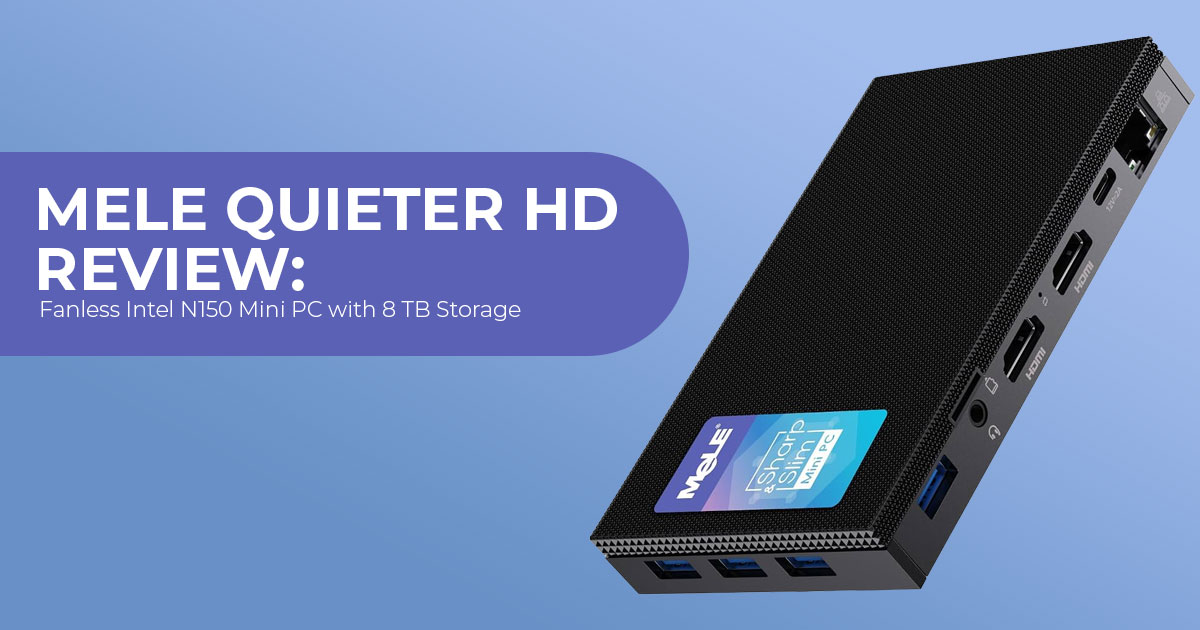
Finding a small mini PC with plenty of internal storage and no fan noise is not easy. Most compact systems give you a fast SSD but little room for additional storage, while systems with larger drives tend to take up more space. The MeLE Quieter HD takes a different approach by fitting both into a 0.6-liter fanless chassis.
The Quieter HD has an M.2 2280 NVMe slot for an SSD and a 2.5-inch SATA bay for a second drive, with support for up to around 8 TB of combined storage. It is also designed to run without a cooling fan, making it suited to situations where silent operation, low maintenance, and a small footprint matter more than high performance.
That puts the Quieter HD in a fairly specific category. It is aimed at digital signage, kiosks, industrial systems, media servers, and always-on home setups rather than demanding desktop workloads. The question is whether its fanless design and dual-storage setup are worth the price when faster mini PCs are available for less.
As technology experts with more than 20 years of experience in hardware and application research and development, we assess products based on performance, durability, build quality, value for money, and long-term use. For the Quieter HD, we focus on how well its design fits the people who are most likely to buy it and whether its hardware choices make sense in everyday use.
This review is based on MeLE’s published specifications and official product documentation, along with coverage from Notebookcheck and Liliputing. We have not tested a review unit ourselves, so third-party test results are not presented as our own measurements.
Where information comes directly from MeLE, we identify it as such.
If you need a fanless mini PC with two internal storage options, the Quieter HD has a clear advantage over many compact systems. If you need strong processing performance, however, its lower-power hardware may be a limitation. The rest of this review looks at its performance, storage options, connectivity, pricing, and the situations where another mini PC makes more sense.
Product Overview: Where the Quieter HD Sits in MeLE’s Lineup
MeLE has been making small, passively cooled computers for years under the Quieter name. The family currently includes slim models such as the Quieter 4C and the dual-LAN Quieter DL, both powered by the same Intel N150 chip. The Quieter HD uses the same basic chassis family as the earlier HD3Q, but the current version is powered by Intel’s N150.
At 150 × 105.4 × 39.6 mm (5.9 × 4.15 × 1.56 inches), the Quieter HD is thicker than MeLE’s smaller Quieter models. Inside that taller body sits a second storage location — a 2.5-inch SATA bay that accepts a hard drive or SATA SSD of up to 4 TB, alongside the main M.2 slot. That combination is uncommon in fanless mini PCs at this size, and it is the main reason to consider the Quieter HD.
MeLE positions the machine for industrial scenarios: digital signage, automation, kiosks, and other deployments where a computer is expected to run 24/7, in dusty rooms, without anyone opening the case for maintenance. The dust-resistant housing and passive cooling design follow directly from that use case.
What this means for the buyer: if you only need a quiet desktop for browsing and office work, this is more hardware than you need. If you need a machine that runs continuously and stores large amounts of data locally, the number of fanless competitors offering the same combination is relatively small.
MeLE Quieter HD Specifications
| Component | Specification |
| Processor | Intel Processor N150 (Twin Lake), 4 cores / 4 threads, up to 3.6GHz, 6MB L3 cache |
| Power Specifications | Intel lists a 6W Processor Base Power; MeLE specifies a 10W TDP for the Quieter HD configuration |
| Graphics | Intel UHD Graphics with 24 execution units at up to 1.0GHz; hardware decoding for H.264, H.265, and AV1 |
| Memory | 1× DDR4-3200 SO-DIMM slot, user-replaceable; ships with 8GB or 16GB, with MeLE listing support for up to 32GB* |
| Storage | 1× M.2 2280 NVMe slot (PCIe 3.0, up to 4TB) + 1× 2.5-inch SATA bay for an HDD or SSD (up to 4TB) + microSD card slot |
| Video Output | 2× HDMI + 1× DisplayPort 1.4, supporting up to three 4K displays |
| USB | 3× USB 3.2 Gen 2 Type-A (10Gbps), 1× USB 2.0 Type-A, and 1× USB-C used for power input |
| Networking | 1× Gigabit Ethernet (Realtek RTL8111H), Wi-Fi 5 (802.11ac), and Bluetooth 5.1 |
| Audio | 1× 3.5mm headphone and microphone combo jack |
| Chassis | Fanless aluminum body, dust-resistant construction, and an included VESA mount |
| Dimensions | 150 × 105.4 × 39.6mm (5.9 × 4.15 × 1.56 inches), 0.6L volume |
| Operating System | Windows 11 Pro |
| Availability | MeLE’s online store; marketplace availability varies by region |
*Maximum supported memory should be confirmed against the specific model and BIOS revision before purchasing an upgrade.
*MeLE lists configurations with up to 32 GB of DDR4 memory, although Intel’s official N150 specification lists 16 GB as the maximum supported memory capacity.
Two small discrepancies are worth knowing about before you shop. First, MeLE and Notebookcheck describe the HDMI ports as HDMI 2.1, while Liliputing lists them as HDMI 2.0; both agree the outputs handle 4K. Second, Intel lists a 6 W Processor Base Power, while MeLE specifies a 10 W TDP for this configuration. Neither difference changes how the machine should be used, but they are the kind of detail that surfaces in buyer reviews later.
Design and Build Quality: What Fanless and Dust-Resistant Actually Buy You
The most important design decision in this product is the absence of a fan. A fanless PC uses a large metal body as the heatsink, and the heat from the processor spreads across the chassis and escapes into the air. There is no cooling fan or other moving part in the cooling system. If you install a mechanical 2.5-inch hard drive, however, the drive itself has moving parts.
That matters in two ways. First, silent operation: With no cooling fan, the PC produces no fan noise. If you install a mechanical hard drive, however, the drive can still produce some noise. Second, dust resistance: a fan pulls air through the case, and that air carries dust, which builds up on heatsinks and eventually forces maintenance. Because there is no cooling fan pulling air through the chassis, the system is less likely to draw dust into the cooling system. MeLE describes the enclosure as dust-resistant, but it does not publish an IP rating, so it should not be treated as a sealed or waterproof system.
The 0.6-liter body is built to be mounted out of the way: the included VESA mount lets you attach it behind a monitor or a signage panel, which is the standard deployment pattern for kiosks and menu boards.
One honest caveat from community reports: fanless machines trade silence for thermal headroom. Testing of the earlier N5105-based Quieter HD3Q showed that sustained stress could push temperatures high enough to trigger power throttling. That result comes from the older N5105 version, so it should not be treated as a direct test of the current N150 model. For lighter workloads, the thermal limits seen in the older N5105 model may be less relevant, but we cannot confirm that without testing the N150 version.
What this means for the buyer: the design targets environments where noise and dust are real problems and where a computer runs for months without being touched. If your room is clean and you do not mind fan noise, you are paying a premium for a benefit you will not use.
Performance: What the Intel N150 Can and Cannot Do
The Intel N150 belongs to Twin Lake, Intel’s 2025 generation of entry-level N-series processors that follows Alder Lake-N (the generation that produced the very popular Intel N100). Twin Lake keeps the same four efficiency cores and the same 6 W-class power envelope as the N100, then raises clocks: the N150 runs at up to 3.6 GHz (versus 3.4 GHz for the N100) and lifts the integrated GPU from 750 MHz to 1.0 GHz.
The higher CPU and GPU clocks give the N150 an edge over the N100, while its integrated graphics support hardware video decoding and up to three 4K displays. That still does not make the N150 a desktop-class processor.
Notebookcheck’s performance database places the N150 around the level of the older Core i5-8250U in its aggregate rating. That is useful as a rough performance reference, not as a claim that the two processors are equivalent in every workload.
| Specification | Intel N150 (Twin Lake) | Intel N100 (Alder Lake-N) | Intel Celeron N5105 (Jasper Lake) |
| Cores / Threads | 4 / 4 | 4 / 4 | 4 / 4 |
| Maximum Turbo Clock | 3.6GHz | 3.4GHz | 2.9GHz |
| L3 Cache | 6MB | 6MB | 4MB |
| Integrated GPU | Intel UHD Graphics, 24 EUs at up to 1.0GHz | Intel UHD Graphics, 24 EUs at up to 0.75GHz | Intel UHD Graphics, 24 EUs |
| Generation | Twin Lake (2025) | Alder Lake-N (2023) | Jasper Lake (2021) |
| Performance Comparison | Baseline | Approximately 5–8% lower single-core performance | Approximately 25–35% lower performance, according to MeLE |
What the N150 is well suited to
- Web browsing with multiple tabs, email, office documents, and spreadsheets
- Video streaming and local 4K playback, including 265 and AV1 content
- Light server roles: file sharing, print serving, and media serving when clients can use direct play
- Digital signage playback, which is mostly a video-decoding workload
Where the N150 falls short
- Heavy multitasking with many large applications open
- Video editing, 3D work, or any sustained all-core compute
- Modern gaming beyond very old or lightweight titles
Two architecture notes. The Quieter HD uses a single-channel DDR4 configuration, which limits the integrated GPU’s bandwidth; for an office or signage machine this is not a practical concern, but it is one reason the N150 is not a gaming chip. And because the memory sits in a replaceable DDR4 SO-DIMM slot, you can buy the cheaper 8 GB model and upgrade it yourself later — a real advantage over mini PCs with soldered RAM.
What this means for the buyer: performance expectations should match the price of entry. This is a machine for predictable, light, always-on workloads, not for anyone who will sit and wait on it.
Storage: The Quieter HD’s Main Advantage — Up to 8 TB
Here is where the Quieter HD stands out from many fanless mini PCs in its class. The storage layout is:
- 2 2280 NVMe SSD slot (PCIe 3.0) — accepts a drive of up to 4 TB. This carries the operating system and fast-access files.
- 5-inch SATA bay — accepts a 2.5-inch hard drive or SATA SSD of up to 4 TB. This is a storage option that many competing fanless mini PCs do not provide.
- microSD card slot — for overflow storage or removable
The two internal bays can therefore provide up to around 8 TB of internal storage, before adding a microSD card.
Why does a second, slower drive bay matter in 2026? Because not all storage needs speed. Large media libraries, surveillance footage, backup targets, and signage asset folders can make better use of a high-capacity hard drive than an expensive SSD when storage cost matters more than access speed. Many compact fanless PCs rely on external USB storage when you need more capacity. The Quieter HD keeps that storage inside the chassis, which makes for a cleaner installation behind a monitor or signage display.
One specification note: the M.2 slot runs at PCIe 3.0, not PCIe 4.0. For typical office and signage workloads, the PCIe 3.0 interface is unlikely to be a meaningful limitation.
What this means for the buyer: if your use case involves storing several terabytes of data inside the machine — a media server, a DVR-style system, a signage server with a large asset library — the Quieter HD is one of the less common fanless options that can provide several terabytes of internal storage without an external drive enclosure.
Display Outputs and Connectivity
Display output
The Quieter HD drives up to three 4K displays simultaneously: two via HDMI and one via DisplayPort 1.4. For digital signage, this supports wall-mounted tri-panel setups or a menu board plus a kitchen display. For office use, it can support a three-monitor setup without a docking station. The N150 supports 4K output and hardware video decoding, making the system well suited to 4K signage and video playback. It is not suited to 4K gaming or demanding GPU-accelerated workloads.
Ports
- 3× USB 2 Gen 2 Type-A (10 Gbps) — fast enough for external SSDs and video capture peripherals
- 1× USB 0 Type-A — fine for keyboards, mice, and printers
- 1× USB-C — used for power input (a 12 V adapter ships in the box); it is not a data or display port, which is worth checking before you buy cables
- 1× 5 mm audio jack — headphone/mic combo, handy for connecting headphones, powered speakers, or a headset
- 1× Gigabit Ethernet (Realtek RTL8111H) — wired networking for kiosks and signage where Wi-Fi is not acceptable
Wireless
The Quieter HD ships with Wi-Fi 5 and Bluetooth 5.1. This is a modest choice for 2026, and one of the few places where the hardware feels dated: the older Celeron N5105 variant of this same chassis, sold alongside it, includes Wi-Fi 6 and Bluetooth 5.2. Wi-Fi 5 is enough for browsing, streaming, and normal office work, but Wi-Fi 6 systems can offer higher throughput and better network efficiency on compatible networks.
What this means for the buyer: the port selection is practical and well matched to the target use cases, with two caveats to plan around: the USB-C port is power-only, and the wireless stack is a generation behind the rest of the market.
Software and Platform Features
The Quieter HD ships with Windows 11 Pro, which covers domain join and remote desktop for business deployments. MeLE’s Quieter line has historically been open to Linux for users who prefer it, and the hardware uses standard x86 components, but users deploying Linux should check current driver and kernel support for their chosen distribution.
For integrators, the BIOS features are more important than they may first appear. MeLE lists support for Wake-on-LAN, RTC wake, and auto power-on — features that let a machine boot itself at a set time, be woken remotely for updates, or come back on after a power failure without anyone visiting the site. For signage and kiosk operators, these features can reduce the need for on-site service visits. Those features are standard on MeLE’s industrial models, and they carry over to the Quieter HD.
What this means for the buyer: the software story matters most if you are buying several of these for a business. For a single home user, Windows 11 Pro and a clean BIOS are simply expected at this price.
Approximate research-period pricing
The figures below reflect prices found during our research and may not match current listings. At the time of our latest check, MeLE’s store listed the Quieter HD from $429.99, while the product page showed $449.99 for the 8 GB/128 GB configuration before tax and shipping.
| Variant | Approximate Price (as of August 2026) |
| Intel N150 · 8GB RAM · 128GB SSD | $429.99–$472.49 |
| Intel N150 · 8GB RAM · 256GB SSD | Approximately $499.99 |
| Intel N150 · 16GB RAM · 512GB SSD | $649.99–$682.49 |
| Intel N5105 variants (older processor) | From approximately $429.99 |
Prices vary by channel and by whether shipping and taxes are included: MeLE’s store lists the Quieter HD from $429.99, while other listings and reports put the base configuration around the mid-$400 range. Notebookcheck’s figures ($472.49 base, $682.49 top) include shipping and taxes.
The value argument rests entirely on the two-drive layout and the industrial feature set. If the 2.5-inch bay is not part of your plan, comparable N150 hardware is available for substantially less — including MeLE’s own Quieter 4C, which pairs the same chip with a slimmer body and a lower price. If you need both fanless cooling and a built-in 2.5-inch drive bay, the number of comparable options is much smaller.
What this means for the buyer: the sensible purchasing strategy is to buy the base configuration and upgrade the RAM and SSD yourself. The memory is a standard SO-DIMM and the drive is a standard M.2 2280; both are user-replaceable, and the higher-priced configurations mainly reflect the cost of the additional RAM and SSD capacity.
MeLE Quieter HD vs. the Alternatives
| Product | Processor | Fanless | Storage Layout | Approx. Research-Period Price | Best For |
| MeLE Quieter HD | Intel N150 | Yes | M.2 NVMe + 2.5-inch SATA + microSD, with up to 8TB of internal storage | $430–$682 | Digital signage, kiosks, and storage-heavy always-on use |
| MeLE Quieter 4C | Intel N150 | Yes | M.2 NVMe + microSD; no 2.5-inch drive bay | From approximately $330 | Budget silent desktop use with the same processor |
| MeLE Quieter DL | Intel N150 | Yes | M.2 NVMe + microSD | From approximately $450 | Router, firewall, and light NAS duties requiring dual 2.5GbE |
| MINIX NEO Z150-0dB | Intel N150 | Yes | 2× M.2 2280 NVMe slots, supporting up to 8TB total | From approximately $345 | A fanless N150 alternative with dual NVMe storage |
| GMKtec M6 Ultra | AMD Ryzen 5 7640HS | No | 2× M.2 NVMe slots | Approximately $460 | Higher CPU performance at a similar price |
| ZOTAC CI669 Nano | Intel Core i7-1355U | Yes | M.2 NVMe + 2.5-inch SATA | Approximately $440 during the research period | Fanless operation with greater performance headroom |
In similarly configured listings, the GMKtec M6 Ultra can offer substantially higher CPU performance than the N150 for a similar price. The catch is that it uses active cooling. You get much higher performance, but you give up the fanless design that defines the Quieter HD.
What this means for the buyer: define your priorities before comparing prices. If raw performance per dollar is the metric, the Quieter HD loses to several alternatives. If silent, 24/7 operation with two internal drives is the requirement, there are far fewer alternatives.
Pros and Cons
| Pros | Cons |
| Fanless design: no cooling-fan noise and no fan that can fail | Expensive for an Intel N150 machine; the specialized form factor carries a premium |
| Dust-resistant housing suits dirty or industrial environments | Modest performance: designed primarily for light workloads |
| Two internal drive bays: supports up to 8TB of total storage | Wi-Fi 5 only; the older N5105 variant is available with Wi-Fi 6 |
| Triple 4K display output through 2× HDMI and DisplayPort 1.4 | Single-channel RAM limits integrated-GPU performance |
| User-upgradeable RAM and SSD using standard SO-DIMM and M.2 components | Single Gigabit Ethernet port; no 2.5GbE option |
| Industrial BIOS features: Wake-on-LAN, automatic power-on, and RTC wake | USB-C is power-only with no data or video support |
| Windows 11 Pro and Linux-friendly hardware | Passive cooling may limit sustained performance under heavy workloads |
Who Should Buy the MeLE Quieter HD (and Who Should Not)
Buy it if you need:
- A digital signage or menu-board player that runs 24/7 without noise in a public space
- An industrial mini PC for a workshop, warehouse, factory floor, or dusty environment
- A kiosk or point-of-sale machine that can be managed remotely and restarts itself after outages
- A quiet home server or media box using SSD storage, with room for several terabytes of internal storage
- An HTPC that plays 4K content silently, with room for a large media library
- A fanless PC for sensitive setups such as astrophotography rigs, when SSD storage is used
Skip it if you need:
- Fast, responsive performance for daily desktop work — a cheaper N100 or N150 box covers this
- Modern gaming or demanding creative workloads
- The absolute lowest price for a fanless N150 PC — the MINIX Z150-0dB and MeLE Quieter 4C cost meaningfully less
- Wi-Fi 6 or 5GbE networking — the Quieter DL is the better MeLE fit for that
The simplest way to think about the Quieter HD is this: it is built for systems that need to be silent, run continuously, tolerate dusty environments, and store a lot of data. Buyers with those requirements will find the Quieter HD easier to justify.
Frequently Asked Questions
Is a fanless mini PC good for everyday use?
For light everyday workloads — browsing, email, documents, streaming — yes. Fanless PCs are quiet, dust-resistant, and have no fan to fail. Their limitation is that passive cooling restricts the processor, so they are not built for heavy compute.
Is the Intel N150 good enough for office work?
Yes, for light workloads. The N150 is suitable for browsing, office applications, streaming, and similar tasks. It is not intended for video editing, heavy multitasking, or demanding games.
Can the MeLE Quieter HD really hold 8 TB of storage?
By specification, yes: a 4 TB M.2 2280 NVMe drive plus a 4 TB 2.5-inch SATA drive, with a microSD card slot on top. The 8 TB figure assumes the maximum-capacity drives in both bays.
Is the MeLE Quieter HD designed for 24/7 operation?
Yes. MeLE markets the Quieter HD for 24/7 operation. That does not mean it will remain cool under every workload, however. Passive cooling can limit sustained performance under heavy CPU loads, so ventilation and workload still matter.
What is the difference between Twin Lake and Alder Lake-N?
Twin Lake is Intel’s refresh of Alder Lake-N, keeping the same efficiency-core architecture and low power draw while raising CPU and GPU clocks. The N150 runs up to 3.6 GHz and its integrated GPU clocks at 1.0 GHz, versus 3.4 GHz and 750 MHz for the N100.
Is the MeLE Quieter HD worth the price?
For buyers who need the fanless, dust-resistant design and the dual drive bays, it is one of the less common options that combines all three requirements. For general desktop use, the same budget buys considerably more performance elsewhere.
Final Verdict
The MeLE Quieter HD is a good example of why you should look beyond processor benchmarks when choosing a fanless mini PC. Its Intel N150 is not built for heavy workloads, but that is not really the point of this system. The Quieter HD is designed around silent operation, low maintenance, 24/7 use, and flexible internal storage.
For the right user, those features make a real difference. You get a fanless and dust-resistant design, support for 24/7 operation, triple 4K display output, and something that is uncommon in a PC this size: an M.2 NVMe slot plus a 2.5-inch SATA bay. Together, they allow up to around 8 TB of internal storage. The replaceable RAM and SSD also make it easier to upgrade or replace key components later.
There are trade-offs. The Intel N150 is a low-power processor, so this is not the machine to buy for demanding workloads. The wireless connectivity is also behind newer mini PCs, while the single Ethernet port and power-only USB-C port may limit some setups. Most importantly, the price needs to make sense for your use case because you can find faster mini PCs for similar money.
Based on the published specifications, available testing, pricing, and its intended use cases, we rate the MeLE Quieter HD 8/10. This score applies to its target market; it is not a general ranking against every mini PC.
If you need a silent, compact PC for digital signage, kiosks, industrial systems, media storage, or an always-on setup, the Quieter HD is a strong option for buyers who specifically need fanless cooling and two internal storage bays. Its combination of fanless cooling and dual internal storage is difficult to find in such a small chassis.
If performance per dollar is your priority, look elsewhere. You can get a faster mini PC for the same money.
Where to Buy the MeLE Quieter HD
Pricing on this product moves frequently, and configurations vary by region, so checking current listings before you decide is worth the few minutes.
Amazon Worldwide
For readers in the United States, the Quieter HD may be listed with multiple RAM and storage configurations. Review the variant details carefully — the 8 GB/128 GB base model is the configuration worth considering if you plan to upgrade the RAM and SSD yourself.
→ Check the MeLE Quieter HD on Amazon Worldwide — view current price and configurations
Amazon India
For readers in India, availability of MeLE’s newer models can lag behind the US and EU markets. If the N150 version is not listed, the earlier Celeron N5105 variant of the same chassis is often available as an alternative — just note the differences in wireless and ports described above.
→ Check the MeLE Quieter HD on Amazon India — view current price and availability
MeLE’s official store
The most complete range of configurations, including the older N5105 variants, is on MeLE’s own store. Prices there have been the lowest we found during research, though shipping and taxes are added at checkout.
→ View configurations and pricing on the MeLE official store
Before you buy, confirm three things against the listing: which processor is inside (N150 or N5105), which wireless version it carries (Wi-Fi 5 or Wi-Fi 6), and whether the price you see includes shipping and taxes. Those three details account for most of the confusion in this product’s listings.
In the end, the decision comes down to one question: do you need what makes the Quieter HD different? If the answer is yes, its compromises make sense. If not, there are better-value options.
Have questions about the MeLE Quieter HD, its storage options, performance, or whether it fits your setup? Leave a comment below. If you’ve already used one, we’d also like to hear how it has performed over time. Follow us for more practical tech reviews, comparisons, and buying advice.
***Disclaimer***
This blog post reflects our research, analysis, and opinions based on available product information, user feedback, and industry knowledge. It should not be taken as the official position of any brand, manufacturer, or company mentioned here. We make every effort to keep this guide accurate, but product specifications, pricing, and availability may change after publication. We recommend double-checking important details before making a purchase.
Some links in this article may be affiliate links. If you choose to buy through these links, we may earn a small commission at no extra cost to you. This helps support our work and allows us to keep publishing in-depth, unbiased reviews. Affiliate partnerships never influence our recommendations.
Opinions expressed by readers are their own and do not necessarily reflect ours. We are not responsible for outcomes resulting from the use of information on this site. Please seek professional advice where appropriate.
All product names, logos, and brands mentioned are the property of their respective owners. These names are used for identification and informational purposes only and do not imply endorsement.
