
Quick Overview
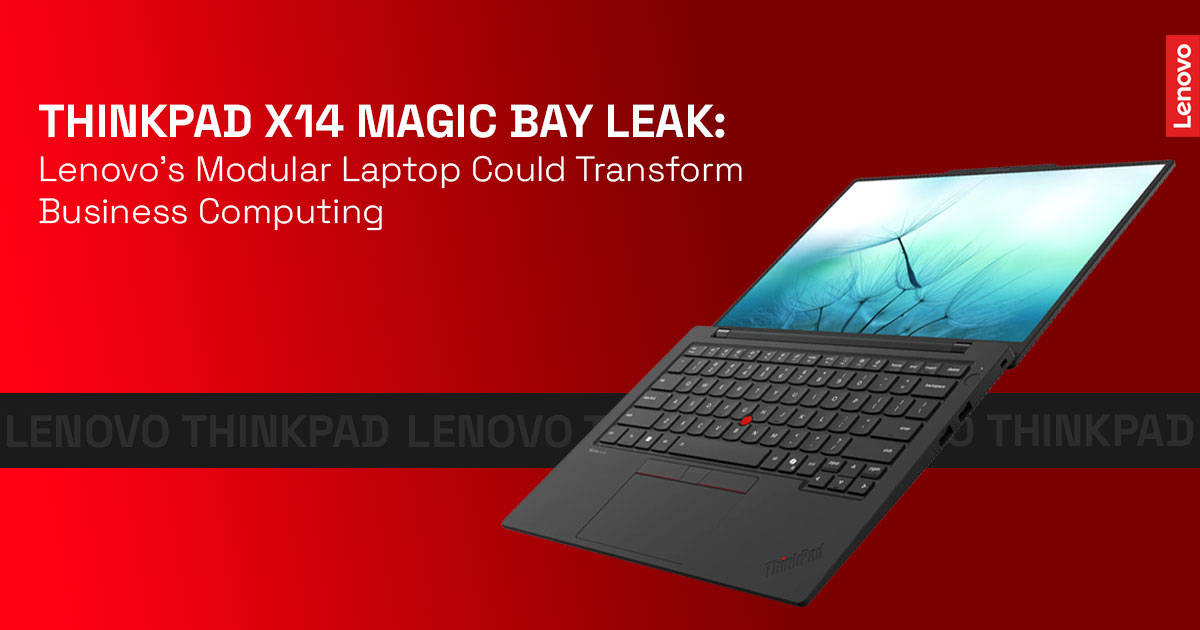
A new leak points to a slim Lenovo ThinkPad X14 Magic Bay laptop designed to support snap- on accessories like cameras, lights, or compact displays. If this concept becomes real, it could bring modular laptops back to the business world. For companies relying on enterprise laptops, this approach could mean longer device life, lower upgrade costs, and more flexibility for hybrid work computing—without replacing the entire machine every time one feature falls behind.
1. Introduction
Many companies replace enterprise laptops every three to four years—not because the device fails, but because one feature becomes outdated. The camera struggles during video calls, connectivity feels limited, or employees need tools that the current system simply cannot support.
That’s why the recent ThinkPad X14 Magic Bay leak is getting attention.
Early details suggest Lenovo is testing a slim Lenovo ThinkPad X14 equipped with Lenovo Magic Bay, a magnetic snap-on accessory system designed for quick upgrades. Instead of replacing the whole device, users could attach Magic Bay accessories like better webcams, lighting modules, or even compact displays. The idea behind this modular laptop approach is simple: keep the device thin, but allow laptop expansion modules when new needs appear.
As technology experts with over 20 years of experience in hardware and application research and development, we deeply analyze each product based on real-world performance, durability, and value for money. Our goal is to help you find the best product in every category—budget, performance, reliability, and long-term usage.
Click here to buy from Amazon
This article is especially useful for business professionals, IT managers, remote workers, and ThinkPad enthusiasts who want to understand whether the Lenovo modular laptop ecosystem could improve everyday work devices.
Our recommendations are based on extensive research, component analysis, real-world usability, and industry expertise.
In the following sections, we explain what the ThinkPad X14 Magic Bay laptop could mean for enterprise laptop lifecycle management, how modular computing in modern laptops works, and why companies looking for upgradeable laptops may find this concept worth watching.
2. The Quiet Comeback of Modular Laptop Design
For years, laptop makers focused on one goal: making devices thinner.
But that shift came with trade-offs. Many business ultrabooks became harder to repair and nearly impossible to upgrade. Batteries were sealed, memory was soldered, and fixing a small issue often meant replacing the entire system.
Now the industry appears to be reconsidering this approach.
The ThinkPad modular laptop concept revealed in the ThinkPad X14 Magic Bay leak suggests a different direction. Instead of rebuilding internal hardware, Lenovo Magic Bay accessories connect externally through a magnetic interface. This laptop accessory port allows users to attach tools only when needed.
That keeps the laptop portable while still adding flexibility.
For example:
- A consultant could attach a Magic Bay camera module during meetings.
- A remote employee might use lighting or productivity hardware accessories for better presentations.
- A field engineer could connect a mobile network module for stronger connectivity.
These types of modular laptop accessories could help businesses extend the enterprise device lifecycle while maintaining mobility.
And that idea sits at the center of modern upgradeable laptops:
Add the features you need today without replacing the entire device tomorrow.
The emerging Lenovo Magic Bay modular laptop system shows how modular computing devices might balance portability with adaptability—something many businesses have been asking for since laptops started becoming sealed systems.
3. ThinkPad Modular Design History: Why the ThinkPad X14 Magic Bay Matters
Long before sealed ultrabooks became common, ThinkPad modular design gave users real flexibility. Older ThinkPad laptops allowed you to swap batteries during travel, insert extra storage drives, or attach docking systems without tools.
For business professionals and IT teams, that design solved practical problems. A traveler could carry a spare battery for long flights. An IT technician could replace a component without dismantling the entire machine. Repairs were quick, downtime stayed low, and hardware lasted longer.
Those ideas form the foundation of today’s ThinkPad modular laptop concept.
The leaked Lenovo ThinkPad X14 Magic Bay laptop appears to revive that philosophy in a modern way. Instead of internal swap bays, the system introduces external modular laptop accessories through the Lenovo Magic Bay interface. The goal remains the same: flexibility without replacing the whole device.
For companies investing in enterprise laptops, that approach can extend device lifespan while keeping machines thin and portable.
4. What Lenovo Magic Bay Is and How the Magic Bay Modular Laptop System Works
Lenovo Magic Bay is a magnetic connector built into the top edge of the laptop lid. The interface typically includes 11 pogo pins that manage attachment, power delivery, and data transfer through a single connection.
The design focuses on speed and simplicity.
Attach a module, and the laptop recognizes it instantly. Most accessories do not require extra drivers or manual setup.
This system enables Lenovo Magic Bay accessories, such as:
- 4K webcam modules for clearer video meetings
- Integrated studio lights for better visibility during calls
- Portable secondary displays for multitasking
- Cellular connectivity modules for mobile work environments
On the ThinkPad X14 Magic Bay laptop, these accessories may focus more on enterprise productivity tools, such as secure communication hardware or collaboration enhancements.
In simple terms, how Lenovo Magic Bay works is straightforward:
Attach a module → power flows through the pins → the laptop recognizes the accessory immediately.
That small change transforms a standard laptop into a modular computing device capable of adapting to different workflows.
5. Expert Insight: Why Modular Laptop Hardware Architecture Is Returning
Work environments have changed. Employees now move between offices, homes, airports, and client sites. A single rigid laptop configuration rarely fits every situation.
That shift explains the renewed interest in modular hardware architecture.
Instead of purchasing multiple devices, a modular laptop system allows users to attach tools only when required. A consultant might add a better camera for client presentations. A remote worker might attach lighting for daily video meetings.
This approach reduces complexity while supporting hybrid work computing.
The ThinkPad X14 Magic Bay system reflects this shift toward flexible enterprise laptop ecosystems.
6. Expert Insight: Sustainable Computing Hardware and Upgradeable Laptops
Electronic waste continues to grow worldwide. Replacing entire laptops when only one component becomes outdated adds to the problem.
Upgradeable laptops address this challenge.
If companies can replace or add a module instead of discarding the whole machine, hardware lifecycles extend significantly. This supports sustainable computing hardware strategies while lowering long-term costs.
For organizations tracking environmental goals, modular enterprise laptops provide a practical path toward reduced waste.
7. Expert Insight: Why Enterprises Prefer Modular Laptop Ecosystems
Frequent laptop refresh cycles create pressure on IT budgets. Many companies replace devices every three years, even when the hardware still functions well.
This is where enterprise modular laptop design offers value.
A flexible system allows organizations to update individual features without replacing the entire device. Cameras, connectivity modules, or collaboration tools can evolve while the core laptop remains in service.
The result is simpler enterprise IT fleet management, fewer disruptions for employees, and hardware that adapts to real work needs.
8. The Modular Productivity Stack™: A Framework for Modern Modular Computing
To understand how modular laptops work in practice, it helps to think in layers.
- Layer 1 — Core Compute Layer: The foundation of the device: processor, memory, and storage. This core hardware delivers stable everyday performance.
- Layer 2 — Hardware Expansion Layer: The Magic Bay modular laptop system allows snap-on modules that add specific features when needed.
- Layer 3 — Workflow Tools Layer: Accessories such as docks, external keyboards, and portable secondary displays expand the workspace.
- Layer 4 — AI Enhancement Layer: Modern processors with AI acceleration improve tasks like video enhancement, image processing, and meeting
- Layer 5 — Peripheral Ecosystem Layer: Wireless devices, cloud tools, and collaboration platforms complete the environment.
This layered model turns a Lenovo modular business laptop ecosystem into a flexible platform that evolves with the user.
Click here to buy from Amazon
9. Why Lenovo Is Exploring Modular Laptop Design Again
Several forces are pushing the industry toward modular computing in modern laptops.
First, hybrid work demands flexible hardware. Employees shift between environments that require different tools.
Second, enterprise replacement costs continue rising. Organizations want longer device lifespans.
Third, sustainability regulations increasingly encourage repairable and upgradeable hardware. The ThinkPad X14 Magic Bay leak aligns with these trends. It suggests Lenovo may expand its modular laptop strategy beyond experimental devices.
10. Enterprise Benefits of Modular Laptops and Enterprise IT Fleet Management
For companies managing hundreds or thousands of devices, modular laptops for business offer clear advantages.
- Extended device lifespan: IT teams can replace modules instead of retiring entire laptops.
- Flexible upgrades: Connectivity, camera quality, or collaboration tools can evolve without hardware replacement.
- Simplified repairs: Swapping a faulty accessory takes minutes instead of hours.
Example scenario:
A manager attaches a Magic Bay lighting module during morning meetings. Later, the same laptop receives a cellular connectivity module for field travel. One device supports both roles.
These benefits support enterprise IT fleet management laptops that adapt to different job functions.
11. Where the Lenovo ThinkPad X14 Could Fit in the ThinkPad Lineup
The Lenovo ThinkPad X14 appears positioned between smaller X-series ultralight laptops and larger T-series enterprise systems.
That placement focuses on two priorities:
- Portability for mobile professionals
- Expandable features through ThinkPad modular accessories
This combination allows a lightweight device to support professional workflows without increasing size or weight permanently.
12. Comparing Modular Laptop Approaches: Framework vs Magic Bay vs Surface
Different manufacturers approach modular laptops in different ways.
| Approach | Modularity Type | Best For | Trade-offs |
| Framework Laptop | Internal modular components (CPU, RAM, ports) | Users who want full hardware control | Slightly larger design |
| Magic Bay modular laptop system | External snap-on modules | Professionals who need quick upgrades | Added module weight |
| Surface ecosystem | Magnetic accessories and docks | Tablet-style hybrid users | Limited hardware expansion |
The Magic Bay accessory ecosystem focuses on speed and simplicity, making it suitable for everyday office environments.
13. Magic Bay Accessories That Could Transform ThinkPad Workflows
The Lenovo Magic Bay accessory ecosystem opens the door to several useful modules.
Potential modular laptop accessories for ThinkPad include:
- AI camera modules with auto-framing for video meetings
- Portable secondary displays for multitasking
- Cellular connectivity modules for remote work
- Lighting and audio modules for presentations
These tools allow one ThinkPad modular laptop to serve multiple work scenarios without carrying additional equipment.
14. How Modular Laptop Accessories Improve Hybrid Work Computing
Hybrid work often demands different setups during the same day.
- Remote worker: Attaches a camera and lighting module for meetings, then removes it for travel.
- Consultant: Adds cellular connectivity before visiting
- Field engineer: Attaches a rugged module for visibility in outdoor
- Content creator: Uses a secondary display module for editing
These quick changes make hybrid work computing more practical without requiring separate devices.
15. Limitations and Risks of Modular Laptop Ecosystems
No hardware concept is perfect.
Potential challenges include:
- Magnetic connectors may wear over time
- Modules add extra cost
- Accessory ecosystems require broad adoption
Past attempts at modular laptop design struggled when accessory support remained limited. However, open ecosystems and third-party hardware support could address this challenge.
When comparing a modular laptop vs. a traditional laptop, the modular model offers stronger future upgrade potential if the ecosystem grows.
16. How Intel Panther Lake Could Strengthen the ThinkPad X14 Magic Bay Platform
Future Intel Panther Lake processors promise improvements in:
- AI processing performance
- power efficiency
- hardware security features
Combined with Magic Bay modules, these chips could enable smarter workflows. For example, video processing tasks could move to dedicated hardware while the main system conserves battery.
This pairing strengthens the case for AI-ready modular laptops.
Click here to buy from Amazon
17. The Bigger Trend: Laptops Becoming Expandable Technology Platforms
Modern devices are shifting from standalone products toward expandable ecosystems.
Smartphones rely on accessories and cloud services. Gaming consoles expand through hardware modules and subscriptions.
The ThinkPad X14 Magic Bay modular laptop suggests enterprise laptops may follow the same direction.
Instead of buying a completely new device every few years, companies may invest in platform- style laptops that evolve through accessories and upgrades.
If the ecosystem grows, modular enterprise laptops could change how companies upgrade and manage their hardware.
18. Frequently Asked Questions (FAQ)
Many readers searching for the ThinkPad X14 Magic Bay, Lenovo Magic Bay accessories, and modular laptops for business often want quick answers before going deeper into the topic. The questions below address common search queries around upgradeable laptops, enterprise laptop lifecycle, and modular computing in modern laptops, helping you understand how this technology may affect everyday work devices.
Q. What are the beneffts of modular laptops for businesses?
- Modular laptops for business reduce long-term costs because companies can upgrade or replace modules instead of the whole device. They also simplify repairs and support flexible enterprise IT fleet management.
Q. How does an external expansion port like Lenovo Magic Bay improve hybrid work?
- A Lenovo Magic Bay modular laptop system lets users attach tools like a secondary display, webcam module, or cellular connectivity module instantly. This flexibility makes hybrid work computing easier for travel and remote meetings.
Q. Will modular laptop designs help reduce electronic waste?
- Yes. Upgradeable laptops allow users to replace specific parts rather than discard the entire device. This approach supports sustainable computing hardware and extends the enterprise device lifecycle.
Q. What is Lenovo Magic Bay on the ThinkPad X14?
- Lenovo Magic Bay is a magnetic accessory interface built into the laptop lid that connects Magic Bay accessories like cameras, lighting modules, or compact displays through pogo pins for power and data.
Q. Will ThinkPad laptops become modular again?
- The ThinkPad X14 Magic Bay leak suggests Lenovo is exploring modular ThinkPad laptop designs again, starting with external accessory modules rather than internal component swaps.
Q. What accessories could the Magic Bay accessory ecosystem support?
- The Magic Bay accessory ecosystem may include AI camera modules, portable displays, studio lights, cellular modem modules, and productivity hardware accessories designed for modern enterprise workflows.
19. Conclusion: Why the ThinkPad X14 Magic Bay Could Redefine Modular Business Laptops
For years, enterprise laptops moved toward thinner designs but lost the flexibility that professionals once relied on. The leaked ThinkPad X14 Magic Bay suggests that the industry may be ready to bring that flexibility back in a smarter way.
Early details point to a modular ThinkPad laptop built for real work situations. Instead of replacing the whole device, users could attach Lenovo Magic Bay accessories like improved webcams, lighting modules, or connectivity options. This approach keeps the laptop slim while adding practical tools when they are needed.
For businesses, that shift could mean a longer enterprise laptop lifecycle, fewer full-device replacements, and systems that adapt to different roles across hybrid work environments. IT teams benefit from easier upgrades, while professionals gain tools that match the task at hand.
At the moment, the Lenovo ThinkPad X14 Gen 1, sometimes referred to as the ThinkPad X14 Magic Bay, remains a recently leaked device and has not been officially released.
The first information about this laptop appeared through the iF Design Awards in March 2026. Reports suggest it may become the first ThinkPad laptop with Magic Bay, a magnetic accessory interface previously seen only in the ThinkBook series. If released, the system could support Magic Bay modules such as high-resolution webcams, lighting accessories, or 4G connectivity modules.
Current Availability Status
United States: The laptop has not been officially announced yet. Industry reports suggest it may use Intel Panther Lake processors and could appear later in 2026.
India: There is currently no confirmed release date and no Amazon listing available.
Current ThinkPad Alternatives Available Today
If you are looking for a high-performance 14-inch ThinkPad laptop that you can purchase right now, the ThinkPad X1 Carbon series remains Lenovo’s flagship business line.
You can check current listings here:
Amazon Worldwide – Lenovo ThinkPad X1 Carbon Gen 13 Aura Edition
Amazon India – Lenovo ThinkPad X1 Carbon Gen 13 Aura Edition
Amazon Worldwide – ThinkPad X1 Carbon Gen 12
Amazon India – ThinkPad X1 Carbon Gen 12
These models deliver the durability, portability, and performance the ThinkPad business laptop ecosystem is known for while we wait to see whether the ThinkPad X14 Magic Bay modular laptop system becomes an official product.
The bigger story here is not just one leaked laptop. It’s the possibility that modular computing in modern laptops may return to mainstream enterprise hardware design.
If Lenovo Magic Bay succeeds, laptops could shift from fixed devices to adaptable platforms. And that raises an interesting question.
Would snap-on modules change the way you use your laptop every day?
If you have worked with modular laptop accessories, or if you are curious about how the Magic Bay accessory ecosystem might work in real setups, share your thoughts below. Your experience helps others make smarter decisions about their next business laptop upgrade.
***Disclaimer***
This blog post reflects our own research, testing, and personal opinions. It should not be taken as the official position of any brand, manufacturer, or company mentioned here. While we aim to keep information accurate and up to date, product details, pricing, and availability can change. We recommend double-checking important details before making a purchase.
Some links in this article may be affiliate links. If you choose to buy through these links, we may earn a small commission at no extra cost to you. This helps support our work and allows us to keep publishing in-depth, unbiased reviews. Our recommendations are never influenced by affiliate partnerships.
Comments shared by readers reflect their own views and not ours. We are not responsible for outcomes resulting from the use of information on this site. Please seek professional advice where appropriate.
All product names, logos, and brands mentioned are the property of their respective owners. These names are used for identification and informational purposes only and do not imply endorsement.
